

How to Get Email Addresses for Free - Methods That Actually Work
You've got 200 target companies, zero budget, and need decision-maker emails by Friday. Every tool you find claims 95%+ accuracy and a "generous" free tier. None of them explain what "free" actually means once you hit the export button.
We've tested the methods, hit the walls, and figured out what actually works. Here's every approach - manual tricks, free tools, and the verification step most guides skip - plus accuracy benchmarks and legal fine print that matter more than any marketing claim.
Three Fastest Free Methods
Ranked by effort:
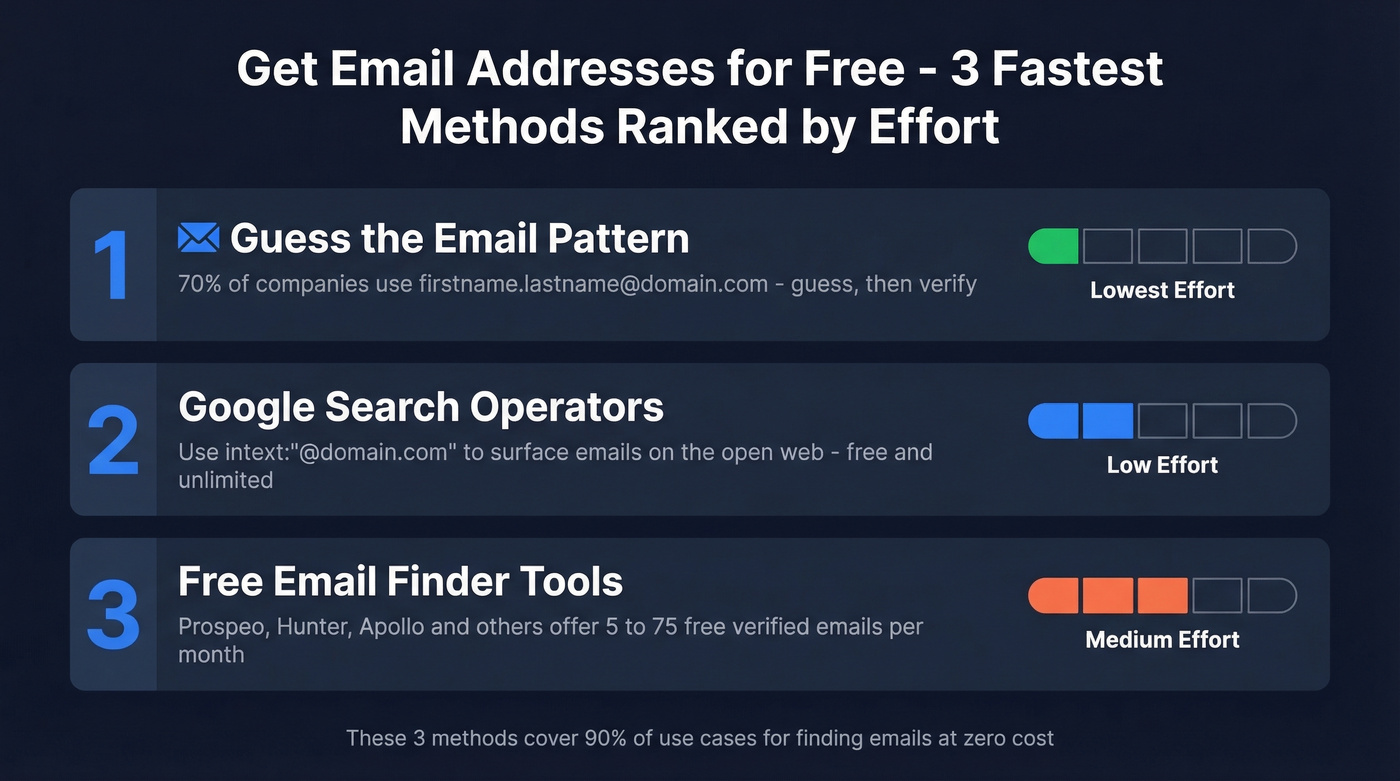
- Google search operators. Use
intext:"@example.com"to surface emails published on the open web. Free, unlimited, surprisingly effective for smaller companies.
Those three cover 90% of use cases. The rest of this guide explains how to use each method properly, why verification matters more than finding, and the legal rules you can't afford to ignore.
Find Emails Without Any Tools
Guess the Email Pattern
Most companies use predictable email formats. About 70% of professional emails follow firstname.lastname@domain.com, and the remaining 30% split across a handful of fallbacks: firstinitiallastname@ (jsmith@), firstname@ (john@), and lastname.firstname@ (smith.john@).
The workflow is simple. Go to the company's website, find the domain, construct your best guess. If you're targeting John Smith at Acme Corp, try john.smith@acme.com first, then jsmith@acme.com, then john@acme.com.
Here's the thing: verify before sending. Guessing without verification is how you end up with a 15-30% bounce rate and a trashed sender reputation. Run your guess through a free verification tool - even one verified email confirms the company's pattern, and you can apply it to every other contact at that domain. (If you need a deeper workflow, see Name to Email.)
Google Search Operators
Google is a surprisingly powerful email lookup tool. Four templates you can copy-paste right now:
intext:"@acme.com"- surfaces any indexed page containing an @acme.com email addresssite:acme.com filetype:pdf (email OR "@")- finds emails buried in PDFs, whitepapers, press kits, annual reportsintitle:"team" ("email" OR "contact") "SaaS"- pulls up team/contact pages across an industrysite:acme.com ("marketing" OR "sales" OR "PR") (contact OR email OR "@")- targets role-specific contacts
Add after:2026-01-01 to any query to filter out stale results. Older PDFs and cached pages are the biggest source of dead emails with this method. A few operators you'll see in older guides - link:, info:, and inanchor: - are deprecated, so don't waste time with them.
Other Free Sources
Beyond Google, emails hide in plain sight. Company team pages and "About Us" sections often list direct contacts, especially at companies with fewer than 200 employees. Press releases almost always include a media contact email, and public filings frequently contain investor relations contacts.
Don't overlook niche directories and trade association member lists. Local chambers of commerce, professional associations, and conference speaker pages often publish member emails that no finder tool has indexed - these are goldmines for niche verticals where mainstream databases have thin coverage. (If you’re building a repeatable system, pair this with sales prospecting techniques.)
Best Free Email Finder Tools
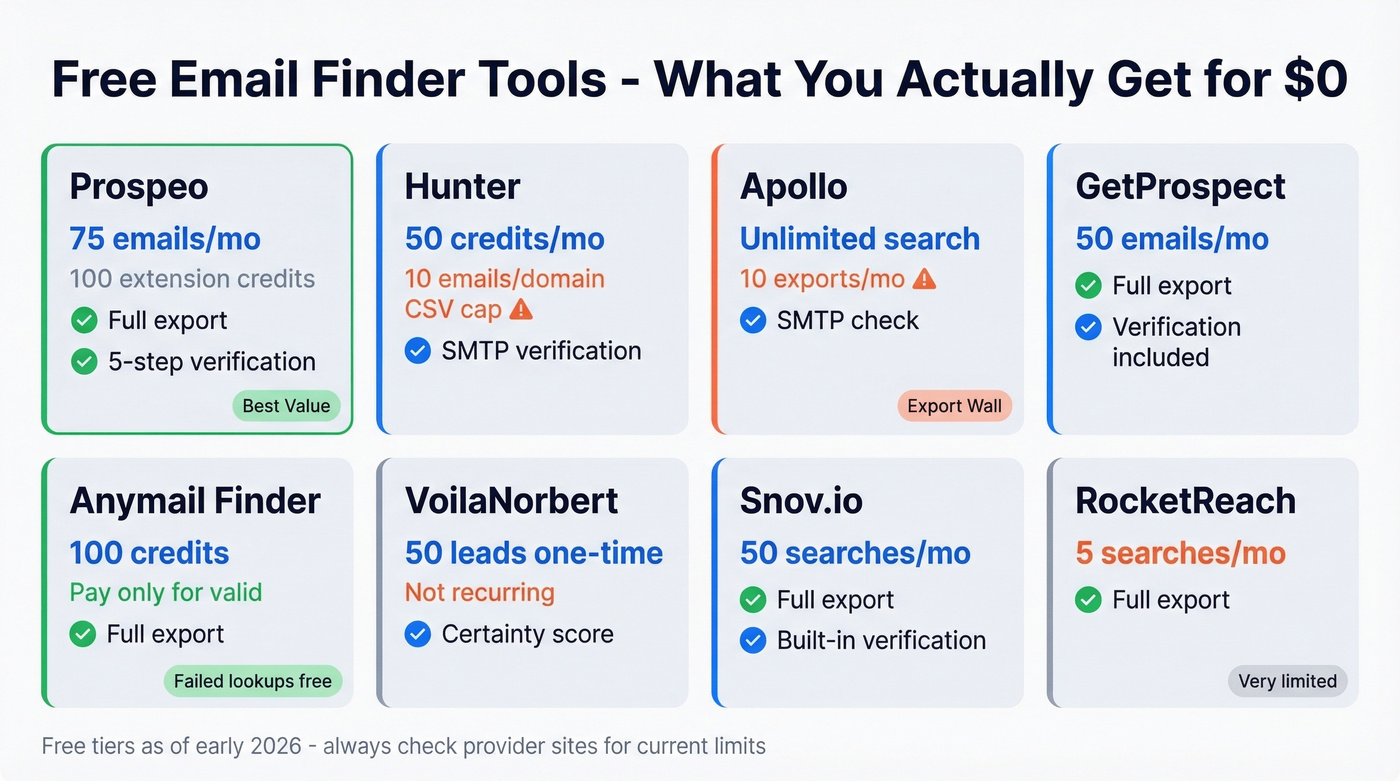
| Tool | Free Tier | Export Limits | Verification | Paid From |
|---|---|---|---|---|
| Prospeo | 75 verified emails + 100 Chrome extension credits/mo | No restrictions | Yes, 5-step | ~$0.01/email |
| Hunter | 50 credits/mo | 10 emails/domain CSV | SMTP + confidence score | $49/mo |
| Apollo | Free plan available | 10 exports/mo | SMTP check | ~$49/user/mo |
| GetProspect | 50 emails/mo | Full export | Included | $49/mo |
| Anymail Finder | 100 free credits | Full export | Pay only for Valid | $14/mo |
| VoilaNorbert | 50 leads (one-time) | Full export | Certainty score | $49/mo |
| Snov.io | 50 searches/mo | Full export | Included | ~$30/mo |
| RocketReach | 5 searches/mo | Full export | Included | ~$50-$100/mo |
Prospeo
If accuracy matters more than volume, this is where we'd start. You get 75 verified emails per month plus 100 Chrome extension credits, and unlike most competitors, there are no export restrictions. What you find, you keep.
The 98% email accuracy comes from a proprietary 5-step verification process that handles catch-all domains, removes spam traps, and filters honeypots. The database includes 143M+ verified emails and 300M+ professional profiles, refreshed on a 7-day cycle - the industry average is six weeks. Teams switching from other providers report bounce rates dropping from 35%+ to under 4%, which is the difference verification makes in practice. (If you’re comparing vendors, start with data enrichment services.)
The Chrome extension (40,000+ users) lets you pull verified emails from any website or web source in one click. For the "200 companies by Friday" scenario, you'd upload your target list, get verified contacts back, and export immediately.

75 emails/month won't sustain a high-volume outbound operation. But for targeted prospecting - 10-15 accounts per week - it's more than enough, and the accuracy means you aren't burning credits on bad data.
Hunter
Hunter's biggest limitation hits before you even export. The free plan gives you 50 credits/month across Email Finder, Domain Search, and Verifier, but CSV exports are capped at 10 emails per domain.
Where Hunter earns its keep is domain-level pattern discovery. Punch in a domain and it shows you the email format the company uses, plus any emails it's found publicly. In Clay's data quality tests, Hunter scored 89.56% data quality but only 47.62% coverage - the emails it finds are usually good, but it misses more than half the contacts you're looking for. Use Hunter for pattern confirmation, not as your primary database. Paid plans start at $49/mo for 2,000 credits. (If you’re shopping around, see Hunter alternatives.)

Apollo
Apollo's free plan is a masterclass in bait-and-switch. Unlimited email credits with fair-use limits around 10,000/month sounds incredible until you realize you only get 10 export credits per month, plus a 250 emails/day sending cap. You can search all you want. You just can't take the data anywhere useful.
The database is massive, but the consensus on r/coldemail is frustrating: Apollo returns "no emails found" for thousands of domains, especially outside the US tech ecosystem. One user described it as "a phone book where half the numbers are disconnected." For mid-market companies in niche verticals, expect coverage gaps. Paid plans run ~$49/user/mo. (If you’re building a full outbound stack, compare SDR tools.)
Anymail Finder
Anymail Finder's billing model deserves respect: you only pay for valid emails. Failed lookups don't consume credits, and "Risky" emails are free. That's a meaningful difference when you're working with a small free allocation of 100 credits. In a benchmark rerun using 5,000 fresh contacts, Anymail Finder posted a 77.5% verified rate - solid for a tool starting at just $14/mo, the cheapest entry point on this list.
Other Tools Worth Knowing
GetProspect gives you 50 free emails/month and works well for sourcing leads from professional profiles. VoilaNorbert offers a one-time trial of 50 leads - Ahrefs tested it at a 92% success rate, the top result in their comparison. Snov.io provides 50 free searches/month with built-in verification at ~$30/mo if you upgrade. RocketReach only offers 5 free searches/month, but Reddit users on r/sales consistently praise its accuracy for mid-market SaaS contacts. (For more options, see our roundup of free lead generation tools.)

You don't need to guess email patterns or scrape Google results. Prospeo gives you 75 verified emails every month for free - pulled from 143M+ verified addresses with 98% accuracy and zero export restrictions.
Stop guessing. Start with 75 free verified emails right now.
What "Free" Actually Costs
Let's be honest: most "free" email finders are designed to get you hooked, not to give you usable data.
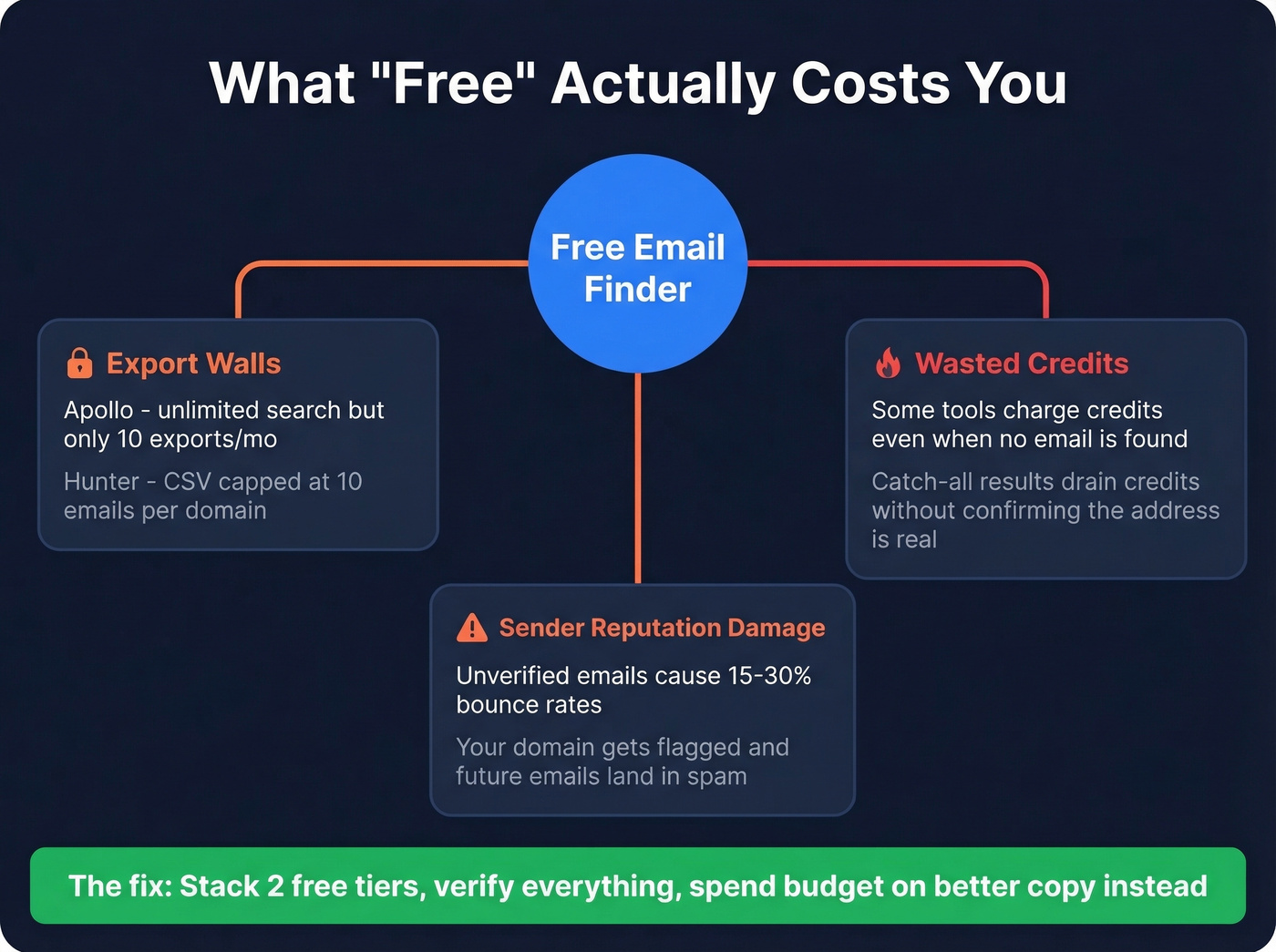
You signed up for a "free email finder," found 50 emails, tried to export them, and discovered you can only download 10 at a time. That's Hunter's free plan. Apollo is worse - unlimited search credits create the illusion of abundance, but 10 export credits per month means you're window-shopping a database you can't actually use.
Then there's the failed-lookup problem. Some tools charge credits even when no email is found. Hunter charges credits only when it returns a result, and Anymail Finder makes "Not found" free, which is why their free tiers stretch further than the raw numbers suggest. Catch-all results are another credit drain - a catch-all domain accepts any email address, so the tool returns a "catch-all" or "risky" result without knowing if the specific address is real. You send to it, it bounces, and your sender reputation takes the hit. (If you want to track this properly, see email bounce rate.)

Our take: if your average deal size is under $5K, you probably don't need a paid email finder at all. Stack two free tiers, verify everything, and spend your budget on better copy instead. The bottleneck for most small teams isn't data - it's messaging. (Use these email subject line examples to lift opens without buying more data.)
Accuracy Benchmarks That Matter
Every email finder claims 95%+ accuracy. Independent benchmarks tell a different story.
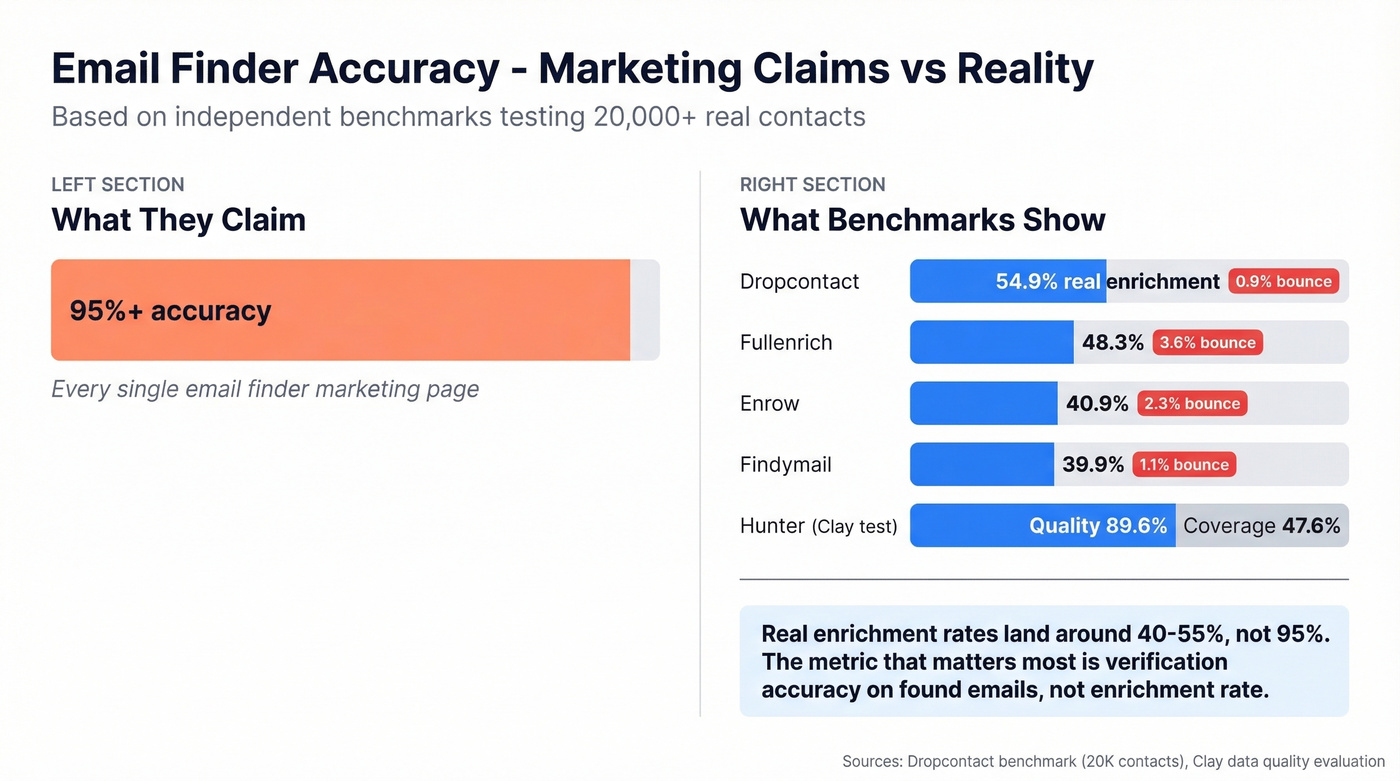
A Dropcontact benchmark tested 15 tools against 20,000 real contacts - 9,800 US, 9,700 Europe, 500 rest of world - and actually sent emails to measure hard bounces. The real enrichment rates after subtracting bounces and wrong-domain errors:
| Tool | Real Enrichment | Hard Bounce | Wrong Domain |
|---|---|---|---|
| Dropcontact | 54.9% | 0.9% | 1.0% |
| Fullenrich | 48.3% | 3.6% | 11.7% |
| Enrow | 40.9% | 2.3% | 5.8% |
| Findymail | 39.9% | 1.1% | 5.2% |
Clay ran a separate evaluation measuring both data quality and coverage. Findymail led with 90.05% quality and 83.73% coverage. Hunter scored 89.56% quality but only 47.62% coverage. The pattern is clear: tools that are selective about returning results tend to have higher quality but lower coverage, while tools that aggressively guess have higher coverage but more bounces.
Both benchmarks are vendor-run - take exact rankings with a grain of salt. But the directional insight is consistent: real enrichment rates for top tools land around 40-55%, nowhere near the 95% that marketing pages promise. Methodology matters too. Some tests use full contact details including domain, while others use only company name, which penalizes domain-based lookup tools and favors those with broader matching algorithms. Always check what inputs a benchmark used before trusting its rankings.
The metric that matters most for your outbound program isn't enrichment rate - it's verification accuracy on found emails. Enrichment rate tells you how many contacts a tool can find. Verification accuracy tells you whether those emails will actually land in an inbox. That's the number that determines whether your campaign succeeds or your domain gets flagged. (For deliverability fundamentals, see our email deliverability guide.)
Why Verification Beats Finding
The tool said "verified." Your ESP said "bounced." We've seen outbound programs tank their domain reputation in a single afternoon by skipping proper verification.
Unverified email lists bounce at 15-30%. Properly verified lists stay under 2-4%. On r/coldemail, users regularly report "verified" emails from budget tools still bouncing at 20%+. That gap is the difference between a healthy outbound program and one that's slowly killing your domain.
Not all verification is equal. Basic SMTP checks confirm a mailbox exists but can't handle catch-all domains, spam traps, or honeypots. When evaluating any email finder, look for these verification statuses in the output: Valid, Risky, Catch-All, and Unknown. If a tool only returns "found" or "not found" without those distinctions, it's doing basic checks at best. Skip the Risky and Unknown addresses, and you'll protect your sender reputation. (If you need a checklist, use how to check if an email exists.)
Free tools with 50% coverage and no verification are why your bounce rate sits at 15-30%. Prospeo's 5-step verification catches spam traps, honeypots, and catch-all domains - teams report bounce rates dropping from 35% to under 4% after switching.
Free emails mean nothing if they bounce. Get 75 verified ones monthly.
Legal Rules You Can't Ignore
Most email-finding guides skip legal compliance entirely. That's irresponsible - here's what you need to know across three frameworks:
| Requirement | CAN-SPAM (US) | GDPR (EU/UK) | CASL (Canada) |
|---|---|---|---|
| Can you cold email? | Yes, with rules | Legitimate interest | Express/implied consent |
| Opt-out window | 10 business days | Immediate | 60 days |
| Key requirement | Physical address | Data processing basis | Consent records |
| Max penalty | $50,120/email | EUR 20M or 4% revenue | $10M/violation |
Under CAN-SPAM, cold email is legal as long as you include a valid physical address, identify the message as commercial, and honor opt-outs within 10 business days. No misleading headers or subject lines.
GDPR is stricter. You need either consent or a legitimate interest basis for processing. B2B has more flexibility than B2C - especially under the UK's PECR rules - but you still need a clear opt-out mechanism and records of your legal basis.
CASL is the toughest of the three. Express or implied consent is required, your unsubscribe mechanism must work within 60 days, and penalties run up to $10M per violation. If you're emailing Canadian contacts, get this right. (Related: Is It Illegal to Buy Email Lists?.)
The practical takeaway: always include an unsubscribe link, always include your physical address, and keep records of where you sourced each contact. Those three habits keep you compliant across all three frameworks.
FAQ
Can I really find email addresses for free?
Yes. Manual methods like Google operators and pattern guessing cost nothing. Free tool tiers give you 5-75 verified emails per month depending on the provider. For more than ~100 emails/month, you'll need a paid plan or to stack multiple free tiers.
Which free email finder is the most accurate?
Prospeo delivers 98% email accuracy with 5-step verification on its free tier of 75 emails/month. Hunter scores 89.56% data quality in Clay's tests but only 47.62% coverage. Apollo offers volume, but r/coldemail users report frequent "no email found" results outside US tech.
How do I build a free email list from scratch?
Combine a free-tier finder with Google search operators. Use a tool like Prospeo or Hunter to pull verified contacts from target domains, then run intext:"@domain.com" searches to catch publicly listed addresses. Export results, verify every address, and you'll have a clean list at zero cost.
Will found emails bounce if I skip verification?
Unverified emails bounce at 15-30%, which can permanently damage your sender domain. Verified lists from tools with multi-step validation stay under 2-4% bounce rate. Always verify before sending - one bad batch can land your domain on blocklists.
Is it legal to cold email someone whose address I found online?
In the US under CAN-SPAM, yes - include a physical address, label the email as commercial, and honor opt-outs within 10 business days. GDPR requires legitimate interest, and CASL requires express or implied consent. Penalties range up to EUR 20M or $10M per violation.