

Gmail Blocking Outgoing Emails: Every Error Code, Every Fix
You hit send. Gmail handed you a "Message Blocked" bounce from mailer-daemon@googlemail.com - and the "technical details below" section was completely empty. No error code, no explanation, just a useless help link.
If Gmail is blocking outgoing emails for you, the usual advice is guesswork. Match your error to the right fix below and move on with your day.
What Error Are You Seeing?
Find your symptom, jump to the fix.
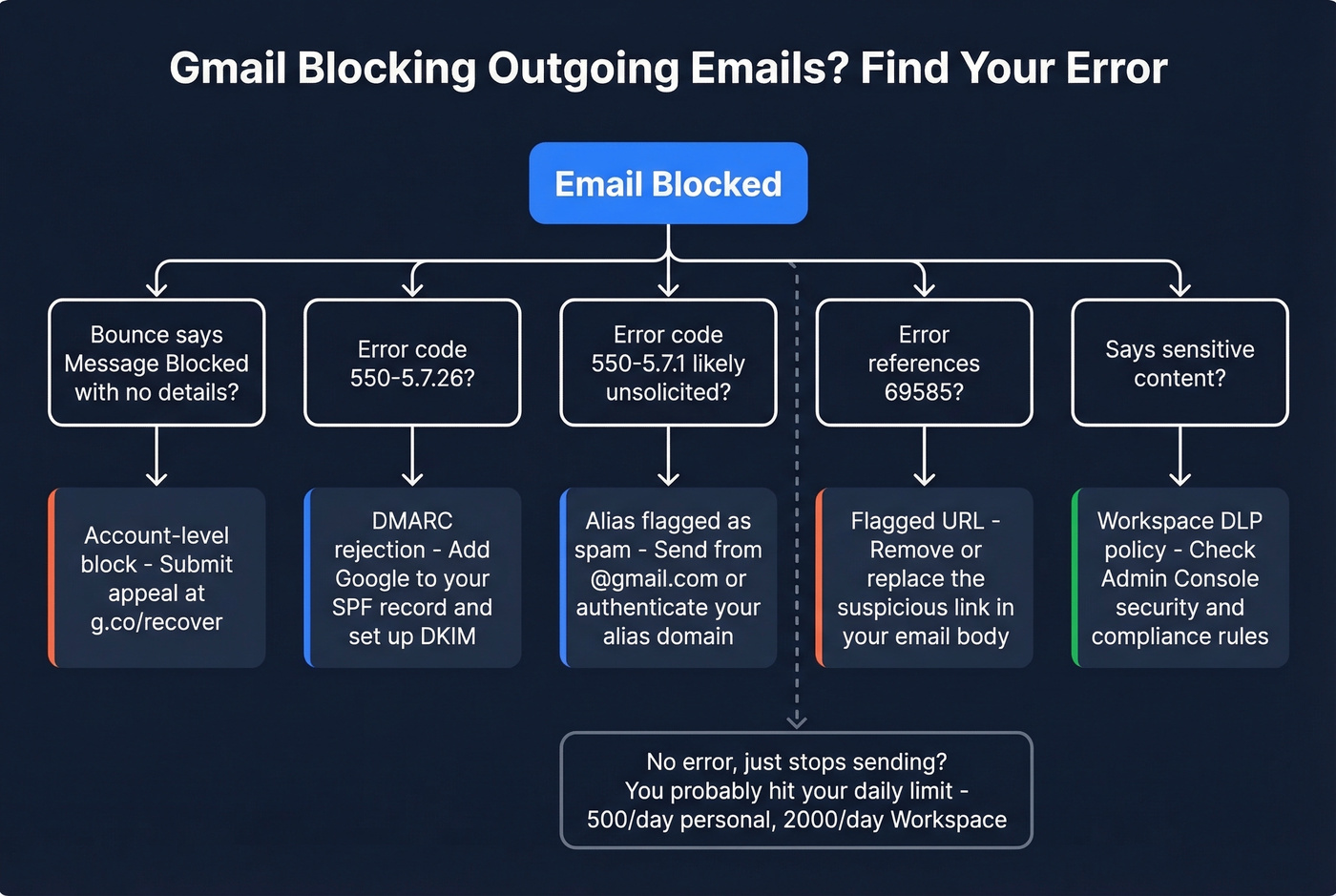
| Your Error | Most Likely Cause | Jump to Fix |
|---|---|---|
| "Message Blocked" (no details) | Account-level block | [Fix](#message-blocked - no-details) |
| 550-5.7.26 | DMARC rejection on alias | [Fix](#error-550-5726 - dmarc-rejection) |
| 550-5.7.1 "likely unsolicited" | Content/alias flagged | [Fix](#error-550-571 - likely-unsolicited) |
| 69585 | Flagged URL in body | [Fix](#error-69585 - flagged-url) |
| "Sensitive content" | Workspace DLP policy | [Fix](#sensitive-content - workspace-dlp) |
| No error, just stops sending | Daily sending limit hit | See triggers |
Personal Gmail accounts cap at ~500 emails/day. Workspace accounts cap at ~2,000/day. If you've hit those limits, wait 24 hours - no fix needed.
Fixes by Error Code
"Message Blocked" - No Details
This is the most frustrating error Gmail throws. Everything you send bounces, the bounce comes from mailer-daemon@googlemail.com, and the promised "technical details" are missing entirely. Google Support threads and Reddit posts on r/Gmail are full of users reporting this exact scenario - plus the joy of getting an AI-generated support response that solves nothing.
We've seen this hit users who've had their accounts for 10+ years with zero issues. It's an account-level block. Google flagged your account for suspicious activity, bulk spam behavior, or a ToS violation - sometimes it's just a hijacking false positive.
What to do:
- Go to g.co/recover or accounts.google.com/signin/recovery
- Look for a "Start Appeal" or "Request Review" option on your login screen
- Submit the appeal and wait 1-5 business days
Don't bother trying to reach Google support through other channels. The appeal form is your only realistic path.
Error 550-5.7.26 - DMARC Rejection
The full bounce: 550 5.7.26 Unauthenticated email from <yourdomain.com> is not accepted due to domain's DMARC policy.
This is the error we see most often - and it's the easiest to fix. It hits when you're using Gmail's "Send As" feature with a custom domain alias, and that domain has a strict DMARC policy (p=reject). The recipient evaluates DMARC for your visible From domain; if the message doesn't authenticate and align via SPF and/or DKIM, DMARC fails and the recipient rejects it outright.
The classic misconfiguration: your SPF record authorizes another provider but not Google. Something like v=spf1 include:mailgun.org ~all - notice what's missing.
The fix: Add Google to your SPF record:
v=spf1 [include:_spf.google.com](https://knowledge.workspace.google.com/admin/security/set-up-spf) include:mailgun.org ~all
You'll also want DKIM alignment. In Google Admin Console, go to Apps > Gmail > Authenticate email, generate a DKIM key, and publish the DNS TXT record. Give DNS up to 48 hours to propagate. Even if SPF fixes it, add DKIM anyway - strict DMARC setups often depend on clean alignment from both. (If you want a quick checklist, see DMARC alignment.)
Error 550-5.7.1 - "Likely Unsolicited"
The bounce reads: 550 5.7.1 ... Gmail has detected that this message is likely unsolicited mail ... blocked.
Here's the thing - this can hit even when you're sending from Gmail's own web interface. The pattern on r/Gmail is consistent: users sending to groups of 50-80 recipients via a custom domain alias get blocked, while sending from their base @gmail.com address works fine.
Quick workaround: Send from your @gmail.com address instead of the alias.
Long-term fix: Properly authenticate the alias domain with SPF, DKIM, and DMARC (see the setup section below). If you're using Gmail aliases with a custom domain and haven't touched your DNS in years, this is almost certainly your problem. Gmail's enforcement has gotten stricter - legacy alias workflows that worked for years are suddenly breaking. (Also worth checking your email subject line and copy patterns if you're sending similar messages in bulk.)
Error 69585 - Flagged URL
Your bounce references support.google.com/mail/answer/69585. Gmail blocked your email before it even left Google's servers. The message never reached the recipient.
The cause is almost always a URL that Google Safe Browsing has flagged as suspicious or malicious. Sometimes Gmail classifies the text content itself as spam-like, even without URLs.
The fix: Remove or replace the suspicious link. Try sending the email without any URLs to confirm the link is the trigger. Google removed the help page that used to explain 69585, so the link in the bounce often doesn't even mention the code - which is why you're left piecing it together from third-party explanations and forum posts.
"Sensitive Content" - Workspace DLP
This one's specific to Google Workspace. The block says something like "Message blocked - may contain sensitive content" and references your organization's security policies.
The block happens before the email leaves your domain - it's internal policy enforcement, not an external rejection. Workspace admins on Google Support report this triggering even when they haven't intentionally created DLP rules, which makes it especially confusing for smaller teams that assumed default settings were harmless.
Admin fix: Go to Admin Console > Security > Content compliance and review active rules. Check for inherited or default policies matching patterns in your emails.
Content Triggers That Block Mail
Beyond error codes, Gmail blocks emails that hit these guardrails:
- Missing subject line triggers rejection
- Certain attachment types including
.exeand.zipget blocked for security - HTML containing JavaScript, ActiveX, or Flash is stripped or blocked
- More than 100 images in a single email
- Any single image over 25MB
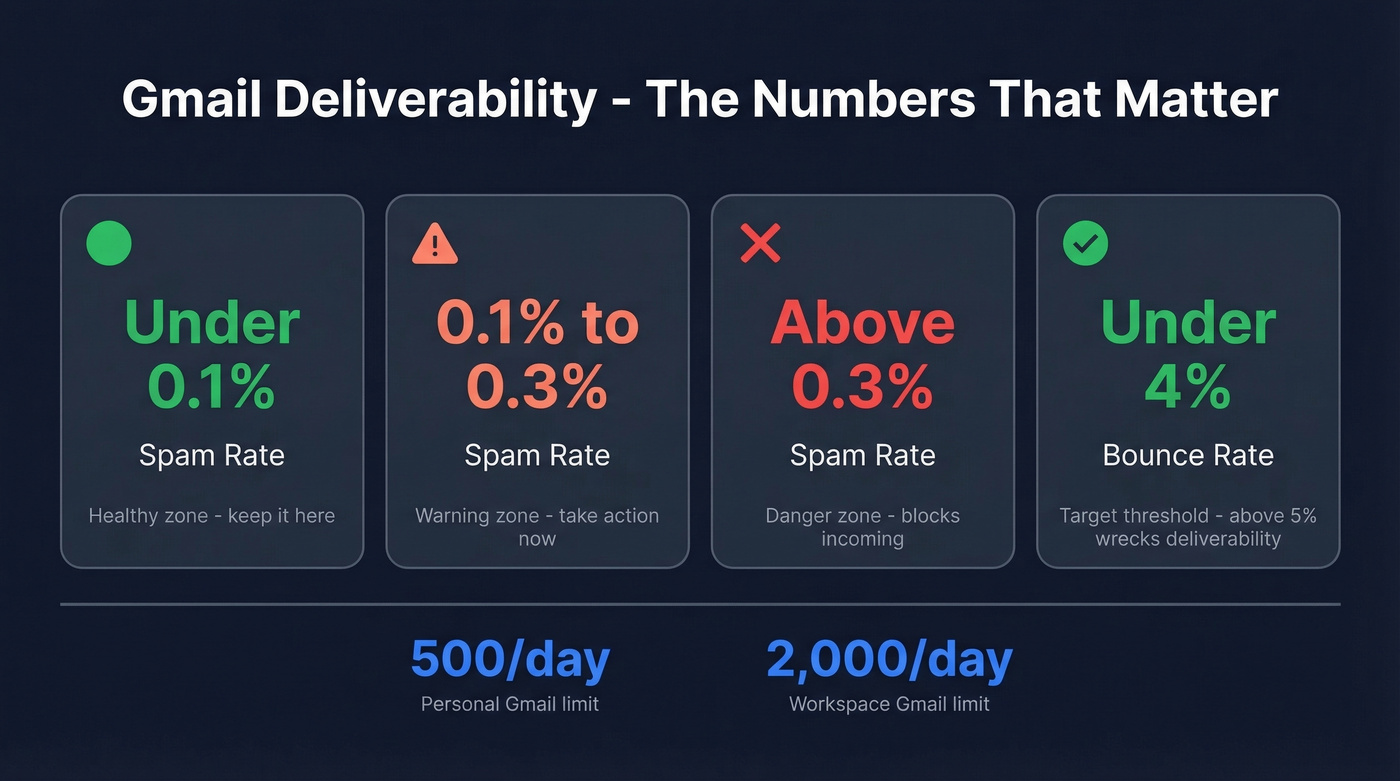
- Exceeding daily limits - 500/day for personal accounts, 2,000/day for Workspace
If you're doing mail merges, the effective limit is often lower than the daily cap. Ramp gradually and watch for temporary blocks. (For safe pacing, see email velocity.)

Most Gmail blocks trace back to bad data - sending to stale, unverified, or catch-all addresses that spike your bounce rate and trigger Google's filters. Prospeo's 5-step verification with catch-all handling and spam-trap removal keeps your bounce rate under 4%. That's 98% email accuracy refreshed every 7 days, not the 6-week-old data that got your account flagged.
Fix the root cause. Stop sending to bad emails.
Set Up SPF, DKIM, and DMARC
This is the fix behind most of the fixes above. If you're sending from a custom domain through Gmail, these three DNS records aren't optional. (If you need syntax help, use these SPF record examples.)
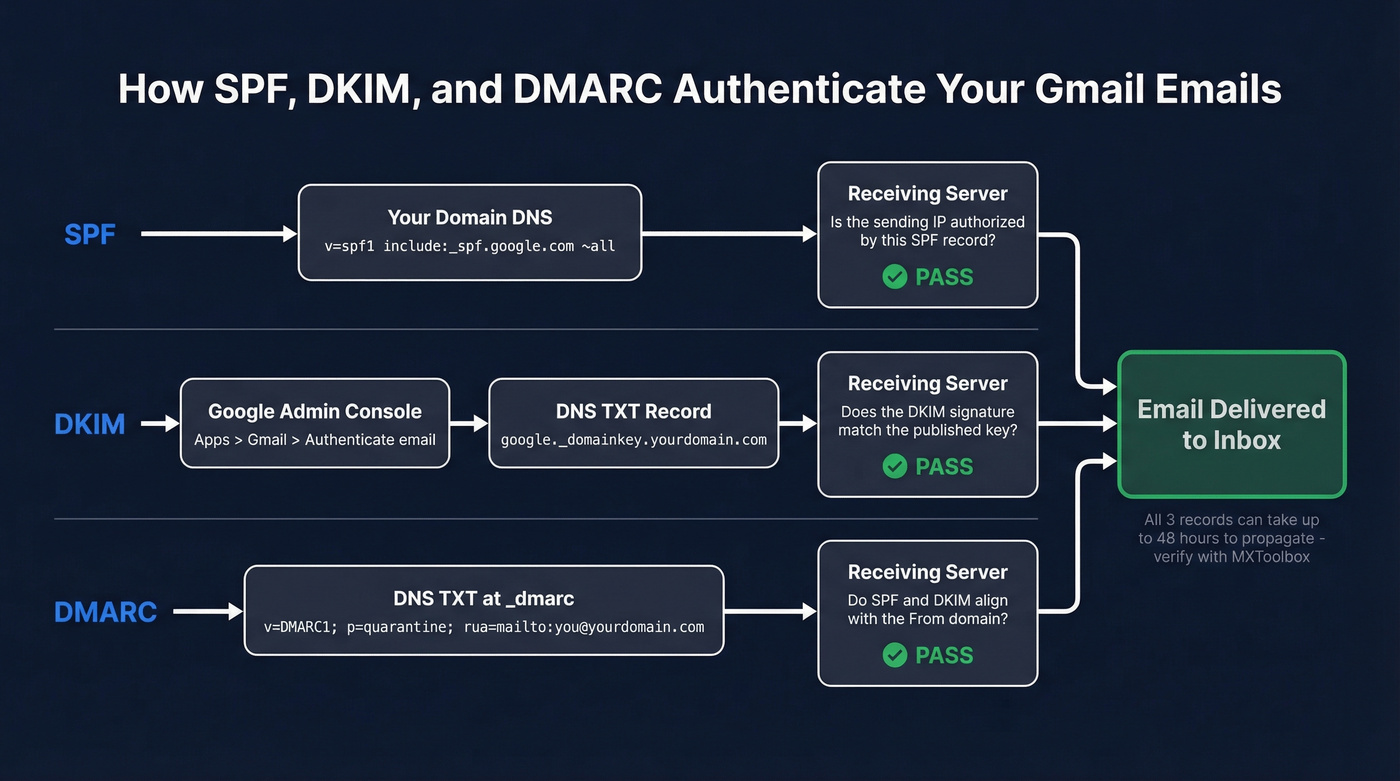
SPF - Add a TXT record at @:
v=spf1 include:_spf.google.com ~all
DKIM - In Google Admin Console: Apps > Gmail > Authenticate email. Generate a DKIM key, then publish the DNS TXT record Google gives you. (If you’re unsure it’s live, follow this guide to verify DKIM is working.)
DMARC - Add a TXT record at _dmarc:
v=DMARC1; p=quarantine; rua=mailto:you@yourdomain.com; pct=100; sp=none
All three records can take up to 48 hours to propagate. Verify with MXToolbox or Google's Check MX tool after 48 hours. (If you’re troubleshooting bounces, this email bounce rate guide helps decode what’s normal vs dangerous.)
Monitor with Postmaster Tools
Once your authentication is solid, monitor ongoing reputation at postmaster.google.com. Add your domain, verify via DNS TXT record, and you'll get dashboards for spam rate, delivery errors, and authentication status.
The thresholds that matter: spam rate under 0.1% is healthy, 0.1-0.3% is a warning, above 0.3% means you're in danger territory. You need at least ~1,000 daily messages to Gmail for data to populate, so smaller senders won't see much here. (For remediation, see how to improve sender reputation.)
One thing to know: Google retired Postmaster Tools v1 on September 30, 2025 and redirected everyone to v2. The new version focuses on compliance dashboards - domain and IP reputation views are gone and aren't coming back.
2026 Enforcement Rules
Google announced new sender requirements in 2024 and started ramping enforcement in late 2025 with temporary and permanent rejections. As of 2026, these rules are fully in effect.
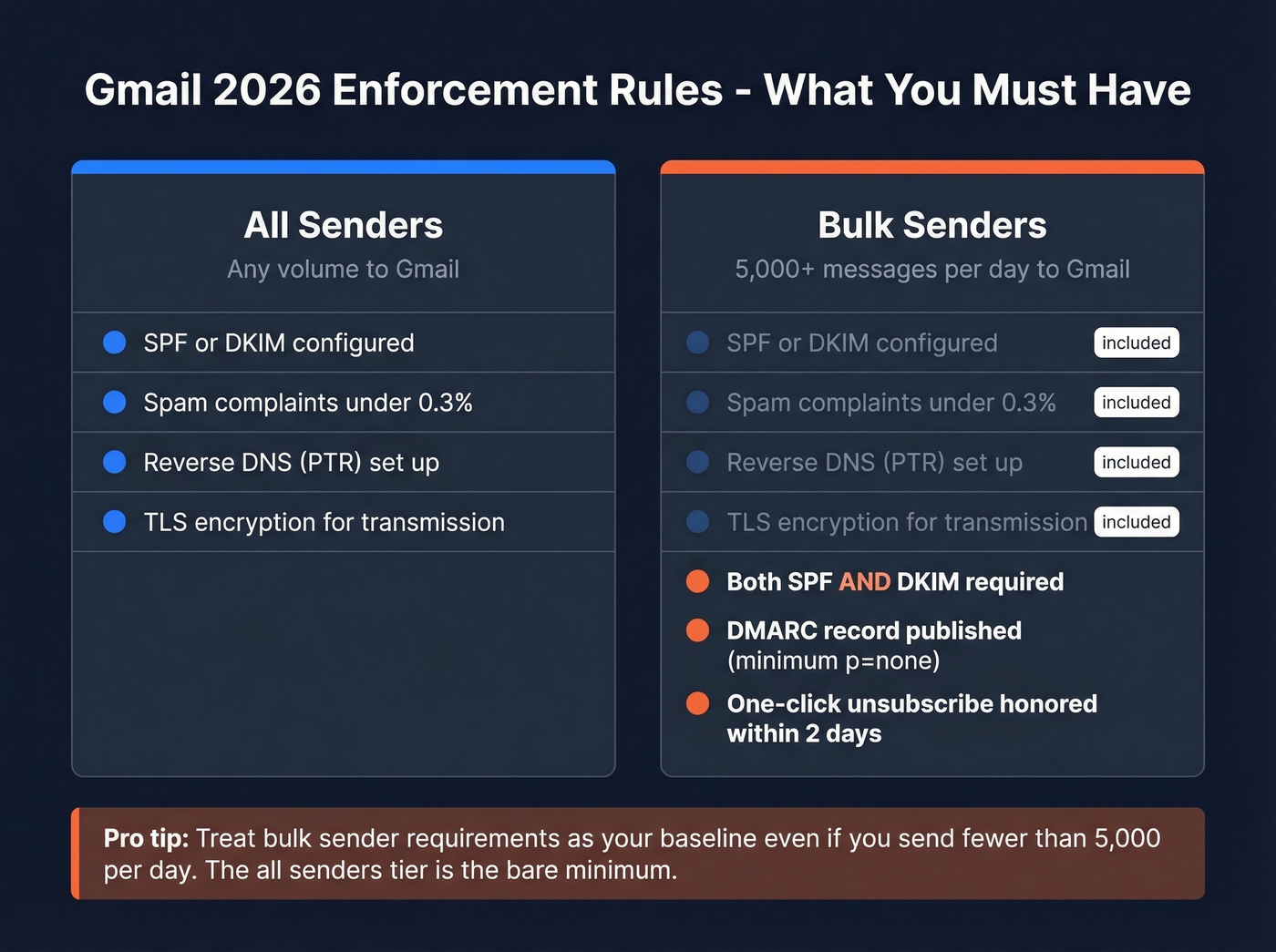
All senders must have SPF or DKIM configured, keep spam complaints under 0.3%, set up reverse DNS (PTR), and use TLS for transmission.
Bulk senders - anyone pushing 5,000+ messages/day to Gmail - must also have both SPF and DKIM, publish a DMARC record at minimum p=none, and support one-click unsubscribe honored within 2 days. (If you're unsure where you fall, see bulk email threshold.)
Let's be honest: if you're sending outbound at any real volume, treat the bulk sender requirements as your baseline. The "all senders" tier is the bare minimum, and even that won't save you if your spam rate creeps up.
Prevent Future Blocks
Most cases of Gmail blocking outgoing emails trace back to one root cause: bad sender reputation. The fastest way to tank your reputation is a high bounce rate. Rates around 5% are enough to wreck deliverability - invalid addresses, spam traps, and honeypots silently destroy your sending domain over time. (If you suspect traps, start with spam trap removal.)
List hygiene is the other overlooked factor. Implement a sunset policy - remove contacts who haven't engaged in 90-180 days - to keep your list fresh and signal to Gmail that you're sending to people who actually want your messages. Without one, stale addresses accumulate, engagement drops, and Gmail starts routing your mail to spam or blocking it outright. We've watched teams go from healthy deliverability to full blocks in under two weeks because they imported an unverified list.
Clean your lists before sending. Warm up sending volume gradually when using a new domain or address. And verify every email address before it enters a sequence - Prospeo's email verification catches invalid addresses, spam traps, and honeypots in bulk with 98% accuracy. The free tier covers 75 verifications per month, so there's no reason to skip this step. (If you’re comparing options, see email reputation tools.)

You just spent 30 minutes debugging SPF records and DMARC policies. Now make sure the emails you're sending actually reach real inboxes. Prospeo verifies 143M+ emails with proprietary infrastructure - no third-party providers, no recycled data. Teams using Prospeo cut bounce rates from 35%+ down to under 4%.
Authenticated domain plus verified contacts equals zero blocks.
FAQ
Why does Gmail say "Message Blocked" with no error code?
Google flagged your account for suspicious activity, bulk spam behavior, or a ToS violation - often a false positive from unusual login patterns. Appeal at g.co/recover and expect a 1-5 business day review. There's no other support channel that resolves this faster.
How many emails can I send per day from Gmail?
Personal Gmail accounts cap at roughly 500 emails per day; Google Workspace accounts cap at 2,000. Exceeding these limits triggers a temporary block that lifts after 24 hours. Mail-merge workflows often hit throttling below the stated cap, so ramp volume gradually.
Do I need DMARC if I only send from Gmail?
If you only send from a @gmail.com address, Google handles authentication for you - no DNS changes needed. But if you use a custom domain alias via "Send As," you need SPF, DKIM, and DMARC configured on that domain or Gmail will reject your outgoing mail with a 550-5.7.26 error.
Can verifying my email list prevent outgoing blocks?
Yes. High bounce rates from invalid addresses destroy sender reputation, which is the top trigger for Gmail blocking outgoing emails. Running your list through a verification tool before sending removes invalid emails, spam traps, and honeypots - keeping bounce rates under 2% and your reputation intact.