

Gmail Changes 2024: What Happened and What You Need to Do
The Gmail changes in 2024 hit harder than most senders expected. Open rates dropped, bounce rates climbed, and cold outreach sequences that printed meetings six months prior started landing in spam. Gmail rewrote the rules, enforcement has only gotten stricter through 2025 and into 2026, and most senders still haven't caught up.
Here's what changed, what it means, and how to fix it.
The Quick Version
Set up SPF, DKIM, and DMARC - it's free and takes 2-3 hours. Monitor your spam rate in Google Postmaster Tools and keep it under 0.3%. Verify your email lists before sending - bad data is the fastest way to tank your sender reputation.
What Gmail Changed in February 2024
In October 2023, Google announced sweeping new sender requirements for bulk senders, with enforcement beginning by February 2024. Gmail already blocks nearly 15 billion unwanted emails every day and stops 99.9% of spam, phishing, and malware. The new policy raised the bar further.
Gmail defines a bulk sender as anyone sending more than 5,000 messages to Gmail addresses in a single day. Here's what the new rules require:
- All senders must authenticate their mail with SPF or DKIM at minimum.
- Bulk senders (5,000+/day) must also have DMARC in place.
- Bulk senders must enable one-click unsubscribe for commercial and marketing email, and process unsubscribes within two days.
- Senders must meet spam rate requirements - 0.3% is the hard ceiling in Google Postmaster Tools, and 0.1% is where you actually want to operate.
Google reported a 75% drop in unauthenticated messages reaching Gmail inboxes after requiring authentication. Unauthenticated bulk email to Gmail was done.
Who's Affected
The bulk email rules apply to messages sent to personal Gmail accounts (@gmail.com, @googlemail.com) - not inbound mail within Google Workspace environments. This catches more people than you'd think: recruiters emailing candidates at personal addresses, SaaS companies running onboarding sequences, agencies blasting cold outreach.
Yahoo rolled out nearly identical requirements in the same window. Both providers enforcing the same rules means there's nowhere to hide. If you're sending commercial email at any meaningful volume, you're in scope.
The Enforcement Timeline
Google didn't flip a switch overnight. Enforcement rolled out in phases, starting with the February 2024 window and escalating from there.
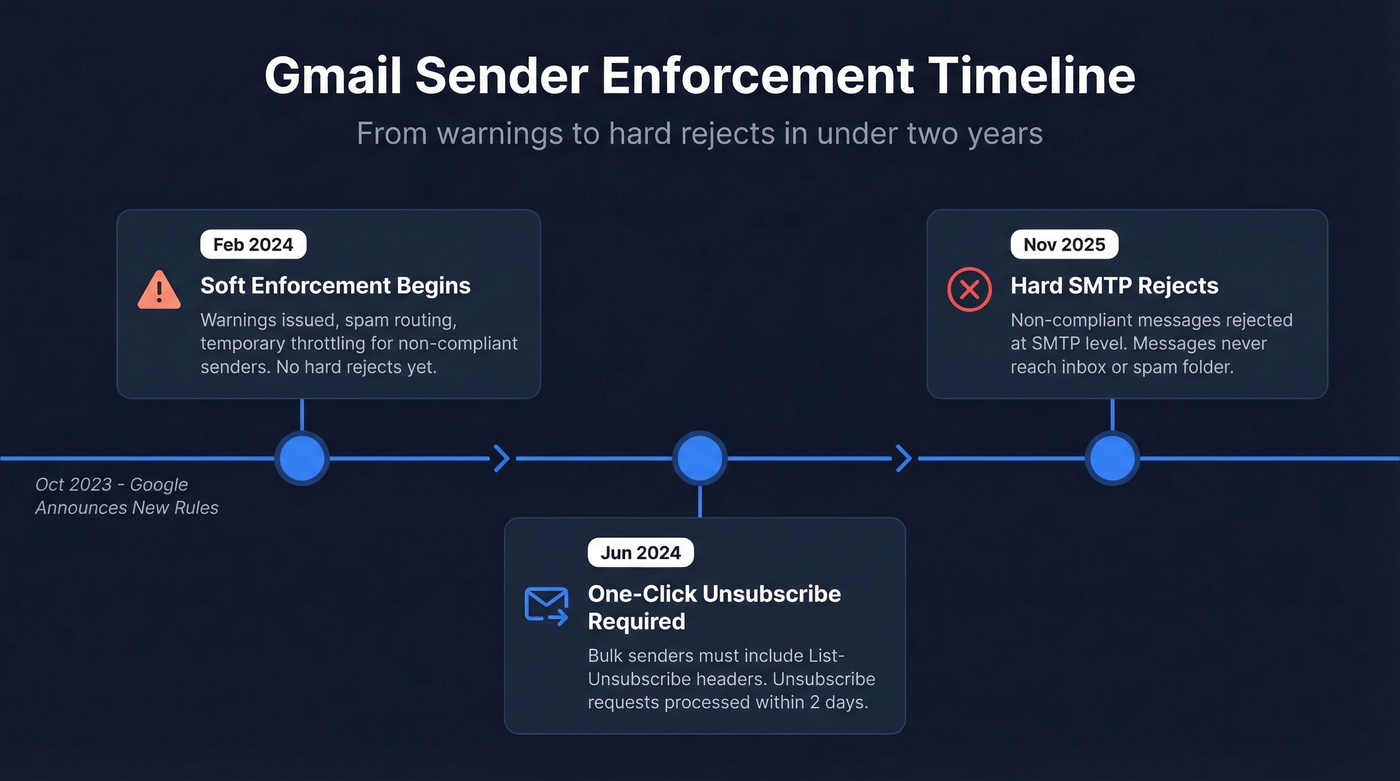
| Date | What Happened |
|---|---|
| Feb 2024 | Soft enforcement - warnings, spam routing, throttling |
| Jun 2024 | One-click unsubscribe mandatory for bulk senders |
| Nov 2025 | Hard SMTP rejects for non-compliant messages become common |
The February 2024 phase was mostly soft enforcement - non-compliant messages got routed to spam and throttled with temporary deferrals. The real teeth showed up later. By June 2024, the one-click unsubscribe requirement kicked in, and starting in November 2025, Gmail began rejecting non-compliant messages at the SMTP level, meaning they never reach the inbox or even the spam folder.
Google Postmaster Tools also shifted emphasis during this period, adding a much more binary Compliance Status - Pass or Fail - that made it obvious when you were out of spec.

Gmail now rejects unauthenticated mail and punishes senders who hit 0.3% spam rates. Every invalid email in your list pushes you closer to that threshold. Prospeo's 5-step verification - with spam-trap removal and honeypot filtering - delivers 98% email accuracy, keeping bounce rates under 4% for 15,000+ companies.
Stop feeding Gmail reasons to flag you. Send to verified emails only.
Real-World Deliverability Impact
According to GlockApps' deliverability benchmarks, inbox placement dropped across the board between Q1 2024 and Q1 2025:
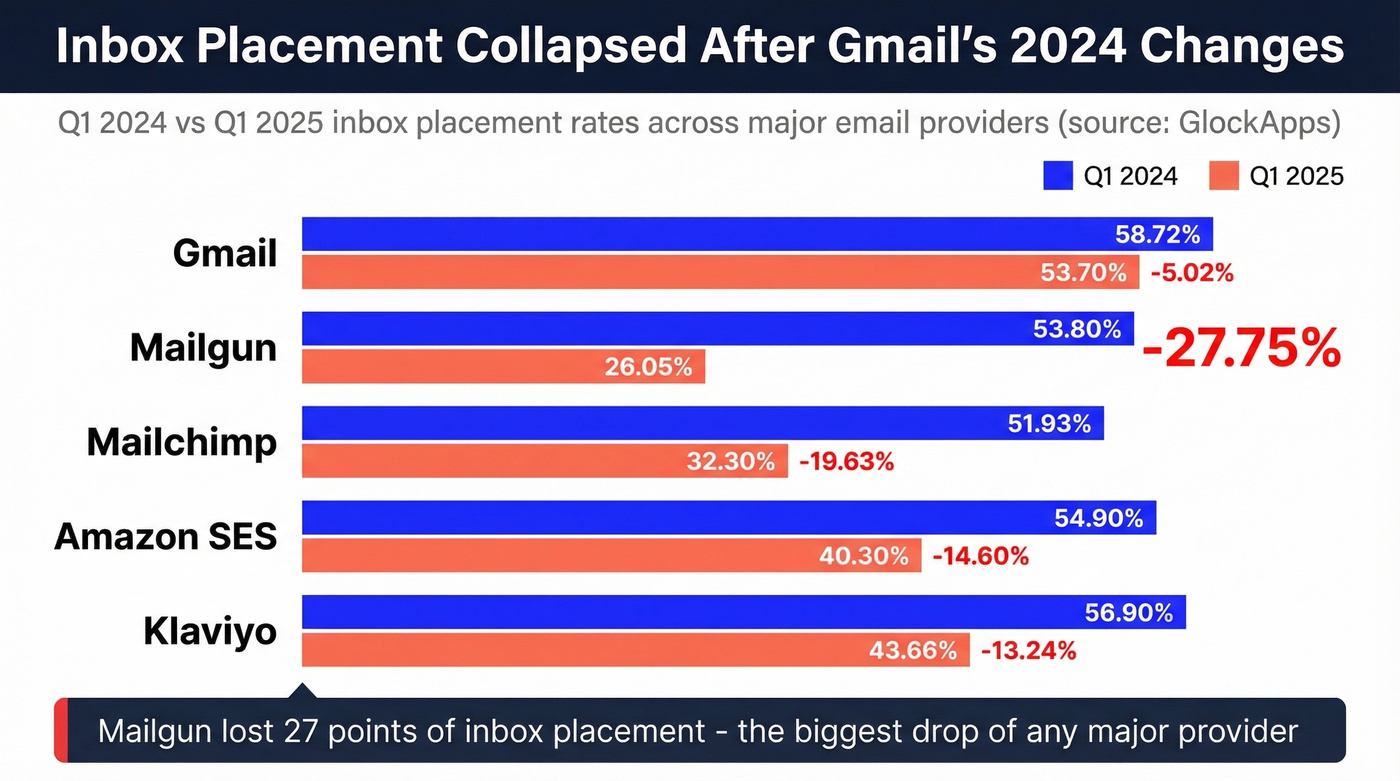
| ESP/Provider | Q1 2024 | Q1 2025 | Change |
|---|---|---|---|
| Gmail | 58.72% | 53.70% | -5.02% |
| Mailgun | 53.80% | 26.05% | -27.75% |
| Mailchimp | 51.93% | 32.30% | -19.63% |
| Amazon SES | 54.90% | 40.30% | -14.60% |
| Klaviyo | 56.90% | 43.66% | -13.24% |
Mailgun got absolutely hammered. A 27-point drop isn't a dip - it's a collapse.
Practitioners on r/coldemail reported even harsher results, with open rates dropping from 20-25% to under 5% for cold outreach campaigns. The consensus is that enforcement got progressively stricter throughout 2025, and messages quietly land in spam rather than bouncing - so senders don't even realize they've got a problem.
Here's what makes this worse: a Mailgun survey of 1,100+ senders found that 70% aren't even using Google Postmaster Tools to monitor their sender reputation, and fewer than 25% noticed deliverability problems they believed were connected to the new requirements. They're flying blind while the rules get tighter.
Your Compliance Checklist
SPF: Publish a single SPF TXT record for your domain - multiple records break SPF entirely. Stay within the 10 DNS lookup limit. Google Workspace users must include include:_spf.google.com. SPF checks the envelope sender (Return-Path), not the visible From address, which trips people up constantly. If you need syntax help, start with a SPF record reference.
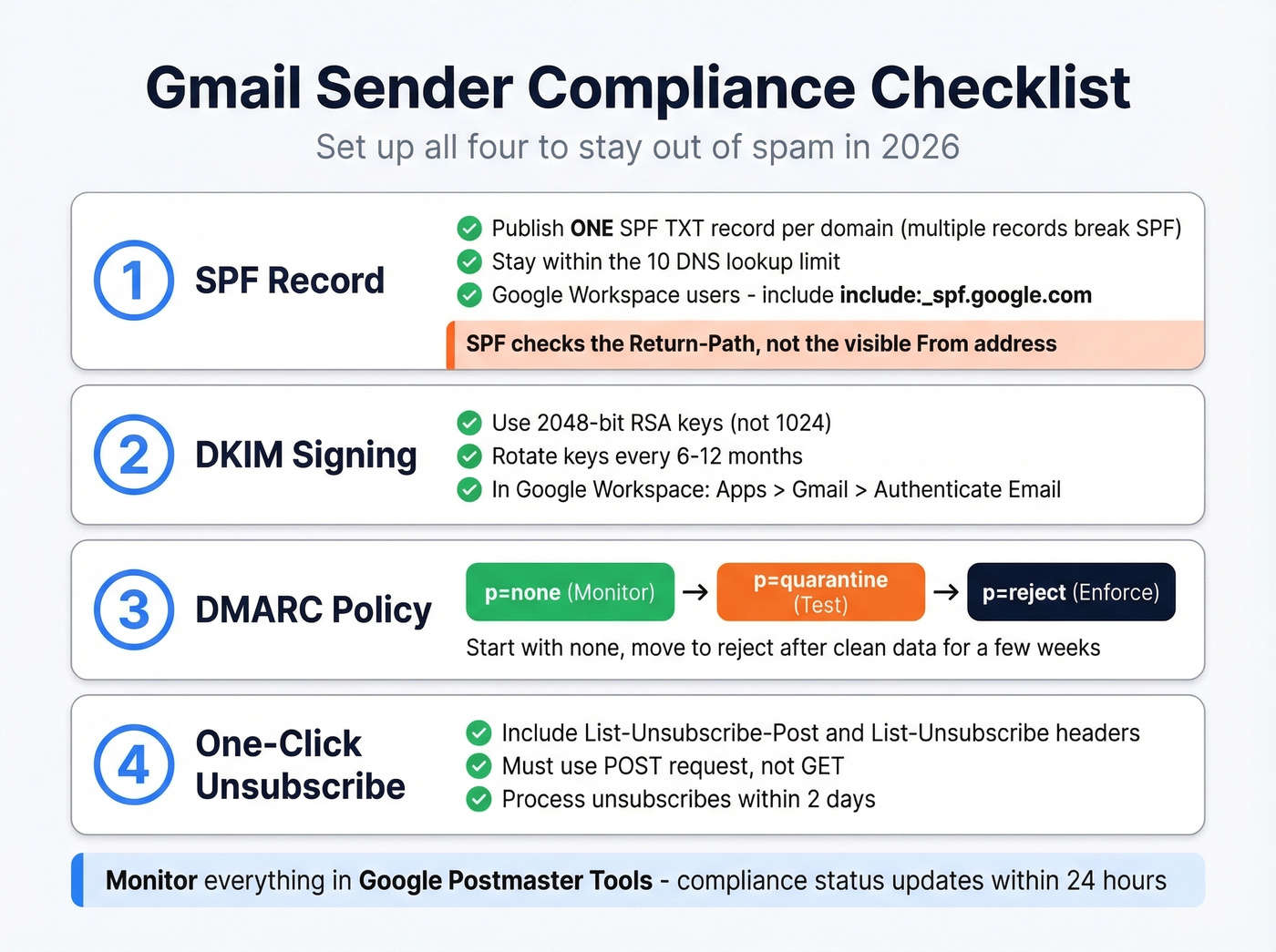
DKIM: Use 2048-bit RSA keys and rotate every 6-12 months. In Google Workspace, go to Apps > Google Workspace > Gmail > Authenticate Email to generate your key, publish the DNS TXT record, then activate. After changes, confirm everything is live with a quick verify DKIM is working check.
DMARC: Don't jump straight to p=reject. Start with p=none to monitor, move to p=quarantine after a few weeks of clean data, then p=reject. DMARC adoption hit 54% in 2024, up from under 43% in 2023 - nearly half of senders are still exposed. If you're troubleshooting deliverability, DMARC alignment is where a lot of setups fail.
One-Click Unsubscribe: Include both List-Unsubscribe-Post: List-Unsubscribe=One-Click and List-Unsubscribe headers. The unsubscribe must use a POST request, not GET, which email security scanners can trigger accidentally. Process requests within two days.
Postmaster Tools: Add your domain, verify via DNS TXT record, and monitor Compliance Status. Data updates within 24 hours but isn't real-time, and Compliance Status can take up to 7 days to reflect fixes.
SMTP Error Codes to Know
When Gmail rejects your messages, the error code tells you exactly why:
| Issue | Error Code | Meaning |
|---|---|---|
| SPF failure | 5.7.27 | SPF record missing or failing |
| DKIM failure | 5.7.30 | DKIM signature didn't verify |
| Alignment | 5.7.26 | SPF/DKIM domain misalignment |
| TLS missing | 5.7.29 | No TLS encryption on connection |
| rDNS issues | 5.7.25 | Reverse DNS lookup failed |
| RFC 5322 | 5.6.0 | Message format non-compliant |
We've seen senders panic over a 421-4.7.30 deferral that reads "Your email has been rate limited because DKIM authentication didn't pass." That's Gmail telling you exactly what's broken. Fix the DKIM record and the deferrals stop.
Staying Under Gmail's Spam Thresholds
Let's do the math on spam complaints. If you're sending 1,000 emails per day, it takes just three spam reports to hit the 0.3% threshold. Three. At 0.1% - where you actually want to be - you can't afford more than one complaint per thousand sends. These thresholds aren't negotiable.
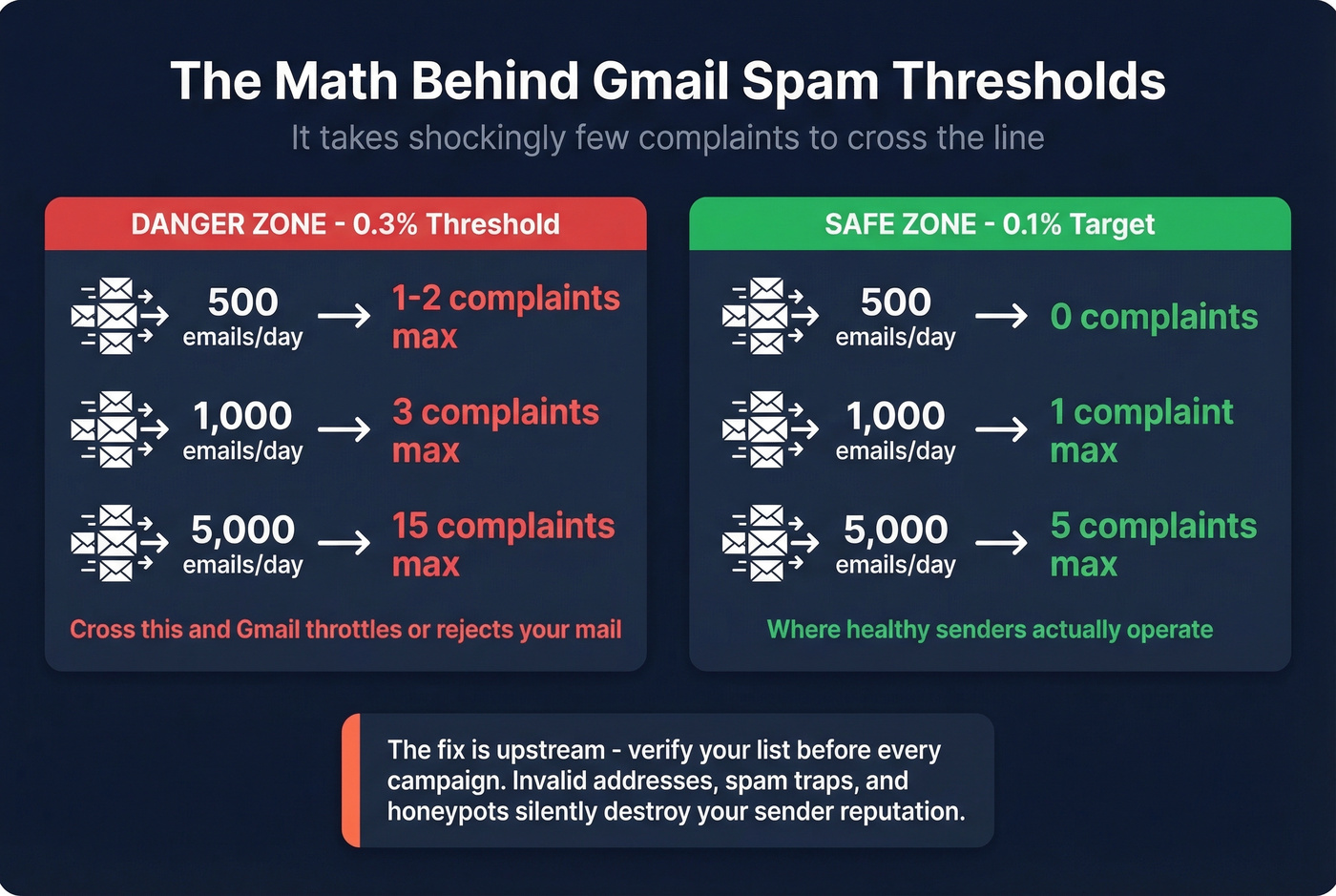
The upstream fix is list hygiene. Every invalid address, every spam trap, every honeypot in your list is a ticking time bomb for your sender reputation. In our experience, senders who verify their lists before every campaign stay well under the 0.1% threshold without thinking about it. If you're cleaning a damaged list, start with a proper spam trap removal process.
Prospeo's 5-step verification catches spam traps, honeypots, catch-all handling, and invalid addresses before they ever hit an inbox - 98% email accuracy at roughly $0.01 per verification. Verifying your list before each campaign takes minutes and keeps your compliance metrics clean.

Perfect authentication is table stakes now. The real differentiator in 2026 is list quality. We've watched teams with flawless SPF/DKIM/DMARC setups still land in spam because 8% of their list was dead addresses and recycled spam traps. Fix your data first. If you're diagnosing performance, track your email bounce rate alongside spam complaints.
For cold outreach specifically, keep sends to 15-30 emails per inbox per day and aim for 30-70 word emails with short subject lines. Anything higher on volume and you're asking for throttling. If you need a deeper framework, use an email velocity model instead of guessing.
Three spam complaints per 1,000 sends and Gmail throttles you. Bad data from other providers is the #1 cause. Prospeo refreshes every record on a 7-day cycle - not the 6-week industry average - so you're never sending to stale, bounced, or recycled addresses that destroy sender reputation.
Clean data at $0.01 per email beats rebuilding a burned domain.
Other Gmail Updates Worth Knowing
The sender requirements grabbed most of the attention, but Gmail also rolled out major consumer-facing updates. Google confirmed Gemini-powered AI features in Gmail, including AI-powered summaries, suggested replies, and drafting help - features that were previously restricted to paid accounts are rolling out more broadly. Users can toggle these on or off.
Gmail also introduced the ability to change your primary Gmail address without creating a new account. You keep the same account and data, your old address still works, and there are limits on how often you can make the switch.
These don't directly affect deliverability. But the AI features do change how recipients interact with and prioritize email in their inbox, which means engagement signals - the ones Gmail uses to decide if you're spam - are shifting in ways we don't fully understand yet. If you're rebuilding performance, it helps to revisit the fundamentals of email deliverability end-to-end.
FAQ
Do these rules apply to Google Workspace senders?
The requirements target messages sent to personal Gmail addresses (@gmail.com, @googlemail.com), not internal Workspace mail. That said, SPF, DKIM, and DMARC protect your deliverability across all providers - skip them at your own risk.
What's the difference between the 2024 sender rules and Gmail's 2026 AI updates?
The 2024 changes are authentication and spam-rate requirements - technical infrastructure for senders. The 2026 updates involve deeper Gemini AI integration affecting how recipients interact with and prioritize email. Completely separate initiatives with different implications.
How do I check if I'm compliant right now?
Set up Google Postmaster Tools (free), verify your domain, and check your Compliance Status. Run your domain through MXToolbox for a quick SPF/DKIM/DMARC diagnostic. For list hygiene, Prospeo's free tier gives you 75 verifications per month to spot-check your contacts before sending - authentication means nothing if you're mailing addresses that bounce.