

How to Check Your Gmail IP Reputation in 2026 - And What Google Removed
You're not losing your mind. The Gmail IP reputation check you're trying to run in Google Postmaster Tools doesn't exist anymore. Google removed the IP Reputation and Domain Reputation dashboards by October 2025, and most guides online still describe dashboards that were retired months ago.
Here's what actually works now.
The Short Version
- Google Postmaster Tools v2 killed the IP Reputation and Domain Reputation dashboards. Stop looking for them.
- Monitor Compliance Status and Spam Rate instead. Run your sending IP through free third-party tools like Sender Score, Spamhaus, and MxToolbox.
- Most reputation damage starts with bad data - verify your list before you send a single email.
What Google Changed in Postmaster Tools v2
Google began automatically redirecting users to Postmaster Tools v2 on September 30, 2025, and retired the v1 API by year's end. The two dashboards everyone relied on - IP Reputation and Domain Reputation - are permanently gone.
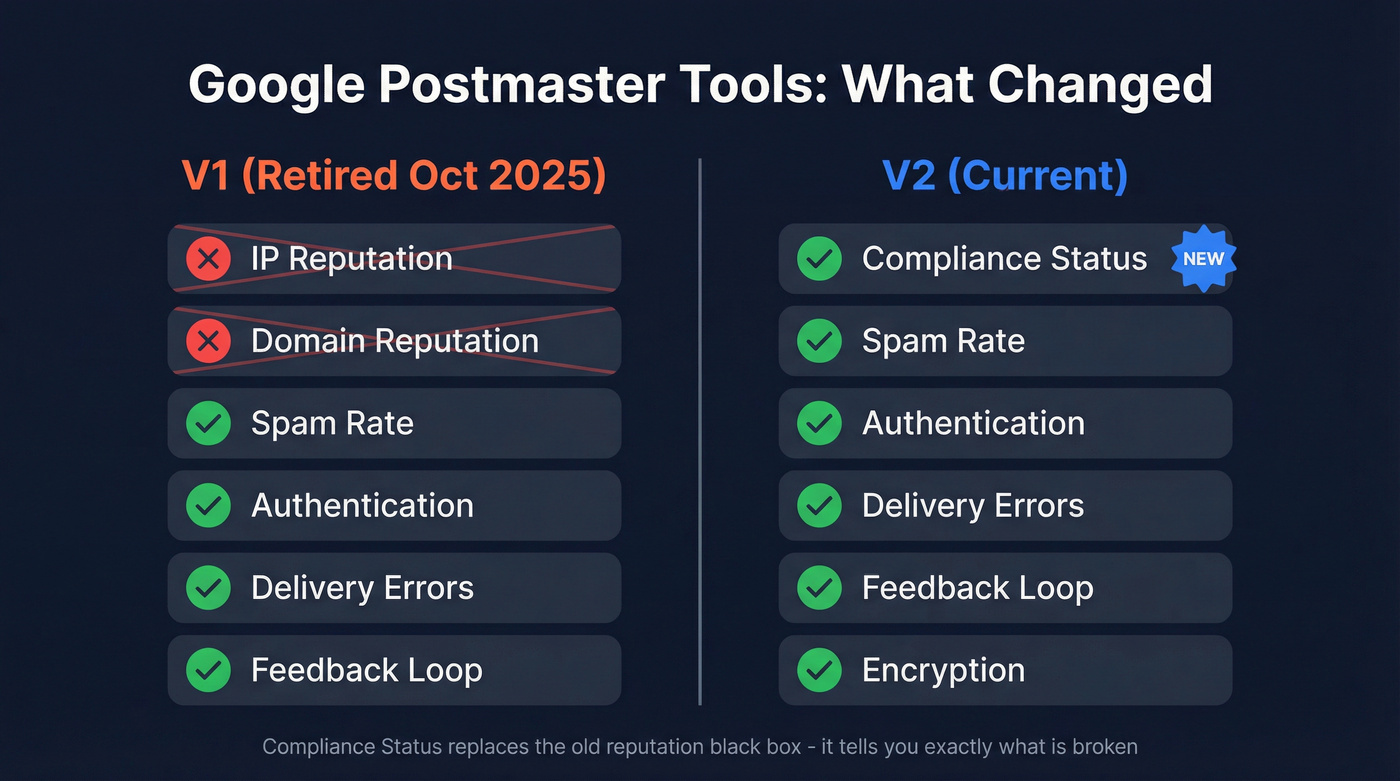
What v2 keeps:
- Spam Rate and Delivery Errors dashboards
- Authentication and Encryption reporting
- Feedback Loop data
- A Compliance Status dashboard that checks SPF/DKIM, DMARC alignment, PTR records, TLS, and one-click unsubscribe
Here's the thing: Compliance Status is more useful than the old reputation score ever was. The old score was a black box - "Medium" told you nothing about what to fix. Compliance Status tells you exactly what's broken, line by line. We've found it catches misconfigurations that the old dashboard would've just silently penalized you for.
How to Check Your Sending IP Reputation Now
Since Postmaster Tools no longer shows IP-level reputation, you need a two-part approach: Google's remaining dashboards for Gmail-specific signals, then third-party checkers for your actual sending IP.
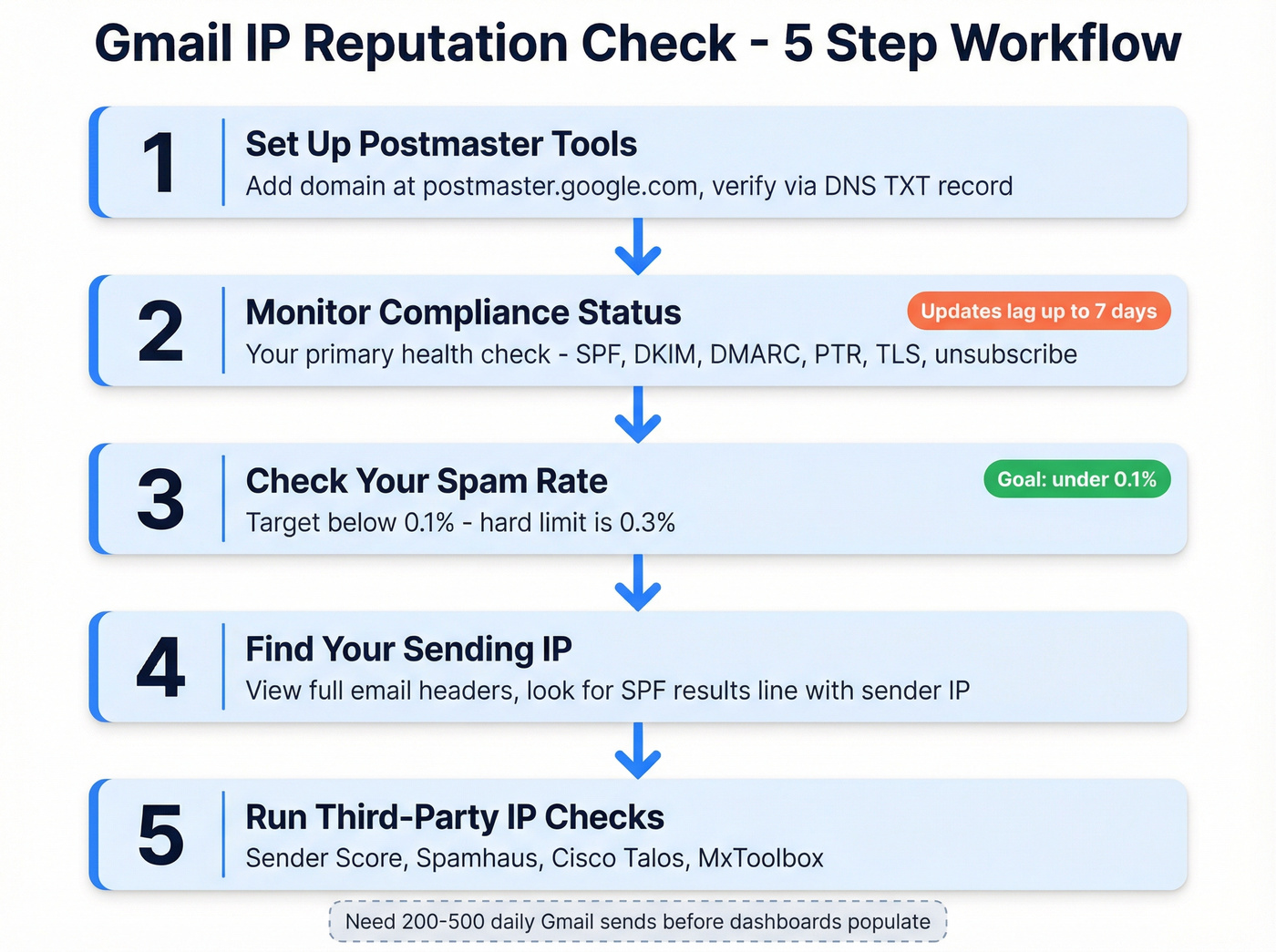
Step 1: Set up Postmaster Tools. Go to postmaster.google.com, add your domain, and verify via DNS TXT record. You'll typically need around 200-500 daily emails to Gmail recipients before dashboards populate consistently.
Step 2: Monitor Compliance Status. This is your primary health check now. As of November 2025, non-compliance can trigger active message rejection - not just spam placement. One detail that trips people up: Compliance Status updates can lag up to 7 days after you apply fixes, so don't panic if changes aren't reflected immediately.
Step 3: Check your Spam Rate. The formula is straightforward: (emails users report as spam / emails delivered to inbox) x 100. But here's what most people miss - this only counts manual "Report spam" clicks from recipients. If Gmail's filters auto-route you to spam, that won't show up here. A low spam rate doesn't guarantee inbox placement. If you want a broader deliverability view, use an email deliverability checklist alongside Postmaster Tools.
Step 4: Find your sending IP. Open a recently sent message, view the full headers, and look for the SPF results line: Authentication-Results: spf=pass (sender IP is X.X.X.X). If you're on a shared IP pool through your ESP, the IP rotates, so check multiple messages from the past week and look at adjacent IPs in the same range too (e.g., if you see 50.31.156.115, check .116 through .121). If you're deciding between infrastructure options, see dedicated IP with clean history.
Step 5: Run the IP through third-party tools. This is where you get the scoring that Google no longer provides.

Most IP reputation damage traces back to bad email data - bounces trigger spam traps, and spam traps destroy your sender score overnight. Prospeo's 5-step verification catches invalid addresses, honeypots, and spam traps before they ever hit your sending infrastructure. 98% email accuracy, refreshed every 7 days.
Fix your bounce rate before Gmail fixes it for you.
Best Free IP Reputation Tools
| Tool | What It Checks | Gmail-Specific? | Price |
|---|---|---|---|
| Google Postmaster Tools | Compliance, spam rate, delivery errors, auth | Yes | Free |
| Sender Score | IP score 0-100 (30 days) | No | Free (account req.) |
| Cisco Talos Intelligence | IP grade + shared IP info | No | Free |
| Spamhaus | Blocklist status (top RBL) | No | Free lookup |
| MxToolbox | 100+ blocklists, MX lookup | No | Free; $129/mo pro |
| MultiRBL | Blocklist aggregation | No | Free |
You don't need a paid suite on day one. Start with Sender Score for a quick numeric grade, Spamhaus to check blocklist status, and Postmaster Tools for Gmail-specific compliance. That combination catches the issues that most often tank deliverability. If you're comparing options, our roundup of email checker tools can help.
Gmail Spam Thresholds
Google's hard spam rate limit is 0.3%. Their recommended target is below 0.1%. This enforcement applies to messages sent to @gmail.com and @googlemail.com addresses, not internal Google Workspace mail.
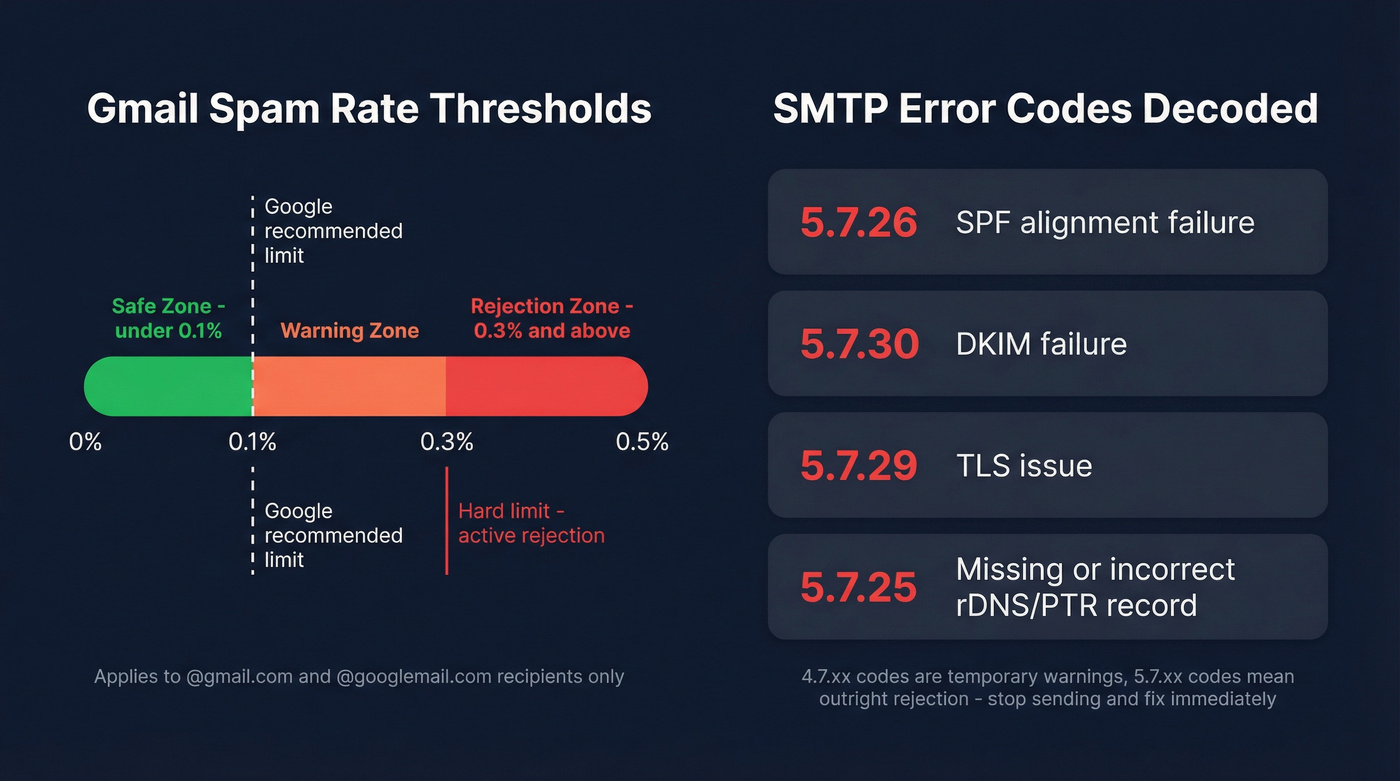
Exceeding these thresholds means Gmail actively rejects non-compliant messages at the SMTP level. The error codes tell you exactly what broke:
- 5.7.26 - SPF alignment failure
- 5.7.30 - DKIM failure
- 5.7.29 - TLS issue
- 5.7.25 - Missing or incorrect rDNS/PTR record
In practice, 4.7.xx versions are temporary deferrals and warnings, while 5.7.xx versions mean Gmail is rejecting your mail outright. If you're seeing 5.7.xx codes, stop sending and fix the underlying issue before you do more damage. If you suspect a listing is involved, follow a blacklist alert triage flow.
How Gmail Actually Evaluates Your Sending Reputation
Gmail evaluates your sending IP alongside domain-level signals, authentication results, and user engagement data. A dedicated IP with clean history carries more weight than a shared pool where other senders drag down the collective score - but even a dedicated IP won't save you if your content triggers spam filters or your bounce rate is out of control. For the full picture, see our guide to email sending infrastructure.
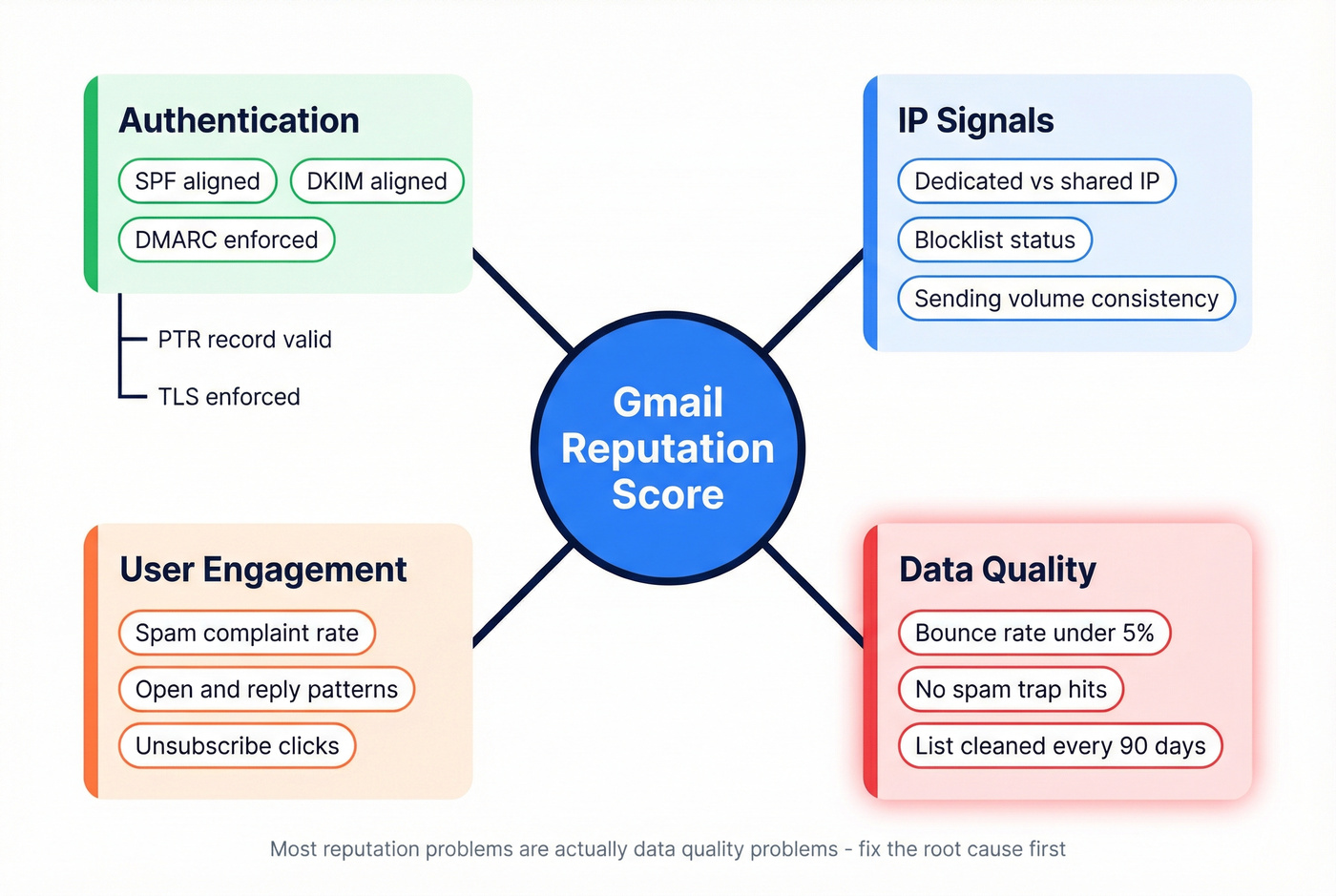
Let's be honest about what we've seen across thousands of outbound campaigns: most reputation problems aren't reputation problems. They're data quality problems. Bad addresses lead to bounces, bounces hit spam traps, and spam traps collapse your reputation in a matter of days. Fix the root cause first. If you're scaling outbound, follow cold email volume best practices to avoid sudden reputation shocks.
If your bounce rate is above 5%, no amount of authentication tweaking will save you. Start by fixing hard bounce issues.
Authentication: Align SPF, DKIM, and DMARC. Confirm PTR records resolve correctly. Enforce TLS. These aren't optional anymore - they're table stakes since Google's February 2024 sender requirements went into effect. If you need a step-by-step, use our SPF, DKIM, DMARC Explained guide.
List hygiene: Remove contacts who haven't engaged in 90+ days. Purge every hard bounce immediately. The consensus on r/coldemail is that most deliverability disasters trace back to senders who skip this step and wonder why their domain got torched. If you want a deeper playbook, see email verification for outreach.
Upstream data quality: This is where we've seen the biggest impact. Prospeo's 5-step email verification catches invalid addresses, spam traps, and honeypots before they hit your sending infrastructure - 98% email accuracy on a 7-day data refresh cycle. One customer, Meritt, saw bounce rates drop from 35% to under 4% after switching their verification workflow. If you're evaluating vendors, compare options in our email ID validators roundup.

Meritt dropped their bounce rate from 35% to under 4% - well below Gmail's 0.3% spam threshold - by running every contact through Prospeo's real-time verification. At $0.01 per email with no contracts, it costs less than a single deliverability crisis.
Clean lists keep you out of 5.7.xx territory permanently.
FAQ
Why can't I find IP reputation in Postmaster Tools?
Google permanently removed the IP Reputation and Domain Reputation dashboards when it migrated to Postmaster Tools v2 in late 2025. Monitor Compliance Status and Spam Rate instead, and use free third-party tools like Sender Score or Cisco Talos for IP-level scoring.
What spam rate triggers Gmail rejection?
Google's hard limit is 0.3%, but they recommend staying below 0.1%. Exceeding the threshold triggers active message rejection at the SMTP level - not just spam folder placement. Check your rate weekly in Postmaster Tools.
Does IP reputation still affect Gmail inbox placement?
Yes. Gmail still evaluates IP-level signals like bounce rates, spam complaints, blocklist presence, and authentication - it just no longer surfaces a letter-grade score. Use Sender Score and Spamhaus alongside Postmaster Tools to approximate where you stand.
How do I prevent reputation damage before it starts?
Verify every email address before sending. Remove hard bounces instantly, keep your spam complaint rate under 0.1%, and make sure SPF/DKIM/DMARC are fully aligned. Skip this if you're only sending to a small, engaged opt-in list - but for any outbound campaign at scale, pre-send verification isn't optional.