

The Complete Mailgun Warmup Guide (With Actual Numbers)
You spun up a dedicated IP on Mailgun, fired off 10,000 emails on day one, and watched your bounce rate climb past 5%. Now Gmail thinks you're a spammer. A proper Mailgun warmup would've prevented this - and the fix isn't complicated, but it demands patience and a specific ramp schedule.
Quick Decision
- Shared IP? No warmup needed. Dedicated IP (100k+ emails/month)? You do.
- Fix authentication first (SPF, DKIM, DMARC), then follow the schedule below.
- Bounce rate above 2% during warmup? That's a list quality problem, not a schedule problem.
Do You Actually Need to Warm Up?
Under 100,000 emails/month or inconsistent volume - stay on Mailgun's shared IP. It's already warmed by other senders. You're done.
100,000+ emails/month consistently - get a dedicated IP. Expect around $30-$60/month depending on your plan and add-ons. You'll need to warm it up.
1M+ emails/month - plan for multiple dedicated IPs, roughly one per million emails/month.
If you're on a shared IP with deliverability issues, warmup isn't your problem. Look at authentication and list quality instead.
Fix Authentication First
Don't touch warmup until these are locked down. Roughly 40% of senders aren't implementing both SPF and DKIM - and Gmail, Yahoo, and Microsoft now require authentication for anyone sending over 5,000 messages/day.
- SPF: One record per domain, max 10 DNS lookups. Use
~allor-all. - DKIM: Sign every message. Mailgun handles this if your sending domain is configured correctly.
- DMARC: Start with
p=noneto collect reports, then move towardp=quarantineand eventuallyp=reject. - BIMI (optional): Display your brand logo in inboxes.
- Domain age: Recently purchased domain? Keep it active for at least 30 days before warming.
- Google Postmaster Tools: Set this up now. Best free way to monitor domain reputation during warmup.
Domain vs. IP Warmup
Inbox providers track your sending domain separately from the IP. Use a subdomain like mail.yourdomain.com rather than your root domain, and separate transactional from marketing traffic. A dedicated domain warmup tool or manual schedule both work - what matters is isolating reputation risk so a bad marketing campaign doesn't tank your transactional receipts.
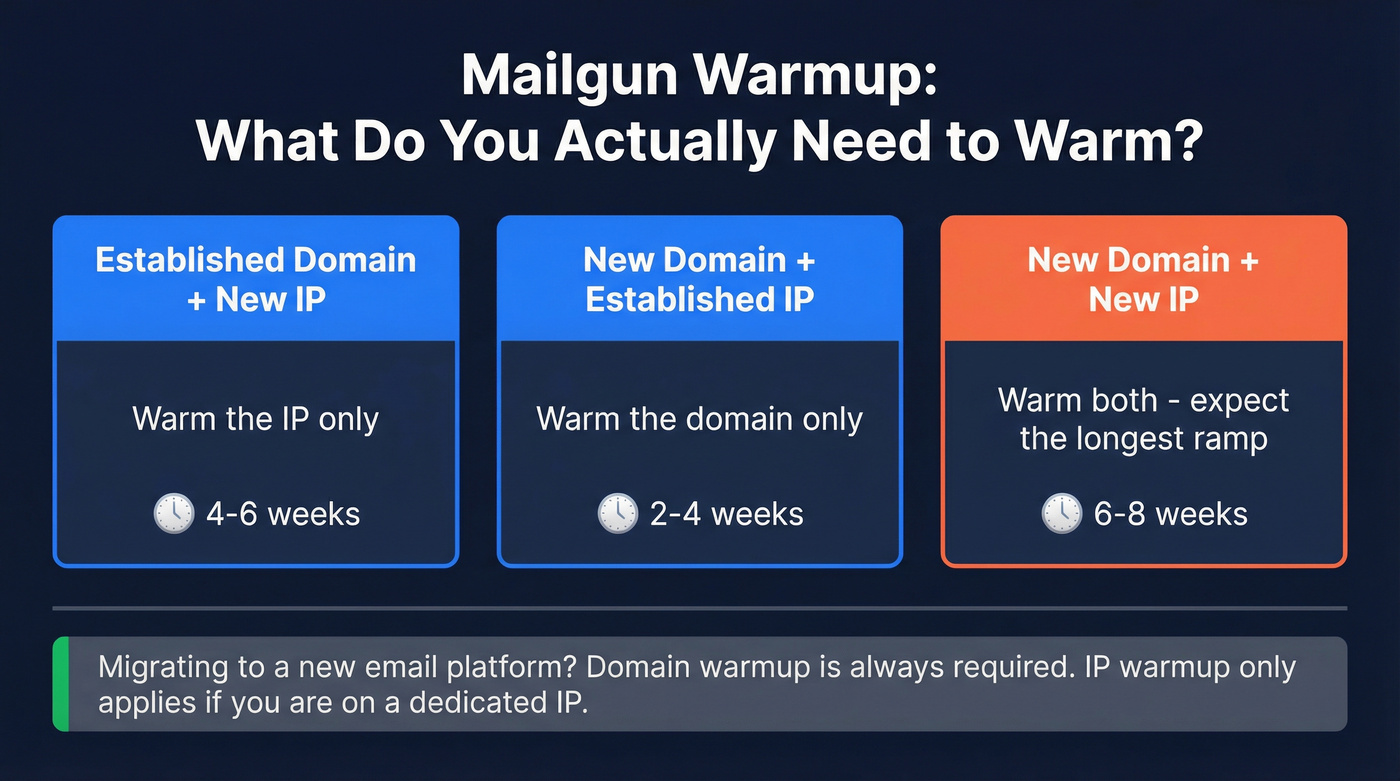
Here's the thing most guides miss: the warmup scenario depends entirely on what you're bringing to the table.
| Scenario | What to Warm |
|---|---|
| Established domain, new IP | IP warmup only |
| New domain, established IP | Domain warmup only |
| New domain + new IP | Both - expect 6-8 weeks |
When migrating to a new email platform, domain warmup is always necessary. IP warmup only applies on a dedicated IP.
Mailgun's Automated IP Warmup
Mailgun offers a built-in automated warmup that caps daily sends and gradually increases them. Stage 1 caps at 1,000 emails/day. Stage 2 caps at 2,500/day.
One detail that trips people up: stage progression is non-cumulative. Stage 2 starts from zero and requires 2,500 sends during that stage to advance to Stage 3. If you hit the daily cap early, Mailgun applies a full-stop throttle on that IP until the 24-hour window resets. Overflow traffic rolls to other dedicated IPs on your domain or to Mailgun's shared pool - your emails still send, just not from the warming IP.
A real frustration: Mailgun references a full schedule breakdown in their docs, but only includes concrete caps for Stage 1 and Stage 2. You'll want to supplement with a manual schedule.
If sending becomes inconsistent after warmup, contact Mailgun support to re-enable the warmup plan.

The #1 warmup killer is bad data - not your ramp schedule. Prospeo's 5-step email verification delivers 98% accuracy, so your bounce rate stays under 2% from day one. No more pausing warmups to clean lists.
Fix your list quality before you touch that warmup schedule.
Manual Warmup Schedule
Mailgun's own guidance: start with 100 emails on day one, increase 20% daily. Send daily - dropping to 3 sends per week means inbox providers take longer to assess your reputation.
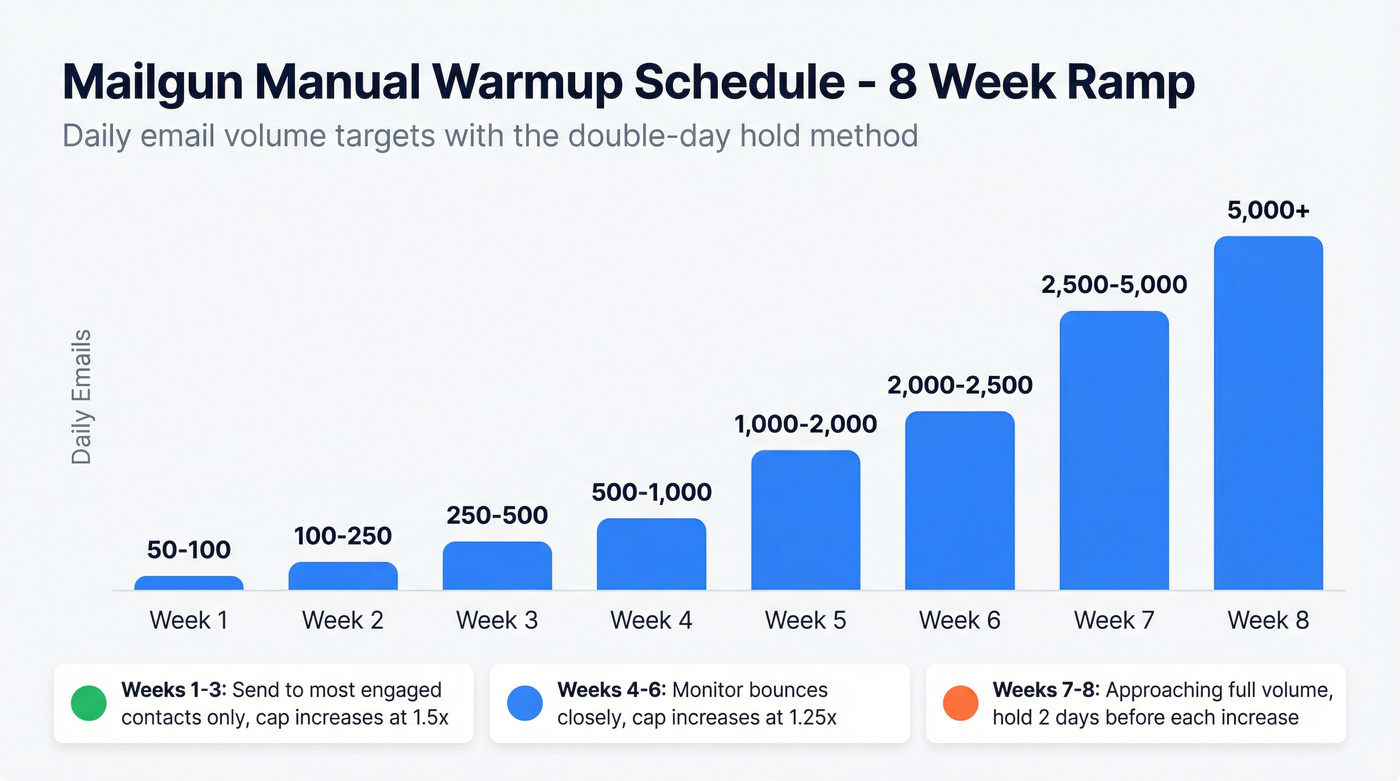
| Week | Daily Volume | Notes |
|---|---|---|
| 1 | 50-100 | Most engaged contacts only |
| 2 | 100-250 | Hold volume 2 days before increasing |
| 3 | 250-500 | Slow increases to ~1.5x |
| 4 | 500-1,000 | Monitor bounces closely |
| 5-6 | 1,000-2,500 | Increase at ~1.25x |
| 7-8 | 2,500-5,000+ | Approaching full volume |
The "double-day method" works well: hold the same volume for two consecutive days before stepping up. We've seen teams blow through a 4-week warmup in 2 weeks by skipping this hold, only to get throttled by Gmail and start over from scratch. Between 100-500/day, cap increases at 1.5x. Above 500/day, keep it at 1.25x.
High-volume senders (50k+/day): batch sends at 100-200/hour in week 1, scaling to 3,000-5,000/hour by week 4.
Monitoring Thresholds During Warmup
| Metric | Healthy | Warning / Pause |
|---|---|---|
| Bounce rate | Under 2% | Above 3% - pause |
| Spam complaints | Under 0.1% | Any spike - stop |
| Open rate | 40%+ | Below 30% - slow down |
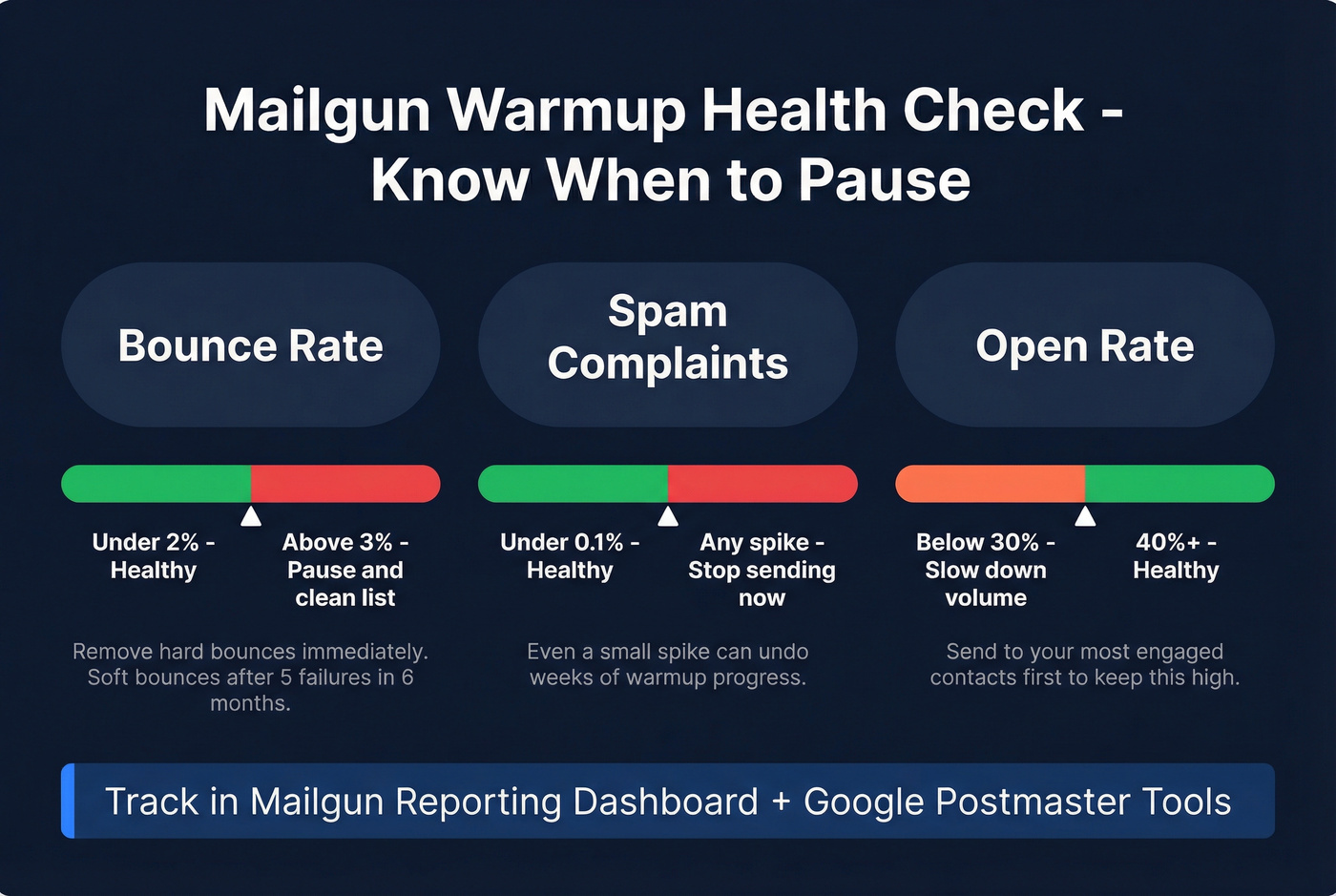
Track these in Mailgun's Reporting Dashboard alongside domain reputation. If bounces cross 3%, stop increasing volume and clean your list. Remove hard bounces immediately and soft bounces after 5 failures within 6 months.
The first week is where most warmups fail - and in our experience, the #1 killer is bad data, not impatience with the ramp.
Cold Email Warmup on Mailgun
Cold outbound requires a much more conservative ramp. Start at 5-10 emails/day for weeks 1-2, increase to 15-20/day by weeks 3-4, then 30-40/day by weeks 5-6. Cap at 50/day per inbox by week 7+.
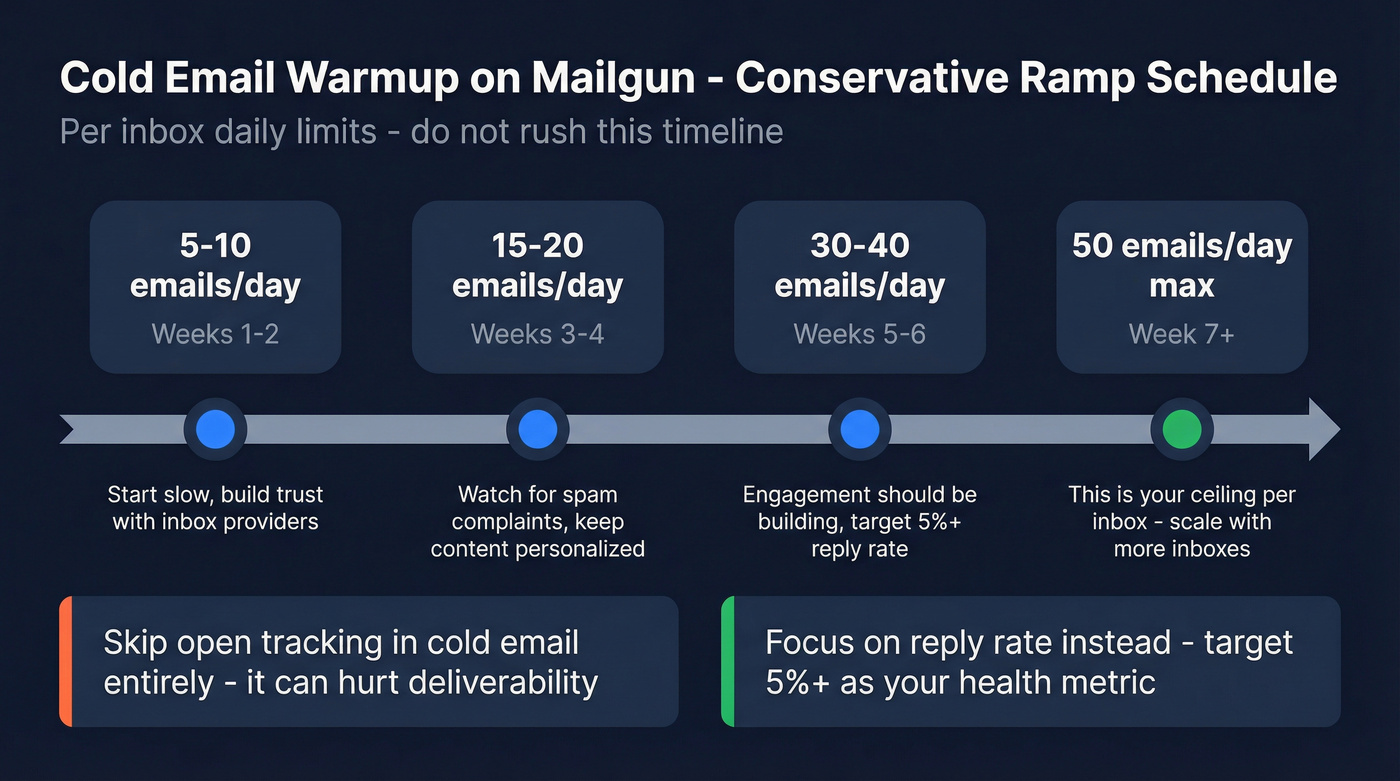
Teams running outsourced sales campaigns often try to accelerate this timeline. Resist the urge. Cold email reputation builds slower because engagement rates are inherently lower than opt-in lists, and inbox providers know the difference.
Skip open tracking in cold email entirely - it can hurt deliverability. Focus on reply rate instead. Target 5%+ as your health metric. (If you want the deeper why, see open tracking.)
Third-Party Warmup Tools
These engagement-based tools simulate inbox activity - opens, replies, spam-folder rescues - to support sender reputation during warmup. They complement Mailgun's built-in warmup; they don't replace it. If you're evaluating one, compare network size and provider coverage first.
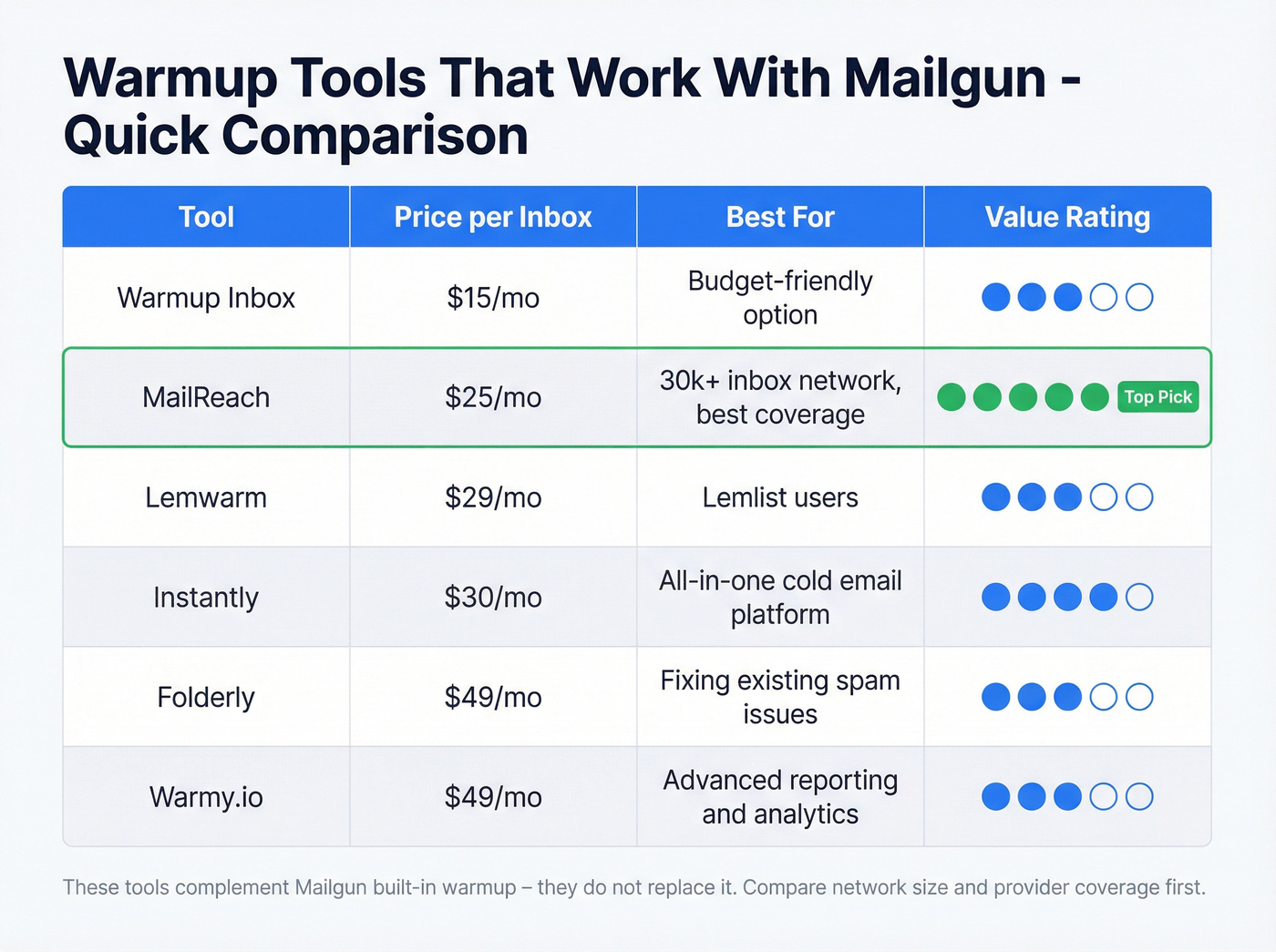
| Tool | Price | Best For |
|---|---|---|
| Warmup Inbox | $15/inbox | Budget option |
| MailReach | $25/inbox | 30k+ inbox network |
| Lemwarm | $29/inbox | Lemlist integration |
| Instantly | $30/mo | All-in-one cold email |
| Folderly | $49/inbox | Spam fix focus |
| Warmy.io | $49/inbox | Advanced reporting |
For most Mailgun users running cold outbound, MailReach offers the strongest network at a reasonable price - 30,000+ real inboxes across Google Workspace and Microsoft 365 with provider-level reputation monitoring. Smartlead is another solid pick if you're already on their sequencing platform. If you're comparing options, start with this list of email warm up tools.
AI-Powered Warmup
Newer tools adjust send volume, reply timing, and engagement patterns dynamically based on real-time deliverability signals. An AI-driven approach reacts faster than a static schedule - pausing automatically when bounce rates spike, accelerating when reputation metrics are strong.
For teams using AI SDR workflows, these tools integrate directly into outbound sequences so warmup happens alongside prospecting rather than as a separate phase. The tradeoff is cost: AI-powered warmup tools typically run $40-$80/inbox compared to $15-$25 for basic options. Unless you're managing 10+ inboxes, the manual schedule above will get you there just fine. (More context: automated email warmup.)
Mailgun vs. Other Platforms
SendGrid follows a similar manual ramp but offers slightly more granular automated controls through their IP access management API. GoDaddy's shared hosting environment limits sending volume and doesn't support dedicated IPs, making it a poor choice for high-volume senders.
Some teams skip the warmup process entirely by buying pre-warmed mailboxes from providers who maintain aged, reputation-established accounts. This can save 4-8 weeks of ramp time but introduces risk - you inherit whatever sending history came before you, and inbox providers can detect sudden behavioral shifts on previously dormant accounts. We've talked to teams on r/coldemail who had mixed results with this approach; the consensus is that it works for short-term campaigns but isn't reliable for long-term sending.
When Warmup Won't Fix Deliverability
Let's be honest: you can follow the schedule perfectly for three weeks, but if your bounce rate is sitting at 4% and your domain reputation is tanking, the schedule isn't the problem. Your data is.
Invalid email addresses generate hard bounces. Hard bounces during warmup are reputation poison - they tell Gmail and Microsoft that you don't know who you're emailing, and a high bounce rate can undo weeks of careful ramping in a single afternoon. (If you need a quick refresher, see hard bounces.)
The fix happens before warmup starts. Verify every address on your list. Prospeo's email verification catches invalid addresses, spam traps, and honeypots before they reach your new IP - with 98% email accuracy and a 5-step verification process that includes catch-all handling. Stack Optimize, an outbound agency using Prospeo for list verification, maintains 94%+ deliverability and under 3% bounce rates across all client campaigns with zero domain flags. If you're shopping around, compare email checker tools and email ID validators before you commit.

Cold outbound at 50 emails/day per inbox means every contact has to count. Prospeo gives you 143M+ verified emails refreshed every 7 days - not the stale data that triggers hard bounces and resets your warmup progress.
Stop warming IPs twice because your data provider gave you dead addresses.
FAQ
How long does Mailgun IP warmup take?
Typically 4-8 weeks for a dedicated IP. Mailgun's automated warmup progresses through stages - Stage 1 caps at 1,000/day, Stage 2 at 2,500/day. The timeline is similar whether you use the built-in tool or a manual schedule.
Do I need to warm up a shared IP?
No. Shared IPs are already warmed by Mailgun's existing sender pool. Warmup only applies to dedicated IPs, which are recommended for senders doing 100,000+ emails/month with consistent volume.
Why is my bounce rate high during warmup?
High bounces almost always point to invalid addresses on your list - not a schedule problem. Verify your list before sending from a new IP. Prospeo's email verification catches spam traps and dead addresses before they damage your sender reputation.
Can I use a third-party warmup tool with Mailgun?
Yes. Tools like MailReach and Warmup Inbox work alongside Mailgun's infrastructure. They handle engagement simulation while Mailgun manages actual delivery. They're complementary - the warmup tool builds reputation signals, and Mailgun sends your real campaigns.