

How to Send Mass Email From Gmail (Without Getting Suspended)
You sent 500 emails from Gmail last Tuesday. 47 bounced. By Wednesday morning, your entire Google account was locked - email, Drive, Docs, Photos, everything. You're now searching "Gmail account suspended" from your phone. This happens more often than most people realize, and sending a Gmail mass email without proper preparation is almost always the cause.
The rules tightened in late 2025, with an enforcement phase kicking in around November, and the consequences are harsher than most people expect. Gmail can reject non-compliant emails at the SMTP level. Here's how to send bulk email from Gmail safely - and when to stop trying.
Quick Decision Guide
- Under 90 recipients: Use Gmail's BCC field. Free, takes two minutes.
- 100-500 with personalization: Mailmeteor's free tier or Gmail's native mail merge (Workspace accounts only).
- 500-2,000: GMass or YAMM paired with a Google Workspace account.
- 2,000+: Stop using Gmail. Switch to a dedicated ESP like Brevo or Instantly.
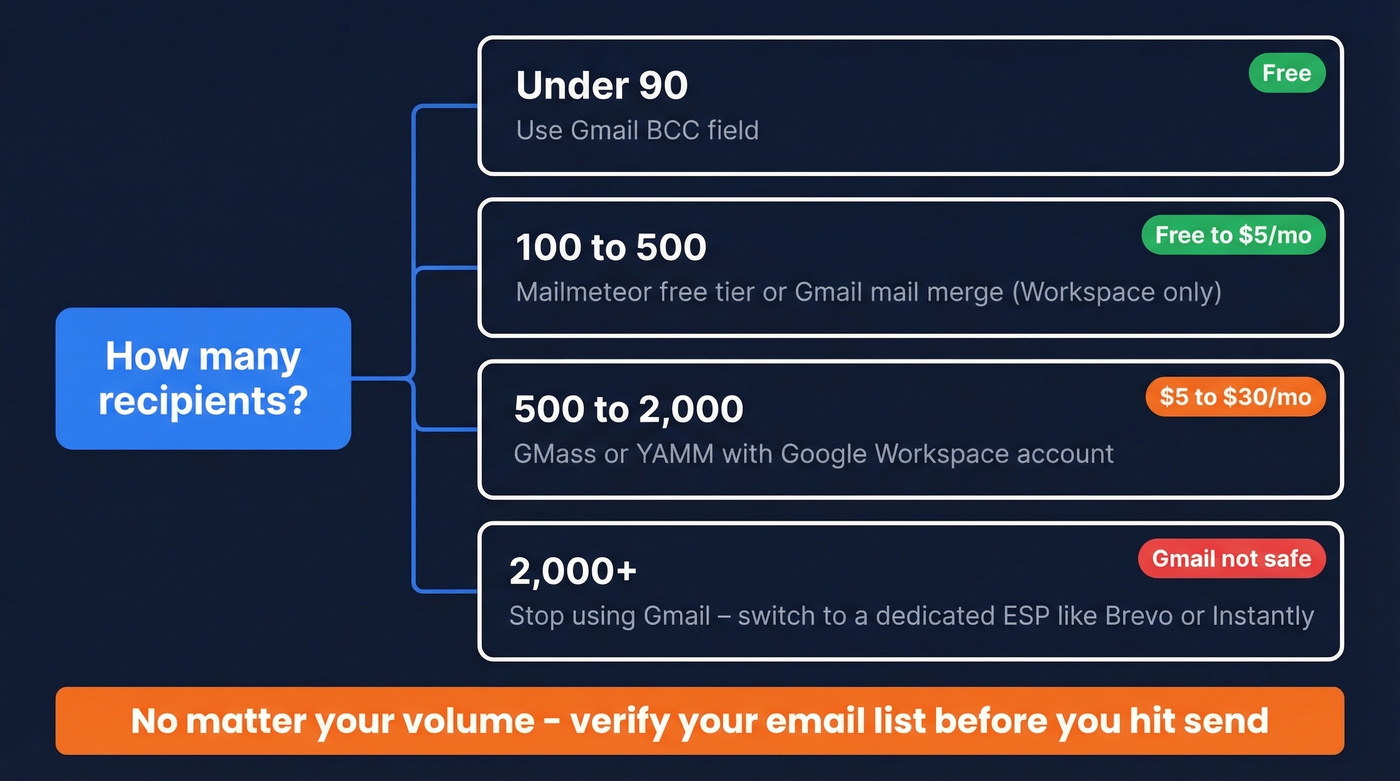
Whatever your volume, verify your list before you hit send. One bad batch of addresses triggers bounces, and bounces trigger suspensions.
Gmail Bulk Email Limits in 2026
The limits are straightforward, but the details trip people up.
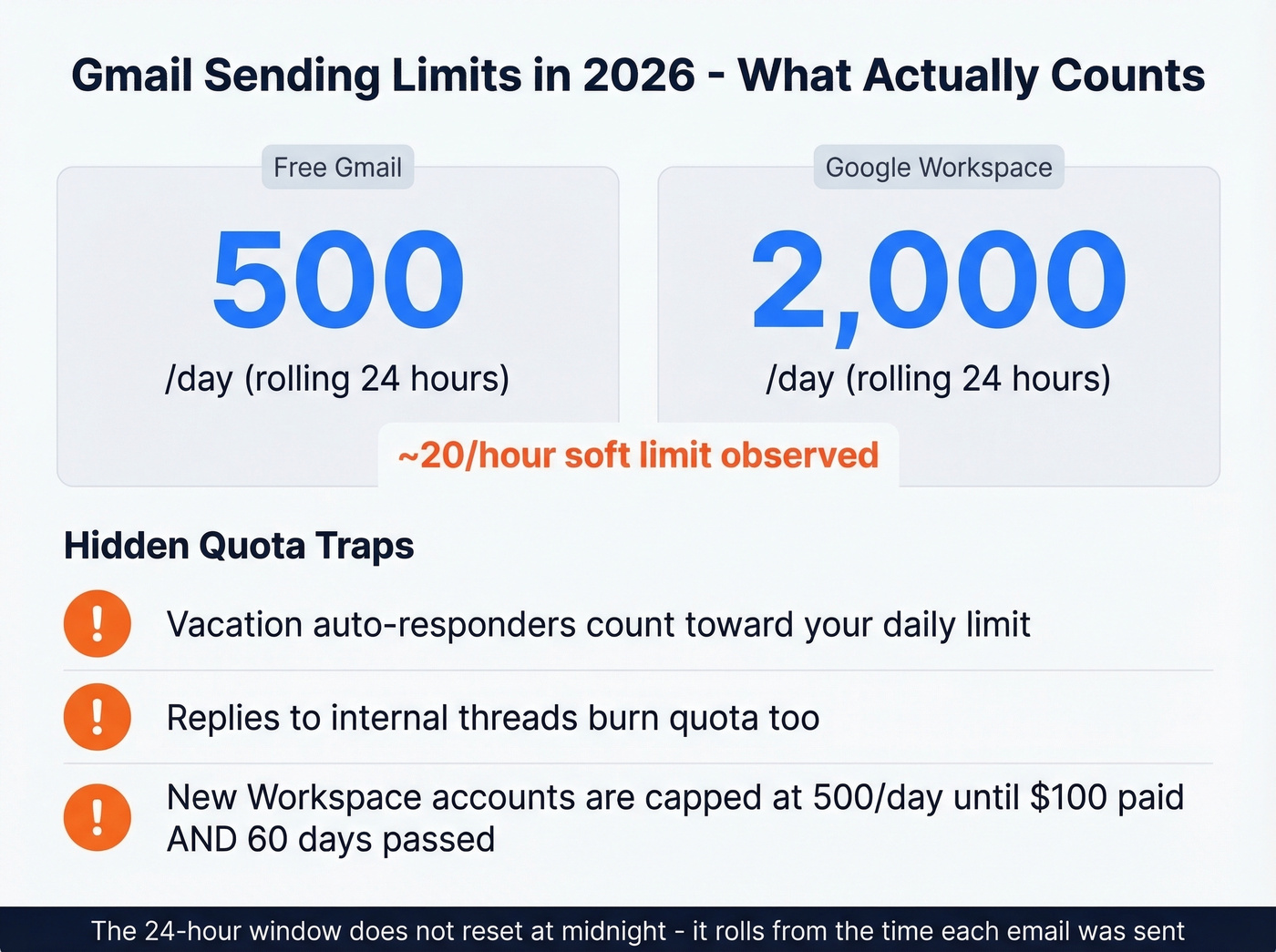
| Free Gmail | Google Workspace | |
|---|---|---|
| Daily send limit | 500 emails | 2,000 emails |
| Window type | Rolling 24 hours | Rolling 24 hours |
| Hourly soft limit | ~20/hour observed | ~20/hour observed |
| Suspension duration | 1-24 hours | 1-24 hours |
The daily quota runs on a rolling 24-hour window - it doesn't reset at midnight. If you sent 400 emails at 3pm, you won't have your full 500 back until 3pm the next day. And sending more than roughly 20 emails per hour has been observed to trigger temporary blocks, even if you're well under the daily cap.
Everything counts toward your quota. Vacation auto-responders, replies to internal threads, emails sent from aliases - all of it. If you've got a vacation responder firing while you're running a campaign, you're burning quota on both sides.
One gotcha for new Workspace accounts: Google gates your sending at 500/day until your domain has paid $100 cumulatively and 60 days have passed since reaching that $100 mark. Brand-new Workspace accounts don't get the full 2,000/day limit on day one.
Three Ways to Send Bulk Emails From Gmail
BCC (Simple but Limited)
The zero-tool approach:
- Open Gmail and click Compose.
- Click the BCC field (not CC - this matters).
- Paste your recipient list and hit Send.
Use this if you're emailing fewer than 90 people, don't need personalization, and want to get something out the door fast. Skip this if you need merge tags, tracking, or follow-up sequences.
The one real risk: accidentally pasting addresses into CC instead of BCC. Every recipient sees every other recipient's email address. It's an embarrassing mistake that happens constantly, and it's a privacy violation if you're sending to customers or prospects.
Gmail's Built-in Mail Merge
Google added a native mail merge feature to Gmail - no extension required. It pulls data from a Google Sheets spreadsheet and lets you insert merge tags like @firstname and @company directly into your compose window. Create a Google Sheet with columns for each merge field, add your recipients' email addresses, compose your email in Gmail, and insert the tags.
The limitations are real, though. This is Workspace-only - free Gmail accounts don't get it. You're limited to 1,500 unique recipients per day for mail merge, and there's no open tracking, no click tracking, and no automated follow-up sequences. It's a one-shot send. For a quick personalized blast to a few hundred people, it works. For anything resembling a campaign, you'll need a third-party tool.
For developers, Google Apps Script can automate Gmail sending programmatically, but it's subject to the same daily quotas.
Third-Party Mail Merge Tools
This is where most people sending mass email from Gmail end up. Three tools dominate the space, and they're different enough that the right choice depends on your volume and budget.
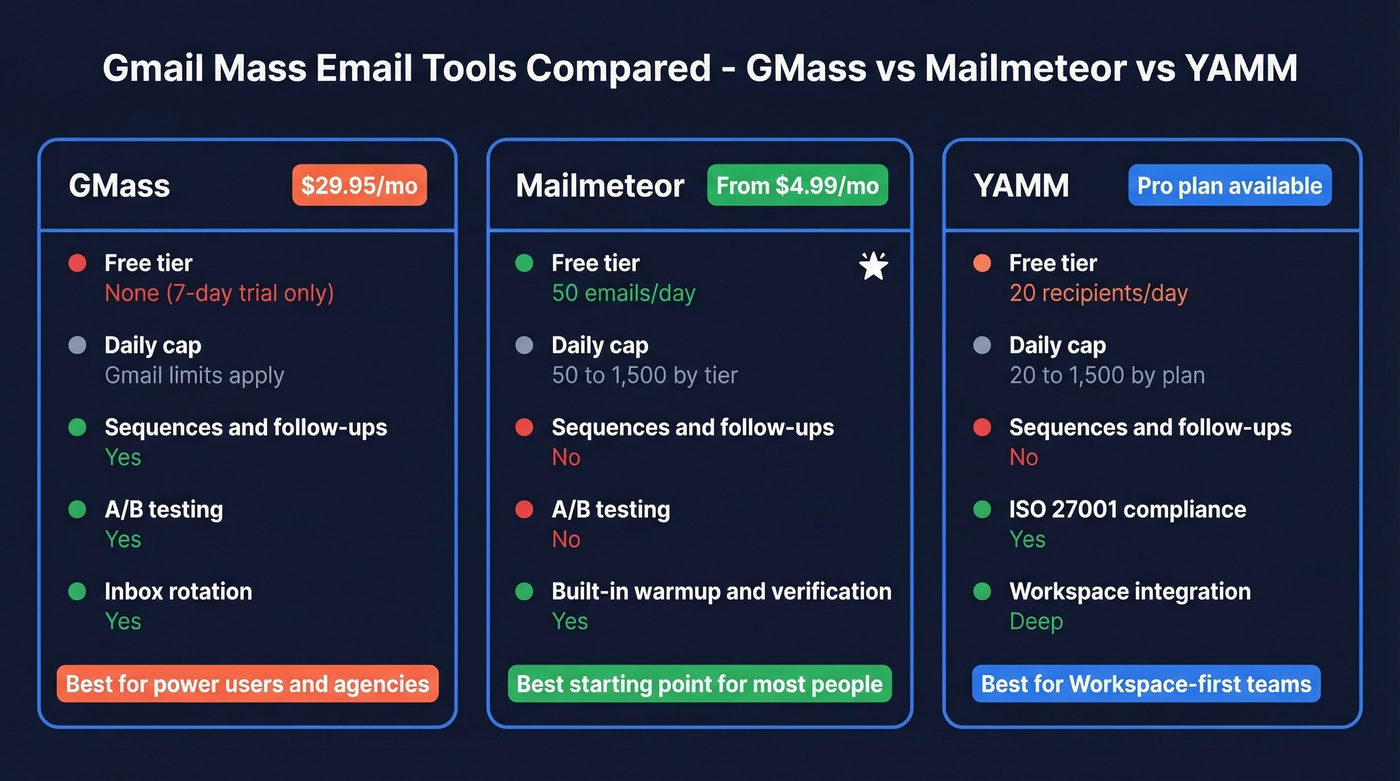
| GMass | Mailmeteor | YAMM | |
|---|---|---|---|
| Free tier | None (7-day trial) | 50 emails/day | 20 recipients/day |
| Starter paid | $29.95/mo | $4.99/mo | Pro plan available |
| Daily send cap | Gmail limits apply | 50-1,500 by tier | 20-1,500 by plan |
| Key strength | Most features | Best free option | Workspace integration |
| Best for | Power users / agencies | Budget-conscious starters | Workspace-first teams |
Skip GMass if you're just testing the waters. At $29.95/mo after the January 2026 price increase, it's the most expensive option in this category. But if you need mail merge, sequences, follow-ups, A/B testing, inbox rotation, and reporting in one package, nothing else comes close. The "unlimited emails" headline on their site needs context: GMass routes overflow through external SMTP servers, and after the first 10,000 SMTP emails (free), you'll pay $5 per 10,000. For a 5-person team, you're looking at $175/mo.

Mailmeteor is where you should start. The free tier gives you 50 emails/day with basic merge - enough to test whether bulk sending from Gmail works for your use case before spending a dollar. Paid plans start at $4.99/mo for 250 emails/day, scaling to $24.99/mo for 1,500/day with warmup and verification included. Rated 4.9/5 from 11,741+ reviews, it's the most-loved tool in the category. You won't get GMass-level sequences or inbox rotation, but most people don't need those features anyway.
YAMM's tradeoff is the opposite of Mailmeteor's. The free tier caps at 20 recipients/day - barely useful for anything beyond a test run. Pro plans unlock 400 recipients/day on free Gmail accounts and 1,500/day on Workspace. Where YAMM earns its keep is clean Google Workspace integration and ISO 27001 compliance, which matters if your IT team asks questions before approving tools. Note that new Workspace accounts can be temporarily limited to 400 recipients/day even on the Pro plan.
Verify Your List First
Every guide on sending bulk email from Gmail tells you how to compose and send. Almost none tell you to check whether those email addresses are valid first. In our experience, accounts that skip verification before a 500+ send are far more likely to trigger a temporary suspension.
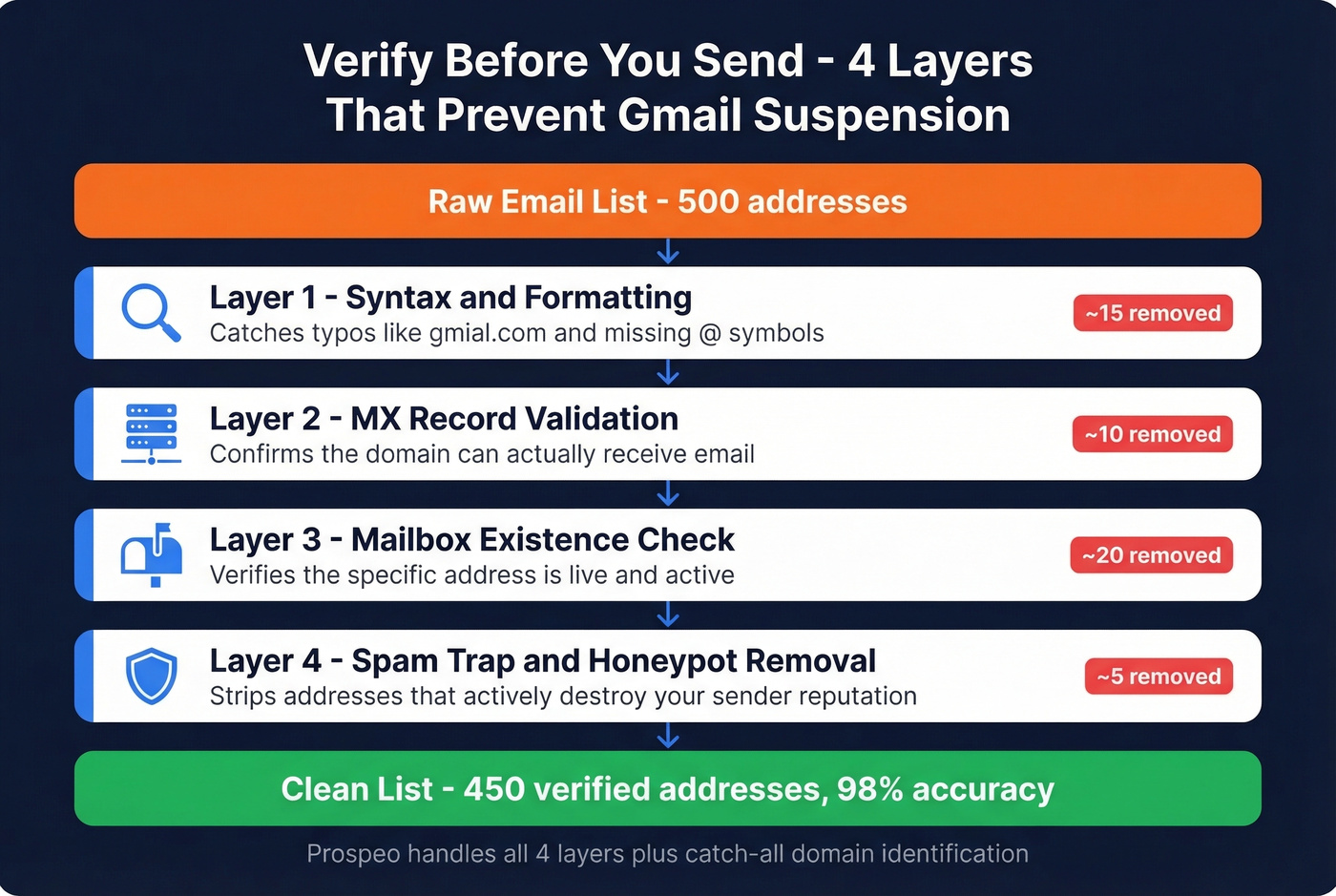
Bounces are the fastest path to a locked account. Send 500 emails, 50 bounce, and Gmail's automated systems flag you. It doesn't matter that the other 450 were legitimate.
The risks go beyond simple typos. Spam traps are addresses operated by ISPs specifically to catch bulk senders. Honeypots are addresses planted on websites to identify scrapers. Catch-all domains accept every email at the server level but silently discard them, inflating your "delivered" count while tanking engagement metrics.
A proper verification workflow checks four things:
- Syntax and formatting - catches typos like "gmial.com"
- MX record validation - confirms the domain can receive email
- Mailbox existence - verifies the specific address is live
- Spam trap and honeypot removal - strips the addresses that actively damage your reputation
Prospeo's 5-step verification process handles all four layers plus catch-all domain identification, delivering 98% email accuracy on verified addresses. The free tier includes 75 verifications per month - enough to clean a small campaign list before you hit send.


50 bounces out of 500 emails locks your Gmail account. Prospeo's 5-step verification catches bad addresses, spam traps, and honeypots before you hit send - delivering 98% email accuracy at $0.01 per verified address.
Clean your list in minutes. Keep your Gmail account alive.
What Changed in 2025-2026
If you used to send bulk emails from Gmail in 2023 and it worked fine, don't assume the same approach works today.
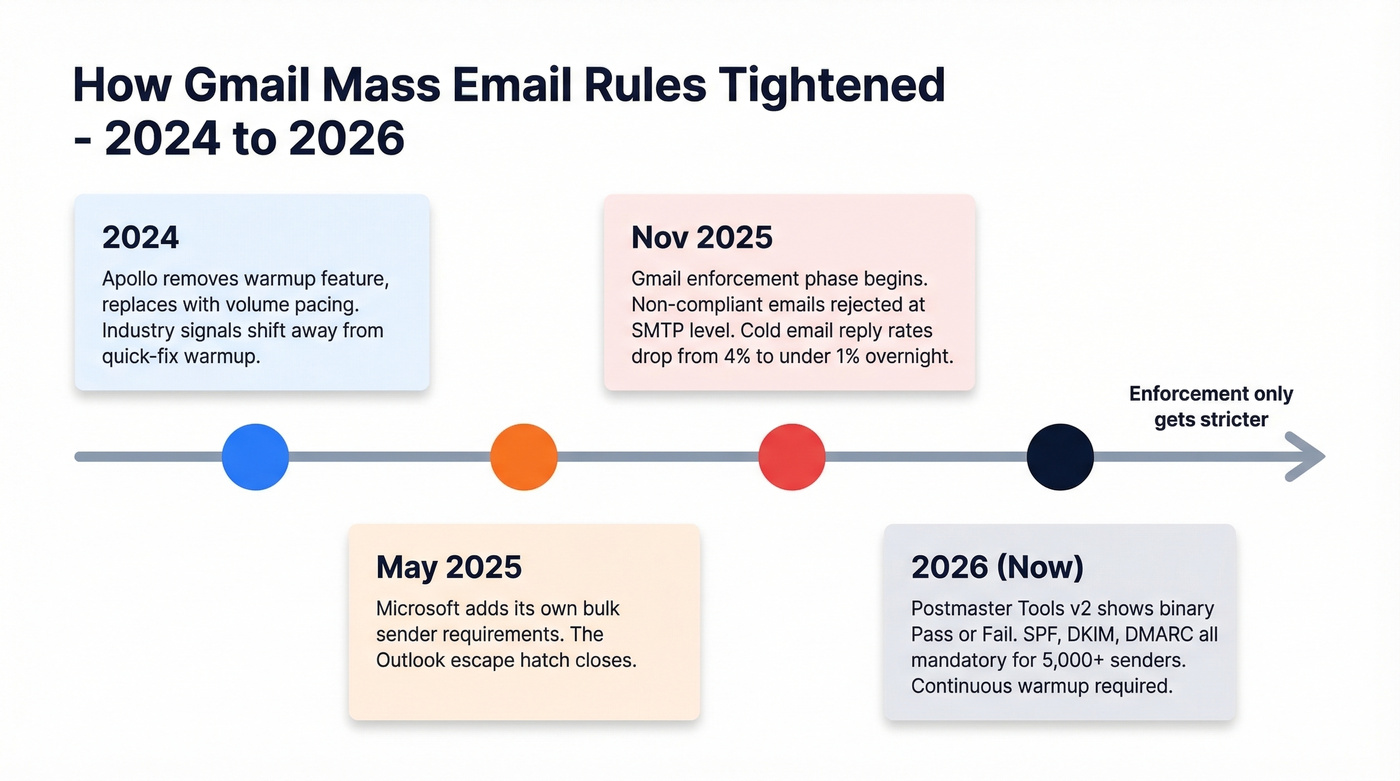
In November 2025, Gmail moved into an enforcement phase. Non-compliant emails get rejected at the SMTP level - your mail server gets an error code back, and the email never reaches the recipient's inbox or spam folder. It just doesn't arrive.
The impact was immediate. Cold emailers on r/coldemail reported reply rates dropping from ~4% to under 1% overnight, forcing complete stack rebuilds. Microsoft joined in May 2025 with its own bulk sender requirements, so the "just switch to Outlook" escape hatch closed too. Even Apollo removed its warmup feature in 2024, replacing it with volume pacing - a clear sign the industry is moving away from quick-fix warmup approaches.
Google's Postmaster Tools shifted to a v2 interface emphasizing binary compliance status - Pass or Fail - rather than the old reputation charts. You're either compliant or you're not.
These are the SMTP error codes you'll see when things go wrong:
| Failure | SMTP Code | Result |
|---|---|---|
| SPF fail | 4.7.27 | Temp rejection |
| DKIM fail | 4.7.30 | Temp rejection |
| SPF/DKIM alignment | 5.7.26 | Hard rejection |
| TLS failure | 5.7.29 | Hard rejection |
| rDNS/PTR missing | 5.7.25 | Hard rejection |
| RFC 5322 violation | 5.6.0 | Hard rejection |
The key operational takeaway from practitioners who adapted: warmup must run continuously, not just for a week or two at setup. Gmail weighs engagement quality signals - time-to-read, reply depth, conversation length - and a dormant account that suddenly sends 500 emails looks exactly like a compromised account.
Deliverability Checklist
Before you send any campaign, run through this list. Every item is mandatory if you're sending more than a few hundred emails.
Technical Setup
Authenticate your domain. Set up SPF, DKIM, and DMARC records. For senders exceeding 5,000 messages/day, all three are mandatory. Even below that threshold, authentication dramatically improves deliverability. (If you need the full setup flow, follow an email authentication guide.)
Set up valid DNS records. Forward and reverse DNS (PTR) records should be correctly configured for your sending IP. Missing PTR records trigger 5.7.25 rejections.
Operational Habits
Monitor spam complaints. Gmail enforces a maximum 0.3% complaint rate but recommends staying below 0.10%. One complaint per thousand emails is your target.
Add one-click unsubscribe. The List-Unsubscribe header (RFC 8058) is required. Process opt-outs within 2 days. Tools like GMass and Mailmeteor add this automatically. (More details: email unsubscribe requirements.)
Warm up continuously. Don't blast 2,000 emails from an account that sent 10 last week. Ramp gradually and maintain consistent volume. (Use a real email warm up schedule if you're scaling.)
Verify every address before sending. Catch-all domains, spam traps, and honeypots are the bounces Gmail punishes you for. This single step prevents more suspensions than everything else on this list combined. (Benchmarks: average email bounce rate.)
Stay CAN-SPAM compliant. Include a physical mailing address and honor opt-outs. Violations carry fines up to $53,088 per email. If you're sending to EU contacts, GDPR applies too - you need documented consent. (See: CAN-SPAM Act Email Marketing.)
What Gets You Suspended
Gmail's suspension system is automated, aggressive, and doesn't distinguish between a spammer and a founder sending job application follow-ups.
The triggers are predictable: sending high volume from a new account, spammy formatting (all-caps subjects, image-heavy emails, URL shorteners), high bounce rates, and exceeding hourly or daily limits. Any combination of these flags your account.
Here's the thing most people don't realize - a Gmail suspension doesn't just kill your email. It disables your entire Google account. Drive files, Google Docs, Photos, Calendar - all inaccessible. One Reddit user reported a brand-new account suspended within hours just for sending job applications, with the appeal rejected.
If you're on Workspace, admins can self-unblock accounts up to five times per year. Free Gmail users have to appeal to Google support, which is roughly as fun as it sounds.
The "create multiple Gmail accounts to spread volume" advice you see everywhere is terrible. Google's systems detect linked accounts, and burning through disposable accounts is exactly the behavior pattern their anti-spam systems are designed to catch.
When to Stop Using Gmail
Let's be honest: Gmail was never built for mass email, and most people hit its ceiling far sooner than they expect. It works for 50-200 recipients with basic personalization. Beyond that, you're fighting the platform instead of using it.
Here are the clear cutoffs:
- Over 500/day on a free account: You've exceeded the limit. You need Workspace plus a tool like GMass or YAMM.
- Over 2,000/day: Stop using Gmail entirely. A dedicated ESP gives you better deliverability, proper analytics, and purpose-built infrastructure.
- Need automated sequences: Multi-step follow-up campaigns have outgrown Gmail. Even GMass's sequences are limited compared to dedicated cold email platforms.
- Need real analytics: Gmail gives you nothing beyond "sent." Open rates, click tracking, reply detection, A/B testing at scale - all of that requires a platform built for it.
For ESPs, the options break down by use case. Brevo is solid for marketing email - free for 300/day, Starter at $9/mo for 5,000/mo. Instantly runs ~$37/mo and is purpose-built for cold email with inbox rotation. Smartlead (~$39/mo) adds multi-account rotation and a unified inbox, making it popular with agencies scaling outbound for multiple clients.
We've seen teams waste months trying to make Gmail work at volumes it wasn't designed for. The math is simple: a $9/mo Brevo plan or a $37/mo Instantly subscription is cheaper than the productivity cost of a suspended Google account and the domain reputation damage from high bounce rates.
Building a mass email list from scratch? Prospeo gives you 143M+ verified emails with catch-all handling and spam-trap removal already done. Every address refreshed every 7 days - not 6 weeks like other providers.
Start with verified contacts and skip the bounce nightmare entirely.
FAQ
How many emails can I send from Gmail per day?
Free Gmail accounts can send 500 emails per day; Google Workspace accounts get 2,000. Both operate on a rolling 24-hour window, not a midnight reset. Sending more than roughly 20 per hour can trigger temporary blocks lasting 1-24 hours, even if you're under the daily cap.
Can Gmail send 10,000 emails at once?
Not natively. GMass routes overflow through external SMTP servers, but you'll pay $5 per 10,000 emails after the first 10K free. For 10,000+ recipients, a dedicated ESP like Brevo ($9/mo for 5,000/mo) or Instantly ($37/mo) is cheaper and safer than pushing Gmail past its design limits.
Will Gmail suspend my account for sending bulk email?
Yes - exceeding limits, high bounce rates, or spam complaints can disable your entire Google account, not just email. The fastest prevention is verifying your list before sending. Prospeo's free tier catches invalid addresses, spam traps, and honeypots that trigger the bounces Gmail penalizes you for.
Is sending mass email from Gmail GDPR/CAN-SPAM compliant?
Gmail doesn't handle compliance for you. You need an unsubscribe mechanism, a physical mailing address, and documented opt-in consent for GDPR. CAN-SPAM violations carry fines up to $53,088 per email. Tools like GMass and Mailmeteor add unsubscribe headers automatically, but legal responsibility stays with you.