

Google Email Changes 2024: Full Timeline and What to Do Now
A marketer on r/Emailmarketing watched their open rates crater from 45% to 25% starting April 2024. They'd authenticated everything and still lost engagement. The problem wasn't their setup - it was that every guide about Google's 2024 email changes was written in February and never updated. Enforcement has shifted dramatically since then, and most senders haven't caught up.
What You Need (Quick Version)
- Authenticate your domain. SPF + DKIM + DMARC - all three, properly aligned. These authentication requirements now apply to every sender, not just high-volume ones. (If you need a deeper technical breakdown, start with DMARC alignment.)
- Keep spam complaints below 0.1%. Gmail's published ceiling is 0.3%, but 0.1% is the real operational target if you want stable inboxing. (More on monitoring and remediation in How to Improve Sender Reputation.)
- Verify your contact list. High bounce rates accelerate throttling and rejections once your reputation drops. Run your list through Prospeo's email verification before every send - stale addresses tank sender reputation fast. (Benchmarks and fixes: Email Bounce Rate.)
The Full Enforcement Timeline
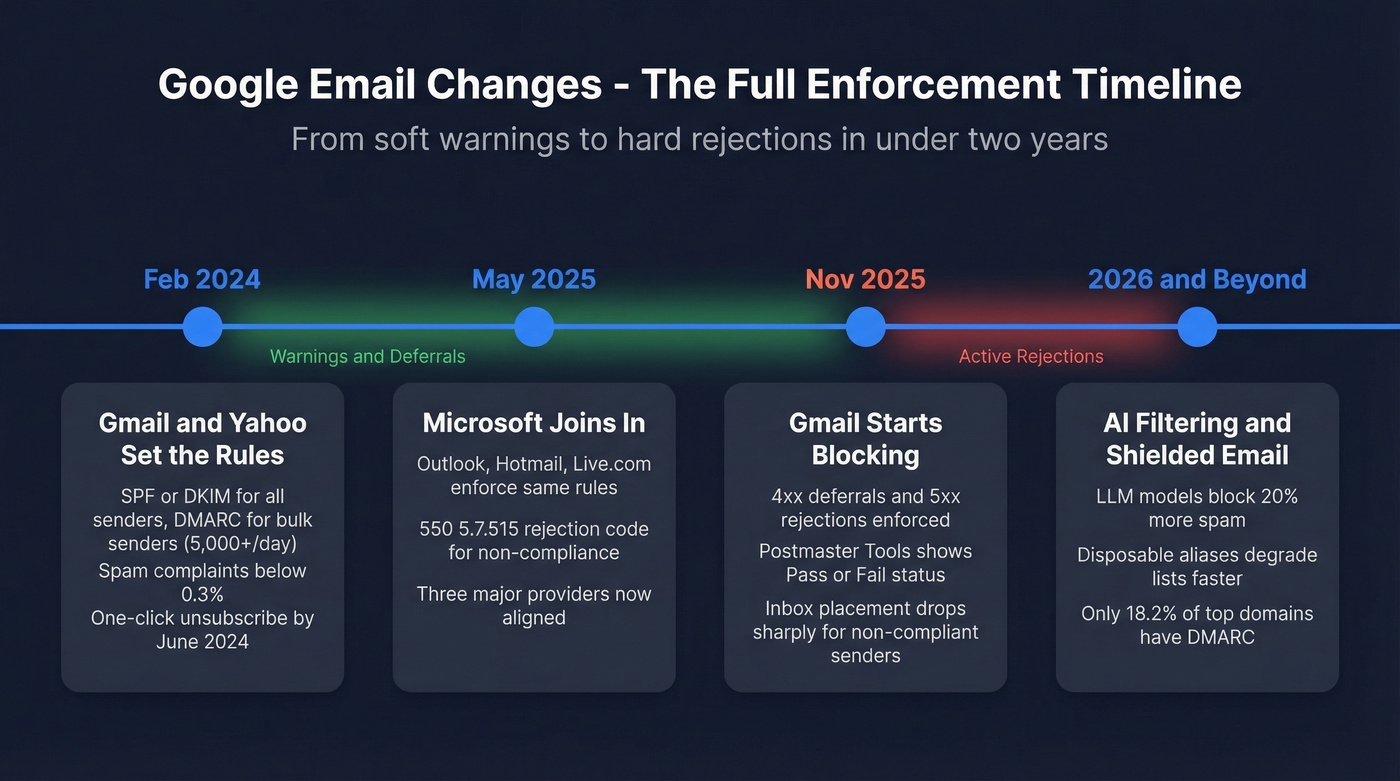
February 2024 - Gmail and Yahoo Set the Rules
Gmail and Yahoo announced requirements effective February 1, 2024, impacting Gmail's 2.5 billion users. All senders need SPF or DKIM at minimum, spam complaints below 0.3%, reverse DNS, and TLS. Bulk senders - those hitting 5,000+ daily messages to Gmail - need both SPF and DKIM, a DMARC record at minimum p=none, and one-click unsubscribe by June 1, 2024. Yahoo rolled out nearly identical rules at the same time, and these bulk sender guidelines reshaped how every outbound team approaches deliverability. (Related: Bulk Email Threshold.)
Here's a scope detail most guides miss: these rules apply to personal Gmail accounts (@gmail.com / @googlemail.com), not Google Workspace inbound. If you're sending B2B to company domains on Workspace, this specific bulk email policy isn't the same gate. Authentication still matters for reputation, though - don't use this as an excuse to skip it. (If you're doing outbound at scale, see Cold Email Marketing.)
May 2025 - Microsoft Joins In
Microsoft followed with bulk sender requirements for Outlook.com, Hotmail, and Live.com. Same 5,000/day threshold, same SPF + DKIM + DMARC mandate. Enforcement began May 5, 2025, with rejection code 550; 5.7.515. Three major mailbox providers now enforce essentially the same email sender requirements Google pioneered. (Tooling overview: Email Reputation Tools.)
November 2025 - Gmail Starts Blocking
The February 2024 rollout was a light touch - warnings and deferrals, rarely outright rejections. In our experience, that phase barely moved the needle. November 2025 is when things got real.
Google updated its bulk sender FAQ to confirm "temporary and permanent rejections," corroborated by both Valimail and Proofpoint. Non-compliant messages now get 4xx deferrals and 5xx rejections at the protocol level. Postmaster Tools v2 foregrounds a binary Compliance Status - Pass or Fail - and Gmail uses that status as a major signal in deliverability decisions. Inbox placement had already slipped from 89.8% to 87.2% by Q4 2024. After November 2025, non-compliant senders saw far worse. (For a full framework, use our Email Deliverability Guide.)
How to Meet Email Authentication Requirements
SPF: Publish one TXT record - v=spf1 include:_spf.youresp.com ~all. Keep DNS lookups at 10 or fewer. Two SPF records on the same domain cause a permerror. That's not a warning - it's an instant fail. (More syntax patterns: SPF Record Examples.)
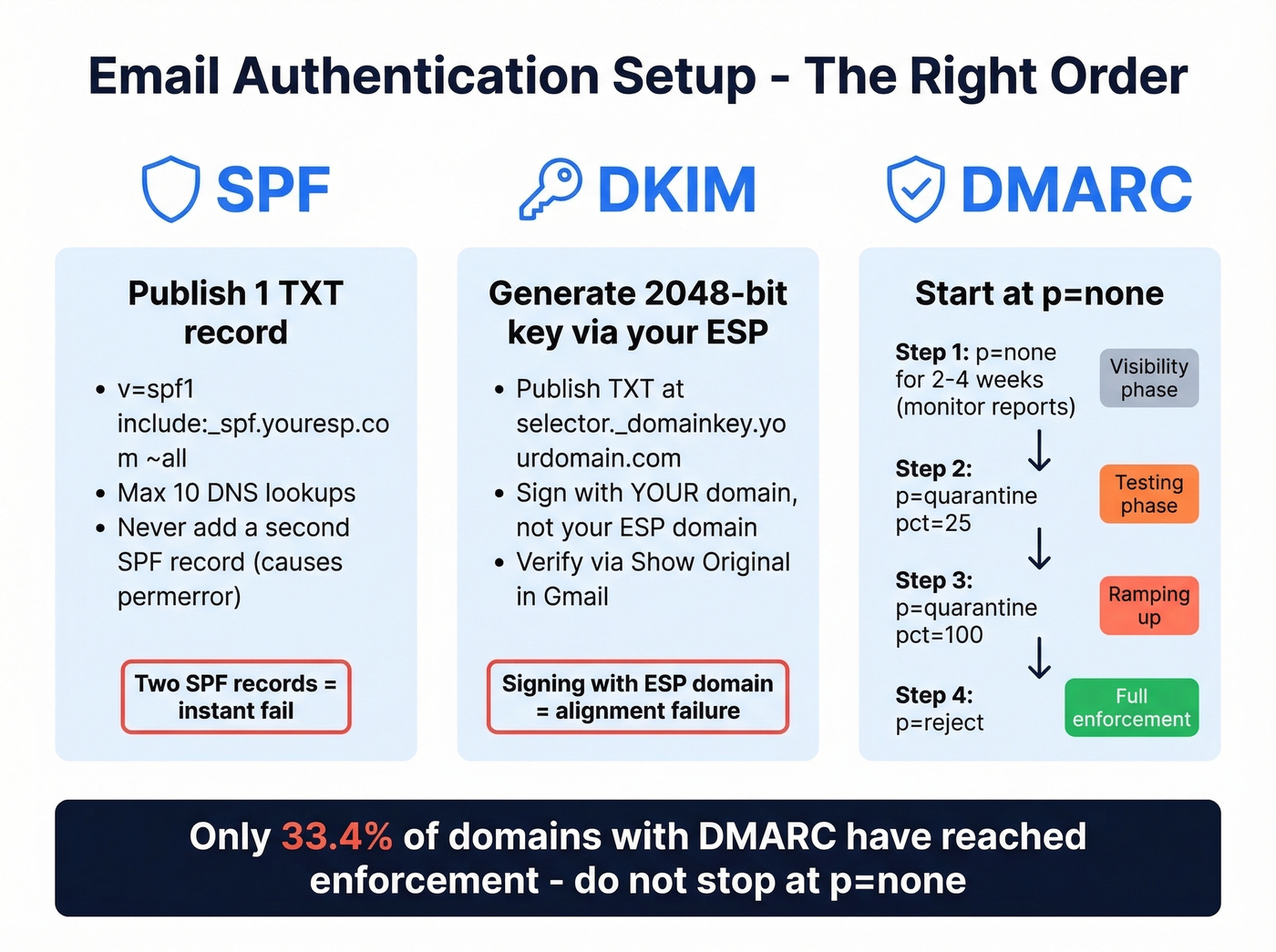
DKIM: Generate a 2048-bit key through your ESP and publish the TXT record at selector._domainkey.yourdomain.com. Verify via "Show original" on a test email in Gmail. (Step-by-step: How to Verify DKIM Is Working.)
DMARC: Start with v=DMARC1; p=none; rua=mailto:dmarc@yourdomain.com at _dmarc.yourdomain.com. Run p=none for 2-4 weeks while monitoring reports - this gives you visibility into who's sending on your behalf before you start blocking anything. Then move to p=quarantine; pct=25, ramp to pct=100, and finally p=reject. Valimail's 2024 Email Authentication Report found only 33.4% of domains with DMARC records had reached enforcement. Don't be in the other 66%.
One-click unsubscribe: Include both List-Unsubscribe and List-Unsubscribe-Post headers. Honor requests within 2 days.

SPF, DKIM, and DMARC won't save you if 20% of your list bounces. Prospeo's 5-step verification catches catch-all domains, spam traps, and honeypots - refreshed every 7 days, not every 6 weeks. Stay under Gmail's 0.1% complaint threshold.
Fix your authentication, then fix your data. Start with 75 free verifications.
Common Compliance Mistakes
Under the 2024 rules, even small misconfigurations trigger rejections. Here are the ones we see most often:
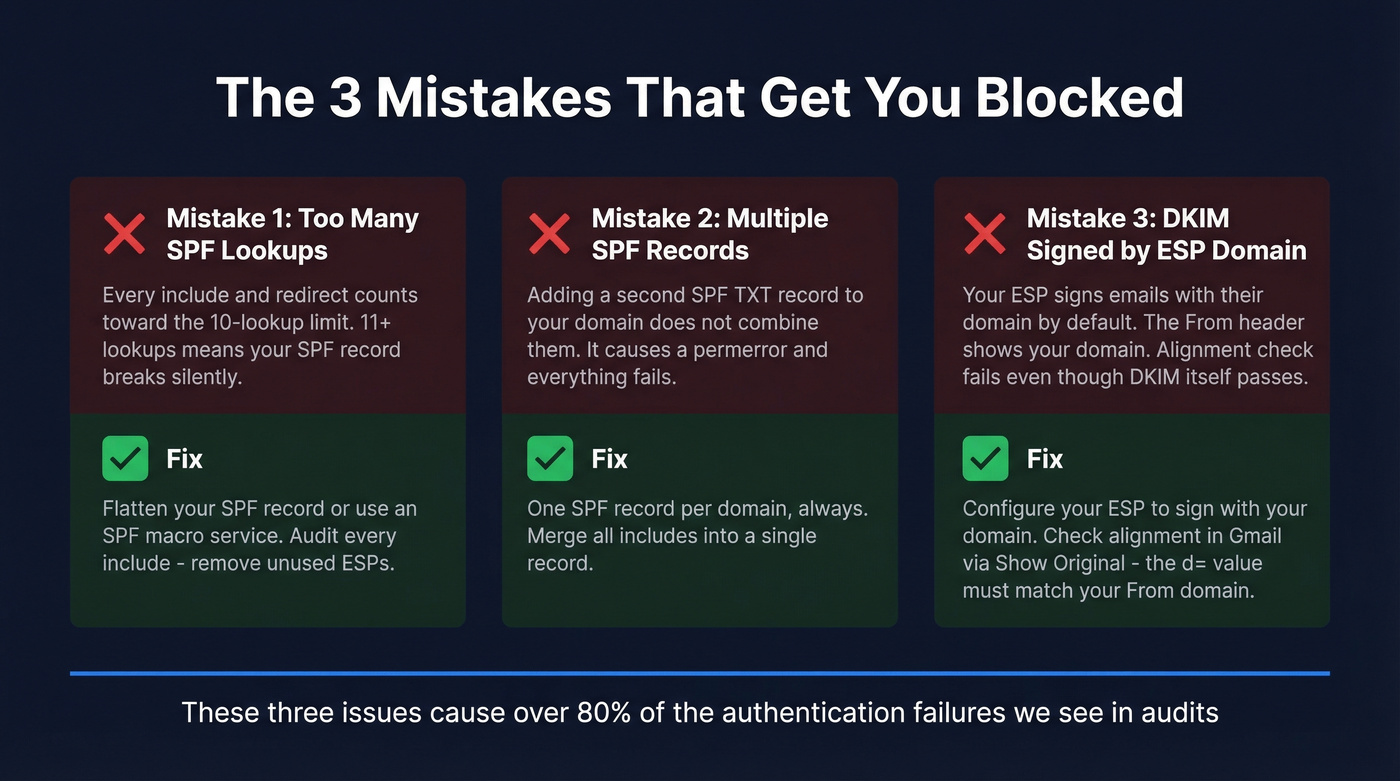
- 11+ SPF lookups. Every
include:andredirect:counts toward the 10-lookup limit. Flatten your record or use an SPF macro service. - Multiple SPF records on one domain. This isn't additive - it's a permerror. One record, one domain.
- DKIM signing with your ESP's domain instead of yours. Alignment fails because the signing domain doesn't match your
From:header. This is the single most common reason teams pass DKIM checks but still fail alignment.
SMTP Error Code Reference
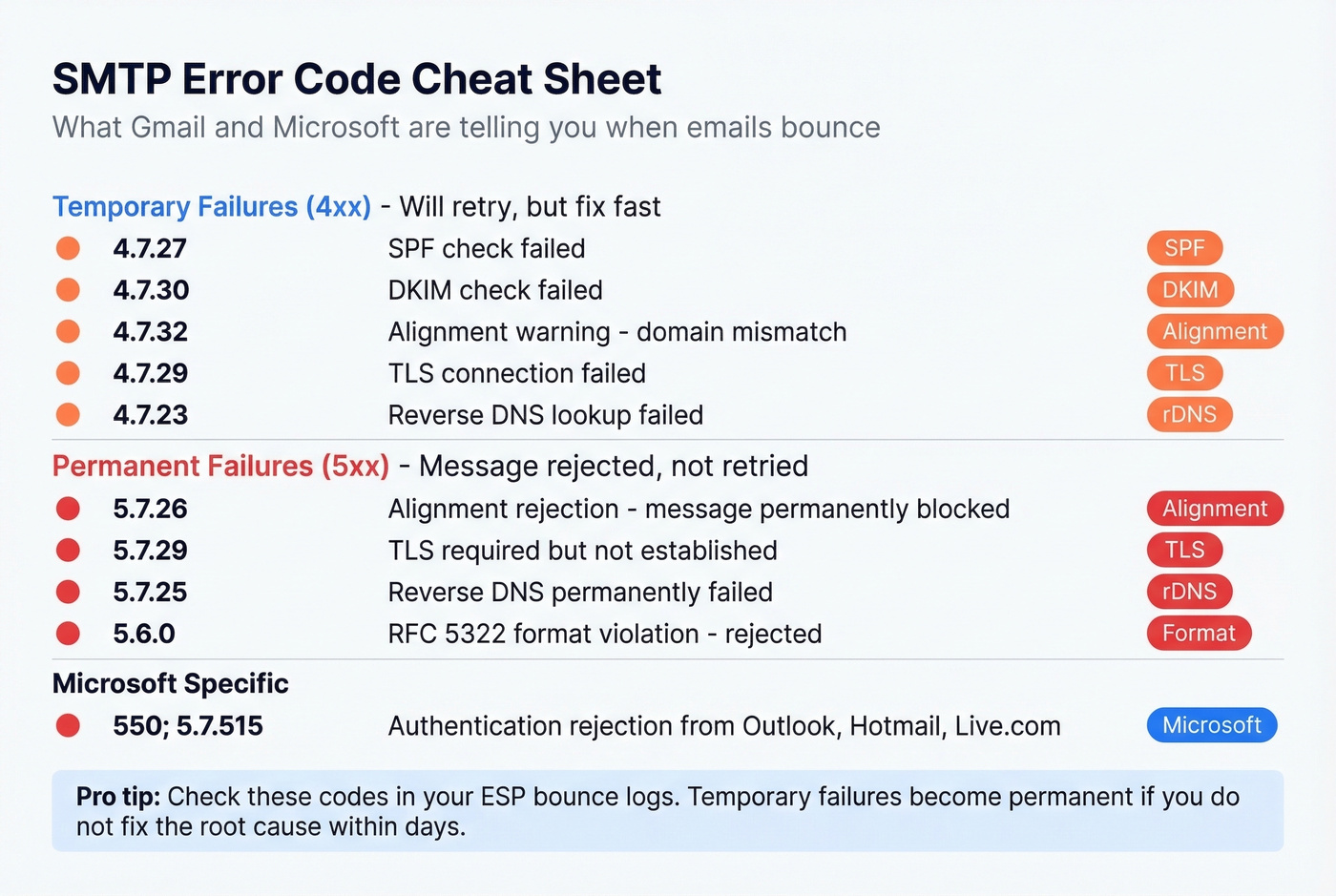
| Code | Meaning |
|---|---|
| 4.7.27 | SPF failure (temp) |
| 4.7.30 | DKIM failure (temp) |
| 4.7.32 | Alignment warning |
| 5.7.26 | Alignment rejection |
| 4.7.29 / 5.7.29 | TLS failure |
| 4.7.23 / 5.7.25 | rDNS failure |
| 5.6.0 | RFC 5322 rejection |
| 550; 5.7.515 | Microsoft auth rejection |
The Upstream Problem - Data Quality
Let's be honest: most deliverability problems aren't authentication problems. They're data problems.
We've seen teams fix authentication perfectly and still bounce 20%+ of their list because they're sending to addresses that don't exist anymore. Bounces inflate complaint rates, destroy sender reputation, and trigger exactly the enforcement mechanisms Gmail built under its new spam policies. One sales agency - Meritt - saw their bounce rate drop from 35% to under 4% after switching to verified data, and their pipeline tripled from $100K to $300K per week.
Before your next campaign, upload your list to Prospeo's email verification and strip out the addresses that'll get you blocked. The 5-step verification process catches catch-all domains, spam traps, and honeypots that other tools miss - and the data refreshes every 7 days, not every 6 weeks like most providers. (If you're comparing vendors, start with Bouncer Alternatives for Email Verification.)

Meritt cut their bounce rate from 35% to under 4% and tripled pipeline to $300K/week - not by tweaking DMARC, but by switching to verified contact data. With Gmail actively rejecting non-compliant senders since November 2025, stale lists are a death sentence.
Every bounced email pushes you closer to Gmail's reject list. Verify at 98% accuracy for $0.01/email.
What's Coming in 2026 and Beyond
Gmail's AI filtering already blocks 99.9% of spam, phishing, and malware, with LLM-based models blocking 20% more than previous systems. Google's Shielded Email feature - similar to Apple's Hide My Email - will generate disposable aliases, meaning lists degrade faster than ever. (Operationally, this ties directly to Email Velocity.)
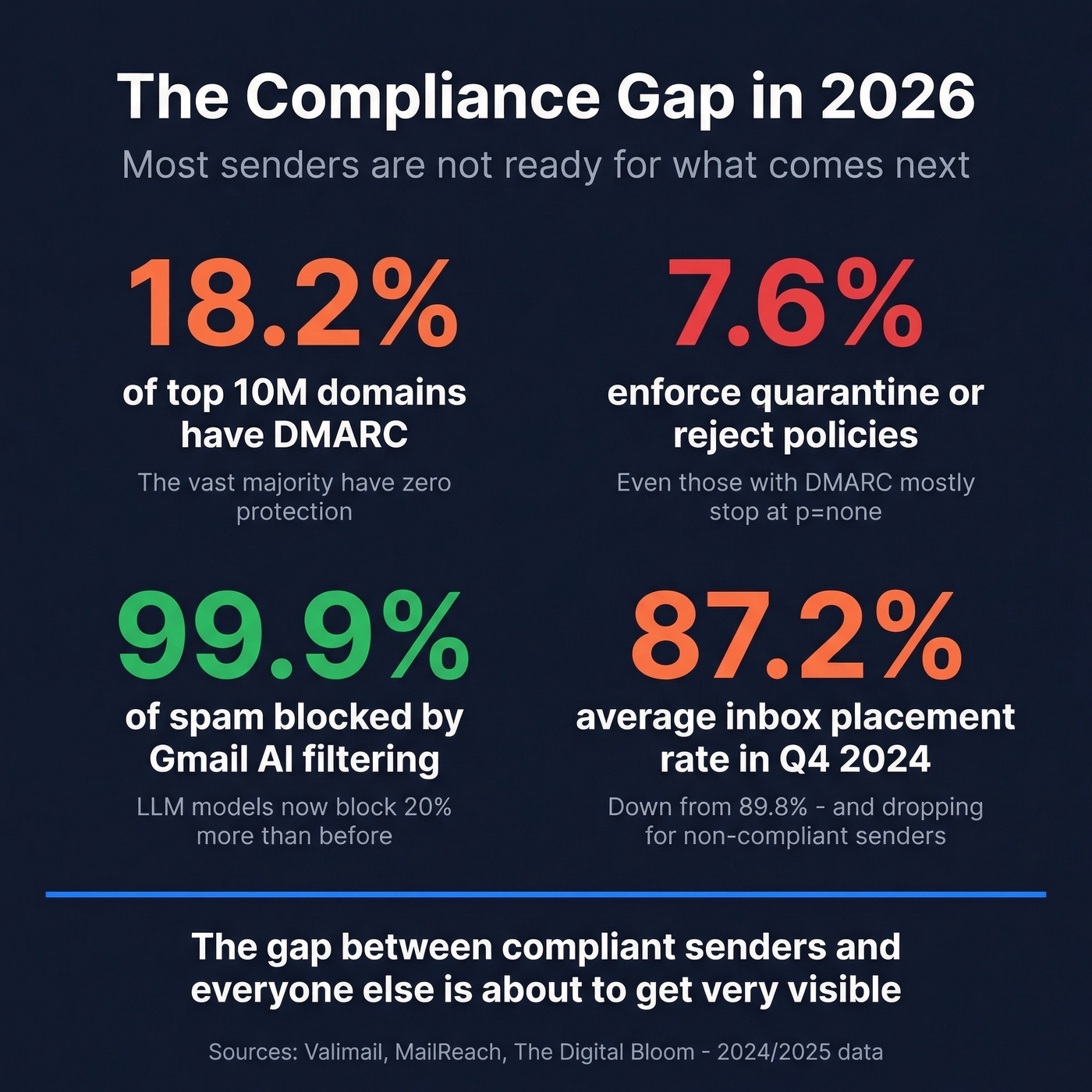
DMARC adoption sits at just 18.2% of the top 10 million domains, with only 7.6% enforcing quarantine or reject policies. The gap between compliant senders and everyone else is about to get very visible. The policy changes Google introduced in 2024 aren't slowing down - they're accelerating.
Frequently Asked Questions
Do Gmail's bulk sender guidelines apply under 5,000 emails per day?
Yes. All senders need SPF or DKIM and complaints below 0.3%. The 5,000/day threshold adds stricter requirements: both SPF and DKIM, DMARC, and one-click unsubscribe. There's no safe volume where authentication doesn't matter.
What's the difference between 0.1% and 0.3% spam rate?
0.3% is the published maximum. 0.1% is where you should aim for stable deliverability - by the time you're approaching 0.3%, recovery can take weeks of suppressed volume and careful list hygiene.
How long does deliverability recovery take after fixing authentication?
DNS changes usually propagate within 24-48 hours. Postmaster Tools updates within about 7 days. Full reputation recovery takes 2-6 weeks depending on volume and complaint history.
How do I reduce bounces that hurt my sender reputation?
Verify every address before sending. Prospeo's email verification - 98% accuracy on a 7-day refresh cycle - catches invalid, catch-all, and spam-trap addresses that inflate bounce rates. Teams using verified data consistently stay under 3% bounce, well within Gmail's safe zone.