Google Email Sender Guidelines: What Changed and How to Stay Compliant in 2026
You just got a 550 bounce on a campaign that was delivering fine last month. Not a soft bounce - a permanent rejection. Gmail refused it outright. That shift ramped up in late 2025, and it's catching senders off guard because most compliance guides still reference the February 2024 rollout like it's breaking news.
Gmail holds around 30.7% of global email client market share and blocks nearly 15 billion unwanted emails daily. These sender requirements are now the floor for deliverability - and in 2026, Google, Yahoo, and Microsoft are aligned on the same baseline bulk-sender standards.
What You Need (Quick Version)
Three items cover 90% of compliance:
- Authenticate your domain - publish SPF, DKIM, and DMARC records. Copy-paste DNS examples below.
- Monitor your spam rate in Google Postmaster Tools - stay under 0.1%, never hit 0.3%.
- If you send 5,000+/day: add one-click unsubscribe headers (RFC 8058) and process opt-outs within 2 days.
That's it. Everything else is detail around those three pillars.
Enforcement Timeline
| Date | What Happened | Error Code |
|---|---|---|
| Feb 2024 | Initial enforcement begins | 421 (temp deferrals) |
| Apr 2024 | Rejection rates increase | 421 mixed |
| Jun 2024 | One-click unsub deadline | - |
| May 2025 | Microsoft starts enforcing bulk-sender requirements | 550 5.7.15 |
| Nov 2025 | Permanent rejections ramp up | 550 (permanent) |
| 2026 | Full enforcement across providers | 550 across providers |
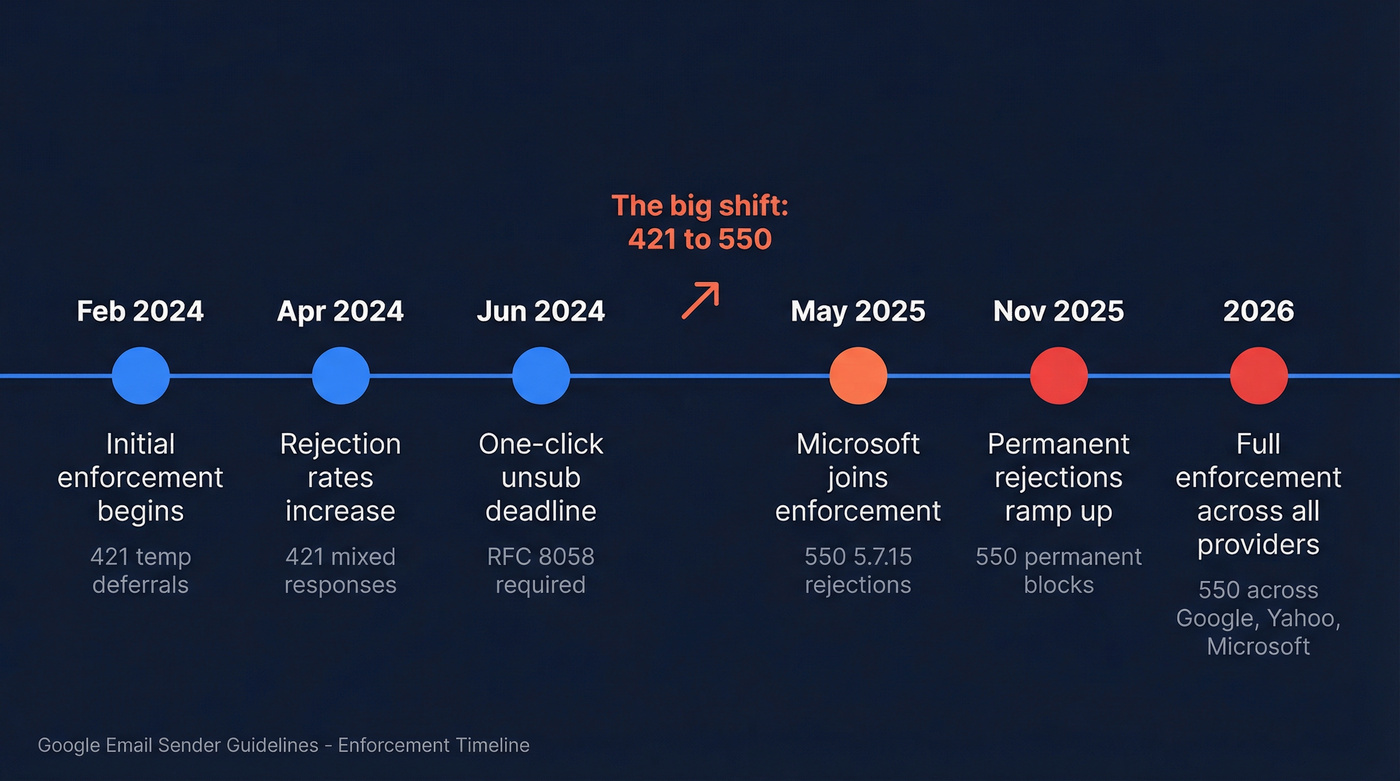
The jump from 421 to 550 is the one that matters. A 421 meant "try again later." A 550 means "no, and don't bother retrying." Completely different outcome for your campaigns. We've seen a common pattern in these failures: DKIM passes while DMARC alignment fails, which means the sender thinks everything looks fine until messages start getting permanently rejected. Understanding what these requirements actually enforce is the difference between inbox placement and a dead campaign.
Full Authentication Requirements
Requirements split into two tiers.
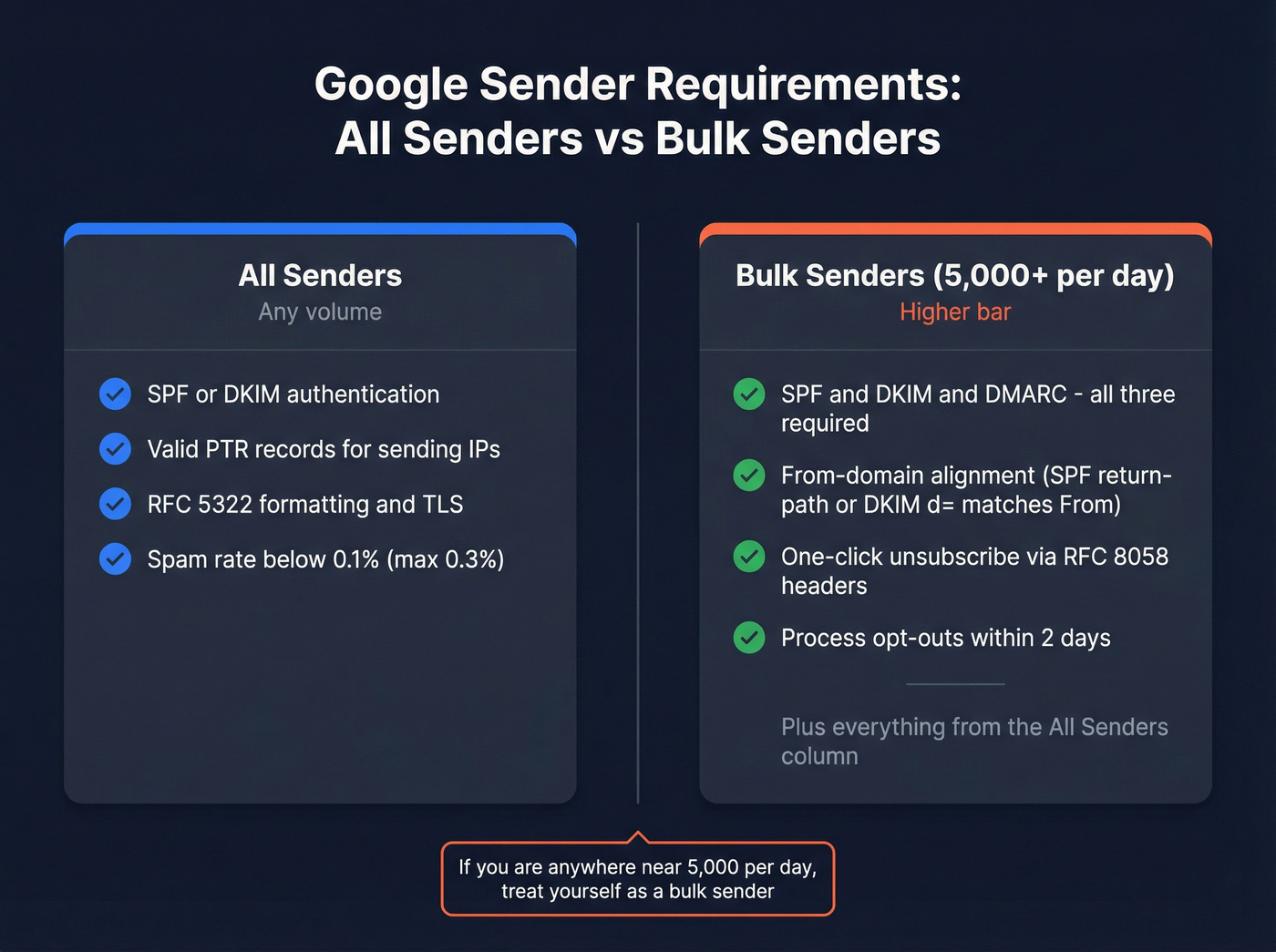
Baseline (All Senders)
- SPF or DKIM authentication on your sending domain
- Valid PTR records for sending IPs
- RFC 5322-compliant message formatting, TLS/STARTTLS
- Spam complaint rate below 0.1% (hard ceiling: 0.3%)
Bulk Senders (5,000+/day)
- SPF and DKIM and DMARC - all three, not pick-one
- From-domain alignment: SPF return-path or DKIM d= must match your From domain
- One-click unsubscribe via RFC 8058 headers, processed within 2 days
If you're anywhere near 5,000/day, treat yourself as a bulk sender operationally. Once you're sending at that volume, providers expect the full checklist every single day. These rules apply whether you're using a dedicated ESP or sending through Google Workspace directly.
Setting Up SPF, DKIM, and DMARC
Here are copy-paste DNS record examples you can start from. Proper authentication is the foundation of modern email deliverability, and getting it wrong at the DNS level means nothing downstream can save you.
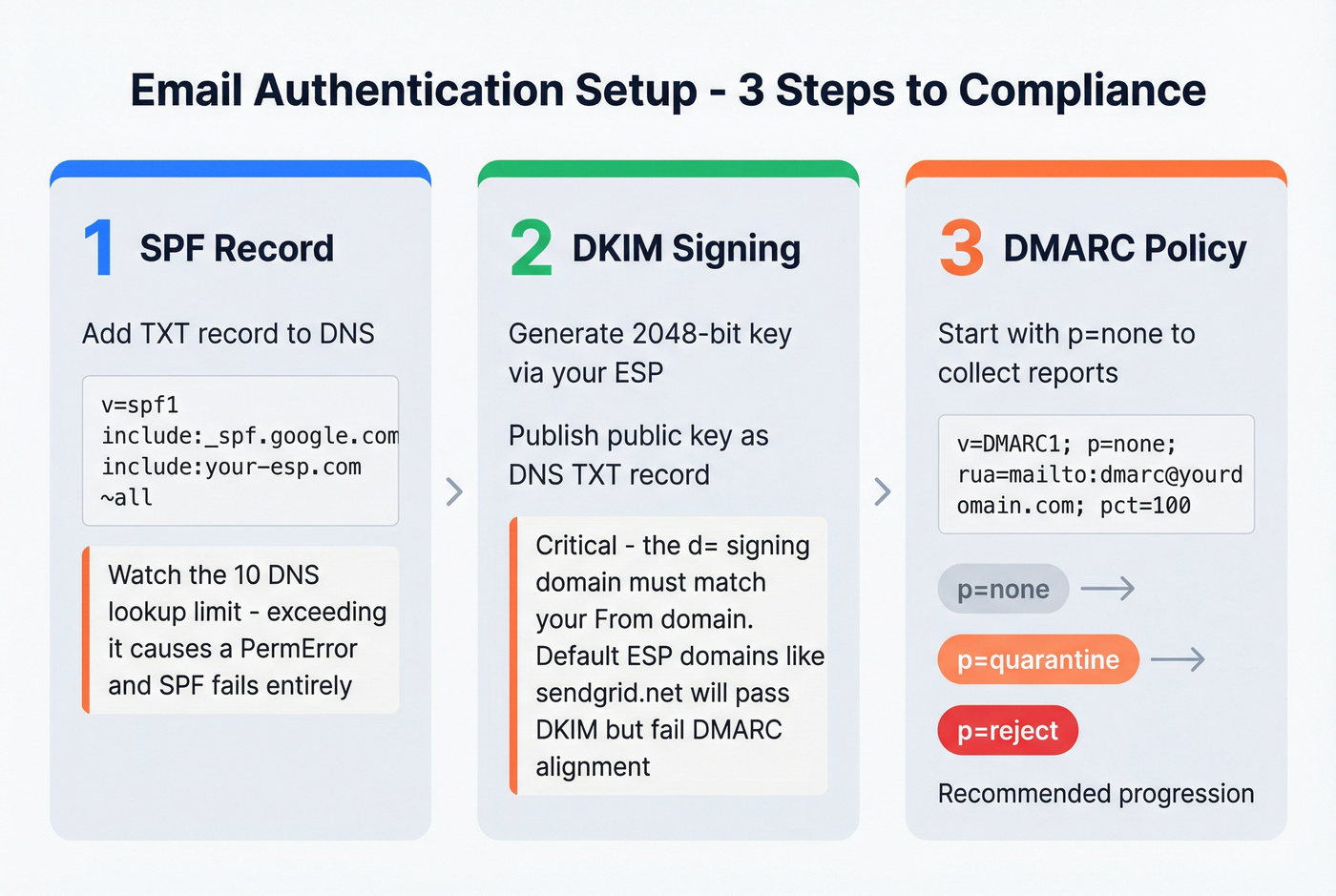
SPF Record
Add a TXT record to your domain's DNS:
v=spf1 include:_spf.google.com include:your-esp.com ~all
List every service that sends email on your behalf. SPF has a 10 DNS lookup limit - exceed it and you get a PermError, which means SPF fails entirely. That old marketing tool you stopped using two years ago? Still eating lookups. Audit regularly.
DKIM Signing
Generate a 2048-bit key through your ESP and publish the public key as a DNS TXT record. Here's the detail most senders miss: your DKIM signing domain (the d= value) must match your From domain. Using an ESP's default DKIM domain like sendgrid.net means DKIM passes but DMARC alignment fails. Set up custom DKIM signing with your own domain - every major ESP supports this under "domain authentication" or "whitelabeling" in their settings.
DMARC Policy
v=DMARC1; p=none; rua=mailto:dmarc@yourdomain.com; pct=100
Start with p=none to collect reports without affecting delivery. Then move to p=quarantine, then p=reject. Most senders stop at p=none and call it done. That's the bare minimum, not real protection. Google's own email sender guidelines documentation makes this progression clear, and properly configured DMARC makes your domain dramatically harder to spoof.

Perfect authentication means nothing if you're emailing invalid addresses. Prospeo's 5-step verification and 98% email accuracy keep bounce rates well below Gmail's thresholds - so your DMARC and SPF work actually pays off.
Stop 550 bounces at the source - start with verified data.
One-Click Unsubscribe Headers
This isn't a footer link. For one-click unsubscribe, you need machine-readable headers:
List-Unsubscribe: <https://yourdomain.com/unsubscribe/UNIQUE_KEY>

List-Unsubscribe-Post: List-Unsubscribe=One-Click
You need both headers for RFC 8058 compliance. And your HTTPS unsubscribe endpoint needs to actually work - many mailbox providers treat non-2xx responses as a failure and won't show one-click behavior consistently.
Transactional emails like order confirmations are typically exempt. Marketing messages aren't.
Monitor With Postmaster Tools
Google Postmaster Tools is free and it's the only way to see how Gmail perceives your sending reputation. Add your domain, verify via TXT record, wait 24-48 hours for data. The Compliance Status dashboard shows whether you're compliant or need work across the major requirements.
Two things to know: data updates with a roughly 24-hour delay, and low-volume days under about 200 emails can produce blank dashboards. Don't assume "no data" means "no problems." After fixing an issue, compliance status can take up to 7 days to update. Yahoo offers a Complaint Feedback Loop for similar visibility, and Microsoft provides SNDS for IP reputation monitoring.
Mistakes That Break Compliance
SPF PermError from exceeding the 10-lookup limit. Audit your includes, remove dead services, flatten nested lookups, or split sending across subdomains. This is the single most common authentication failure we see in our experience.
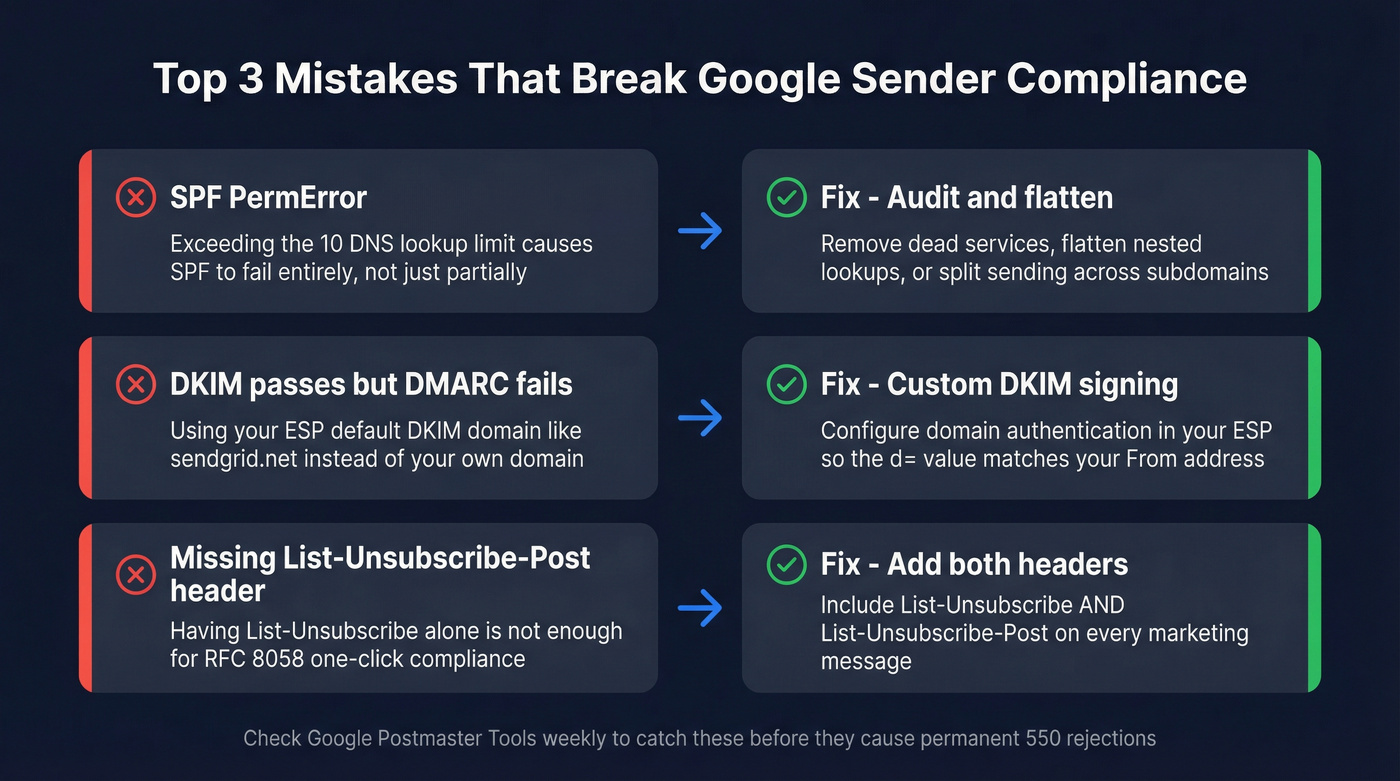
ESP default DKIM domains passing DKIM but failing DMARC alignment. Configure custom DKIM signing so the d= domain matches your From address. Look for "domain authentication" or "whitelabeling" in your ESP's settings.
A subtler issue catches even experienced senders: you have List-Unsubscribe but not the POST companion header. Providers treat this as non-compliant for one-click unsubscribe. You need both headers, every time, on every marketing message.
If Postmaster Tools shows blank dashboards, check over a 7-day window, not a single day. Consistently low volume? Supplement with third-party deliverability monitoring tools like MXToolbox or GlockApps.
Impact on Cold Email
Here's the thing: these guidelines didn't create new rules so much as enforce what good senders were already doing. If your outbound operation broke after November 2025, the data was already bad - Google just stopped being polite about it.
In practice, cap at 50 emails per day per inbox, warm up new inboxes for 3-4 weeks, and avoid open-tracking pixels in cold email. Keep bounce rates under 2%. Bad addresses cause bounces, bounces and complaints both hurt reputation at the domain level, and once your spam complaint rate is above 0.3%, Gmail may start issuing 550s even if authentication is set up perfectly.
Even sending from Google Workspace doesn't exempt you from authentication and reputation requirements. Google's inactive account deletion policy - accounts dormant 2+ years get removed - means lists decay faster than they used to. The consensus on r/coldemail is that list hygiene matters more now than any sending trick or warm-up tool.
Verify your lists before sending. Prospeo runs a 5-step verification process with catch-all handling, spam-trap removal, and honeypot filtering. At 98% email accuracy, you're not burning domain reputation on dead addresses. Teams like Stack Optimize maintain 94%+ deliverability and sub-3% bounce rates across all client campaigns using this approach.
Cold email under Google's 2026 rules demands sub-2% bounce rates and pristine sender reputation. Prospeo refreshes 300M+ profiles every 7 days - not every 6 weeks - so you're never sending to stale addresses that trigger permanent rejections.
Weekly-refreshed data is how you stay compliant at scale.
FAQ
What happens if I don't comply with Google's sender guidelines?
Non-compliant emails receive permanent 550 rejections - not temporary delays. Your messages won't reach Gmail inboxes, and retrying won't help. In 2026, Google, Yahoo, and Microsoft all enforce the same baseline, so non-compliance affects deliverability across providers simultaneously.
Do these rules apply to transactional emails?
Authentication requirements apply to all email types. One-click unsubscribe is required specifically for marketing and promotional messages. Order confirmations, password resets, and similar transactional messages are exempt from the unsubscribe header requirement.
How do I keep my spam rate below 0.1%?
Monitor complaint rates in Google Postmaster Tools, honor unsubscribe requests within 2 days, and verify email lists before sending. Let's be honest - if you're sending to unverified lists in 2026, you're gambling with your domain reputation every single campaign.
Have enforcement consequences changed since 2024?
The core requirements from February 2024 remain identical, but consequences escalated sharply. The shift from temporary 421 deferrals to permanent 550 rejections in late 2025 means non-compliance now results in immediate, irreversible blocks rather than gentle nudges. Check Postmaster Tools weekly to catch issues before they become permanent rejections.