Best Google Maps Scraping Tools in 2026 (Honest Guide)
You scraped 10,000 Google Maps listings last quarter. You got business names, addresses, star ratings, and a pile of phone numbers - most of which ring front desks. What you didn't get: email addresses for the actual decision-makers. Maybe 2,000 listings had a website at all, and fewer than half surfaced a usable email. That's the dirty secret of every Google Maps scraping tool - listings aren't leads, and the gap between the two costs more than most people budget for.
Our Picks (TL;DR)
| Use Case | Pick | Why |
|---|---|---|
| Best for lead gen | Prospeo | Verified emails, ~$0.01 each |
| Best cloud scraper | Apify | Pay-per-event, API, flexible |
| Best no-code option | Outscraper | Simple UI, free tier, CSV export |
| Best free option | Instant Data Scraper | Chrome extension, zero cost |
| Best for developers | gosom/google-maps-scraper | MIT open-source, full control |
What Google Maps Data Actually Gives You
Every Maps scraping tool - extension, cloud platform, or open-source - pulls from the same underlying data: business name, address and coordinates, phone number (usually the main line), website URL when listed, star rating and review count, business category, opening hours, and price range.
That's genuinely useful for market research, competitor analysis, and building prospect lists by geography. But notice what's missing: email addresses. Google Maps listings almost never include emails natively. You'll need a separate enrichment step, and that step is where costs quietly double.
The other constraint worth knowing: Google Maps caps visible results at roughly 120 per search query. Doesn't matter which tool you use. Search "plumbers in Chicago" and you're getting ~120 results max. To get more, narrow searches by neighborhood or zip code and run multiple queries.
Which Tool Type Do You Need?
| Category | Skill Level | Budget | Scale |
|---|---|---|---|
| Chrome extension | Beginner | Free-$30/mo | Under 500 leads |
| Cloud platform | Intermediate | $4-100/mo | 1K-100K leads |
| Open-source | Developer | Free (+ infra) | Unlimited |
| B2B database | Any | $0-99/mo | 1K-1M+ leads |
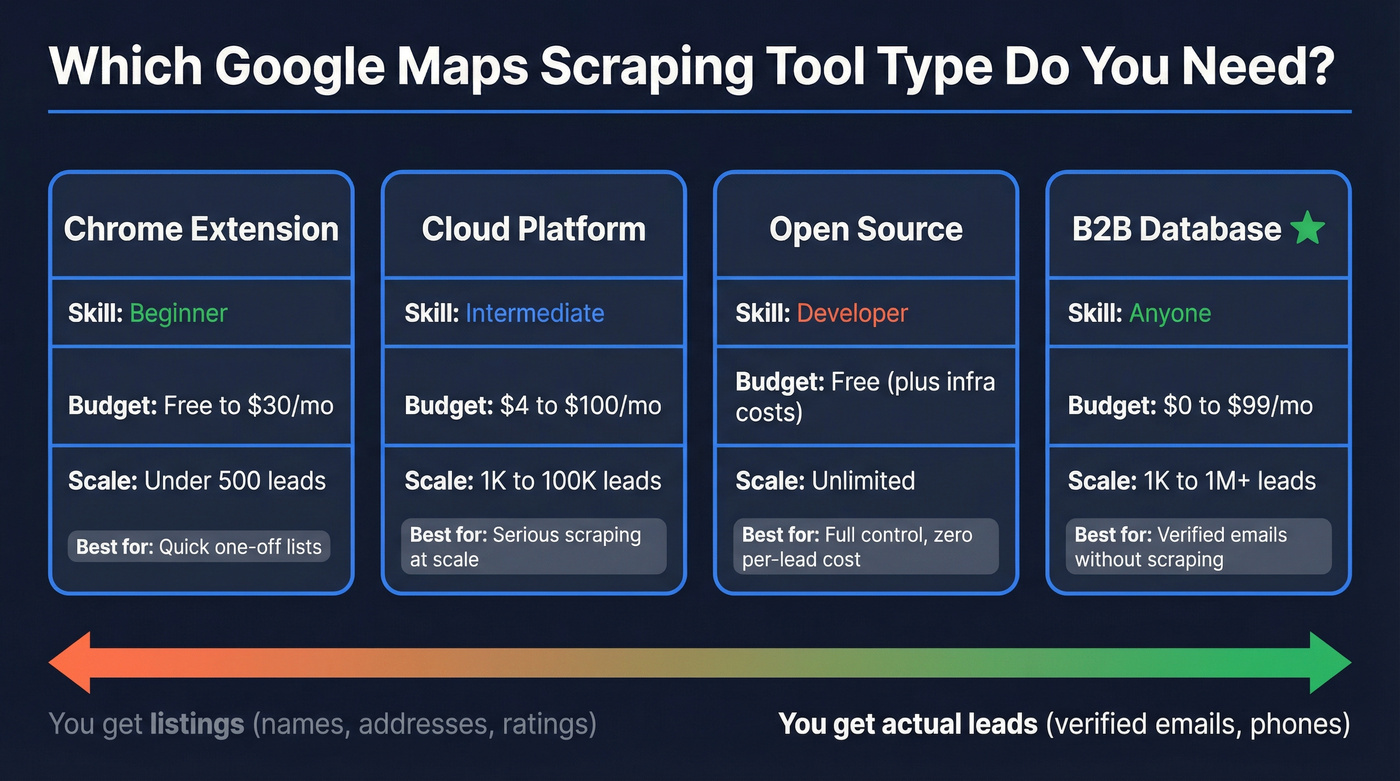
The first three categories scrape place listings. The fourth skips scraping and gives you verified contact data directly. Most people who think they need a scraper actually want leads, not listings - and that distinction changes the entire buying decision.
Best Google Maps Scraping Tools Compared
Apify - Most Powerful Cloud Scraper
Apify is the tool we'd recommend to anyone who genuinely needs to scrape Google Maps at scale. Their Google Maps Scraper actor (compass/crawler-google-places) runs on a pay-per-event model that keeps costs predictable.
On Apify's actor page, pricing starts at $2.10 per 1,000 scraped places. The pay-per-event breakdown works out to $4 per 1,000 places base, plus a small $0.007 actor start fee per run. Add-ons stack on top: contact details cost $0.002/place, reviews run $0.0005/review, and filters add $0.001 per filter per place. A real example: scraping 10,000 places with contact details comes to roughly $40 base + $20 contacts = about $60, plus any filter or review add-ons that push it toward $70-75.
Export formats include JSON, CSV, and Excel, with full API access and Python client libraries. One tip we've picked up from scraping communities: use many categories with fewer search terms per query to avoid false negatives. The tradeoff - emails aren't included by default. You'll still need a separate enrichment tool for those.

Outscraper - Simplest No-Code Option
Outscraper is the tool we'd point a marketing manager toward - someone who needs 5,000 restaurant listings in a metro area and doesn't want to touch an API. Paste a search query, hit go, download CSV. That's the whole workflow.
The free tier gives you limited credits to test before committing. Paid usage runs in the ballpark of $3-5 per 1,000 records depending on what you extract. Like every other scraper on this list, you'll still need enrichment to get emails.
Instant Data Scraper - Best Free Extension
Install the extension, run infinite scroll on a Google Maps search, and it captures company name, rating, number of reviews, category, and address from the list view. For a quick list of 50-100 businesses at zero cost, nothing beats Instant Data Scraper.
The limitations are real, though. Phone numbers and websites require clicking into each listing individually - the list view doesn't show them. And the 120-result ceiling is a Google Maps platform limitation, not an extension bug. Some people chain Instant Data Scraper with Data Miner to scrape individual listing pages, but the process is slow and Data Miner isn't free.
gosom/google-maps-scraper - Best Open-Source
The gosom/google-maps-scraper repo has 3,300+ GitHub stars and an MIT license. It extracts the full field set: name, address, phone, website, rating, reviews, coordinates, and even email when available.
Here's the catch. You're managing your own infrastructure - proxies, CAPTCHA handling, rate limiting, and server costs. For a developer who wants zero per-lead costs and full control, it's the obvious choice. For everyone else, the operational overhead isn't worth it.
PhantomBuster - Automation Platform
Use this if: you're already paying for PhantomBuster for other workflows and want to add Maps data extraction without a new vendor.
Skip this if: you're buying it specifically for Maps scraping. The time-based billing ($56-$128/mo) means you're paying for minutes, not leads. Results can be capped at 200 per search in the common Maps workflow, and that phantom can require two slots - which makes it a poor fit for a one-slot free plan. The economics just don't work for dedicated Maps scraping.
Bright Data - Enterprise-Grade
Bright Data is a full scraping infrastructure platform with proxy management, CAPTCHA solving, and browser automation. Pricing starts around $500/mo and scales past $2,000/mo. For Google Maps specifically, it's overkill unless you're an agency scraping millions of records across dozens of sources.
SphereScout - Pre-Built Local Lead Database
Instead of scraping, SphereScout maintains a pre-built database of local business contacts. Plans run $49/mo for 15,000 contacts up to $499/mo for 500,000, plus a free tier of 100. Reasonable if you want local business data without the scraping step, though the database is limited to local businesses rather than the broader B2B universe.
Mapsscraper - Chrome Extension for Quick Exports
Another Chrome extension with a free trial and paid plans around $15-30/mo for volume. Like Instant Data Scraper, it's bound by the same ~120-result ceiling per search. Useful for one-off exports, not a serious tool for ongoing lead generation.

Every Google Maps scraper gives you business names and addresses. None of them give you verified emails for the decision-makers inside those businesses. Prospeo skips the scraping step entirely - 300M+ profiles, 98% email accuracy, 125M+ verified mobile numbers, all refreshed every 7 days.
Stop enriching scraped listings. Start with verified contacts.
Pricing Comparison
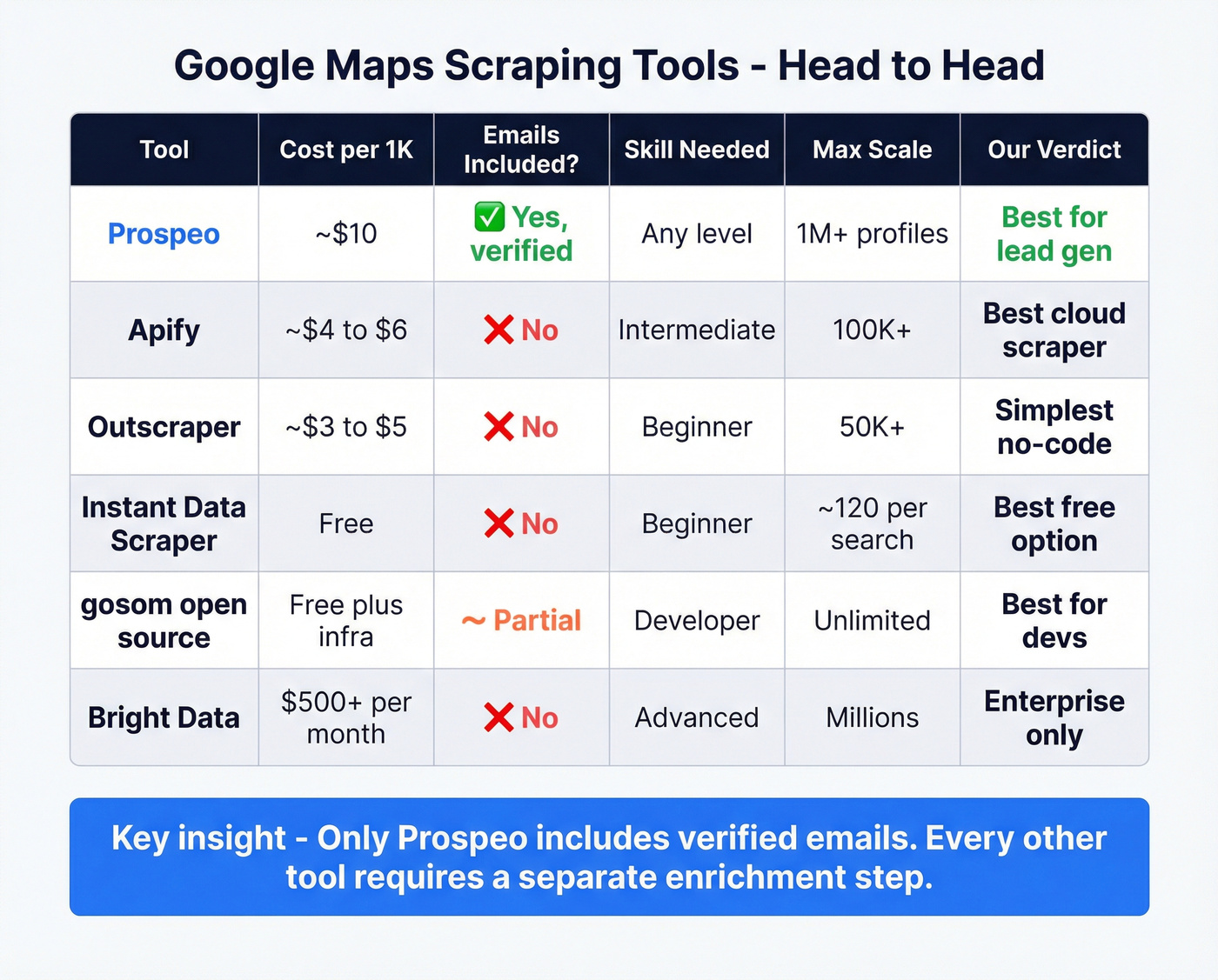
| Tool | Cost/1K Leads | Free Tier | Emails? | Best For |
|---|---|---|---|---|
| Prospeo | ~$10 | 75 emails/mo + 100 extension credits | Yes, verified | Lead gen |
| Apify | ~$4-6 with add-ons | Trial credits | No | Scale scraping |
| Outscraper | ~$3-5 | Limited credits | No | Non-technical users |
| Instant Data | Free | Unlimited | No | Quick one-off lists |
| gosom | Free + infra | N/A | Partial | Developers only |
| PhantomBuster | $56-128/mo flat | 1 slot | No | Existing users only |
| Bright Data | $500+/mo | No | No | Agency scale |
| SphereScout | ~$3.27/1K | 100 contacts | Partial | Local businesses |
| Mapsscraper | ~$15-30/mo | Trial | No | Quick exports |
Here's where the math gets interesting. If your goal is emails, scraping is only step one. A concrete benchmark from a real-world workflow: to get 15,000 emails, you'll likely need to scrape 50,000 places because only ~30% of listings have websites where emails can be found, and the total scraping + enrichment cost lands around $300.
With a B2B database, 1,000 verified emails costs about $10. That's not a rounding error - it's an order of magnitude.

The Hidden Cost Nobody Talks About
Here's a strong opinion: if your average deal size is under $5,000, you probably don't need a scraping pipeline at all. The infrastructure cost eats your margins alive.
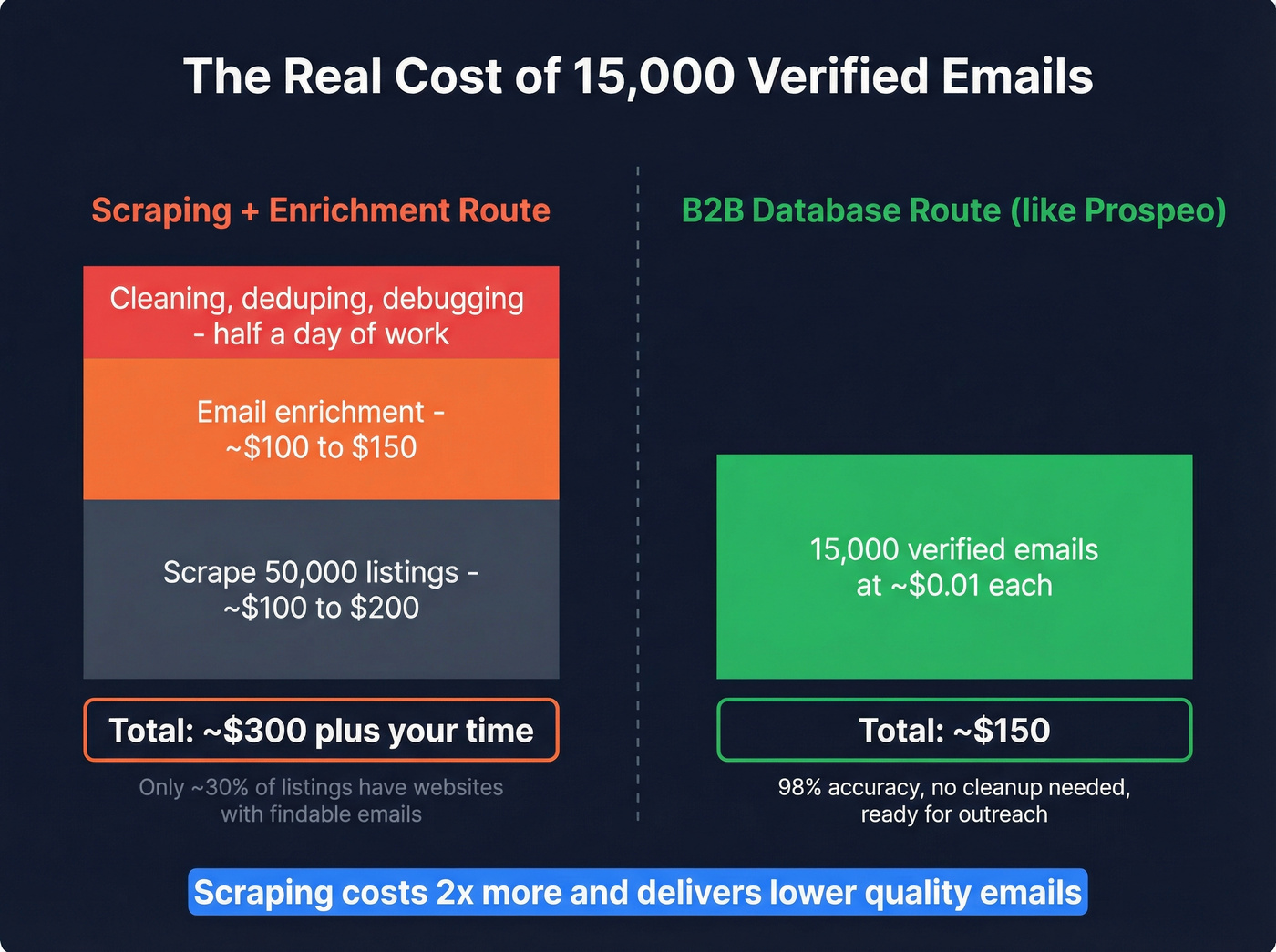
Let's break down the full math. You want emails for 15,000 local businesses. Step one: scrape roughly 50,000 Google Maps listings, because only about 30% have websites where emails can be extracted. Step two: run those through an email enrichment tool. Total: roughly $300 for 15,000 emails, and you still have to deal with deduping, cleaning, and deliverability issues that'll eat an entire day of someone's time - debugging failed runs, deduplicating results, reformatting output for your CRM.
The core frustration is simple: Maps doesn't give you emails natively, and enrichment is where the workflow gets messy.
You scraped 10,000 listings. Now you need emails. That enrichment step doubles your cost and halves your accuracy - unless you start with a B2B database built for it. Prospeo delivers verified emails at ~$0.01 each with 98% accuracy, so your outreach actually lands.
Listings aren't leads. Verified emails are. Get them for a penny each.
How to Automate Your Pipeline
If you do go the scraping route, here's the workflow that scales. Use Apify's API with the compass/crawler-google-places actor. A basic Python script using apify-client lets you pass in search queries, set maxCrawledPlacesPerSearch, and specify country codes. Schedule runs daily or weekly through Apify's built-in scheduler, then push results to your CRM via Zapier, Make, or n8n.
The typical flow is Apify -> webhook -> Zapier -> HubSpot/Salesforce. For enrichment, feed your scraped company domains into an enrichment API that returns verified emails and phones. The whole pipeline takes an afternoon to set up and runs hands-free after that.
If you want to go deeper on the email side, pair this with an email verification step and a deliverability-first outbound email campaign setup.
Legal Considerations
Scraping Google Maps isn't illegal, but it's not a free-for-all either.
Google's Terms of Service restrict automated data extraction. Violating ToS can get accounts flagged, IPs blocked, and scraping runs disrupted. GDPR applies if you're collecting personal data on EU residents - you need a lawful basis for processing and must respect opt-out requests. Stick to scraping what you need, not everything you can. And never scrape behind login walls; that crosses from gray area into clearly problematic territory.
Using a compliant B2B database that enforces opt-outs and maintains GDPR compliance sidesteps most of these concerns entirely.
FAQ
Is scraping Google Maps legal?
Scraping publicly visible Google Maps data is generally legal, but it violates Google's Terms of Service, which can result in account bans and IP blocks. GDPR applies when you collect personal data in the EU. Using a compliant B2B database avoids most legal gray areas.
Why does my scraper only return 120 results?
Google Maps caps visible results at roughly 120 per search query - it's a platform limitation, not a bug in your tool. To get more results, narrow your search by neighborhood or zip code. Cloud platforms like Apify handle this by running multiple narrowed queries automatically.
Can I get emails from Google Maps?
Not directly. Google Maps listings rarely include email addresses. You need a separate enrichment step - scraping business websites for contact info, then verifying what you find. Prospeo's database provides 143M+ verified emails natively, skipping the multi-step pipeline entirely.
What's the cheapest way to extract Maps data?
For small batches under 100 leads, Instant Data Scraper is completely free. For larger volumes, Apify starts from $2.10 per 1,000 places, with a pay-per-event breakdown at $4 per 1,000 places plus add-ons. For verified contact data without scraping, Prospeo's free tier gives you 75 emails/month at no cost.
How do I get phone numbers from listings?
Cloud scrapers like Apify and Outscraper extract phone numbers from each business's Maps profile automatically. Chrome extensions often miss phone numbers unless you scrape each listing's detail page individually - the list view typically only shows name, rating, category, and address.