

How to Get a Valid Email Address: Find, Create, or Verify
"How do I get a valid email address?" is actually three different questions wearing the same trench coat. You might need to find a prospect's work email, create a professional address for your business, or verify that an address you already have won't bounce.
Most guides only cover one of these. We're covering all three.
What You Need (Quick Version)
- Creating your own professional email? Register a domain ($10-35/year) and pair it with Google Workspace or Microsoft 365.
- Verifying an email you already have? Use a free checker like ZeroBounce (100 free/month) or Email Hippo (100/day).
How to Find Someone's Email
This is the most common reason people land on this page. It's also where the tools matter most.
Free Methods That Actually Work
Before paying for anything, try these:
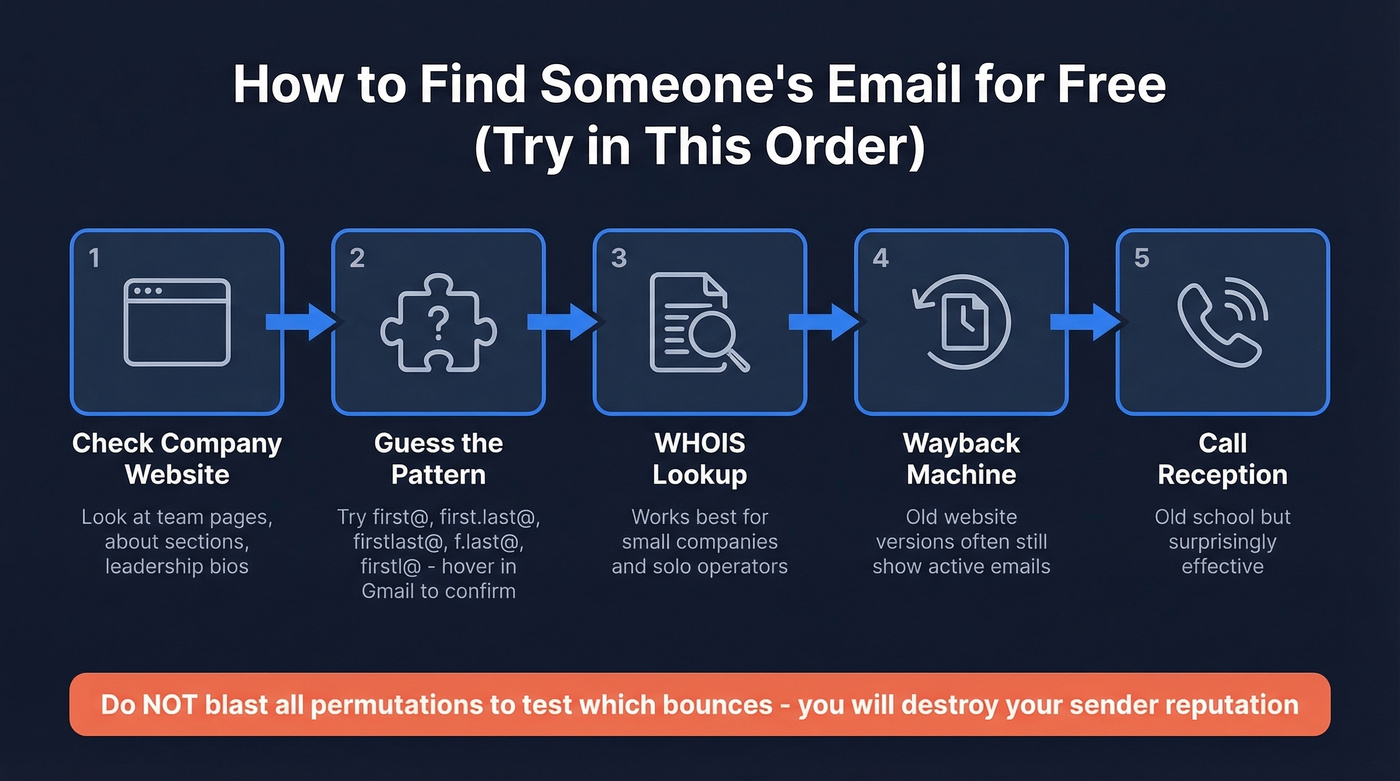
- Check the company website. Leadership pages, team directories, and "About" sections often list emails directly.
- Guess the pattern. Most companies use one of five formats:
first@,first.last@,firstlast@,f.last@, orfirstl@. Use a tool like Mailmeteor's permutator to generate variations, then paste them into Gmail's "To" field. If a profile photo appears on hover, you've likely found the right address. - Try WHOIS lookup. For smaller companies and solo operators, a WHOIS search on their domain sometimes surfaces an admin or registrant email.
- Check the Wayback Machine. Older versions of company websites often displayed email addresses that have since been removed but are still active.
- Call the company. Old-fashioned, but a quick call to reception gets you the right email in minutes.
Whatever you do, don't blast all the permutations to see which one bounces. That's a fast way to torch your sender reputation (and if you need a fix, see sender reputation).
Email Finder Tools
Free methods work for one-off lookups, but they don't scale. If you're building prospect lists regularly, you need a dedicated tool - and accuracy varies wildly between them. A benchmark of 20,000 real contacts found effective enrichment rates ranging from 40-55% across top tools, with hard bounce rates between 0.9% and 3.6%. The tool you pick matters more than most people realize.

Prospeo stands out because it combines finding and verifying into a single step. Most tools find an email and hand it back without confirming it's deliverable - you then need a separate verifier. Prospeo runs every result through a 5-step verification process with catch-all handling, spam-trap removal, and honeypot filtering before returning it. The database covers 300M+ professional profiles with 143M+ verified emails, refreshed on a 7-day cycle while the industry average sits around 6 weeks. That freshness gap matters - ZeroBounce found that email lists decay by roughly 28% per year, so stale data means bounces. Pricing starts at ~$0.01 per email with 75 free emails/month and no contract. (If you're comparing options, see email search tools and data enrichment services.)

Hunter.io is a solid domain-level search tool - enter a company domain and it returns known email patterns and addresses, starting at ~$49/mo. The consensus on r/sales is that Hunter's database is pretty small, which makes it better as a verification layer than a primary finder. (If you're shopping around, check Hunter alternatives.)
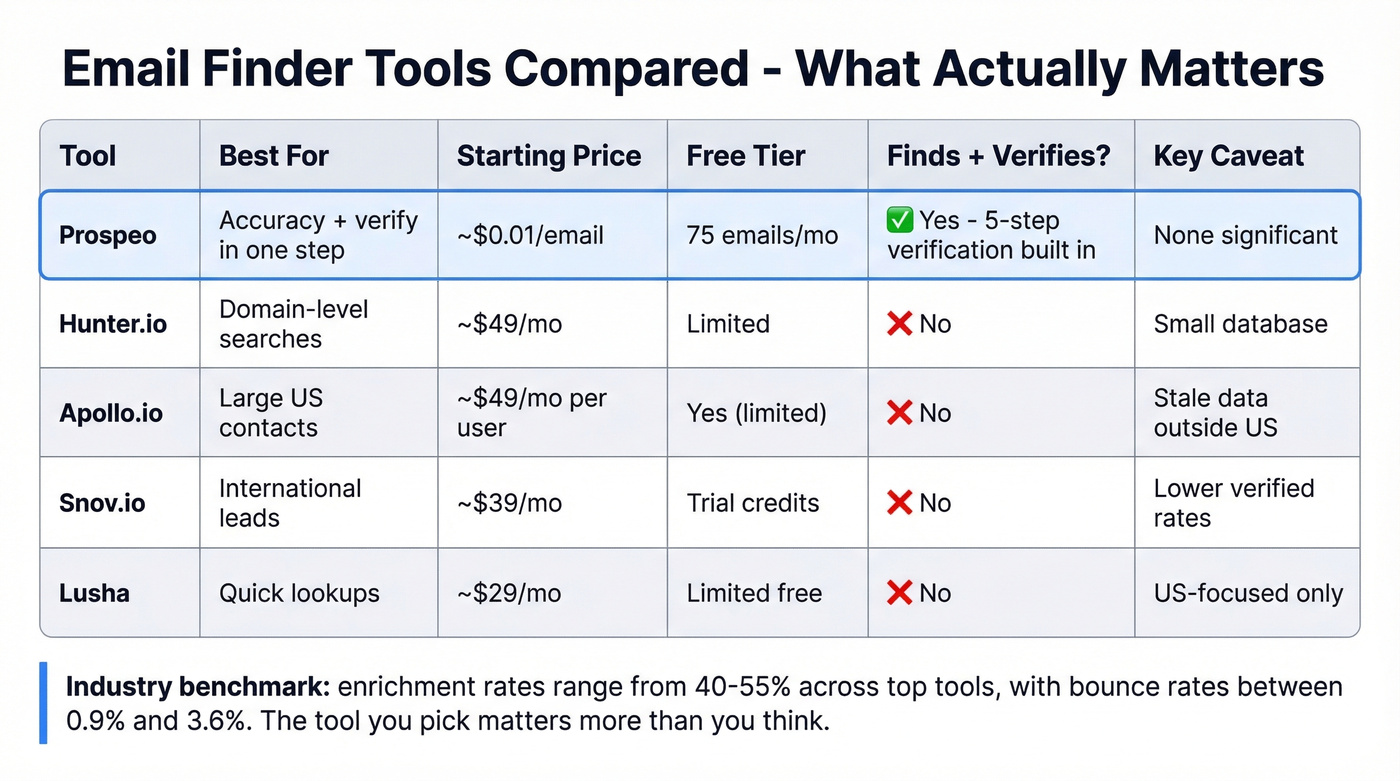
Apollo.io brings a massive US contact database (275M+ contacts, 60M+ companies) with a generous free tier and paid plans from ~$49/mo per user. The downside is data freshness - Reddit threads consistently mention that Apollo's data "feels bad sometimes" outside the US market.
Snov.io works well for international leads at ~$39/mo with built-in automation. Lusha offers quick lookups from ~$29/mo but skews heavily US-focused. Instantly's Lead Finder offers 450M+ contacts and waterfall enrichment - worth testing if you're already on their platform.
| Tool | Best For | Starting Price | Free Tier | Key Caveat |
|---|---|---|---|---|
| Prospeo | Accuracy + verify in one step | ~$0.01/email | 75 emails/mo | - |
| Hunter.io | Domain-level searches | ~$49/mo | - | Small database |
| Apollo.io | Large US contact database | ~$49/mo/user | Yes (limited) | Bounces on older data |
| Snov.io | International leads | ~$39/mo | Trial credits | Lower verified rates |
| Lusha | Quick lookups | ~$29/mo | Limited free | US-focused |
On the legal side: finding someone's email using publicly available information is legal in most jurisdictions. Under GDPR, you need a legitimate reason and must honor opt-outs. Under CAN-SPAM, include truthful headers and an unsubscribe link in any outreach. (For more on list sourcing, see Is It Illegal to Buy Email Lists?.)

You just read about guessing email formats and hoping a profile photo appears on hover. Prospeo skips all of that - 143M+ verified emails, 5-step verification built in, and a 7-day refresh cycle so you never hit a decayed address. At ~$0.01 per email, one bounced cold email costs you more in reputation than an entire Prospeo search.
Get valid emails on the first try. 75 free lookups, no credit card.
How to Create a Valid Email for Your Business
If you need a professional email address for yourself or your company, the whole process takes about 30 minutes:
- Choose an email host. Google Workspace (~$6/mo per user) and Microsoft 365 (~$6/mo per user) are the two standards. For personal use, a free Gmail, Outlook, or Yahoo account works fine.
- Register a domain. This typically costs $10-35/year. Most email hosts let you register during setup. One gotcha: Google Workspace doesn't support free subdomains or uncommon extensions like
.site, so stick with.comor.coif possible. - Choose your email format.
firstname.lastname@yourdomain.comis the gold standard. It scales cleanly as your team grows. Set up aliases likesales@orsupport@for shared inboxes. - Create mailboxes. Set up individual accounts for each team member and enforce strong passwords from day one.
Total cost for year one: typically $80-$120+ for a single user (domain + one mailbox), depending on your provider and plan.
How Email Address Verification Works
Whether you found an email through a tool, received it on a form, or inherited a list from marketing, verification is the step most people skip - and the one that costs them the most. (If you're troubleshooting, see check if an email exists and how to check if an email will bounce.)

A proper verification check runs through multiple layers: syntax validation to confirm the format is correct, MX/DNS lookup to confirm the domain accepts email, SMTP verification, disposable domain detection, and catch-all handling. For practical purposes, stick to letters, numbers, dots, hyphens, underscores (and often plus +) in the local part. RFC 5322 technically allows characters like ! and #, but most providers reject them. (For deeper deliverability context, see email deliverability.)
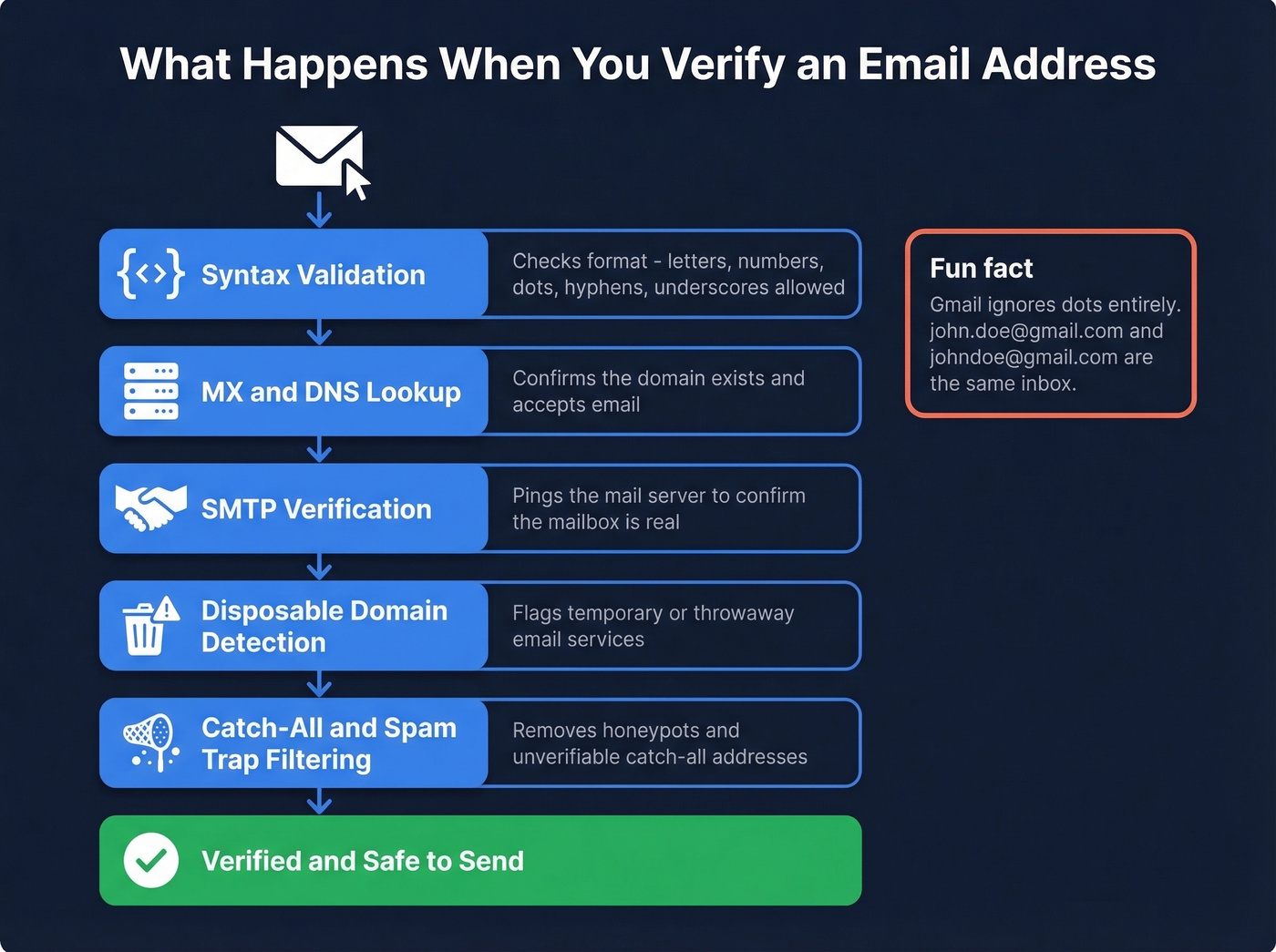
Here's a quirk worth knowing: Gmail ignores dots entirely. So john.doe@gmail.com and johndoe@gmail.com hit the same inbox.
You can technically verify an address manually via TELNET and SMTP commands, but it's impractical beyond a handful of addresses. Skip this if you have more than about ten emails to check.
Why Verification Isn't Optional
Let's be honest - if your average deal size is under $5K, you probably can't afford not to verify. The math is simple. Global inbox placement averages around 84%, which means roughly one in six emails never reaches the inbox. A healthy bounce rate sits below 2%. Between 2-5% signals list quality problems. Above 5% and you're actively damaging your sender reputation - the kind of damage that takes weeks to repair. (Benchmarks and fixes: email bounce rate.)
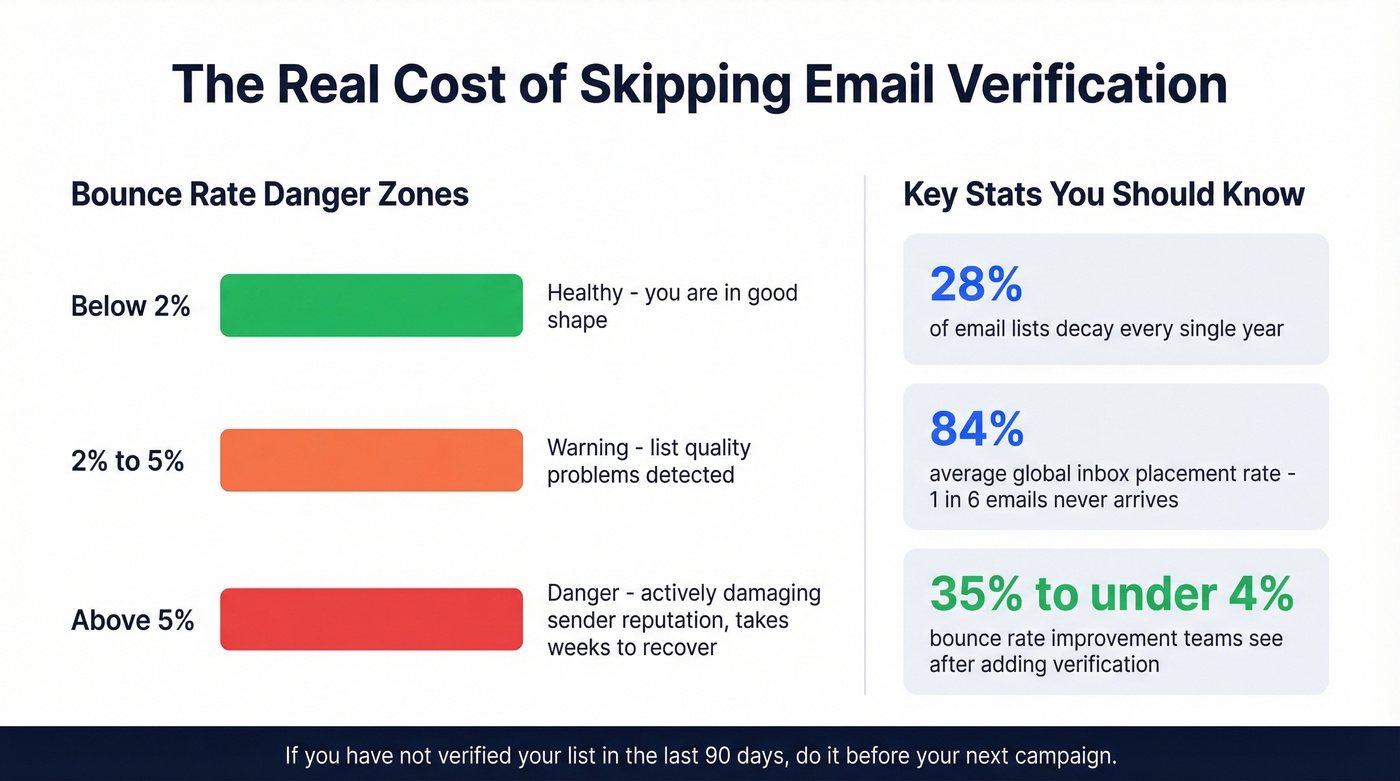
We've seen teams go from 35% bounce rates to under 4% just by adding a verification step before every send. If you haven't verified your list in the last 90 days, do it before your next campaign.
For standalone verification, ZeroBounce (100 free/month) and Email Hippo (100/day) both handle bulk checks well. (If you want more options, see Bouncer alternatives.)
Email lists decay 28% per year, and most tools refresh every 6 weeks. Prospeo refreshes every 7 days and runs every result through catch-all handling, spam-trap removal, and honeypot filtering before you ever see it. Finding and verifying happen in a single step - no second tool, no extra cost.
Stop paying twice to find and then verify. Prospeo does both at once.
FAQ
Is it legal to find someone's email address?
Yes, using publicly available information for legitimate business purposes is legal in most jurisdictions. Under GDPR, honor opt-out requests promptly. Under CAN-SPAM, include truthful headers and a working unsubscribe link. These are the practical guardrails most outbound teams follow.
What's a good email bounce rate?
Below 2% is healthy for outbound campaigns. Between 2-5% signals list quality problems, and above 5% will damage your sender reputation. Email lists decay by roughly 28% per year, so verify contacts quarterly at minimum to stay under that threshold.
Do I need both an email finder and a verifier?
Not always. Tools like Prospeo combine finding and verification into a single step, delivering only confirmed-deliverable results. If you just need to clean an existing list, a standalone verifier like ZeroBounce or Email Hippo works fine. Skipping verification entirely is how bounce rates hit double digits.