

How Many Emails Can You Send Before Considered Spam?
You just launched a cold email campaign, and by day three your inbox placement has cratered. Open rates are in the single digits. Your domain reputation is tanking. The problem isn't your copy - it's that you blew past a threshold you didn't know existed.
Gmail caps personal accounts at 500 emails per day. Google Workspace allows 2,000 . Outlook.com lets Microsoft 365 subscribers hit 1,000 non-relationship recipients daily. But none of those numbers matter as much as this one: a 0.3% spam complaint rate. That's the hard ceiling Google and Yahoo enforce, and if you exceed it, your emails go to spam regardless of volume. For cold outreach, most practitioners keep it to 10-15 emails per inbox per day. The rest of this article breaks down the math behind these numbers and how to scale without getting flagged.
Provider Sending Limits in 2026
The official caps vary by provider, but the safe zone for cold email is always far below the technical maximum.
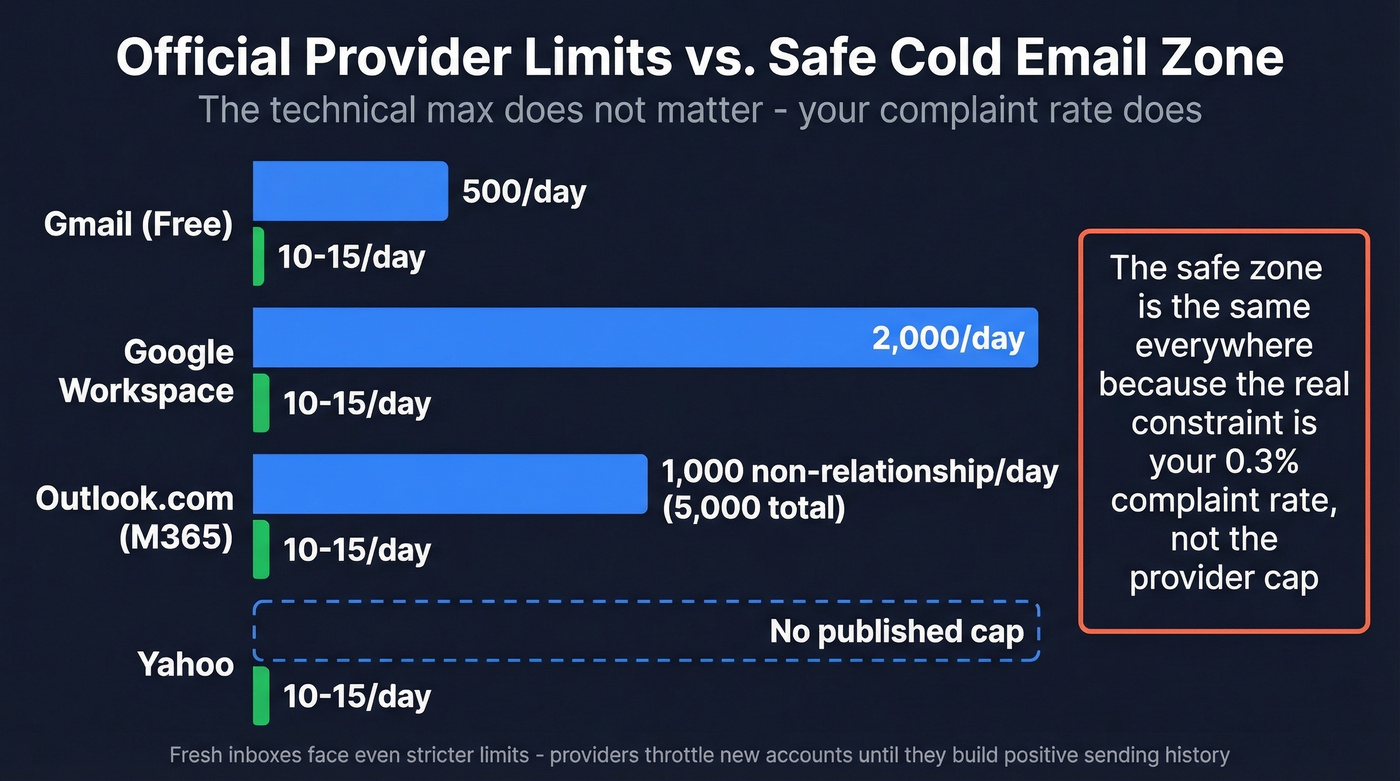
| Provider | Official Cap | Safe Zone (Cold) |
|---|---|---|
| Gmail (free) | 500/day | 10-15/day |
| Google Workspace | 2,000/day | 10-15/day |
| Outlook.com (M365) | 5,000 daily / 1,000 non-relationship | 10-15/day |
| Yahoo | No published cap | 10-15/day |
The safe zone is identical everywhere because the real constraint isn't the provider cap. It's the complaint rate. Fresh inboxes face even stricter practical limits - providers throttle new accounts aggressively until they've built a positive sending history.
Spam Complaint Rate Math
With 392.5 billion emails sent daily in 2026, providers have gotten ruthless about filtering. Global inbox placement sits around 84% (Gmail at 87%, Microsoft at just 76%), meaning roughly one in six emails never reaches the inbox. Your complaint rate determines which side of that line you land on.
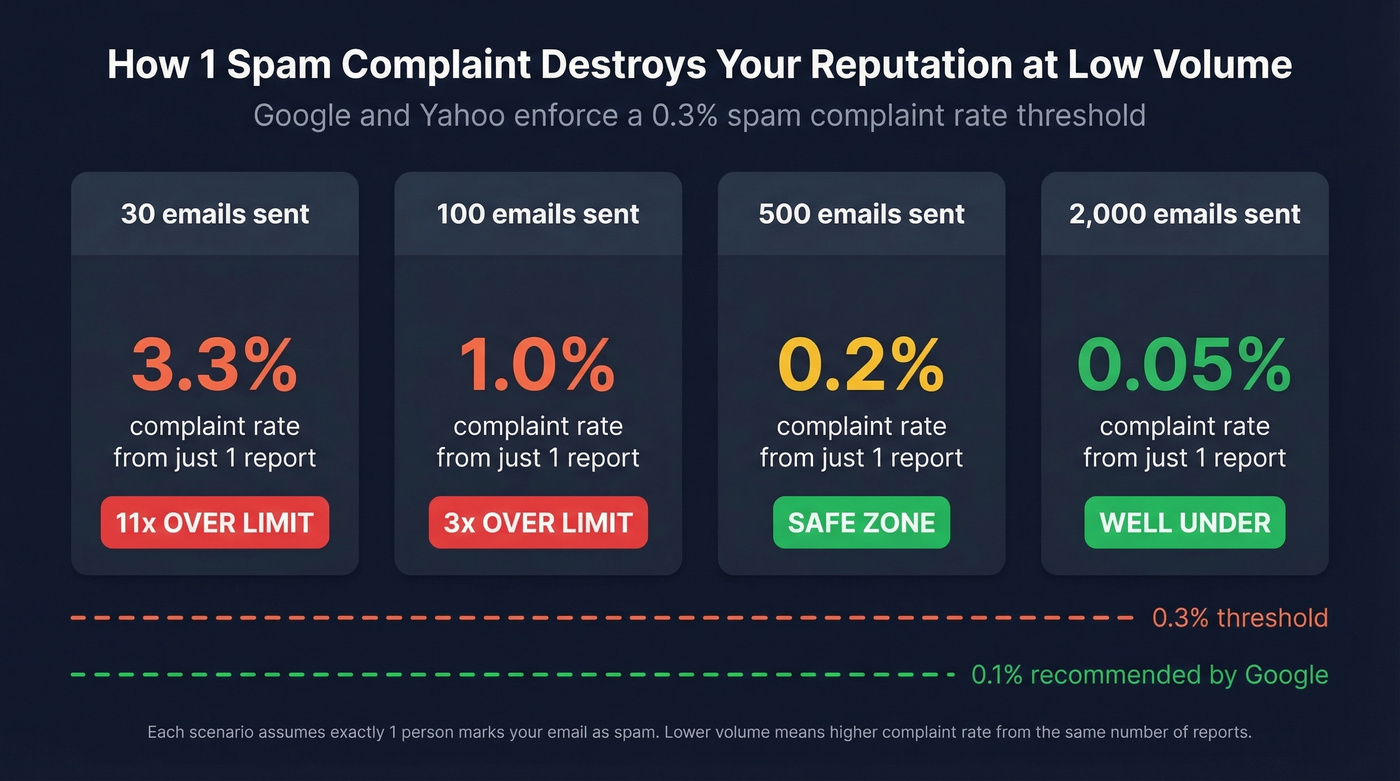
Here's where the math kills small senders. The 0.3% spam complaint threshold sounds generous until you run the numbers at low volume. Send 30 emails in a day. One person marks you as spam. That's a 3.3% complaint rate - eleven times over the limit. Yahoo calculates this based on mail delivered to the inbox, not total sent, which makes the denominator even smaller if you're already hitting spam folders.
Volume alone isn't the answer. You can send 2,000 emails a day from Workspace and stay clean, or send 30 and get flagged. It depends entirely on how recipients react.
What Google and Yahoo Enforce
Since February 2024, Google and Yahoo reject mail from bulk senders who fail these checks:
- Authentication: SPF or DKIM at minimum for all senders. Bulk senders need SPF + DKIM and a published DMARC policy (at least p=none) where DMARC passes. (If you need a refresher, see DMARC policy and SPF.)
- Spam complaint rate below 0.3%. Google recommends under 0.1%.
- One-click unsubscribe via List-Unsubscribe header (RFC 8058 POST method preferred).
- Visible unsubscribe link in the email body.
- Honor unsubscribe requests within 2 days.
- Valid forward and reverse DNS for sending IPs.
Miss any of these and you're not just risking spam placement - you're risking outright rejection at the server level. These rules apply equally to marketing campaigns and cold outreach. Providers don't distinguish between the two.

At 10-15 cold emails per inbox per day, every single bounce compounds your spam complaint rate. Prospeo's 5-step verification - syntax, domain, mailbox, catch-all, and spam-trap filtering - delivers 98% email accuracy so your limited daily sends actually reach real inboxes.
Stop burning warm-up progress on bad data. Verify first.
Warm-Up Schedule for New Inboxes
A fresh domain or inbox needs a ramp period before you can send at any meaningful volume. Skip this and you'll land in spam immediately. We've seen it happen dozens of times, and the consensus on r/coldemail is the same: warm-up is non-negotiable. (If you’re building a system, compare email warmup tools and track sender reputation.)
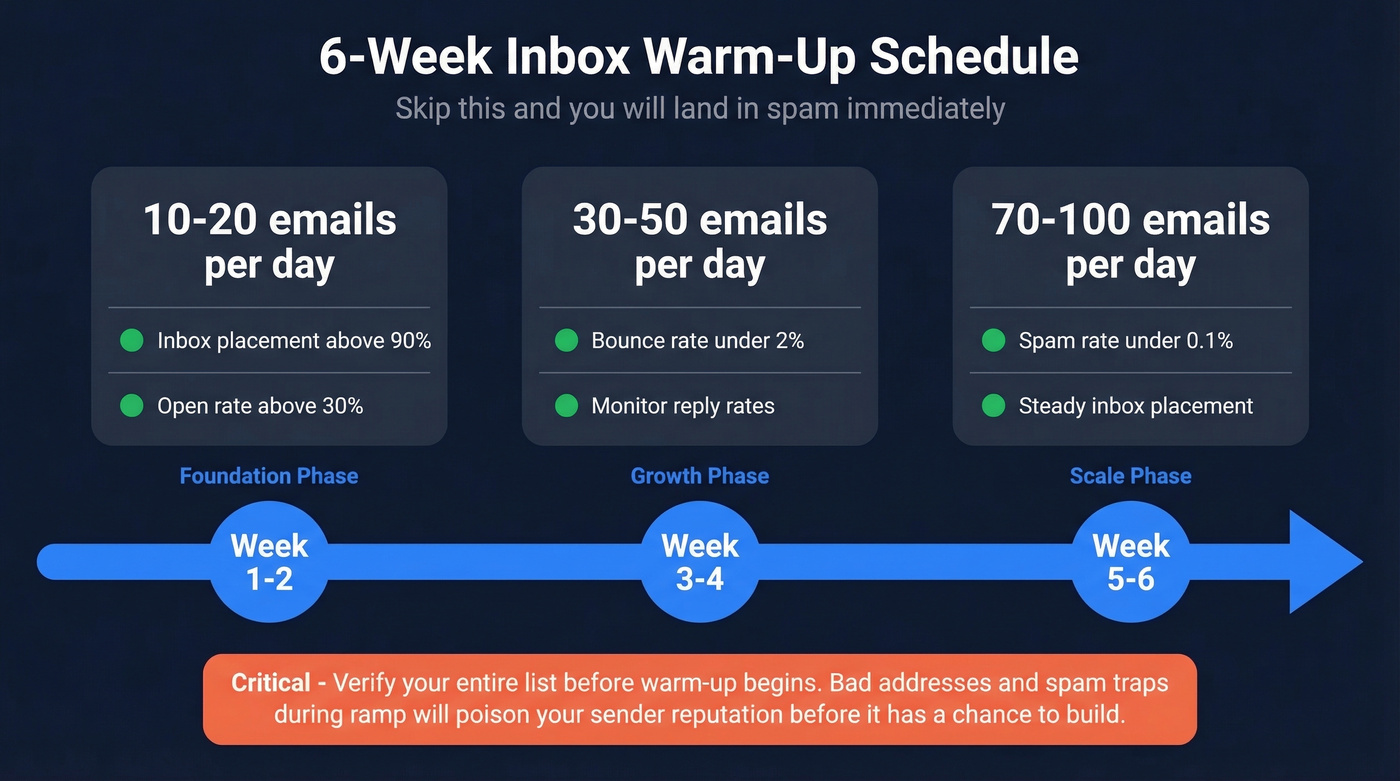
| Week | Volume/Day | What to Monitor |
|---|---|---|
| 1-2 | 10-20 | Inbox placement 90%+, open rate 30%+ |
| 3-4 | 30-50 | Bounce rate under 2% |
| 5-6 | 70-100 | Spam rate under 0.1% |
Before you start warm-up, verify your entire list. Bad addresses and spam traps during the ramp period will poison your sender reputation before it has a chance to build. This is the single most common mistake we see teams make - they rush the warm-up with unverified data and wonder why their domain is burned within two weeks. (More on keeping bounces down in email bounce rate and cleaning issues like spam traps.)
Scaling Without Getting Flagged
Scaling cold email in 2026 means scaling infrastructure, not volume per inbox. Buy 10-12 secondary domains. Set up 2-3 inboxes on each. Keep every inbox at 10-15 emails per day. That gives you roughly 300-450 sends daily across your infrastructure. Want more? Add more domains, not more emails per inbox. (This is basically managing email velocity at the inbox level.)
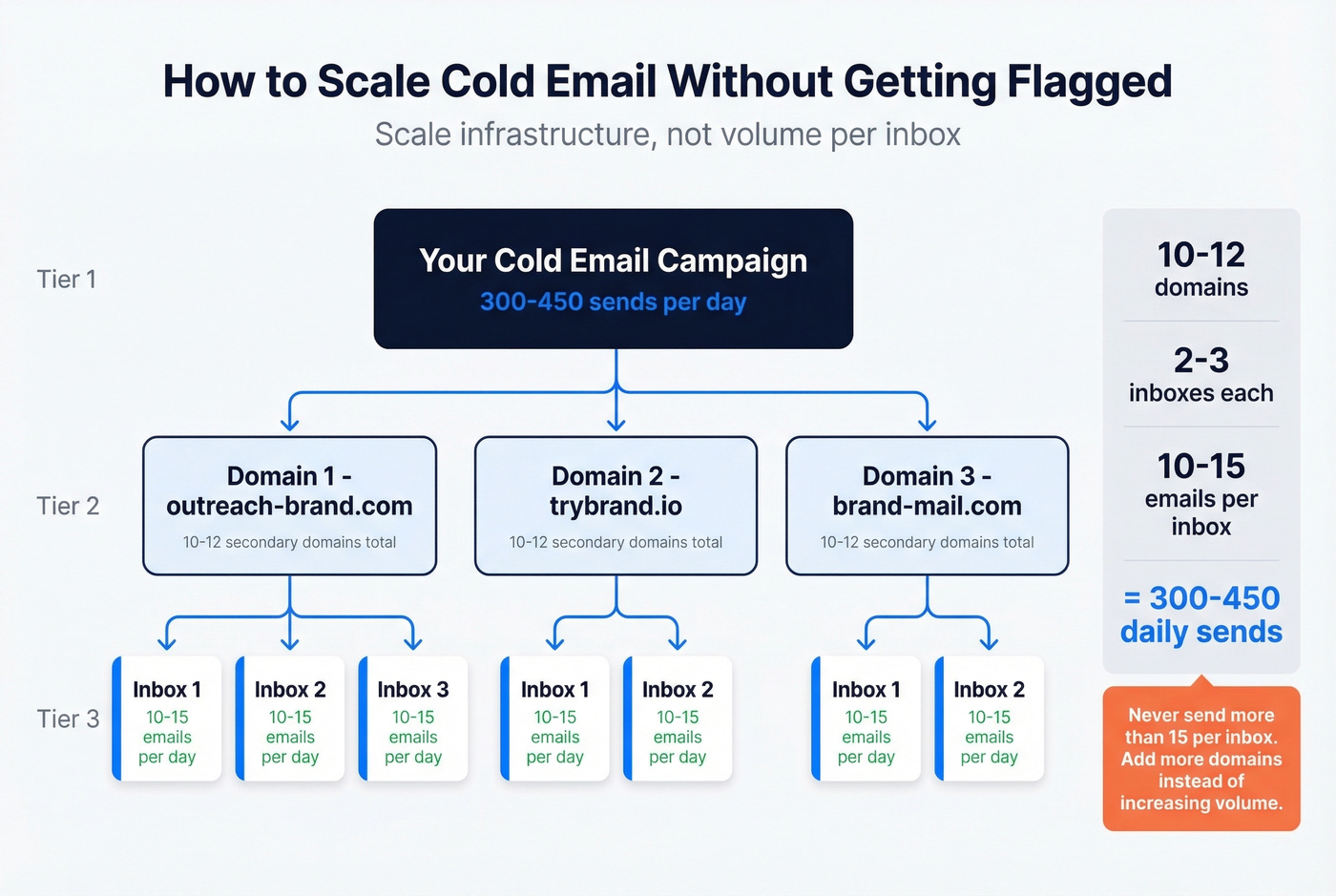
Let's be honest: if your average deal size is under $10k, you probably don't need more than 200 sends a day. Most teams over-invest in volume and under-invest in targeting. A tighter list with 98% verified addresses will outperform a massive list with 8% bounces every single time. (If you want a tighter outbound system, start with sales prospecting techniques.)
Don't blast all 15 emails at 9:00 AM either. Space sends across the day. Providers track sending patterns closely, and a sudden spike from a low-volume inbox triggers the same flags as exceeding a hard cap. Teams that stagger sends over 6-8 hours and verify before sending consistently stay under the 2% bounce threshold. (For timing, see best time to send cold emails.)
For teams trying to hit 100k+ emails per month, the infrastructure math scales linearly. You'd need roughly 50+ domains with multiple inboxes each, all warmed up and monitored individually. Some teams have scaled to millions of cold emails over the course of a year, but only by treating every inbox as its own micro-reputation that needs protecting. The principle never changes: distribute volume across infrastructure rather than concentrating it.
Here's the thing most teams miss - bad data is the root cause of most spam flags. You're not getting flagged because your subject line has a spam word. You're getting flagged because 8% of your list is bouncing and providers interpret that as mailing scraped, unverified contacts. Prospeo runs every address through a 5-step verification process covering syntax checks, domain validation, mailbox-level verification, catch-all handling, and spam-trap filtering, delivering 98% email accuracy. Snyk's sales team dropped bounce rates from 35-40% to under 5% after switching to Prospeo's verification workflow. At roughly $0.01 per verified email with a free tier to start, it's the cheapest insurance your domain reputation can get. (If you’re comparing options, see email reputation tools.)
Snyk's 50 AEs dropped bounce rates from 35-40% to under 5% with Prospeo. When you're scaling across dozens of domains at 10-15 sends each, a single spam trap can torch weeks of warm-up. At $0.01 per verified email, Prospeo is cheaper than replacing a burned domain.
Protect every inbox in your infrastructure for a penny per lead.
CAN-SPAM Compliance
Even if your deliverability is perfect, you still need to stay legal. CAN-SPAM applies to all commercial email and makes no exception for B2B. Each violation carries penalties up to $53,088 per email. Every message needs a valid physical postal address, a working opt-out mechanism, and honest subject lines. Honor opt-out requests within 10 business days, and never sell or transfer opted-out addresses. (If you’re building sequences, use cold email follow-up templates to stay consistent without spamming.)
Skip this section if you're only sending within the EU - GDPR has its own stricter rules around consent that supersede CAN-SPAM entirely.
FAQ
Is the "50 emails per day" rule real?
No. The real constraints are your complaint rate (under 0.3%) and bounce rate (under 2%), not a fixed daily number. Most cold email practitioners use 10-15 per inbox as a safe heuristic, but that's a best practice, not a hard rule imposed by providers.
Can I send cold emails from my main domain?
You shouldn't. If cold outreach triggers spam flags, your entire company's email reputation suffers - marketing, transactional, everything. Use secondary domains with at least 2-4 weeks of warm-up sending history before launching campaigns.
How do I keep my bounce rate under 2%?
Verify every email address before sending. A 5-step verification process that catches catch-all domains, spam traps, and honeypots is the single highest-ROI step in any cold email workflow. Upload a CSV, get results in minutes, and only send to addresses that pass.
Can I realistically send 100k+ emails per month?
Yes, but not from a single inbox or domain. You need distributed infrastructure - dozens of warmed-up inboxes across multiple domains, each staying within the 10-15 emails/day safe zone. Verification and staggered sending patterns aren't optional at that scale.