

How to Check Blacklist Status - And What to Do About It
A cold emailer we know watched reply rates crater over two weeks. They finally ran their sending setup through a blacklist check and found a real listing. After fixing the root cause, submitting the delisting request, and cleaning up stale contacts, deliverability started recovering fast.
That's the thing about blacklists: they quietly kill campaigns, and most people don't know how to check blacklist status until the damage is already done. Spam-related blacklisting alone costs senders an estimated $20 billion annually in lost deliverability and remediation.
The word "blacklist" means different things depending on who's searching. You might be worried about your email sending IP, a secondhand phone, or whether a former employer flagged you. We'll cover all three - starting with the one that costs businesses the most money.
What You Need (Quick Version)
- Email or IP blacklisted? Run your sending IP and domain through MXToolbox. If Spamhaus, Barracuda, or SpamCop show a listing, follow the delisting steps below. Prioritize major lists first, and only chase niche lists if you're seeing real delivery failures.
- Phone blacklisted? Dial *#06# to get your IMEI, then check it on IMEIpro. If it's listed, contact the original carrier - a new SIM won't fix it.
- Employer blacklist? No centralized database exists. Request your background check report and ask a trusted contact to run a reference check.
Hundreds of public blacklists exist, but only a handful actually matter. Don't panic until you know which one flagged you.
What Is a Blacklist?
A blacklist is a database of IPs, domains, phone IMEIs, or identities flagged for suspicious or unwanted activity. You'll encounter three types.
Email/IP blacklists track sending servers and domains associated with spam. These are the ones that tank your cold email campaigns. IP-based lists flag the server sending your mail, while domain-based lists flag the identity in your "From" address or the URLs in your message body. Changing your IP won't help if your domain is the problem - domain reputation travels with you. Some providers like Abusix further categorize IP blocklists into spam, policy, and exploit lists, each with different causes and remediation paths.
Phone/IMEI blacklists are shared carrier databases that block stolen or fraud-flagged devices from connecting to cellular networks.
Employer "blacklists" aren't databases at all - they're internal do-not-hire flags or negative references that feel like a blacklist but have no centralized registry.
One thing to keep straight: the blacklist provider isn't blocking your mail or phone directly. It's the mailbox provider or carrier using that blacklist that does the blocking.
How to Check Email & IP Blacklists
Run a Multi-List Scanner
Start with MXToolbox's blacklist checker - it scans 100+ lists in one pass. For broader coverage, try multirbl.valli.org or DNSChecker.
Check three things: your sending IP address, your sending domain, and any link domains that appear in your email body or signature. Most people forget that third one. It's often the culprit.

Check Provider-Specific Reputation
Here's what most guides miss: Gmail primarily relies on an internal reputation system with no formal delisting process. You monitor it through Google Postmaster Tools - if your domain reputation drops to "Low" or "Bad," the fix is improving your sending behavior over time. There's no button to click, no form to submit. (If you need a deeper playbook, see our guide on improving your sending behavior.)
Microsoft is similar but slightly more transparent. Use Microsoft SNDS to monitor your IP reputation with Outlook and Microsoft 365, and submit remediation requests through their support forms if you're blocked.
Read Your Bounce Codes
Your bounce messages contain clues about which list or internal block flagged you. Save these - you'll need them for delisting requests.
| Bounce Code | Typical Source |
|---|---|
| 550 5.7.1 Client host blocked | Spamhaus |
| 550 SC-001 | Barracuda |
| 550 5.7.606 Banned sending IP | Microsoft internal block |
If your bounce rate is above 2% consistently, you've got a problem worth investigating immediately. (Benchmarks and fixes: email bounce rate.)
Which Blacklists Actually Matter
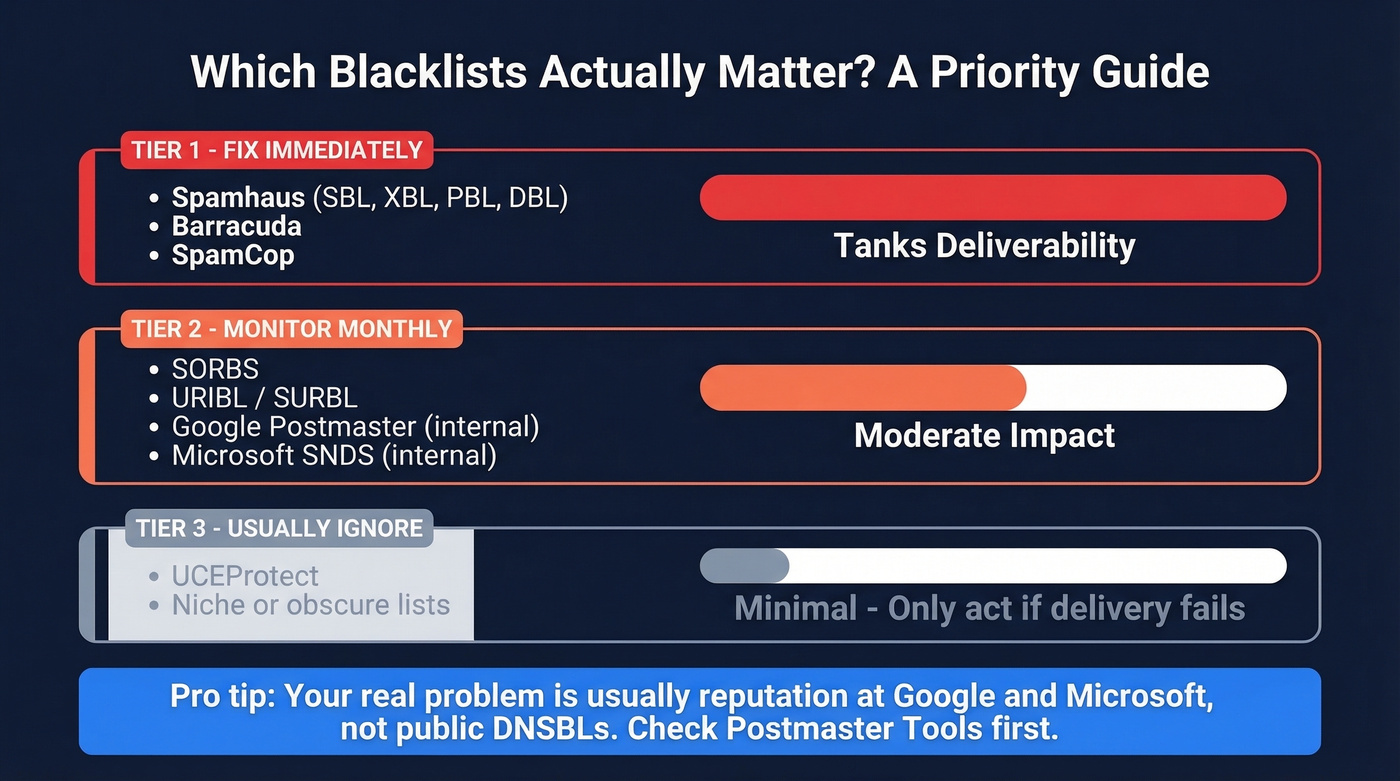
There are hundreds of public blocklists. Most are noise.
| Tier | Blacklists / Systems | Impact |
|---|---|---|
| Tier 1 | Spamhaus (SBL, XBL, PBL, DBL), Barracuda, SpamCop | Tanks deliverability. Fix immediately. |
| Tier 2 | SORBS, URIBL/SURBL, provider reputation systems (Google & Microsoft) | Moderate. Monitor monthly. |
| Tier 3 | UCEProtect, niche/obscure lists | Minimal. Ignore unless delivery fails. |
Threads on r/email back this up - people regularly see "listed" results on super niche lists, including brand-new domains, that don't translate into real-world blocking at major inbox providers. If MXToolbox shows you clean on Spamhaus, Barracuda, and SpamCop, you're in good shape.
Let's be honest: most senders obsess over public blocklists when their real problem is reputation at Google and Microsoft - two systems that run on internal signals. Check Postmaster Tools before you spiral over a long list of obscure DNSBLs. For a broader toolkit, see our roundup of email reputation tools.

Most blacklist problems start with dirty contact data - invalid emails that bounce, spam traps hiding in purchased lists, stale records that haven't been verified in months. Prospeo's 5-step email verification with spam-trap removal and honeypot filtering keeps your bounce rate under control. Every record refreshes on a 7-day cycle, so you're never sending to dead addresses that trigger blacklists.
Stop fixing blacklist damage. Prevent it with 98% accurate emails.
How to Read Results (and When to Ignore Them)
A clean scan from a multi-list checker doesn't guarantee inbox placement. We've seen this pattern repeatedly: someone runs MXToolbox, gets a clean result, and still can't reach specific recipients.
One sysadmin shared a perfect example. After a WordPress compromise, their emails were blocked by two recipients - but every scanner showed "no issues." The fix? Removing the website link from their email signature. The block wasn't a public DNSBL listing at all. It was URL reputation or recipient-side security filtering that no public tool catches.

A technical note worth knowing: CBL (the Composite Blocking List) is now folded into Spamhaus XBL, so you don't need to check it separately. And some Invaluement query hostnames are outdated - if you're running manual DNS lookups against old endpoints, you'll get stale results. Stick to MXToolbox or multirbl.valli.org for reliable, current data. If you're troubleshooting content-level issues too, run an email spam checker alongside blacklist scans.
How to Get Delisted
Before you submit a single removal request, fix the root cause. Every blacklist operator will tell you the same thing: if you delist without fixing the underlying problem, you'll be re-listed within days.
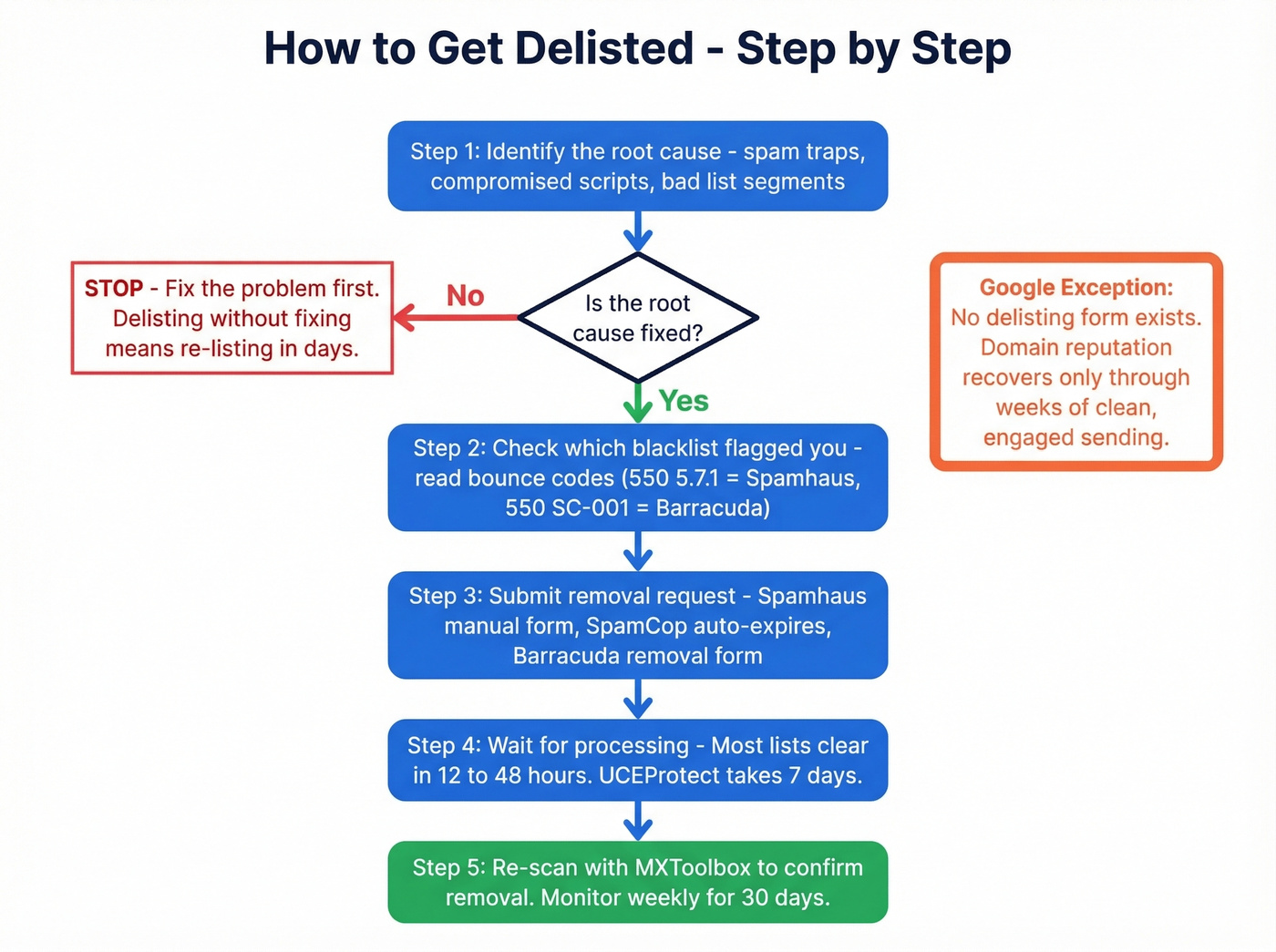
Identify the spam trap hits, compromised script, or bad list segment first. Then follow this playbook:
| Blacklist | Delisting Process | Timeline |
|---|---|---|
| Spamhaus SBL | Manual form + explanation | 24-48 hrs |
| Spamhaus XBL | Auto after fixing compromise | Hours to 24 hrs |
| Spamhaus PBL | Request removal if legit server | Varies |
| SpamCop | Auto if no new reports | ~24 hrs |
| Barracuda | Removal request form | 12-24 hrs |
| SORBS | Removal request | 1-7 days |
| UCEProtect L1 | Free after 7 days; paid express | 7 days |
Google is the exception - there's no delisting form. Your domain reputation recovers as your sending behavior improves, which can take weeks of clean, engaged sending. Patience is the only option there. If you're specifically dealing with Spamhaus, follow a dedicated Spamhaus blacklist removal workflow.
How to Prevent Getting Blacklisted
Prevention is cheaper than remediation in every way. Here's the checklist that matters:
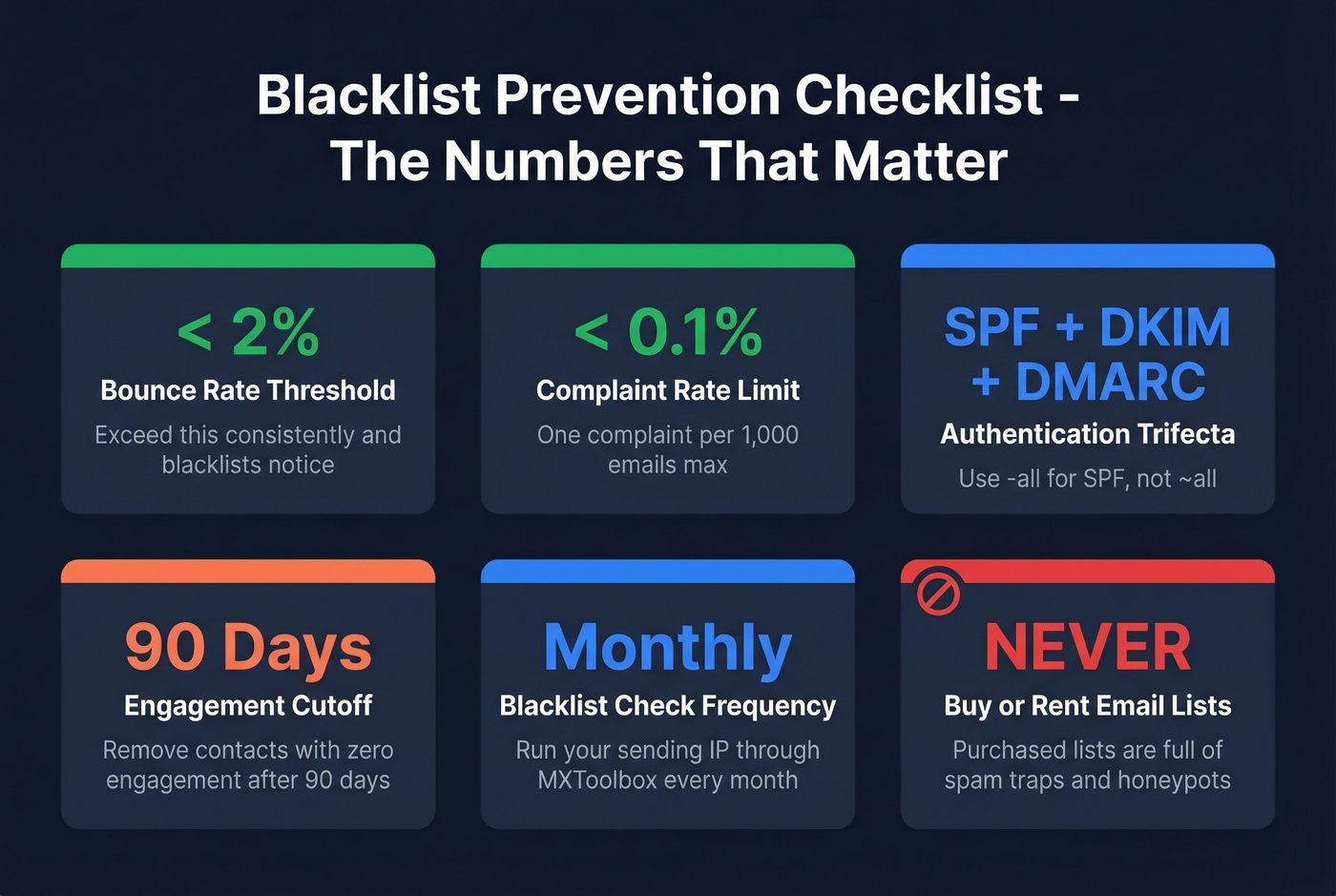
- Set up SPF, DKIM, and DMARC. Use
-allfor SPF, not~all. The stricter policy helps stop unauthorized sending and tightens authentication. (More detail: DMARC alignment and SPF record examples.) - Never buy or rent email lists. Purchased lists are riddled with spam traps. (If you're unsure about compliance, read is it illegal to buy email lists.)
- Clean your list before every campaign. Remove hard bounces, unsubscribes, and contacts who haven't engaged in 90+ days.
- Keep bounce rates under 2% and complaint rates under 0.1%. Exceed them consistently and you'll trigger filtering and blocklist attention.
- Warm up new IPs and domains gradually. Sudden volume spikes are one of the fastest ways to get throttled, blocked, or listed. (See email velocity.)
- Check for bad neighbors on shared IPs. If you're on shared hosting, someone else's spam can get your IP flagged. Run your sending IP through MXToolbox monthly.
- Verify your email data before sending. Bad data is one of the biggest causes of outbound deliverability problems - invalid addresses bounce, spam traps trigger listings, and honeypots flag you as a spammer. Prospeo's 5-step verification catches all three, including catch-all handling, spam-trap removal, and honeypot filtering, before you hit send. (If you suspect traps, use a dedicated spam trap removal process.)
You just spent hours checking blacklists, submitting delisting requests, and cleaning your sender reputation. Now make sure it doesn't happen again. Prospeo delivers 143M+ verified emails at 98% accuracy - with catch-all handling, spam-trap removal, and a data refresh cycle 6x faster than the industry average. One agency cut bounce rates from 35% to under 3% across every client domain.
Replace the data that got you blacklisted. Start with 75 free verified emails.
How to Check If a Phone Is Blacklisted
Find Your IMEI and Run a Check
Dial *#06# on any phone to pull up the IMEI number. You can also find it in Settings > About Phone, on the SIM tray, or on the original box. Once you have it, run it through IMEIpro or your carrier's specific lookup tool.
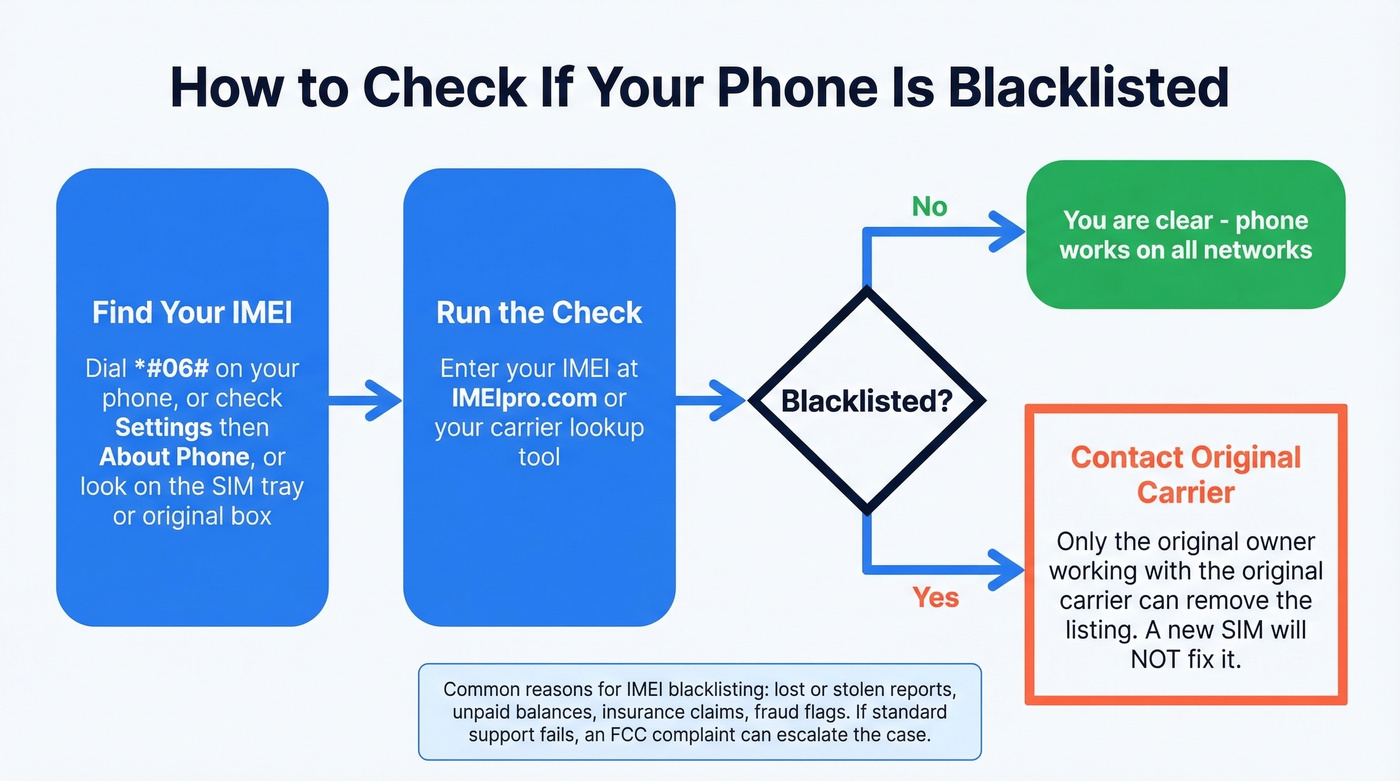
A blacklisted IMEI means the device is blocked from connecting to most cellular networks - a new SIM card won't fix it. Common reasons include lost/stolen reports, unpaid balances, insurance claims, or fraud flags.
Can You Unblacklist a Phone?
Usually only the original owner working with the original carrier can remove an IMEI from the blocklist. If you bought a used phone and discovered it's blocked, your options are limited.
But there are edge cases. One Verizon customer got a phone un-blacklisted after filing an FCC complaint. The root cause turned out to be an internal carrier flag tied to a prior Best Buy order - not theft at all. Verizon's fraud team removed the listing within 24 hours once the FCC got involved. The takeaway: "blacklisted" doesn't always mean stolen, and escalation works when standard support channels don't.
How to Check for Employer Blacklists
Let's be direct: no centralized employer blacklist database exists. What people experience as "being blacklisted" is usually one of three things - an internal do-not-hire flag at a specific company, a negative reference from a former manager, or an issue on a background check report.
Your practical steps: request a copy of your background check report, ask a trusted contact to run a reference check on your behalf, and if you suspect a specific company flagged you, contact their HR department directly. Skip this section if you're here for email or IP blacklists - the two worlds don't overlap.
FAQ
How often should I check my blacklist status?
Monthly for most senders. Weekly if you're running high-volume outbound or recently recovered from a listing. Set up Google Postmaster Tools for ongoing Gmail reputation monitoring - it's free and catches problems before they escalate to full blocklist events.
Can I get blacklisted for sending cold emails?
Yes - if you're sending to unverified lists with high bounce rates or spam trap hits. Keep bounce rates under 2% and complaint rates under 0.1%. Verify your data before every campaign and warm up new domains gradually.
Does one listing mean all my emails bounce?
No. Each mailbox provider chooses which blocklists to reference. A Spamhaus listing causes widespread blocking because most providers use it. A listing on an obscure niche list often has zero real-world impact unless a specific recipient system references it.
How do I know if Gmail is blocking me?
Gmail doesn't publish public blocklists. Check Google Postmaster Tools for your domain reputation - it shows "Bad," "Low," "Medium," or "High." There's no formal delisting process; reputation improves as your sending behavior improves over weeks of clean engagement.
What's the fastest way to prevent blacklisting?
Verify every address before you send. Catching invalid addresses, spam traps, and honeypots removes a major trigger for blocklist listings and protects sender reputation. Tools like NeverBounce, ZeroBounce, and Prospeo all handle this - Prospeo's free tier gives you 75 verifications per month to get started.