

How to Check If an Email Address Is Correct Before You Hit Send
You just uploaded 5,000 leads into your sequencer and 800 bounced on the first send. Your bounce rate is sitting at 16%, your domain reputation just took a hit, and deliverability for the next campaign is already compromised.
The industry threshold for a healthy bounce rate is under 2% - under 1% is ideal. Every bad address chips away at your sender reputation, and once that's damaged, even valid contacts stop seeing your messages. We've watched teams lose months of warm-up progress from a single dirty list. Knowing how to check if an email address is correct saves you from that spiral entirely. (If you're already dealing with bounces, start with our guide on bounce rate.)
What You Need (Quick Version)
- Checking one email? Use a free tool like Email Hippo, Mailmeteor Email Checker, or Verifalia - paste the address and get a result in seconds.
- Cleaning a list? ZeroBounce or NeverBounce are two reliable picks for bulk verification.
Four Ways to Verify an Email Address
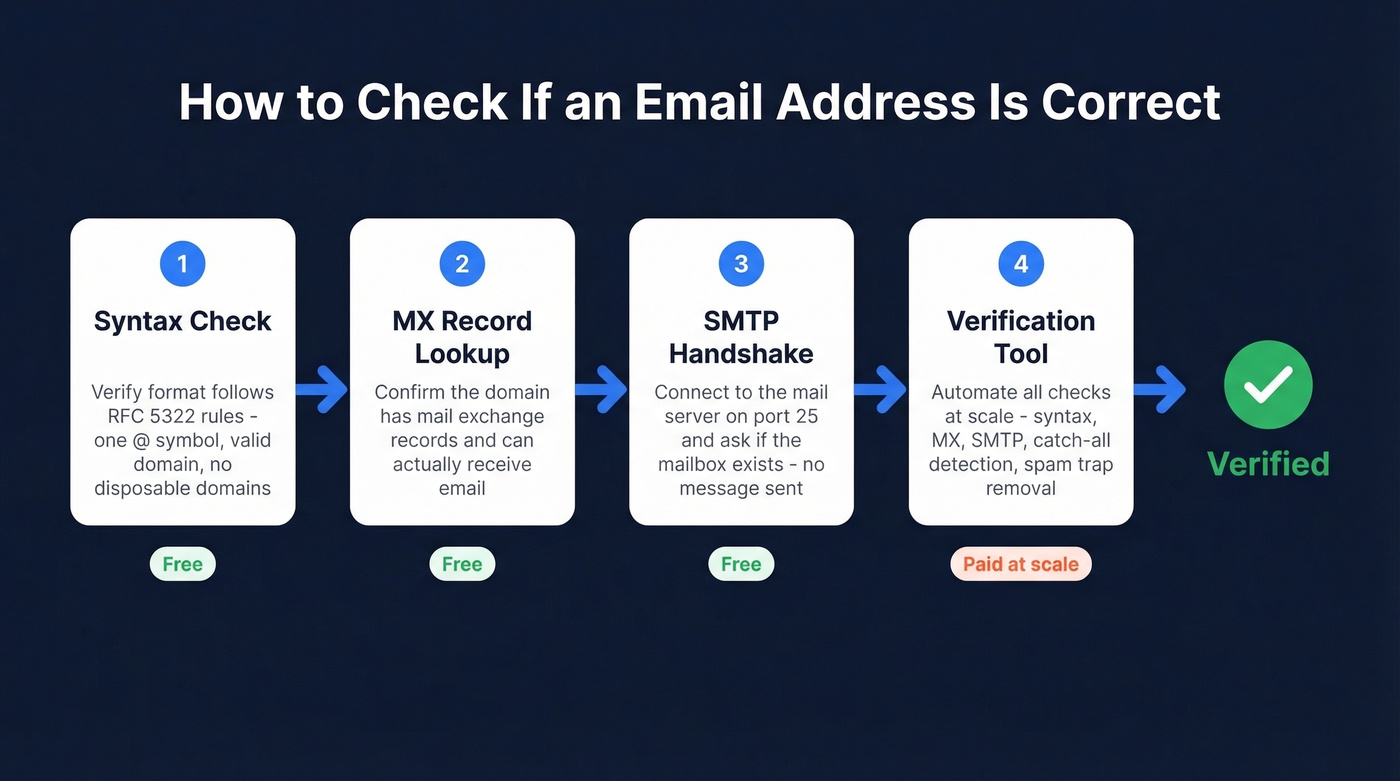
1. Check the Syntax First
Before you hit any server, check whether the address is even formatted correctly. A valid email follows RFC 5322 rules: one @ symbol, a valid local part, and a real domain. Flag disposable domains like Mailinator or Guerrilla Mail at this stage too. Syntax checks are free, instant, and catch the obvious junk. If you want a deeper walkthrough of validation methods, see how to check valid email id.
2. Look Up MX Records
An email domain needs MX (Mail Exchange) records to receive mail. You can check this from any terminal:
dig MX gmail.com
No MX records? The domain can't receive email. Full stop.
One common mistake: using A/AAAA lookups instead of MX lookups. A domain can receive email without hosting a website, so checking whether it resolves to a web server tells you nothing useful. Always check MX specifically. (This is one of the fastest ways to check if an email will bounce before you send.)
3. Run an SMTP Handshake (Without Sending)
You can connect to a mail server and ask whether a specific mailbox exists without actually sending a message. Connect to the MX host on port 25, run EHLO, issue MAIL FROM, then RCPT TO:<target@domain.com>. The server's response tells you what you need to know:
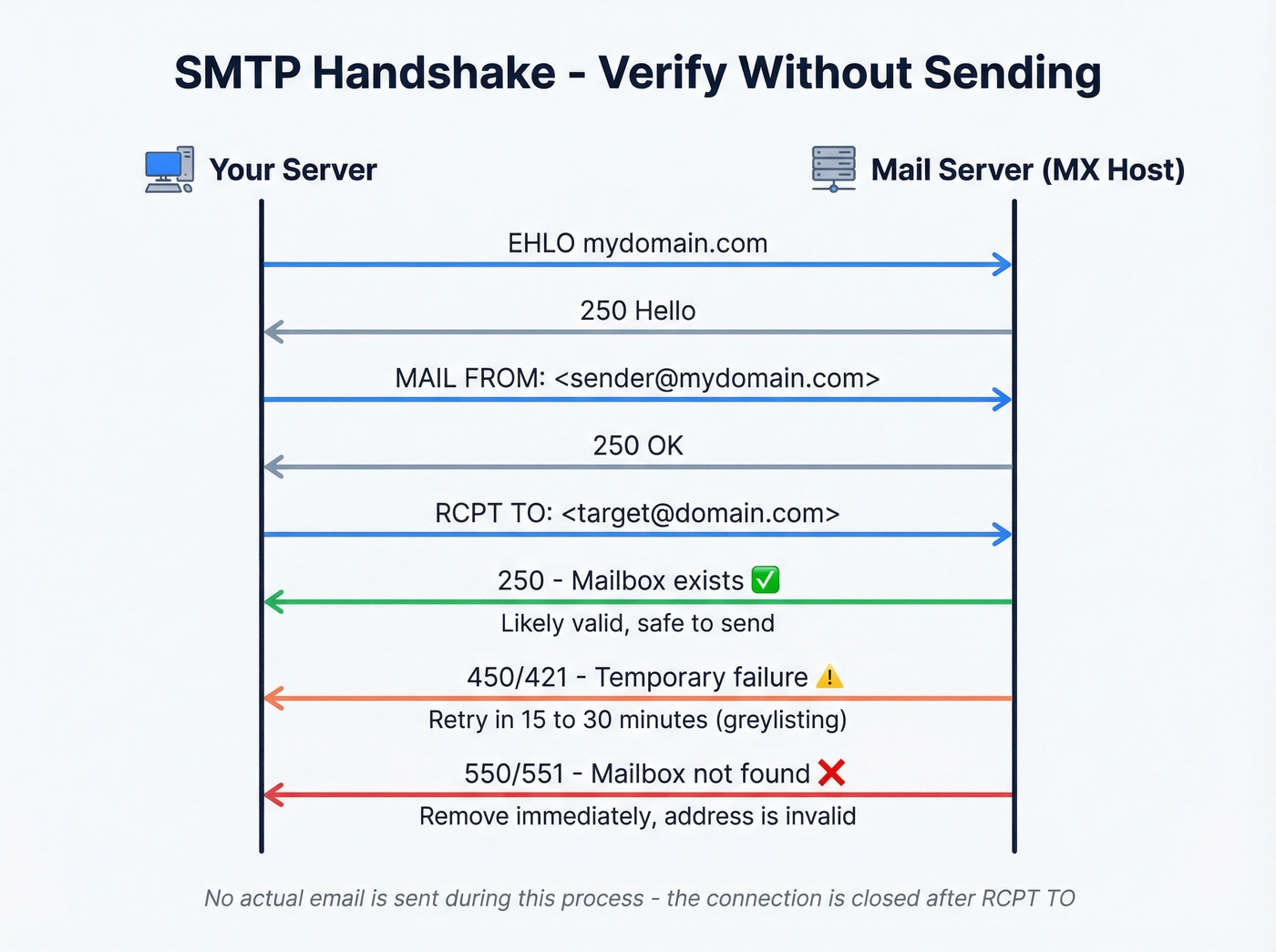
| Code | Meaning | Action |
|---|---|---|
| 250 | Mailbox accepted | Likely valid |
| 450/421 | Temporary failure | Retry in 15-30 min |
| 550/551 | Mailbox doesn't exist | Mark invalid |
A 450 often means greylisting - the server rejects first-time senders and expects a retry. Wait and try again. A 550 is definitive: that mailbox doesn't exist, so remove it immediately. If you're trying to confirm existence (not just correctness), use our guide on check if an email exists.
4. Use a Verification Tool
Manual SMTP checks work for a handful of addresses, but you're not going to telnet into mail servers for a 10,000-row CSV. That's where verification tools come in. They automate the entire chain - syntax, MX lookup, SMTP handshake, disposable domain detection, role-based filtering, and spam-trap removal - in seconds. If you need to validate addresses at scale, this is the only practical path. (For more on protecting inbox placement, see our email deliverability guide.)

Most teams find emails with one tool, then verify them with another. That's two vendors, two costs, and a gap where data decays between steps. Prospeo eliminates that gap with its 5-step verification running at the point of discovery, delivering 98% accuracy across 143M+ verified addresses. Every contact comes pre-verified from the start. If you're comparing options, our breakdown of Hunter alternatives can help.
For teams that already have lists and just need to clean them, here's how the dedicated verification tools stack up:
| Tool | Free Tier | ~Cost per 1K | Accuracy | Best For |
|---|---|---|---|---|
| Prospeo | 75/mo | ~$10 | 98% | Prospecting with built-in verify |
| ZeroBounce | 100/mo | ~$8 | 97.8% | Bulk list cleaning |
| NeverBounce | 10 free | ~$8 | 96.9% | Reliable mid-range |
| Bouncer | 100 free | ~$7 | 96.5% | Catch-all resolution |
| MillionVerifier | 500 free | ~$0.30 | 95.8% | Budget bulk |
| Email Hippo | 100/day | Free | - | Quick one-off checks |
ZeroBounce and NeverBounce are the workhorses many outbound teams default to when they want something proven and predictable. If you're just spot-checking a few addresses before a cold email, Email Hippo's free tier is more than enough. If you're building lists from scratch, start with free lead generation tools.
Reading Your Verification Results
Every tool returns one of four statuses. Here's what to do with each:
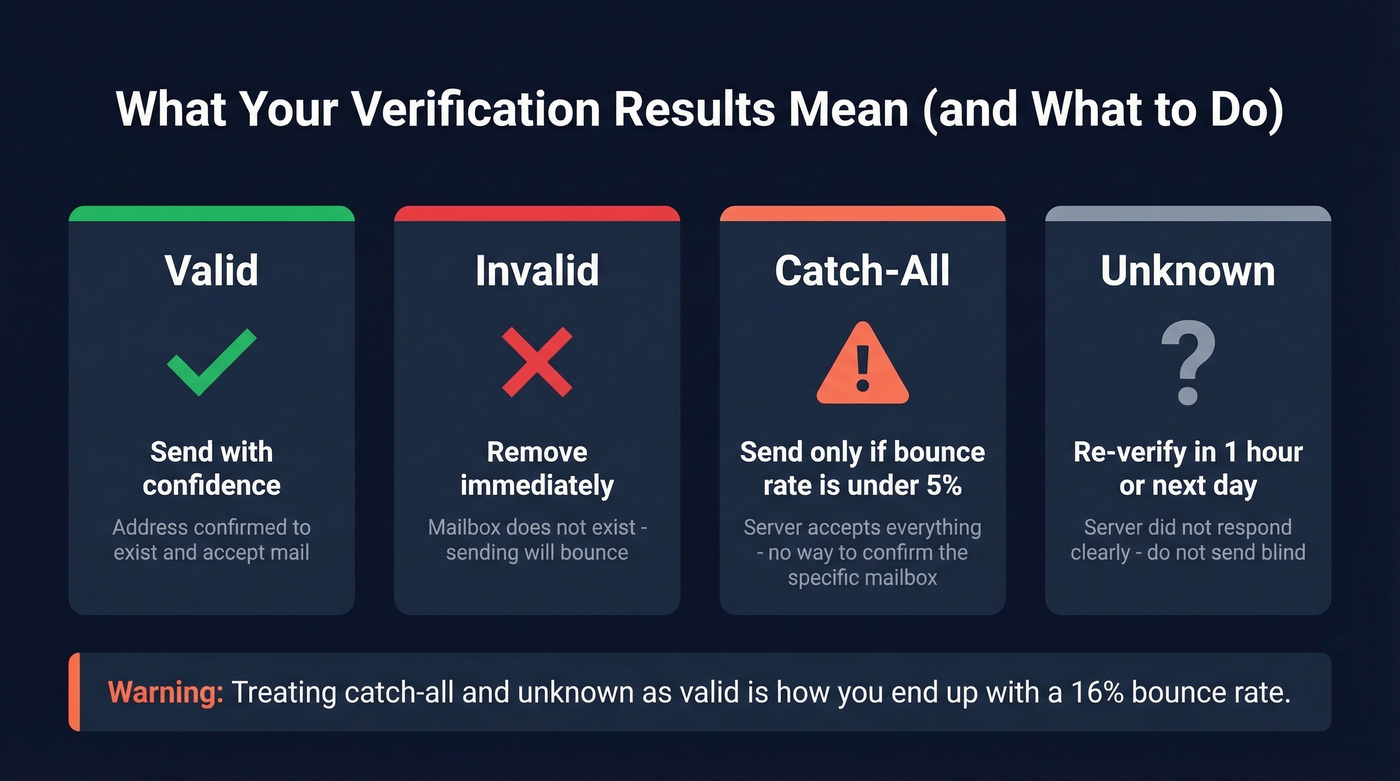
- Valid - send with confidence.
- Invalid - remove immediately.
- Catch-all - proceed only if your current bounce rate is under 5%. If you're already running hot, skip these.
- Unknown - re-verify in an hour or the next day. Don't send blind.
Treating catch-all and unknown the same as "valid" is how you end up with a 16% bounce rate. We've seen it happen more times than we can count. If you're scaling outbound, it also helps to manage email velocity so you don’t compound deliverability issues.

You're reading about verification because bad data already burned you. Prospeo's 5-step verification runs at the point of discovery - syntax, MX, SMTP, catch-all handling, and spam-trap removal - so every email arrives pre-verified at 98% accuracy.
Skip the two-tool workflow. Find and verify in one step.
The Catch-All Problem
Here's the dirty secret of email verification: 30-40% of B2B email addresses sit on catch-all domains. These servers return 250 OK for literally any address - real or fake. You could send to unicorn-ceo-42@bigcorp.com and the server would accept it. We've seen catch-all domains account for a third of entire prospect lists, which is genuinely maddening when you're paying for verification and still can't get a straight answer.
Look, if your deal sizes are below five figures, you probably shouldn't be sending to catch-all addresses at all. The domain risk isn't worth the marginal pipeline. The consensus on r/coldemail tends to agree - most experienced senders either skip catch-alls entirely or run them through a secondary verification layer before touching them. If you're building sequences, our B2B cold email sequence guide covers safer list and sending practices.
Verification Isn't One-and-Done
Email addresses decay. People change jobs, companies restructure, domains expire. After just four weeks, roughly 2% of a verified list goes invalid. That compounds fast if you're sitting on lists for months without re-checking.
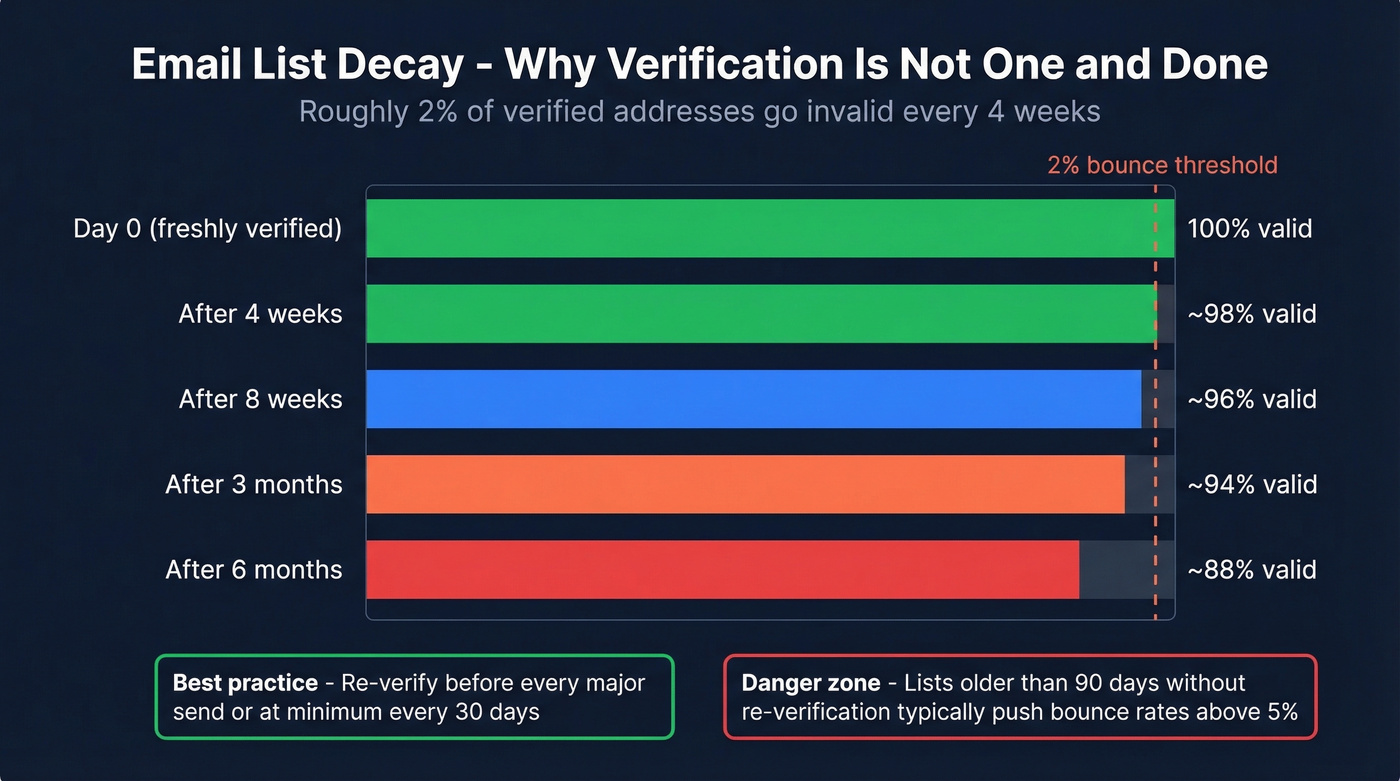
Let's be honest: the method for how to check if an email address is correct doesn't change. But the answers do. A perfectly valid address in January can bounce by March because someone switched companies. Re-verify before every major send. If you're running weekly campaigns, build re-verification into your workflow so it happens automatically rather than when you remember. If your reputation already took a hit, follow the steps in improve sender reputation.
Email addresses decay 2% every four weeks. Prospeo refreshes its 143M+ verified emails every 7 days - not the 6-week industry average - so you never send to a stale address. At roughly $0.01 per email, cleaning your list costs less than a single bounce.
Get emails that are correct today, not last quarter.
Is the Sender Legitimate?
If you're checking whether an incoming email is real rather than validating your own outbound list, the approach is different. Hover over the display name to reveal the actual sending address - spoofed emails hide behind familiar names. Watch for character substitution: rn masquerading as m, 1 swapped for l. Check the domain's age via WHOIS; a brand claiming ten years of history on a 30-day-old domain is a red flag. Skip this section if you're only here for outbound verification.
Frequently Asked Questions
Can I verify an email address without sending a message?
Yes. Run an SMTP handshake - connect to the mail server on port 25 and issue a RCPT TO command. A 250 response means the mailbox exists; a 550 means it doesn't. Free tools like Email Hippo and Verifalia automate this for single addresses if you don't want to touch a terminal.
How often should I re-verify my email list?
Re-verify before every major campaign, or at minimum every 30 days. Roughly 2% of addresses go invalid each month due to job changes and domain expirations. Lists older than 90 days without re-verification typically push bounce rates above 5%.
What's the best free email verification tool?
For quick one-offs, Email Hippo offers 100 free checks per day. For ongoing prospecting, Prospeo's free tier includes 75 verified email credits per month with full 5-step verification - enough to test real campaigns, not just spot-check addresses.
What does "catch-all" mean in verification results?
A catch-all domain accepts mail to any address at that domain, whether the mailbox exists or not. Verification tools can't confirm individual addresses on these servers. Only send to catch-all results if your bounce rate is currently under 5%; otherwise, treat them as unknown and skip.