

How to Check If an Email Address Is Valid (2026)
You just sent a 5,000-email campaign and 400 bounced. Your ESP is threatening to suspend your account, your sender domain reputation is tanking, and your next send is in 48 hours. That's what happens when you skip email verification - or trust the wrong tool to do it.
Here's how to check if an email address is valid before it costs you a sending domain. Roughly one in six emails never reaches the inbox, with global inbox placement sitting around 84%. Microsoft is the worst offender at just 75.6% inbox placement, while Gmail lands 87.2%. And that's for senders with clean lists. Gmail starts throttling senders whose spam complaint rate exceeds 0.3%, and once your bounce rate crosses 2%, both Gmail and Microsoft clamp down fast.
What You Need (Quick Version)
Your approach depends on where you're starting:
One-off check. Paste the address into a free online verifier like Verifalia or Hunter's free tier. You'll get a result in seconds.
Bulk list cleaning. You've got an existing list - maybe thousands of contacts - and you need to scrub it before your next campaign. Use a paid verification tool like ZeroBounce or Kickbox. Expect to pay roughly $0.003-$0.01 per email, depending on volume and features.
What "Valid Email" Actually Means
People use "valid" loosely, but there are three distinct layers. Confusing them is how teams end up with lists that look clean but still bounce.
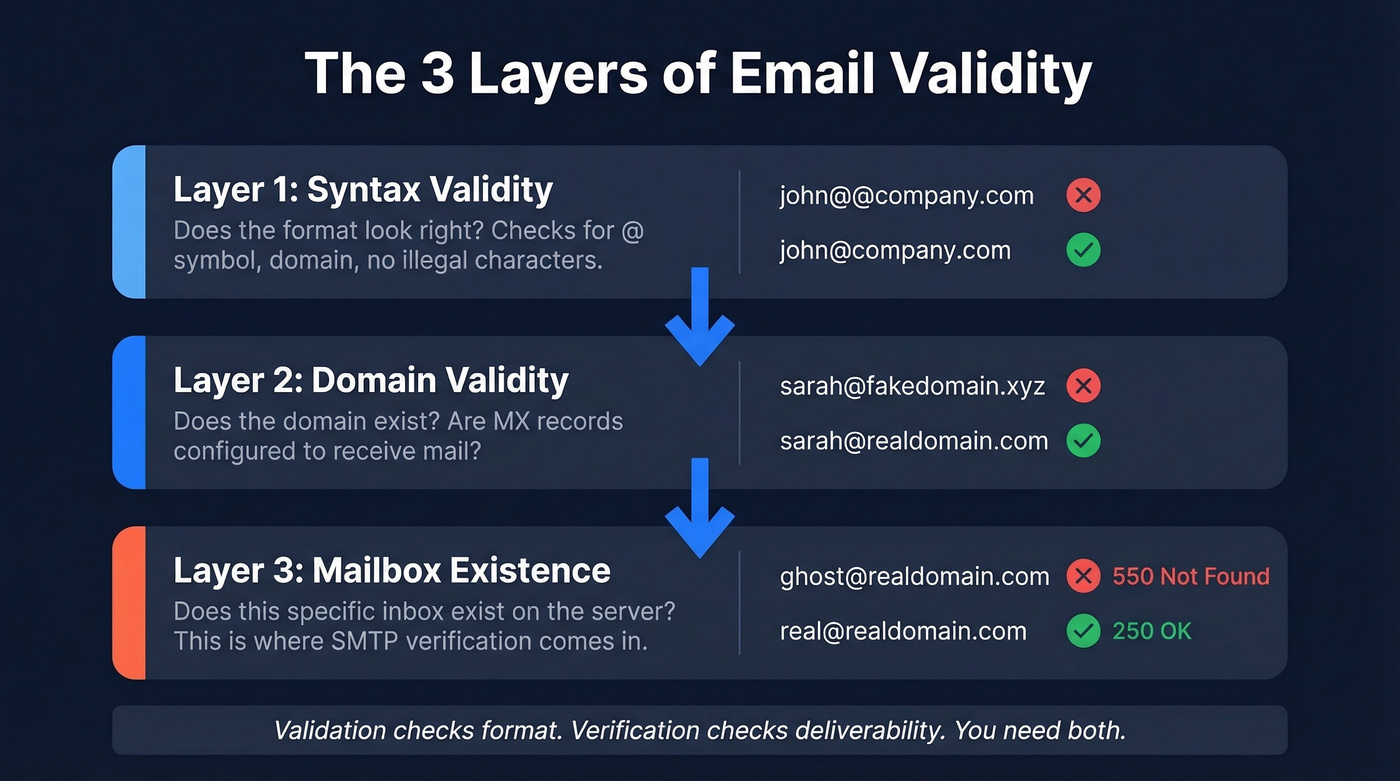
Syntax validity is the simplest layer. Does the address follow the right format? An @ symbol, a domain, no illegal characters. This catches typos like john@@company.com or missing TLDs. A basic regex pattern handles this (more detail in our email syntax check guide).
Domain validity goes deeper. Does the domain actually exist? Does it have MX records configured to receive mail? An address like sarah@totallynotarealdomain.xyz passes syntax checks but fails here.
Mailbox existence is the real test. The domain exists and accepts mail - but does this specific mailbox exist on that server? This is where SMTP verification comes in, and it's where things get complicated. Major providers increasingly obscure their responses, catch-all domains accept everything, and enterprise security layers add noise that makes definitive answers rare.
The industry uses "validation" and "verification" almost interchangeably, but they're different. Validation checks format. Verification checks deliverability. You need both, but verification is what actually prevents bounces (full breakdown: email validation vs verification).
How Email Verification Works
Every verification tool - free checker or enterprise API - runs some version of the same five-step pipeline. Understanding it helps you spot which tools are cutting corners (see also: how does email verification work).
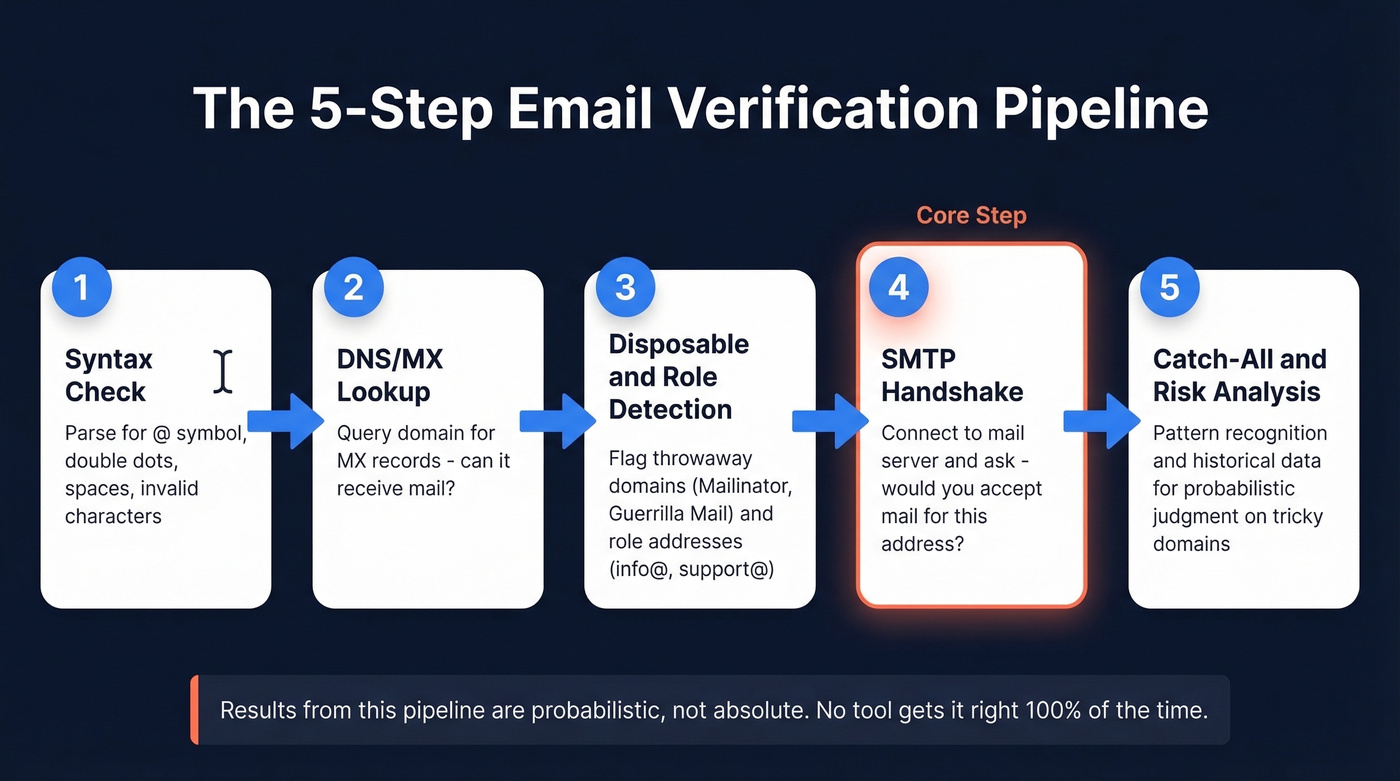
Step 1: Syntax check. The tool parses the address for structural correctness. Missing @, double dots, spaces, invalid characters - all caught here. Trivial, and every tool does it.
Step 2: DNS/MX lookup. The tool queries DNS for the domain's MX records to confirm it's configured to receive email. No MX records means the domain can't accept mail.
Step 3: Disposable and role-based detection. Is this a throwaway address from Guerrilla Mail or Mailinator? Is it a role-based address like info@ or support@ that'll tank your reply rates? Good tools maintain databases of known disposable domains and flag role-based prefixes.
Step 4: SMTP handshake. The core of verification. The tool connects to the mail server, introduces itself, and asks "would you accept mail for this address?" without actually sending anything. The server's response tells you whether the mailbox exists.
Step 5: Catch-all and risk analysis. If the domain accepts mail for any address, the SMTP handshake can't confirm individual mailboxes. Advanced tools use pattern recognition, domain behavior analysis, and historical data to make a probabilistic judgment.
Here's the thing most vendors won't tell you: results from this pipeline are probabilistic, not absolute. We've tested tools that confidently mark addresses as "valid" only to watch them hard-bounce on send.
SMTP Response Codes
When you're reading verification results or debugging manually, these codes matter:
| Code | Meaning | What It Tells You |
|---|---|---|
| 220 | Service ready | Server accepted connection |
| 250 | OK / Action completed | Mailbox exists, message accepted |
| 450/451/452 | Temporary failure | Greylisting, rate limit, try later |
| 550 | Mailbox unavailable | Address doesn't exist |
| 551 | User not local | Try a different server |
| 553 | Mailbox name invalid | Syntax rejected by server |
A 250 on RCPT TO is your green light. A 550 is definitive - that mailbox is dead. The 4xx range is where things get murky, especially with greylisting.
Verify an Email Manually (SMTP)
Manual SMTP verification is impractical for anything beyond a handful of addresses, but it's worth understanding because it demystifies what every tool does under the hood.
Step 1: Find the MX record.
[nslookup -q=mx example.com](https://learn.microsoft.com/en-us/windows-server/administration/windows-commands/nslookup)
This returns the domain's mail exchangers. You'll see entries with preference values - lower numbers mean higher priority. Pick the one with the lowest preference value.
Step 2: Connect via Telnet.
telnet mail.example.com 25
If the server's reachable, you'll get a 220 banner. If not, port 25 is probably blocked by your ISP or the server's firewall.
Step 3: Run the SMTP dialogue.
EHLO verify.test
MAIL FROM:<test@yourdomain.com>
RCPT TO:<target@example.com>
A valid mailbox typically returns 250 2.1.5 OK. An invalid one returns something like 550-5.1.1 The email account that you tried to reach does not exist.
Important caveats. Major providers increasingly block or rate-limit SMTP enumeration. Repeated probing from the same IP risks blacklisting. Catch-all servers return 250 for literally any address, real or fake. And Telnet doesn't support backspace after connecting - one typo and you'll get a 500-class syntax error.
Use this to learn how verification works. Use a tool for actual work.

Prospeo's 5-step verification handles catch-all domains, spam traps, and honeypots - the exact edge cases that return "unknown" in other tools. Every email in our 143M+ database is verified at 98% accuracy with a 7-day refresh cycle, so you're never sending to stale addresses.
Skip the SMTP guesswork. Get emails that are already verified.
Why Tools Return "Unknown"
If you've run a list through a verifier and gotten back 15% "unknown" results, you're not alone. Two main culprits.
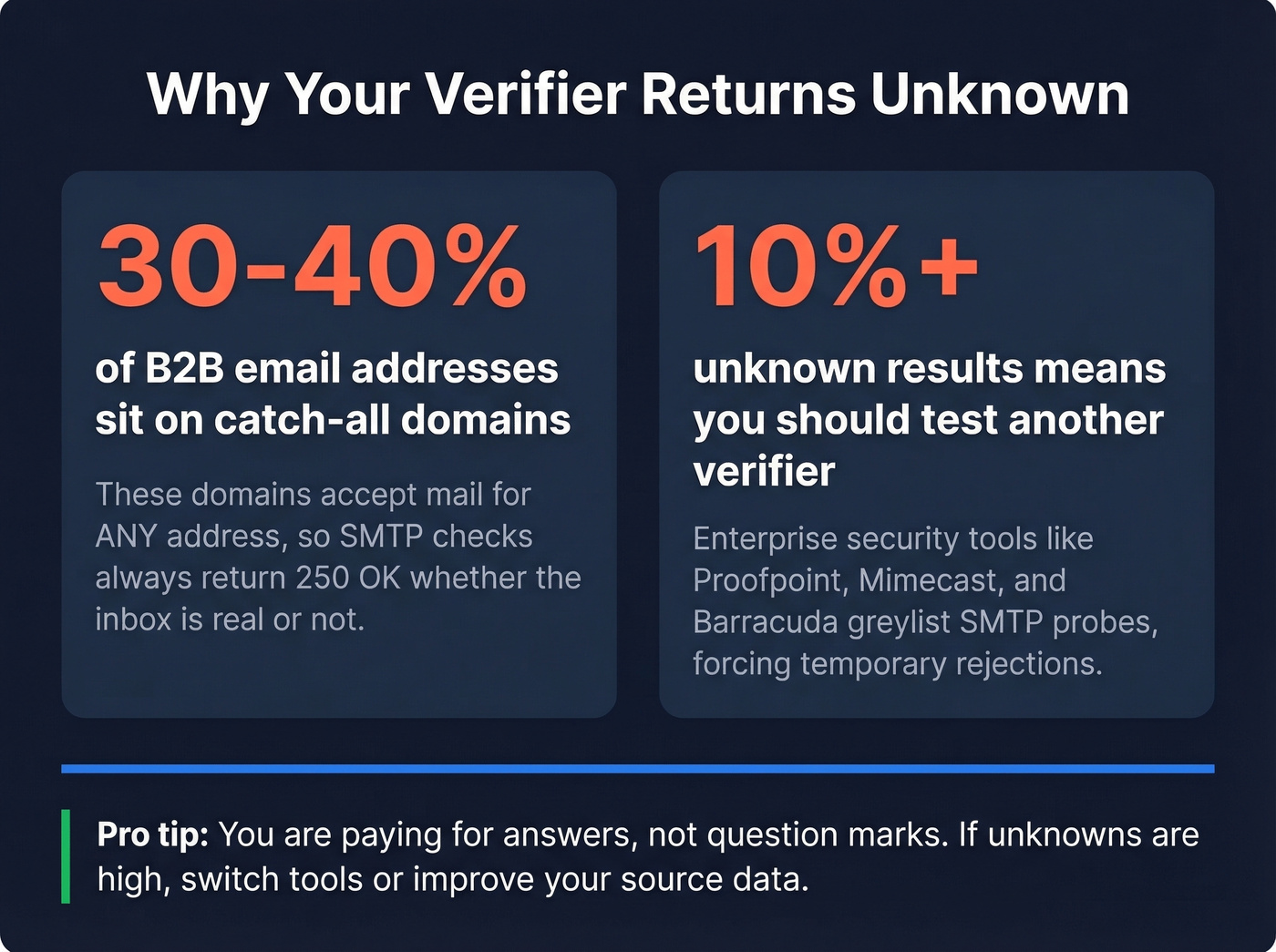
Catch-all domains. These accept mail for any address at the domain - anything@company.com gets accepted. The SMTP handshake returns 250 whether the mailbox is real or not. Roughly 30-40% of B2B email addresses sit on catch-all domains, making this the single biggest source of "unknown" verdicts. Even the best tools are guessing when a domain is configured this way.
Enterprise security layers. Companies running Proofpoint, Mimecast, Barracuda, or Microsoft Defender often greylist or rate-limit SMTP probes. The verification tool gets a temporary rejection instead of a definitive answer and conservatively marks the result as unknown.
If you're seeing 10%+ "unknown" results, test another verifier. You're paying for answers, not question marks.
Best Email Validation Tools in 2026
Let's set expectations before we get into individual tools. The only independent accuracy benchmark we trust is Hunter's 3,000-email test across 15 verification tools. The best performer hit 70% accuracy. Not 95%. Not 99%. Seventy percent. So when a vendor claims 99.6% accuracy, that's their internal guarantee - not what you should expect every dataset to score in the wild.
Look, most teams don't need a better verification tool. They need better source data. Verifying garbage emails at 70% accuracy still leaves you with 30% garbage.
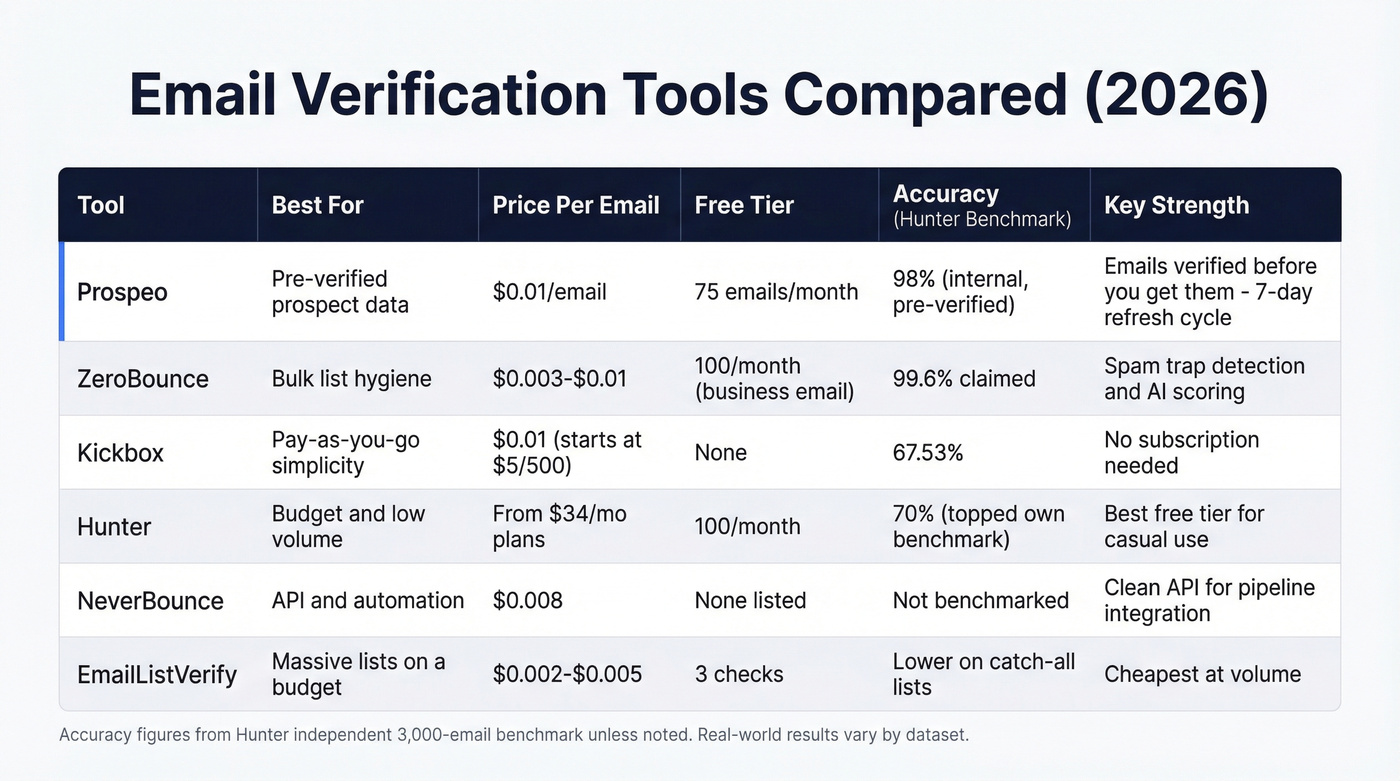
Prospeo

Use this if you're building prospect lists and want emails that are already verified before you touch them. Prospeo's 300M+ profiles go through a 5-step verification process with catch-all handling, spam-trap removal, and honeypot filtering - all on a 7-day refresh cycle. The result is 98% email accuracy out of the box.
The advantage is upstream: instead of finding emails from sketchy sources and then paying to clean them, you start with clean data. Meritt switched and saw their bounce rate drop from 35% to under 4%. That's not a verification story - it's a data quality story.
Runs about $0.01/email with a free tier of 75 emails/month. Native integrations with Salesforce, HubSpot, Instantly, Lemlist, and Clay mean verified contacts flow straight into your stack.
ZeroBounce

ZeroBounce is a strong pure-play verifier for bulk list hygiene, with spam-trap detection and an AI-based scoring system. It guarantees 99.6% validation accuracy, though real-world performance on messy datasets with catch-all domains and enterprise firewalls will be lower - as the Hunter benchmark showed.
The consensus on r/coldemail is that ZeroBounce catches more invalids than budget alternatives. One user found MillionVerifier missing unregistered domains entirely, which is a basic DNS check failure.
The tradeoff: verification results expire after 30 days. Plans typically start around $20-$100/month depending on credits and modules, with pay-as-you-go pricing around $0.003-$0.01/email. Free accounts include 100 monthly verifications when you sign up with a business domain.
Kickbox
Kickbox placed third in the independent benchmark at 67.53% accuracy - which, in context, is genuinely good. No subscription required: $5 gets you 500 verifications, with volume discounts from there. For teams that want simple pay-as-you-go pricing without monthly commitments, Kickbox is the cleanest option.
Hunter
Hunter's free tier is hard to beat for low-volume use: 100 verifications per month at no cost. They also published the benchmark referenced above - and topped their own test at 70%. Paid plans start at $34/mo. For anyone checking email validity on a budget, this is a solid starting point.
NeverBounce
Reliable pay-as-you-go verifier with a clean API. Good choice for teams running automated workflows that need verification baked into the pipeline. Around $0.008/email, with lower rates at higher volume. Skip this if you don't need API access - you're paying for integration flexibility you won't use.
EmailListVerify
The budget pick. Typically around $0.002-$0.005/email at volume, making it among the cheapest services available. Offers a tiny free tier of 3 checks for quick one-offs. Useful when you're scrubbing a massive list and a few percentage points of accuracy matter less than cost. In our experience, accuracy drops noticeably on catch-all-heavy B2B lists compared to ZeroBounce or Kickbox.
Quick Comparison
| Tool | Cost / 10K Emails | Free Tier | Best For |
|---|---|---|---|
| Prospeo | ~$100 | 75 emails/mo | Find + verify from scratch |
| ZeroBounce | ~$30-$100 | 100/mo | Large existing lists |
| Kickbox | ~$100 | None | Simple PAYG verification |
| Hunter | ~$34/mo (plan) | 100/mo | Small-volume checks |
| NeverBounce | ~$80 | None | API-driven workflows |
| EmailListVerify | ~$20-$50 | 3 checks | Budget bulk cleaning |
Bounces above 2% trigger throttling from Gmail and Microsoft. Prospeo's proprietary email infrastructure catches invalid addresses before they hit your list - no third-party providers, no recycled data. Teams using Prospeo see bounce rates drop from 35%+ to under 4%.
Protect your sender reputation starting at $0.01 per verified email.
How Often to Re-Verify
Email lists decay faster than most teams realize. Average professional turnover hit 41% in 2023, with 38% of employees leaving within their first year. A list you verified in January could be 10-15% stale by April.
The minimum cadence is quarterly. When you're running high-volume outbound, monthly is better. Real-time validation at signup or form submission is the gold standard for inbound lists. Monitor your domain reputation via Google Postmaster Tools - it's free and shows you exactly when list quality is slipping.
Mistakes That Kill Deliverability
Treating verification as a one-time event. Lists decay continuously. A "clean" list from six months ago isn't clean anymore. Build re-verification into your workflow, not your spring cleaning (SOP: email verification list).
Ignoring disposable and role-based addresses. info@company.com might technically be valid, but it'll tank your reply rates and often feeds into shared inboxes that flag cold email as spam. Software companies average 0.93% bounce rates while ecommerce sits at 0.29% - role-based addresses push you well above those benchmarks.
Using cheap tools that miss obvious invalids. We've watched teams save $20 on verification and lose $2,000 in domain reputation damage. One Reddit user found MillionVerifier failing to flag completely unregistered domains - addresses that should've been caught by a basic DNS lookup. If your verification tool can't handle that, it's worthless.
Sending to purchased lists without verification. Purchased lists are the fastest way to destroy a sending domain. Verify every single address first. Better yet, don't use purchased lists.
Blasting "unknown" results at full volume. Unknown doesn't mean valid. Segment unknowns into a separate, low-volume warm-up send - or skip them entirely.
FAQ
Can you verify an email without sending a message?
Yes. SMTP verification connects to the mail server and checks whether the mailbox exists using the RCPT TO command - no actual email is sent. Free tools like Verifalia and Hunter automate this process. Paste an address, they run the handshake, and you get a result in seconds.
How accurate are email verification tools?
Less accurate than vendors claim. The only independent benchmark we've seen tested 3,000 emails across 15 tools, and the best performer scored 70% overall accuracy. Catch-all domains and enterprise security layers drag scores down. Test multiple tools on a sample set and compare results before committing to one provider.
What bounce rate is too high?
Anything above 2% is a red flag for Gmail and Microsoft. The average hard bounce rate across industries is 0.21%. If you're consistently above 1%, clean your list immediately - your sender reputation is already taking damage.
What's the difference between validation and verification?
Validation checks format and syntax - does the address look structurally correct? Verification checks deliverability - does the mailbox actually exist and accept mail? You need both, but verification is what prevents bounces. Most modern tools bundle both steps automatically.