

=== CURRENT ARTICLE (slug: how-to-check-whether-an-email-address-exists) ===
How to Check Whether an Email Address Exists (Without Getting Burned)
You just uploaded 5,000 contacts into your sequencer, hit send, and watched 1,200 bounce back overnight. Your domain reputation tanks. Deliverability craters. Now you're spending two weeks cleaning up a mess that should've taken ten minutes to prevent.
Knowing how to check whether an email address exists before you hit send is the difference between a clean campaign and a deliverability disaster. Email lists decay at 25%+ per year - people change jobs, companies kill domains, IT admins decommission mailboxes. Meanwhile, Google, Yahoo, and Microsoft have all tightened authentication enforcement around SPF, DKIM, DMARC, complaint-rate thresholds, and one-click unsubscribe for bulk senders. The margin for error on bad addresses has shrunk to nearly zero.
The Quick Version
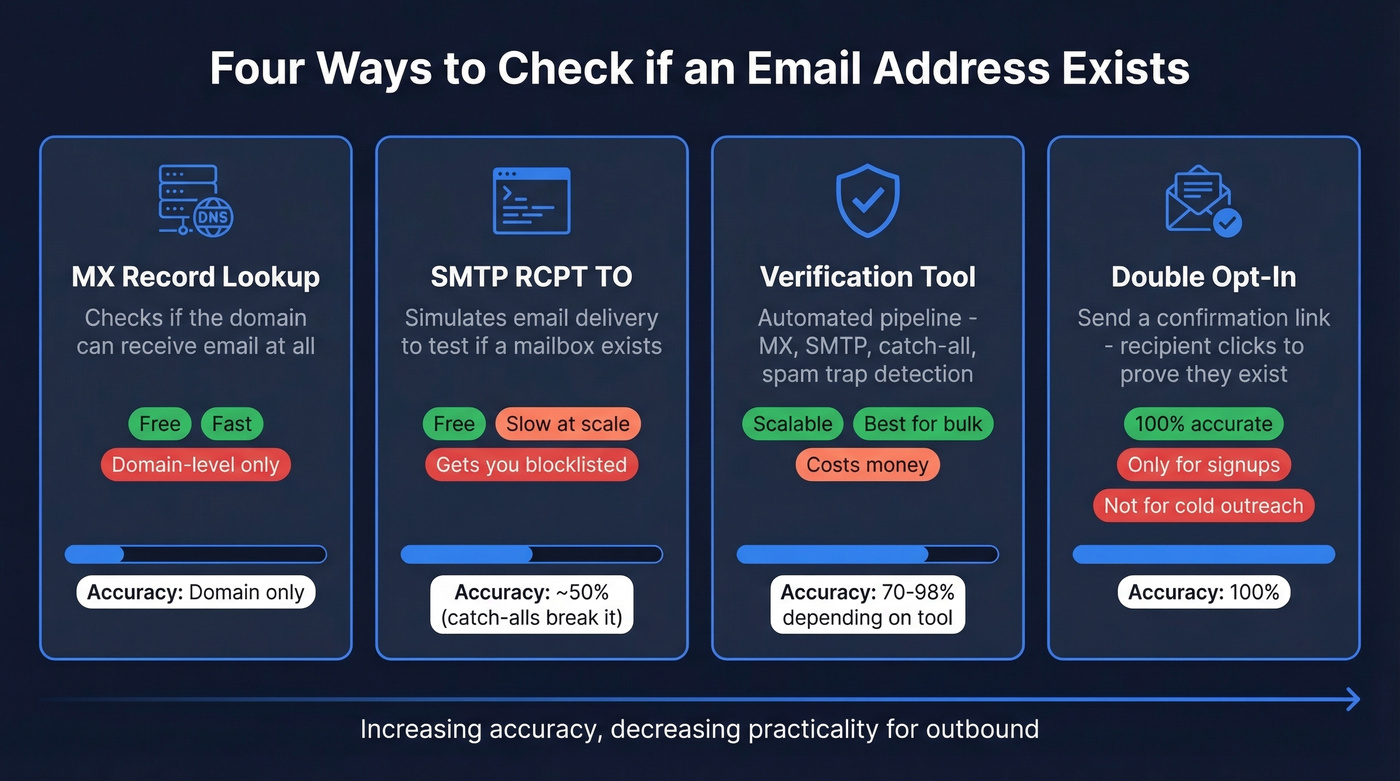
There are four ways to verify whether an email address exists: MX record lookups, SMTP verification via RCPT TO, dedicated verification tools, and double opt-in confirmation emails. For 99% of you, a verification tool is the practical answer. The manual methods are educational and useful for debugging, but they'll fail you at scale.
Here's the thing most articles won't tell you: no tool is 100% accurate. The best independent benchmark tops out at 70% overall accuracy. The goal isn't perfection - it's getting close enough to protect your sender reputation.
Four Ways to Verify an Email Exists
Check MX Records Manually
Before you can verify a specific mailbox, confirm the domain can receive email at all. MX (Mail Exchange) records tell you which servers handle incoming mail for a domain. No MX records? That domain can't receive email. Full stop.
Open a terminal and run:
dig example.com MX +short
This returns the mail servers and their priority values. If you get nothing back, the domain doesn't accept email. For more detail, query Google's public DNS resolver directly - useful when your local DNS cache is stale:
dig @8.8.8.8 example.com MX
On Windows, use:
[nslookup -type=mx example.com](https://learn.microsoft.com/en-us/windows-server/administration/windows-commands/nslookup)
For extra confidence, check SPF and TXT records too (dig example.com TXT +short). A domain with properly configured SPF and DMARC is more likely to be actively maintained.
MX lookups are fast, free, and definitive for domain-level checks. They won't tell you whether john@example.com exists - just that example.com has working mail infrastructure. Think of it as the first filter: if MX fails, don't bother going further.
If you're troubleshooting bounces end-to-end, start with bounce rate benchmarks and codes.
SMTP Verification via RCPT TO
This is the classic method developers have been debating on Stack Overflow since at least 2010. You connect directly to the recipient's mail server and simulate the beginning of an email delivery without actually sending anything.
The full SMTP dialogue:
telnet mail.example.com 25
HELO verify.yourdomain.com
MAIL FROM:<>
RCPT TO:<john@example.com>
QUIT
The critical moment is the response to RCPT TO:
| Response Code | Meaning | Action |
|---|---|---|
| 250 (2.1.5) | Accepted | Likely valid |
| 550 (5.1.1) | User unknown | Invalid |
| 421, 450 | Temporary failure | Retry in 15-30 min |
A 250 response suggests the mailbox exists, but it doesn't guarantee it. Many servers accept everything at RCPT TO and reject later. The old VRFY command was designed for exactly this purpose, but it's disabled on virtually every modern mail server for security reasons.
If you're doing outbound at any volume, pair verification with a safer sending strategy - see email velocity and best way to send bulk email without getting blacklisted.
Use a Verification Tool
Verification tools automate everything above - MX lookups, SMTP probing, disposable email detection, catch-all handling - and add layers that manual methods can't replicate. A modern verification pipeline runs five or more checks in a single pass, handling edge cases like catch-all domains, greylisting, and accept-all-then-reject patterns that break manual SMTP checks completely. You'd need weeks to build and maintain this infrastructure yourself.
The workflow is simple: upload a CSV or paste individual addresses, let the tool process them, and export your cleaned list. Most tools also offer APIs for real-time verification at point of capture. Need to validate a single contact before sending a cold email? The single-lookup mode handles that in seconds.
If you're choosing vendors, compare options in Bouncer alternatives or Hunter alternatives.
Send a Confirmation Email (Double Opt-In)
This is the only method that's 100% accurate. You send a confirmation email with a unique link, and the recipient clicks it to prove the address is real and monitored. It's the gold standard for sign-up flows and newsletter subscriptions.
The obvious limitation: it doesn't help with pre-existing lists or cold outreach. You can't send a "please confirm you exist" email to a prospect you've never spoken to. For list cleaning and outbound verification, you're back to the tools.
For cold outreach flows specifically, use a B2B cold email sequence that keeps risk low.
Why SMTP Verification Fails in 2026
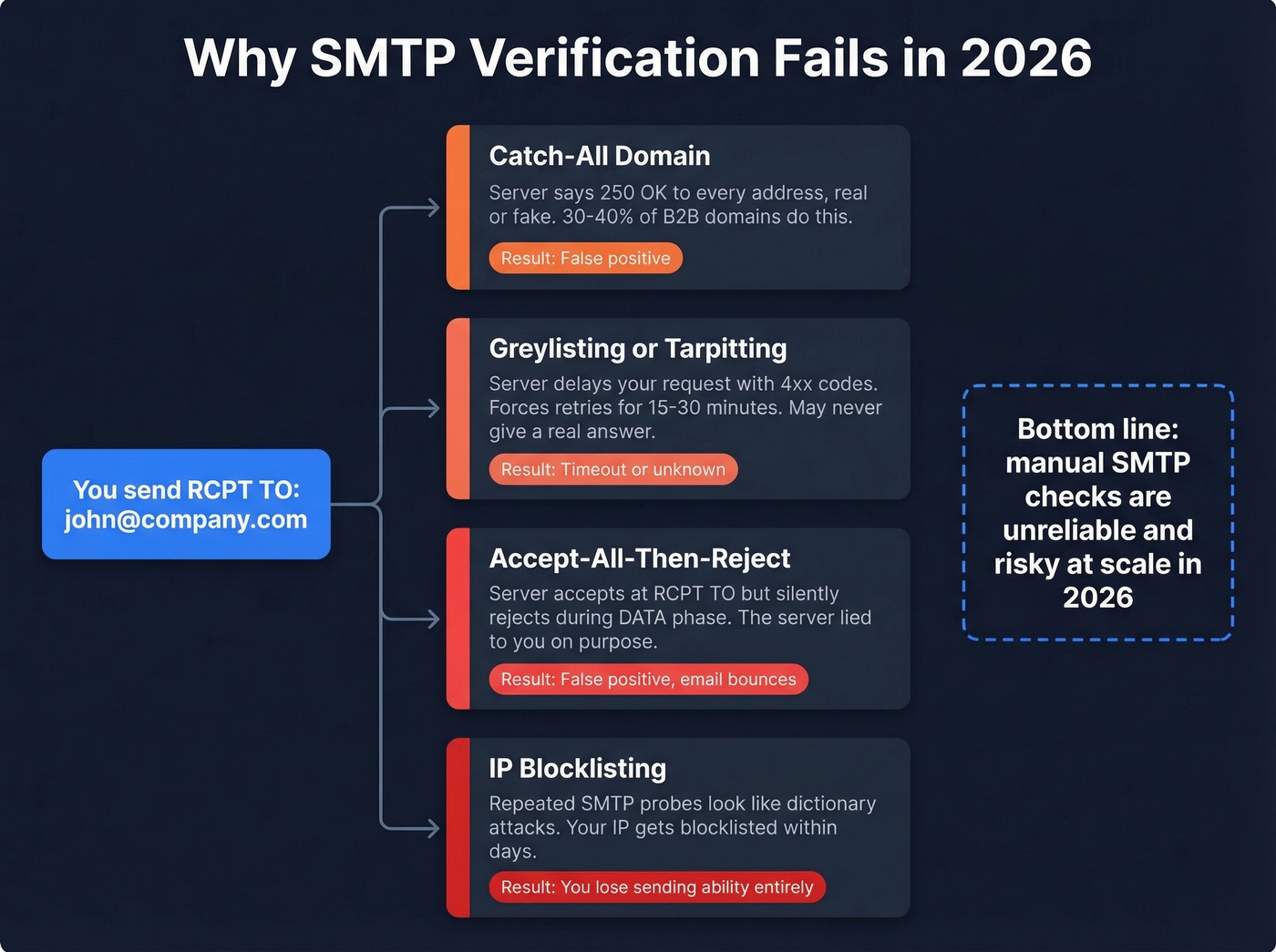
Manual SMTP verification was clever a decade ago. Today, mail servers have evolved specifically to defeat it. In cold outreach and self-hosting communities, people keep asking how to verify an email address without getting blocked - and whether any provider actually can. The pain is real, and it comes down to four failure modes.
Catch-All Domains Accept Everything
Between 30 and 40 percent of B2B email addresses sit on catch-all domains - servers configured to accept every address regardless of whether the mailbox exists. Send RCPT TO:<literally-anything@company.com> and you'll get a 250 OK. This is the single biggest reason verifiers return "unknown" results, and it's especially common in enterprise environments running Microsoft 365, Google Workspace, or security gateways like Proofpoint and Mimecast.
If you're seeing lots of "unknown," it often correlates with list source quality - see email list providers and how to generate an email list.
Greylisting and Tarpitting
Many servers deliberately delay responses to unfamiliar senders, returning temporary 4xx codes that force you to retry in 15-30 minutes. At scale, this turns a quick verification into an hours-long crawl. Some servers never give you a definitive answer at all.
Accept-All-Then-Reject-at-DATA
Some mail servers accept at RCPT TO but reject the message later during the DATA phase. This is an anti-directory-harvest tactic. Your SMTP probe sees 250 OK and marks the address as valid, but an actual email to that address would bounce. The server lied to you, by design.
You'll Get Blocklisted
Wikipedia's article on callback verification puts it bluntly: this practice "is abusive" and "can lead to blocklisting of the server, the domain or the IP block." Repeated SMTP probes look identical to dictionary attacks, and many major providers either return ambiguous responses or actively block these probes.
We've seen teams try to build internal verification by scripting SMTP checks. It works for about a week before their sending IP lands on a blocklist. Don't reinvent this wheel.
If you do get listed, follow a proper Spamhaus blacklist removal process and tighten your sender reputation.

You just read why SMTP verification fails on catch-all domains, greylisting, and accept-all-then-reject servers. Prospeo's 5-step verification pipeline handles all of it - catch-all detection, spam-trap removal, and honeypot filtering - delivering 98% email accuracy across 143M+ verified addresses.
Stop debugging SMTP responses. Get verified emails at $0.01 each.
How Accurate Are Verification Tools, Really?
Let's be honest about the numbers. Hunter ran the only substantial independent benchmark - 15 tools tested against 3,000 real business emails segmented by company size. The results are sobering:
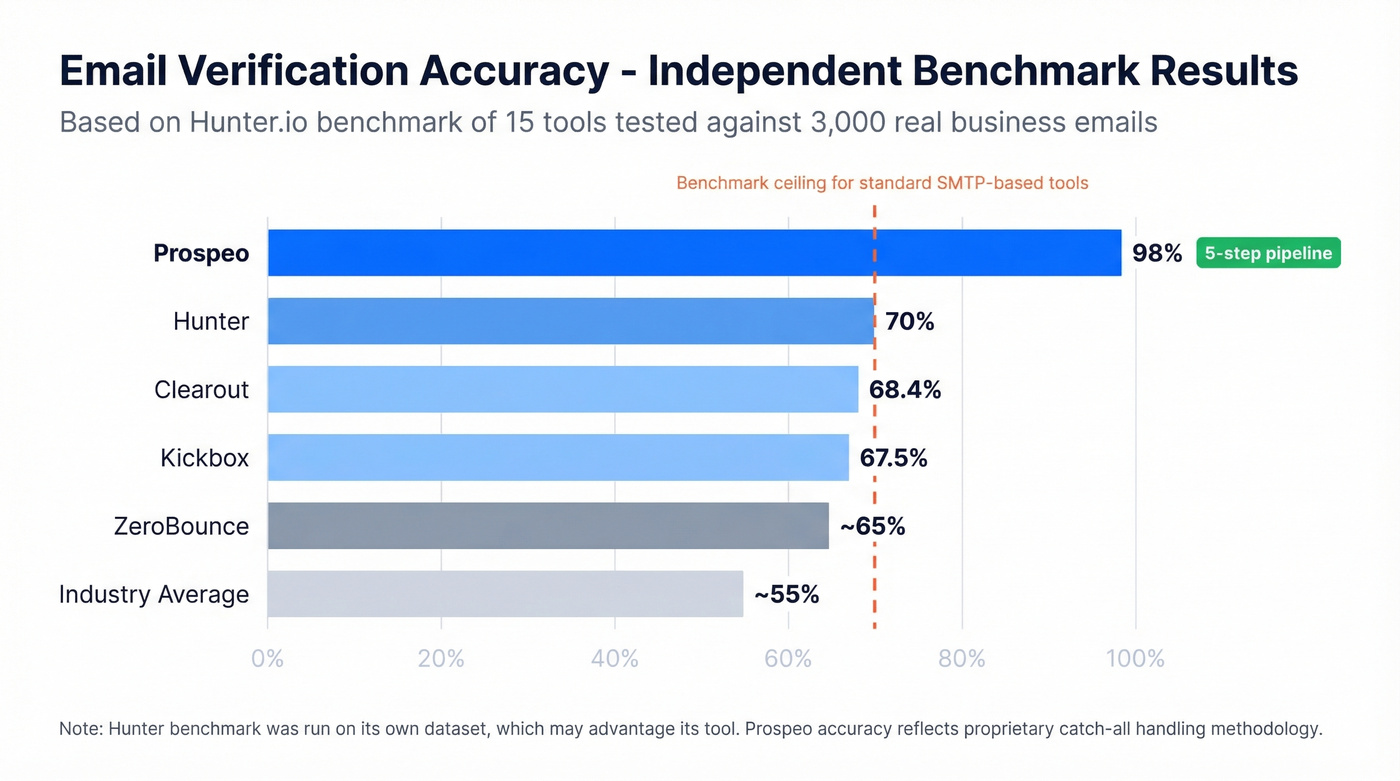
- Hunter: 70.00% overall accuracy
- Clearout: 68.37%
- Kickbox: 67.53%
That's the top three. Accuracy drops further on mid-market and enterprise domains, where stricter mail server configurations make probing harder. There's a bias worth noting: the benchmark was run on Hunter's own dataset, which may advantage its tool. Still, it's the most concrete comparative data available.
So what does "unknown" actually mean? It's not a failure - it means the domain is catch-all or the server blocked the probe. The tool is being honest rather than guessing. The problem is that 30-40% of B2B addresses fall into this bucket, which is a lot of uncertainty.
Here's our take: if your average deal size is under five figures, you probably don't need to agonize over catch-all addresses. Skip them in bulk outreach and move on. But if you're selling six-figure deals and every contact matters, you need a tool with proprietary catch-all handling - not one that returns "unknown" and shrugs.
In our testing, Prospeo returned definitive results on catch-all addresses that three other tools flagged as "unknown." Its 98% email accuracy reflects a different architecture than tools relying solely on SMTP probing - a 5-step verification pipeline with spam-trap removal and honeypot filtering built on proprietary infrastructure. When the standard benchmark ceiling is 70%, that methodology gap matters.
To reduce risk further, add a spam trap removal step to your hygiene process.
Best Verification Tools Compared
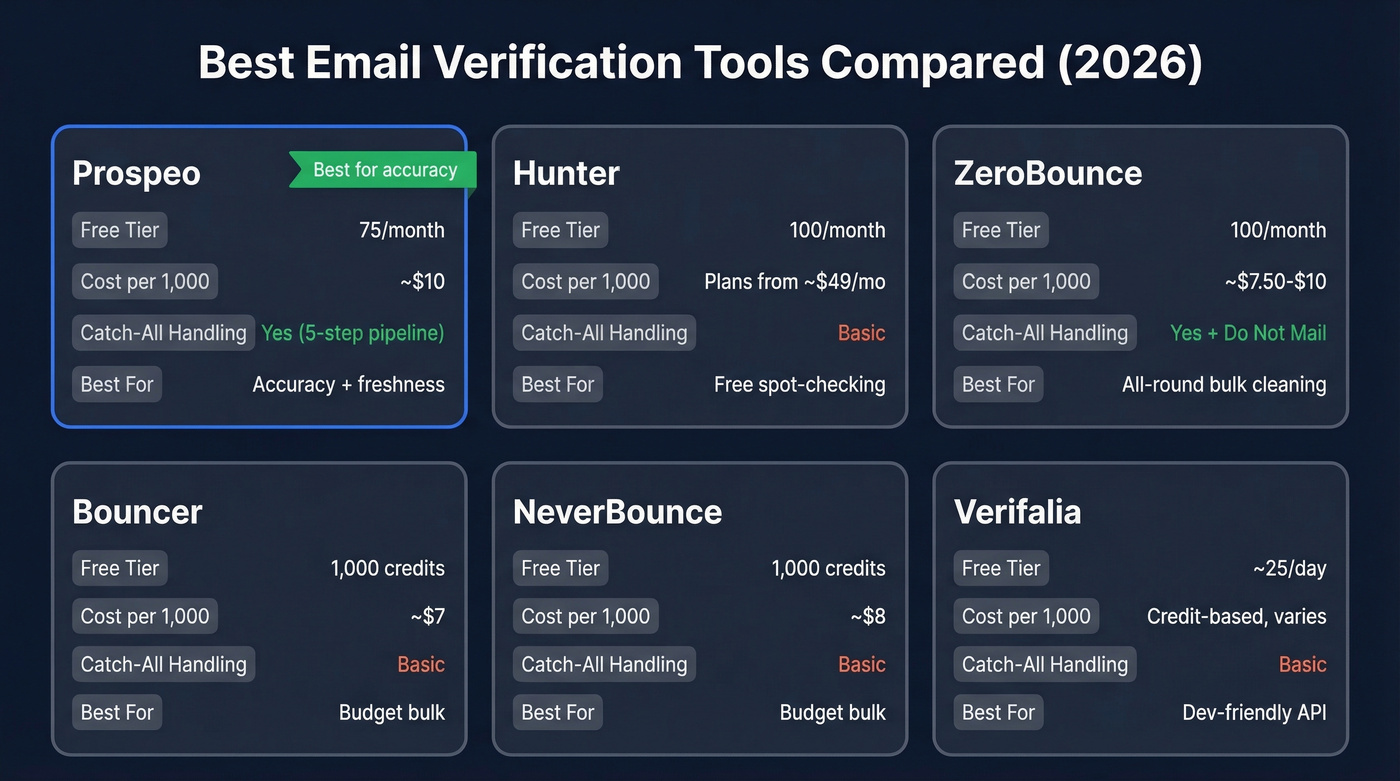
| Tool | Free Tier | Cost per 1,000 | Catch-All Handling | Best For |
|---|---|---|---|---|
| Prospeo | 75/month | ~$10 | Yes (5-step) | Accuracy + freshness |
| Hunter | 100/month | Plans from ~$49/mo | Basic | Free spot-checking |
| ZeroBounce | 100/month | ~$7.50-$10 | Yes + "Do Not Mail" | All-round bulk |
| Bouncer | 1,000 credits | ~$7 | Basic | Budget bulk |
| NeverBounce | 1,000 credits | ~$8 | Basic | Budget bulk |
| Verifalia | ~25/day | Credit-based, varies | Basic | Dev-friendly API |
Hunter earns its spot for transparency. It ran the only real independent benchmark, published the methodology, and acknowledged its own potential bias. The free tier of 100 verifications per month is generous for spot-checking individual addresses. For bulk list cleaning, you'll hit limits quickly.
ZeroBounce is a strong all-rounder. Beyond standard valid/invalid categorization, it flags "Do Not Mail" addresses - role-based emails, known complainers, and other risky contacts. Pay-as-you-go runs about $8-10 per 1,000 emails depending on volume, with 100 free monthly credits to start.
Skip Bouncer and NeverBounce if you need advanced catch-all handling. They're solid budget options at $7 and $8 per 1,000 respectively, both offering 1,000 free credits to start. Good for straightforward bulk cleaning where most of your list sits on standard domains. But for enterprise prospects on catch-all configurations, you'll get too many "unknown" results to act on.
Verifalia is the developer's pick - about 25 free verifications per day and a clean, lightweight API. Good for integrating verification into custom workflows without the overhead of a full platform.
Best Practices for List Hygiene
Good verification habits matter more than which tool you pick.
Re-verify every 30 days. After 4 weeks, roughly 2% of a verified list goes invalid. That compounds fast - skip two months and you're looking at 4-6% decay on top of whatever was already marginal.
Keep bounce rate below 2%. Ideally under 1%. With Google, Yahoo, and Microsoft all enforcing stricter complaint-rate thresholds in 2026, even a 3% bounce rate can trigger deliverability penalties. One of our users, Stack Optimize, maintains 94%+ deliverability and under 3% bounce across all their clients by verifying every contact before it enters a sequence - zero domain flags.
Never treat "accept-all" as "valid." Catch-all results require a risk-based decision. Running high-volume cold outreach? Skip them. Sending a handful of personalized emails to high-value targets? The risk is probably worth it.
Verify at point of capture. Don't wait until you've built a list of 10,000 contacts to discover 20% are bad. Verify in real time via API on forms, imports, and CRM integrations. Validating addresses the moment they enter your system saves you from cleaning up later.
Filter inactive contacts first. If someone hasn't opened an email in 6 months, don't waste credits verifying them. Clean your engagement data first, then verify what's left.
If you're building a full deliverability stack, add email reputation tools alongside verification.
Treat list hygiene as infrastructure, not maintenance. SPF/DKIM/DMARC are mandatory in 2026. A 3% bounce rate that was tolerable in 2023 now triggers deliverability penalties from the major inbox providers. This isn't a quarterly chore - it's a core part of your sending stack.
Email lists decay 25%+ per year. Prospeo refreshes its entire 300M+ profile database every 7 days - not the 6-week industry average. That means the emails you pull are already verified before you ever check them. Teams using Prospeo see bounce rates drop from 35%+ to under 4%.
Clean data from the start beats cleaning bad data after the bounce.
FAQ
Can you check if an email exists without sending a message?
Yes. MX lookups and SMTP RCPT TO commands probe the mail server without delivering anything, but catch-all domains make these unreliable for 30-40% of B2B addresses. Verification tools automate this with multi-step pipelines that resolve catch-all unknowns far more reliably than manual probing.
Why does my email verifier return "unknown"?
The domain is almost certainly catch-all - configured to accept all addresses regardless of whether the mailbox exists. The server could also be blocking the probe via greylisting or rate limiting. This affects 30-40% of B2B emails and isn't a tool failure; it's an honest result from a server that won't give a straight answer.
How often should I re-verify my email list?
Re-verify active sending lists every 30 days. After 4 weeks, roughly 2% of verified addresses go invalid, and that compounds quickly. Monthly is the standard for consistent outbound teams; quarterly is the absolute minimum before deliverability starts to degrade.
Are free email verification tools accurate enough?
For spot-checking a handful of addresses, free tiers from Hunter (100/mo) or Prospeo (75/mo) work fine. For bulk cleaning above a few hundred contacts, paid plans with catch-all handling are worth it - the cost of bounced emails far exceeds verification fees at roughly $0.01 per address.
How do I verify an email on a catch-all domain?
Standard SMTP probes can't distinguish real from fake mailboxes on catch-all domains because the server returns 250 OK for every address. You need a tool with proprietary catch-all handling that cross-references multiple data signals beyond the SMTP response to determine whether the mailbox is genuinely active.