

How to Find a Person's Email Address (Free & Paid Methods That Actually Work)
You crafted the perfect cold email. Personalized opener, sharp value prop, clean CTA. You hit send - and it bounced. That bounce didn't just waste your time. It chipped away at your sender reputation, the invisible score that determines whether your next 500 emails land in inboxes or spam folders.
The bottleneck isn't copywriting. It's knowing how to find a person's email address - a valid one - before you ever hit send.
The Fastest Route
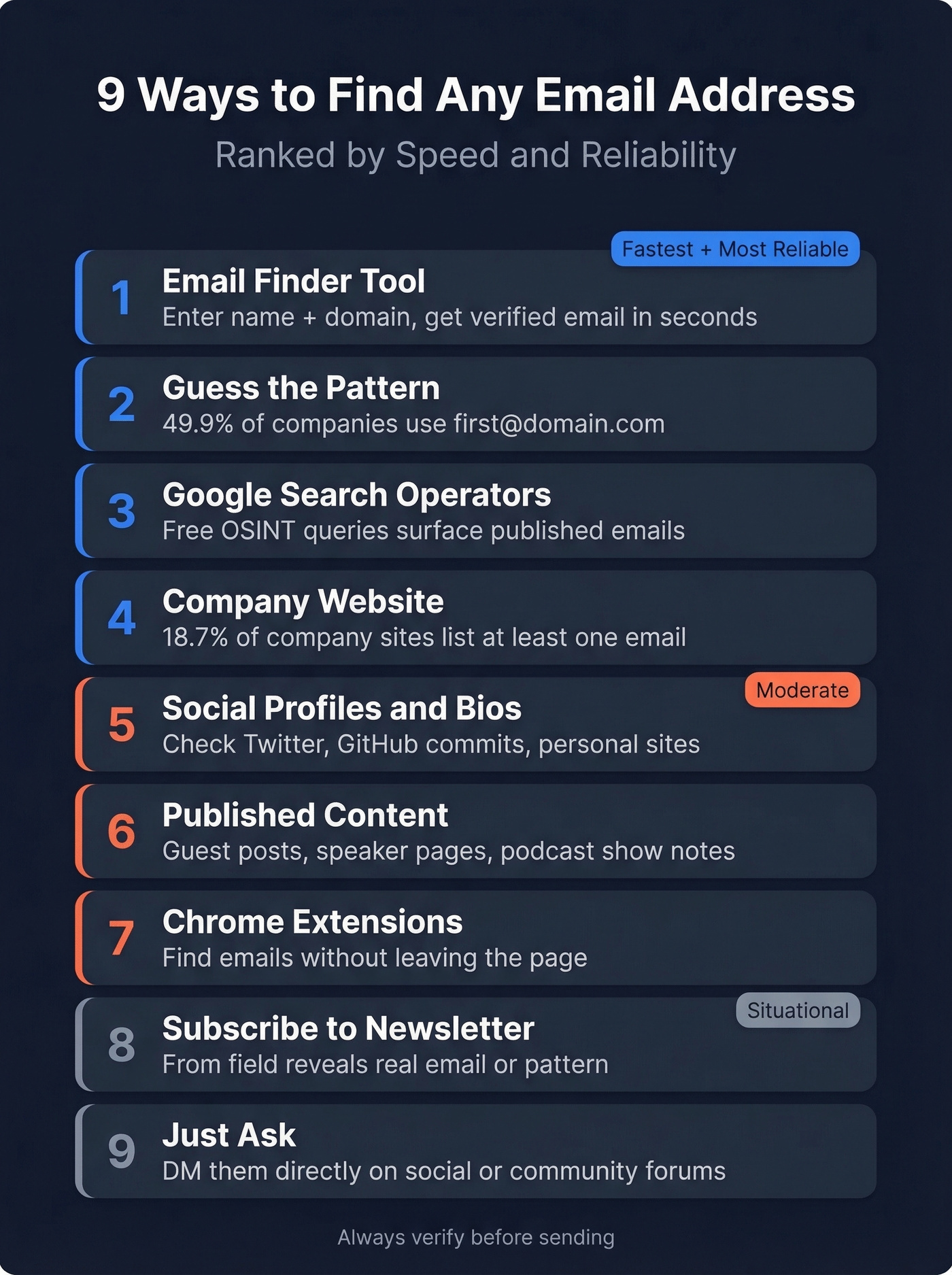
If you want completely free, guess the email pattern and verify it - 49.9% of companies use first@domain.com, so your odds are decent. Read on for all 9 methods, ranked by speed and reliability, plus a head-to-head tool comparison with real accuracy data.
9 Proven Methods to Find Any Email Address
1. Guess the Email Pattern
Oldest trick in the book. Still works. Hunter analyzed 12 million email addresses and found that 49.9% of companies use the simplest format: first@domain.com. Here are the five most common patterns:
first@domain.com(john@acme.com)first.last@domain.com(john.smith@acme.com)firstlast@domain.com(johnsmith@acme.com)flast@domain.com(jsmith@acme.com)first_last@domain.com(john_smith@acme.com)
The workflow is simple: find one known email at the target company from their website, press releases, or job postings, reverse-engineer the pattern, then apply it to your prospect's name. But here's the critical step most people skip - verify the address before you send. A guessed email that bounces does more damage than no email at all. Run it through a verification tool first. Every time. (If you want a deeper playbook, see email verification.)
2. Check the Company Website
You'd be surprised how often the answer is sitting on a public webpage. Hunter's analysis of roughly 905,000 company websites found that 18.7% mentioned at least one email address. That's nearly one in five.
Where to look:
- About / Team page - bios often include direct emails
- Contact page - sometimes lists individual department contacts, not just a generic info@ address
- Blog author bios - writers frequently include their email
- Press / Media page - PR contacts reveal the company's email pattern
- WHOIS records - domain registration data occasionally exposes an admin email
Even if you don't find your exact prospect, one email from anyone at the company gives you the pattern.
3. Use Google Search Operators
Google is a free email finder if you know the right queries. These four operators are your best starting point:
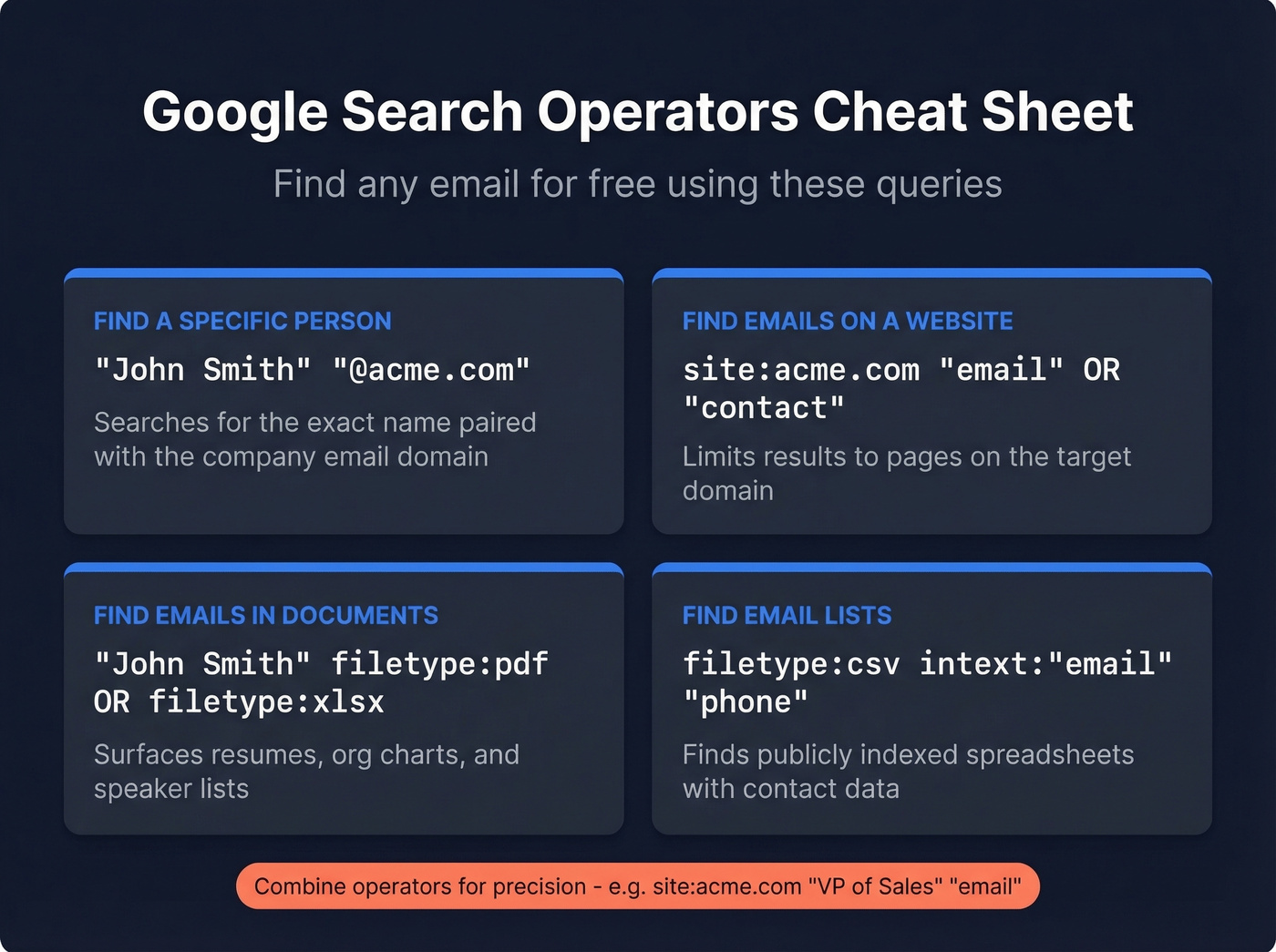
Find a specific person's email:
"John Smith" "@acme.com"
Find emails published on a company's site:
site:acme.com "email" OR "contact"
Find documents containing contact info:
"John Smith" filetype:pdf OR filetype:xlsx
Find spreadsheets with email lists:
filetype:csv intext:"email" "phone"
These are standard OSINT techniques. Combine operators for precision: site:acme.com "VP of Sales" "email" can surface internal directories, conference speaker pages, or PDF org charts with direct contact info. Results won't always be current, so verify anything you find. (More outbound tactics here: sales prospecting techniques.)
4. Use an Email Finder Tool
This is the fastest method by far. You enter a name and a company domain, and the tool returns an email address in seconds.
The best tools combine public web data, email pattern intelligence, and verification checks - including SMTP handshakes - to reduce bounces. The key difference between tools isn't the search; it's the verification. A tool that finds an email but doesn't verify it is just giving you a guess with a nice UI. We break down accuracy data in the comparison section below. (If you’re building lists at scale, see name to email.)

5. Search Social Profiles and Bios
Plenty of professionals publish their email in places you wouldn't think to check:
- X/Twitter bios - especially common among founders and marketers
- GitHub commit history - developers' emails are embedded in git commits
- Slack and Discord communities - in public workspaces, click a user's profile; many include an email field
- Personal websites - check the footer or contact page
- Substack or newsletter landing pages - authors often list their email
Hit-or-miss, but when it hits, you get a verified, self-published address. No guessing required.
6. Check Their Published Content
People who create content tend to leave their email scattered across the internet. Author bios on guest blog posts almost always include a contact email, conference speaker pages frequently list presenter emails alongside session details, and podcast show notes are another goldmine. If your prospect has any public-facing presence, their email is probably one Google search away.
7. Subscribe to Their Newsletter
Here's a trick most people overlook. If your prospect or their company runs a newsletter, subscribe to it. The confirmation email or first issue will come from an address that reveals either the person's direct email or, at minimum, the company's email pattern. Check the "From" field - it's often a real person's address, not a no-reply.
8. Try the Chrome Extension Route
Browser extensions let you find emails without leaving the page you're already on. While browsing a company website or a professional profile, the extension surfaces contact data in a sidebar - no tab-switching, no copy-pasting names into a separate tool. (Related: email scraper Chrome extensions.)
9. Just Ask
When all else fails, a direct message works more often than you'd think. A short, specific ask on X, a professional network, or even a community forum can get you the email in minutes. Keep it professional: "Hey [Name], I'd love to send you a quick note about [specific topic]. What's the best email to reach you?"
This works best for warm-ish connections - someone you've interacted with online, met at an event, or share a mutual contact with.
Best Email Finder Tools Compared
Prospeo - Best for Email Accuracy
Use this if: You've been burned by bounced emails and need the highest verification accuracy available. You want self-serve pricing with no contracts, and you care more about data quality than having a built-in CRM.
Skip this if: You need an all-in-one platform with sequencing, CRM, and dialer bundled together. Pair Prospeo with Instantly or Lemlist for that workflow.
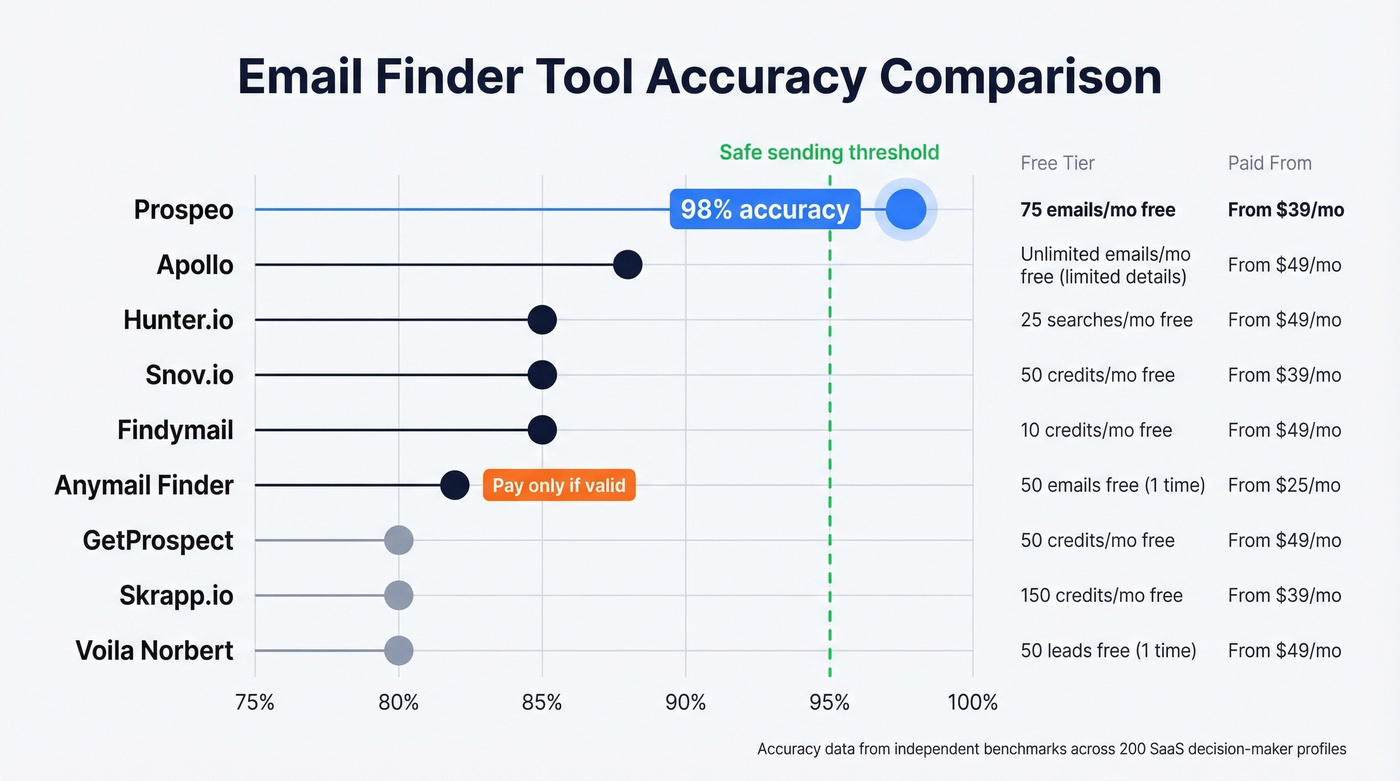
Prospeo's 98% email accuracy comes from a proprietary 5-step verification process that includes catch-all handling, spam-trap removal, and honeypot filtering. The database covers 300M+ professional profiles with a 7-day data refresh cycle - compared to the 6-week industry average, that's a massive difference for anyone targeting fast-moving markets where people change jobs frequently. (If you’re troubleshooting deliverability, see email deliverability and spam trap removal.)

Real results back this up. Stack Optimize built from $0 to $1M ARR using Prospeo with sub-3% bounce rates and zero domain flags across all clients. Snyk's 50-person AE team cut their bounce rate from 35-40% down to under 5% after switching. The free tier gives you 75 verified emails plus 100 Chrome extension credits per month. Paid plans start around $39/mo with no annual commitment.
Hunter.io - Best for Domain Search
Use this if: Your workflow starts with a company domain and you need to find everyone's email at that org. Hunter is a top choice for this use case, and the UI is dead simple.
Skip this if: You need phone numbers or a large contact database for outbound prospecting. Hunter is an email-first tool. (If you’re evaluating options, see Hunter alternatives.)
In a ContactOut benchmark across 200 SaaS decision-maker profiles, Hunter returned 170 valid emails - 85% accuracy - with 15 invalid and 15 not found. Where Hunter really shines is domain-level discovery: enter a company URL and get every email pattern and associated contact they've indexed. Free tier includes 50 credits per month. Paid plans start at $49/mo for 1,000 credits.

Apollo - Best All-in-One (With Caveats)
Apollo is the Swiss Army knife of sales tools - email finding, CRM, and sequencing in one platform. The free tier is genuinely generous, and the 250M+ contact database is massive.
Here's the thing, though: if your average deal size is under $15k, you probably don't need Apollo's complexity. A focused email finder plus a dedicated sequencer will get you better data with less friction. The consensus on r/sales tends to agree - Apollo's strength is breadth, not depth on any single feature.
Apollo hit 88% accuracy in the same 200-profile test - 176 valid, 10 invalid, 14 not found. Those numbers are respectable, but the 10 invalid emails are the problem. Invalid means your sequence sends to a dead address, and your domain takes the hit. Free tier available, paid plans from ~$49/mo per user. Always verify Apollo emails through an independent tool before sending.
Snov.io
Snov.io combines email finding with drip campaign functionality, making it a natural fit for solo founders and small teams who want to find, verify, and send from one platform without juggling three subscriptions. Free trial includes 50 credits. Paid plans start at $39/mo for 1,000 credits.
Anymail Finder
Anymail Finder's standout feature is its pay-only-for-valid model. You don't burn credits on emails that can't be verified - if the tool isn't confident, you don't pay. That's a meaningful differentiator for budget-conscious teams tired of wasting credits on "unknown" results. It offers 100 free credits to start, with paid plans from $14/mo. It won't match the database depth of Apollo or the accuracy of top-tier tools, but for teams watching every dollar, it's worth testing.
Tool Comparison
| Tool | Free Tier | Paid From | Accuracy |
|---|---|---|---|
| Prospeo | 75 emails/mo | ~$39/mo | 98% |
| Hunter | 50 credits/mo | $49/mo | 85% |
| Apollo | Free tier | ~$49/mo/user | 88% |
| Snov.io | 50 credits | $39/mo | ~85% |
| Anymail Finder | 100 credits | $14/mo | ~82% (pay-if-valid) |
| GetProspect | 50 emails/mo | $49/mo | ~80% |
| Skrapp.io | 50 credits/mo | $49/mo | ~80% |
| Findymail | 10 credits trial | $49/mo | ~85% |
| Voila Norbert | 50 credits | $49/mo | ~80% |

You just read 9 ways to find someone's email. Prospeo does it in seconds - enter a name and domain, get a verified address backed by 5-step verification, catch-all handling, and spam-trap removal. 98% accuracy. $0.01 per email.
Stop guessing patterns and start sending to verified inboxes.
Every bounced email chips away at your sender reputation. Prospeo's 300M+ profile database refreshes every 7 days - not every 6 weeks - so you're never emailing someone who changed jobs last month. Teams using Prospeo see bounce rates drop below 4%.
Find any professional's verified email in seconds, not hours.
Always Verify Before You Send
Here's the number that matters: keep your total bounce rate below 2%, with hard bounces under 1%. Exceed those thresholds and email providers start throttling your domain. Enough hard bounces in a short window and you'll land in spam - not just for the bad addresses, but for every email you send from that domain. (More detail: email bounce rate and improve sender reputation.)
The silent killer is catch-all domains. A catch-all server accepts email sent to any address at that domain, so standard verification tools report "valid" even for addresses that don't exist. Your email technically delivers, but nobody reads it - and some catch-all configurations eventually bounce, damaging your reputation quietly over time.
We've seen teams lose entire domains to bad data. It happens faster than you'd think - one bad list, one week of sends, and suddenly your legitimate emails are landing in spam too. Teams that switch to proper verification routinely see bounce rates drop from 30-40% to under 5%. Before you send any campaign, run your list through verification. No exceptions.
What About Personal Emails?
Sometimes you're not looking for a work email. Maybe you're a recruiter reaching a passive candidate, a journalist tracking down a source, or you're simply trying to reconnect with someone who's changed jobs. Most B2B email finder tools focus exclusively on professional addresses, so personal emails require a different approach.
People-search engines like BeenVerified or Spokeo can surface personal emails, though results vary. GitHub profiles, personal websites, and public social bios are also worth checking. Personal emails are actually more stable than work emails - they don't change when someone switches companies - but they're harder to find ethically and privacy laws apply more strictly. GDPR in particular treats personal email outreach differently than B2B communication. Tread carefully, document your legitimate interest, and always provide an opt-out.
Legal Compliance You Can't Skip
Finding someone's email is legal. Misusing it isn't. The penalties are steep enough to sink a startup:
| Regulation | Max Penalty | Scope |
|---|---|---|
| GDPR | EUR 20M or 4% revenue | EU/EEA data subjects |
| CAN-SPAM | $53,088/email | US recipients |
| TCPA | $500-$1,500/violation | US phone + SMS |
| CCPA | $2,663-$7,988/violation | California residents |
Multiple new state privacy laws have taken effect since 2025, expanding the patchwork of US regulations well beyond California. (Related: is it illegal to buy email lists.)
Your operational checklist:
- Document your legitimate interest for every outreach campaign
- Honor opt-out requests within 10 business days (CAN-SPAM requirement)
- Include a physical mailing address and working unsubscribe link in every email
- Maintain clean lists - remove bounces and unsubscribes immediately
- Never buy scraped lists from unvetted vendors
Let's be honest: compliance isn't just about avoiding fines. Clean data practices and proper opt-out handling directly improve your deliverability. The teams that take compliance seriously are the same teams whose emails actually land in inboxes.
FAQ
Is it legal to find and email someone you don't know?
Yes, B2B cold outreach is legal in most jurisdictions. CAN-SPAM requires an unsubscribe mechanism and honored opt-outs within 10 days. GDPR requires documented legitimate interest for EU contacts. Always include your physical address and a working unsubscribe link in every message.
How do you find a person's email address for free?
Guess the pattern - 49.9% of companies use first@domain.com - then check the company website or use Google search operators like "name" "@domain.com". Most paid tools also offer free tiers: Prospeo gives 75 credits/mo, Hunter gives 50.
How do I know if the email I found is still valid?
Run it through an email verification tool before sending. Keep total bounces under 2% and hard bounces under 1% to protect your sender reputation. Tools with weekly data refresh cycles - like Prospeo's 7-day cycle versus the 6-week industry average - significantly reduce stale-data risk.
What's a catch-all domain and why does it matter?
A catch-all domain accepts email sent to any address at that domain, so standard verification reports "valid" even for nonexistent mailboxes. This causes silent bounces that erode sender reputation over time. Use a tool with dedicated catch-all detection - not all verification services handle this correctly.