

How to Remind Someone to Reply to Your Email Without Being Annoying
You emailed your boss Monday morning. It's Thursday. You need that approval to move forward, and your inbox is mocking you with silence. If someone's going to reply, there's a 90% chance it happens within two days. Two days have passed. You're not being impatient - you're statistically justified in sending that nudge.
Knowing how to remind someone to reply to your email without being annoying comes down to timing, wording, and knowing when to switch channels entirely. Follow-ups drive 42% of all replies, so skipping them means leaving nearly half your responses on the table.
Why They Haven't Replied
Before you spiral, consider the five most common reasons someone goes quiet - none of which are "they hate you."
- They're genuinely busy. Your email landed between dozens of others and got buried.
- They operate at a different pace. What feels urgent to you is a Tuesday-afternoon task for them.
- They need time to think. Your question requires research, a decision, or input from someone else.
- They're procrastinating. Your email requires effort, and effort loses to easier tasks every time.
- Power dynamics. Some people delay because they know it gives them leverage.
These reasons come from [Psychology Today's analysis of non-responses](https://www.psychologytoday.com/us/blog/how-to-do-life/201409/when-they-dont-respond-to-your-emails-and-voicemails). The actionable takeaway: wait double the time you expected a reply. Expected one day? Follow up after two. Expected a week? Give it two weeks.
When to Send a Reminder
Timing matters more than wording. Here's a quick reference:
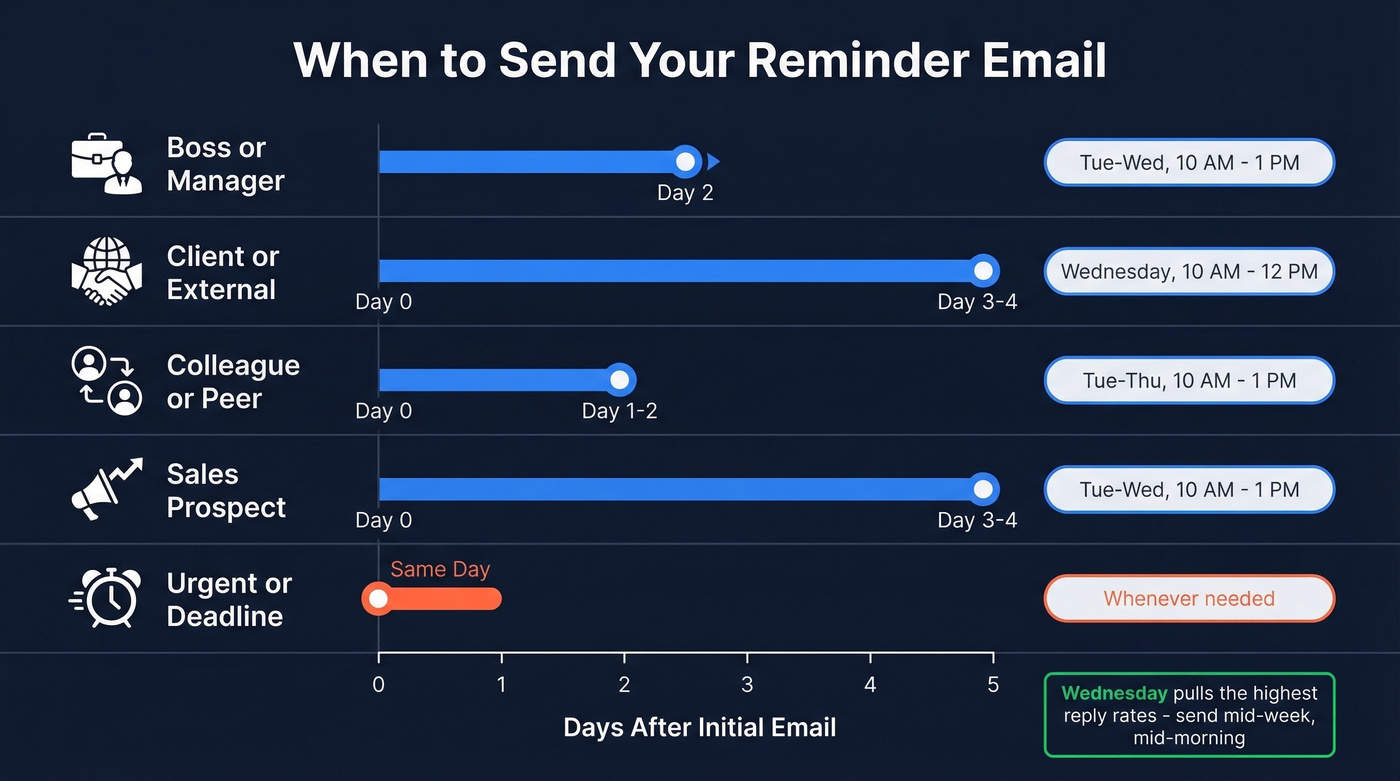
| Scenario | Wait Time | Best Day | Best Window |
|---|---|---|---|
| Boss / manager | 2 days | Tue-Wed | 10 AM-1 PM |
| Client / external | 3-4 biz days | Wednesday | 10 AM-12 PM |
| Colleague / peer | 1-2 days | Tue-Thu | 10 AM-1 PM |
| Sales prospect | 3-4 days | Tue-Wed | 10 AM-1 PM |
| Urgent / deadline | Same day | Whenever | Whenever |
[Instantly's 2026 benchmark data](https://instantly.ai/cold-email-benchmark-report-2026) shows cold-email follow-ups spaced 3-4 days apart perform best, and [Wednesday consistently pulls the highest reply rates](https://www.klaviyo.com/blog/best-day-to-send-emails). The [10 AM-1 PM window](https://www.yesware.com/blog/best-time-to-send-email/) catches people after they've cleared their morning backlog but before the post-lunch fade. For workplace reminders, the same principle holds: mid-week beats Monday (when inboxes are a war zone) and Friday (when people are mentally checked out).
What to Stop Writing
These phrases need to die. Every one signals "I have nothing new to say, but I'm emailing you anyway."
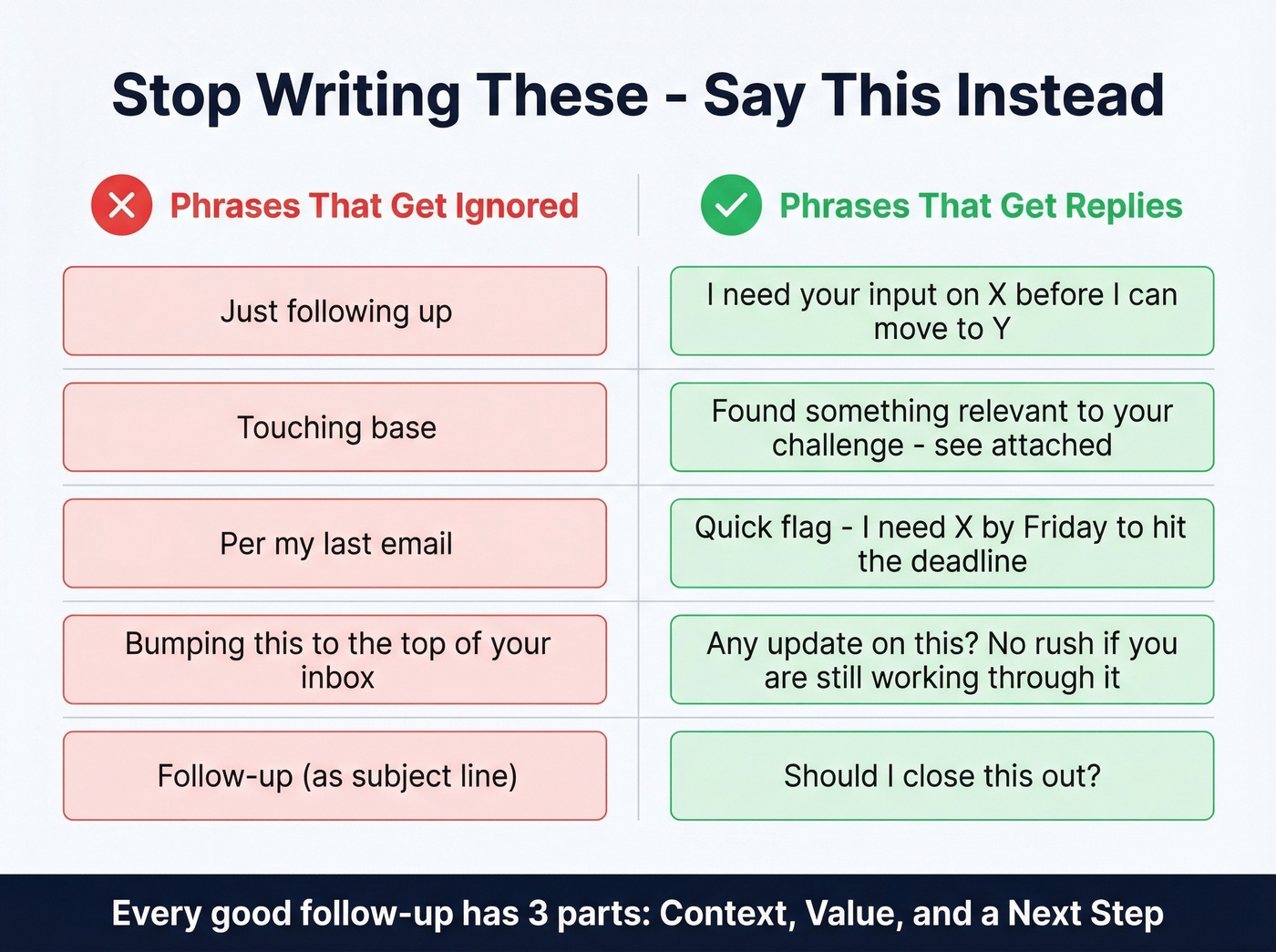
- "Just following up" - says nothing. Trains recipients to ignore you because there's never anything new after those words. (If you need alternatives, see how to say just checking in professionally.)
- "Touching base" / "Circling back" - corporate filler with zero information content.
- "Per my last email" - passive-aggressive, even when you don't mean it. Everyone reads it that way.
- "Bumping this to the top of your inbox" - you're not their inbox manager.
- "Follow-up" as a subject line - 33% of people decide to open based on the subject line alone. "Follow-up" gives them zero reason to click. If you want better options, borrow from these email subject line examples.
Here's the thing: every effective follow-up has three parts - context (why you're writing), value (what's in it for them), and a deadline or next step. If you can't add at least one of those, you're not ready to follow up yet. (For more structure, use these sales follow-up templates.)

Every follow-up you craft is wasted if the email address is stale. 98% of Prospeo emails are verified and refreshed every 7 days - not every 6 weeks like other providers. Stop chasing silence caused by bad data.
Fix the data before you fix the follow-up.
5 Polite Reminder Scripts That Get Replies
The best follow-ups feel like replies, not reminders. Keep every one under 80 words - that's the sweet spot where reply rates peak. Pick whichever script matches your situation and adapt the tone. (If you're following up on someone overloaded, this guide on follow-up email to a busy person helps.)
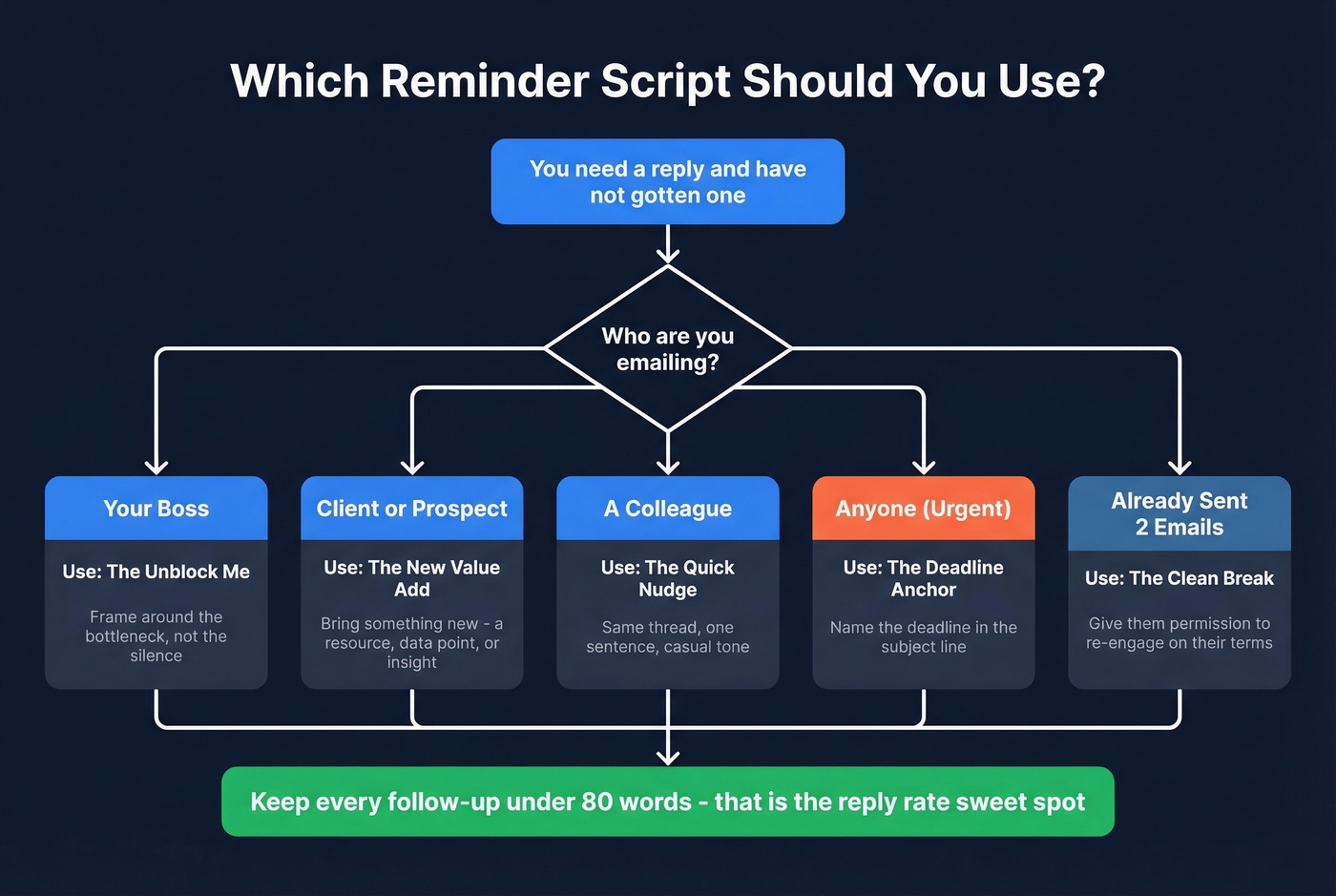
The "Unblock Me" (for Your Boss)
Frame the follow-up around the bottleneck, not the silence. We've tested dozens of internal follow-up approaches, and this framing outperforms polite nudges every time because it makes the cost of inaction concrete.
Subject: Quick decision needed on [project] before I can [next step]
Hi [Name], I'm at the point on [project] where I need your call on [specific decision]. Without it, [consequence - e.g., "the vendor timeline slips"]. Happy to jump on a 5-minute call if that's easier. What works?
The "New Value Add" (for a Client or Prospect)
Don't just ask if they saw your email. Bring something new. A follow-up after no response is really about giving them a reason to engage - not repeating your original ask. (More ideas: emails that get responses.)
Subject: Thought of you - [relevant resource or insight]
Hi [Name], since we last spoke I came across [article/case study/data point] that's relevant to [their specific challenge]. Attached it here. Also wanted to check - does the proposal still make sense, or should I simplify the scope?
The "Quick Nudge" (for a Colleague)
Same thread. Casual tone. One sentence.
Hey [Name] - any update on this? No rush if you're still working through it.
The "Deadline Anchor" (for Urgent Items)
When there's a real deadline, name it. Urgency in the subject line, brevity in the body.
Subject: Need [X] by [date] - can you confirm?
Hi [Name], quick flag - I need [specific deliverable] by [date/time] to hit the [milestone]. Can you confirm that's doable, or should I adjust the timeline?
The "Clean Break" (Final Follow-Up)
After two unanswered emails, send a closing note. This one works surprisingly well - in our experience, roughly one in three "break-up" emails actually triggers a reply because people feel the window closing.
Subject: Should I close this out?
Hi [Name], I haven't heard back, so I'll assume the timing isn't right. I'm going to close this out on my end, but feel free to reach out whenever it makes sense. No hard feelings either way.
The "clean break" is the most underrated follow-up in existence. Most people are afraid to send it because it feels like giving up. It's not. It's giving the other person permission to re-engage on their terms, and that psychological shift is exactly why it works.
When Email Silence Continues
After two follow-ups with no reply, stop emailing. Switch channels - Slack or Teams for internal, a phone call for external contacts, or walk over if you share an office. Changing the medium beats rewording the same message.
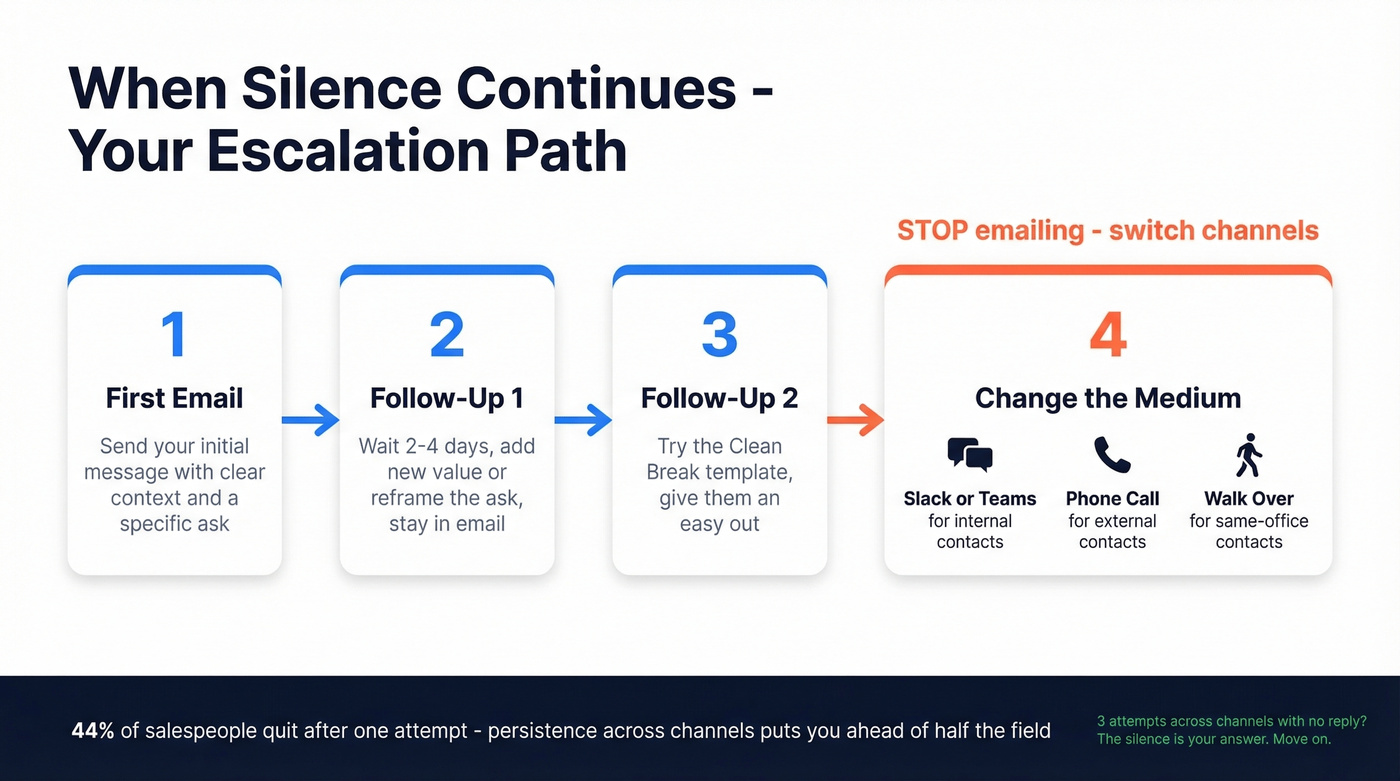
44% of salespeople give up after a single attempt, which means persistence alone puts you ahead of nearly half the field. But persistence doesn't mean sending the same email four times. It means changing the medium. If three attempts across channels get nothing, the silence is your answer. Move on. (If you're building a repeatable process, see sequence management.)
The Reason Nobody Talks About
Look, there's an overlooked explanation for silence that has nothing to do with the other person's priorities: your email never made it. Addresses go stale fast - people change jobs, companies switch domains, and spam filters in 2026 are sharper than ever. The consensus on r/coldemail is that enterprise filtering, especially Microsoft 365, has gotten noticeably tougher over the past year.
Before you rewrite your follow-up for the fifth time, verify the address is actually valid. Prospeo checks emails in real-time with 98% accuracy and catches stale addresses before they bounce. The free tier gives you 75 verifications a month - enough to confirm whether you're being ignored or just emailing a dead inbox. (If you want a broader playbook, start with this email deliverability guide and then learn how to check if an email exists.)

When three emails get zero response, the address might be dead. Prospeo's 5-step verification catches stale contacts, spam traps, and catch-all domains before you send. 143M+ verified emails at $0.01 each.
Your follow-up can't land if the inbox doesn't exist.
FAQ
How many reminder emails should I send before giving up?
Two to three via email is the right range. If silence continues, switch to another channel - Slack, phone, or in-person. After three total attempts across channels with no response, the silence is your answer. Don't burn the relationship by pushing past that point.
Is "bump" professional in a reminder email?
In casual, fast-moving environments like startups and agencies - yes. Reply in the same thread with a single word: bump. In formal corporate settings or with external clients you don't know well, skip it. If you'd say "bump" out loud to this person in the hallway, you can type it.
How do I email someone who hasn't replied to a time-sensitive request?
Lead with the deadline, not the fact that they haven't responded. Use the "Deadline Anchor" template above and keep the tone collaborative - "Can you confirm this is doable, or should I adjust the timeline?" gives them an easy out while still moving things forward.
What if the email address is wrong or bouncing?
More common than you'd think. People change roles, domains expire, and spam filters catch legitimate messages. Run the address through a verification tool before assuming you're being ignored. A wrong address is the most fixable reason for silence.