

How to Track Emails: What Actually Works in 2026
You send 200 cold emails on Monday. By Wednesday, your tracker says 140 were opened. You feel great - until you realize 60 of those "opens" were machines pre-fetching images on behalf of Apple Mail users who never saw your subject line. The other 80? Maybe half are real. Your open rate isn't 70%. It's closer to 40%, and even that's generous.
The playbook for tracking emails has changed. Open tracking is compromised. But clicks, replies, and the right tooling still give you a clear picture of who's engaging. Let's fix your setup.
The Short Version
- Prioritize clicks and replies over opens. Open tracking is compromised by Apple Mail Privacy Protection, image preloading, and security scanning. Clicks are the real signal.
- Top free picks for Gmail: Streak or Mailtrack.
- Top pick for Outlook sales teams: Yesware.
- Verify your list before you track anything. Bounced emails produce zero tracking data and wreck your sender reputation.
- Treat single opens as noise. Only act on patterns: multiple opens plus a click or reply.
Email Tracking 101
Three mechanisms power most email tracking tools.
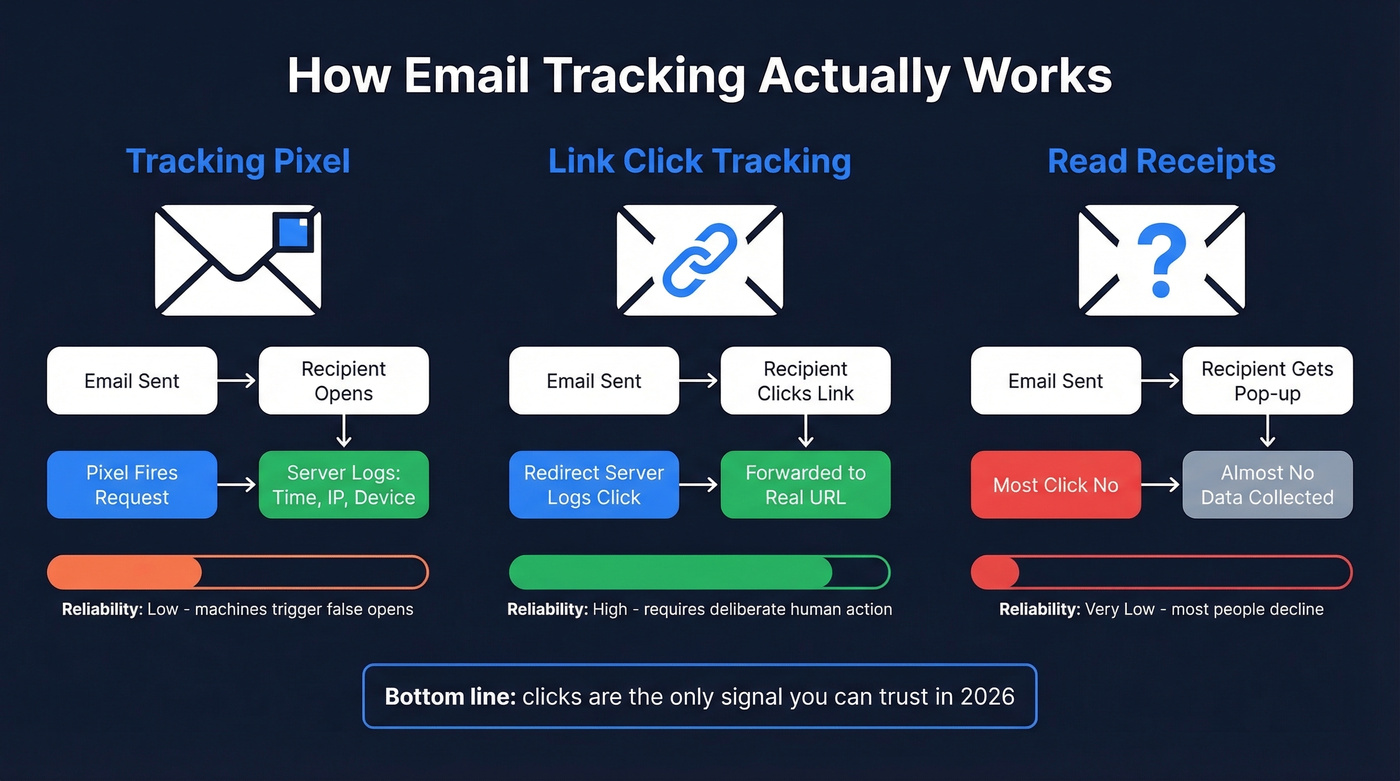
Tracking pixels are tiny 1x1 transparent images embedded in your email's HTML. When a recipient opens the email and their client loads images, the pixel fires a request back to the tracking server. That request logs the timestamp, IP address, device type, and email client. The recipient sees nothing. (If you want the technical deep dive, see email tracking pixels.)
Link click tracking wraps your URLs in redirect links. When someone clicks, they hit the tracking server first, which logs the click, then forwards them to the actual destination. This is far more reliable than pixel tracking because it requires deliberate action - a human choosing to tap or click a link.
Read receipts are the old-school method. The recipient gets a prompt asking them to confirm they read your email. Most people decline. Least useful mechanism for sales and marketing by a wide margin.
Why Open Tracking Is Broken
Open rates were never perfectly accurate. But they used to be directionally useful. That changed in September 2021 when Apple launched Mail Privacy Protection with iOS 15 and macOS Monterey.
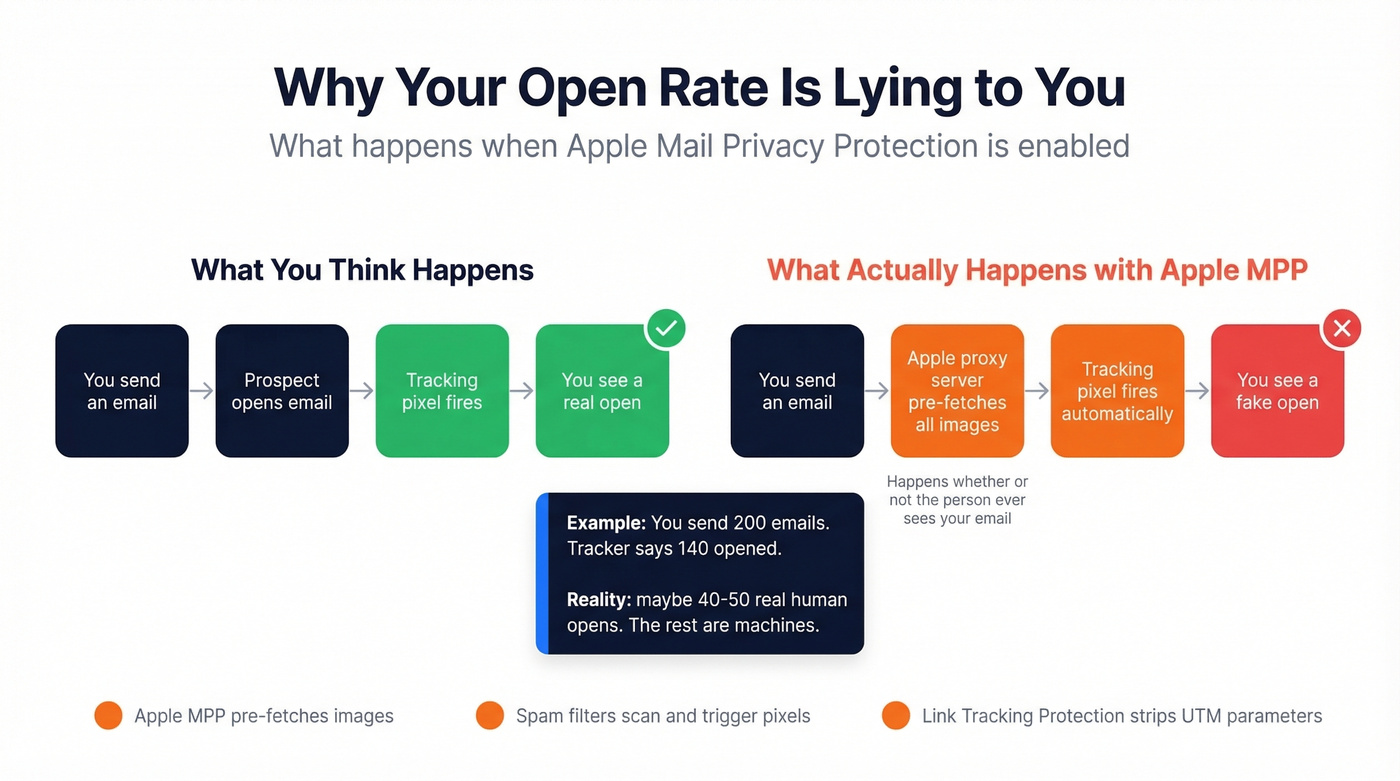
Here's the thing: MPP is opt-in, but adoption has been massive. When it's on, Apple pre-fetches email content through proxy servers regardless of whether the recipient actually opens the email. Every email can register as "opened." Every IP address gets masked. The result is phantom engagement that inflates your open rates and makes individual-level tracking meaningless for Apple Mail users.
It gets worse. Apple's Link Tracking Protection strips UTM parameters from URLs in Mail and Safari, breaking attribution. Previews, spam filters, and security scanners also pre-load images to scan for threats, generating false opens before a human ever sees the message. This is part of the same privacy shift driving cookie deprecation across the web - and it's now firmly embedded in email.
So are open rates completely useless? Not quite. They're still useful directionally over time - if your open rate drops off a cliff week-over-week, that's a deliverability warning worth investigating. But using opens to trigger automations or decide who to follow up with? That's building on sand.
Metrics That Actually Matter
The hierarchy is simple: replies > clicks > opens. A reply is unambiguous intent. A click means someone engaged deliberately. An open might be a machine.
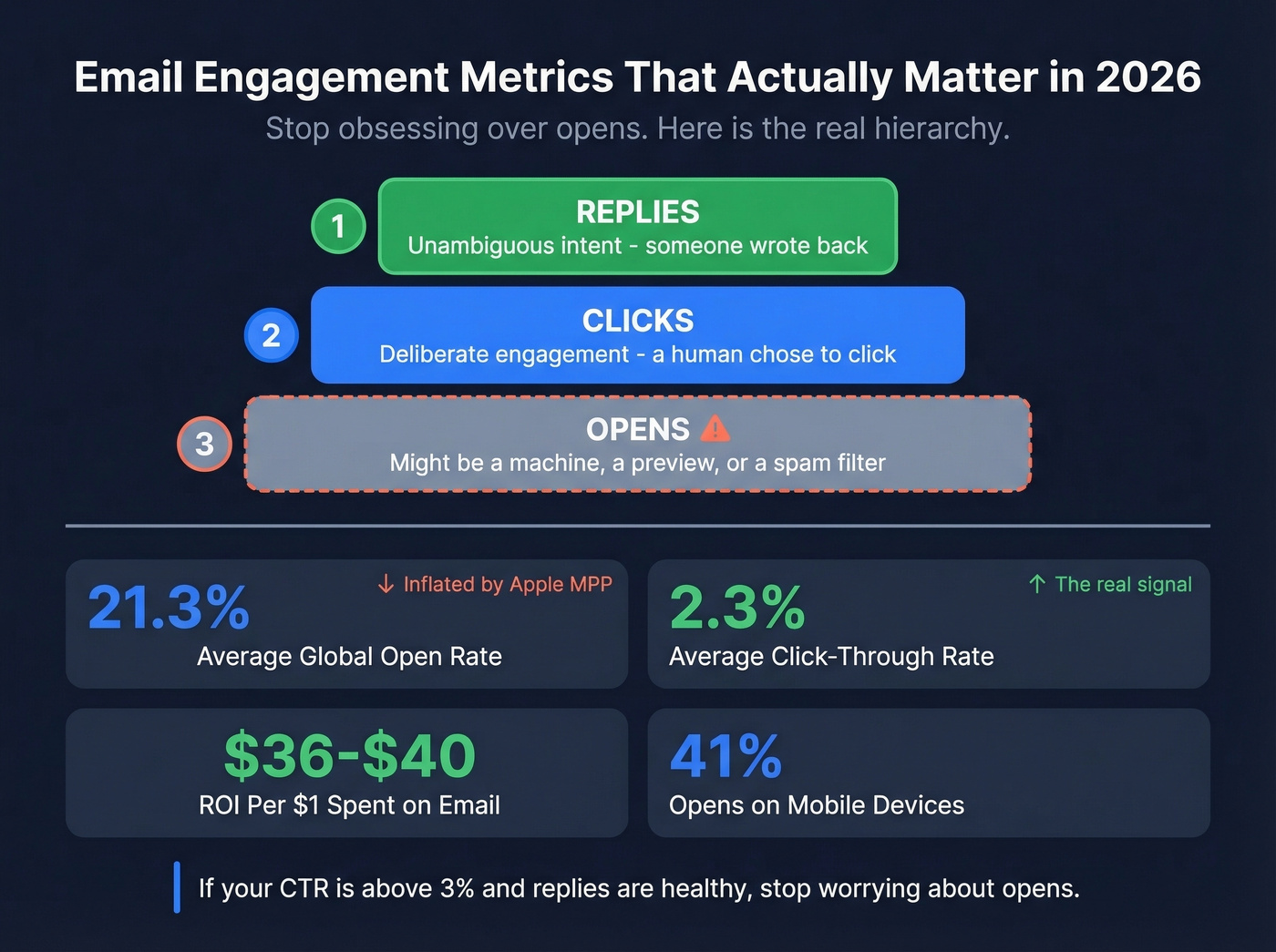
Here are the 2025 benchmarks, the most recent full-year data available:
- Average global open rate: 21.3% (inflated by MPP - real human opens are lower)
- Average click-through rate: 2.3% (use the click rate formula to sanity-check your reporting)
- Email ROI: $36-$40 per $1 spent
- Mobile opens: ~41% of all email opens
If your click-through rate is above 3% and your reply rate is healthy, stop obsessing over opens.
Best Email Tracking Tools in 2026
Here's what's worth your time.
| Tool | Starting Price | Platform | Free Tier | Best For |
|---|---|---|---|---|
| Streak | $15/user/mo | Gmail | Yes | Gmail CRM + tracking |
| Mailtrack | $2.99/user/mo (annual) | Gmail | Unlimited (branded) | Zero-friction tracking |
| Yesware | $19-$65/user/mo | Gmail + Outlook | 10 recipients/mo | Outlook sales teams |
| HubSpot | $45+/mo | Gmail + Outlook | Yes | HubSpot ecosystem |
| Mixmax | $12/user/mo | Gmail | Yes (starter) | High-volume sequences |
| Boomerang | ~$5/mo | Gmail + Outlook | 10 tracked/mo | Send-later + tracking |
| Mailbutler | $4.95/user/mo | Gmail + Outlook + Apple Mail | Trial only | Apple Mail support |
| SalesHandy | Free / $9/mo | Gmail + Outlook | Yes | Bulk outbound tracking |
| Cirrus Insight | $14-$21/user/mo | Gmail + Outlook | Trial only | Salesforce integration |
| Right Inbox | $5.95/mo | Gmail | Yes | Gmail scheduling |

Streak
Streak isn't just a tracker - it's a lightweight CRM that lives inside Gmail. The free plan includes basic email tracking, but the real value kicks in at Pro ($15/user/month) where you get pipeline management alongside your tracking data. What makes Streak different is context: it shows you what to do with tracking data, not just that someone opened. You see the open against a deal stage, a pipeline, a relationship history. That changes how you act on the information entirely, turning a notification into a decision point rather than just a data point sitting in your sidebar.
Use this if: you want tracking plus CRM without leaving Gmail. Skip this if: you're on Outlook or need enterprise-grade sequence management.
Mailtrack
The simplest email tracker that exists - and that's both its strength and its limit. Install the Chrome extension, and every email you send gets tracked automatically. Green checkmarks appear next to sent emails: single check means delivered, double check means opened. The free plan is unlimited but adds a small "Sent with Mailtrack" signature. Premium at $2.99/user/month (billed annually) removes branding and adds click tracking. Mailtrack is CASA-compliant and reviewed yearly.
If you just want to know whether someone opened your email and nothing else, this is the answer. Don't overthink it.
Yesware
If you've been using Outlook's native read receipts, Yesware is the upgrade you didn't know you needed. Read receipts prompt the recipient to confirm - most click "No." Outlook Web handles them inconsistently. And they carry no legal standing as proof of delivery. Yesware embeds invisible tracking pixels that work silently, without prompting anyone. Free tier covers 10 recipients/month, and paid plans scale from $19 to $65/user/month for enterprise features including templates, sequences, and CRM sync.
We've seen Outlook-heavy sales floors try to get by with native read receipts. It never works.
HubSpot, Mixmax, and the Rest
HubSpot Sales Hub gives you genuinely useful free email tracking if you're already in the HubSpot ecosystem - open and click notifications, a basic CRM, meeting scheduling. The catch: once you want sequences or team-level features, you're looking at $45+/month and climbing fast.
Mixmax is built for teams sending at volume. The free tier covers basic tracking, but paid plans ($12/user/month) unlock sequences, templates, and campaign-level visibility that inbox-native tools can't match. Gmail only.
Boomerang pairs send-later scheduling with solid tracking from about $5/month. The response tracking feature - which resurfaces emails that haven't gotten a reply - is genuinely useful for follow-up discipline. Works in Gmail and Outlook.
Mailbutler ($4.95/user/month after trial) is one of the rare trackers supporting Apple Mail alongside Outlook and Gmail. If you're on Apple Mail, this is one of your few options. Right Inbox ($5.95/month) handles Gmail scheduling and basic tracking without a full CRM. SalesHandy (free or from $9/month) targets bulk outbound with document tracking and mail merge. Cirrus Insight ($14-$21/user/month) is purpose-built for Salesforce - if your CRM is Salesforce and you want tracking data flowing directly into contact records, skip the others and start here.

You can't track engagement on emails that never arrive. Bounced emails produce zero tracking data and tank your sender reputation. Prospeo's 5-step verification delivers 98% email accuracy - so every email you send is trackable, deliverable, and reaches a real inbox.
Fix your list before you fix your tracking. Start free with 75 verified emails.
How to Track Emails in Gmail
Gmail doesn't include native open/click tracking for outbound email. You'll need an extension. Here's the fastest path:
- Install Streak or Mailtrack from the Chrome Web Store.
- Compose an email normally. The extension automatically embeds a tracking pixel.
- Send. You'll get a notification when the recipient opens or clicks.
- Watch for clicks, not opens. A click is the only reliable signal that a human engaged.
If you're using Streak's tracking alongside its CRM, opens and clicks get logged against the contact's pipeline stage - that context makes the data significantly more actionable than a standalone notification.
How to Track Emails in Outlook
Outlook's built-in read receipts are tempting but broken in practice. The recipient sees a pop-up asking to confirm. Most click "No." Outlook Web doesn't support them the same way as the desktop app.
For invisible tracking, use Yesware or Boomerang. Both embed tracking pixels that work silently. The setup mirrors Gmail: install the add-in, compose normally, and tracking activates automatically.
Tracking Mistakes That Waste Your Time
Email trackers still work - but only if you avoid these traps.
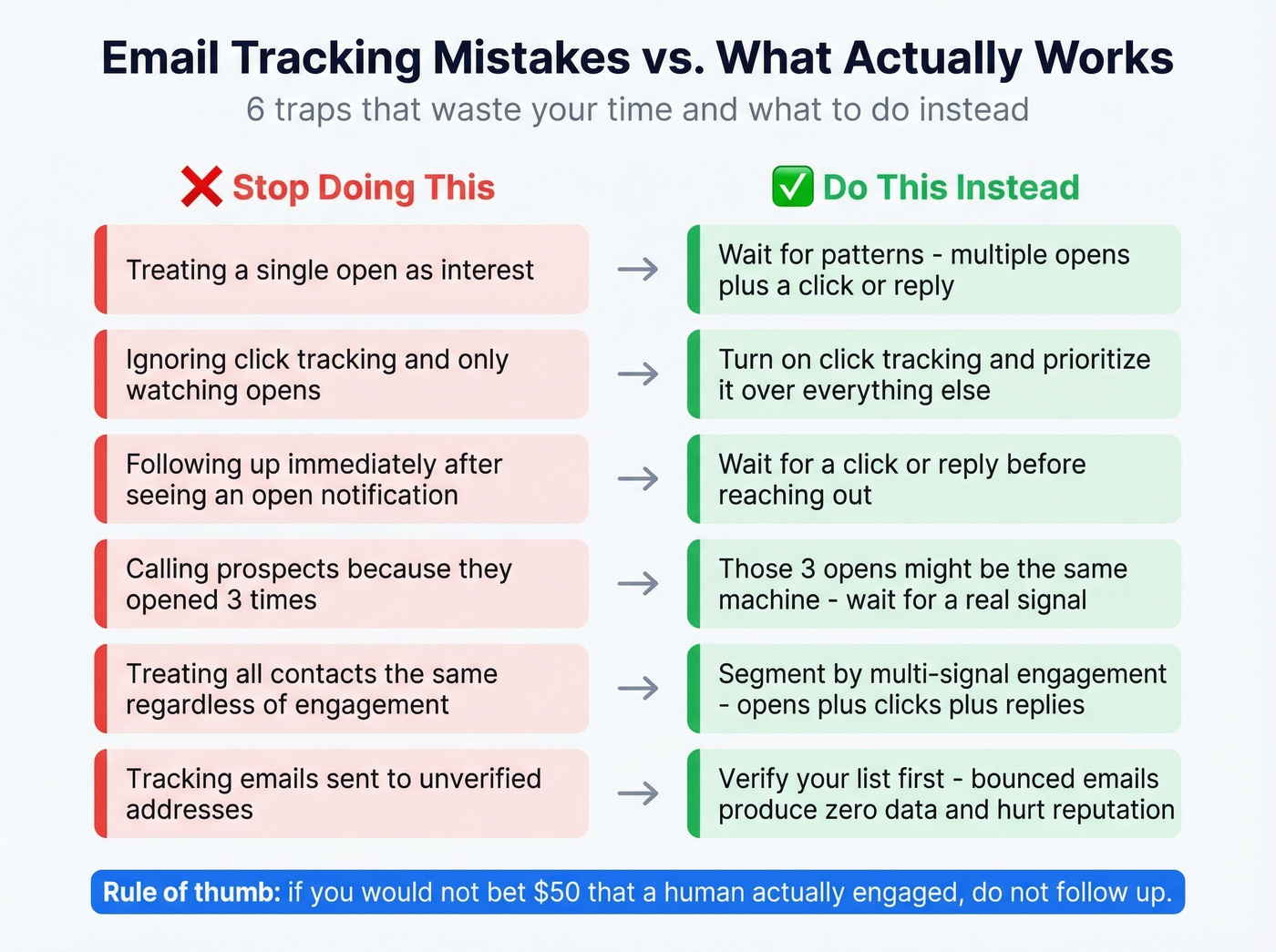
Treating opens as interest. A single open in 2026 means almost nothing. It could be Apple MPP, a preview, a spam filter, or a security scanner. Never trigger a follow-up based solely on an open.
Ignoring click tracking. Clicks require deliberate action. Most trackers offer click tracking - turn it on and prioritize it over everything else.
Following up too quickly after an open. "Hey, I saw you opened my email" is the fastest way to creep someone out and kill a deal. Wait for a pattern before acting. (If you need copy, use these sales follow-up templates.)
Calling prospects "because they opened 3 times." Those three opens might be the same machine pre-fetch firing repeatedly. Wait for a click or reply.
Not segmenting by engagement patterns. A contact who opened three emails and clicked twice is a completely different animal from one who opened once. Build segments based on multi-signal engagement, not raw open counts. (This is basically lead scoring applied to email engagement.)
Tracking emails sent to bad addresses. This one compounds everything else. If 15% of your list is invalid, those emails bounce - producing zero tracking data while damaging your sender reputation. Every bounced email makes your next batch more likely to land in spam. (More on email bounce rate benchmarks and fixes.)
That last point deserves its own section.
Clean Your List Before You Track
Here's a pattern we see constantly: a team invests in tracking tools, builds sequences, launches campaigns - and 20-30% of their list bounces on the first send. No tracking data comes back from bounced emails. Worse, the bounces tank their sender domain reputation, which means even the valid emails start landing in spam. The tracking tool works fine. The data underneath it is the problem.
Real talk: most teams blaming their tracking tool for bad data actually have a list quality problem. If your bounce rate is above 5%, no tracker on this list will save you. Fix the foundation first. (Start with an email deliverability guide if you need a checklist.)
Meritt saw this firsthand - their bounce rate was 35% before they cleaned their list, then dropped to under 4%. Snyk's team of 50 AEs went from 35-40% bounces to under 5%, and AE-sourced pipeline jumped 180%. Prospeo's 5-step verification process catches spam traps and honeypots before they hit your outbox, and the free tier covers 75 verifications per month - enough to test the impact on a single campaign.
The math is straightforward: clean data means higher deliverability, which means more tracking data, which means better decisions.
The article says it clearly: replies > clicks > opens. But none of that matters if you're emailing outdated addresses. Prospeo refreshes 300M+ contacts every 7 days - not every 6 weeks like competitors - so the people you're tracking are still at the company you think they're at.
Stop tracking ghosts. Start with data that's refreshed weekly.
Is Email Tracking Legal?
Under GDPR, email tracking qualifies as processing personal data. Tracking pixels collect timestamps, IP addresses, device information, and email client data - all tied to a specific recipient. Consent must be freely given, specific, informed, and unambiguous. France's CNIL launched a public consultation in June 2025 drawing a clear line: individual-level tracking likely requires consent, while anonymous campaign-level metrics aggregated by domain may be permissible without it.
Under U.S. law, CAN-SPAM operates on an opt-out model. You don't need prior consent to send commercial email, but you must include a clear unsubscribe mechanism, a valid physical address, and non-deceptive headers. Penalties run up to $51,744 per email. CPRA adds another layer for qualifying California companies, with penalties of $2,500-$7,500 per violation, per user, per incident.
The practical takeaway: if you're sending to EU recipients, get consent for individual-level tracking or stick to anonymized campaign metrics. For US-only sends, make sure your opt-out mechanisms work flawlessly.
FAQ
Can you track emails without the recipient knowing?
Yes. Tracking pixels are invisible, and recipients don't see them or receive any notification. Most Chrome extensions and sales tools use pixel-based tracking by default. GDPR may require disclosure when sending to EU recipients. Read receipts, by contrast, always prompt the recipient for confirmation.
Does email tracking work with Apple Mail?
Open data isn't reliable for anyone with Apple MPP enabled, since the system generates machine opens automatically. Click tracking still works normally because it requires a deliberate tap on a link. If your audience skews Apple, prioritize click-through rate and reply rate as your primary engagement signals.
What's the best free email tracker?
Mailtrack offers unlimited free tracking in Gmail with green checkmarks showing read status - ideal for pure simplicity. Streak adds a free CRM alongside tracking for pipeline context. Boomerang is the strongest free option for Outlook users who also want send-later scheduling.
Is email tracking legal under GDPR?
Individual-level tracking that identifies who opened and personalizes follow-ups likely requires explicit consent under GDPR. Anonymous campaign-level metrics aggregated by recipient domain may be permissible without consent. CNIL's 2025 draft guidance addresses this distinction but remains in consultation as of 2026.
How do I improve email tracking accuracy?
Verify your list before sending - catching invalid addresses, spam traps, and catch-all domains before they bounce is the single highest-impact step. Prioritize click tracking over opens, since clicks aren't affected by Apple MPP or image preloading. Only act on multi-signal engagement patterns like repeated opens combined with a click or reply.