

How to Verify Email Addresses in Bulk - Without Wrecking Your Sender Reputation
Three months to warm a domain. Three seconds to burn it with a bad list.
That's the math behind bulk email verification, and it's why skipping this step is the most expensive shortcut in outbound. If you're sending cold email at any real volume, cleaning your list isn't optional - it's the difference between landing in inboxes and getting blacklisted. This guide covers the full process: tools, pricing, catch-all handling, and the mistakes that quietly destroy sender reputation.
Why Your List Is Rotting Right Now
23% of email addresses go invalid within a single year. People change jobs, companies rebrand domains, inboxes get abandoned. Every invalid email you keep costs an estimated $15-$20 per year in wasted sends, damaged reputation, and lost opportunity. On a 10K list, that's $30K-$40K quietly leaking out.
ESPs and ISPs watch your bounce rate closely. The operational threshold is total bounces under 2%, with hard bounces under 1%. Cross those lines and you're looking at throttled delivery, spam folder placement, or blacklisting. Gmail penalizes spam complaint rates above 0.3%, and inbox placement rates already vary wildly by provider - Gmail sits around 87%, Microsoft closer to 76%. A dirty list accelerates every one of those signals.
Let's be blunt: verifying your email list before the first send is the single highest-ROI deliverability habit you can build. If you want the full deliverability picture, start with an email deliverability guide and work backward from the metrics that matter.
What You Need (Quick Version)
TL;DR
- Prep: Export as CSV. Deduplicate before uploading.
- Verify: Upload to a bulk verification tool. Remove invalids, suppress disposables, segment catch-alls.
- Maintain: Re-verify every 60-90 days. List decay never stops.
Quick picks: DeBounce for budget cleaning. ZeroBounce for ongoing spot-checks. Prospeo to skip cleanup entirely and start with pre-verified data.
If you're also sending at scale, pair verification with a safe email velocity plan so you don't spike negative signals.
How Bulk Verification Actually Works
Most verification tools run your emails through a layered stack:
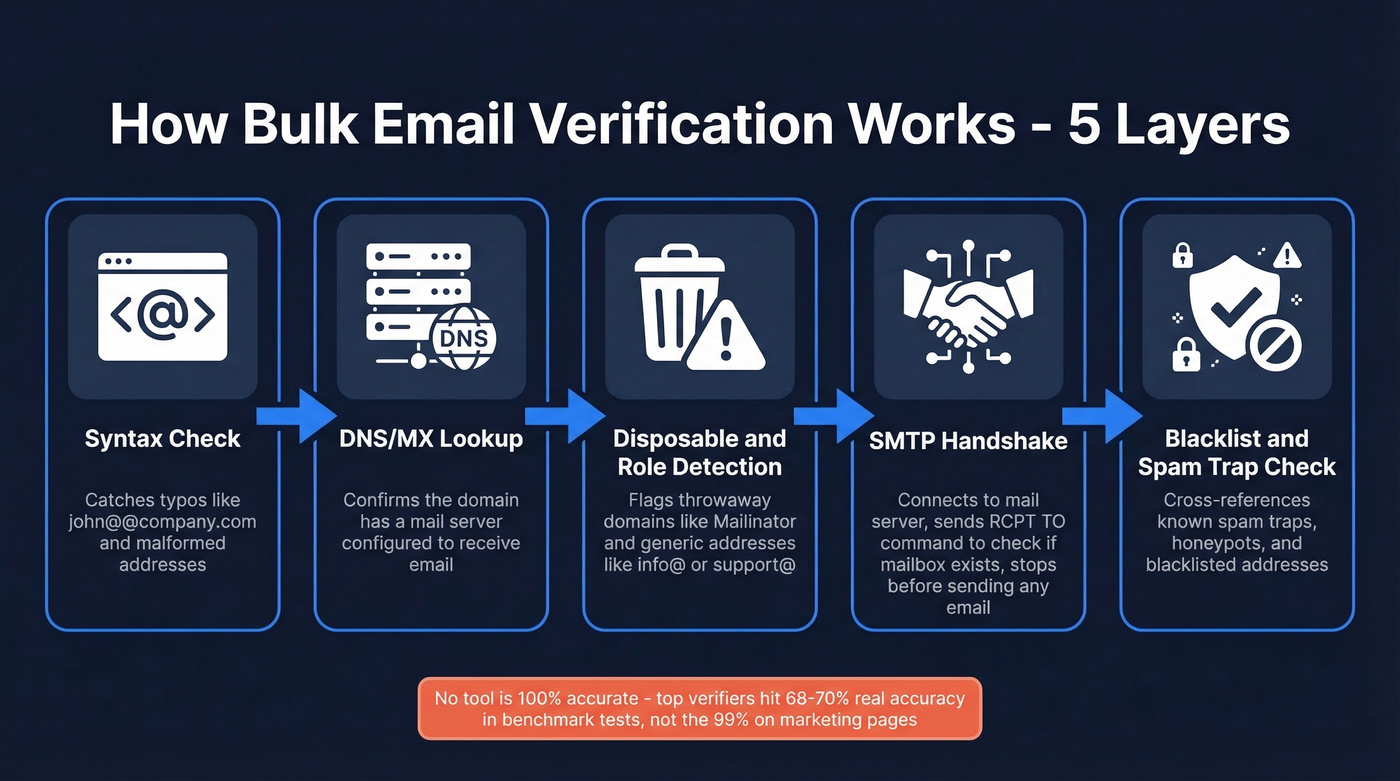
- Syntax validation - Does the address follow RFC 5322 rules? Catches typos like
john@@company.com. - DNS/MX record lookup - Does the domain have a mail server configured to receive email?
- Disposable and role-based detection - Flags throwaway domains (Mailinator, Guerrilla Mail) and generic addresses like
info@orsupport@. - SMTP handshake - Connects to the mail server and issues a
RCPT TOcommand to check if the mailbox exists, stopping beforeDATAso no email is sent. - Blacklist and spam-trap checks - Cross-references databases of known spam traps, honeypots, and blacklisted addresses.
Here's the thing most vendors won't tell you: no tool is 100% accurate. A Hunter benchmark testing 3,000 real business emails across 15 verifiers found the top tools hitting 68-70% overall accuracy - not the 99% plastered on marketing pages. If you're comparing vendors, use a shortlist like these Bouncer alternatives to sanity-check claims and pricing.
One practitioner on Reddit discovered that the same tool returned different verification statuses for identical Yahoo addresses depending on whether they used the bulk API or single-check API. The gap between marketing claims and real-world results is wide, and it matters when you're making send/suppress decisions on thousands of contacts.

Hunter's benchmark found top verifiers hit just 68-70% real accuracy. Prospeo's 5-step verification - with catch-all handling, spam-trap removal, and honeypot filtering - delivers 98% accuracy before you ever export a list. At $0.01/email, the cheapest verification is the one you never need to run.
Stop cleaning bad data. Start with data that's already clean.
The Catch-All Problem
Catch-all domains are the blind spot of email verification. These servers accept mail for any address at the domain - real or fabricated - returning a 250 OK regardless. The SMTP handshake can't distinguish fake.person@company.com from a real mailbox.
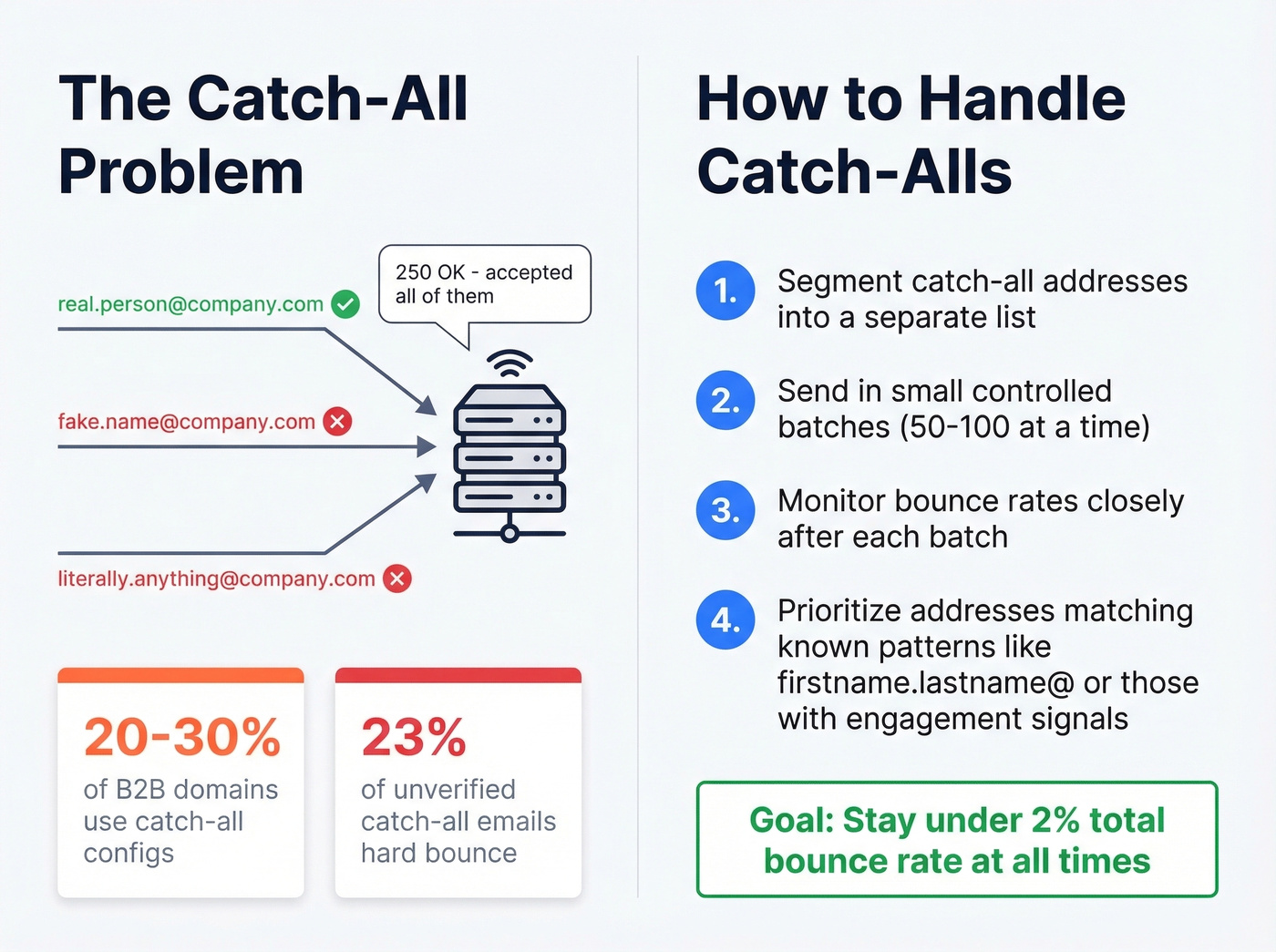
This isn't niche. 20-30% of B2B domains use catch-all configurations, and 23% of unverified catch-all emails hard bounce when you actually send. We've seen teams cross the 2% bounce threshold overnight by blasting their full catch-all segment without testing first.
The fix is straightforward: segment catch-all addresses and send in small, controlled batches while monitoring bounces. If a company uses a firstname.lastname@ pattern and your contact matches it, confidence goes up. Prioritize catch-all addresses where you have other engagement signals - website visits, content downloads, intent data - and suppress the rest until you can validate them through actual sends.
Step-by-Step Bulk Verification
Step 1: Prepare your file. Export as CSV with one email per row. Deduplicate first - most tools charge per check, and duplicates waste credits while creating contact management chaos downstream.
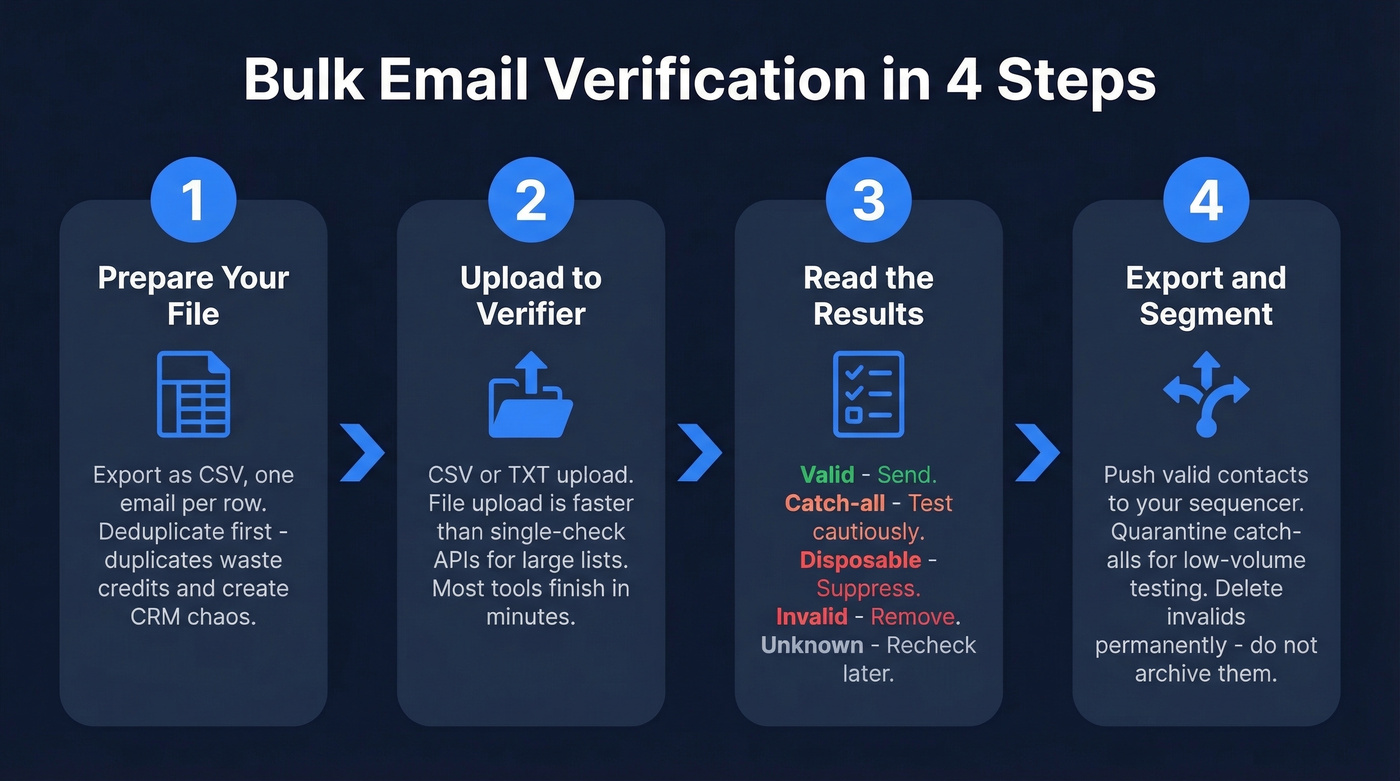
Step 2: Upload to your verifier. Most tools accept CSV or TXT. Verifications typically finish in minutes, though timing depends on list size and how quickly mail servers respond. For hundreds or thousands of addresses, file upload is almost always faster than single-check APIs. If you're building lists before verification, a structured lead generation workflow helps prevent garbage data from entering the pipeline in the first place.
Step 3: Interpret the statuses.
| Status | Action |
|---|---|
| Valid | Send |
| Catch-all | Test cautiously |
| Disposable | Suppress |
| Invalid | Remove |
| Unknown | Recheck later |
Step 4: Export and segment. Push valid contacts to your sequencer. Quarantine catch-alls and unknowns for lower-volume testing. Delete invalids permanently - don't just archive them, because someone on your team will inevitably re-import that CSV six months from now and undo all your work.
Best Tools for Bulk Email Verification
| Tool | $/1K | Free Credits | Accuracy Claim |
|---|---|---|---|
| Prospeo | ~$10 | 75 emails/mo | 98% |
| DeBounce | $2 | 100 | 98% |
| MillionVerifier | ~$3.70 | - | 99% |
| EmailListVerify | $3.40 | 100 | 91% |
| Kickbox | $8 | 100 | 98% |
| NeverBounce | $8 | 10 | 99% |
| ZeroBounce | $9 | 100/mo (business domain) | 99% |
| Emailable | $10 | 250 | 99% |
Skip the cleanup entirely (best overall). Prospeo takes a fundamentally different approach. Instead of finding emails elsewhere and paying to clean them, you start with 143M+ emails already verified at 98% accuracy on a 7-day refresh cycle. Their proprietary 5-step verification process includes catch-all handling, spam-trap removal, and honeypot filtering - the exact layers you'd otherwise pay a separate tool to run. At roughly $0.01/email, the cheapest verification is the one you don't need. Stack Optimize built from $0 to $1M ARR running 94%+ deliverability with bounce rates under 3% and zero domain flags across all clients using this approach.
Budget pick. DeBounce at $2/1K is the best value for straightforward list cleaning. One Reddit user built an in-house tool validating 100K emails for under $1, but most teams don't have that engineering bandwidth. DeBounce gets you 90% of the way there for a fraction of the effort.
Accuracy-first. If accuracy matters above all else, use a verifier that performs well in benchmark-style testing and handles "Unknown" and catch-all results cleanly - then validate your own sample before running the full list. Never trust a single tool's marketing page.
Ongoing spot-checks. ZeroBounce is popular for maintenance because you get 100 free monthly verifications when you sign up with a business domain. If you're deciding between verification vs enrichment, compare against dedicated data enrichment services so you don't pay twice for overlapping features.
Mistakes That Kill Deliverability
Treating verification as a one-time cleanup. Lists decay continuously. Recheck every 60-90 days, minimum. We've watched teams nail their first campaign, then wonder why reply rates crater three months later. The list rotted while they weren't looking.
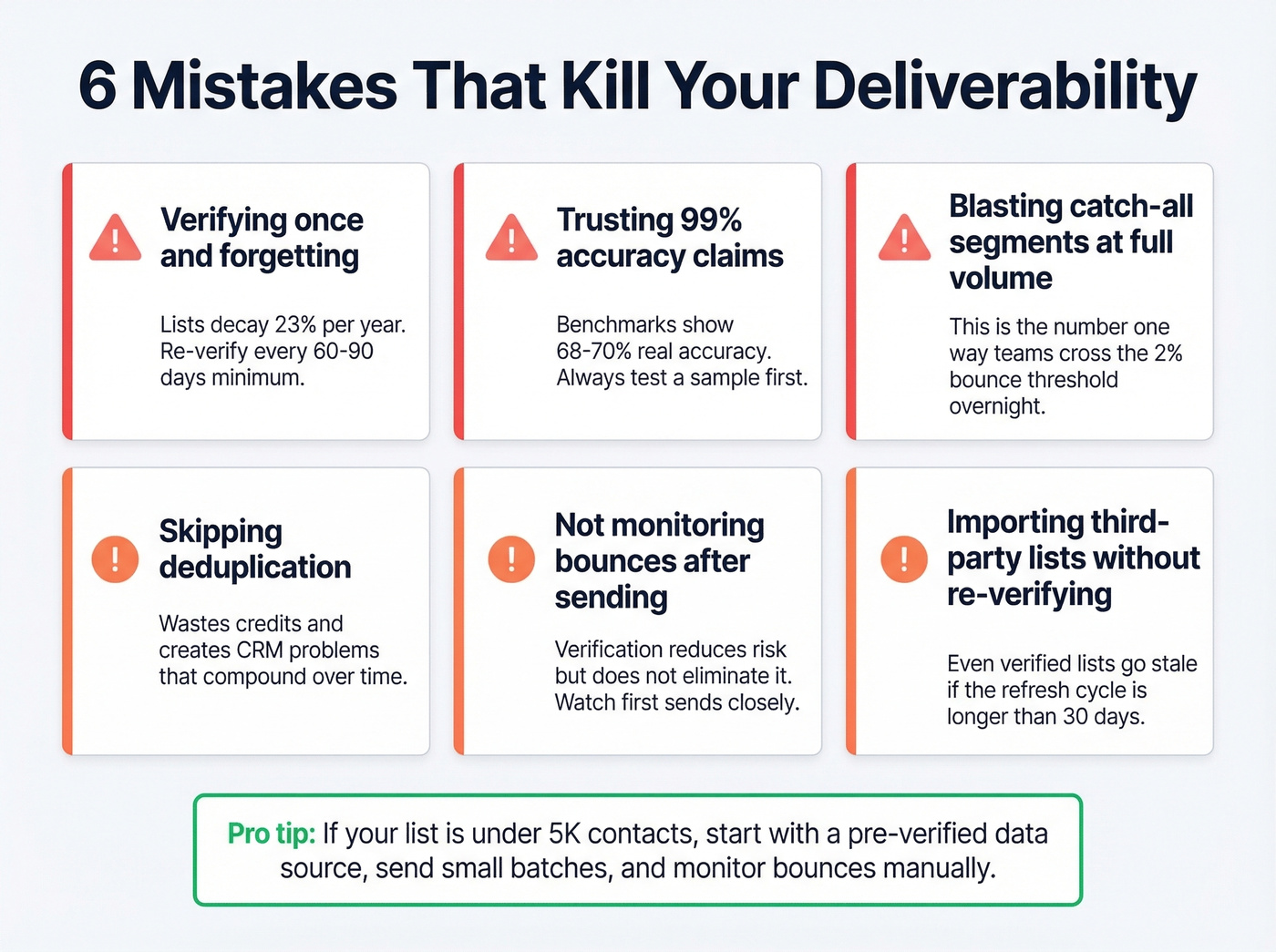
Trusting "99% accuracy" claims at face value. Benchmark tests show top tools at 68-70% overall accuracy. Always test a sample before committing your full list.
Ignoring catch-all segments. Sending to unverified catch-all addresses at full volume is how you cross the 2% bounce threshold overnight. We covered this above, but it bears repeating because it's the single most common deliverability killer we see in outbound teams.
Skipping deduplication. Duplicates waste credits and create downstream CRM problems that compound over time.
Not monitoring bounce rates post-send. Verification reduces risk. It doesn't eliminate it. Watch your first sends closely and suppress new bounces immediately. If you need a deeper benchmark + troubleshooting map, use this email bounce rate guide.
Importing from a new source without re-verifying. Even "verified" third-party lists can contain stale data if the provider's refresh cycle is longer than 30 days. If you're sourcing contacts externally, make sure you understand the compliance and risk tradeoffs in buy email lists.
Look - if your average deal size is under $10K and your list is under 5K contacts, you probably don't need a standalone verification tool at all. Start with a pre-verified data source, send in small batches, and monitor bounces manually. The verification industry has convinced everyone they need enterprise tooling for what's often a data-quality-at-source problem.
Stack Optimize ran 94%+ deliverability with under 3% bounce rates and zero domain flags - no separate verification tool needed. Prospeo refreshes 143M+ emails every 7 days, so your lists don't rot between sends. That's the difference between re-verifying every 60 days and never worrying about it.
Replace your verification budget with data that stays fresh weekly.
FAQ
How often should I re-verify my email list?
Every 60-90 days. Lists decay roughly 23% per year from job changes, domain expirations, and abandoned accounts. Waiting longer risks crossing the 2% bounce threshold that damages sender reputation. Teams with strong deliverability treat re-verification as a recurring calendar event, not a one-time project.
What's the difference between real-time API and bulk verification?
Real-time API verifies emails at the point of capture - form submissions, sign-ups, enrichment workflows. Bulk verification processes an existing list via file upload. Most teams need bulk first to scrub their current database, then layer in real-time API to keep new entries clean going forward.
Can I skip verification with a pre-verified data source?
Yes. Platforms that verify emails at collection on a short refresh cycle keep data clean without third-party verification tools. That said, re-verify any list older than 90 days regardless of source - decay is relentless and doesn't care where the data came from.
How do I handle mixed formats before bulk verification?
Standardize first. Strip whitespace, remove display names (anything before < and after >), and convert to lowercase. Then upload the cleaned CSV. Most tools handle minor formatting issues, but garbage-in means garbage-out - deduplication and normalization before upload saves credits and produces more reliable results.