

How to Write a Follow-Up Email After a Meeting That Actually Gets a Reply
You just wrapped a 45-minute discovery call covering requirements, pricing, three stakeholders, and a vague promise to "circle back next week." Now you're staring at your notes trying to turn that mess into something sendable. If you've ever struggled with how to write a follow-up email after a meeting, you're in good company - as one sales engineer put it on Reddit, the rewriting process feels "more manual and ad-hoc than it should be." That's where most post-meeting emails die.
Here's how to make it take five minutes instead of thirty.
The Quick Version
- 5-part structure: thank, recap, action items, next steps, close
- Send the same day for external meetings; within 24 hours for internal
- Under 150 words - shorter emails get better reply rates
- Subject line: 3-7 words referencing the meeting topic
- Verify the address before sending, especially for new contacts from events or referrals
Structure Your Post-Meeting Email
Most effective follow-ups follow the same skeleton. We've used this across hundreds of client meetings, and it works every time. Five parts, no guesswork.
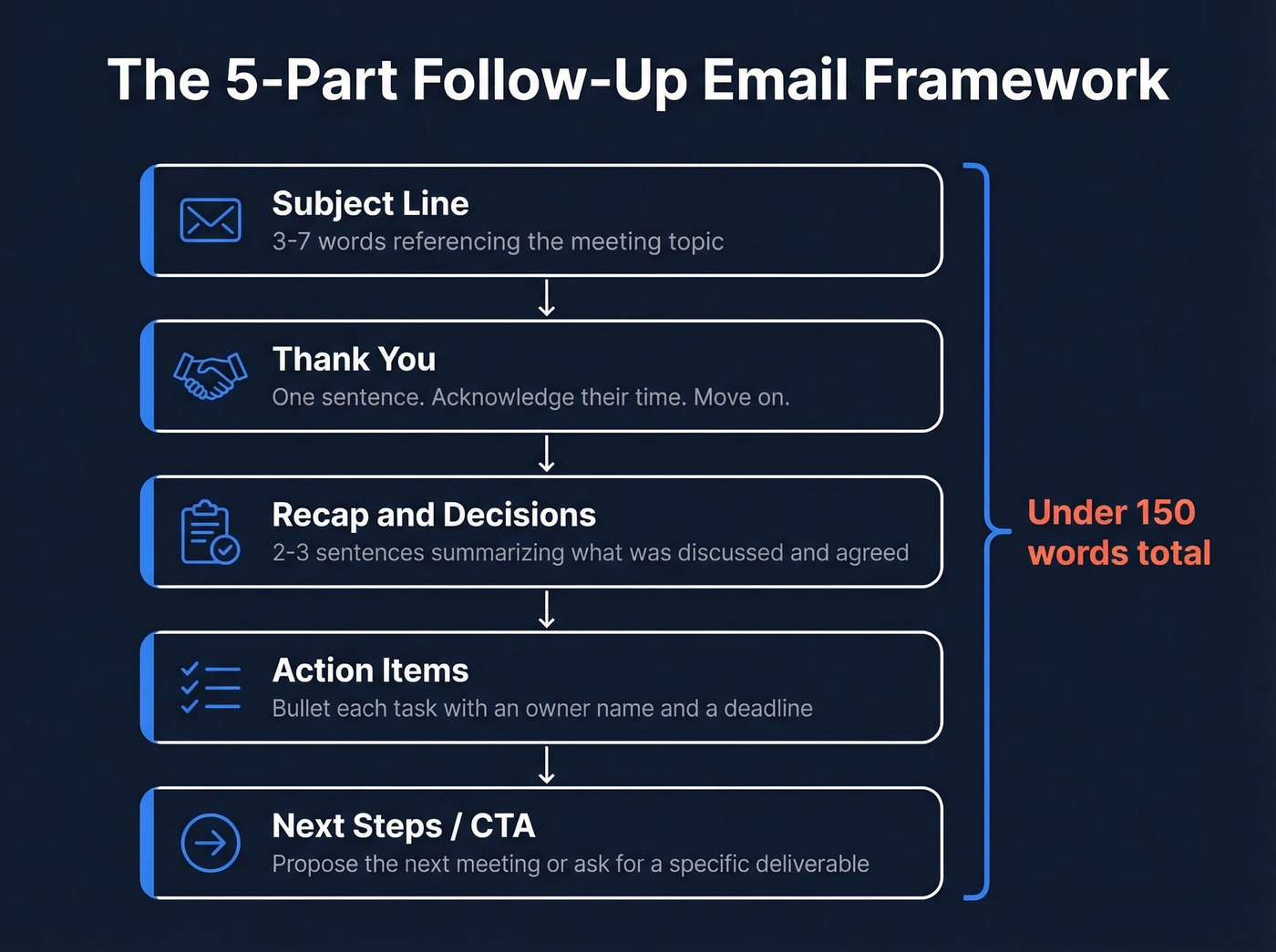
1. Subject line - 3-7 words that reference the meeting topic. Not "Quick follow-up." Not "Touching base." Be specific.
2. Thank you - One sentence. Acknowledge their time. Move on.
3. Recap and decisions - Two to three sentences summarizing what was discussed and any agreements reached. This prevents misunderstandings and creates a written record that everyone can point back to when memories start diverging three days later.
4. Action items with owners and deadlines - Bullet each item. Name the person responsible. Include a date. Nearly half of all action items from meetings never get completed, and naming an owner with a deadline is the simplest fix.
5. Next steps / CTA - Propose the next meeting, ask for a specific deliverable, or confirm the timeline. End with something the recipient can act on.
Thank, recap, assign, advance. Every template below follows this pattern.
Subject Lines That Get Opened
The 3-7 word rule isn't arbitrary - short subject lines make your email feel quick to read, which makes it more likely to get opened at all.
| Scenario | Subject line example |
|---|---|
| Internal recap | "Q3 planning - action items" |
| Client meeting | "Next steps from today's call" |
| Sales discovery | "Your [pain point] - recap" |
| Sales demo | "Demo recap - trial access inside" |
| Networking | "Great meeting you at [event]" |
| No-response nudge | "Still on your radar?" |
| Scheduling next meeting | "Locking in our next call" |
| Resource share | "Resources from our conversation" |
Never use "Follow up" as your entire subject line. It tells the recipient nothing and gets buried under fifty identical emails.
If you want more options, pull from these subject line example lists and adapt them to the meeting topic.
When to Send
Some reps send immediately after the meeting ends; others wait a day for "better pacing." In our experience, the answer depends on the meeting type:
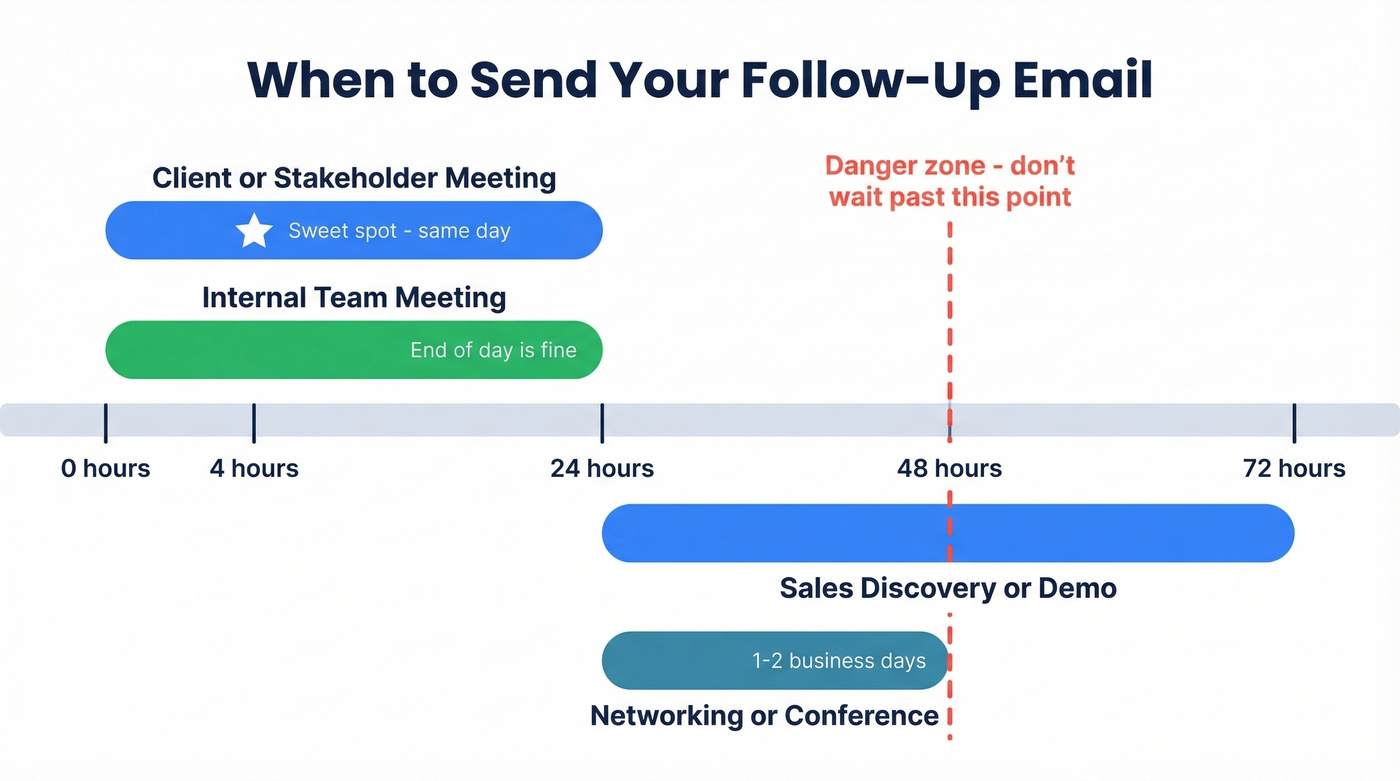
| Meeting type | Send within |
|---|---|
| Internal team meeting | 24 hours (end of day is fine) |
| Client or stakeholder | Same day or next business day |
| Sales discovery or demo | 24-72 hours |
| Networking or conference | 1-2 business days |
For external meetings, same-day is the sweet spot. Fast enough to ride the momentum, slow enough to write something thoughtful. For internal meetings, end-of-day works - your colleagues aren't going anywhere.
The one thing everyone agrees on: don't wait more than 48 hours. Set the expectation during the meeting itself - "I'll send a recap after this" - and you've already committed yourself to following through.
When to skip the follow-up entirely: Don't send one if the meeting was a calendar placeholder with no real decisions, if action items are already captured in your project management tool, or if there was no meaningful exchange. A pointless follow-up is worse than none. It trains people to ignore your emails.
For more timing guidance, see When Should You Follow Up on an Email?.
Who Gets the Email
Reply should be your default, not Reply All. Only loop in the full group when the response affects everyone - scheduling changes, decisions that need group input, or when someone explicitly asks you to.
CC stakeholders who weren't in the meeting but need visibility. For executive follow-ups, copy their assistant - they're the ones who actually schedule the next step. Don't CC someone's manager to apply pressure. That reads as public shaming, not urgency.
Use BCC sparingly. It's fine for keeping your manager informed without cluttering the thread, but if the BCC'd person needs to respond, they shouldn't be hidden.

You just wrote the perfect follow-up email. Don't let it bounce. 35% of sales teams send follow-ups to outdated or invalid addresses - killing momentum from meetings that went well. Prospeo verifies emails at 98% accuracy with a 7-day refresh cycle, so your recap lands in the inbox, not the void.
Verify every contact before your follow-up goes out.
How Many Follow-Ups to Send
Fewer than you think. Belkins analyzed 16.5 million cold emails across 93 business domains and found the highest reply rate - 8.4% - came from a single email. Each additional follow-up eroded performance, and sending four or more emails more than tripled spam complaints.
If you're building a sequence, use these sales follow-up templates as a starting point and keep the total touches tight.
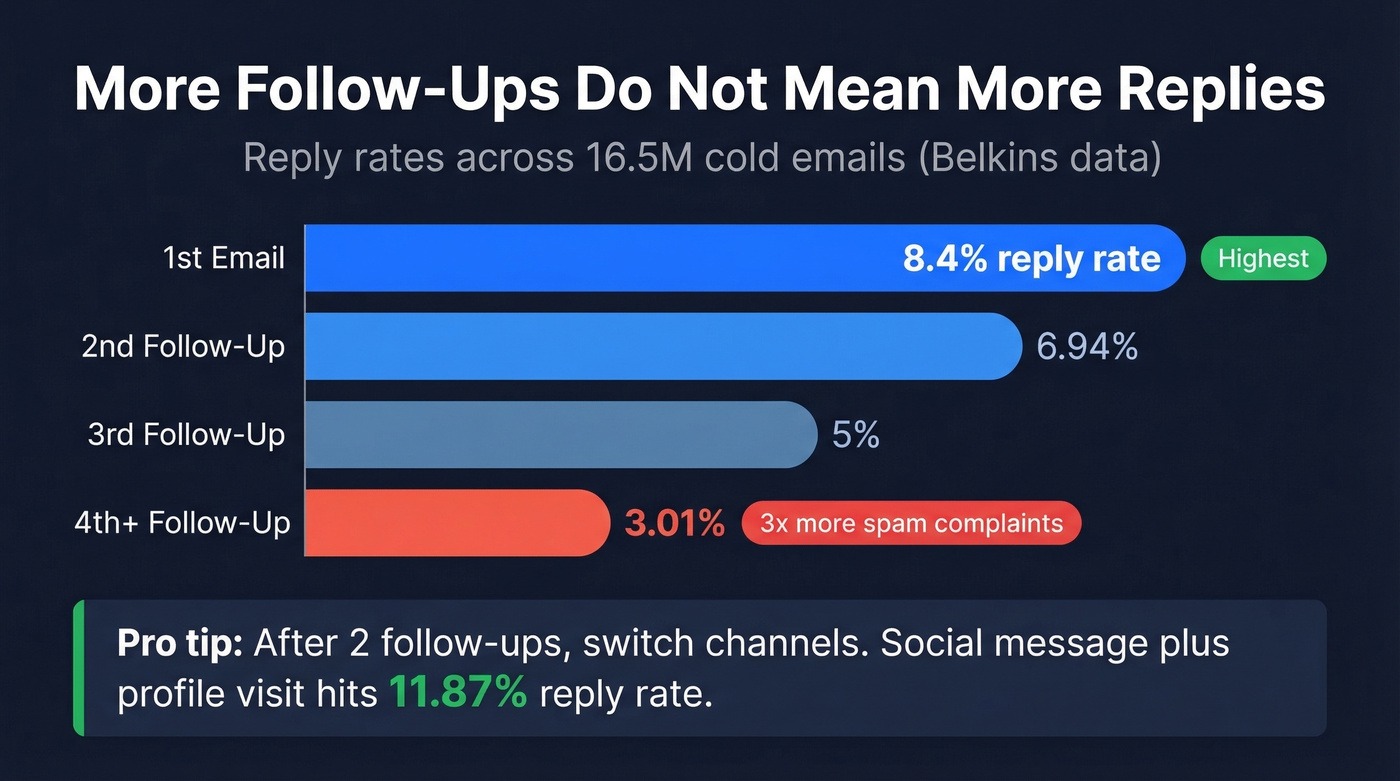
Founders see a 6.64% reply rate on the first email, a peak of 6.94% after the second follow-up, then a slide to 3.01% by the fourth. You're not persistent at that point. You're annoying.
After that, switch channels. A social message plus profile-visit combo hits an 11.87% reply rate in Belkins' data - higher than any email sequence.
8 Meeting Follow-Up Templates
Internal Team Meeting
After any cross-functional sync, sprint review, or planning session.
Subject: [Project] sync - action items
Hi team,
Thanks for today's session. Here's what we agreed on:
- [Decision 1]
- [Decision 2]
Action items:
- [Task] - [Owner] by [Date]
- [Task] - [Owner] by [Date]
Next sync is [date/time]. Flag anything I missed.
Send this within 24 hours while decisions are fresh. If you wait until tomorrow, people will remember the meeting differently.
Client or Stakeholder Meeting
After any external meeting where you're managing the relationship.
Subject: Next steps from today's call
Hi [Name],
Thanks for your time today. Here's a quick recap:
We discussed [topic] and agreed to [decision]. On our end, we'll have [deliverable] ready by [date]. Could you confirm [their action item] by [date]?
Happy to jump on a call if anything needs clarifying.
Sales Discovery or Demo
After a first call or product demo with a prospect.
Subject: [Their pain point] - recap + next steps
Hi [Name],
Great conversation today. You mentioned [specific challenge] - here's how we'd address that: [one-sentence solution].
I've attached [resource/recording/deck]. Next step: [specific CTA - trial access, intro to champion, proposal review]. Does [date] work for a 20-minute follow-up?
When to use: The prospect named a specific pain point you can solve. Skip this if the call was exploratory with no clear next step - use the scheduling template instead.
If you want to tighten the discovery recap, borrow a few from this discovery questions framework.
Networking or Conference
After meeting someone at an event, dinner, or introduction.
Subject: Great meeting you at [event]
Hi [Name],
Really enjoyed our conversation about [topic]. Your point about [specific detail] stuck with me.
I'd love to continue the conversation - would you be open to a quick coffee chat or call in the next couple weeks? [Suggest a specific day if possible.]
Reference something only someone at that conversation would know. "Your take on [specific opinion]" beats "Great to connect" every time.
You Weren't the Organizer
When you attended a meeting but didn't run it, and next steps feel unclear.
Subject: Confirming my takeaways from [meeting]
Hi [Organizer name],
Thanks for pulling that together. My key takeaways:
- [Your understanding of decisions]
- [Your action item, if any]
Did I miss anything? Happy to take on [specific task] if it's helpful.
No-Response Nudge
Use 3-5 days after your first follow-up went unanswered.
Subject: Still on your radar?
Hi [Name],
I sent over [recap/proposal/resource] on [date] - wanted to make sure it didn't get buried. Is [original CTA] still on track, or has the timeline shifted?
Either way, just let me know.
If you need a softer version, use a polite chaser email instead of a hard nudge.
Scheduling the Next Meeting
When the meeting ended with a verbal "let's meet again" but no date.
Subject: Locking in our next call
Hi [Name],
We talked about reconnecting in [timeframe]. How does [specific date and time] look? If that doesn't work, here are two more options: [date] or [date].
Looking forward to it.
For more phrasing options, see email wording to schedule a meeting.
Sharing Resources
When you promised to send materials, links, or introductions.
Subject: Resources from our conversation
Hi [Name],
As promised, here's [what you discussed]:
- [Link/attachment 1]
- [Link/attachment 2]
Let me know if you have questions on any of this. [Optional: suggest next step.]
Writing a Follow-Up After a Business Meeting
The templates above cover most scenarios, but business meetings with external partners, vendors, or prospective clients deserve extra attention. The stakes are higher, the audience is less forgiving, and the follow-up often serves as a de facto contract of what was agreed upon.
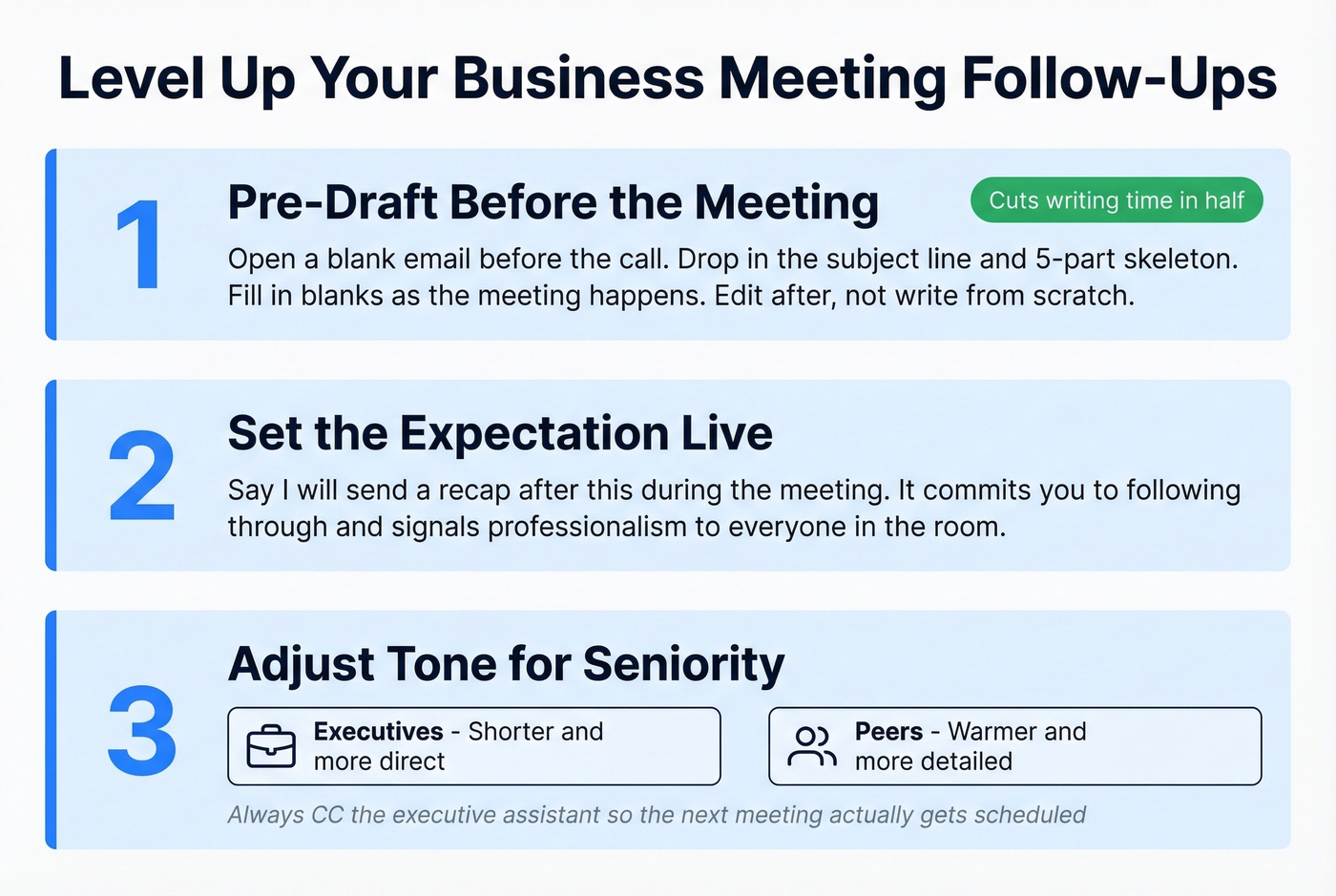
Pre-draft before the meeting. Open a blank email, drop in the subject line and the 5-part skeleton, and fill in the blanks as the meeting progresses. This approach means you're editing after the call, not writing from scratch. We've seen teams cut their follow-up writing time in half this way.
Set the expectation live. Say "I'll send a recap after this" during the meeting. It commits you to following through and signals professionalism.
Adjust tone for seniority. Shorter and more direct for executives. Warmer and more detailed for peers. Copy their assistant on executive follow-ups so the next meeting actually gets scheduled.
If you're sending these as part of a broader motion, this sales communication guide helps keep tone consistent across touchpoints.
Tools That Speed Up Follow-Ups
AI transcription tools handle the hardest part - capturing what was actually said so you're not reconstructing from memory. Here's the thing: the bottleneck isn't writing the email, it's remembering what happened accurately enough to write it well.
| Tool | What it does | Starting price |
|---|---|---|
| Otter.ai | AI transcription | Free (300 min/mo), Pro $16.99/mo |
| Fellow | Meeting notes + follow-up drafts | Free 14-day trial, ~$7/user/mo |
| Fireflies.ai | Transcription + action items | Free tier, Pro ~$10/mo (annual) |
| Prospeo | Email verification before sending | Free (75 emails/mo), ~$0.01/email |
One limitation worth knowing: many transcription tools extract action items but don't push them into your task manager - you'll still need to copy them over manually.
A bounced follow-up is worse than no follow-up. You did the work, wrote the recap, and it never landed. For new contacts from conferences, referrals, or cold outreach, the email address you have is often wrong. Prospeo checks addresses in real time with 98% accuracy using a 5-step verification process that includes catch-all handling, spam-trap removal, and honeypot filtering. The free tier gives you 75 verifications per month - enough to cover every new contact you meet.
If you're troubleshooting bounces, start with email bounce rate and then work through this email deliverability guide.
Met someone at a conference but only got their name and company? Prospeo's Chrome extension finds verified emails from any company website or professional profile in one click - used by 40,000+ salespeople who refuse to let warm conversations go cold. At $0.01 per email, one found address pays for itself the moment your follow-up gets a reply.
Turn every meeting into a verified contact in seconds.
Mistakes That Kill Your Follow-Up
The most common killer is length. If your follow-up reads like a memo - anything over 150 words - you've lost them. Cut ruthlessly.
The second biggest mistake is vague accountability. "Let's circle back" isn't an action item. "[Name] sends proposal by Friday" is. Name the owner, name the date, or it won't happen. I've watched deals stall for weeks because nobody wrote down who was supposed to do what.
Vague subject lines are the third offender. "Follow up" tells the recipient nothing and gets buried. Reference the topic.
And whatever you do, don't wait more than 48 hours. Momentum dies fast.
Let's be honest: if your deal size is under five figures, you probably don't need a multi-touch automated sequence. A single well-written follow-up sent the same day will outperform a five-email drip campaign every time. The templates above are all you need.
FAQ
How long should a follow-up email be?
Under 150 words. Exclaimer's research puts the sweet spot at 50-125 words for maximum reply rates, while Koalendar recommends staying under 150. Include only what the recipient needs to act on - a thank-you, key decisions, action items with owners, and next steps.
Should I follow up if I wasn't the meeting organizer?
Yes - especially if action items involve you or next steps are unclear. Keep it brief: reference the meeting, confirm your takeaways, and ask if you missed anything. The "You Weren't the Organizer" template above covers this exact scenario.
What subject line works best for a meeting follow-up?
Three to seven words that reference the meeting topic. "Next steps from today's call" or "Q3 planning - action items" both work. Avoid generic lines like "Follow up" or "Touching base" - they get buried instantly.
How do I make sure my follow-up actually reaches the recipient?
Verify the email address before hitting send, especially for new contacts from events or referrals. A bounced email wastes your effort and can hurt your sender reputation over time.
How do you follow up when no clear next steps were discussed?
Start with a brief thank-you, then summarize the key points of the conversation. Even without formal action items, propose a next step yourself - suggest a follow-up call, share a relevant resource, or ask a clarifying question. Ending with a concrete ask gives the recipient a reason to reply.