

HubSpot Email Deliverability Issues: How to Diagnose and Fix Them
You migrated to HubSpot, sent your first campaign, and open rates cratered. Emails that used to land in inboxes on your old ESP now sit in spam folders. You're not imagining it - HubSpot email deliverability issues show up constantly in Community threads and across r/Emailmarketing and r/hubspot, and we've spent the last year helping teams untangle the mess.
Quick Diagnosis Checklist
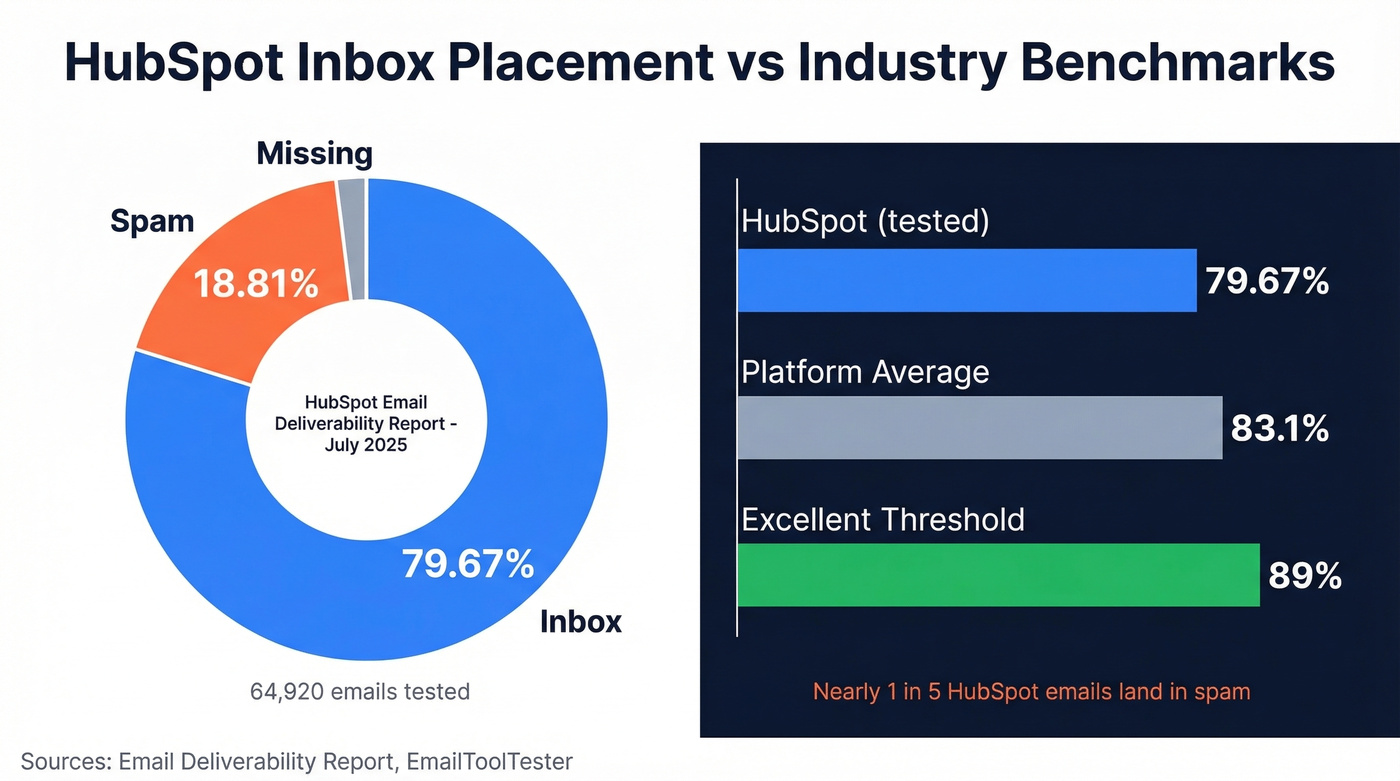
HubSpot's deliverability problem is real. A July 2025 test from Email Deliverability Report put inbox placement at 79.67% - nearly one in five emails landing in spam.
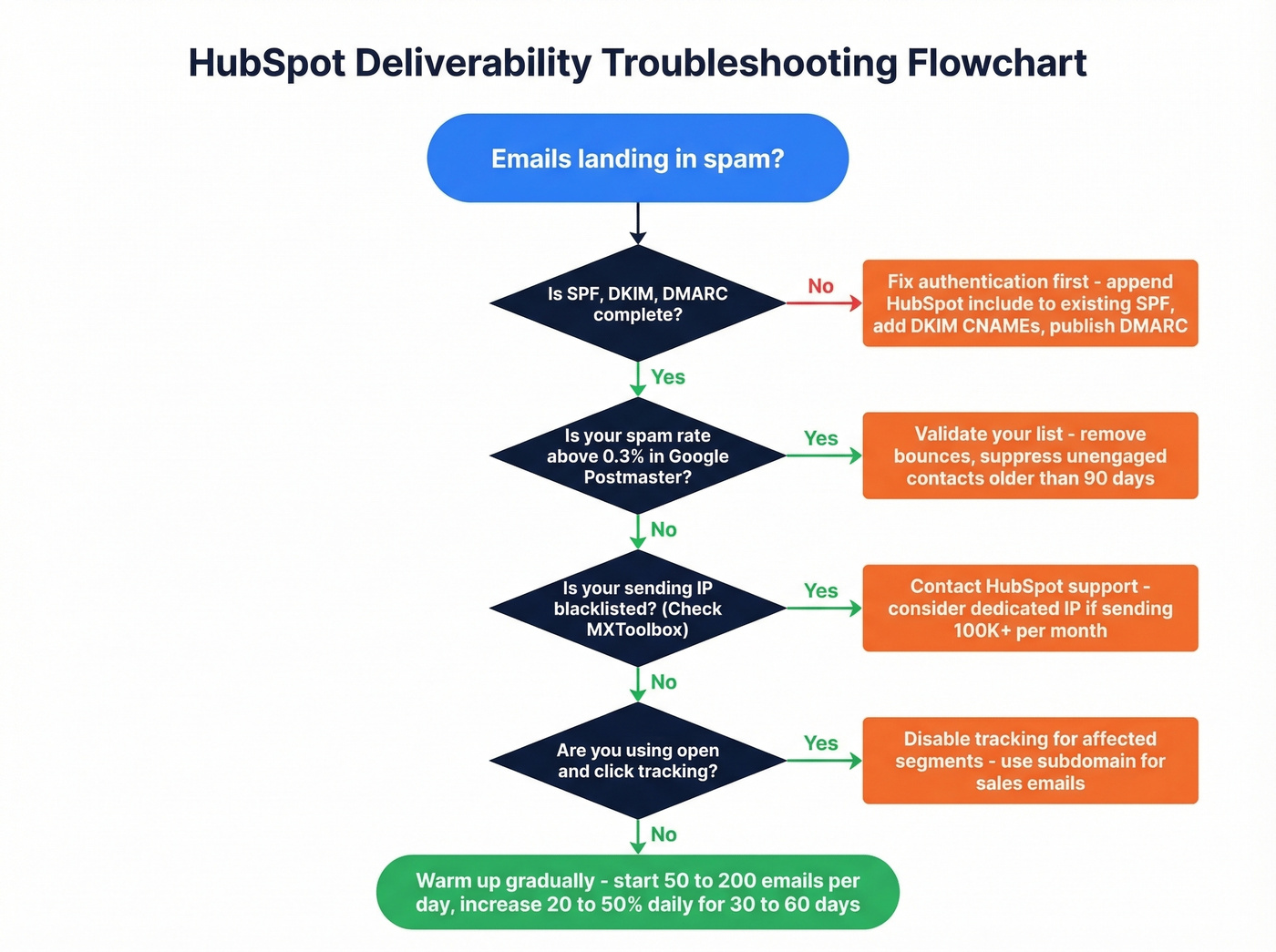
Before you change anything, do three things: check Google Postmaster Tools for your real spam rate, run MXToolbox to see if your sending IP is blacklisted, and verify SPF/DKIM/DMARC is actually complete. If you imported a list without validating it first, that's your #1 problem. Full stop.
How Bad Is HubSpot's Inbox Placement?
Out of 64,920 emails in that snapshot, 79.67% hit the inbox, 18.81% landed in spam, and 1.90% vanished entirely. EmailToolTester's independent test backs this up - 77.7% inbox placement against an 83.1% platform average and their 89% "excellent" bar.
Here's the thing: HubSpot's own benchmark data showing 42.35% average open rates is misleading. Apple Mail Privacy Protection inflates opens by roughly 18 points. Your "fine" open rates are probably masking a serious problem, and you won't know until you look at the right metrics.
Diagnose Before You Fix
Three free steps. All non-negotiable.
1. Google Postmaster Tools. HubSpot shows only a fraction of spam reports compared with what Gmail Postmaster Tools reveals. One user found 2-4% spam rates in Postmaster the day after sends, while HubSpot showed almost nothing.
2. MXToolbox blacklist check. A user who migrated from Mailchimp found their HubSpot sending IP listed on five blocklists. That's shared IP reputation at work - and it had nothing to do with their own sending behavior.
3. HubSpot Email Health tool. Anything less than "Authenticated" needs immediate attention.
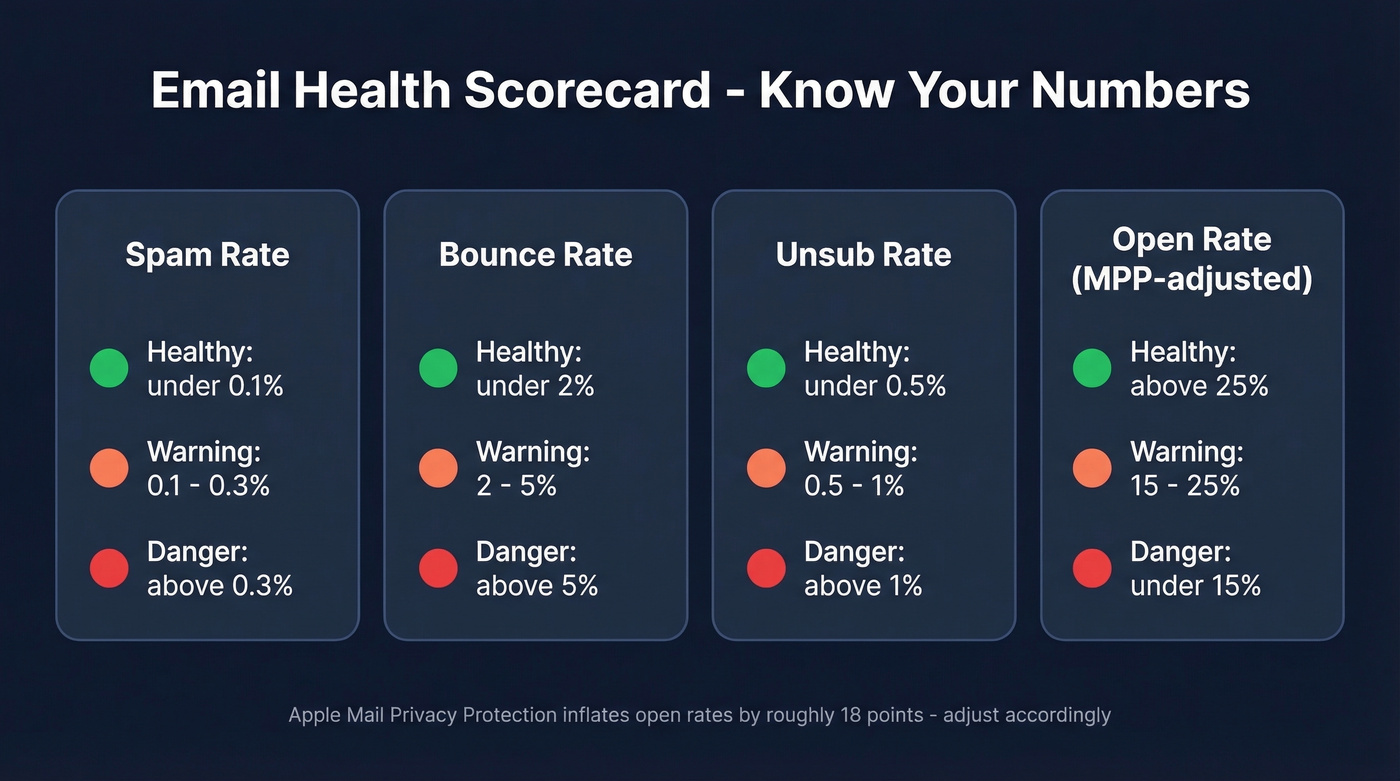
Here are the numbers you're aiming for:
| Metric | Healthy | Warning | Danger |
|---|---|---|---|
| Spam rate | <0.1% | 0.1-0.3% | >0.3% |
| Bounce rate | <2% | 2-5% | >5% |
| Unsub rate | <0.5% | 0.5-1% | >1% |
| Open rate (MPP-adjusted) | >25% | 15-25% | <15% |

Most HubSpot deliverability issues start with bad data entering your CRM. Prospeo's native HubSpot integration verifies every email through a 5-step process - catching spam traps, honeypots, and catch-all domains - before import. 98% email accuracy means bounce rates stay under 2%, not the 5%+ that lands you in email jail.
Fix deliverability at the source - not after the damage is done.
The Most Common Problems (and Fixes)
Incomplete Authentication
The biggest gotcha: don't create a second SPF record. Append HubSpot's include to your existing record - one v=spf1, one -all. DKIM requires two CNAME records. DMARC gets published as a TXT record on your domain (often the root), and subdomains inherit it from there.
If you're unsure about syntax, start with a clean SPF record and confirm how to verify DKIM is working.
If you're on Cloudflare, disable domain-wide CNAME flattening and don't proxy the relevant records for your email sending domain. DNS propagation takes 10-70 minutes typically but can stretch to 48 hours. We've seen teams spend weeks troubleshooting deliverability when the real issue was a misconfigured SPF record that took five minutes to fix. Proper authentication is the single fastest win.
Shared IP Reputation
HubSpot groups customers into shared reputation pools. Other senders' bad behavior drags your deliverability down - that user with five blocklist hits didn't do anything wrong. They inherited someone else's mess.
You can mitigate this with better authentication and list hygiene, but you can't fully solve it without a dedicated IP. More on that below. If you need a broader framework, follow an email deliverability guide and focus on how to improve sender reputation.
Tracking Triggering Spam Filters
HubSpot's open and click tracking can trigger spam filters, and Community experts recommend disabling tracking when deliverability is the priority. Three workarounds:
- Disable open/click tracking for affected segments
- Use a subdomain for 1:1 sales emails to separate reputation
- Send from your email client and log via HubSpot's BCC address
If you want the technical why, it usually comes down to the email tracking pixel and your tracking domain reputation.
Let's be honest: there's no way to force tracked emails past filters that flag them. If tracking is killing your deliverability, stop tracking. You can always re-enable it once your reputation recovers.
Sending to Unvalidated Lists
This is the deliverability death spiral. One HubSpot user imported ~700 contacts, sent to opted-out and invalid addresses, triggered hard bounces, then accidentally resent to the same list. Result: "email jail" for 2+ weeks. Support couldn't expedite the restriction.

HubSpot isn't an email validation tool. NeverBounce and ZeroBounce handle reactive cleanup with native HubSpot integrations. But the smarter move is preventing bad data from entering your CRM in the first place. Prospeo's native HubSpot integration verifies emails at 98% accuracy before import, with a 5-step verification process that catches catch-all domains, spam traps, and honeypots - the exact addresses that trigger bounce cascades. One bad import can cost you weeks of sending ability.
If you're trying to get bounce rates under control fast, use a dedicated process for email bounce rate monitoring and suppression.
Gmail and Yahoo Enforcement Rules
Gmail and Yahoo bulk-sender requirements apply at 5,000+ emails per day. Keep your spam rate below 0.1%, never let it hit 0.3%, and make sure one-click unsubscribe works.
Gmail ramped enforcement in late 2025, and non-compliant traffic can see permanent 550 rejections. These are hard cutoffs, not suggestions.
No Warm-Up After Migration
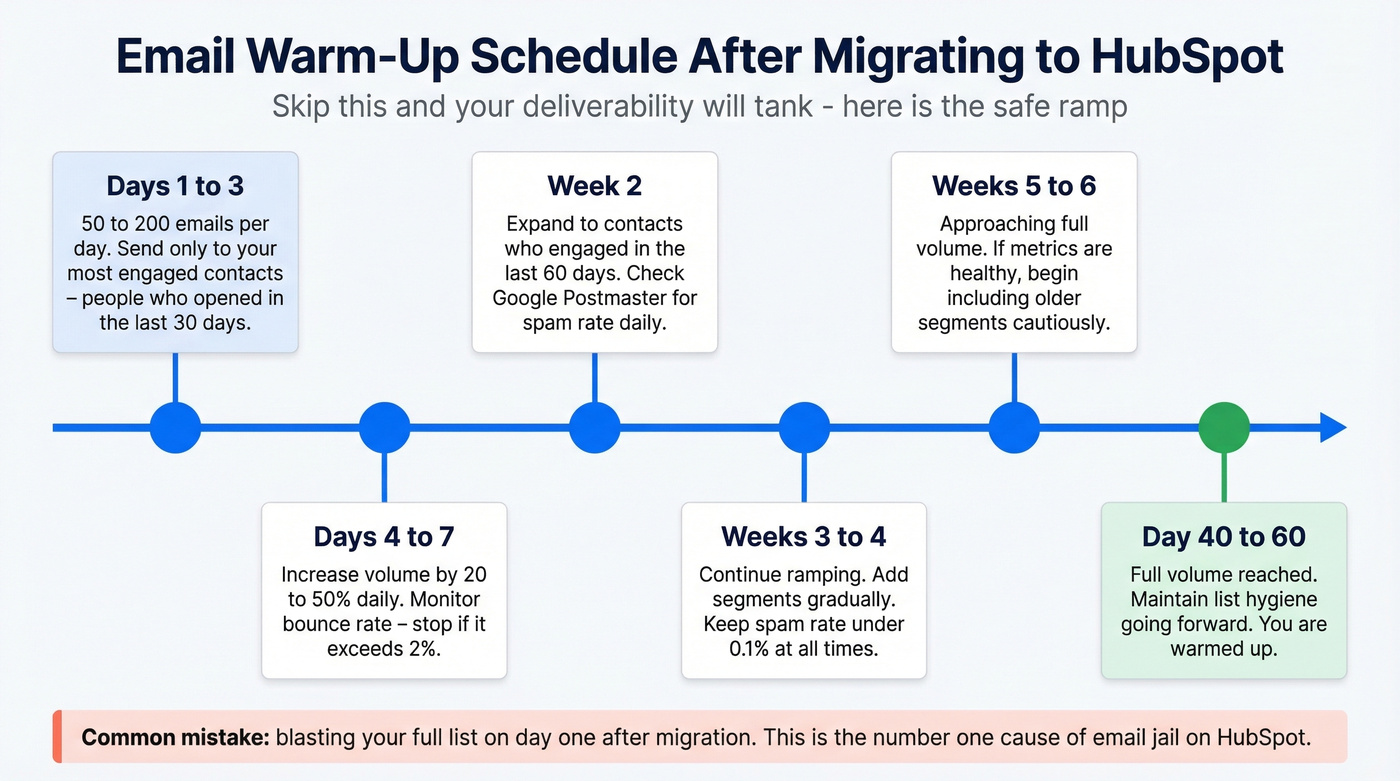
If you switched ESPs and immediately blasted your full list, that's a major contributor. New domain or ESP migrations need a 30-60 day ramp: start with 50-200 emails per day, increase 20-50% daily while monitoring bounces. HubSpot's dedicated IP add-on includes an automated 40-day warm-up. Don't skip it.
To avoid over-sending during the ramp, set guardrails around email velocity.
Should You Buy a Dedicated IP?
HubSpot's dedicated IP add-on runs roughly $630/month based on user reports. We've seen teams jump to dedicated IPs thinking it'll solve everything. It won't.
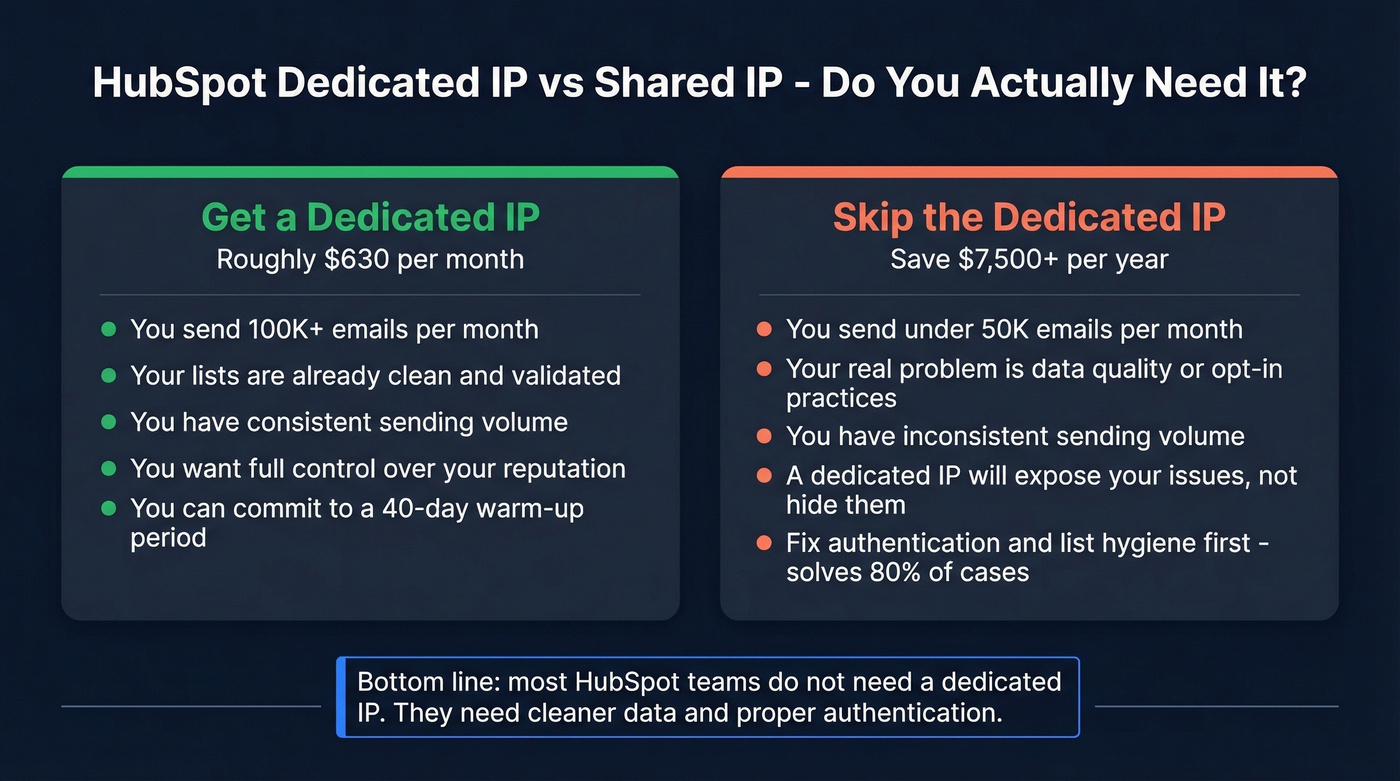
Get one if you send 100K+ emails per month with clean lists and consistent volume. Skip it if your problems are data quality or opt-in practices - a dedicated IP actually makes things worse because you lose the shared reputation cushion that was partially masking your issues.
For teams sending fewer than 50K emails monthly with modest deal sizes, a dedicated IP is a waste of money. Fix your data and authentication first. That alone solves 80% of cases in our experience.
HubSpot Starter: The Trap
If you're on Starter and having deliverability problems, your options are severely limited. Starter users report not having access to HubSpot tech support, which makes remediation slower and more frustrating. Workflows for bounce and unsub management require Marketing Hub Professional or Enterprise, so you'll be doing more of this manually with less visibility.
A real example: one Starter user sent 3 separate 1:1 emails from the HubSpot web app and all 3 recipients said the messages went to spam - even with no links and a normal subject line. On Starter, you're essentially flying blind.
That 700-contact import that triggered email jail? It never would have happened with verified data. Prospeo enriches and validates contacts at $0.01 per email with 98% accuracy, refreshed every 7 days. Plug it into HubSpot and stop gambling your sender reputation on stale, unverified lists.
Your HubSpot reputation is only as good as the data you feed it.
FAQ
Why do HubSpot emails go to spam even with SPF and DKIM?
Authentication is necessary but not sufficient. Shared IP reputation, HubSpot's open/click tracking pixels, and unvalidated contacts generating bounces all trigger spam filters independently. Run Google Postmaster Tools to isolate which factor is dragging you down.
How do I check my real spam rate on Gmail?
Set up Google Postmaster Tools - it's free and shows your actual Gmail spam rate within 24 hours of a send. Keep it below 0.1%; anything above 0.3% risks permanent 550 rejections under Gmail's 2026 bulk-sender rules.
How can I fix HubSpot email deliverability issues without a dedicated IP?
Complete SPF/DKIM/DMARC authentication, validate your contact list before every import, suppress unengaged contacts older than 90 days, and warm up gradually after any migration. These fundamentals resolve roughly 80% of cases. The consensus on r/hubspot is that most teams don't need a dedicated IP - they need cleaner data.
Can I prevent inbox placement problems before they start?
Yes. Validate every contact before importing using a verification tool with catch-all and spam-trap detection, use double opt-in for inbound leads, suppress graymail on a rolling basis, and warm up any new sending domain over 30-60 days. Prevention is dramatically cheaper than remediation - one bad import can lock your account for weeks with no recourse.