

Inbound Lead Management: The 2026 Operational Playbook
Your SDR team booked 40 demos last month. Marketing popped champagne. Then sales reported that half those calls were with people who'd never buy - the wrong titles, the wrong company sizes, the wrong everything. The problem isn't lead generation. It's everything that happens after someone fills out a form, and most teams are terrible at it.
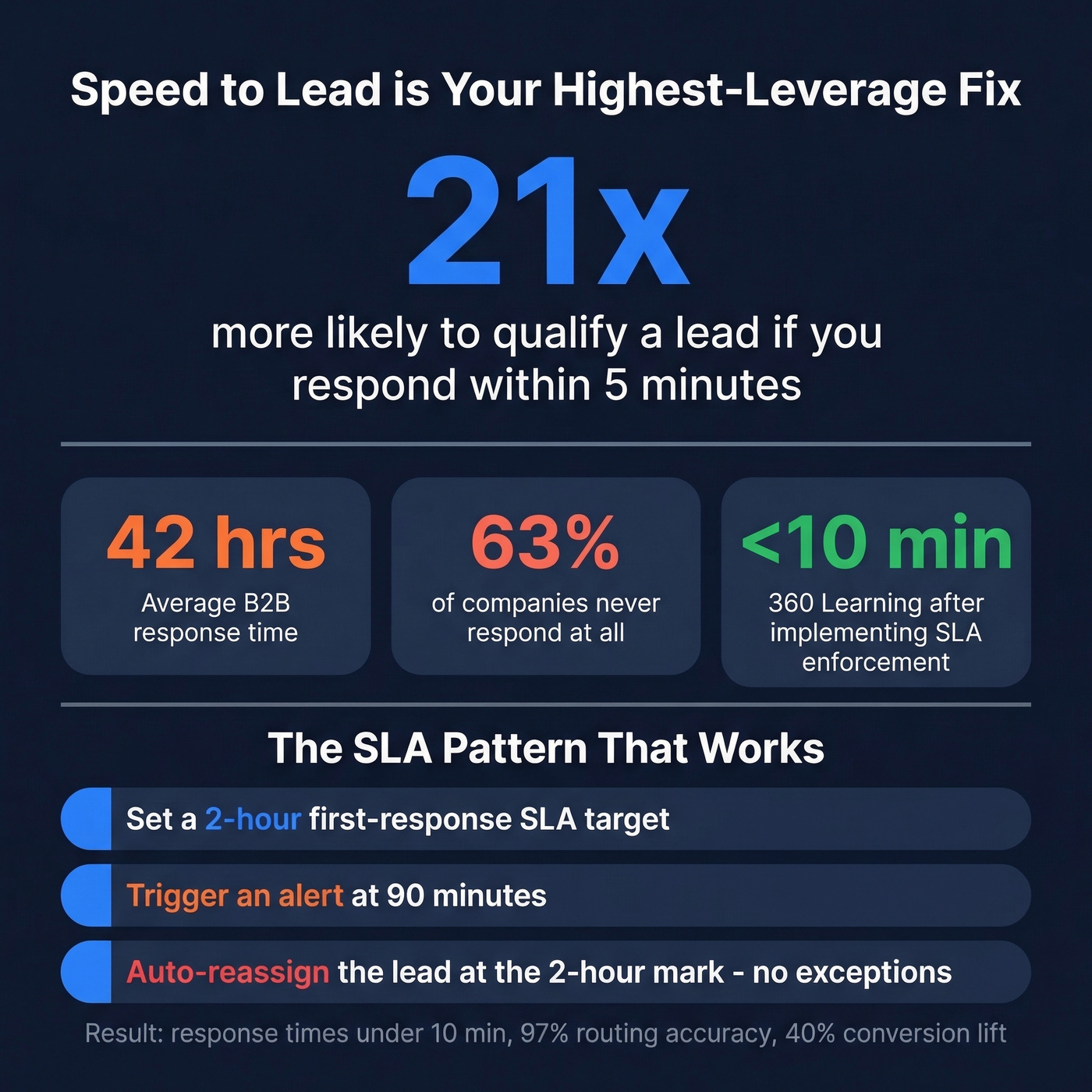
63% of companies never respond to inbound leads at all. The average B2B response time is 42 hours. Meanwhile, 92% of buyers already have a vendor in mind before they start evaluating, and the winning vendor lands on the Day One shortlist 95% of the time. If you aren't managing inbound leads with precision, you're losing deals before your reps even pick up the phone.
The Quick Version
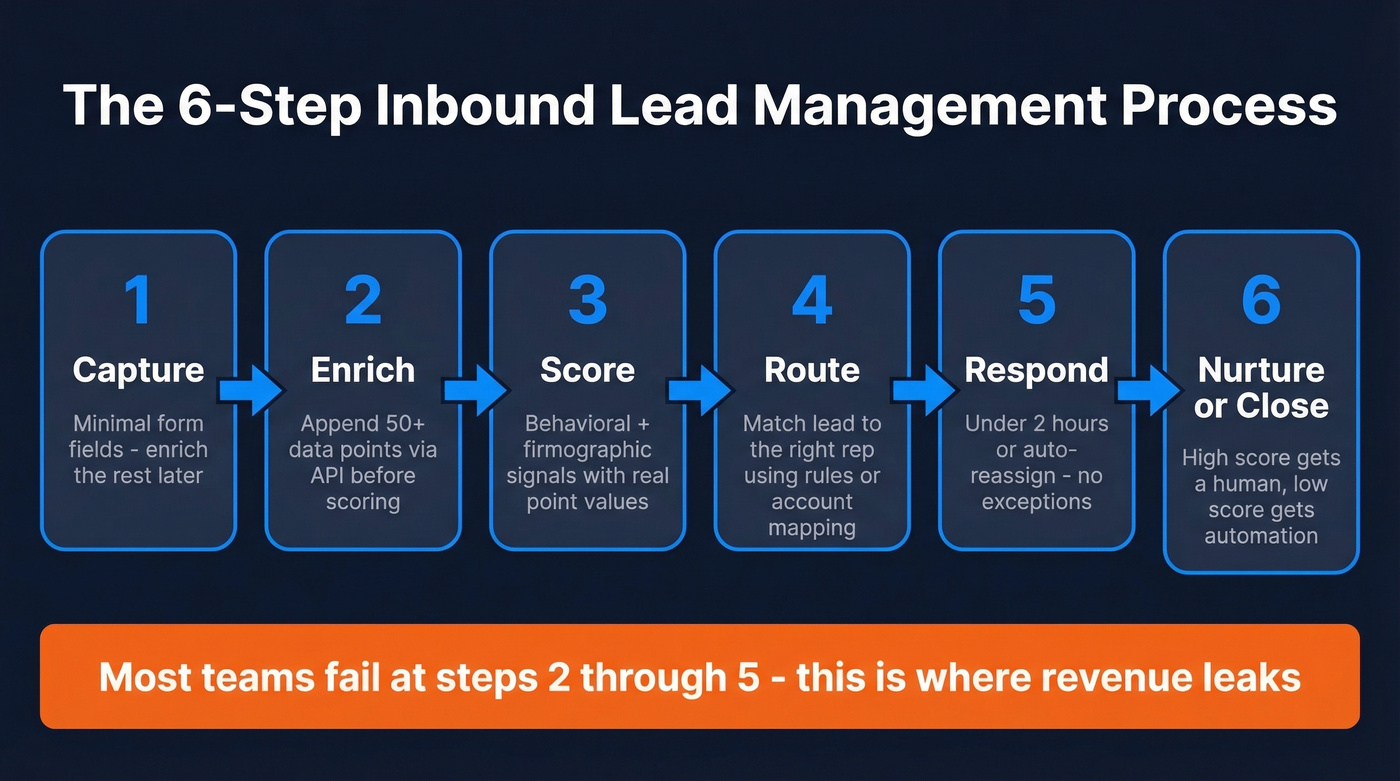
This is about the post-capture process - not generation. Six steps: capture, enrich, score, route, respond, nurture/close. Most teams fail at steps two through five. Start by fixing your speed-to-lead and building a real scoring model with actual point values. You need three core systems at minimum: a CRM, an enrichment platform, and a routing/scheduling tool.
Why Most Inbound Funnels Leak Revenue
Your SDR just had their third unqualified demo call this week. The prospect was a two-person startup with no budget, no timeline, and no idea what your product does. They clicked "Book a Demo" because the button was there.
This isn't a one-off. 40% of marketers cite unqualified leads as their top funnel pain point, and 44% of sales reps say lead quality is their number-one complaint. Agency founders report that 40-60% of booked calls end up being unqualified - a pattern that shows up repeatedly on r/growmybusiness and r/sales threads.
Here's the thing: 63% of leads who inquire won't convert for at least three months. That's not a failure - it's the nature of B2B buying cycles, which average 10.1 months. The failure is treating every form fill like it's ready for a sales conversation, or worse, ignoring it entirely because your team can't tell the difference between a tire-kicker and a future six-figure deal.
Most B2B teams don't have a lead generation problem. They have a lead handling problem. Doubling your ad spend while 63% of current leads go unanswered is lighting money on fire.
The 6-Step Process That Works
Step 1: Capture the Lead
Forms, chat widgets, gated content - table stakes. What matters more than the capture mechanism is what you capture on the form. Every field you add reduces conversion rate, but every field you skip makes downstream scoring harder. The minimum viable form for most B2B companies: work email, company name, and one qualifying question like team size, use case, or budget range. Everything else can be enriched.
Step 2: Enrich Before You Score
A name and email address isn't enough to score or route anything. Without enrichment, you're asking reps to Google every lead manually - or worse, routing blind based on nothing but the form fill.
Run every inbound lead through an enrichment API that returns 50+ data points per contact - job title, company size, industry, verified email and mobile - so your scoring model has something real to work with. We've run our own inbound leads through Prospeo's enrichment and consistently see an 83% match rate with 98% email accuracy on a 7-day refresh cycle, at roughly $0.01 per email. That's a fraction of what enterprise enrichment tools charge.

Use enrichment if: you're scoring leads, routing by segment, or running any automation that depends on company size, title, or industry.
Skip enrichment if: you're a solo founder manually reviewing every lead. Even then, you probably shouldn't skip it.
One practitioner tip that rarely shows up in vendor docs: snapshot time-sensitive enrichment fields at lead creation. If you're syncing enrichment data to a live CRM field, your reporting will reflect the current state of the contact, not the state at handoff. Create a separate "enrichment at creation" field set so your conversion analysis stays accurate.
Step 3: Score to Prioritize
Most guides tell you to "score your leads" without giving you actual numbers. Here's a working model adapted from Belkins' implementation:
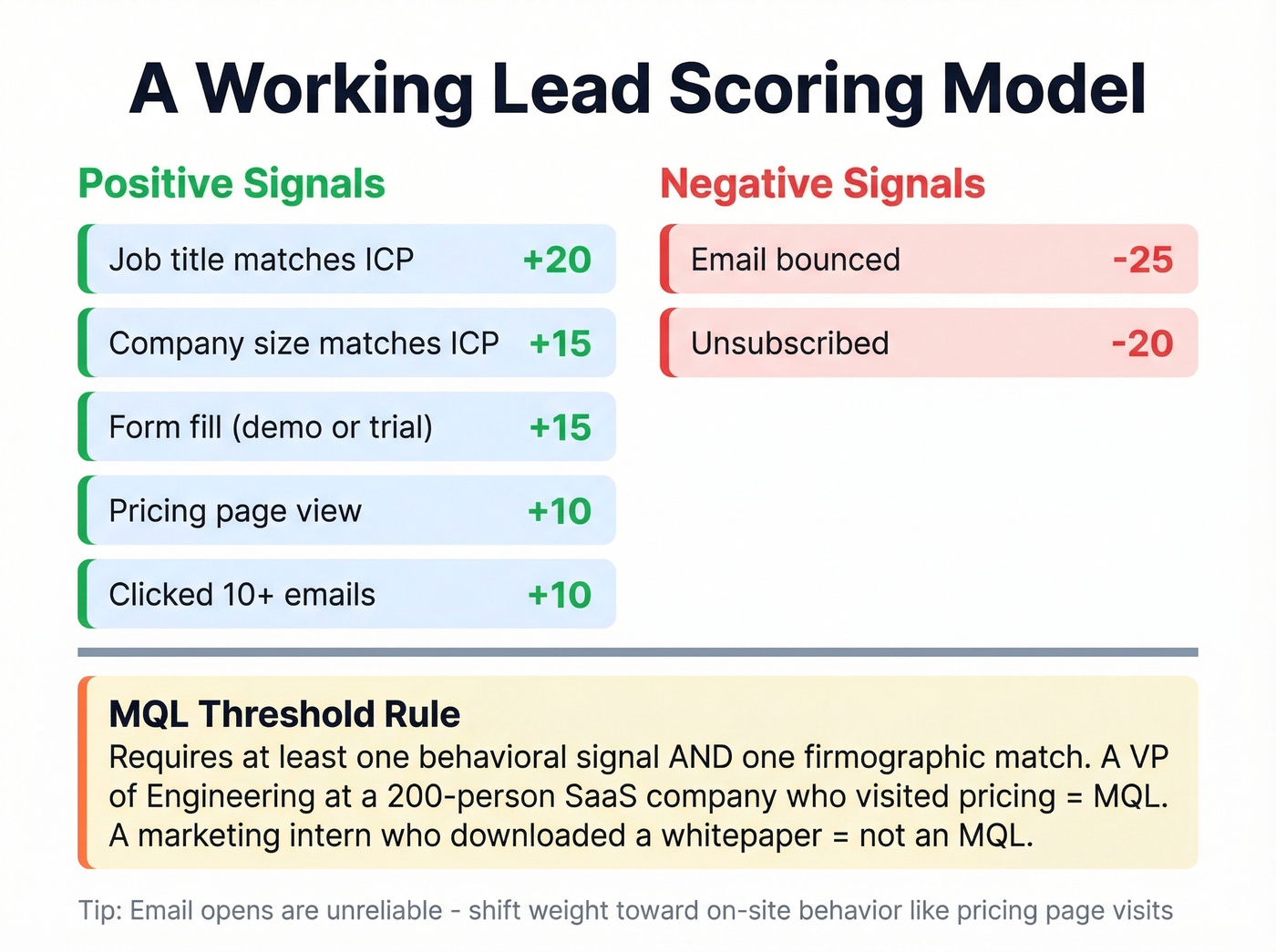
| Signal | Points |
|---|---|
| Pricing page view | +10 |
| Form fill (demo/trial) | +15 |
| Clicked 10+ emails | +10 |
| Job title matches ICP | +20 |
| Company size matches ICP | +15 |
| Email bounced | -25 |
| Unsubscribed | -20 |
Email opens are increasingly unreliable as a scoring signal - privacy changes have inflated open rates across the board. Shift weight toward on-site behavior: pricing page visits, feature page depth, and form submissions. Those signals actually indicate intent.
The threshold matters too. We've seen teams set MQL thresholds so low that every newsletter subscriber gets routed to sales. Set your MQL bar at a score that requires at least one behavioral signal and one firmographic match. A VP of Engineering at a 200-person SaaS company who visited your pricing page is an MQL. A marketing intern who downloaded a whitepaper isn't.
If you need a deeper rubric, start with an ideal customer profile and then formalize your lead scoring rules.
Step 4: Route to the Right Rep
Four routing models, each with a clear tradeoff:
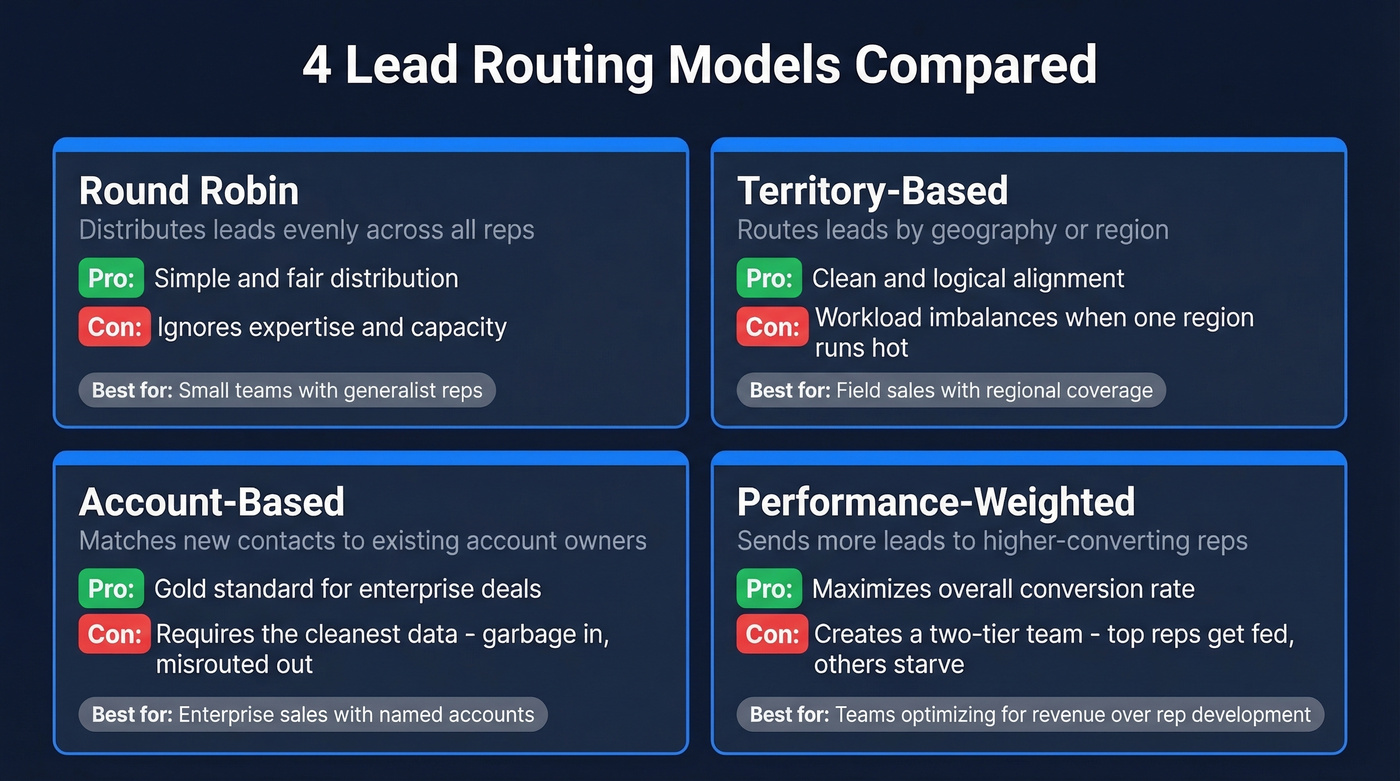
Round-robin distributes leads evenly. Fair, but it ignores expertise and capacity. Your best closer gets the same volume as the rep who started last week.
Territory-based routing aligns leads by geography. Clean and logical, but creates workload imbalances when one region runs hot.
Account-based routing with lead-to-account matching is the gold standard for enterprise sales. It routes subsidiaries, personal email addresses, and new contacts to the existing account owner. It also requires the cleanest data - garbage in, misrouted out.
Performance-weighted routing sends more leads to reps with higher conversion rates. It works, but it risks creating a two-tier team where top performers get fed while others starve.
If you're on Salesforce, native assignment rules cap at 3,000 rules and don't support round-robin or workload balancing natively. Many teams outgrow the built-in routing and need tools like Chili Piper, LeanData, or Distribution Engine. For inside sales specifically, routing logic needs to account for rep specialization - a mid-market AE shouldn't be fielding SMB demo requests.
This is also where clean lead status definitions prevent handoff chaos.
Step 5: Respond Fast
Speed-to-lead is the single highest-leverage fix in most inbound funnels. The data is unambiguous:
| Metric | Benchmark |
|---|---|
| Qualify within 5 min | 21x more likely |
| Avg B2B response | 42 hours |
| Small co. (1-300) | 48 min |
| Mid co. (301-2,500) | 1h 38m |
| Large co. (2,501+) | 1h 28m |
The SLA enforcement pattern that actually works: set a 2-hour first-response target, trigger an alert at 90 minutes, and auto-reassign the lead at the 2-hour mark. No exceptions, no "I was in a meeting" excuses. 360 Learning implemented this approach - response times dropped to under 10 minutes, routing accuracy hit 97%, and conversions jumped 40%.
If your reps need help with what to send in that first touch, keep a set of sales follow-up templates ready.
Step 6: Nurture or Close
Here's where every scaling team hits the same wall: where do you draw the line between automation and human touch? Reddit threads on r/b2bmarketing surface this question constantly, and there's no universal answer. But there is a framework.
High-score leads with enterprise firmographics get a human immediately. Mid-score leads with long timelines get automated nurture sequences with periodic human check-ins. Low-score leads get content-only nurture until they re-engage.
One operational detail worth stealing from HubSpot practitioners on Reddit: rename your lifecycle stages to match how your team actually talks. "Marketing Qualified" becomes "Qualified Lead." "Disqualified" becomes "Closed" because reps get confused by "disqualified qualified lead." Remove "Subscriber" entirely - it rarely adds value. HubSpot's default lifecycle automation is too limited for real workflows, and the consultants who implement it daily will tell you the same thing.

Your scoring model is only as good as the data behind it. Prospeo enriches every inbound lead with 50+ data points - job title, company size, industry, verified email and mobile - at an 83% match rate and 98% email accuracy. All on a 7-day refresh cycle, at ~$0.01 per email.
Stop routing blind. Enrich every lead before it hits your scoring model.
Building Your Inbound Lead Workflow
Before you optimize, you need to know what "normal" looks like. A well-documented inbound lead workflow maps every handoff - from form fill to enrichment to scoring to routing to rep action - so nothing falls through the cracks. Here's where most B2B companies land on visitor-to-lead conversion, per FirstPageSage:
| Industry | Visitor to Lead |
|---|---|
| B2B SaaS | 1.1% |
| IT & Managed Services | 1.5% |
| Engineering | 1.2% |
| Legal Services | 7.4% |
| Manufacturing | 2.2% |
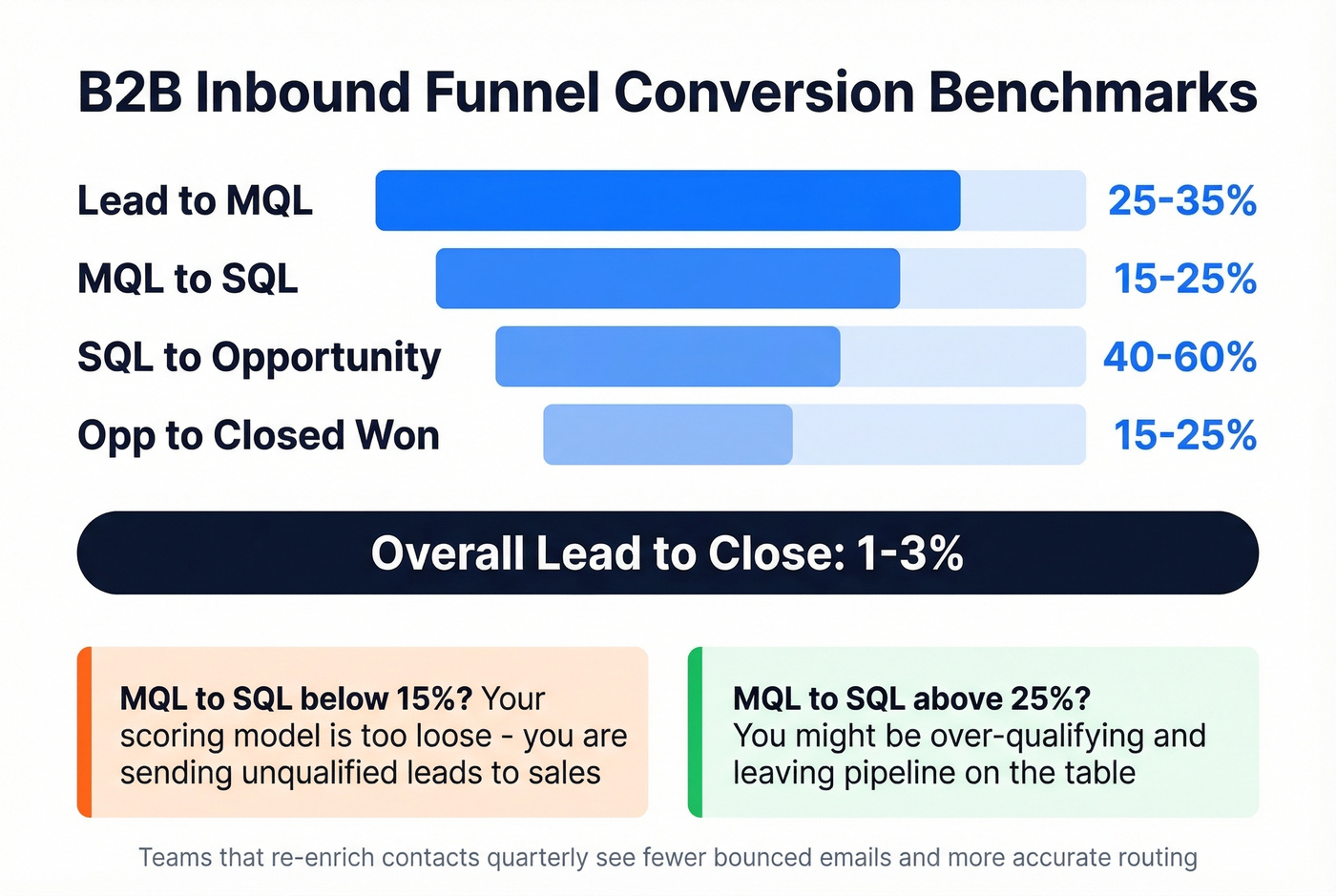
And the stage-by-stage conversion ranges that RevOps teams typically benchmark against:
| Stage | Typical Range |
|---|---|
| Lead to MQL | 25-35% |
| MQL to SQL | 15-25% |
| SQL to Opportunity | 40-60% |
| Opp to Closed Won | 15-25% |
| Overall (lead to close) | 1-3% |
Companies with over 25,000 monthly visitors tend to see sub-1% demo request rates - volume doesn't automatically mean more pipeline. If your MQL-to-SQL rate is below 15%, your scoring model is too loose. Above 25%, you're probably over-qualifying and leaving pipeline on the table. Teams that re-enrich contacts quarterly see measurably fewer bounced emails and more accurate routing, because stale data degrades every metric downstream.
To pressure-test your numbers, compare against the average B2B lead conversion rate and track the right funnel metrics.
Tools for Each Stage
| Category | Tool | Price | Notes |
|---|---|---|---|
| CRM | HubSpot | Free CRM; Marketing Hub Pro ~$800/mo | Enterprise ~$3,200/mo |
| CRM | Salesforce | ~$25-$300+/user/mo | Einstein add-on $50/user |
| Enrichment | Prospeo | ~$0.01/email; free tier | 98% accuracy, 50+ fields |
| Enrichment | HubSpot Breeze | From $45/mo | Enrichment add-on |
| Enrichment | ZoomInfo | ~$15-40K/year | Enterprise pricing |
| Routing | Chili Piper | $15-30/user + platform | Concierge from ~$150/mo |
| Routing | LeanData | ~$25-50/user/mo | Account-based routing |
| Routing | Distribution Engine | $20-55/user/mo | Salesforce-native |
| Scheduling | RevenueHero | Free tier; paid ~$25/mo | Good for SMB |
| Scheduling | Calendly | Free tier; paid ~$10/mo | Lightweight option |
| Intent | Warmly | Free to 500 visitors | AI agents $10-16K/yr |

Unqualified demos burn rep hours and kill pipeline velocity. Prospeo's enrichment API returns firmographic and contact data in real-time so your routing logic actually has something to work with - no more Googling prospects between calls, no more mid-market AEs fielding startup demo requests.
Give your routing engine real data. 300M+ profiles, 30+ filters, zero guesswork.
Common Failures and Fixes
Marketing is celebrating record demo requests. Sales says quality has never been worse. Sound familiar?
Here are the failure modes we see most often:
- No scoring gate before the calendar. Every form fill gets a meeting link. Fix: require a minimum lead score before exposing scheduling.
- Routing to the newest SDR by default. The path of least resistance isn't a routing strategy. Fix: implement account-based selling or performance-weighted routing.
- Stale CRM data. Enrichment ran once at lead creation and never again. Job titles change, companies grow, people leave. Fix: re-enrich quarterly at minimum.
- No SLA enforcement. Response time "goals" without auto-reassignment are suggestions, not SLAs. Fix: 90-minute alert, 2-hour auto-reassignment. No exceptions.
- No feedback loop. Marketing never hears which leads closed and which were junk. Fix: build a lead-source-to-close-rate report and review it monthly with both teams. Adjust scoring weights based on what actually converts.
Let's be honest: if your team is spending energy generating more leads while 63% of the current ones go unanswered, you're optimizing the wrong end of the funnel. Inbound lead management isn't a set-it-and-forget-it system. It's a living process that needs monthly tuning based on what's actually closing.
FAQ
What's the difference between inbound lead management and lead generation?
Lead generation gets people to your site. Inbound lead management is everything after - enrichment, scoring, routing, follow-up, and nurture. Most teams over-invest in top-of-funnel volume while their post-capture process leaks revenue at every stage.
How fast should we respond to inbound leads?
Under five minutes is the gold standard - leads contacted that fast are 21x more likely to qualify. Set a 2-hour SLA with auto-reassignment as your starting point, then tighten from there.
What's a good MQL-to-SQL conversion rate?
15-25% is typical for B2B SaaS. Below 15% means your scoring model is too loose and reps waste time on unqualified calls. Above 25%, you're probably over-qualifying and leaving viable pipeline on the table.
Do I need a separate enrichment tool if I use HubSpot or Salesforce?
Usually yes. Native CRM enrichment covers basics, but dedicated tools return 50+ fields per contact at much higher match rates - giving scoring models significantly more signal to work with. That richer data is what lets you route accurately instead of guessing.