

Introduction Email to Client Subject Lines That Actually Get Opened
You've just closed the deal, and now you need to send the first real email. You write the body in five minutes. Then you stare at the subject line for twenty.
Here's what's at stake: HubSpot data shows 64% of recipients decide to open or delete based on the subject line alone. But an introduction email to a client isn't cold outreach - your recipient already expects to hear from you. That changes everything about how you write it.
If you want more swipeable options beyond client intros, keep a running list of email subject line examples you can adapt by scenario.
Keep It Short: What the Data Says
Most "ideal length" advice gives you a single number. The real answer depends on your client's device.
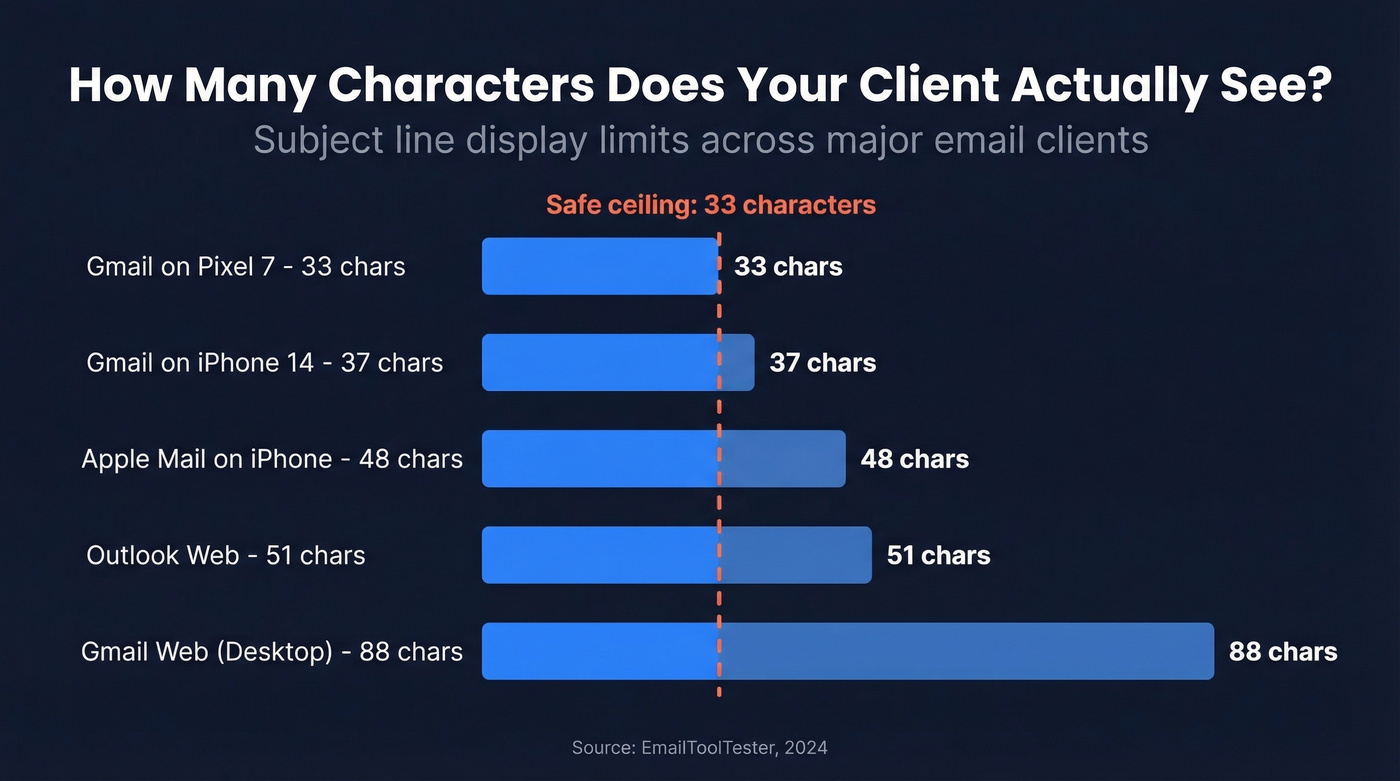
EmailToolTester tested character display across major clients:
| Device / Client | Characters Shown |
|---|---|
| Gmail on Pixel 7 | 33 |
| Gmail on iPhone 14 | 37 |
| Apple Mail on iPhone | 48 |
| Outlook web | ~51 |
| Gmail web (desktop) | ~88 |
33 characters is your safe ceiling. Front-load the important words - your client's name, the project, the action - into those first 33 characters. Everything after that is bonus context for desktop readers.
SendGrid's analysis confirms the pattern: while the average subject line runs 6 words, the best performers clock in at just 2-4 words. Shorter forces clarity. And clarity is what gets opened.
If you're sending these as part of a sequence, it also helps to align subject lines with your broader email copywriting approach so the open matches the read.
Quick Reference
- Cap subject lines at 33 characters for full mobile visibility
- Aim for 2-4 words when possible
- Clarity beats cleverness every time
- Jump to your scenario below: onboarding, handoff, kickoff, referral, or upsell
35+ Subject Lines by Scenario
New Client Welcome / Onboarding
This email matters. 86% of customers stay loyal when onboarding is done right, and your subject line is the first signal that they made the right choice.
If you’re building a full onboarding flow, treat this like sequence management: consistent framing, clear next steps, and minimal surprises.
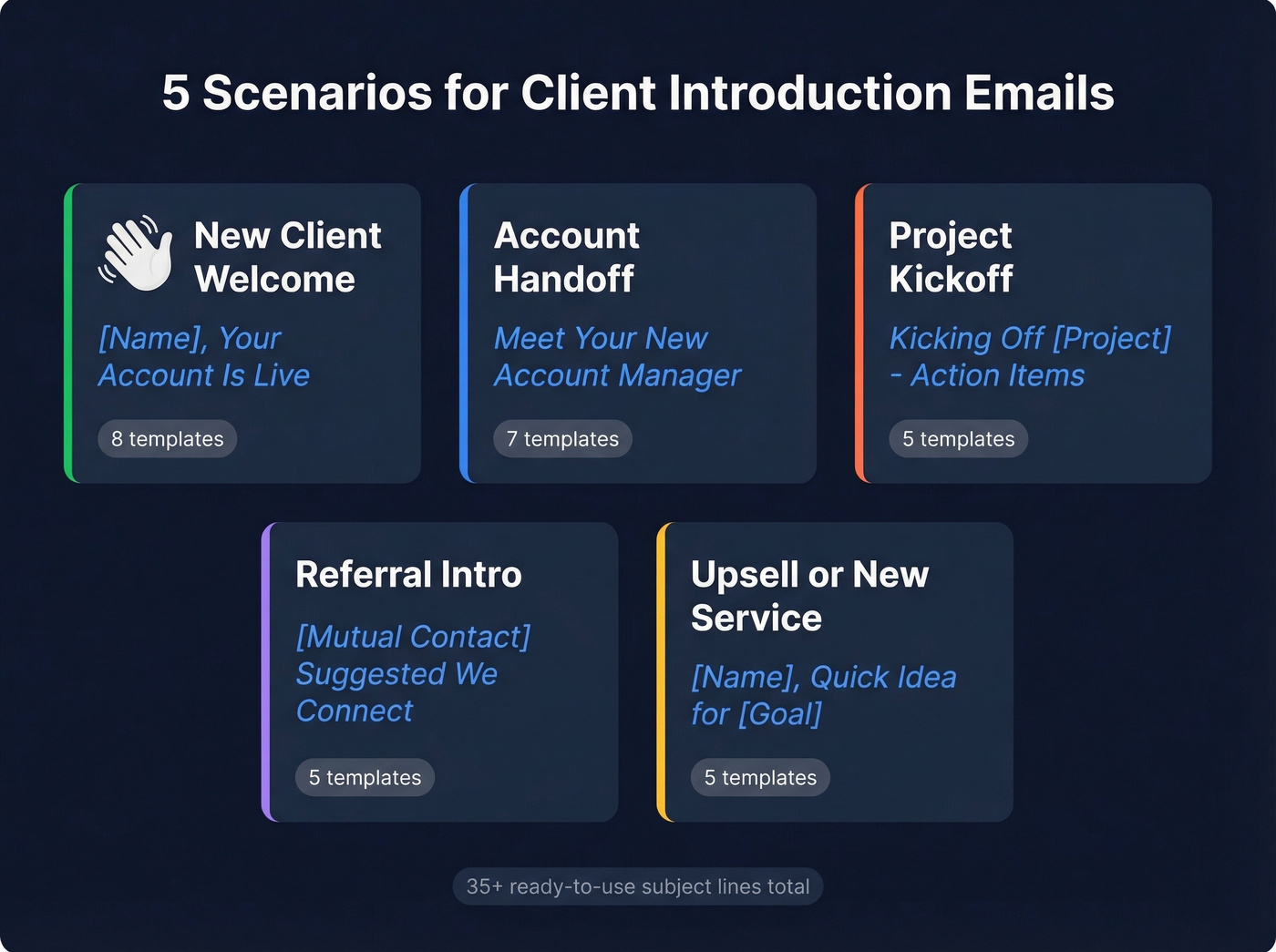
- Welcome to [Company] - Next Steps
- [Name], Your Account Is Live
- Your Onboarding Checklist Inside
- Getting Started With [Company]
- [Name], Let's Set You Up
- First Steps for [Company Name]
- Your [Product] Access Is Ready
- Welcome Aboard, [Name]
We've found that including the client's name plus a concrete next step ("Your Account Is Live") outperforms generic welcomes by a wide margin. People scan for relevance, not warmth.
Account Manager Handoff
Your subject line is your handshake. The best handoff emails mirror what CSMs actually say: "I'm your primary point of contact, and my job is to make sure you're taken care of." Don't bury the transition - lead with it.
- [Name] - Your New Point of Contact
- Meet Your New Account Manager
- Introducing Myself as Your New CSM
- [Name], I'm Taking Over Your Account
- New Face, Same Commitment - [Company]
- Your Account Team Update
- Hi [Name] - Quick Introduction
When choosing a subject line for introducing yourself to a client after a handoff, directness wins over creativity. The recipient wants to know who you are and why you're emailing - that's it.
If you need the full message (not just the subject), use these handoff email templates to speed up the transition.
Project Kickoff / New Engagement
- Kicking Off [Project] - Action Items
- [Company] x [Client] - Let's Go
- [Project Name] Kickoff Details
- Ready to Start - [Project Name]
- Your Kickoff Agenda for [Date]
Referral-Based Introduction
- [Mutual Contact] Suggested We Connect
- Introduction via [Name]
- [Name] Thought We Should Meet
- Connecting Through [Mutual Contact]
- [Referrer] Intro - [Your Company]
If this turns into a sales motion, keep a few sales follow-up templates ready so the momentum doesn’t die after the first thread.
Upsell / New Service Introduction
- New From [Company] - Built for You
- [Name], Quick Idea for [Goal]
- Something New for [Client Company]
- Expanding What We Do Together
- A New Option Worth 5 Minutes
If you’re positioning an add-on, it helps to be clear on the difference between upselling and cross-sell so the subject line matches the offer.

You spent 20 minutes perfecting that subject line. Don't waste it on a bounced email. Prospeo's 5-step verification catches dead addresses, spam traps, and catch-all domains before you hit send - with 98% accuracy.
Verify your client's email in seconds. 75 free lookups every month.
Mistakes That Kill Open Rates
Most of these seem obvious until you check your sent folder. 55% of emails are opened on mobile, which means truncation is the silent killer - but it's not the only one.
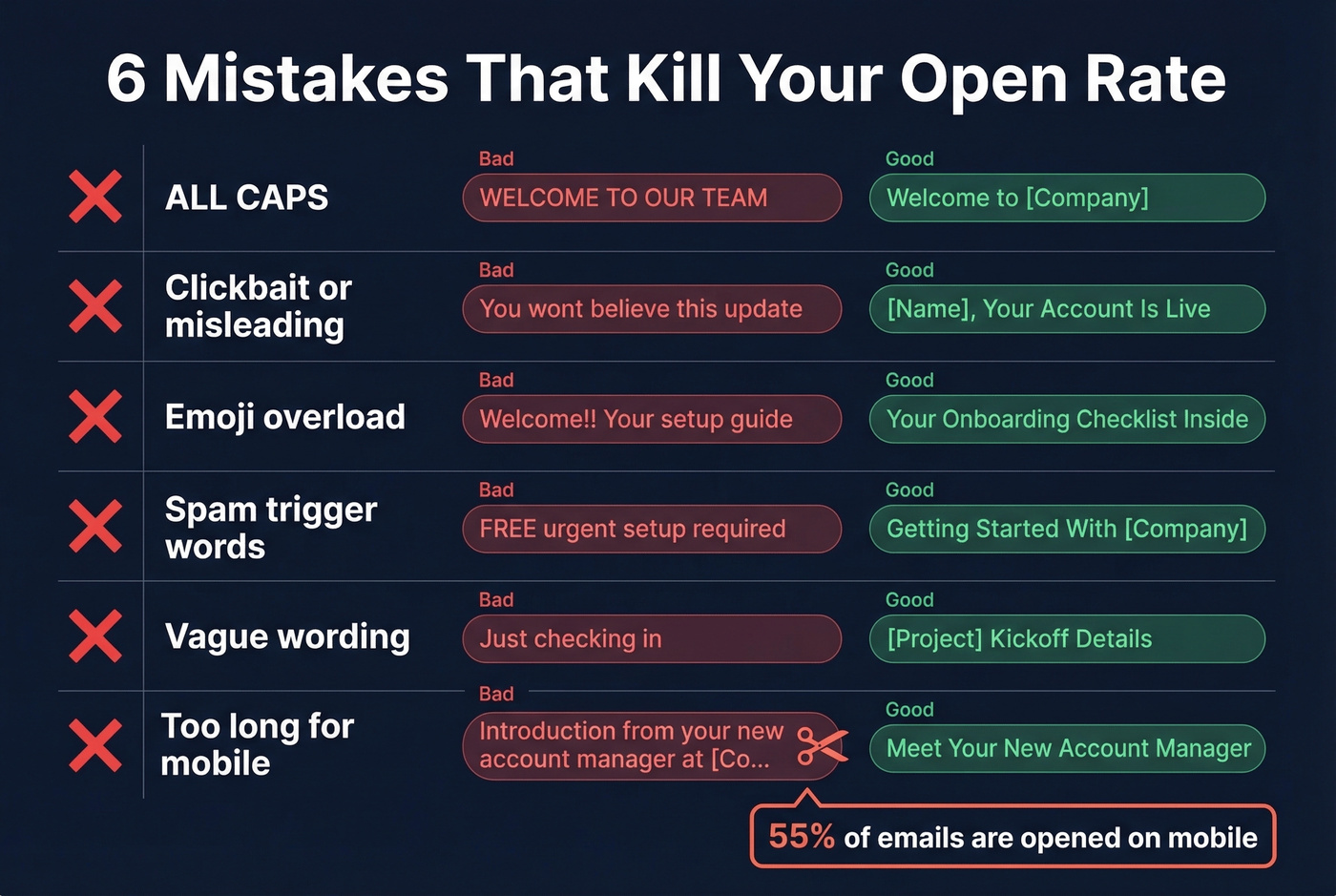
ALL CAPS reads as shouting and can trigger spam filters. Clickbait or misleading promises destroy trust with people who already know you - the consensus on r/coldemail is that deceptive subject lines are the fastest way to burn goodwill with warm contacts. Emoji overload makes your introduction look like a marketing blast instead of a professional handshake.
Spam-trigger words like "free," "urgent," or "limited time" belong in promotions, not client emails. Vague wording like "Just checking in" tells the recipient nothing - be specific about what's inside. And if you're CC'ing the outgoing account manager, keep the subject line neutral rather than personalizing to one person.
If “Just checking in” is already in your sent folder, here are better ways to say it: how to say just checking in professionally.
Look, in our experience the worst offender isn't any of the flashy mistakes. It's vague subject lines. They don't trigger spam filters, so you never realize they're underperforming. You just quietly get ignored.
How to A/B Test Subject Lines
If you're sending introduction emails at scale - onboarding cohorts, handoff sequences - test them.
If you want to go deeper than subject lines, pair this with email preview text A/B testing so the subject + preheader work together.
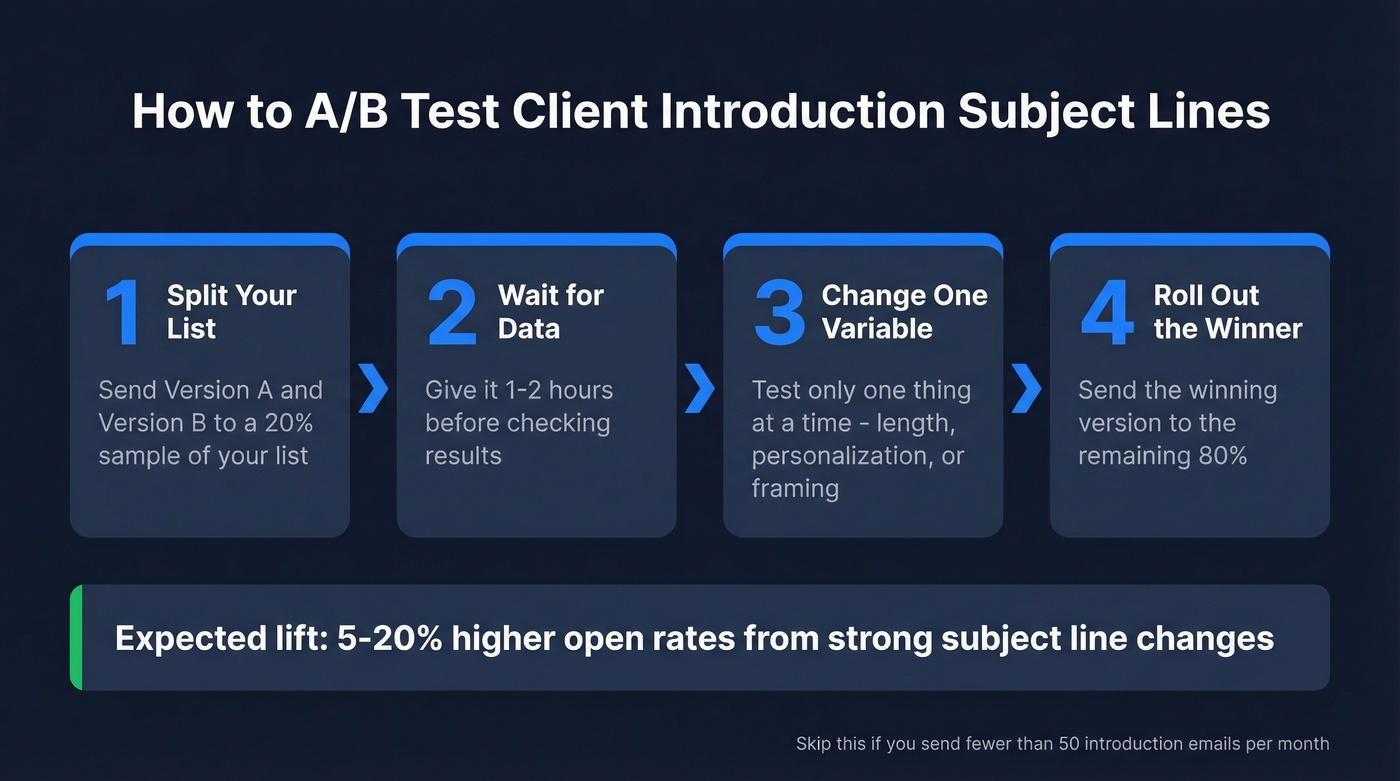
Send version A and version B to a 20% sample. Wait 1-2 hours for results. Change only one variable per test: length, personalization, or framing. Strong subject line changes can lift open rates by 5-20% depending on the baseline, and even small tweaks to your client introduction email subject compound across hundreds of sends over a quarter.
Skip this if you're only sending a handful of one-off introductions per month. A/B testing only makes sense when you have enough volume for the results to mean something.
Verify Before You Send
A perfect subject line means nothing if the email bounces. Contacts change roles, companies switch email systems, and that address from the sales process might already be dead by the time onboarding starts.
Prospeo's 5-step verification - including catch-all handling and spam-trap removal - delivers 98% email accuracy. The free tier covers 75 verifications per month, which handles most client onboarding workflows without spending a dime.
If bounces are a recurring issue, start with email bounce rate benchmarks and fixes so you can spot whether it’s list quality, deliverability, or sending behavior.
Scaling client onboarding means sending hundreds of introduction emails a month. Prospeo finds and verifies professional emails across 300M+ profiles so every welcome, handoff, and kickoff email lands in the right inbox - not a bounce log.
Stop guessing at email addresses. Find verified contacts for $0.01 each.
FAQ
What's the ideal length for a client introduction subject line?
Aim for 33 characters or fewer to guarantee full visibility on mobile. Desktop clients show 50-88 characters depending on the app, but most emails get opened on phones first. Front-load the client's name or project into those opening words so the most important information never gets truncated.
Should I use the client's name in the subject line?
Yes. For client emails, using their name or company signals the message is expected, not unsolicited. It separates you from marketing noise and increases the odds they open immediately rather than skimming past.
How does a company introduction email differ from a personal one?
When introducing your company, lead with the brand or service - e.g., "[Company] + [Client] - Getting Started." For a personal introduction, lead with your name or role. Match the subject to the email's actual content to keep trust high.
How do I make sure my introduction email doesn't bounce?
Verify the address before hitting send. Contacts change roles faster than your CRM updates. Run addresses through a verification tool that catches invalid, catch-all, and spam-trap addresses in real time so your first impression doesn't land in a dead inbox.