

How to Check Your IP Reputation for Free (and Actually Fix It)
Your open rates dropped from 35% to 8% overnight. Nothing changed - same copy, same list, same sending schedule. But somewhere between Tuesday and Wednesday, your IP landed on a blacklist, and now half your emails are hitting spam.
The other reason you're here: a suspicious IP showed up in your logs, and you need to know if it's hostile. Either way, you need a free IP reputation check that surfaces the problem in seconds - and then you need to know what to do with the results.
What You Need (Quick Version)
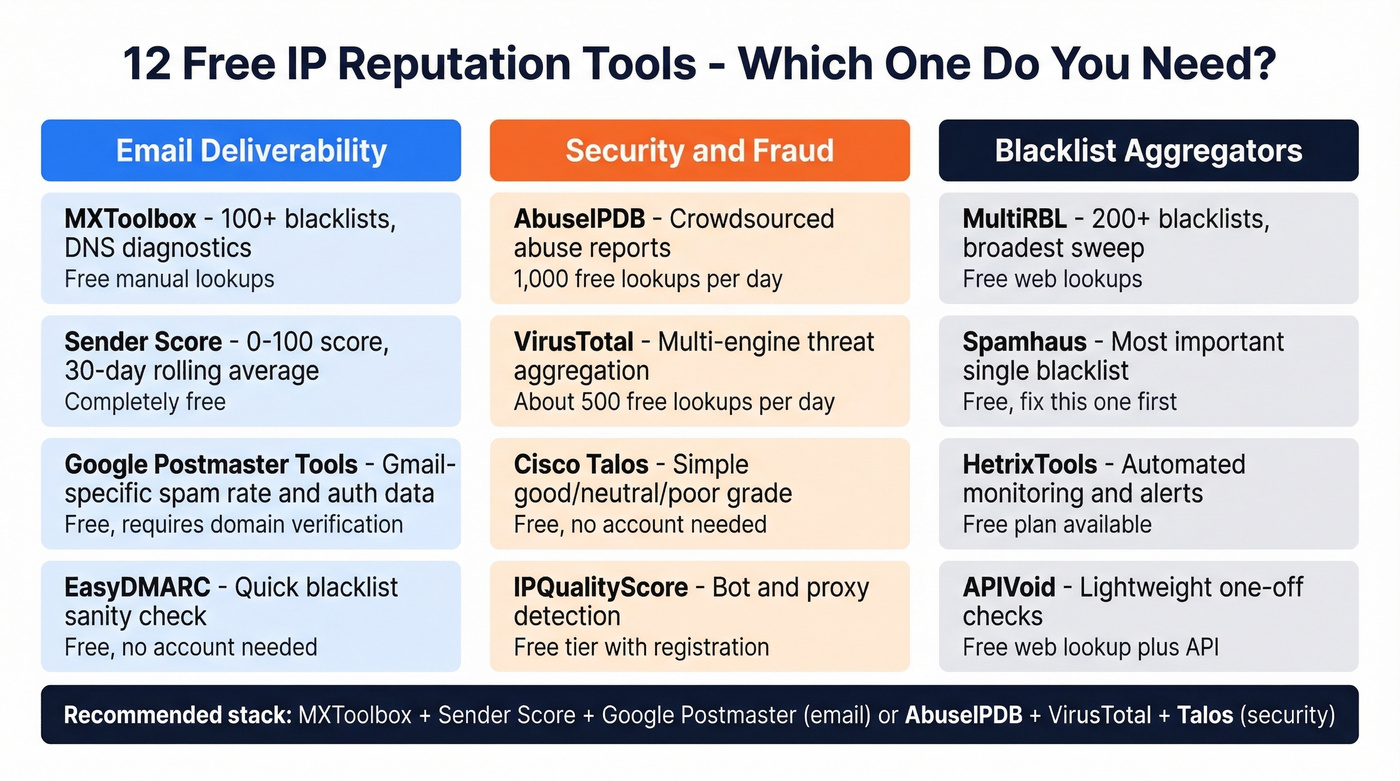
For email deliverability problems: MXToolbox (blacklist sweep) + Sender Score (overall health) + Google Postmaster Tools (Gmail-specific data).
For security and fraud investigation: AbuseIPDB (crowdsourced abuse reports) + VirusTotal (broad threat intel) + Cisco Talos (reputation grade).
Already blacklisted? Skip straight to the delisting section - time matters.
If bounces caused the blacklisting, the fix starts with your data, not your IP. The data quality section covers that.
What Is IP Reputation?
IP reputation is a trustworthiness score assigned to every IP address based on its historical behavior. ISPs, email providers, and security platforms use it to decide whether traffic from your IP gets delivered, quarantined, or blocked outright. Proofpoint defines it as a measure of how much the internet trusts your address.
Why you care depends on your role. Email senders care because reputation directly controls inbox placement - a bad score means campaigns land in spam. Security teams care because a low-reputation IP hitting their network is likely malicious.
One critical distinction: on a shared IP (common with ESPs like Mailchimp or SendGrid), another sender's bad behavior can tank your reputation. On a dedicated IP, your reputation is entirely your own.
What Determines Your Score?
Six factors drive your IP reputation. Understanding them is the difference between guessing and actually fixing the problem.
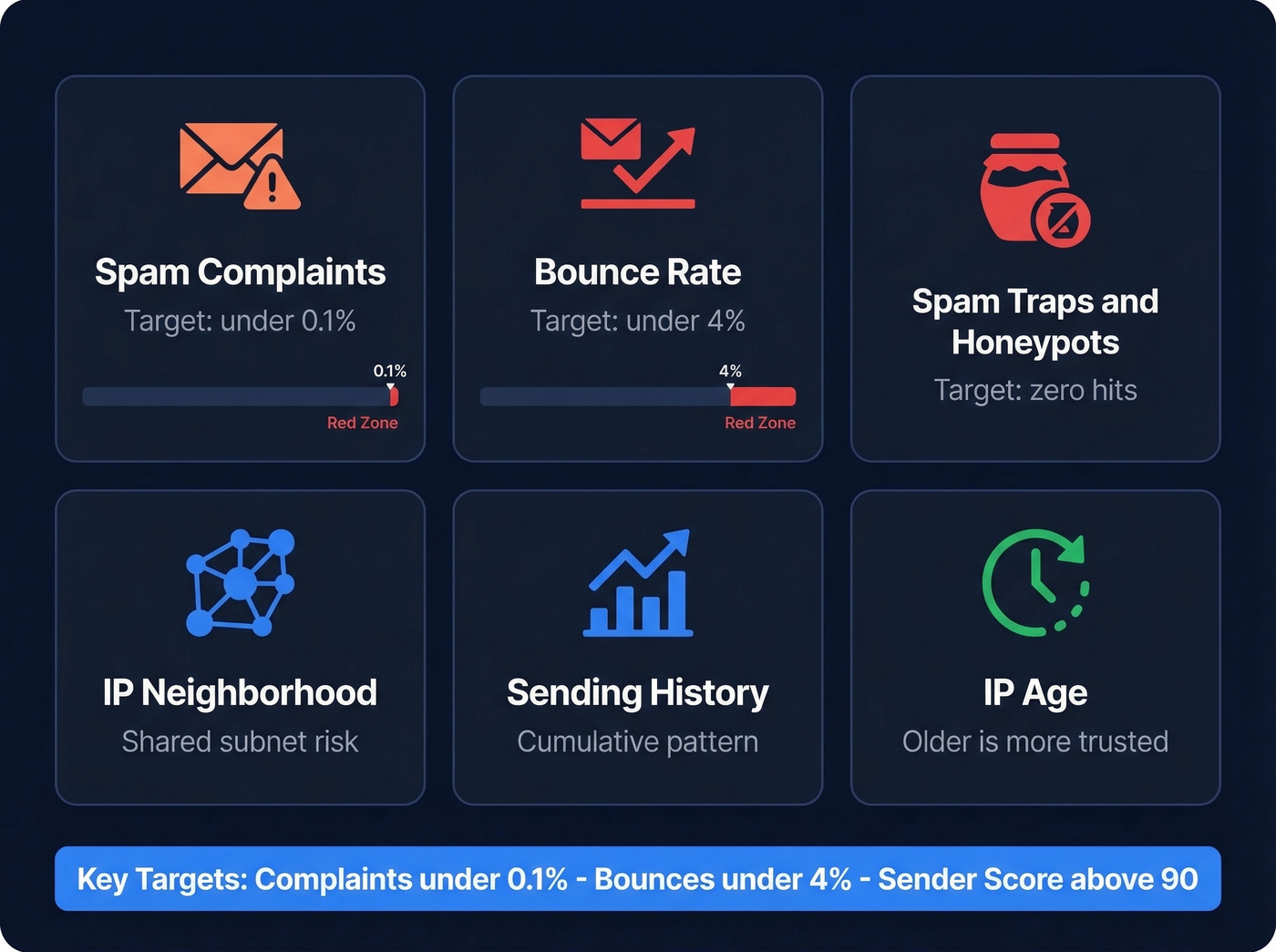
Spam complaints are the heaviest signal. The safest universal target is under 0.1%. Yahoo can penalize at 0.3%, but don't use that as your ceiling.
Bounce rates tell ISPs you're sending to addresses that don't exist. Hard bounces above 4% are a red flag that can get you blacklisted fast. (If you need benchmarks and fixes, see bounce rates.)
Spam traps and honeypots are addresses that should never receive email - they exist solely to catch senders using purchased, scraped, or poorly maintained lists. Hit enough of them and you're done.
IP neighborhood is underrated. If your IP shares a subnet with known spammers, you inherit some of their bad reputation even if you've done nothing wrong.
Sending history is cumulative. One bad week won't destroy you, but a pattern of complaints, bounces, and irregular volume spikes will.
IP age acts as a stabilizer. Older IPs with clean histories get more benefit of the doubt, which is why warmup matters so much for new IPs. (More on safe ramping in email velocity.)
The targets to memorize: spam complaints under 0.1%, bounce rate under 4%, Sender Score above 90.
How to Find Your Sending IP
Before you can check anything, you need to know which IP you're actually sending from.
Open a recently sent email and view the full message headers. Look for the SPF authentication line - it'll read something like Authentication-Results: spf=pass (sender IP is 198.51.100.42). That IP is what you need to check. (If you're troubleshooting auth, use this guide to verify DKIM.)
The catch: if you're on a shared IP pool (most ESP users are), your sending IP can rotate between messages. Check headers from multiple emails sent over the past week. If you see different IPs, check each one separately. Don't rely on a single message from months ago - ESPs reassign IPs regularly.
For security investigations, the IP you need is usually in your firewall logs, web server access logs, or SIEM alerts.

High bounce rates are the fastest path to a blacklisted IP. Prospeo's 5-step email verification - including catch-all handling, spam-trap removal, and honeypot filtering - delivers 98% accuracy. That's how Snyk cut bounces from 35-40% to under 5% across 50 AEs.
Stop fixing blacklist damage. Prevent it with verified data.
12 Free Tools to Check IP Reputation
No single tool covers everything - that's why practitioners stack three or four. A common stack we've seen work well is AbuseIPDB, VirusTotal, Talos, and MXToolbox. (For a broader stack, see email reputation tools.)
Email Deliverability Tools
MXToolbox
MXToolbox is one of the most full-featured free tools on this list. Paste an IP into the Blacklist Check and it checks 100+ blacklists simultaneously, returning results in seconds. It also handles DNS lookups, SMTP diagnostics, and SPF/DKIM/DMARC validation.

The free tier gives you manual lookups - type in an IP, get results. The Delivery Center starts at $129/mo for 5 domains, but for most teams, weekly manual checks are plenty.
Sender Score
Validity's Sender Score gives you a single 0-100 number based on a 30-day rolling average, drawing from over 100 billion emails analyzed monthly. The bands: 90+ is excellent, 70-89 is good, 50-69 means trouble, below 50 means most of your email is hitting spam. Completely free, no limits.
Google Postmaster Tools
If Gmail is a significant portion of your audience (and it probably is), Postmaster Tools is non-negotiable. It shows exactly how Gmail views your domain and IP - spam rate, authentication results, delivery errors. You need to verify domain ownership, and it only covers Gmail. Free and unlimited once set up. (If you're diagnosing inboxing end-to-end, use an email deliverability guide.)
EasyDMARC
EasyDMARC's free lookup scans major blacklists instantly - no account required, unlimited checks. Think of it as a quick sanity check, not a deep diagnostic tool.
Security and Fraud Tools
AbuseIPDB
AbuseIPDB is the tool security teams reach for first. It's crowdsourced - users report abusive IPs, and those reports build a confidence score indicating how likely an IP is to be malicious.
The free tier gives you 1,000 lookups per day, generous enough for most security operations. Paid plans run $5-$150/mo depending on volume. In our experience, AbuseIPDB is particularly useful for investigating IPs in firewall logs - the user-submitted reports often tell you exactly what kind of abuse is happening.
VirusTotal
VirusTotal aggregates results from dozens of antivirus engines and threat intelligence feeds into one lookup. You can check files, URLs, and domains too. The free tier caps at roughly 500 lookups per day. Paid plans start around $833/mo, but the free tier handles most ad-hoc investigations without issue.
Cisco Talos
Talos gives you a simple good/neutral/poor/unknown grade for any IP, plus it shows which other IPs share the same server and their reputations. Free, no account needed. One warning: "neutral" on Talos doesn't mean clean - it means they don't have enough data to judge. Only "good" is actually good.
IPQualityScore
IPQS is built for fraud detection - bot traffic, fake registrations, proxy/VPN detection. It monitors over 4 billion IPv4 addresses and hundreds of billions of IPv6 addresses. If your use case is "is this IP a bot?" rather than "is my email landing in spam?", IPQS is the right tool. Free tier requires registration; paid plans start around $250/mo.
Blacklist Aggregators
MultiRBL
Checks 200+ blacklists across IPv4 and IPv6. Free web lookups. The broadest sweep you'll find without paying.
Spamhaus Checker
Spamhaus is one of the most important blacklists to check. If you're listed here, fix it before anything else. Spamhaus listings include SBL (confirmed spam sources), XBL (compromised hosts), and PBL (policy blocks for dynamic IPs) - each requires a different response.
HetrixTools
Here's the standout: automated monitoring on a free plan. Most tools only offer manual lookups for free; HetrixTools monitors your IP for blacklist listings and notifies you when something changes. That's the difference between catching a problem in hours versus days. Paid plans start around $8/mo for expanded monitoring.
APIVoid
Free web lookup for quick checks, with an API for integration. API subscriptions start around $15/mo.
Honorable mentions: urlscan.io for URL investigation and AlienVault OTX for community threat intelligence.
Comparison Table
| Tool | Best For | Free Tier | Paid From |
|---|---|---|---|
| MXToolbox | First check when blacklisted | Manual lookups | $129/mo |
| Sender Score | Tracking overall sending health | Unlimited | Free only |
| Google Postmaster | Gmail-specific diagnostics | Unlimited | Free only |
| EasyDMARC | Fast blacklist sanity check | Unlimited | Free only |
| AbuseIPDB | Investigating suspicious IPs | 1,000/day | $5/mo |
| VirusTotal | Multi-engine threat intel | ~500/day | ~$833/mo |
| Cisco Talos | Quick reputation grade | Unlimited | Free only |
| IPQS | Bot and fraud detection | Limited (registration) | ~$250/mo |
| MultiRBL | Broadest blacklist sweep | Web lookups | Free only |
| Spamhaus | High-impact blacklist checks | Unlimited | Free only |
| HetrixTools | Automated alerts on listing | Free plan | ~$8/mo |
| APIVoid | Lightweight one-off checks | Manual | ~$15/mo |
How to Read Your Results
Score Bands
Sender Score uses clear bands: 90+ is excellent (strong inbox placement), 70-89 is good (minor issues worth investigating), 50-69 is risky (expect significant spam folder placement), and below 50 is poor (most email isn't getting delivered). Talos uses a simpler good/neutral/poor/unknown system.
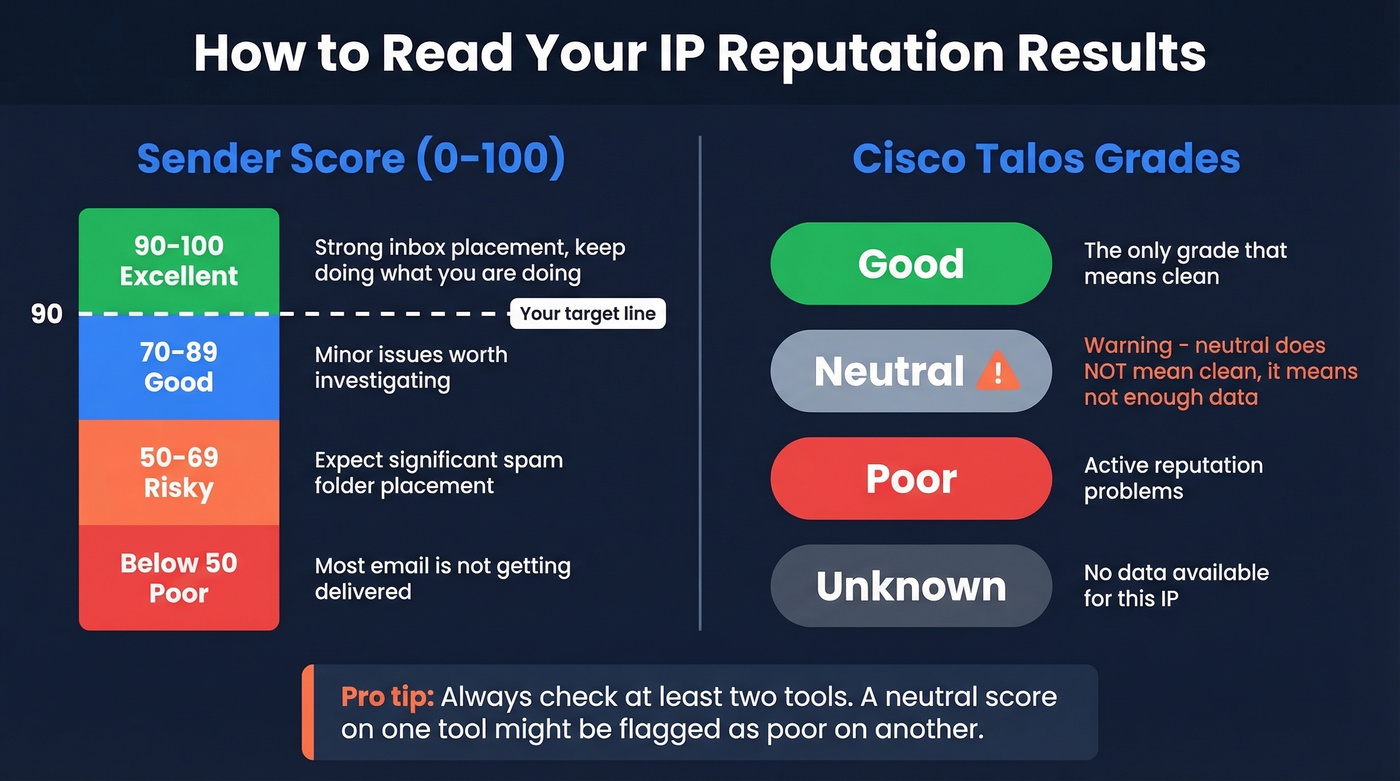
Here's the thing: "neutral" is a trap. On Talos and several other tools, neutral doesn't mean your IP is clean. It means there's insufficient data to judge. A brand-new IP will show neutral. So will a dormant one. Don't see neutral and assume you're fine - dig deeper with a second tool.
Why Tools Disagree
You'll check your IP on three tools and get three different answers. That's normal.
Each blacklist uses different detection methods. Spamhaus relies on spam traps, honeypots, and behavioral analysis. Barracuda uses appliance feedback combined with machine learning. SpamCop depends almost entirely on user reports. Under the hood, they all use DNSBL (DNS-based Blackhole List) queries - your IP gets reversed into a lookup like 1.2.0.192.zen.spamhaus.org, and the response code tells you which specific list you're on.
Check multiple tools, prioritize Spamhaus (it's widely treated as a global standard), and don't panic if one obscure blacklist flags you while everything else is clean.
How to Get Delisted
Before you request delisting anywhere, run through this checklist. Submitting a removal request without fixing the root cause just gets you re-listed faster.
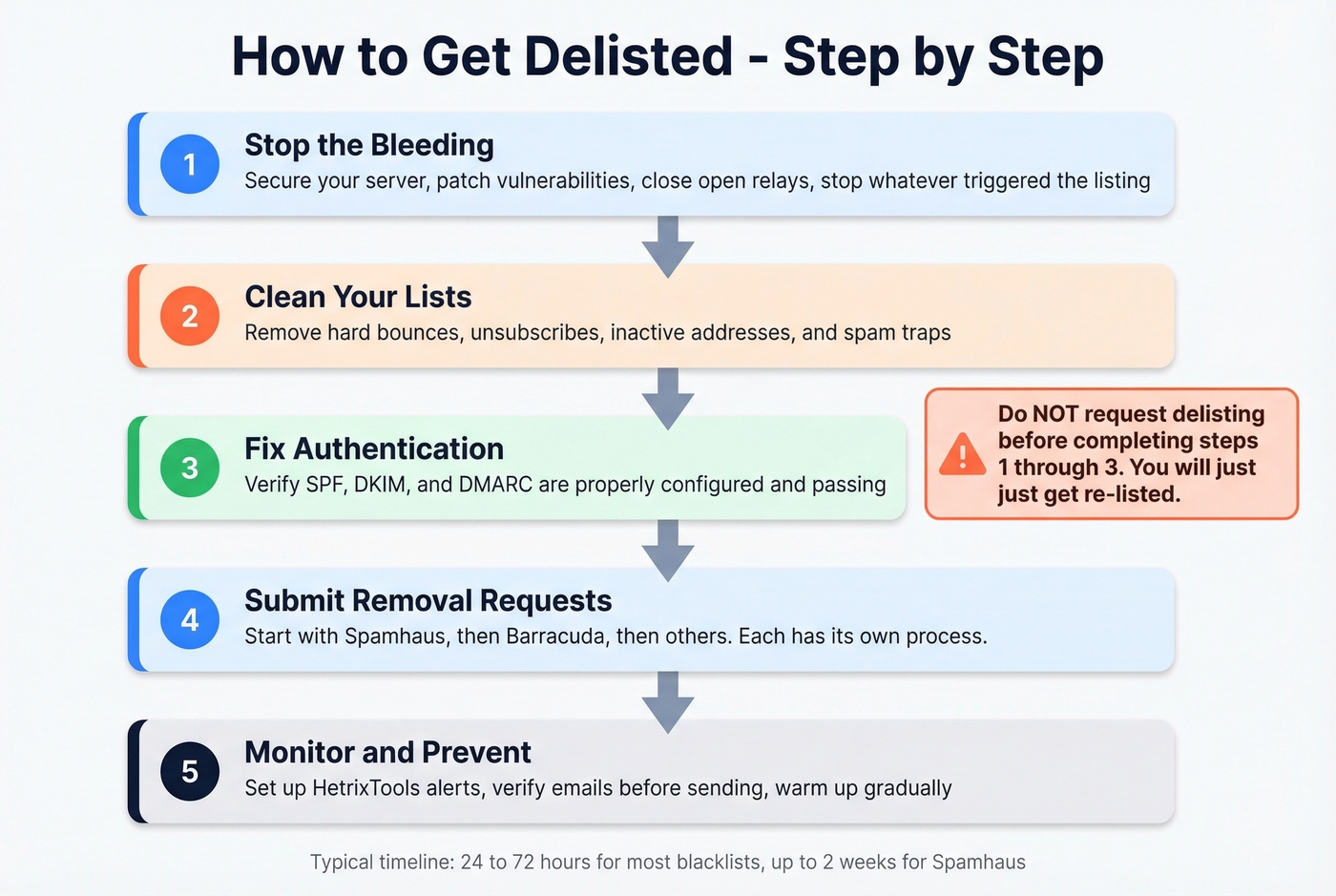
Pre-delisting checklist:
- Secure your server (patch vulnerabilities, close open relays)
- Clean your email lists (remove bounces, unsubscribes, inactive addresses)
- Verify SPF, DKIM, and DMARC are properly configured (see DMARC alignment)
- Identify and stop whatever triggered the listing
If you're listed on Spamhaus, fix that first. It's the most widely referenced blacklist, and being listed there has the broadest impact. (Step-by-step: Spamhaus blacklist removal.)
| Blacklist | Delist Time | Method |
|---|---|---|
| SpamCop | 24-48h | Auto (no new reports) |
| Spamhaus SBL | 24-48h | Manual request + fix |
| Spamhaus XBL | Hours-24h | Auto after cleanup |
| Barracuda | 12-24h | Manual request |
| UCEProtect L1 | 7 days | Free auto-delist |
Spamhaus SBL requires a manual request explaining what went wrong and what you've fixed. XBL often auto-delists once the underlying issue is resolved. SpamCop auto-expires if no new reports come in within 24-48 hours.
Rebuild and Protect Your Reputation
Warm Up Properly
If you're starting with a new or recently delisted IP, don't blast your full volume on day one. Start at 50 emails per day and double weekly. During warmup, send only to your most engaged contacts - people who open and click consistently. Make sure SPF, DKIM, and DMARC are configured correctly before you send a single email. SecurityScorecard's warmup guide covers the technical setup well. (If you're building a safer ramp plan, see unlimited email warmup.)
Clean Your Contact Data
Here's the pattern we see over and over: a team buys or scrapes a list, sends without verification, bounces spike above 4%, they hit spam traps, they land on Spamhaus, and their entire sending infrastructure is compromised. The deliverability collapse chain starts with bad data. Every time.
Spam traps look like normal email addresses, but they're maintained by ISPs and blacklist operators to catch senders using unverified lists. Purchased and rented lists are riddled with them. Running your list through Prospeo's 5-step verification catches spam traps, honeypots, and invalid addresses at 98% accuracy - including catch-all domains. Stack Optimize maintained 94%+ deliverability and zero blacklistings across all client domains using this approach for list verification. (If you need remediation steps, use this spam trap removal playbook.)
Monitor Continuously
One-off lookups are fine for troubleshooting, but they won't catch problems early. HetrixTools' free plan handles automated blacklist monitoring and notifies you when your IP gets listed - that's the minimum viable setup. Run manual checks weekly using MXToolbox and Sender Score alongside it. For technical teams, Uptime Kuma with custom DNSBL scripts is a free self-hosted alternative. Skip MXToolbox's paid monitoring at $129/mo unless you're managing dozens of sending domains.
You just spent 20 minutes checking blacklists and delisting forms. The real fix is upstream: your contact data. Prospeo refreshes 300M+ profiles every 7 days - not every 6 weeks - so you never send to dead addresses that spike bounces and trigger blacklists.
Clean data at $0.01 per email beats delisting requests every week.
5 Mistakes That Destroy IP Reputation
1. Sending to purchased or unverified lists. This is the fastest path to a blacklist. Purchased lists are full of spam traps, dead addresses, and people who never opted in. Verify every address before it touches your sending infrastructure. (If you're doing outbound, follow a safer cold email marketing process.)
2. Making unsubscribe difficult. When people can't find the unsubscribe link, they hit "mark as spam" instead. Every spam complaint counts against your reputation. Make unsubscribe one click, visible, and instant.
3. Ignoring bounce rates above 4%. Hard bounces are a direct signal to ISPs that you're not maintaining your lists. Monitor your bounce rate after every send and remove invalid addresses immediately.
4. Deploying strict DMARC without testing. DMARC protects your domain from spoofing, but jumping straight to p=reject without testing can block your own legitimate email. Start with p=none, monitor reports, move to p=quarantine, then p=reject. (If you need examples, use these SPF record examples.)
5. Sending too much too fast on a cold IP. A new IP with no sending history that suddenly pushes 10,000 emails looks exactly like a spammer. Follow the warmup schedule: 50/day, double weekly, engaged contacts first.
Let's be honest about something: most teams don't have an IP reputation problem. They have a data quality problem. If your bounce rate is under 2% and your complaint rate is under 0.1%, your IP reputation will take care of itself. Stop obsessing over blacklist checkers and start obsessing over list hygiene.
FAQ
What is a good IP reputation score?
Sender Score 90+ is excellent and means strong inbox placement. 70-89 is good but worth investigating. Below 50 means most email hits spam. On Cisco Talos, only "good" is actually clean - "neutral" just means insufficient data.
How often should I check?
Weekly for active senders, daily during warmup or after a deliverability drop. HetrixTools offers free automated monitoring with alerts, eliminating the need for manual daily checks during normal operations.
Can a shared IP hurt my reputation?
Yes. On shared IPs, another sender's spam complaints and bounces drag your reputation down too. If deliverability is critical to your business, move to a dedicated IP and warm it up properly before sending at volume.
How long does rebuilding take?
Delisting takes 24 hours to 7 days depending on the blacklist. Rebuilding reputation afterward requires 2-4 weeks of clean, low-volume sending with strong engagement signals. ISPs need consistent good behavior before they restore trust.
Does email verification prevent blacklisting?
High bounce rates from invalid addresses are a top blacklisting trigger. Running your list through a verification tool before sending removes bounces, spam traps, and honeypots - it's the single highest-leverage prevention step for protecting sender reputation.