

How to Check If an Email Address Is Valid (And What "Valid" Really Means)
You exported 5,000 contacts from your CRM, loaded them into a sequence, and watched the bounce rate climb past 8% by day two. Your sending domain took the hit before you even noticed. Before you send another campaign, the question you should be asking about every contact is simple: is this email address valid?
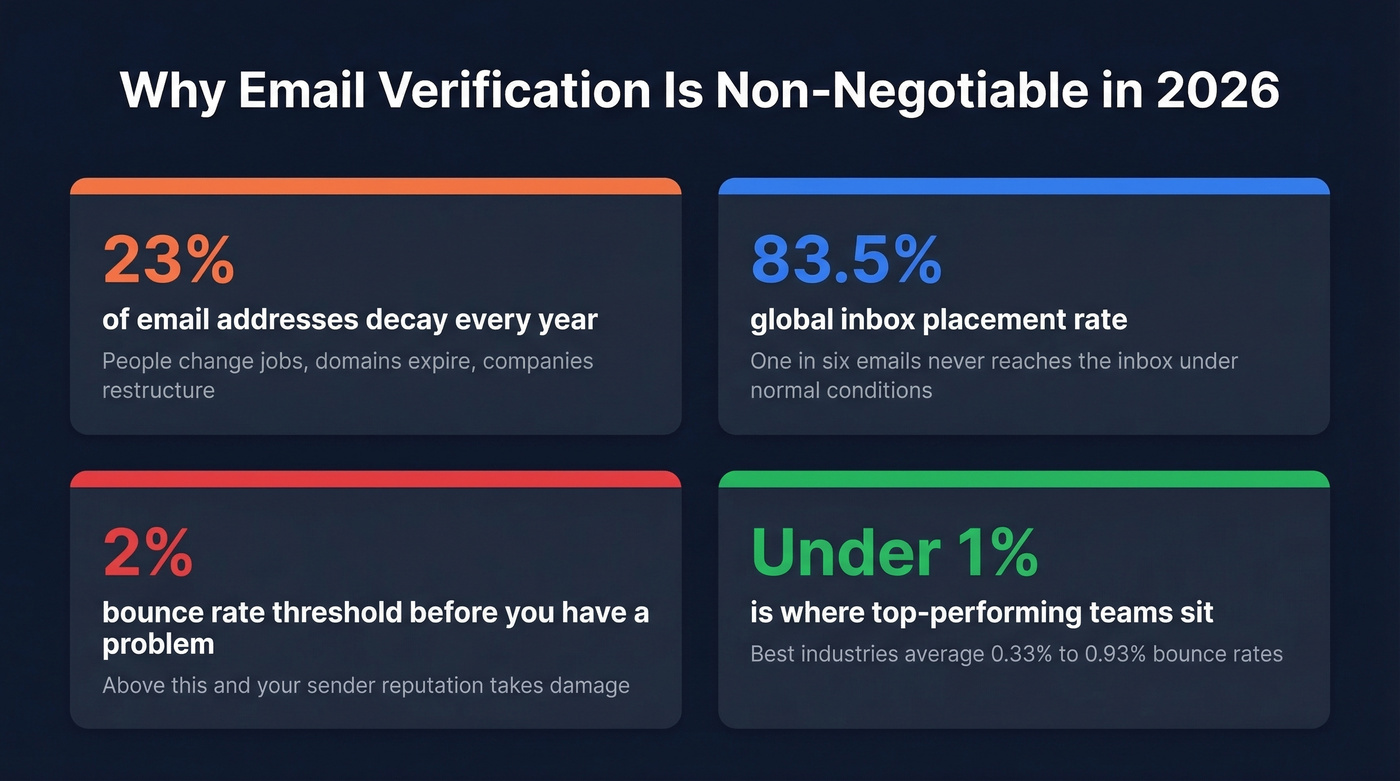
About 23% of email addresses decay every year. People change jobs, domains expire, companies restructure. If you're not verifying addresses before you send, you're gambling with your sender reputation every single time. And since mid-2025, Microsoft requires SPF, DKIM, and DMARC for anyone sending 5,000+ daily emails to Outlook, Hotmail, and Live domains - meaning dirty lists now get blocked, not just junked.
Here's the threshold: if your bounce rate exceeds 2%, you've got a list quality problem. No amount of warm-up fixes bad data. (If you want the deeper benchmark breakdown, see our guide to bounce rate.)
What "Valid" Actually Means
Most people think verification is binary - the email works or it doesn't. Some tools market "30+ verification steps." In practice, every verification boils down to three layers, and each catches different problems.
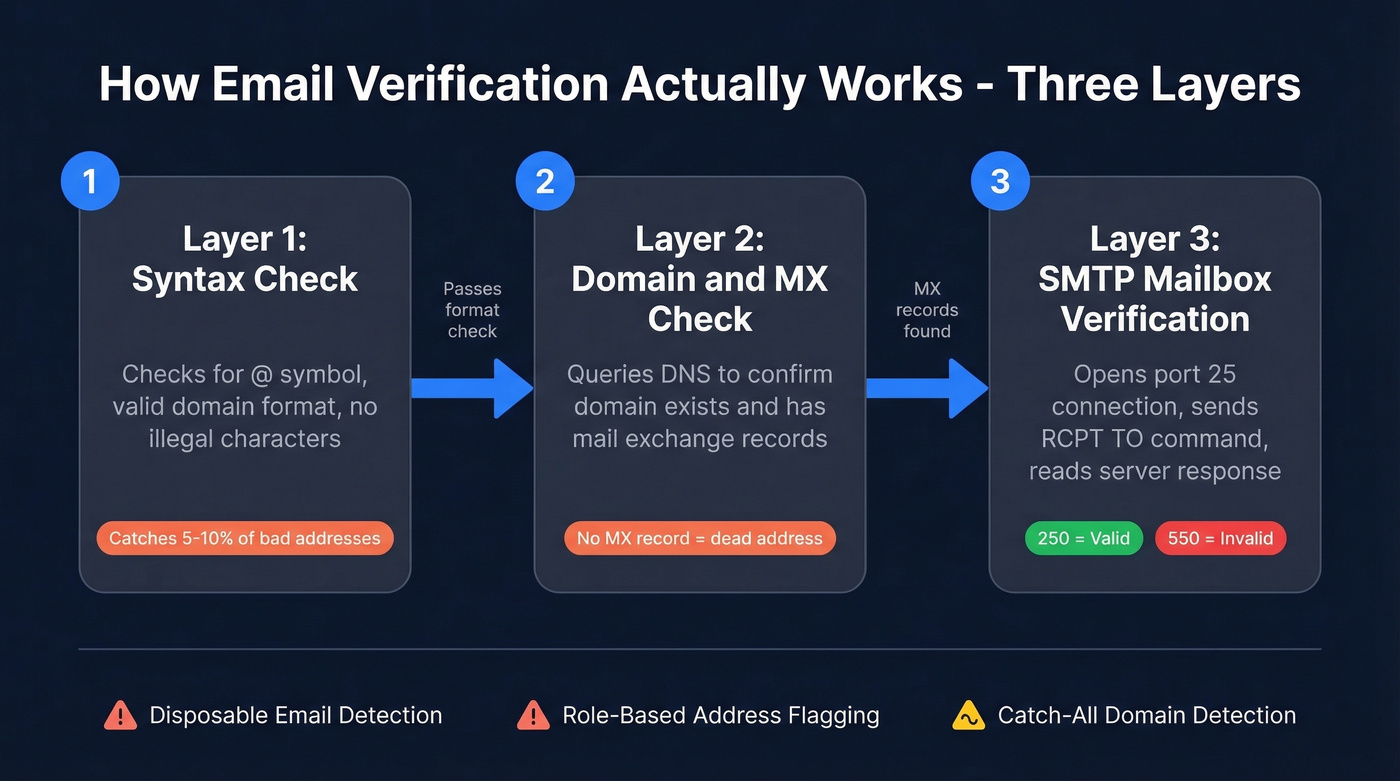
Layer 1: Syntax validation. Does the address follow the right format? An @ symbol, valid domain structure, no illegal characters. Syntax alone catches roughly 5-10% of bad addresses - mostly typos and scraping errors.
Layer 2: Domain and MX check. The tool queries DNS to confirm the domain exists and has mail exchange records configured. No MX record means the address is dead regardless of what comes before the @.
Layer 3: SMTP mailbox verification. This is where it gets real. The tool opens a connection on port 25, runs an SMTP handshake, and issues a RCPT TO command - without sending a message. A 250 response means the mailbox was accepted. A 550 means it doesn't exist. This is the most reliable way to confirm an address is real without actually delivering anything. (Related: how to check if an email exists and how to check if email will bounce.)
Many tools also flag disposable email providers (Guerrilla Mail, Mailinator) and role-based addresses (info@, sales@) - a check users on r/coldemail consistently expect from any serious verification service. If you're building lists from scratch, it also helps to understand name to email workflows.
How to Read Verification Results
Every verification tool returns results using roughly the same taxonomy:
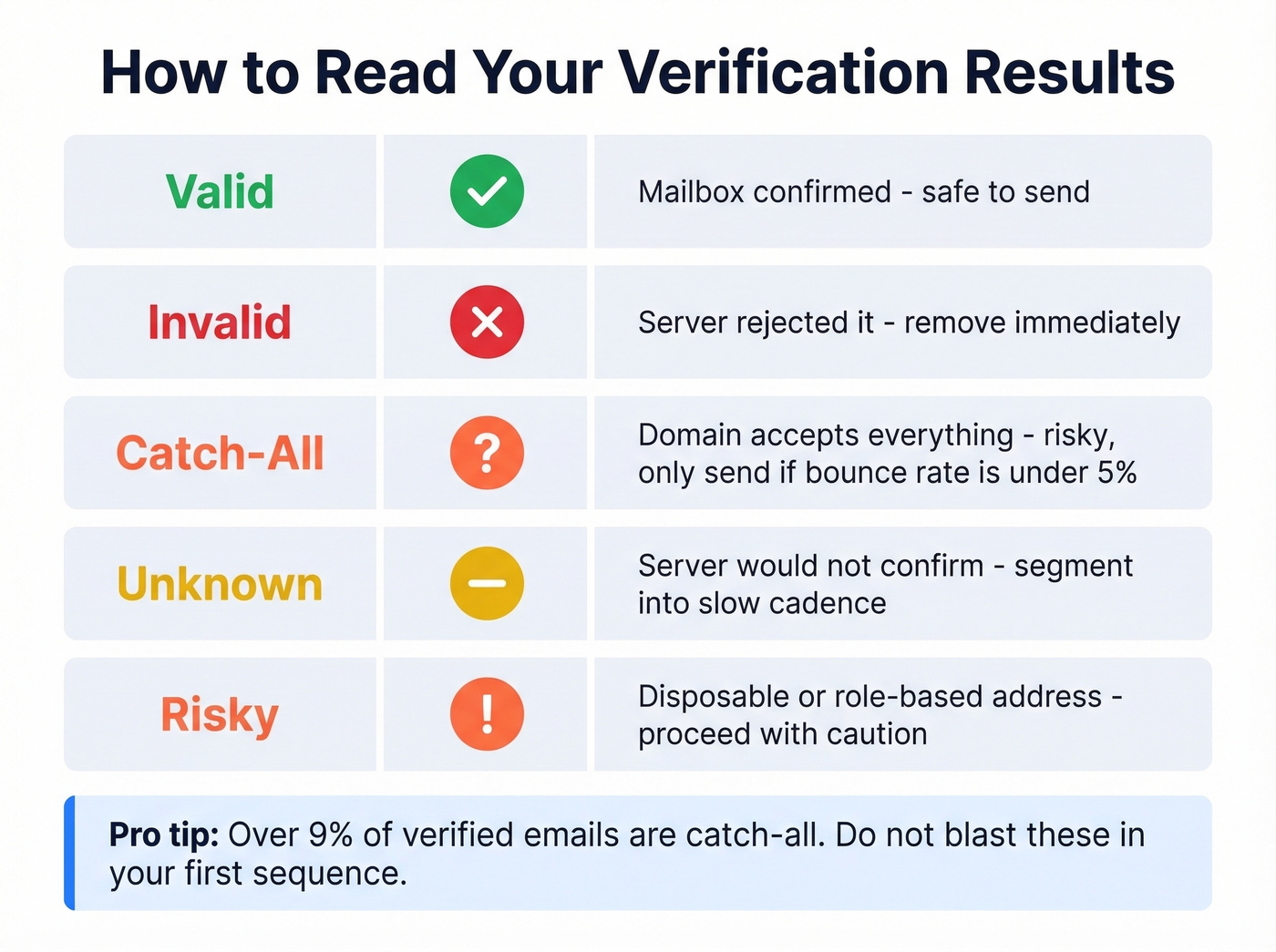
| Status | Safe to Send? | What It Means |
|---|---|---|
| Valid | Yes | Mailbox confirmed |
| Invalid | No | Server rejected it |
| Catch-all | Risky | Domain accepts all |
| Unknown | Unclear | Server won't confirm |
| Risky | Caution | Disposable or role-based |
Catch-all domains deserve extra attention. Over 9% of verified emails fall into catch-all, and these domains accept messages for any recipient - then sometimes silently discard them. Only email catch-all contacts if your overall bounce rate is comfortably under 5%.
"Unknown" doesn't mean invalid. Gmail and Outlook use anti-enumeration tactics that deliberately return ambiguous responses to prevent bulk lookups. Greylisting servers return temporary 450 failures that good tools handle by retrying. Don't delete unknown contacts, but don't blast them in your first sequence either. Segment them into a slower, lower-volume cadence instead. (For the bigger picture, see our email deliverability guide.)

Why verify emails after the fact when you can start with clean data? Prospeo's 143M+ emails go through 5-step verification - catch-all handling, spam-trap removal, honeypot filtering - and refresh every 7 days. 98% accuracy at $0.01 per email.
Skip the verification step entirely. Pull emails that are already valid.
Why Verification Matters More in 2026
The global inbox placement rate sits around ~83.5% - roughly one in six emails never reaches the inbox even under normal conditions. Authentication rules are tighter than ever, and high bounce rates signal spam behavior to every major provider. (If you're troubleshooting reputation issues, this pairs well with how to improve sender reputation.)
Here's how industry bounce rates stack up:
| Industry | Avg. Bounce Rate |
|---|---|
| Beauty / personal care | 0.33% |
| Agriculture / food | 0.50% |
| Business / finance | 0.55% |
| Consulting | 0.79% |
| Creative agencies | 0.93% |
| Construction | 1.28% |
Below 1% is where you want to be. One Reddit user on r/Emailmarketing shared their experience - after cleaning their list, bounces dropped and replies went up without changing a word of copy. List cleaning is the highest-ROI deliverability fix you can make.
Best Tools to Verify an Email Address
Every tool here claims 96-99.9% accuracy. Those numbers are self-reported, not independently benchmarked. We've run enough bake-offs to know real-world accuracy depends on your list composition - catch-all domains, provider mix, and role-based addresses all shift the numbers. If you're wondering whether a given address is legit, here are the tools worth your time. (If you're comparing stacks, you may also want our roundup of email reputation tools.)
Prospeo
Prospeo makes the whole "is this email address valid" question mostly irrelevant. Instead of finding emails and then verifying them separately, you pull from a database of 143M+ verified emails already run through a 5-step verification process - catch-all handling, spam-trap removal, honeypot filtering included. The database refreshes every 7 days versus the six-week industry average, and that gap matters when nearly a quarter of addresses decay annually.
Accuracy is 98% at $0.01 per email, with 75 free verified emails per month to test. For outbound teams, starting with clean data instead of cleaning dirty data saves both money and domain reputation. If you're evaluating providers, compare options in our guide to email list providers.
Hunter
Hunter's free plan lets you verify up to 100 email addresses per month. The interface is clean, results are fast, and the Chrome extension is genuinely useful. Best for one-off checks before manual outreach, not bulk list cleaning. (If you're shopping around, see Hunter alternatives.)

ZeroBounce
100 free validations per month with a minimum purchase of $15 for 2,000 credits. Use this for scrubbing large existing lists. Skip it for single lookups where the minimum purchase doesn't make sense.
Bouncer
The budget pick. 1,000 free credits, then just $7 per 1,000 emails on pay-as-you-go. If you already have your own sourcing workflow and just need a verification layer, Bouncer's the cheapest option that doesn't cut corners. (More options here: Bouncer alternatives.)
NeverBounce, Verifalia, Emailable
NeverBounce gives you 1,000 free credits and charges $8 per 1,000 after that - established and reliable. Verifalia offers 25 free verifications per day, making it the fastest option for a quick one-off check when you need to confirm an address on the spot. Emailable provides 250 free credits on signup with pay-as-you-go pricing around $4-8 per 1,000 - solid mid-tier, nothing flashy, nothing broken.
Pricing Comparison
| Tool | Free Tier | Cost per 1,000 | Accuracy | Best For |
|---|---|---|---|---|
| Prospeo | 75/month | ~$10 | 98% | Pre-verified outbound data |
| Hunter | 100/month | Plan-based | Not public | Quick one-off checks |
| ZeroBounce | 100/month | ~$7.50 (min $15/2K) | 96-98% | Bulk list cleaning |
| Bouncer | 1,000 one-time | $7 | 99.5% | Budget verification |
| NeverBounce | 1,000 one-time | $8 | 99.9% | Verification layer for existing stacks |
| Verifalia | 25/day | Plan-based | Not public | Spot checks |
| Emailable | 250 one-time | ~$4-8 | 99%+ | Mid-volume PAYG |
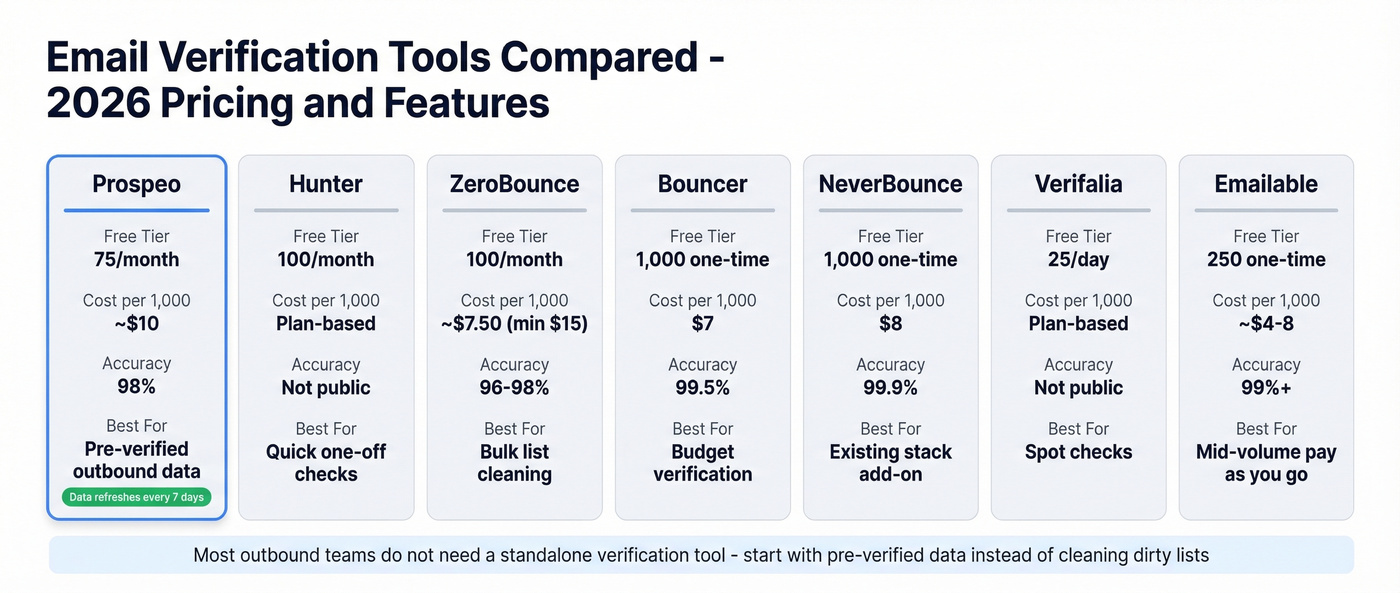
Let's be honest: most teams don't need a standalone verification tool at all. If your deal sizes are above $5k and you're running outbound sequences, the real fix is sourcing pre-verified data so you never have to clean lists in the first place. Verification tools are a band-aid. Clean data sources are the cure. (If you're building a full outbound stack, start with our list of outbound lead generation tools.)
23% of email addresses decay every year, and most providers refresh every 6 weeks. Prospeo refreshes every 7 days. That's the difference between a 2% bounce rate and a domain reputation crisis.
Your list is rotting. Start with data that was verified this week.
What Verification Can't Tell You
Here's the thing: verification is a point-in-time snapshot. An address that's valid today can bounce next week when someone changes jobs. It confirms deliverability signals - not engagement, not consent, not whether the person wants to hear from you.
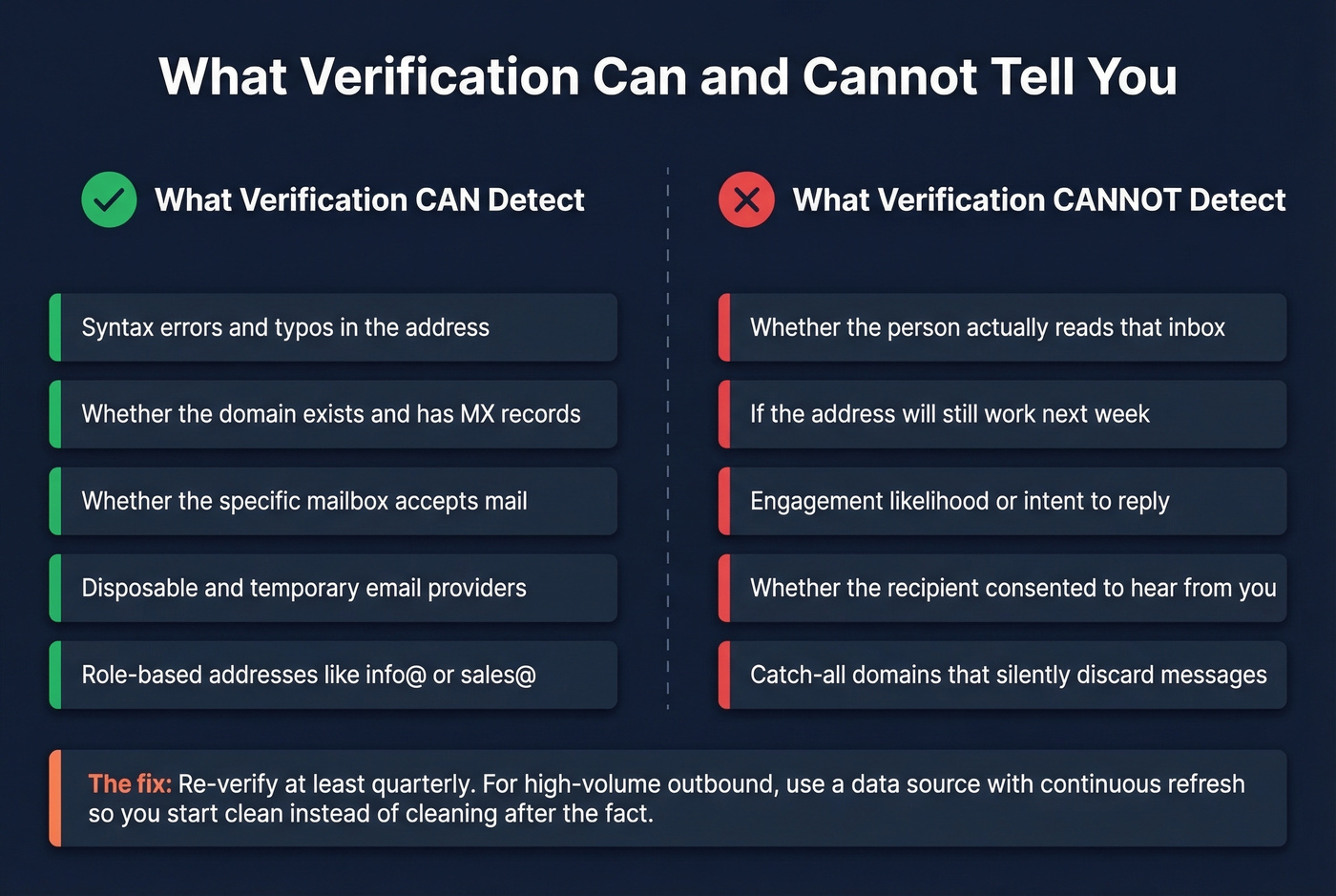
Catch-all domains accept everything then silently discard. Gmail and Outlook use anti-enumeration that produces ambiguous results for real addresses. No tool can tell you if the person actually reads that inbox.
The practical fix is to reduce your dependence on point-in-time verification altogether. Re-verify quarterly at minimum. For high-volume outbound, consider switching to a data source with a continuous refresh cycle so you're starting clean instead of cleaning after the fact - we've seen teams cut their bounce rates from 35%+ to under 4% just by changing where they source contacts. (If you're sourcing via scraping, read our guide to web scraping lead generation.)
FAQ
How do I check if an email address is valid without sending a message?
SMTP verification connects to the mail server and checks whether the mailbox exists using the RCPT TO command - no email is sent. The server responds with a status code (250 for valid, 550 for invalid) and the connection closes. Free tiers from Hunter, ZeroBounce, or Prospeo all perform this check at no cost.
Why does my verification tool return "unknown"?
The domain is catch-all, or the server uses greylisting or anti-enumeration tactics. Gmail and Outlook deliberately return ambiguous responses to block bulk lookups. "Unknown" doesn't mean invalid - it means the tool can't confirm either way. Segment these contacts into a slower, lower-volume cadence.
What bounce rate should I worry about?
Anything above 2% signals a list quality problem. Below 1% is ideal. If you're consistently above 2%, the fix is better data, not better deliverability settings. Verifying addresses before every send is the simplest way to stay under that threshold.
What's a good free tool to verify emails in bulk?
Bouncer offers 1,000 free credits on signup - the most generous one-time allowance. For ongoing monthly use, Prospeo provides 75 free verified emails per month with its 5-step verification built in, while Hunter gives 100 free checks. Combine two free tiers if you need more volume without spending.
How often should I re-verify my email list?
At least quarterly. With 23% annual decay, a list older than three months carries meaningful bounce risk. High-volume outbound teams should verify monthly or switch to a data source with a weekly refresh cycle to avoid the re-verification treadmill entirely.