

Is This Email Valid? What It Means, How to Check, and Why Tools Disagree
"Is this email valid" isn't a yes/no question. It's really asking which tool's definition of "safe to send" you're willing to live with. Paste the same address into three verifiers and you'll get "valid," "risky," and "unknown" - then end up trusting none of them.
The frustration is everywhere in developer and outbound communities. People on r/coldemail ask for verifiers with low false positives and bulk support, while cold emailers complain that verification gets expensive fast once you're cleaning real volume. We've been there too.
How to Check If an Email Is Valid
Use a verifier that runs all three checks: syntax, DNS/MX, and an SMTP mailbox ping. For a single address, this typically takes 100-500 ms.
Here's the thing most people miss: "valid" doesn't mean "deliverable." Valid usually means the mailbox appears to exist right now. Deliverability also depends on server policies like greylisting and rate limits, catch-all behavior, and your own sender reputation. Those are separate problems.
Three solid options for quick checks:
- Hunter - good for occasional checks. Free plan: up to 100 verifications/month, plus free single checks without signup.
- Mailmeteor - free single-email checks without an account.
If your average deal size is modest and you're sending low volume, you don't need "enterprise verification." You need a tool that's fast, reasonably strict, and affordable enough that you'll actually use it every time.
What "Valid" Actually Means
"Valid" means one thing: the address passes the tool's checks and the mailbox looks like it exists at the time of verification. That's it.
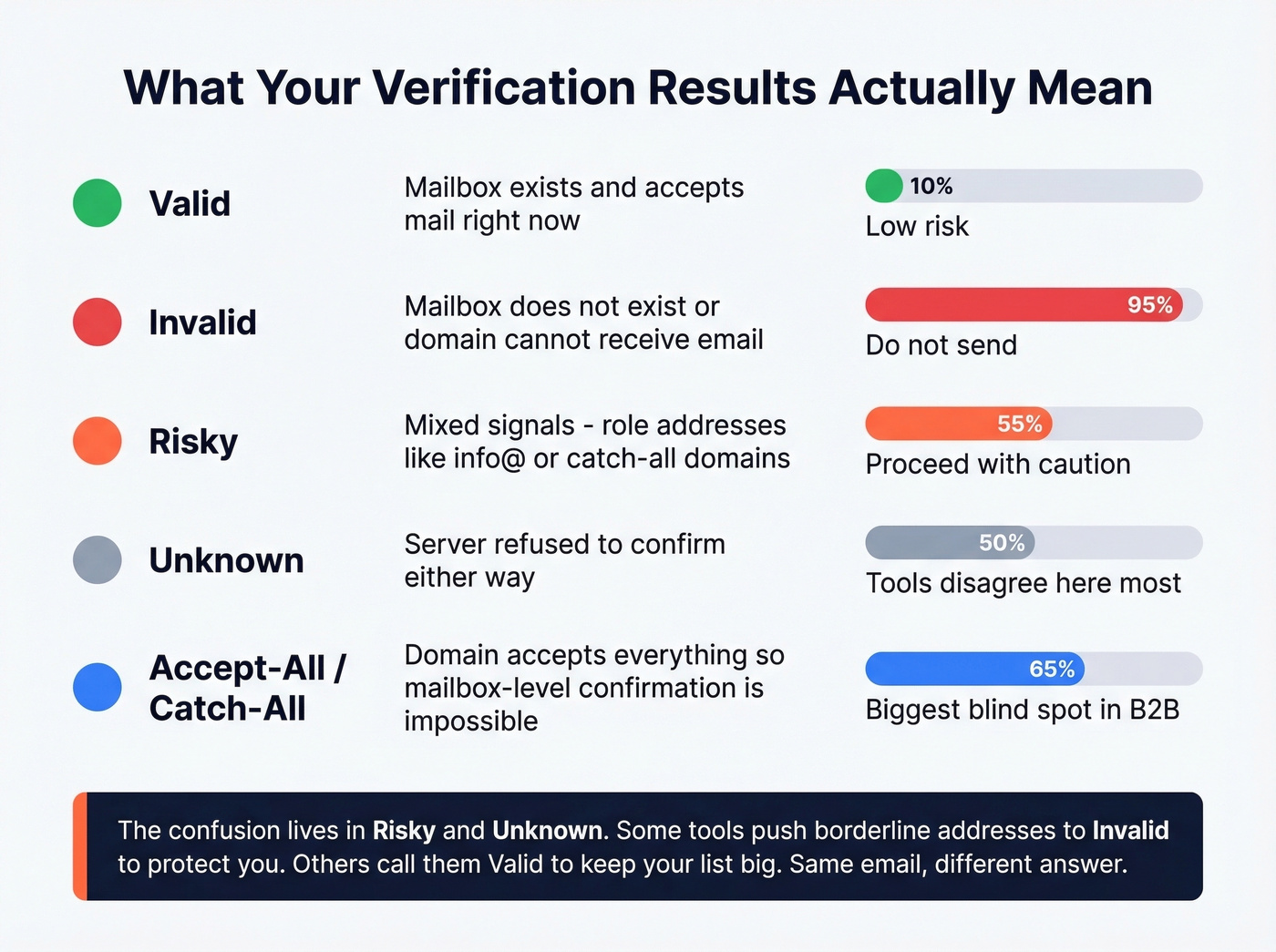
It doesn't mean the person reads it, the inbox will be active next week, you'll avoid spam, or you're safe from bounces on a catch-all domain.
Most verifiers bucket results like this:
- Valid - mailbox exists and accepts mail.
- Invalid - mailbox doesn't exist, or the domain can't receive email.
- Risky - deliverable signals are mixed, common with role inboxes like info@ or catch-all domains.
- Unknown - the server refuses to confirm either way.
- Accept-all / Catch-all - the domain accepts everything, so mailbox-level confirmation isn't possible.
The confusion lives in the risky and unknown buckets. Some tools shove borderline addresses into "invalid" to protect your sender reputation. Others label them "valid" to keep your list size high. That's why tools disagree - they're optimizing for different outcomes.
One more reality check: authentication keeps tightening. In 2024, 53.8% of senders used DMARC, up 11% year over year. That trend widens the gap between "mailbox exists" and "email reliably lands." (If you're troubleshooting auth, start with SPF and DMARC alignment.)
And here's something most explainers skip entirely: disposable email detection. Many verifiers flag temporary inbox domains - the kind people use to grab a download and disappear. If you run lead capture forms, disposable detection matters just as much as syntax.
How Email Verification Works
Most tools follow the same core flow. The difference is how aggressively they retry, how they handle edge cases, and whether they score risk or just slap on a label. (If you're building a full outbound workflow, pair verification with data enrichment so records stay usable.)
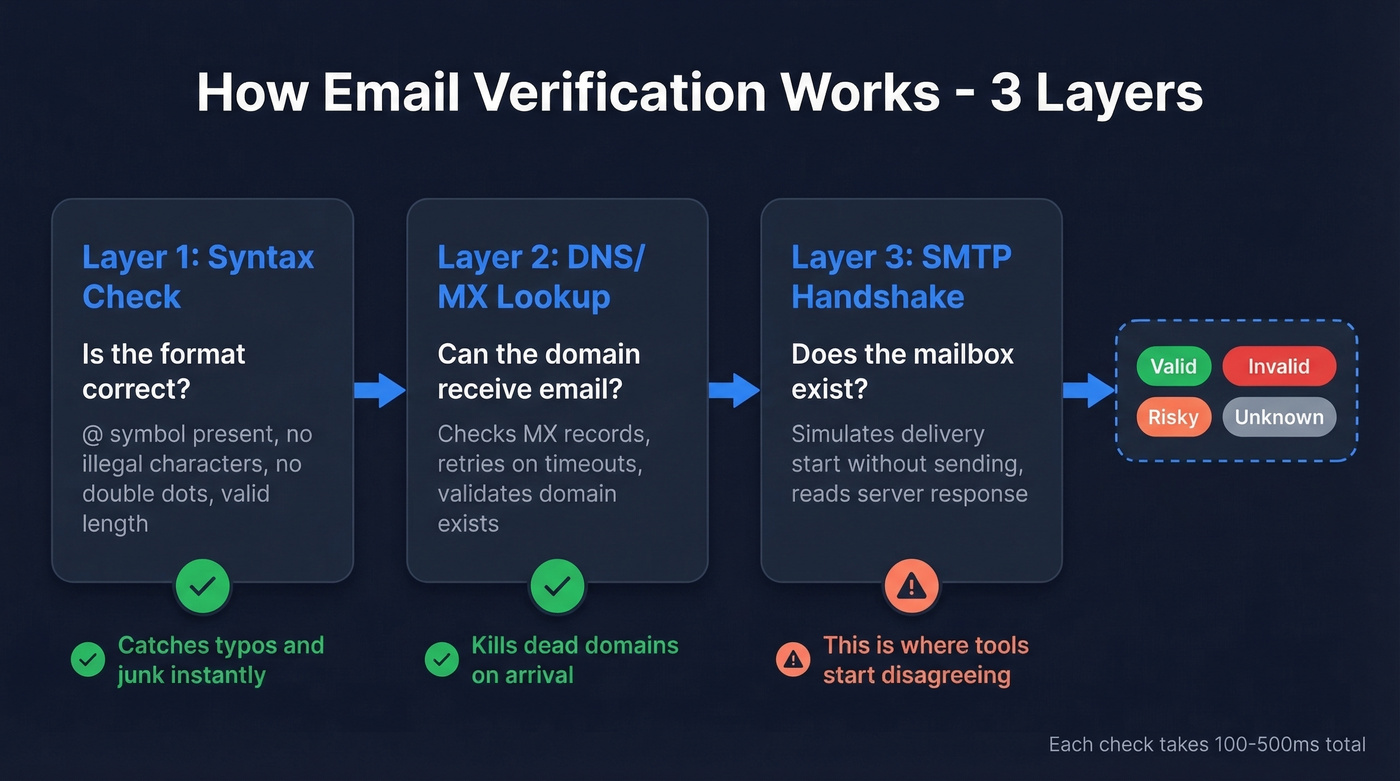
Layer 1: Syntax Check
The formatting gate: @ present, no illegal characters, no double dots, no trailing spaces, valid length. It catches typos and junk instantly.
Layer 2: DNS/MX Record Lookup
The tool checks whether the domain exists and has MX records pointing to mail servers. If the domain can't receive email, the address is dead on arrival. DNS can be noisy - timeouts and misconfigurations happen - so good tools treat DNS as a strong signal and retry intelligently instead of failing fast.
Layer 3: SMTP Handshake
This is the mailbox test. The verifier connects to the recipient mail server and simulates the start of delivery without actually sending a message. The server response often reveals whether the mailbox exists. No email shows up in anyone's inbox.
Where It Gets Messy
SMTP is where email validation becomes a judgment call:
- Catch-all domains accept everything, so the server says "yes" even for fake mailboxes.
- Greylisting rejects the first attempt on purpose; tools that don't retry mislabel good addresses as invalid.
- Rate limiting blocks verifier IPs and creates false negatives.
- Deliberately vague responses are common on large providers to prevent mailbox enumeration.
Catch-all behavior is the single biggest reason tools disagree. It breaks the core promise of mailbox-level certainty. (If you're trying to reduce bounces, see how to check if an email exists and how to check if email will bounce.)
The Catch-All Problem
Catch-all domains are the biggest headache in verification. A catch-all domain is configured to accept mail for any address at the domain - real or not - so the server won't confirm whether jane@domain.com is a real mailbox. When someone asks whether an email address is valid, the honest answer for catch-all domains is often "we can't tell."
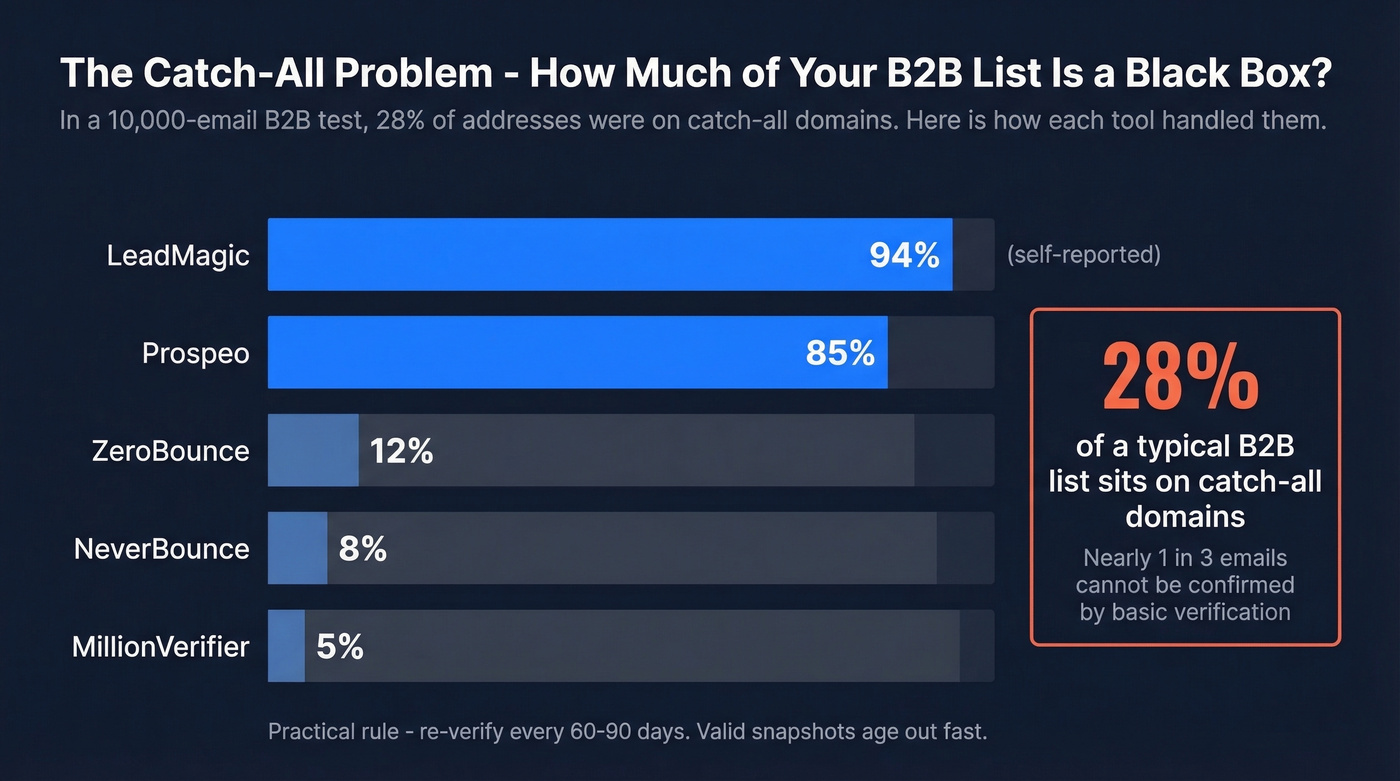
In a 10,000-email B2B test, 28% of addresses were on catch-all domains. That's nearly a third of a typical B2B list that can't be confirmed with a basic mailbox ping, which is a staggering blind spot if you're relying on a single-layer verifier and assuming everything marked "valid" is actually safe to send.
Catch-all also isn't the same as an alias. Aliases forward to a real inbox. Catch-all can route to a shared bucket - or nowhere useful at all.
Resolution rates differ dramatically. In that same benchmark, catch-all resolution ranged from 5% at MillionVerifier to 94% at LeadMagic (self-reported). ZeroBounce landed at 12% and NeverBounce at 8%.
Practical rule: re-verify every 60-90 days. We've seen teams clean a list, pause outreach for a quarter, then come back to bounce rates 3-4x higher because the "valid" snapshot aged out. (For deeper benchmarks and fixes, use our email bounce rate guide.)

Catch-all domains, greylisting, false negatives - you just read why single-layer verifiers can't give you a straight answer. Prospeo's proprietary 5-step verification handles catch-all resolution, spam-trap removal, and honeypot filtering so you don't have to guess. 98% email accuracy, refreshed every 7 days.
Get emails that are actually valid - not "probably valid."
Why Tools Give Different Results
Let's break this down with a real example. In a head-to-head test of 563 emails, ZeroBounce marked 453 as valid while NeverBounce marked 392. When the tester sent to the "valid" sets, ZeroBounce's list produced 2 bounces, while NeverBounce had zero.
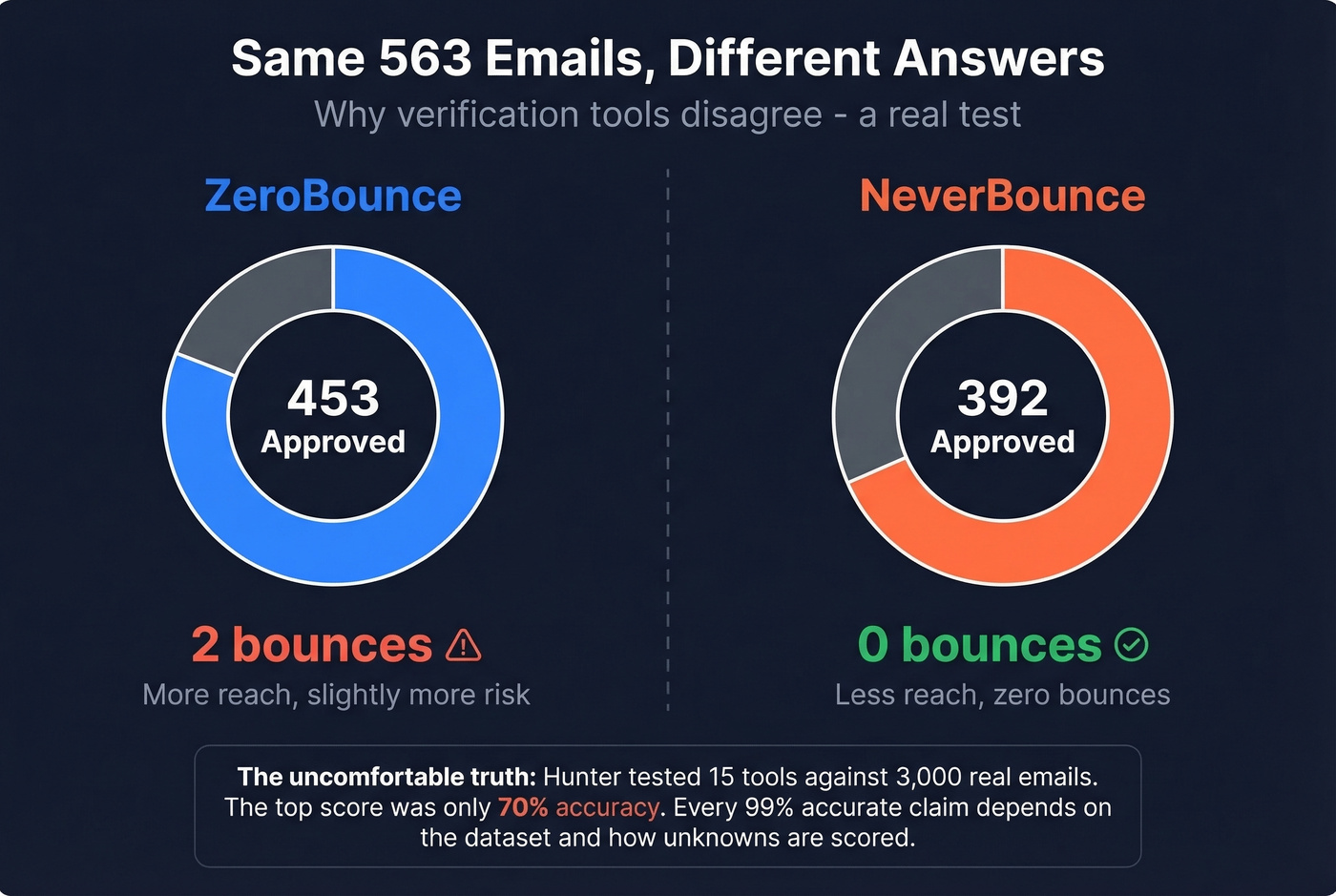
Both tools did their job:
- ZeroBounce approved more addresses - more reach, slightly more risk.
- NeverBounce rejected more borderline addresses - less reach, fewer bounces.
The bigger punchline comes from Hunter's own benchmark: they tested 15 tools against 3,000 real business emails, and the top score was only 70% accuracy because "unknown" results counted as misses. That's the uncomfortable truth behind every "99% accurate" marketing line. Accuracy depends on the dataset, how unknowns are scored, and how catch-all is treated.
Bounce Rate Benchmarks
A good bounce rate is under 2%. Under 1% is where you want to live.
Mailchimp's large-scale analysis found average hard bounces around 0.21% and soft bounces around 0.70%. If your bounce rate exceeds 2%, you have a data quality problem - full stop. (If you're also watching sending limits, track email velocity alongside bounces.)
| Industry | Hard Bounce | Soft Bounce |
|---|---|---|
| Software & Web App | 1.37% | 0.49% |
| Architecture | 1.54% | 0.54% |
| Ecommerce | 0.45% | 0.12% |
| Daily Deals | 0.28% | 0.06% |
B2B categories run higher because job turnover and domain changes are constant. If you're in B2B SaaS and your hard bounce rate is pushing 1.5%+, clean your list before you send another campaign. Don't wait for your ESP to flag you.
Best Email Verification Tools Compared
| Tool | Cost/1K | Free Tier | Catch-all Resolution | Best For |
|---|---|---|---|---|
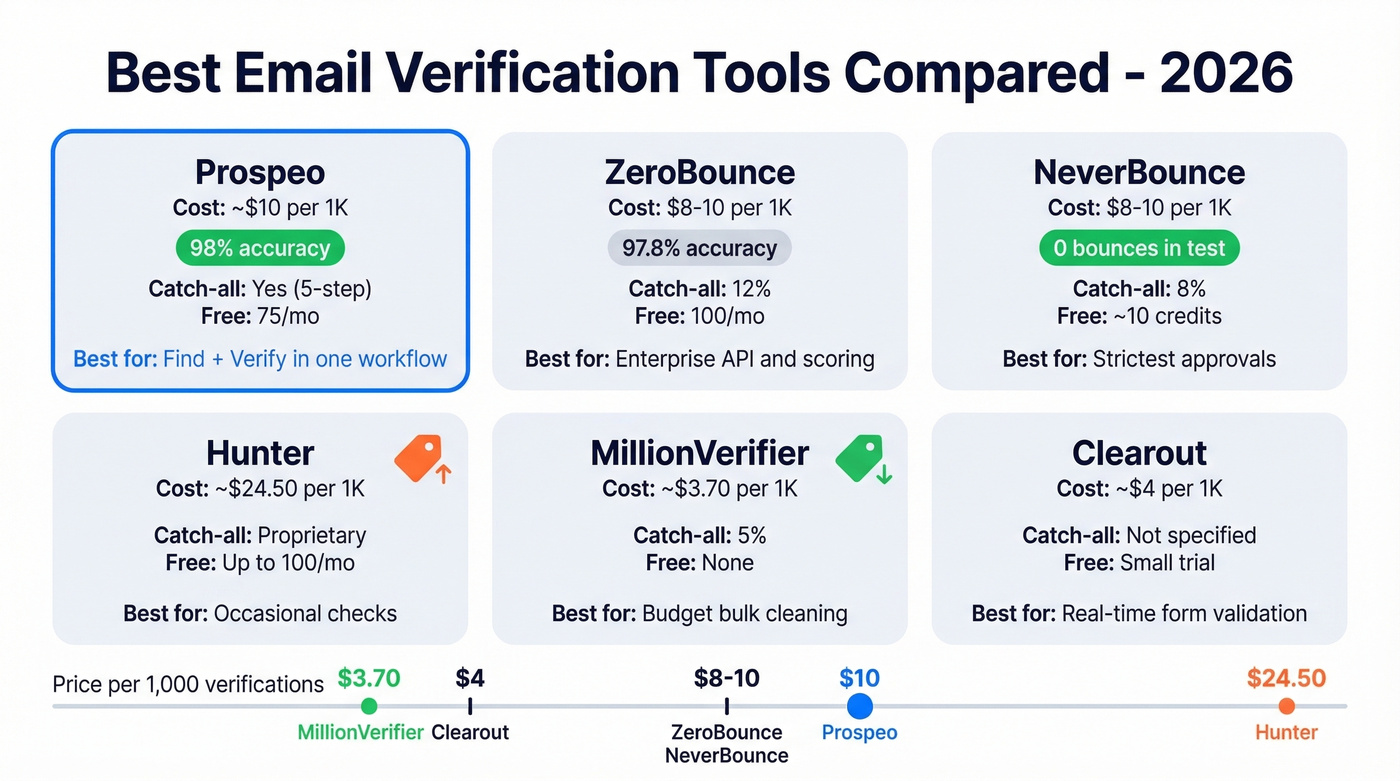
| Prospeo | ~$10 | 75/mo | Yes (5-step) | Find + verify |
| ZeroBounce | $8-10 | 100/mo | 12% | Enterprise API |
| NeverBounce | $8-10 | ~10 credits | 8% | Lowest bounces |
| Hunter | ~$24.50 | Up to 100/mo | Proprietary | Occasional checks |
| MillionVerifier | ~$3.70 | None | 5% | Cheapest bulk |
| Clearout | ~$4 | Small free trial | - | Form validation |
| Bouncer | ~$4.90 | Small trial | - | Simple bulk runs |
| Emailable | ~$6.90 | Small trial | - | Non-technical teams |
| Mailmeteor | Free | Free single checks | - | One-off checks |
| Verifalia | Not public | Free single validator | - | Widget + API |
Prospeo
Prospeo is the best pick when you care about accuracy and freshness and don't want a stitched-together stack. It finds and verifies emails in one workflow using a 5-step verification process: syntax and DNS checks, SMTP verification, catch-all handling, spam-trap removal, and honeypot filtering. The result is 98% email accuracy across 143M+ verified emails, backed by a database of 300M+ professional profiles. (If you're comparing stacks, see our best email ID finder and best email list providers roundups.)
Data refreshes every 7 days, compared to an industry average of about 6 weeks. That gap is exactly why lists built from "pretty good" sources still rot fast. Pricing is self-serve at roughly $0.01 per email, with 75 free emails/month plus 100 Chrome extension credits/month. No contracts.
ZeroBounce (Enterprise Workflows)
ZeroBounce is built for teams that want an enterprise-grade API and detailed scoring. In the 10K-email benchmark, it hit 97.8% accuracy, but catch-all resolution was only 12%, so catch-all-heavy B2B lists will come back with a lot of "unknown."
Use it if you need scoring, compliance-friendly workflows, and API-first operations. Expect $8-10 per 1,000 credits with 100 free monthly verifications when you sign up with a business domain. Skip it if your lists are catch-all heavy - you'll spend money to get "we don't know" on a third of your records.
NeverBounce (Strictest Approvals)
NeverBounce is the strict option. In the 563-email test, it approved fewer addresses than ZeroBounce and produced zero bounces on the approved set. The tradeoff is obvious: you'll throw away more borderline emails.
If you're warming a domain or protecting a fragile sender reputation, that strictness is exactly what you're paying for. Pricing is typically $8-10 per 1,000, with a small starter credit allotment. (To protect deliverability end-to-end, add email reputation tools to your stack.)
Hunter (Pricey, Convenient)
Hunter is convenient and familiar, and its educational content is excellent. But it's also one of the priciest verifiers on this list at roughly $24.50 per 1,000. Use it for occasional checks and light workflows. Don't pick it for bulk cleaning unless budget genuinely doesn't matter. (If you're shopping around, compare options in our Hunter alternatives guide.)
MillionVerifier (Budget King)
MillionVerifier wins on price at about $3.70 per 1,000. That's why it comes up constantly in r/coldemail threads about verification costs. The downside is predictable: minimal catch-all resolution (around 5% in the benchmark), so B2B lists can skew heavily toward "unknown." For consumer lists with fewer catch-all domains, it's a solid deal.
Clearout (Best for Real-Time Forms)
Clearout is a strong fit for real-time validation on sign-up forms and lead capture flows, where speed and API reliability matter more than fancy dashboards. Pricing lands around $4 per 1,000. Most teams will see a small free trial rather than a generous permanent free tier.
Quick Mentions
Bouncer is a solid, straightforward bulk verifier around $4.90 per 1,000. Emailable works well around $6.90 per 1,000 when non-technical teammates need a clean UI. Mailmeteor is the fastest answer for one-off checks because it's free for single lookups. Verifalia is useful if you want a widget and an API, plus a free single-email validator.
Most verifiers disagree because they cut corners on edge cases. Prospeo doesn't rely on third-party email providers - our proprietary infrastructure runs syntax, DNS, SMTP, catch-all handling, and spam-trap filtering in one pass. At $0.01 per email, re-verifying every 60-90 days won't break your budget.
Stop paying more for worse accuracy. Start with 75 free verifications.
Verification vs. Double Opt-In
Verification and double opt-in solve different problems.
Use verification for outbound prospecting, list cleaning, and reactivating old contacts - any situation where you can't ask the recipient to confirm first. Before you send, the question should always be "is this email valid" rather than "does it look right." (If you're scaling outbound, align this with your cold email marketing process.)
Use double opt-in for newsletters, inbound lead magnets, and sign-up forms. It's the cleanest way to prove the address is real and that the person wants your emails.
For messy sources like event lists and webinar registrations, use both: verify first to remove obvious junk and disposable addresses, then let double opt-in confirm the rest. Cold outbound doesn't get to use double opt-in. Verification is the gate. Treat it like one.
FAQ
How do I check if an email is valid without sending a message?
Use an email verification tool that performs an SMTP handshake - it connects to the recipient's mail server and checks mailbox signals without delivering anything. No message shows up in the recipient's inbox. Tools like Prospeo, ZeroBounce, and Hunter all offer this.
What does an "unknown" verification result mean?
It means the mail server refused to confirm or deny the mailbox exists. This is common with privacy-focused providers and catch-all domains. Try a second verifier - different tools have different retry logic and IP reputations that can break through where others can't.
Why do two tools give different results for the same address?
They make different tradeoffs. Conservative tools reject borderline addresses to minimize bounces; permissive tools approve more to maximize list size. Catch-all handling, greylisting retry logic, and verifier IP reputation also change outcomes. In a 563-email test, ZeroBounce approved 453 addresses while NeverBounce approved 392.
Can you verify a catch-all email address?
A catch-all domain accepts mail for any address, so standard SMTP checks can't confirm individual mailboxes. In a 10,000-email B2B test, 28% of addresses sat on catch-all domains. Prospeo's 5-step process includes dedicated catch-all handling, which resolves more of these than basic validators.
How often should I re-verify my email list?
Every 60-90 days. Job changes, mailbox deactivations, and domain migrations turn "valid" lists into bounce traps fast. Re-verification is cheaper than repairing deliverability damage from a spike in hard bounces.