

Best Lead App for Sales Teams in 2026
Four completely different software categories all call themselves a lead app. A church attendance tracker, a Slack bot for virtual coffee chats, a student learning platform, and actual sales tools - all sharing the same name. The term is useless without context.
Here's the thing: there's no single app that handles everything, and you shouldn't want one. What you need is a small, tight stack - a data layer, a CRM, and maybe an automation connector. The rest is noise.
Pick Your Path
Most teams looking for a lead app need one of three things:
"I need a CRM to track leads." Start with HubSpot CRM (free for small teams) or Zoho CRM at $20/user/mo. Both handle contact management, pipeline tracking, and basic automation without an enterprise-priced contract. If you want more options, here are more examples of a CRM to compare.
"I need accurate lead data to fill my CRM." Prospeo's free tier gives you 75 verified emails and 100 Chrome extension credits per month. Paid plans run about $0.01 per email, with 98% email accuracy and a 7-day data refresh cycle. Your CRM is worthless if the data inside it bounces. If you’re evaluating vendors, start with these data enrichment services.
"I need a mobile app for field sales." Badger Maps at $58/user/mo or Salesforce Maps at $75/user/mo handle route planning, territory management, and on-the-ground lead capture. For a broader comparison, see our guide to sales mapping software.
One stat worth internalizing: responding to a lead within 5 minutes increases conversion chances by 900%. Speed matters more than which specific tool you pick.
What "Lead App" Actually Means
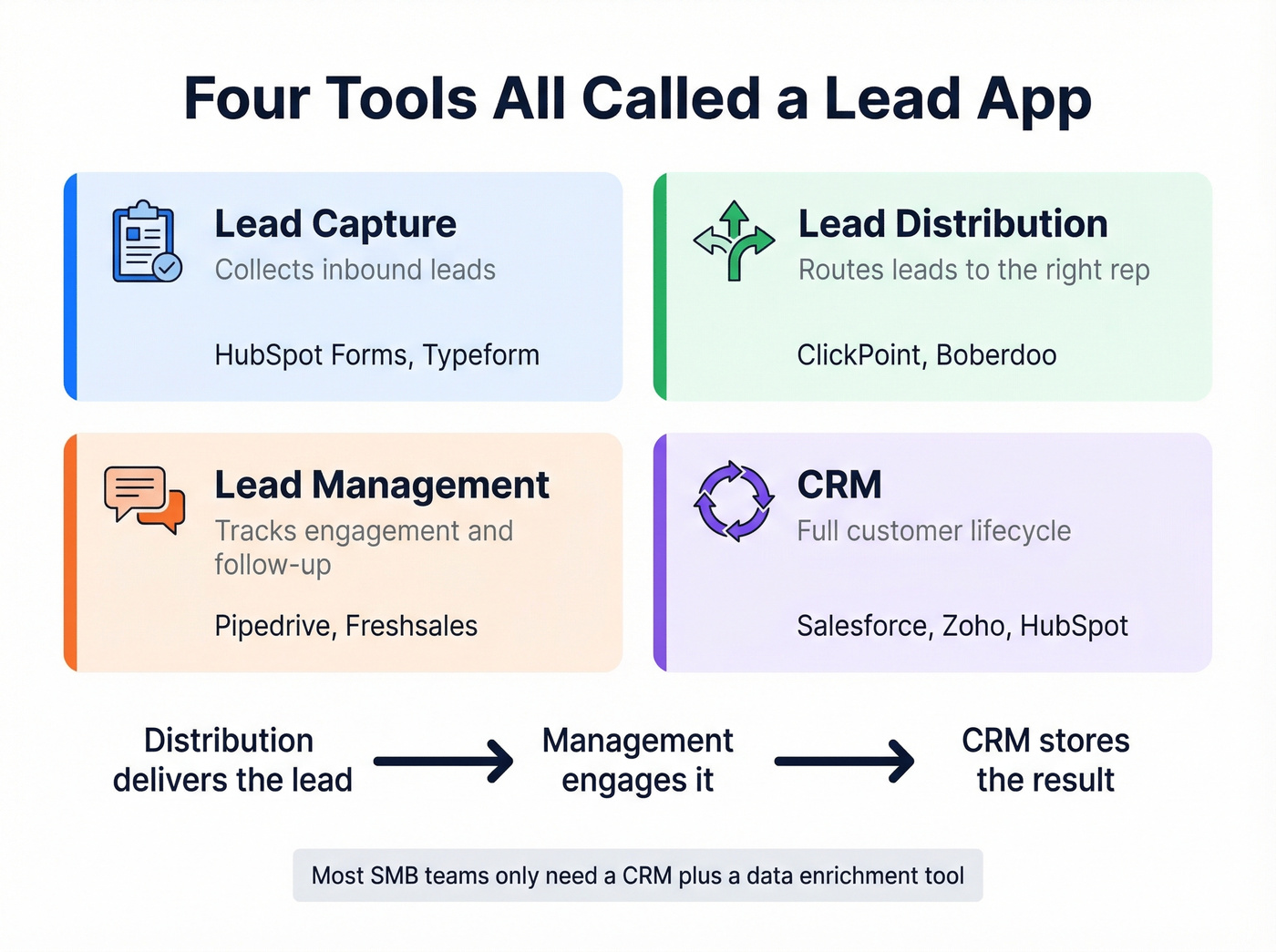
The confusion isn't branding - it's that four genuinely different software categories share the label:
| Category | What It Does | Example Tools |
|---|---|---|
| Lead Capture | Collects inbound leads | HubSpot Forms, Typeform |
| Lead Distribution | Routes leads to reps | ClickPoint, Boberdoo |
| Lead Management | Tracks engagement | Pipedrive, Freshsales |
| CRM | Full customer lifecycle | Salesforce, Zoho, HubSpot |
Lead distribution delivers the lead, lead management engages it, and the CRM stores the result. Most SMB teams don't need all four. A CRM with decent automation covers management and storage, and a data enrichment tool handles the quality side. (If you’re building this end-to-end, use a simple lead generation workflow so nothing leaks.)
And then there's the product literally named "LEAD." lead.app is a workforce collaboration bot for Slack and Microsoft Teams - virtual coffee chats, onboarding buddies, peer learning. It has a 4.8/5 on G2 with exactly 2 reviews, a complaint about no phone support, and pricing that starts around $32 with a free plan. Fine HR tool. Nothing to do with sales leads.
The lead capture software market is projected to hit $4.55B by 2029, up from $2.69B in 2024. More teams are realizing that a CRM alone doesn't solve the data problem - you need something feeding it clean, verified contacts.
The Minimum Viable Lead Stack
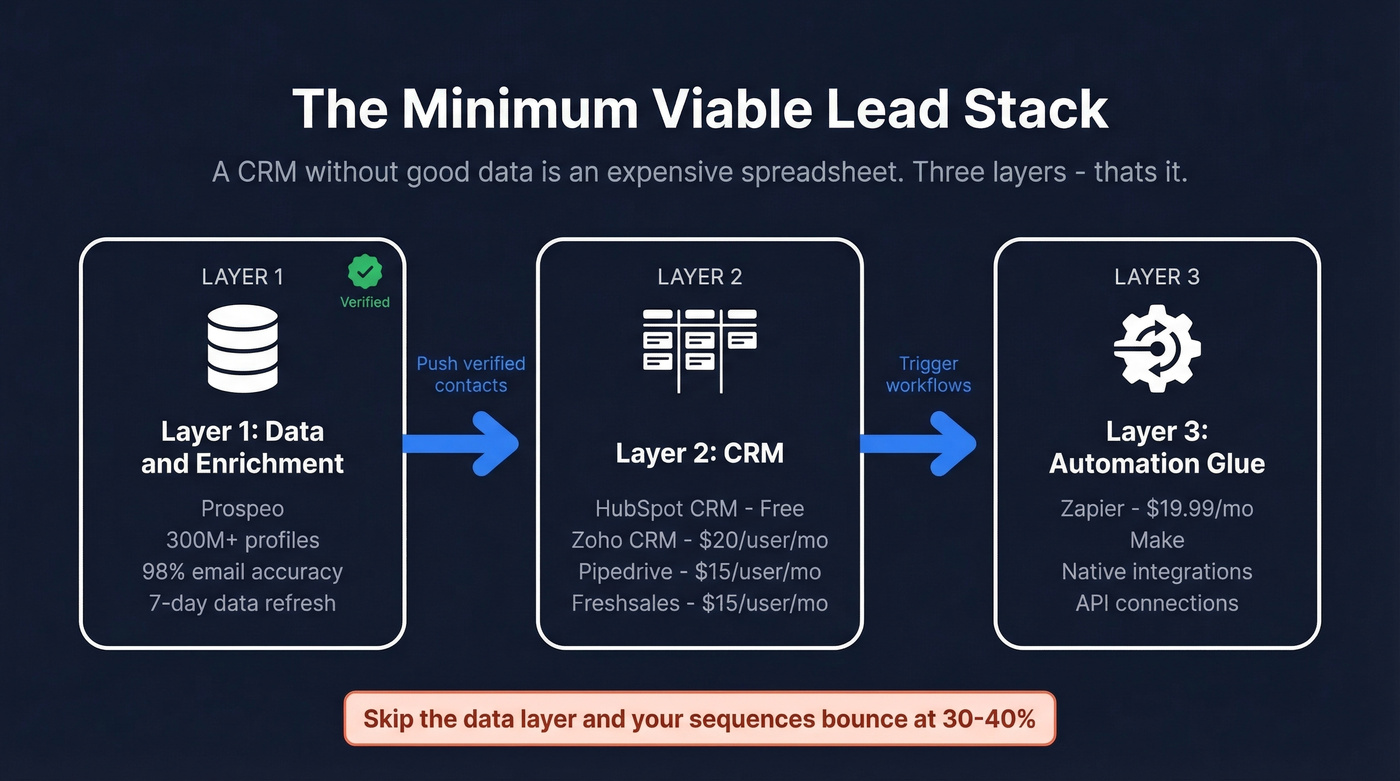
A CRM without good data is an expensive spreadsheet. Three layers, that's it.
Data & Enrichment
This is the layer most teams skip - and it's why their sequences bounce at 30-40%.
Prospeo covers 300M+ professional profiles, 143M+ verified emails, and 125M+ verified mobile numbers. The 7-day data refresh cycle is the real differentiator; most competitors refresh every 4-6 weeks, meaning you're emailing people who changed jobs a month ago. The free tier is enough to test whether the data quality holds for your ICP, and paid plans scale at roughly $0.01 per email with no contracts. Push verified contacts directly into HubSpot, Salesforce, Smartlead, Instantly, Lemlist, or Clay - or connect workflows through Zapier, Make, or the API for custom setups. If you need a deeper breakdown of this layer, see our guide to lead enrichment.

CRM
HubSpot CRM is the default for teams under 20 reps. The free tier is genuinely useful: contact management, deal tracking, email logging, and basic reporting. In our testing, it handles most of what a sub-20-person team needs without spending a dollar. You don't hit real limitations until you need custom reporting or advanced automation, which starts on paid Sales Hub tiers around $50/user/mo. Where HubSpot falls short is customization depth - non-standard sales processes will fight the system. If you’re choosing between platforms, our best contact management software roundup can help.
Zoho CRM is the value play. Standard starts at $20/user/mo, Professional at $35, Enterprise at $50, with a free tier for up to 3 users. More customization than HubSpot, solid workflow automation, steeper learning curve. For a 5-15 person sales team that needs territory management, lead scoring, and multi-channel tracking without Salesforce prices, Zoho is the obvious pick. (If you’re implementing scoring, use this lead scoring guide.)
Salesforce Sales Cloud - skip it unless you have a dedicated admin. Essentials starts at $25/user/mo for up to 5 users, but most teams end up on $75-150/user/mo tiers. For teams over 50 reps with complex processes, it's still the best option. For everyone else, it's overkill. If you want the real cost breakdown, see our Salesforce pricing guide.
Automation Glue
Zapier connects everything. Paid plans start at $19.99/month. Use it to push new leads from capture forms into your CRM, trigger enrichment workflows, and sync tools that lack native integrations.
Best CRMs for Lead Tracking
Pipedrive
The fastest CRM to set up and the one reps actually enjoy using. Pipedrive's entire UX is built around visual deal stages - drag cards, update statuses, see your forecast. Plans run $15-60/user/mo. Don't expect marketing automation or complex reporting. Pipedrive is deliberately focused on pipeline management and nothing else, which is exactly why it works.

Freshsales
Teams switch to Freshsales when they're tired of paying separately for a CRM, phone system, and email sequencer. Freshsales bundles calling, email sequences, and AI-powered lead scoring into one app starting around $15/user/mo. The tradeoff is a smaller integration ecosystem than HubSpot or Salesforce - so if you rely on niche third-party tools, look elsewhere.
Mobile CRM Checklist
If your reps work from phones more than laptops, make sure your CRM handles offline mode with automatic sync, native call logging, push notifications for new leads, and real-time data sync across devices. Route planning requires a dedicated field sales tool - don't expect your CRM's mobile app to handle it.

Your CRM is only as good as the data feeding it. Prospeo gives you 300M+ profiles with 98% email accuracy, refreshed every 7 days - not every 6 weeks. Push verified contacts straight into HubSpot, Salesforce, or any tool in your stack.
Stop filling your CRM with data that bounces at 30%.
Field Sales Lead Apps
Field sales reps spend only 55% of their day actually selling. The rest is driving, planning routes, logging visits, and fighting tools that weren't built for someone standing in a parking lot. A good field sales app claws back 30-60 minutes per day.
Badger Maps
The most established field sales routing tool. At $58/user/mo annually or $69 month-to-month, you get route optimization, territory management, and check-in logging. The map-based interface is intuitive - drop pins for prospects, optimize your drive order, log notes after each visit. It doesn't try to be a CRM, which is the right call.
Where Badger Maps wins over Salesforce Maps: price and simplicity. Where Salesforce Maps wins: native Salesforce integration depth and enterprise analytics.
SalesRabbit
SalesRabbit targets door-to-door and canvassing teams at $59/user/mo. Strong on territory management and lead tracking for physical visits. If your reps knock on doors rather than send emails, it's the right fit. Less relevant for B2B inside sales.
| Tool | Price (Annual) | Route Planning | CRM Sync | Offline |
|---|---|---|---|---|
| Badger Maps | $58/user/mo | Yes | Yes | Yes |
| Salesforce Maps | $75/user/mo | Yes | Native SF | Yes |
| SalesRabbit | $59/user/mo | Yes | Varies | Yes |
Why Most Lead Generating Apps Fail
Stop searching for "the best" tool. The app isn't the problem. The data is.
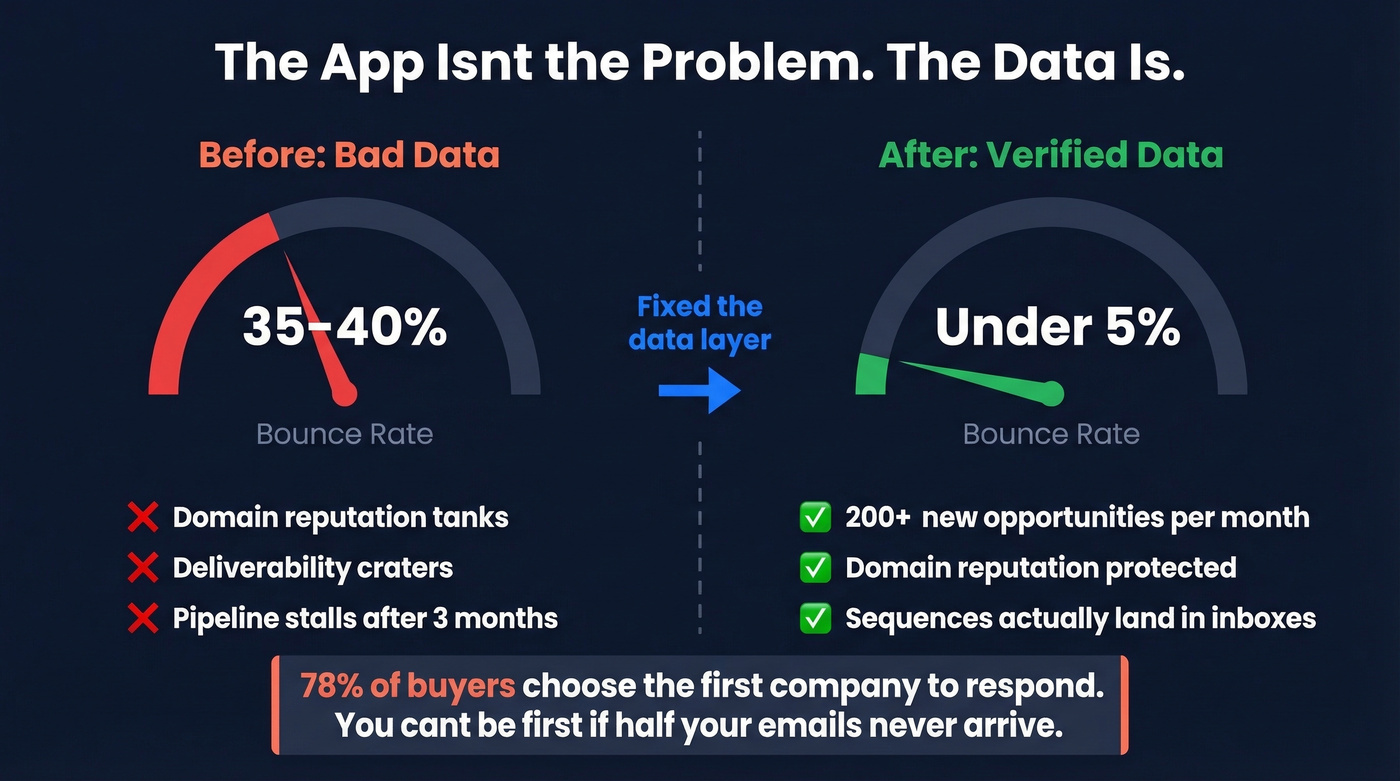
We've seen this pattern dozens of times. A team picks a CRM, imports a purchased list, launches sequences, and watches 30-40% of emails bounce. Their domain reputation tanks. Deliverability craters. Three months later, they're blaming the CRM when the actual failure was upstream - bad data going in. If you’re diagnosing this, start with email bounce rate benchmarks and fixes.
Snyk's sales team lived this exact scenario. Their bounce rate sat at 35-40% before they fixed the data layer. After switching to verified data, it dropped to under 5%, and they generated 200+ new opportunities per month. The CRM didn't change. The sequencer didn't change. The data did.
78% of buyers choose the first company to respond. You can't be first if half your emails never arrive. Whatever tool you use, verify before you import. Every time.

Pricing Reality Table
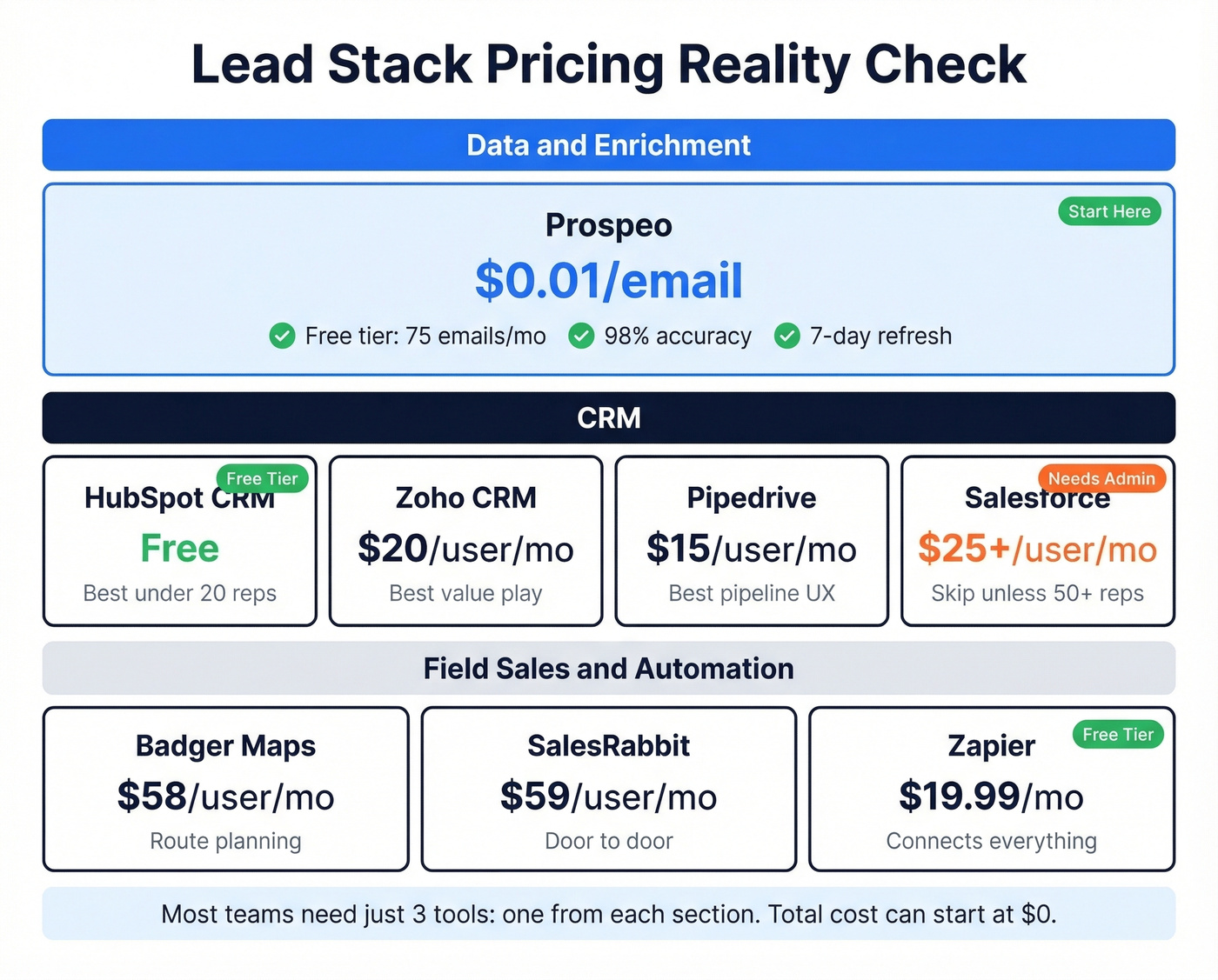
| Tool | Category | Starting Price | Free Tier? | Best For |
|---|---|---|---|---|
| Prospeo | Data/Enrichment | ~$0.01/email | Yes (75 emails + 100 extension credits/mo) | Best accuracy per dollar - start here |
| HubSpot CRM | CRM | Free | Yes | Best free start - switch when you hit 20 reps |
| Zoho CRM | CRM | $20/user/mo | Yes (3 users) | Best under $25/user for growing teams |
| Salesforce | CRM | $25/user/mo | 30-day trial | Skip unless 50+ reps and a dedicated admin |
| Pipedrive | CRM | ~$15/user/mo | 14-day trial | Best UX for pipeline-obsessed small teams |
| Freshsales | CRM | ~$15/user/mo | Yes (limited) | Best all-in-one if you hate managing integrations |
| Badger Maps | Field Sales | $58/user/mo | Demo only | Only if reps drive to meetings |
| SalesRabbit | Field Sales | $59/user/mo | Demo only | Only if reps knock on doors |
| Zapier | Automation | $19.99/mo | Yes (limited) | Glue for any stack without native integrations |
Building the Right Stack
There's no magic lead app that solves everything. The teams that win at outbound build a tight three-layer stack: verified data feeding a CRM connected by lightweight automation. Start with the data layer - everything downstream depends on it. If you want to pressure-test your outbound motion, use these sales prospecting techniques.
Let's be honest: the consensus on r/sales is that most outbound failures aren't tool failures. They're data failures. Fix the inputs and the outputs take care of themselves.
Building a lead stack shouldn't cost enterprise money. Prospeo starts free with 75 emails/month, scales at $0.01/email, and integrates natively with HubSpot, Salesforce, Smartlead, Instantly, Clay, and Zapier. No contracts. No sales calls.
The data layer your minimum viable stack is missing.
FAQ
What's the best free lead app for small business?
HubSpot CRM is the best free option for tracking and managing leads - contact management, deal tracking, and email logging at no cost. For sourcing verified contact data, pair it with Prospeo's free tier (75 emails + 100 Chrome extension credits/month). Together they give you a complete lead stack without spending a dollar.
What's the difference between a lead app and a CRM?
A lead app typically handles one piece of the funnel - capturing, enriching, or distributing leads. A CRM manages the entire customer lifecycle from first touch through closed deal. Most teams need both: an enrichment tool feeding verified data into a CRM that tracks the relationship.
Do I need separate apps for lead generation and management?
Yes, for most teams. Finding and verifying contacts is a different workflow from tracking pipeline and nurturing deals. A CRM handles management; a data platform handles generation. Trying to do both in one tool means doing both poorly - that's why even the best lead generating apps focus on data quality and leave pipeline tracking to a dedicated CRM.
What should a mobile lead app include?
Offline mode with auto-sync, native call logging, real-time data sync, and push notifications for new leads are non-negotiable. Field teams also need route planning and GPS check-ins. Test the mobile experience during your trial - desktop-first CRMs often have weak mobile apps that frustrate reps in the field.
How do I stop leads from bouncing?
Verify every email before importing it into your CRM or sequencer. A 5-step verification process that includes catch-all handling and spam-trap removal keeps bounce rates under 5%. A 2% bounce rate is manageable; a 30% bounce rate destroys your sender reputation and tanks deliverability for months.