

Lead Generation Automation: How to Build a Stack That Actually Works
Your SDR just loaded 5,000 contacts into a sending tool. By Thursday, 800 have bounced, your domain reputation is tanking, and your reply rate is sitting at 0.4%. The tools aren't broken - the data feeding them is.
Here's the uncomfortable truth: 97% of buyers research your website before engaging, but only 9% trust what they find there. Your lead generation automation stack needs to reach buyers before they've already made up their mind - and it needs to do that without torching your sender reputation in the process.
What You Need (Quick Version)
You need 3-5 tools, not 12. Start with clean, verified data, add an orchestration layer like Clay, and connect a sending platform like Instantly. Total cost: under $500/month. The rest of this guide shows you exactly how to automate lead generation from sourcing through sending.
What Is Lead Generation Automation?
Lead generation automation covers every piece of software that finds, verifies, enriches, and engages buyers without you touching a spreadsheet. It spans inbound capture through forms, chatbots, and visitor identification tools; outbound prospecting via email finding and cold sequences; enrichment by appending firmographic and technographic data; nurturing through drip campaigns and retargeting; and scoring that ranks leads by fit and intent.
The market is massive. Marketing automation is projected to grow from roughly $47B in 2025 to $81B by 2030 at an 11.5% CAGR. Organizations generate an average of 1,877 leads per month at a mean cost of $198.44 per lead. Automation's job is to push that CPL down while keeping quality up - and the leverage is real, since automated emails account for just 2% of sends but drive 37% of email-attributed sales.
Why Most Automation Stacks Fail
The biggest lie in automated lead generation is that the tools are the hard part. They're not. Data quality is.
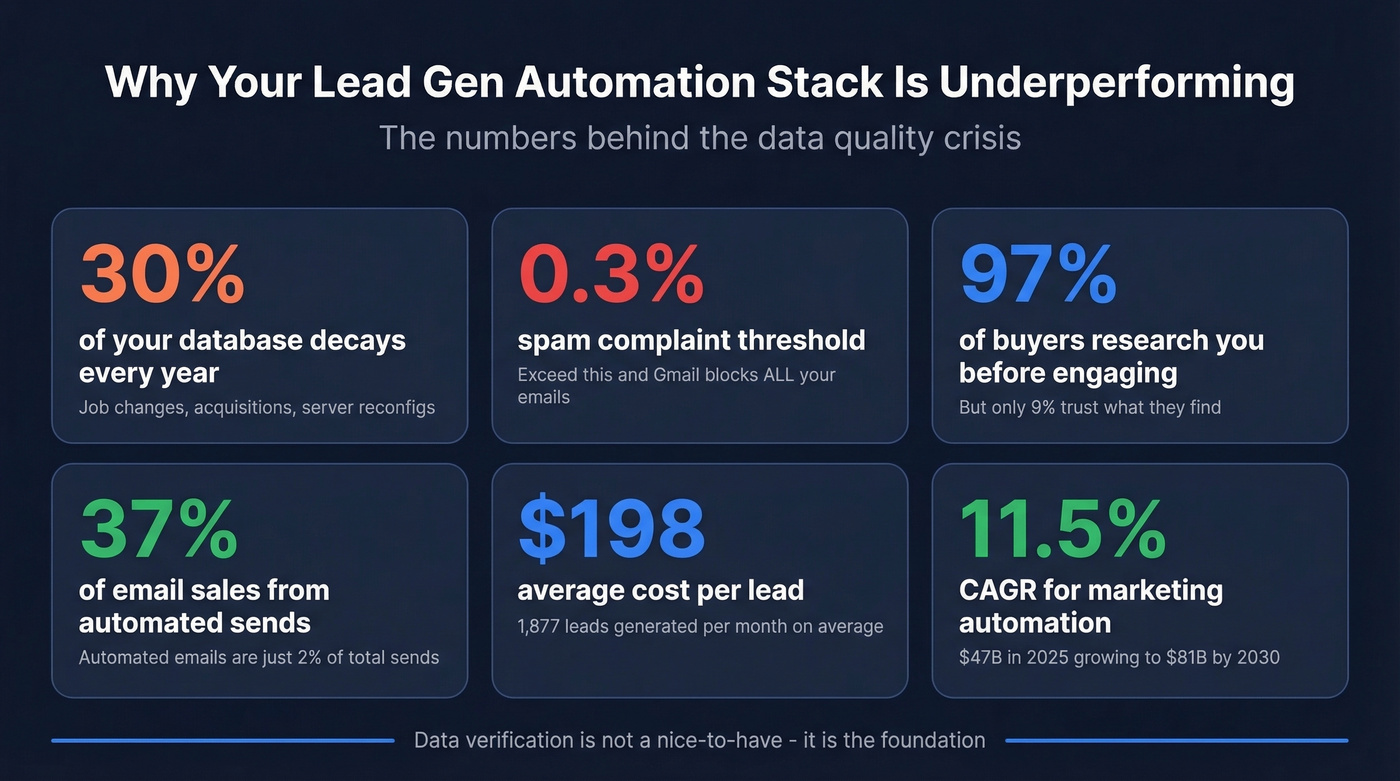
The average sales database decays roughly 30% per year. People change jobs, companies get acquired, email servers get reconfigured. If you're feeding stale or unverified data into your stack, you're not scaling outreach - you're scaling damage. Every bounced email chips away at your sender reputation, and Gmail and Yahoo now enforce a 0.3% spam complaint threshold for bulk senders. Exceed it, and your emails stop reaching inboxes entirely. Not just for the bad contacts. For everyone.
Data verification isn't a nice-to-have. It's the foundation. If you want a deeper benchmark-and-fix breakdown, see our email bounce rate guide.

How to Build Your Stack
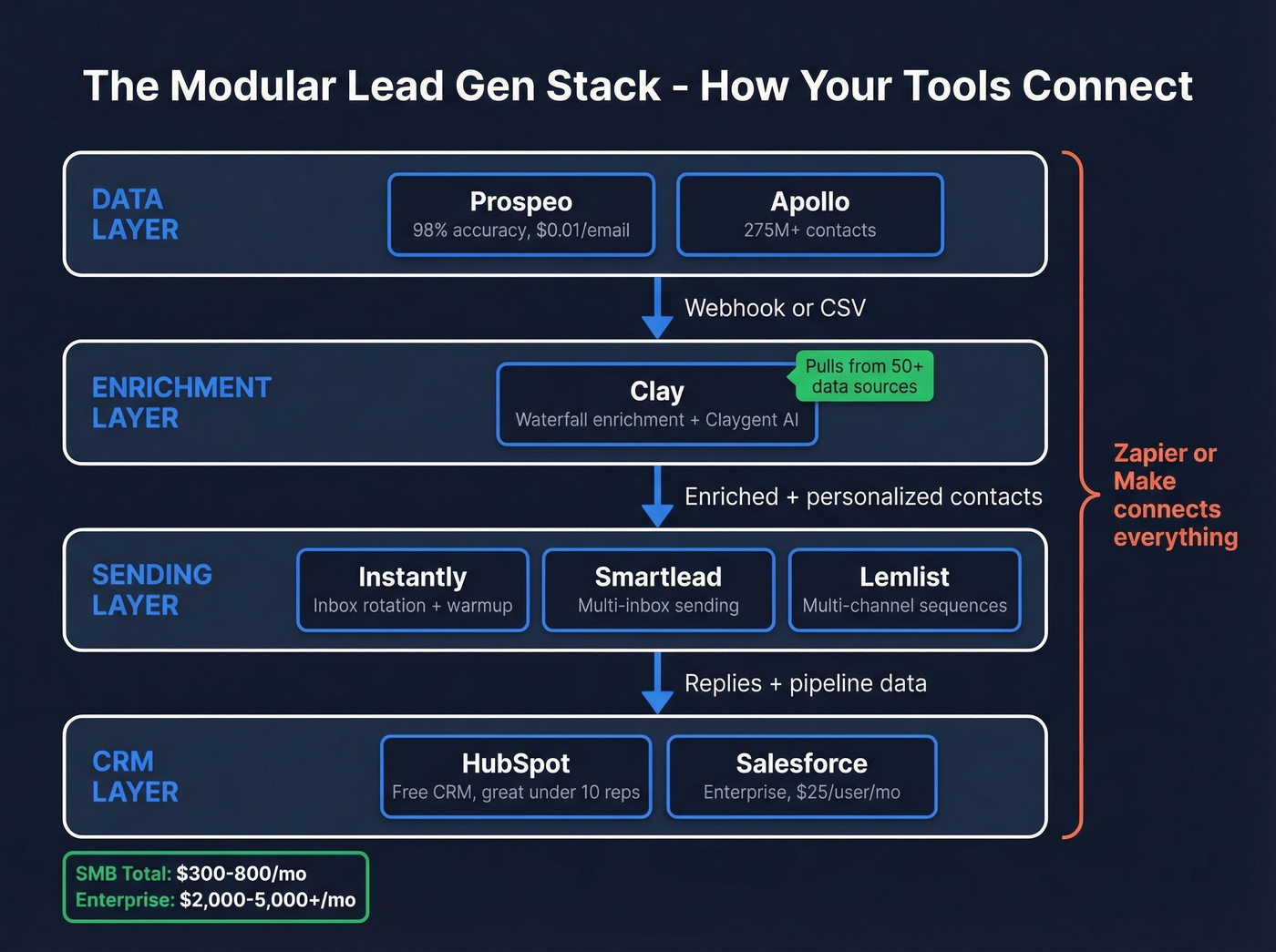
Let's be honest: most teams are paying for Apollo, Clay, Instantly, AND a CRM, but nobody on the team can explain how data flows between them. You have tools, not a system.
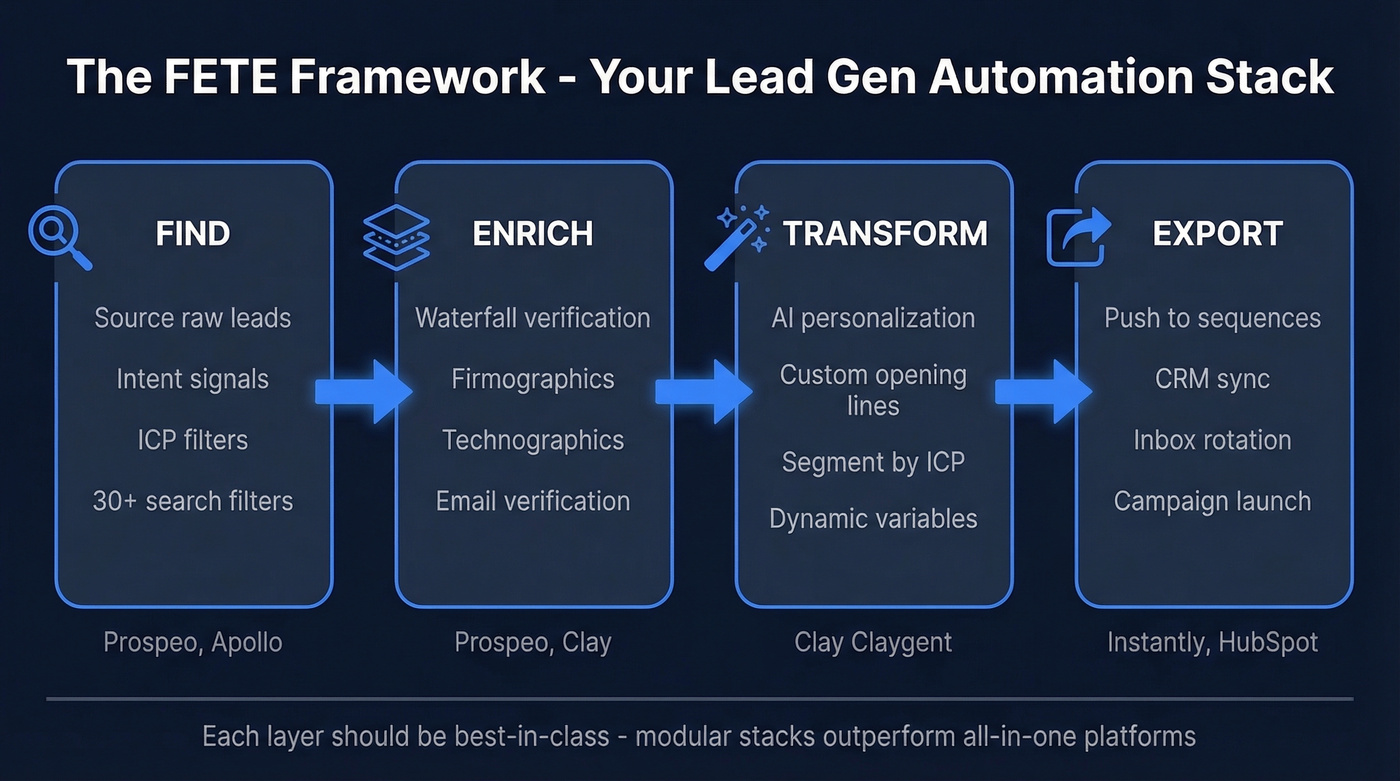
The clearest framework comes from the GTM engineering community: FETE - Find, Enrich, Transform, Export. Every tool in your stack should map to one of these layers. If it doesn't, you probably don't need it.
Find is where you source raw leads. This is your prospecting database - use 30+ search filters covering buyer intent, technographics, job changes, and funding signals, or tap Apollo's 275M+ contact database. Intent data lives here too: knowing which companies are actively researching your category before you reach out. (If you need more sourcing ideas, start with these sales prospecting techniques.)
Enrich is where you verify and append data. Waterfall enrichment - running a contact through multiple data sources sequentially until you get a verified email and phone - is the key concept here. Clay popularized this approach, pulling from dozens of providers to maximize coverage. Your verification layer catches bad emails before they enter your sequences. For a broader vendor shortlist, see our data enrichment services roundup.
Transform is personalization at scale. Clay's AI agent (Claygent) can write custom opening lines based on a prospect's recent job change, company funding round, or tech stack. Generic templates at volume is just spam at volume. This layer separates a 1% reply rate from a 5% reply rate. If you want more examples, use these sales follow-up templates as a baseline.
Export pushes enriched, personalized contacts into your sending tools and CRM. Instantly, Smartlead, or Lemlist for email sequences. HubSpot or Salesforce for pipeline tracking. (If you're wiring systems together, this connect outreach tool to CRM setup guide helps.)
Here's a concrete workflow: new lead sourced from your database, pushed to Clay via webhook, enriched with firmographics and technographics. If the company has 50+ employees AND uses Salesforce, route to Instantly Sequence A. Under 50 employees? Route to Sequence B with SMB messaging. That's how you automate the workflow from first touch to CRM entry without manual data entry at any step.
The key insight: each layer should be best-in-class for its job. Trying to do everything in one platform means compromising on data quality, personalization, or deliverability. The modular stack wins. (For more on keeping inbox placement stable, read our email deliverability guide.)

Your FETE stack starts with Find - and Find starts with data you can trust. Prospeo gives you 300M+ profiles with 98% email accuracy, 30+ filters including buyer intent and technographics, and a 7-day refresh cycle so your sequences never run on stale contacts. Teams using Prospeo book 26% more meetings than ZoomInfo users and 35% more than Apollo - at $0.01 per email.
Stop scaling damage. Start scaling pipeline with verified data.
Best Lead Automation Tools for Every Layer
| Tool | Category | Best For | Starting Price | Key Stat |
|---|---|---|---|---|
| Prospeo | Data & Verification | Verified contacts + enrichment | Free; ~$0.01/email | 98% accuracy, 7-day refresh |
| Apollo | Prospecting Database | Large-scale lead sourcing | Free; ~$49/user/mo | 275M+ contacts |
| Clay | Enrichment & Orchestration | Waterfall enrichment + AI | Free tier | Waterfall enrichment + Claygent |
| Instantly | Cold Email Sending | High-volume outbound | ~$30/mo | Inbox rotation + warmup |
| Smartlead | Cold Email Sending | Multi-inbox sending | ~$39/mo | Multi-inbox management |
| HubSpot | CRM + Marketing | All-in-one inbound + CRM | Free CRM; $15/seat/mo | 28% tech share on tracked sites |
| Salesforce | Enterprise CRM | Complex sales processes | $25/user/mo (Starter) | Enterprise standard |
| Zapier | Workflow Automation | No-code connections | Free; $19.99/mo paid | 7,000+ integrations |
| Make | Workflow Automation | Visual automation builder | Free tier | Visual multi-step flows |
| Leadfeeder | Visitor ID | Website visitor to company | Free lite; $139/mo | Visitor identification |
Data & Verification
This is the layer where cutting corners costs the most. A 98% email accuracy rate means your sequences actually reach inboxes instead of bouncing into the void. If your current provider doesn't verify on at least a weekly cycle, you're building on sand. At ~$0.01 per email, Prospeo is 90% cheaper than enterprise alternatives like ZoomInfo - and we've seen teams book 26% more meetings compared to ZoomInfo and 35% more compared to Apollo using the same sequences.
Enrichment & Orchestration
Clay is the standout here. In a practitioner thread on Reddit heading into 2026, the OP summed it up bluntly: "this year clay is doing it for me again." Its waterfall approach pulls from multiple data providers to fill gaps no single source can cover. If you're only using one enrichment provider, you're leaving data on the table.
Cold Email Sending
Instantly vs. Smartlead comes down to preference. Either works. The bigger variable is the data feeding them, not the sending platform itself. We've tested both extensively, and the deliverability difference between them is marginal compared to the difference between verified and unverified contact lists. If you're choosing a sender, compare options in our AI bulk email sender guide.
CRM
HubSpot's free CRM is genuinely good for teams under 10 reps - the marketing automation layer on paid plans is where it earns its footprint. Salesforce is the enterprise standard, but at $25/user/month for Sales Cloud Starter, it's overkill for most SMBs. Skip it until your sales process demands custom objects and complex reporting. If you want a broader overview, here are more examples of a CRM.
Our take: most teams with deal sizes under $15K don't need more than four tools. A verified data source, Clay, a sending platform, and a free CRM. Everything else is optimization - and optimization only matters after the fundamentals work.
A realistic SMB stack runs $300-800/month. Enterprise teams layering in intent data, multi-channel sequencing, and Salesforce integrations should budget $2,000-5,000+/month.
You just read why 800 bounces kill your domain reputation. Prospeo's 5-step verification with catch-all handling, spam-trap removal, and honeypot filtering keeps your bounce rate under control - ask Snyk, who dropped from 35-40% bounces to under 5% and generated 200+ new opportunities per month. Native integrations with Clay, Instantly, Smartlead, and Lemlist mean your enriched contacts flow straight into your sending stack.
Plug verified data into your automation stack in under 10 minutes.
Weekly Operating Cadence
A stack without a rhythm is just software you're paying for. Here's the weekly cadence that works for teams running automated outreach at 500-1,000 prospects per week.
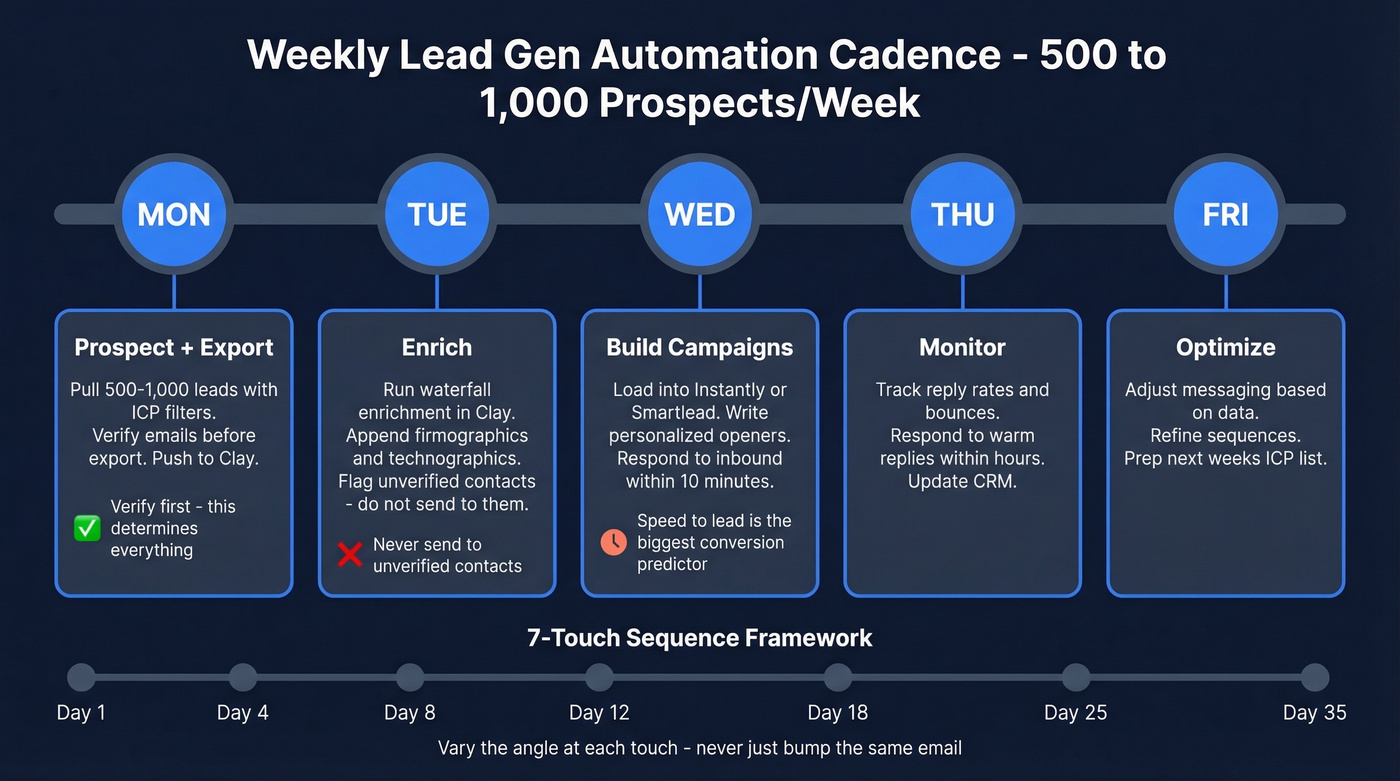
Monday - Prospect and export. Pull 500-1,000 leads from your database using ICP filters. Verify emails before they leave the platform. Export to Clay for enrichment. This is the step most teams rush, and it's the one that determines whether the rest of the week produces pipeline or bounces.
Tuesday - Enrich. Run waterfall enrichment in Clay. Append firmographics, technographics, and personalization signals like recent funding, job changes, and tech stack details. Flag any contacts that didn't return verified data - don't send to them.
Wednesday - Build campaigns. Load enriched contacts into Instantly or Smartlead. Set up sequences, configure send schedules, and write personalized opening lines using Tuesday's enrichment data. For inbound leads that came in over the weekend, respond within 10 minutes of form submission - speed-to-lead data from InsideSales.com consistently shows response time is the single biggest predictor of conversion.
Thursday and Friday - Monitor and optimize. Track reply rates, bounce rates, and deliverability metrics. Respond to warm replies within hours. Update your CRM. Adjust messaging based on what's working. This feedback loop is what separates teams that generate automated leads effectively from those who just blast and pray.
The sequence itself should follow a 7-touch framework across Days 1, 4, 8, 12, 18, 25, and 35. Each touch varies the angle - don't just "bump" the same email. Conferences don't fail; follow-up does. The same applies to every automated sequence you build.
Compliance and Deliverability
Automation without compliance guardrails is a liability. GDPR fines reach up to EUR 20M or 4% of global annual turnover - whichever is higher. Data subject access requests must be fulfilled within 30 days. This isn't optional.
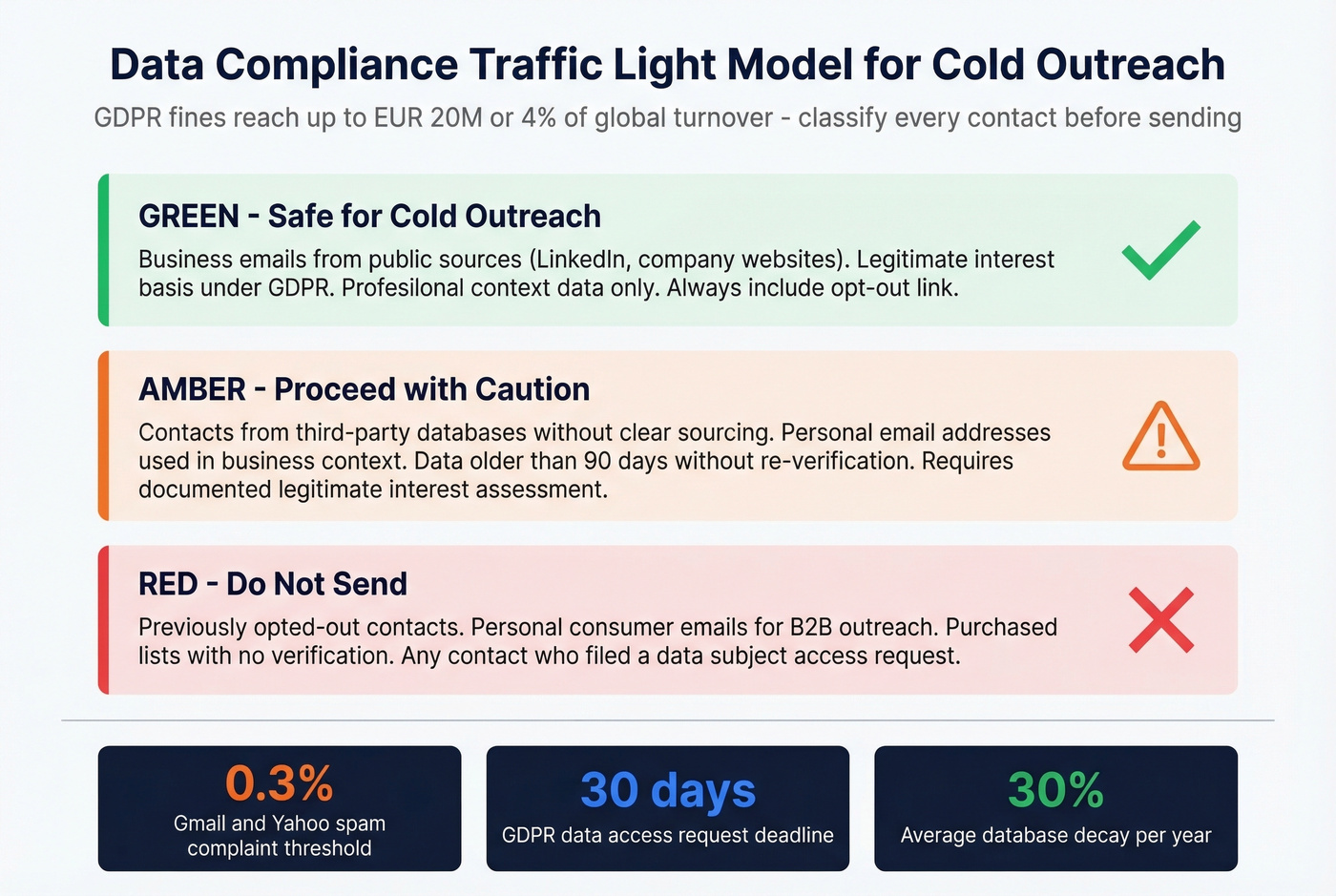
The simplest framework is a traffic-light model for your data:
Green (safe for cold outreach): Work email, job title, company name, public professional profile URL. These are fair game under legitimate interest for B2B outreach in most jurisdictions.
Yellow (needs consent or legitimate interest documentation): Personal email, mobile numbers, inferred intent scores. You can use these, but document your legal basis and make opt-out frictionless.
Red (never use for cold outreach): Health data, ethnicity, union membership, political opinions, or any sensitive category under GDPR Article 9.
Operational controls matter just as much. Maintain suppression lists religiously. Include a 1-click opt-out on every email - no exceptions. Keep an audit trail of where each contact's data originated. For US outreach, CAN-SPAM requires a physical mailing address and clear identification of the message as an advertisement.
On the deliverability side, keep your spam complaint rate below 0.3%. Warm up new sending domains for at least two weeks before scaling volume. Verify your lists before every campaign - a single bad batch can tank months of domain reputation building.
Five Mistakes That Kill Pipeline
Skipping data verification. Every bounced email costs you twice: the wasted send and the domain reputation damage. A 10% bounce rate doesn't just mean 10% fewer contacts reached - it means ISPs start throttling your entire sending volume. Verify first, always.
Giving up after one touch. 44% of salespeople abandon a prospect after a single attempt. The 7-touch sequence framework exists because most deals require multiple interactions. If you're only sending one email, you're not doing outbound - you're doing wishful thinking.
Automating without personalizing. Generic templates at scale equals spam at scale. Tailored nurturing boosts sales-ready leads by 50%, but only when the AI is personalizing based on real signals, not just mail-merging a first name.
Ignoring sales-marketing alignment. Misaligned teams cost roughly 10% in annual revenue. If marketing is scoring leads on one set of criteria and sales is qualifying on another, your automation is just moving garbage faster through the funnel.
Neglecting referrals. Referred leads convert 16% higher than cold outreach leads, yet most automation stacks focus exclusively on cold channels. Build a referral ask into your post-sale sequences. It's the highest-ROI automation most teams never build.
FAQ
How much does lead generation automation cost?
A basic outbound stack - data, enrichment, sending, and a free CRM - runs $300-800/month for a small team. Enterprise stacks with intent data and multi-channel sequencing typically range from $2,000-5,000+/month. Most tools offer free tiers, so you can test the full workflow before committing budget.
Is automated lead generation GDPR compliant?
It can be, if you use work emails under legitimate interest, include a 1-click opt-out in every message, and fulfill data subject access requests within 30 days. Avoid personal emails for cold outreach in the EU without explicit consent. Maximum penalties reach EUR 20M or 4% of global annual turnover.
What's a good reply rate for automated cold email?
Expect around 2% for baseline B2B cold email replies. Well-targeted campaigns with verified data and personalized messaging reach 5-8%. The biggest lever isn't copy - it's whether the email actually hits the inbox. Verified emails and strong deliverability fundamentals beat clever copy sent to bad data every time.
How can I automate lead generation end to end?
Follow four steps: find prospects using database filters and intent signals, enrich contacts with verified emails and firmographic data, transform records into personalized outreach using AI, and export everything into a sending platform and CRM. The FETE framework above walks through each layer in detail.
What's a good free tool to start automating leads?
Prospeo offers 75 free verified emails plus 100 Chrome extension credits per month - enough to test a real outbound workflow. HubSpot's free CRM handles pipeline tracking, and Clay's free tier covers basic enrichment. Combined, you can run a functional automated outreach system at zero cost while validating your ICP and messaging.