

Lead to Deal Automation: How to Close Every Stage
Your pipeline report has 47 stalled deals. Yesterday's hottest inbound lead sat unassigned for six hours while your SDR manually sorted a spreadsheet. Meanwhile, opportunities closed within 50 days hit a 47% win rate - after that window, win rates crater below 20%. Every hour of manual handoff is money evaporating.
The gap between "we have leads" and "we close deals" isn't a strategy problem. It's a plumbing problem - and reps still spend just 28.5% of their time on revenue-generating activities. Lead to deal automation fixes that gap by connecting every stage from first touch to signed contract. Let's build it.
What You Need (Quick Version)
Your automation stack needs three layers:
- CRM with native workflows - HubSpot, Pipedrive, or Close. This is your system of record and primary automation engine.
- Data platform for verified contacts - Prospeo handles enrichment and verification so automations don't fire into dead inboxes. 98% email accuracy, 7-day refresh cycle, native CRM integrations. If you’re comparing vendors, start with these data enrichment services.
- iPaaS connector - Zapier or Make to bridge tools that don't talk natively.
Start with two automations: new-lead routing and stalled-deal alerts. Add lead scoring in week two. Fix your data quality before you touch anything else - every downstream automation breaks if emails bounce and phone numbers are dead.
What the Full Pipeline Covers
Most "automation guides" stop at email sequences. That covers about 15% of the picture. A complete system spans five stages, each with its own triggers and actions:
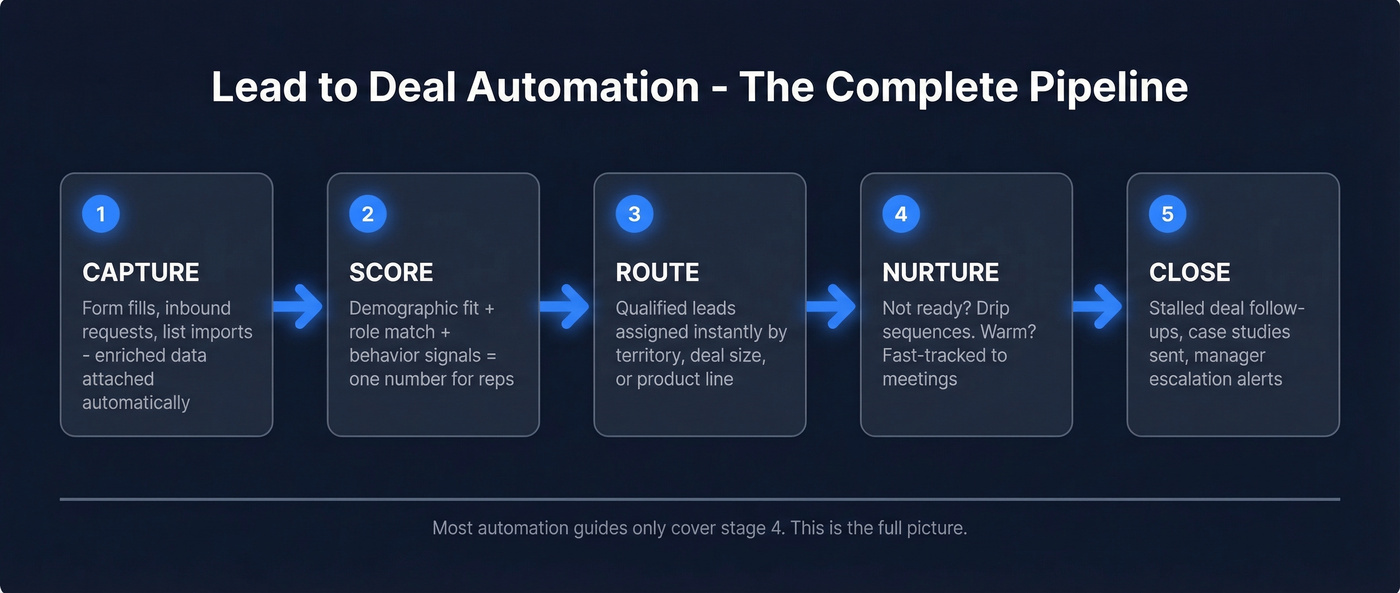
- Capture - form fills, inbound requests, and list imports land in your CRM with enriched data attached automatically.
- Score - demographic fit, role match, and behavioral signals combine into a single number that tells reps where to focus. (If you need a starting point, use an Ideal Customer Profile Template to define fit.)
- Route - qualified leads get assigned to the right rep instantly based on territory, deal size, or product line.
- Nurture - leads that aren't ready get drip sequences; warm leads get fast-tracked to meetings.
- Close - stalled deals trigger follow-ups, case studies get sent automatically, managers get escalation alerts.
Automating your outbound sequences while manually routing leads and ignoring stalled deals is like paving one lane of a five-lane highway. With 45% of teams already running hybrid AI-SDR models, the bar keeps rising. Some practitioners use ChatGPT + Make.com to triage leads and draft initial replies - a workflow that takes about 15 minutes to set up.
Fix Your Data First
Here's the thing: the most elegant sales automation in the world fails on bad data. And this isn't theoretical.
A bounced email doesn't just mean one missed contact. It kills your sender reputation. A damaged sender reputation means your entire sequence lands in spam. Now every automation downstream - nurture drips, meeting requests, stalled-deal follow-ups - fires into inboxes that never see them. One bad data layer poisons everything above it, and suddenly your "automated pipeline" is just an expensive way to burn your domain. If you’re troubleshooting, start with email deliverability and your email bounce rate.
Snyk lived this. With 50 AEs prospecting 4-6 hours per week, their bounce rate ran 35-40% before they fixed their data layer with verified enrichment. Bounces dropped under 5%, AE-sourced pipeline jumped 180%, and they started generating 200+ new opportunities per month. That's the difference between a pipeline that works and one leaking from every joint.

Every automation recipe above depends on verified contact data at the enrichment step. Prospeo's API returns 50+ data points per contact at a 92% match rate - so your scoring, routing, and nurture workflows run on real signals, not stale records.
Stop automating on top of bad data. Fix the foundation first.
A Lead Scoring Model You Can Copy
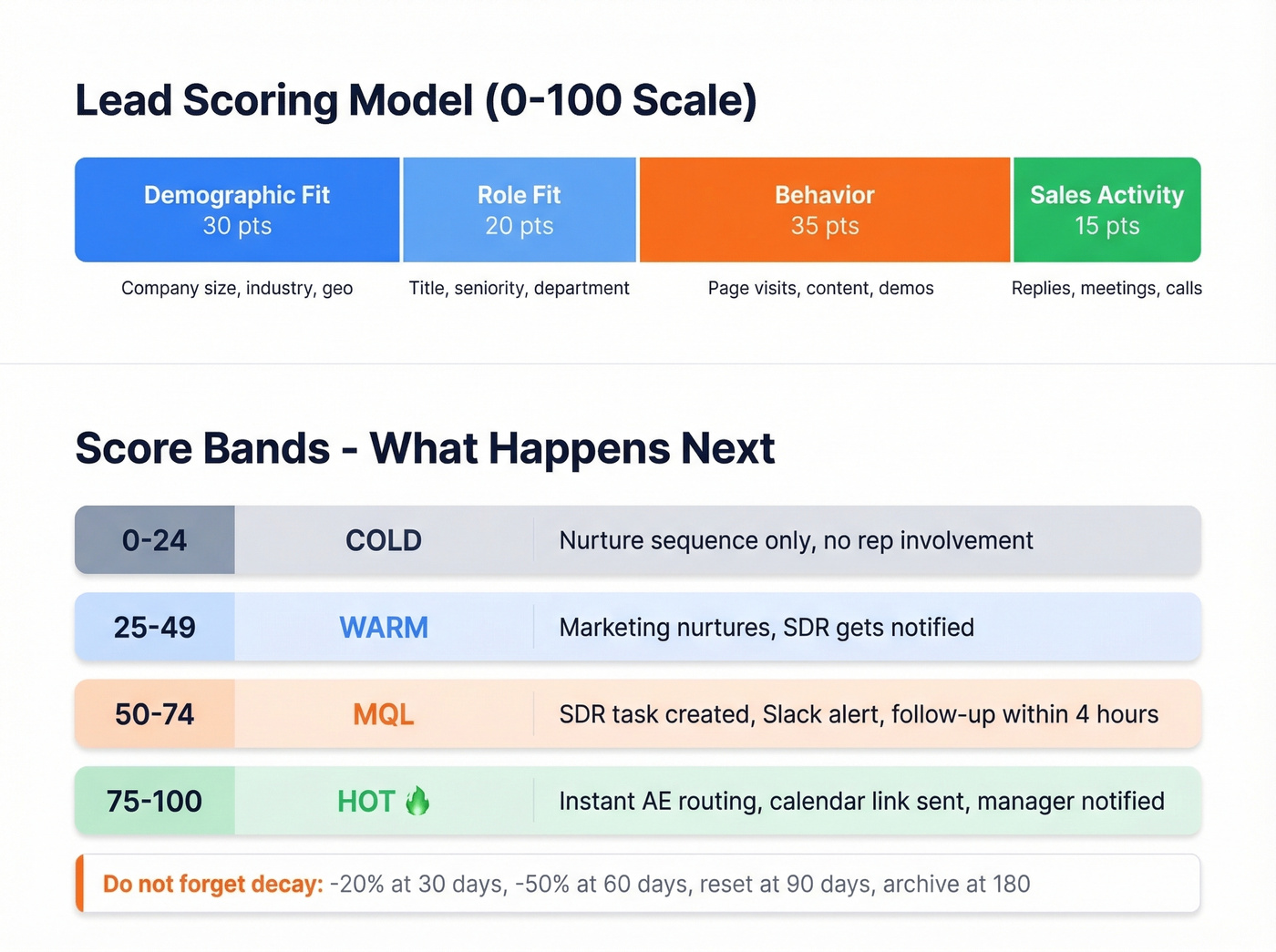
Most teams either skip scoring entirely or build something so complex nobody trusts it. We've seen both extremes. Here's a model that actually works, on a 0-100 scale:
| Category | Max Points | What It Measures |
|---|---|---|
| Demographic fit | 30 | Company size, industry, geo |
| Role fit | 20 | Title, seniority, department |
| Behavior | 35 | Page visits, content, demos |
| Sales activity | 15 | Replies, meetings, calls |
Score bands drive your automation triggers, and these thresholds determine exactly when a human gets involved:
- 0-24 (Cold) - Nurture sequence only. No rep involvement.
- 25-49 (Warm) - Marketing continues nurturing, SDR gets notified.
- 50-74 (MQL) - SDR task created, Slack alert fires, follow-up within 4 hours.
- 75-100 (Hot) - Instant routing to AE, calendar link sent, manager notified.
For behavioral scoring, assign points that reflect real buying intent: pricing page visit +15, demo request +25, ROI calculator +20, case study download +12. Don't forget negative signals - an unsubscribe is -25.
The piece most teams miss is decay. Without it, a lead who visited your pricing page eight months ago still looks hot. After 30 days of no engagement, reduce behavioral score by 20%. At 60 days, cut it 50%. At 90 days, reset to zero and archive at 180. Scoring without decay lies to you.
Automation Recipes for Every Stage
Here are three recipes you can build this week in any modern CRM. We've tested variations of each across HubSpot, Pipedrive, and Close.
New Lead Routing With Automated Enrollment
Trigger: New contact created in CRM.
Workflow: Enrich the contact via API to fill missing job title, company size, and verified email before scoring fires. Run through your scoring model. If score is 50 or above, assign via territory rules, create a follow-up task due within 4 hours, and notify the rep via Slack. If score is below 50, automated contact enrollment drops the lead into the appropriate nurture sequence based on their score band and industry - no manual list building required.
Stalled Deal Alert
Think of this as a countdown clock that starts the moment a deal goes quiet:
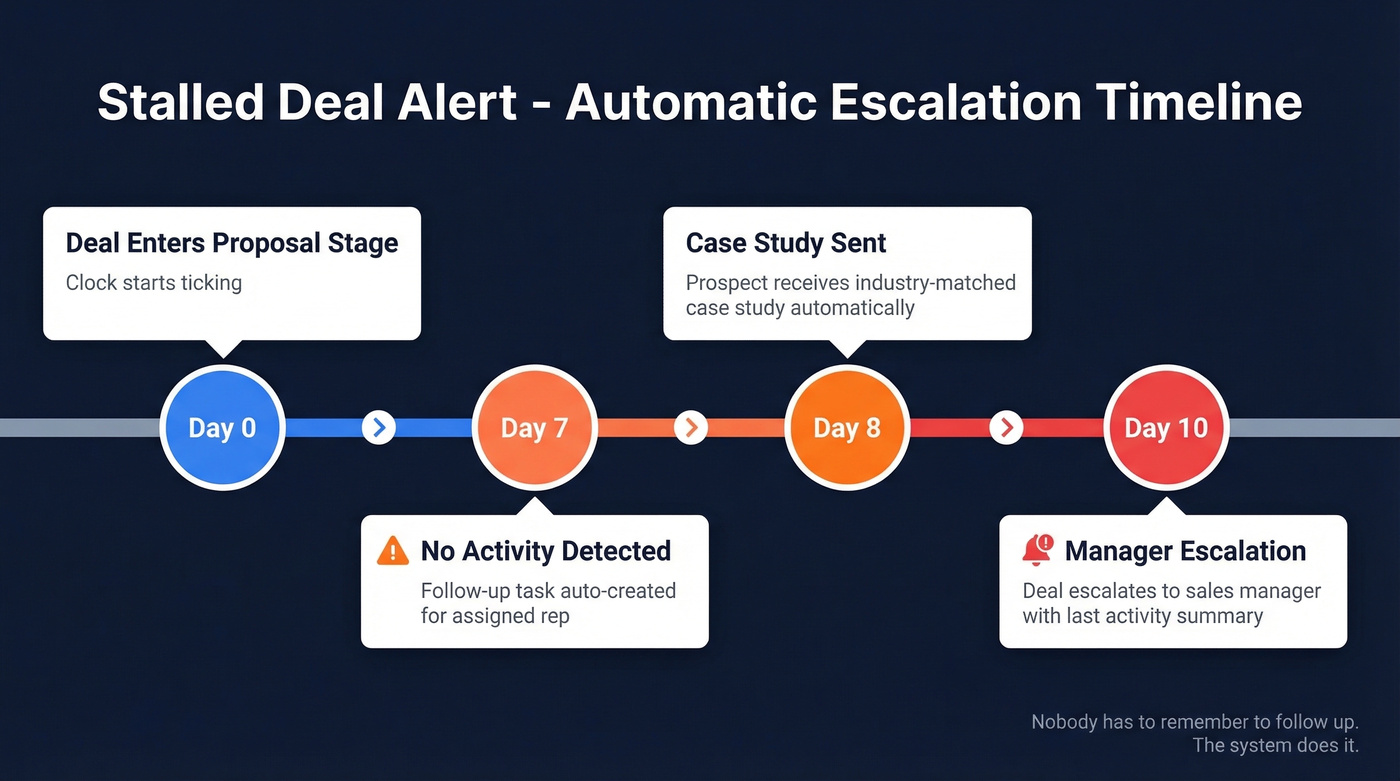
- Day 0 - Deal enters Proposal stage.
- Day 7 with no activity - Follow-up task auto-created for the assigned rep.
- Day 8 - Prospect receives a relevant case study mapped to their industry.
- Day 10, still no response - Deal escalates to the sales manager with a summary of last activity.
This pattern comes from Pipeline CRM's automation templates and works in virtually any CRM with time-based triggers. Nobody has to remember to follow up. The system does it. If you want copy you can plug in immediately, keep a set of sales follow-up templates ready for these triggers.
Form Fill to Booked Meeting
Before: Prospect fills out a form. Gets a "someone will reach out" email. Waits 24 hours. Loses interest.
After: Prospect fills out a form, the system qualifies the submission against your scoring criteria in real time, routes to the right rep, and displays a calendar widget immediately. Chili Piper's data across ~4 million form submissions shows this pattern converts 66.7% of qualified submissions into booked meetings, compared to an industry average of 30%. That's not a marginal improvement - it's doubling your conversion.
Mistakes That Break Everything
1. HubSpot's governance gap. You can't force deal creation through the Leads object - reps can still create deals directly, bypassing your entire qualification workflow. One HubSpot community user put it bluntly: there's no way to enforce the path, so reps just skip it. Build process agreements, not just automations.
2. Naive Zapier triggers. A "reply received" trigger sounds smart until it creates a CRM record from someone writing "stop emailing me." Filter your triggers by reply content or sentiment before they fire actions.
3. Scoring without decay. A lead who downloaded a whitepaper nine months ago isn't warm. Without time-based score reduction, your MQL list is full of ghosts.
4. Automating on bad data. Reps already spend under a third of their time on revenue-generating activities - bad data makes that number worse by sending every downstream workflow into inboxes that don't exist.
5. Too many lead stages. Five stages create confusion. Three is usually enough: New, Working, Qualified. Every extra stage is a place where leads get stuck and forgotten. If you’re seeing this in the wild, it usually shows up as classic sales pipeline challenges.
Look - if your average deal size is under $15K, you don't need a $40K/year data platform or a 15-tool stack. A CRM, a verified data source, and Zapier cover 90% of what most teams need. The teams that close fastest aren't the ones with the most tools. They're the ones whose tools actually talk to each other.
Tools for Your Stack
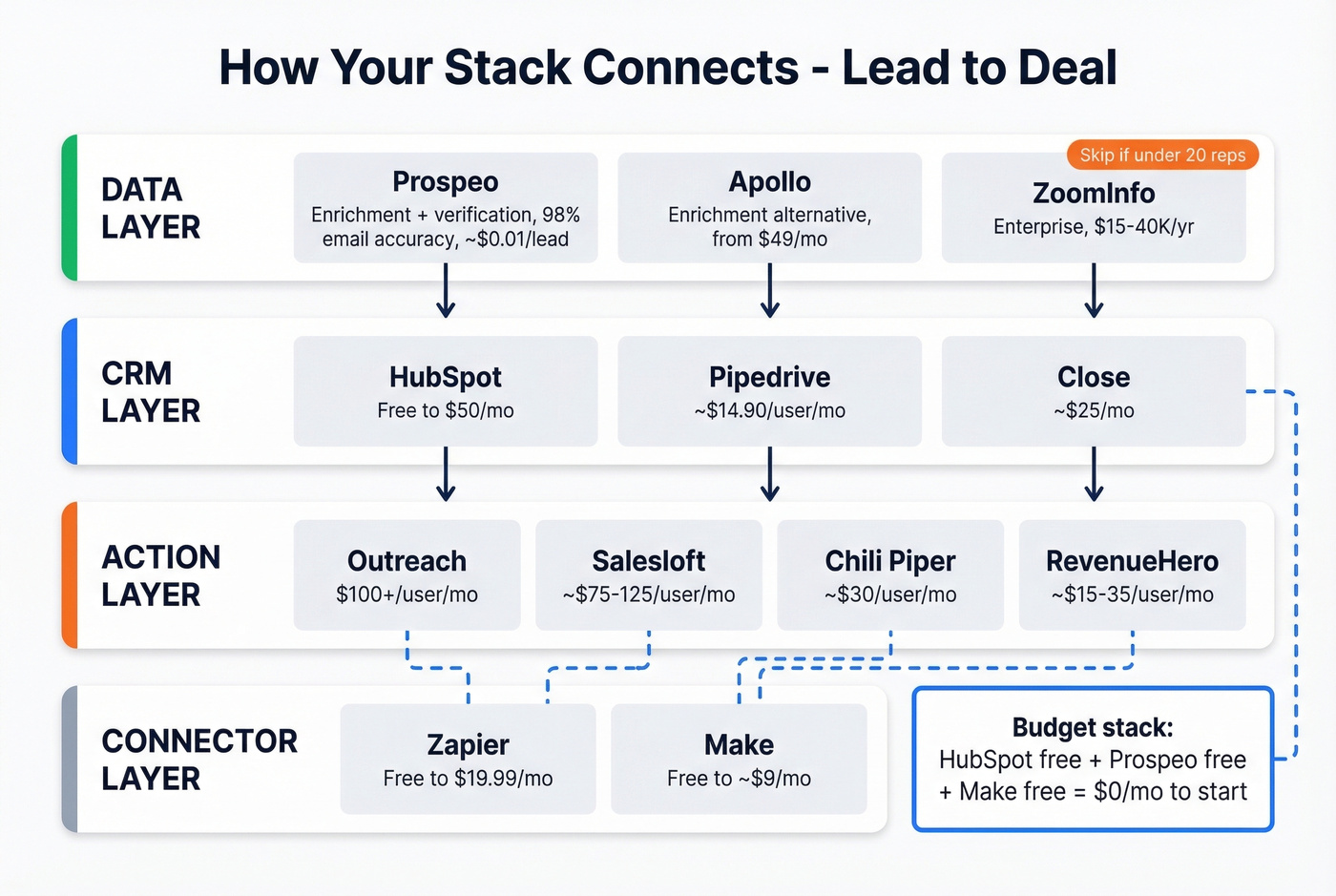
Most teams don't need more tools. They need the three or four they have to actually communicate. Here's what a solid stack looks like:
| Category | Tool | Starting Price |
|---|---|---|
| CRM | HubSpot Sales Hub | Free; paid from $50/mo |
| CRM | Pipedrive | From ~$14.90/user/mo |
| CRM | Close | From ~$25/mo |
| Enrichment | Prospeo | Free; ~$0.01/email |
| Enrichment | Apollo | Free; paid from $49/mo |
| Enrichment | ZoomInfo | Custom; ~$15-40K/yr |
| Sequencing | Outreach | $100+/user/mo |
| Sequencing | Salesloft | ~$75-125/user/mo |
| Routing | Chili Piper | From ~$30/user/mo |
| Routing | RevenueHero | ~$15-35/user/mo |
| iPaaS | Zapier | Free; paid from $19.99/mo |
| iPaaS | Make | Free; paid from ~$9/mo |
Skip ZoomInfo if you're a team under 20 reps. At roughly $0.01 per lead versus $1+ at ZoomInfo, the math on Prospeo isn't close - and in our experience, the 98% email accuracy holds up better than what we've seen from pricier alternatives. If you’re evaluating sources, compare against a broader set of B2B company data providers.
FAQ
What's the difference between lead automation and deal automation?
Lead automation handles capture, scoring, and routing - everything before an opportunity exists. Deal automation manages pipeline progression, stalled-deal alerts, and close-stage workflows after the opportunity is created. Full lead to deal automation connects both into a single system so nothing falls through the cracks between stages.
How long does setup take?
Expect under an hour for new-lead routing and stalled-deal alerts in most CRMs. Add scoring and enrichment in week two, then layer in form-to-meeting routing by week three. Most teams are fully operational within 30 days.
What's the most common reason it fails?
Bad contact data. Bounced emails break sequences, kill sender reputation, and make every downstream automation unreliable. Verify your data before automating anything - it's the single highest-leverage fix you can make.
Can small teams afford this?
Yes. A CRM free tier from HubSpot, Prospeo's free plan with 75 emails and 100 Chrome extension credits per month, and Make's free tier give you a working lead to deal automation stack at $0/month. Scale spending only when pipeline justifies it.