

Lead Tracking: How to Build a System That Actually Converts
It's Monday morning. Twenty-three leads came in over the weekend - webinar signups, demo requests, a couple of content downloads. No one followed up. No one knows which channel they came from. Nobody's been assigned as owner. By Tuesday afternoon, half have gone cold and the other half are talking to your competitor.
This isn't a dramatic failure. It's the default state for most B2B teams without proper lead tracking. The breakdown is gradual - a slow drip of missed opportunities that nobody notices until the pipeline review. Think about the $12K webinar your marketing team ran last quarter: 340 leads captured, sales says they're garbage, marketing says nobody followed up, and there's no data to prove either side right. That's not a lead gen problem. That's a tracking problem.
What You Need (Quick Version)
- Define your lead stages and scoring thresholds before you touch any tool. Technology can't fix a process you haven't designed.
- Move off spreadsheets once you have 2+ reps or 100+ active leads per month. Before that, a sheet is fine. After that, it's a liability.
- Use multi-touch attribution. Last-click is lying to you about which channels actually work.
- Automate routing, scoring, and follow-up sequences. Speed-to-lead isn't an operational metric - it's a revenue KPI.
- Verify your data first. A system built on bad data wastes every downstream step.
What Is Lead Tracking?
Lead tracking is the process of documenting where your leads come from, what they do after they arrive, and where they sit in your sales funnel at any given moment. It bridges the gap between "we generated a lead" and "we closed a deal."
Three concepts that people constantly conflate deserve separation. Lead generation is the starting line - it finds prospects and gets them into your orbit. Tracking documents the source, behavior, and stage of each lead as it moves through your pipeline. Lead management is the umbrella covering everything: tracking plus scoring plus nurturing plus converting. Think of it like a relay race: generation finds the baton, tracking watches it move from hand to hand, and management is the entire race strategy.
Without a reliable system, you can't answer basic questions. Which campaign produced the lead? Did they visit the pricing page? Have they talked to a rep? Are they stuck in a stage? You're flying blind, and your CRM is just an expensive address book.
Why B2B Lead Tracking Matters
The average B2B organization generates 1,877 leads per month. Eighty percent never convert. That's not a volume problem - it's a visibility problem, and without tracking you can't tell which 20% will convert or which channels produced them.
B2B buying has gotten dramatically more complex. Buyers now touch 14+ touchpoints before converting, deals involve 8-13 decision-makers, and buying cycles have increased 22%. A single form submission tells you almost nothing about where that lead actually is in their journey. You need the full picture - every page visit, every email open, every content download - stitched together into a coherent timeline.
Then there's the cost angle. Your cost per lead varies wildly by channel: roughly $53 for email, $181 for paid search, and $811 for tradeshows. If you can't attribute revenue back to those channels, you're guessing where to spend next quarter's budget. We've seen teams pour money into channels that look great on last-click attribution but contribute almost nothing to closed revenue. Some small sales teams generate up to $1 million more annually after implementing lead management software - not because they generate more leads, but because they stop losing the ones they already have.
There's also a compliance dimension most teams overlook. GDPR and CCPA require you to document how you collected lead data, what consent was given, and how long you retain it. A proper tracking system creates that audit trail automatically. A spreadsheet doesn't.
How the Process Works
Five stages. Most teams get the first one right and botch the rest.
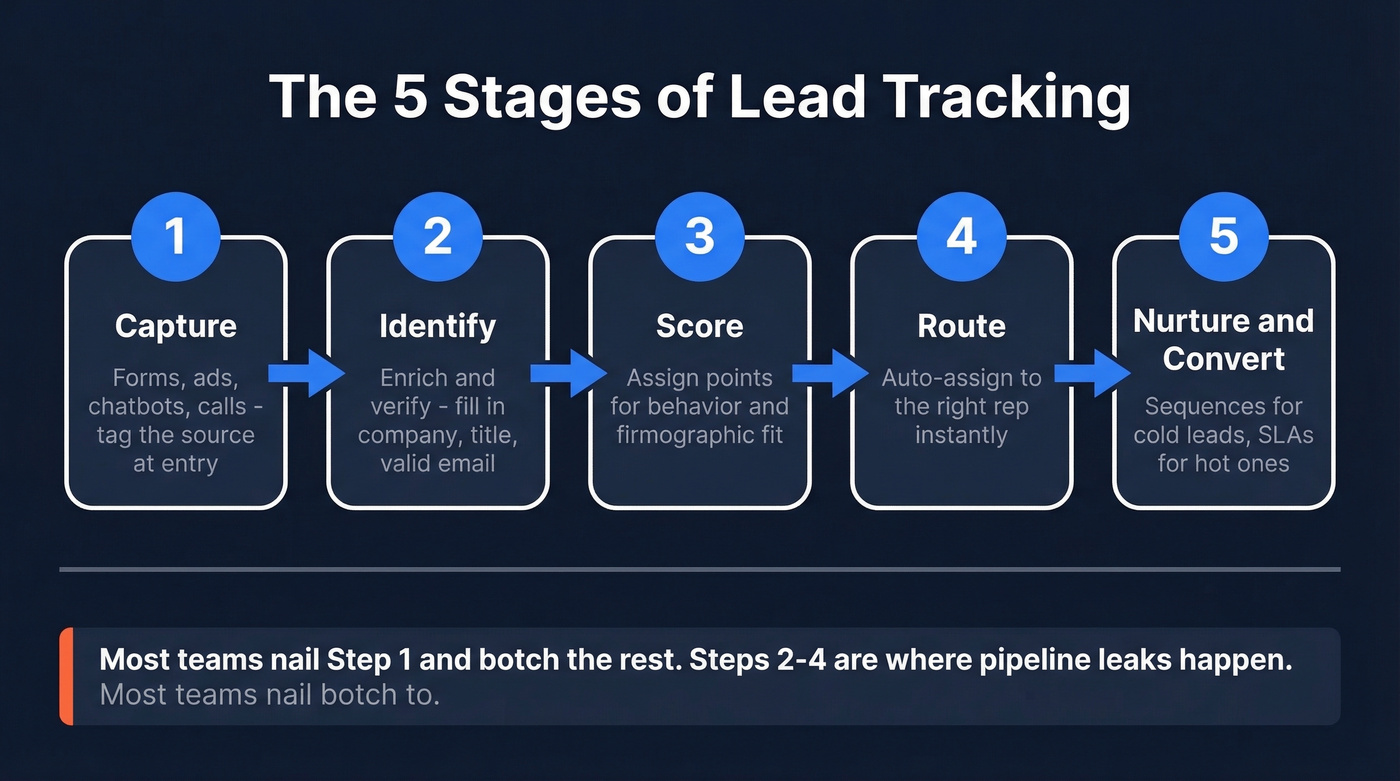
1. Capture. Every lead enters through a touchpoint - a form submission, a chatbot conversation, an ad click, a webinar registration, or a phone call. The key is tagging the source at the moment of entry. UTM parameters on your URLs, cookies for website behavior, hidden form fields for campaign attribution, and call tracking tools like CallRail or CallTrackingMetrics for phone-based leads. If you're not capturing source data at the point of entry, you'll never reconstruct it later.
2. Identify. Here's the step most teams skip entirely. A lead comes in with a name and email - but is that email valid? What company are they from? What's their title? Enrichment tools fill in the blanks with firmographic and contact data so your scoring model works with real people, not dead records. Prospeo enriches CRM records with 50+ data points and verifies emails at 98% accuracy in real time, which means your downstream processes start with clean inputs instead of guesswork.

3. Score. Assign points based on behavioral signals like pricing page visits, email engagement, and content downloads, plus firmographic fit - title, company size, industry, tech stack. More on this below. (If you want a deeper framework, see our guide to lead scoring.)
4. Route. Once a lead hits your MQL threshold, it needs to land on a rep's desk immediately. Auto-assign based on territory, segment, or score. Manual routing introduces delays, and delays kill conversion rates.
5. Nurture and convert. Not every lead is ready to buy today. Automated sequences keep your brand in front of leads who aren't at threshold yet, while handoff SLAs ensure hot leads get a human touch within minutes, not days.
A Lead Scoring Model You Can Steal
Scoring doesn't need to be complicated. Start with a simple point system and refine it quarterly based on what actually converts.
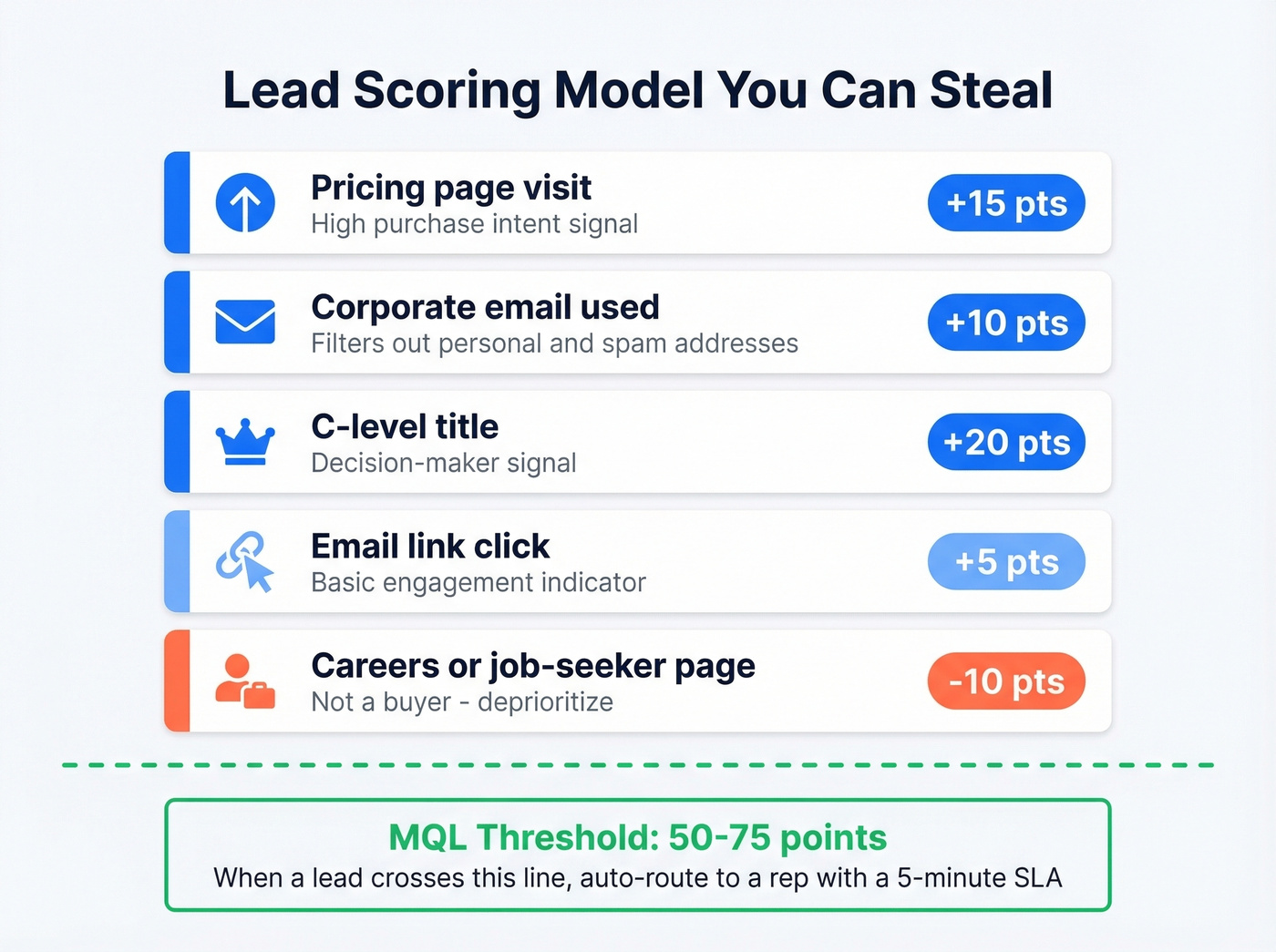
| Signal | Points | Rationale |
|---|---|---|
| Pricing page visit | +15 | High purchase intent |
| Corporate email used | +10 | Filters out personal/spam |
| C-level title | +20 | Decision-maker signal |
| Email link click | +5 | Engagement indicator |
| Careers/job-seeker page | -10 | Not a buyer |
Set your MQL handoff threshold at 50-75 points. When a lead crosses that line, it auto-routes to a rep with a task and a 5-minute SLA. Below that threshold, the lead stays in nurture sequences.
Here's the thing nobody talks about: scoring without verified data means you're scoring bounced emails and departed employees. If a lead's email is invalid or their title is six months stale, every score your model produces is fiction. You need data verification baked into the intake workflow, not bolted on as an afterthought. In our experience, teams that verify at capture see 30-40% fewer wasted rep hours chasing dead leads.

You just read why enrichment is the step most teams skip. Prospeo fills in 50+ data points per lead - title, company size, tech stack, verified email - with a 92% match rate and 98% email accuracy. Your scoring model finally works with real data, not guesswork.
Stop scoring dead records. Enrich every lead at capture.
Attribution Models That Help
Fifty-seven percent of companies use some form of attribution model. Twenty-two percent still rely exclusively on last-click. If you're in that 22%, you're systematically overvaluing bottom-of-funnel channels and undervaluing everything that creates demand in the first place.
One distinction worth internalizing: there's a difference between aggregate reporting ("our blog drove 400 leads this quarter") and individual lead-level tracking ("this specific lead first touched us through a blog post, then attended a webinar, then requested a demo"). Aggregate data tells you what channels work in general. Lead-level data tells you what's working for the deal you're about to close. You need both.
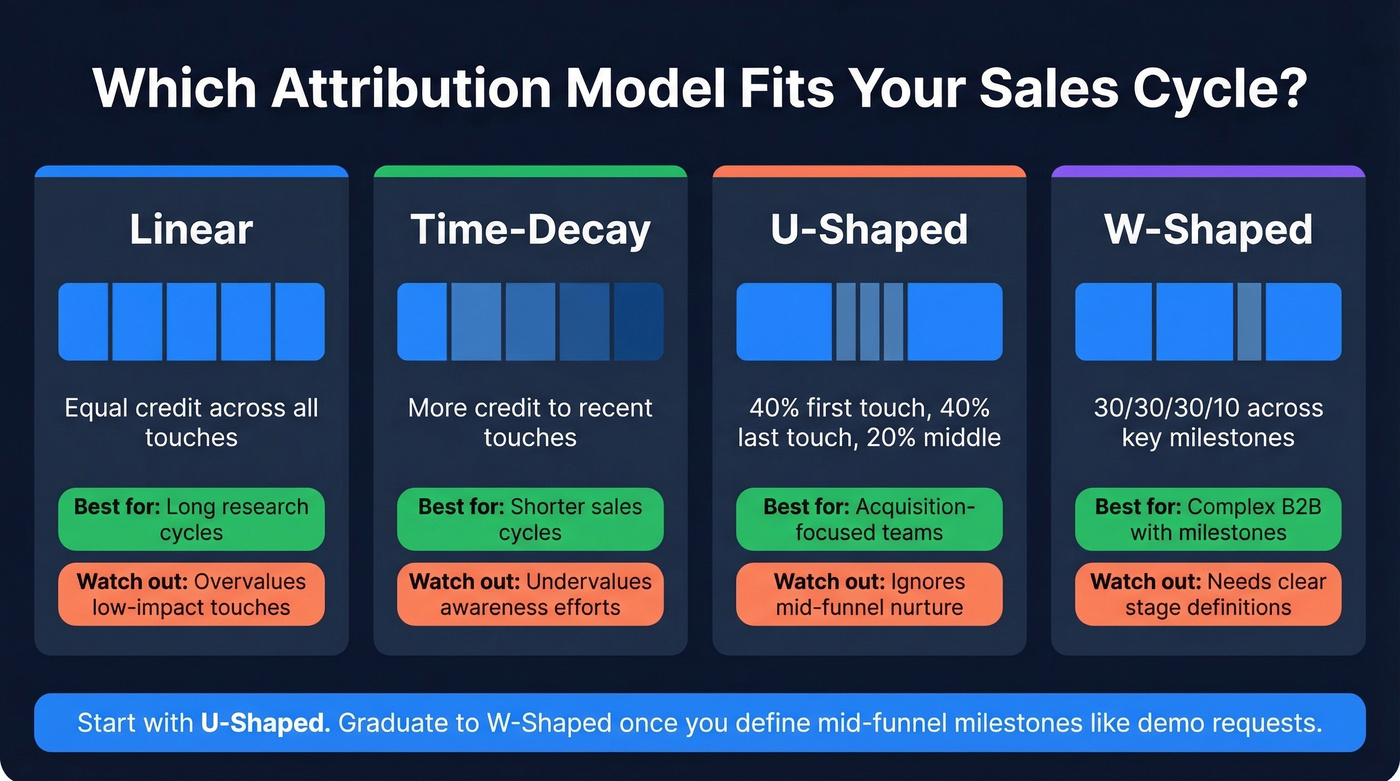
| Model | Credit Split | Best For | Weakness |
|---|---|---|---|
| Linear | Equal across touches | Long research cycles | Overvalues low-impact touches |
| Time-Decay | Weighted toward recent | Shorter sales cycles | Undervalues awareness |
| U-Shaped | 40% first, 40% last, 20% mid | Acquisition-focused teams | Ignores mid-funnel nurture |
| W-Shaped | 30/30/30/10 split | Complex B2B with milestones | Needs clear stage definitions |
For most B2B teams with sales cycles over 30 days, start with U-shaped attribution and graduate to W-shaped once you've defined clear mid-funnel milestones like a demo request or a pricing page visit after nurture. Companies switching from single-touch to multi-touch attribution see a 22% increase in budget efficiency and a 27% reduction in wasted ad spend.
Only 14% of companies have fully automated lead-to-revenue tracking. Get attribution right and you're already ahead of most of your market.
When to Ditch the Spreadsheet
Spreadsheets work fine for a solo founder tracking 30 leads. They stop working the moment any of these become true: more than two people are selling, you're handling 100-300+ active leads per month across multiple channels, deals involve multiple stakeholders at the same account, or you need automated reminders and triggered sequences.
Spreadsheets are static snapshots; CRMs are dynamic engines. A spreadsheet doesn't remind you to follow up. It doesn't flag a lead that's gone cold. One departing employee can copy and walk out with your entire pipeline.
Let's be honest, though: a CRM with dirty data and no automation is just a more expensive spreadsheet. If your average deal size is under $5K and you're closing fewer than 20 deals a month, a well-maintained spreadsheet with a disciplined follow-up process will outperform a CRM that nobody uses correctly. The tool doesn't matter if the process behind it is broken. But the moment you cross those thresholds, migrate fast - the cost of lost leads compounds quickly.
Five Mistakes That Kill Your Pipeline
1. Misaligned marketing-to-sales handoffs. Marketing says a lead is qualified. Sales disagrees. Nobody defined what "qualified" means. Without a shared MQL/SQL definition and documented SLAs for follow-up timing, leads bounce between teams with no next step. This is the single most common pipeline leak we see - and the easiest to fix with a one-page SLA document.
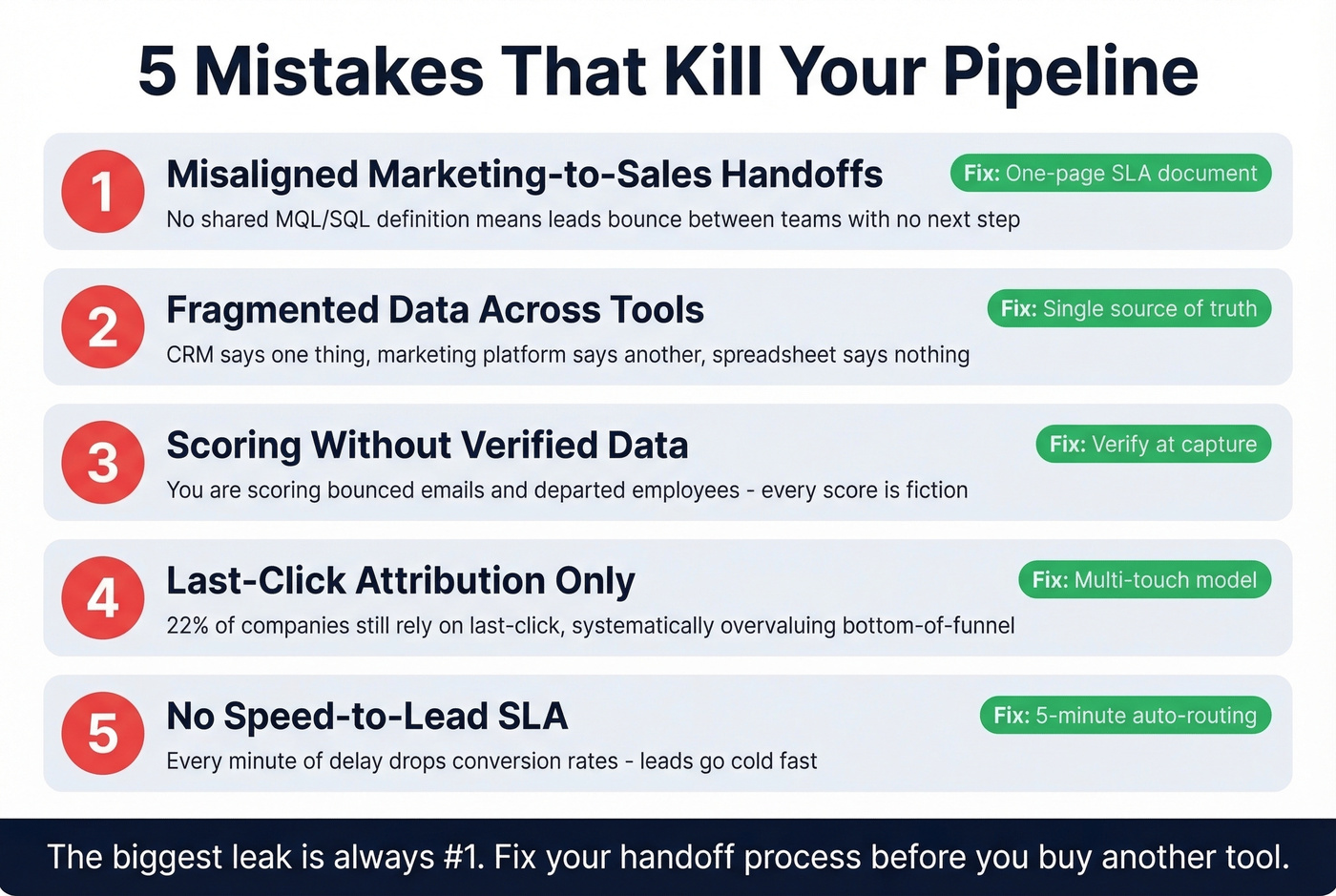
2. Fragmented data. Your CRM says one thing, your marketing automation platform says another, and someone's spreadsheet hasn't been updated since last quarter. When you have multiple dashboards telling different stories, nobody trusts any of them. You need a single customer view, not three conflicting ones.
3. Slow lead response time. Manual routing and approval workflows introduce delays. While your team is deciding who should own a lead, your competitor is already on the phone. Treat lead response time as a revenue KPI, not an operational metric - responding within 5 minutes dramatically changes your conversion odds. One concrete tactic that works: enforce a mandatory status update field in your CRM within 24-36 hours of lead assignment. If a rep hasn't updated the lead's status, it auto-escalates to their manager.
4. No nurture after capture. A lead downloads a whitepaper and gets... nothing. Or worse, a generic drip sequence that ignores their actual behavior and intent signals. Seventy-two percent of B2B organizations use email automation, but automation without segmentation is just spam at scale. (If you need a structure, start with personalized drip campaigns.)
5. Dirty data. One invalid email can misroute a lead, trigger a spam trap, or waste a rep's entire morning chasing a dead end. Bounced emails corrupt your scoring model, bad phone numbers waste rep time, and stale records mean you're tracking phantoms instead of buyers. Build verification into your intake workflow so your pipeline reflects reality, not last quarter's org chart.
Best Lead Tracking Tools in 2026
No single tool does everything. You need coverage across four categories: CRM for pipeline management, attribution for channel intelligence, call tracking for phone-based leads, and data quality for making sure the records you're tracking are actually real.
CRMs
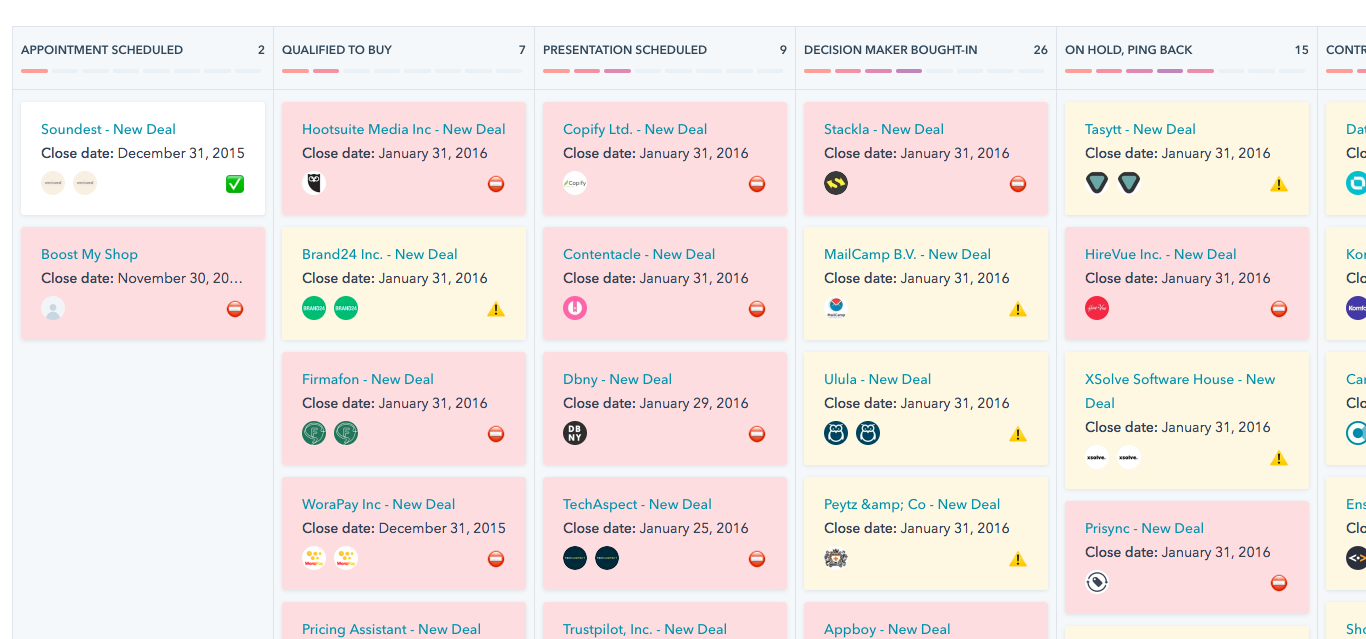
HubSpot is the obvious starting point for teams under 10 reps - it includes lead management, basic automation, and reporting out of the box. Paid plans start around $20-$30/user/month depending on tier and bundle. Salesforce starts around $25/user/month and scales into the hundreds; it remains the enterprise default, but it's often overkill for small teams. Pipedrive runs about $15-$100/user/month and is underrated for pure sales teams who want simplicity over feature sprawl. Skip Pipedrive if you need marketing automation baked in - it's built for sellers, not marketers.
Attribution
Ruler Analytics starts at L199/month and is strong for marketing teams needing lead-level attribution with offline tracking. WhatConverts from $130/month excels at distinguishing individual lead-level data from aggregate reporting, which makes it a solid pick for agencies managing multiple client accounts. GA4 is free but insufficient for B2B lead-level tracking - it tells you about sessions, not people.
Call Tracking
If phone calls are a meaningful lead source, CallRail (starting around $45/month) and CallTrackingMetrics (starting around $65/month) both attribute inbound calls to specific campaigns and keywords. Skip this category entirely if your leads come exclusively through digital forms.
Data Quality and Enrichment
Prospeo covers 300M+ professional profiles with 98% email accuracy and an 83% CRM enrichment match rate. The free tier gives you 75 emails per month; paid plans run roughly $0.01 per email with no contracts or sales calls required. For teams that need verified contact data without enterprise pricing, it's the clear winner in this category. (For more options, compare data enrichment services.)
Clearbit offers enrichment and is widely used, though packaging depends on the vendor and plan you buy it through. ZoomInfo starts at $15K+/year and delivers enterprise-grade data, but at about 100x the per-lead cost of smaller tools - and with lower email accuracy rates.
| Category | Tool | Starting Price | Best For |
|---|---|---|---|
| CRM | HubSpot | Free (~$20-$30/user paid) | Teams under 10 reps |
| CRM | Salesforce | From ~$25/user/mo | Enterprise orgs |
| CRM | Pipedrive | ~$15-$100/user/mo | Sales-focused teams |
| Attribution | Ruler Analytics | L199/mo | Lead-level attribution |
| Attribution | WhatConverts | $130/mo | Agency multi-client |
| Attribution | GA4 | Free | Basic web analytics |
| Call Tracking | CallRail | ~$45/mo | Phone lead attribution |
| Enrichment | Prospeo | Free (~$0.01/email) | Verified data, no contracts |
| Enrichment | ZoomInfo | ~$15K+/year | Enterprise with budget |
Bad data breaks every stage of lead tracking - scoring, routing, follow-up. Prospeo's 5-step verification catches invalid emails, spam traps, and stale contacts before they enter your pipeline. Data refreshes every 7 days, not the 6-week industry average.
Clean data in, closed deals out. It starts at $0.01 per email.
How to Automate Lead Tracking
Automation isn't about replacing judgment - it's about removing the delays and manual steps that kill conversion rates. Three workflows every team should have running:
Welcome sequence. Welcome emails generate 320% more revenue per email than standard promotional sends. The workflow: form submission triggers email verification, then enrichment, then a 3-email welcome sequence tailored to the lead's source and segment. This should fire within minutes, not hours.
Score-based routing. When a lead crosses your 50-75 point MQL threshold, the CRM auto-assigns them to the right rep based on territory or segment, fires a Slack notification, and creates a task with a 5-minute SLA. No manual review, no routing committee, no delays. Tools like Zapier or Make can bridge this between systems if your CRM's native automation isn't flexible enough. Track pipeline velocity at this stage - the time from MQL to first rep contact is where most teams hemorrhage conversions. If you need messaging that actually gets replies once the lead is assigned, keep sales follow-up templates handy.
Meeting reminders. Automated reminders at 24 hours, 1 hour, and 5 minutes before a scheduled call reduce no-shows by 30-40%. This is the easiest automation to set up and one of the highest-ROI. Most CRMs and scheduling tools handle this natively - just make sure it's actually turned on.
FAQ
What's the difference between lead tracking and lead management?
Lead tracking documents where leads come from, what they do, and where they sit in your funnel. Lead management is the broader system that includes tracking plus scoring, nurturing, and converting. Tracking is the visibility layer that makes every other component possible.
Can I track leads with a spreadsheet?
Yes, if you're a solo founder with under 50 active leads. Beyond that, spreadsheets lack automation, reminders, permissions, and real-time collaboration. They fail silently through missed follow-ups and overwritten data - migrate to a CRM once you cross two reps or 100 leads per month.
What's the most important metric to monitor?
Lead response time. Responding within 5 minutes dramatically changes your conversion odds - treat it as a revenue KPI. Everything else matters, but speed is where most teams leave the most money on the table.
How do I keep lead data clean in my CRM?
Verify emails before they enter your system, enrich records with firmographic data, and set a refresh cadence. A quarterly audit catches the worst offenders, but automated verification at capture prevents most problems from starting.
How many touchpoints does a B2B lead need before converting?
On average, 14+ in B2B. That's why single-touch attribution - first-click or last-click - is misleading. Multi-touch models like U-shaped or W-shaped give you the real picture of which channels influence revenue.