

LeadIQ vs SafetyMails: Which Do You Need in 2026?
A RevOps lead we work with pulled 500 contacts from their prospecting tool last quarter, loaded them into a sequence, and watched 60 bounce within 48 hours. The tool found the emails fine - it just didn't verify them deeply enough. That's the core tension here: LeadIQ and SafetyMails don't really compete. They solve different halves of the same problem. LeadIQ sits in G2's Lead Intelligence category; SafetyMails lives in Email Verification. Comparing them is like comparing a fishing rod to a fish scaler.
30-Second Verdict
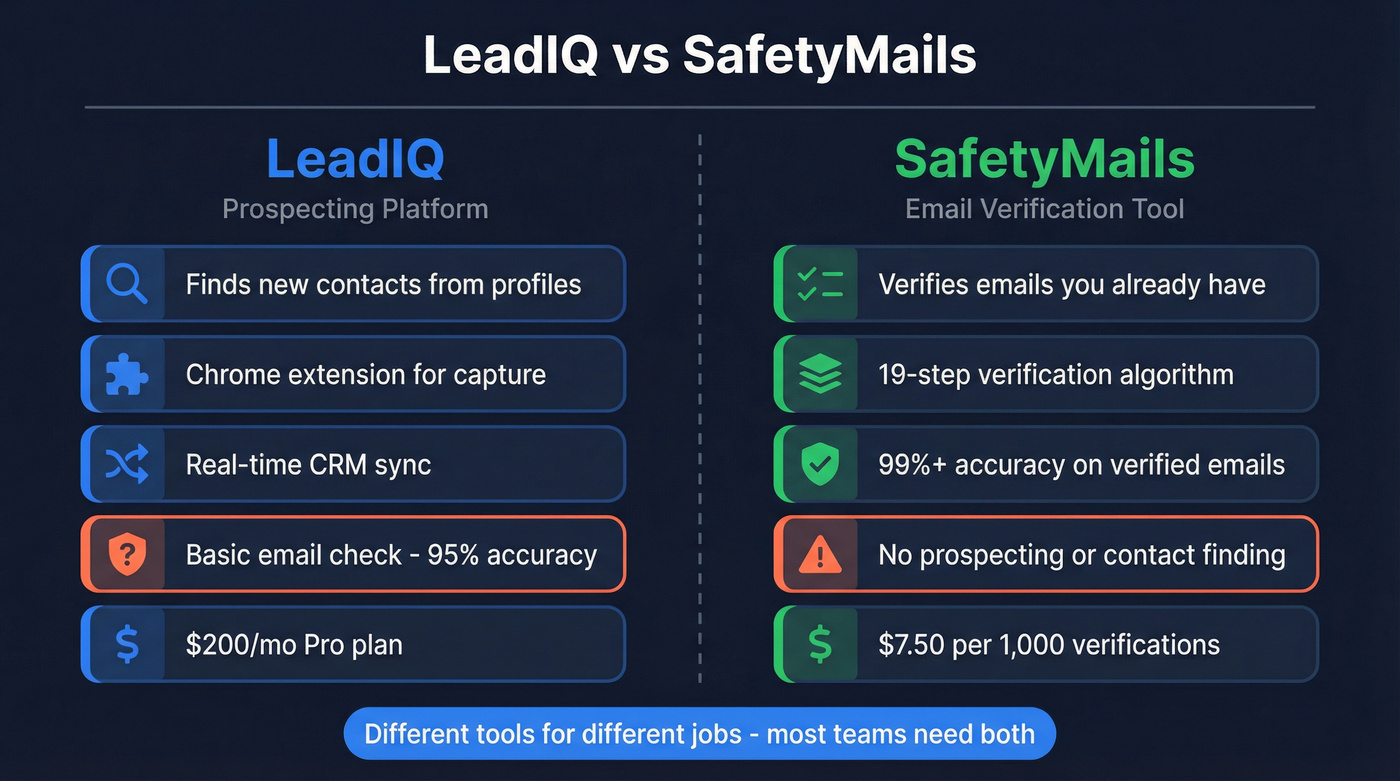
Pick LeadIQ if you need to find new contacts and push them into your CRM. Pick SafetyMails if you already have a list and need to scrub it before sending.
What LeadIQ Does
LeadIQ is a prospecting platform. You browse professional profiles, capture contact data through its Chrome extension, and sync everything to your CRM in real time. It also tracks job changes (Champion Tracking), writes AI-assisted outbound messages (Scribe), and enriches existing CRM records (see data enrichment options if you’re comparing stacks).
LeadIQ does include email verification, but it's a mail-server check - not deep validation (for deeper validation, see an AI email checker breakdown). Per their help docs, a "verified" email means roughly 95% likely accurate on non-catch-all domains. Catch-all emails get marked "unverified," which means a meaningful chunk of your list goes unconfirmed. In r/sales and other community threads, this is a recurring frustration - SDRs regularly post about needing a second tool just to handle the catch-all gap LeadIQ leaves behind.
- Free plan: 50 credits per month for a single user
- Pro plan: $200/mo, credit-based
- G2 rating: 4.2/5 across 1,160 reviews


LeadIQ finds emails but leaves catch-alls unverified. SafetyMails verifies but can't find contacts. Prospeo does both - 98% email accuracy with catch-all handling, spam-trap removal, and 5-step verification built into every search. No second tool needed.
Kill the two-tool stack. Find and verify in one workflow.
What SafetyMails Does
SafetyMails takes a completely different approach. You upload a list - up to 2M addresses at once - and it runs a 19-step verification algorithm checking syntax, DNS health, MX records, mailbox existence, disposable domains, role-based addresses, spamtrap-like risk patterns, and catch-all risk. SafetyMails guarantees at least 99% accuracy on verified emails, and with 8,000+ clients and 2bn+ verified emails, the track record backs that up.
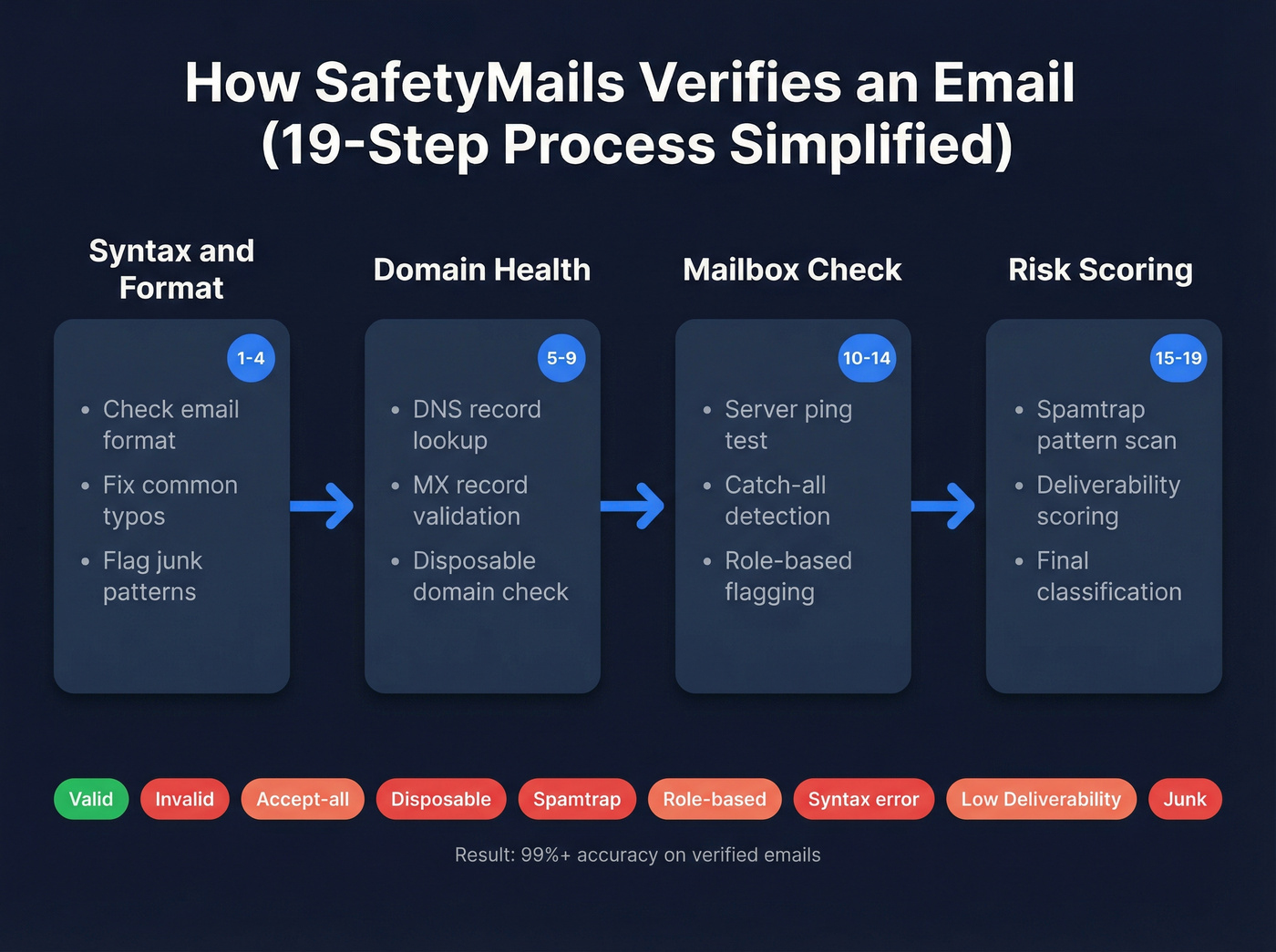
A real-time API handles form validation for inbound leads. Results get sorted into nine buckets: Valid, Invalid, Accept-all, Disposable, Spamtrap, Role-based, Syntax error, Low Deliverability, and Junk. That granularity matters when you're trying to keep total bounces below the ~2% threshold that protects sender reputation (more on email bounce rate benchmarks and fixes).
G2 reviews highlight the real-time API but note the verification process can take some time. Worth knowing: SafetyMails doesn't appear on most "best verification tools" roundups - Lemlist's list omits it entirely - so you're betting on a lesser-known player.
- PAYG: $7.50 per 1,000 verifications (larger packs drop the per-credit cost)
- Subscription: $6.80/mo for 1,000 credits/month
- Free trial: 100 credits + 15-day API trial
- Certifications: ISO/IEC 27001:2013, SOC 1 Type II, SOC 2 Type II, PCI DSS Level 1
- Ratings: G2 4.3/5 (8 reviews), GetApp 4.9/5 (33 reviews)
Key Differences at a Glance
| Category | LeadIQ | SafetyMails |
|---|---|---|
| Primary function | Find contacts | Verify emails |
| Database | Prospecting + enrichment workflows | No |
| Verification depth | Mail-server check (~95% on non-catch-all) | 19-step algorithm (99%+ on verified emails) |
| Catch-all handling | Marks "unverified" | Flags accept-all + risk signals |
| Pricing model | Credits ($200/mo Pro) | PAYG or subscription |
| Free tier | 50 credits | 100 credits |
| Integrations | Salesforce, HubSpot | Mailchimp, HubSpot |
| Compliance certs | - | ISO 27001, SOC 1/2, PCI DSS Level 1 |
| Best for | Building prospect lists | Cleaning existing lists |
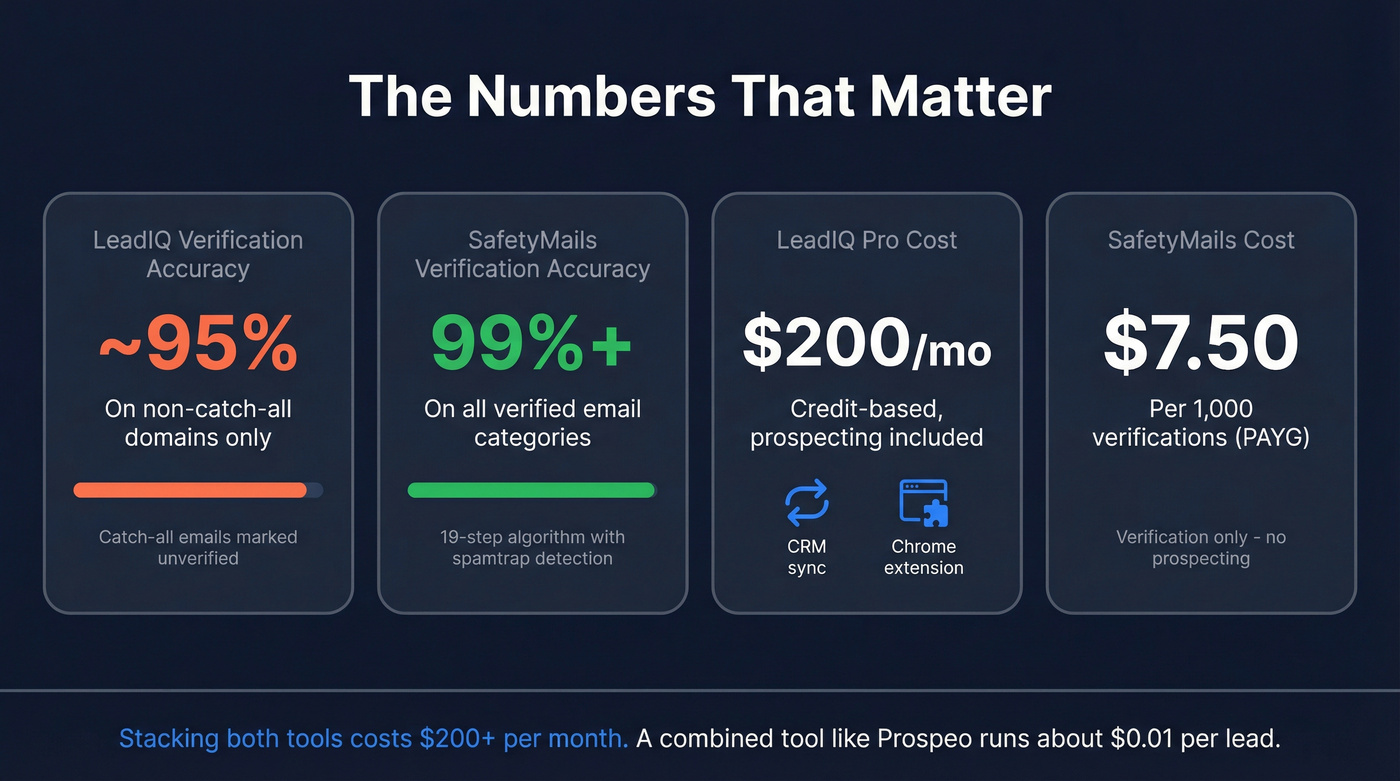
This table highlights the apples-to-oranges problem. LeadIQ's verification is a lightweight check designed to flag obvious bad addresses during prospecting. SafetyMails' verification is the entire product - spamtrap-style risk filtering, disposable flagging, typo correction, the works. If your bounce rate exceeds ~2%, LeadIQ's built-in check usually isn't enough (see email deliverability for the downstream impact).
Here's the thing: most teams don't realize they need both prospecting and deep verification until their domain reputation takes a hit. By then, you've already burned sender trust that takes weeks to rebuild. Budget for verification from day one, or pick a tool that bakes it in (especially if you’re scaling outbound lead generation).
When to Use Each Tool
Pick LeadIQ If...
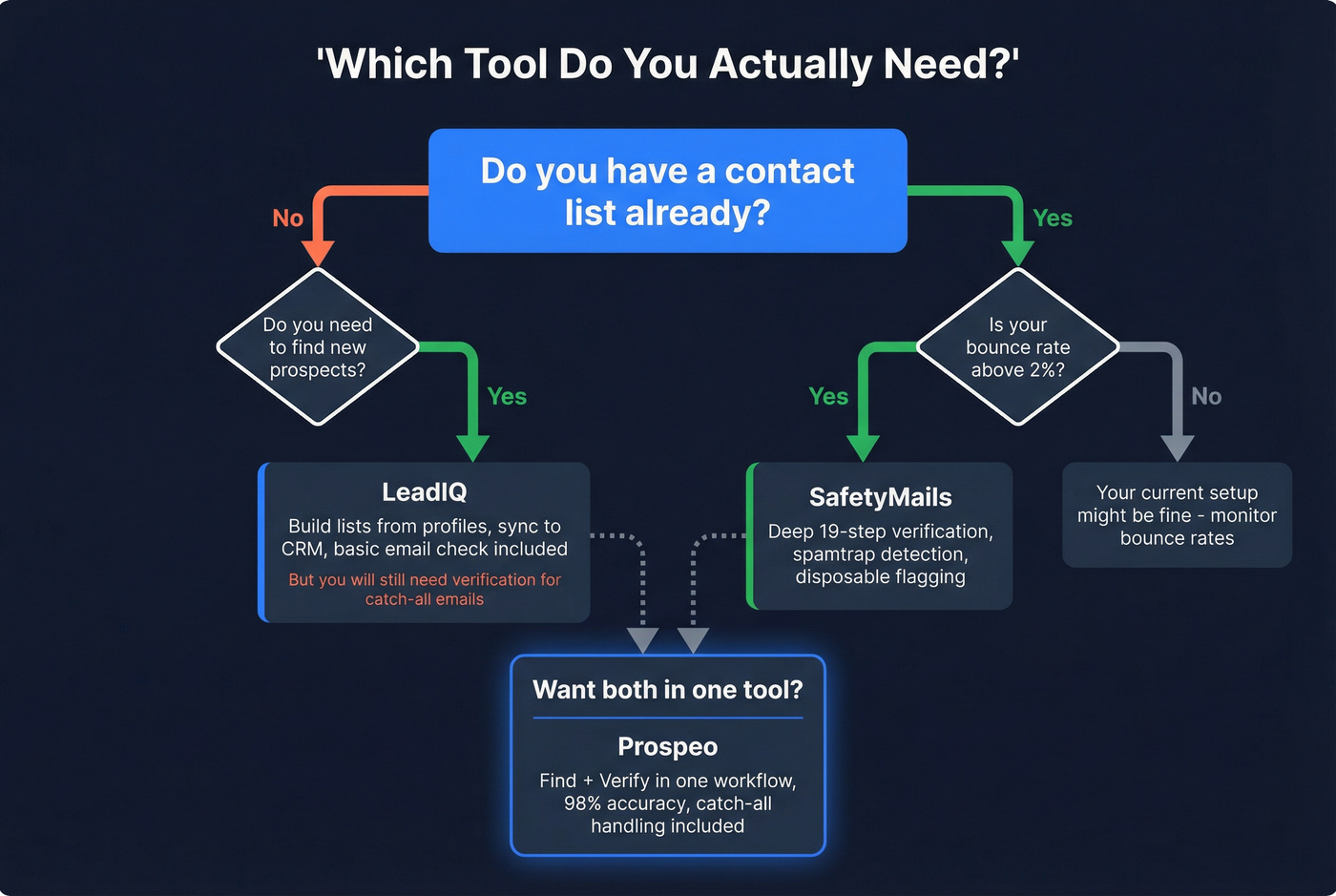
You need to find new contacts, not verify existing ones. You want CRM sync and prospecting workflows baked in. Your team prospects from professional profiles and needs a Chrome extension. And you're okay running catch-all emails through a separate verifier later (or upgrading your sales prospecting techniques so you’re not relying on one data source).
Pick SafetyMails If...
You already have a list and need to clean it before sending. You need spamtrap-style risk filtering, disposable flagging, and typo correction. You want a standalone verification API for real-time form validation. Just know you're going with a smaller vendor - 8 G2 reviews vs. LeadIQ's 1,160.
Skip Both If You Need One Tool
It's also built for teams that care about workflow, not just raw data: 30+ search filters (including intent signals across 15,000 topics), a Chrome extension used by 40,000+ users, and enrichment that returns 50+ data points per contact with an 83% enrichment match rate. We've seen teams like Meritt cut bounce rates from 35% to under 4% after switching - without adding a separate verifier. For teams scaling outbound, that "one system" setup matters more than people admit (and it pairs well with tighter sequence management).
The free tier gives you 75 verified emails and 100 Chrome extension credits per month. Enough to test data quality before committing.

Teams like Meritt cut bounce rates from 35% to under 4% without adding a separate verifier. Prospeo's proprietary verification runs on every email at ~$0.01/lead - 90% cheaper than stacking LeadIQ + SafetyMails together.
One platform. One cost. Zero bounced-email surprises.
FAQ
Can SafetyMails replace LeadIQ?
No. SafetyMails only verifies emails you already have, so it can't generate new contacts or run prospecting workflows. If you need list-building, you'll still need a data source - then use SafetyMails to keep bounces under ~2% and protect deliverability.
Can LeadIQ replace SafetyMails?
Not reliably for high-volume sending. LeadIQ's built-in check is roughly 95% accurate on non-catch-all domains, but catch-all addresses often stay unconfirmed. If you're seeing bounce rates creep above ~2%, add a dedicated verifier or switch to a tool with deeper validation.
What's a good one-tool alternative?
Prospeo is a strong option because it finds and verifies in the same workflow - 98% email accuracy, catch-all handling, and spam-trap removal. For most teams, that replaces the "prospecting tool + verifier" stack and cuts cost to roughly $0.01/lead.
Bottom Line
The clean way to think about LeadIQ vs SafetyMails is "prospecting vs. deliverability." LeadIQ helps you build lists and sync contacts into your CRM; SafetyMails helps you clean lists so you don't torch sender reputation. If you want one workflow that does both and avoids the catch-all gap, Prospeo is the simplest path: find + verify in one step, 98% accuracy, and a free tier that's actually usable.