

Mass Cold Email in 2026: How to Scale Without Hitting Spam
You just got your first campaign back from a new domain. Open rate: 11%. Reply rate: 0.3%. Half the list bounced. The domain you bought three weeks ago is already flagged.
That's what mass cold email looks like when you skip the fundamentals - and in 2026, the fundamentals aren't optional.
What You Need (Quick Version)
Get these right, in this order:
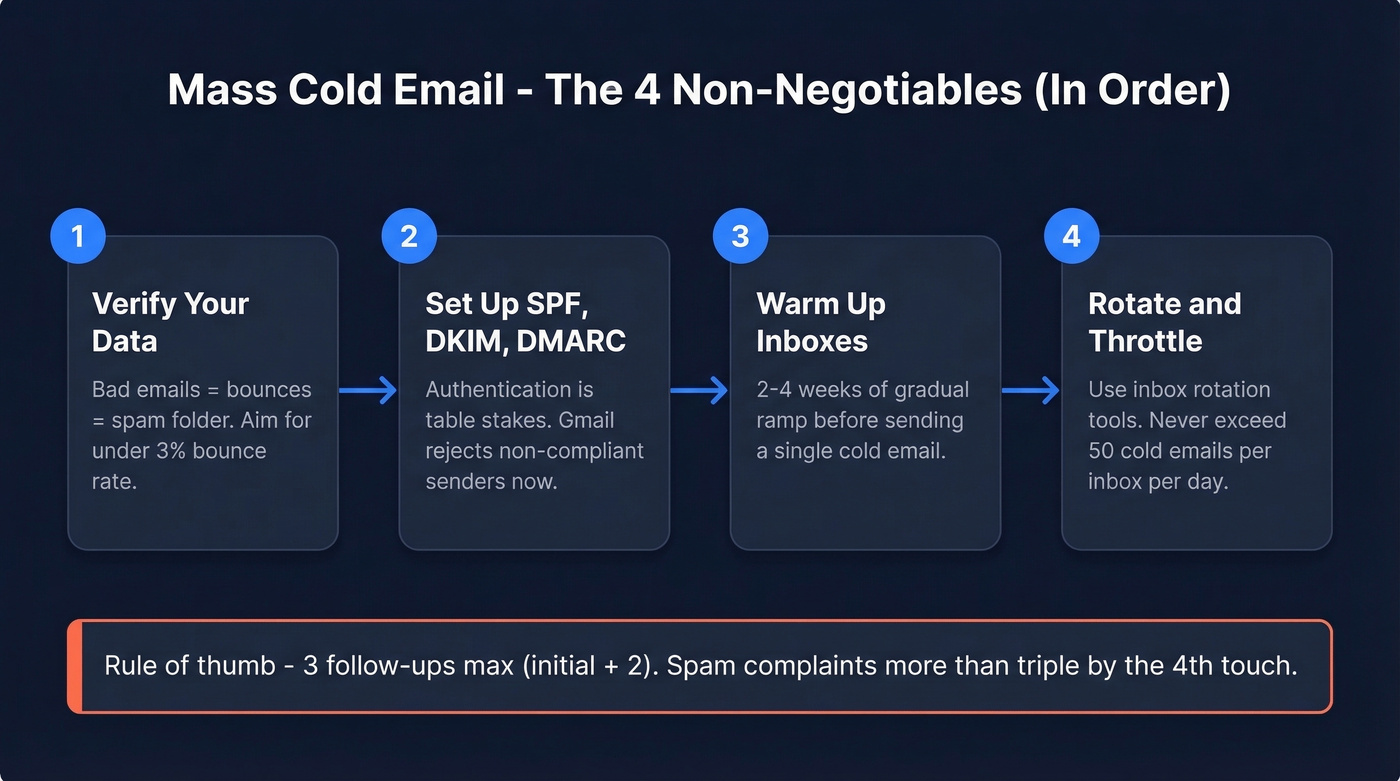
- Verified contact data - bad emails mean bounces, bounces mean reputation damage, reputation damage means the spam folder. (If you need a deeper workflow, start with an Email Deliverability Guide and then tighten your Email Bounce Rate targets.)
- SPF, DKIM, and DMARC - authentication is table stakes. Gmail rejects non-compliant senders at the SMTP level now. (If you're troubleshooting, use this How to Verify DKIM Is Working checklist.)
- Warmup - new inboxes need 2-4 weeks of gradual ramp before you send a single cold email. (Tools and guardrails: Best Unlimited Email Warmup Tools.)
- Sending platform with rotation - Instantly, Smartlead, or similar. You need inbox rotation and throttling built in. (More options: 7 Best AI Bulk Email Senders in 2026.)
One more thing: 3 follow-ups max (initial + 2). Spam complaints more than triple by the 4th touch. (If you want copy you can plug in, see Cold Email Follow-Up Templates That Get Replies.)
Where High-Volume Cold Email Stands in 2026
Let's be honest. Belkins analyzed 16.5M cold emails across 93 domains and found the average reply rate dropped to 5.8% - down from 6.8% the year before. On r/coldemail, operators who relied on volume over quality saw reply rates crater from ~4% to under 1% overnight.
Google now enforces hard spam-rate thresholds: stay below 0.10% reported spam, and never exceed 0.30% or you'll face bulk filtering. Track it in Google Postmaster Tools. Microsoft retired Basic Auth in Exchange Online. DMARC enforcement tightened across every major provider.
Cold email isn't dead. The bar for infrastructure and data quality just went up, and any bulk sending strategy that ignores these signals will fail before it starts.
Start With Clean Data
Every deliverability problem traces back to data. Bad data leads to bounces, bounces kill reputation, and reputation damage lands you in spam. It's a one-way trip.
We've seen teams burn through 5+ domains in a month by skipping verification. On the other end, Stack Optimize built from zero to $1M ARR running client campaigns with 94%+ deliverability and under 3% bounce rates - the difference was verifying every email before it hit a sequence. (If you're building lists at scale, pair verification with data enrichment so you’re not just cleaning - you're improving targeting.)
Prospeo runs emails through a 5-step verification process - catch-all handling, spam-trap removal, honeypot filtering - delivering 98% email accuracy. The free tier gives you 75 verified emails per month plus 100 Chrome extension credits, and paid plans work out to roughly $0.01 per email. It integrates natively with Instantly, Smartlead, and Lemlist, so verified contacts flow straight into your sequences without a CSV export step. (If you’re dealing with deliverability landmines, this Spam Trap Removal guide helps you understand what you’re filtering out.)

Your warmup schedule is worthless if 10% of your list bounces. Prospeo's 5-step verification - catch-all handling, spam-trap removal, honeypot filtering - delivers 98% email accuracy so your freshly warmed domains stay clean. Native integrations with Instantly, Smartlead, and Lemlist mean verified contacts hit your sequences without a CSV in sight.
Protect every domain in your rotation. Verify before you send.
Authenticate the Right Way
No authentication, no inbox. Set these up on every sending domain before you send a single email.
SPF - one record per domain, include all senders, stay under 10 DNS lookups:
v=spf1 include:_spf.google.com include:sendgrid.net ~all
DKIM - publish the selector TXT record your email provider generates. Check headers for dkim=pass after sending a test.
DMARC - start with monitoring, then tighten:
v=DMARC1; p=none; rua=mailto:dmarc@yourdomain.com; pct=100
Move to p=quarantine or p=reject after 2-4 weeks of clean reports. Verify everything passes using MXToolbox or Google Admin Toolbox. (If you want to go deeper on policy and alignment, see DMARC Alignment.)
Warmup Ramp Schedule
New inboxes need a slow ramp. Rush this and you'll trigger filters before your first real campaign goes out.
| Week | Emails/Day | Notes |
|---|---|---|
| 1 | 5-10 | Warmup tool only |
| 2 | 10-20 | Still warmup only |
| 3 | 20-35 | Start light cold sends |
| 4 | 35-50 | Ramp cold volume |
| 5-6 | 50-75 | Full volume, mixed |
Never exceed 50 cold emails per inbox per day, even after full warmup. Keep warmup running continuously - Gmail weights engagement signals like reply depth and conversation length for inbox placement, and the moment warmup stops, those positive signals disappear. Fresh domains can also get listed on new-domain blacklists, so patience during this phase pays for itself. (For a more technical view of pacing, see Email Velocity.)
At 400 cold emails per day, even a 5% bounce rate burns through domains fast. Stack Optimize scaled to $1M ARR running client campaigns with under 3% bounce rates - powered by Prospeo's 98% accurate data refreshed every 7 days. At ~$0.01 per verified email, clean data costs less than a single replacement domain.
Stop budgeting for replacement domains. Budget for clean data instead.
Limits vs. Safe Volume
Provider caps and safe cold-email volume are two very different numbers.
| Provider | Hard Cap | Safe Cold Volume |
|---|---|---|
| Free Gmail | 500/day web, 100/day SMTP | Don't use for cold |
| Google Workspace | 2,000/day | 20-50/day/inbox |
| Outlook.com | 5,000/day | 20-50/day/inbox |
| Office 365 | 10,000 recipients | 20-50/day/inbox |
The hard caps are technical limits. The safe volume column is what keeps you out of spam. Treat them as gospel.
Infrastructure Math for Scale
Scaling mass cold email means more domains and inboxes, not more volume per inbox. Here's the heuristic: 2-3 email accounts per domain, 10-15 emails per day per account. Always use secondary or lookalike domains - never your primary brand domain.
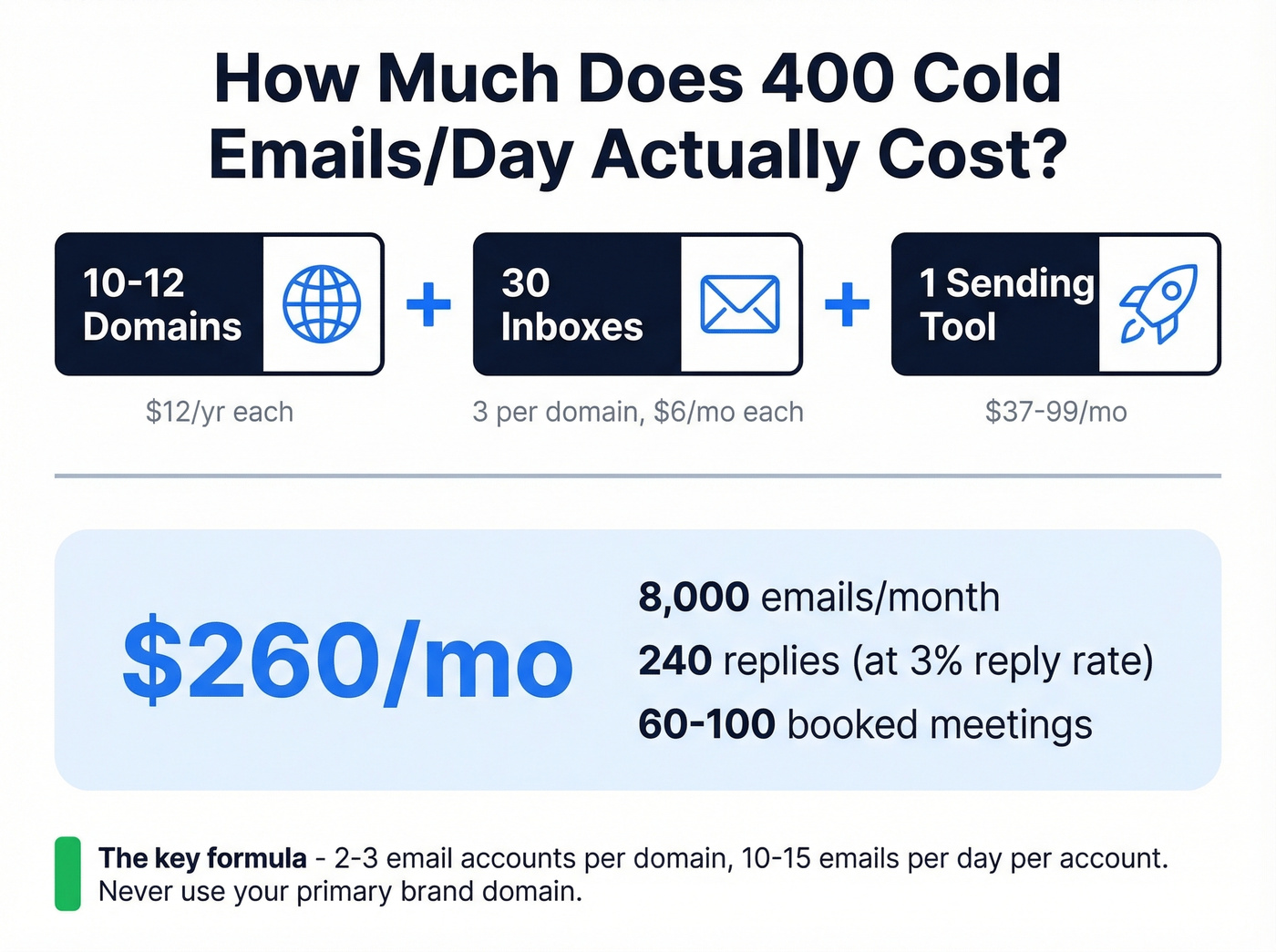
Want to send 400 emails per day? That's roughly 10-12 domains.
| Component | Quantity | Unit Cost | Monthly |
|---|---|---|---|
| Domains | 10 | ~$12/yr each | ~$10 |
| Inboxes | 30 (3 per domain) | ~$6/mo each | $180 |
| Sending tool | 1 | ~$37-99/mo | ~$70 |
| Total | ~$260/mo |
At 400/day, that's ~8,000 cold emails per month across 20 sending days. At a 3% reply rate, you're looking at ~240 replies. With a strong list and offer, that turns into 60-100 booked meetings.
Not cheap, but predictable - and far less painful than burning your primary domain.
Scale Methods
Three approaches. Pick the one that matches your deal size and team.
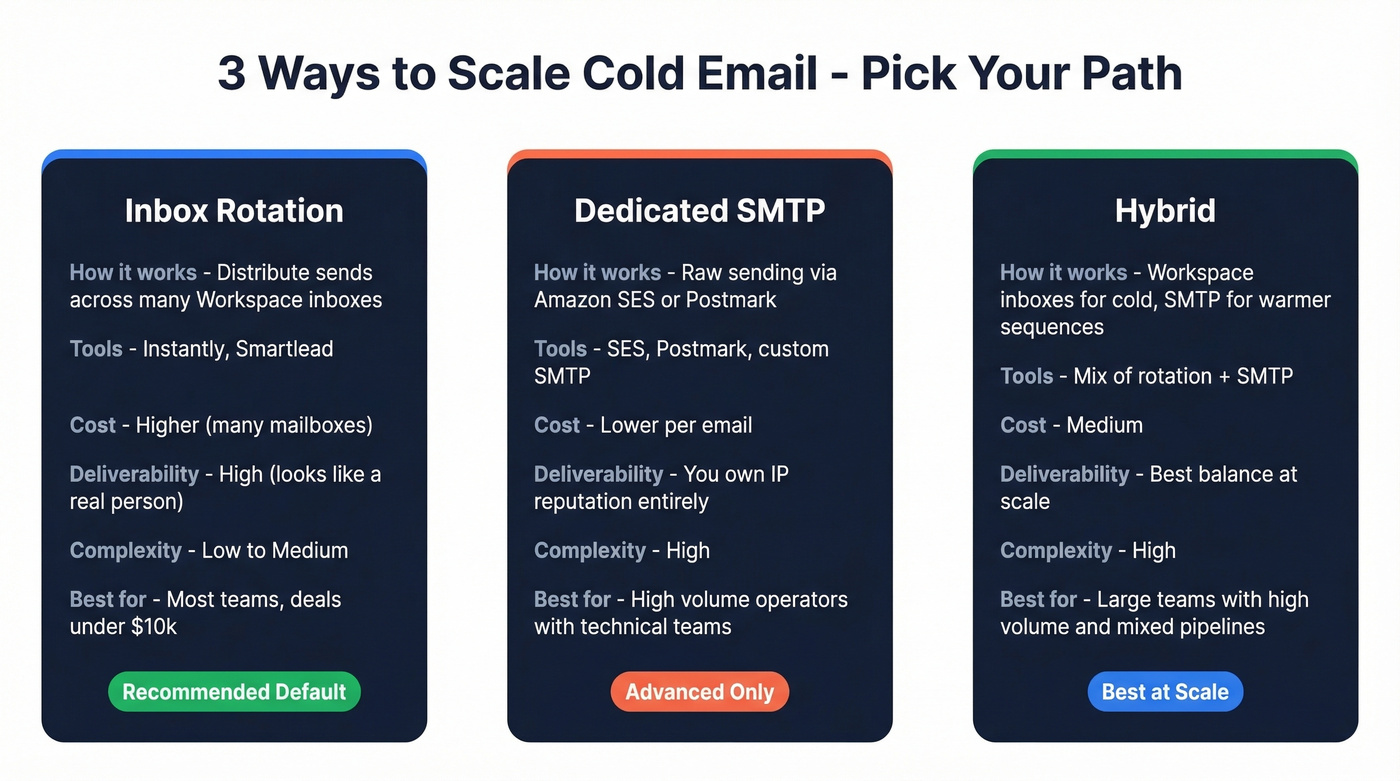
Inbox rotation is the default for most teams running bulk cold email. You distribute a campaign across many accounts - 5,000 emails sent as 50 emails from 100 accounts. Instantly and Smartlead handle this natively. It works, but all those mailboxes add up, and one misconfigured domain can drag down deliverability across the entire rotation pool.
Dedicated SMTP services like Amazon SES or Postmark give you raw sending power at lower per-email cost. The tradeoff: you own the IP reputation entirely, warmup is harder, and you lose the "looks like a real person" signal that Workspace inboxes carry. Some operators are exploring dedicated cold-email SMTP servers as a hedge against potential provider crackdowns on rotation tools.
Hybrid combines a few rotated Workspace inboxes for top-of-funnel cold outreach with SMTP for warmer sequences. More complex to manage, but it balances deliverability with cost at higher volumes.
Here's the thing: if your average deal size is under $10k, you probably don't need more than 5 domains and inbox rotation. We've watched teams spend $500+/month on infrastructure for a $3k deal. That's optimizing the wrong variable - write better emails instead. (If you want a tighter outbound system beyond email, use these sales prospecting techniques to diversify.)
Personalization and Follow-Ups
A ResearchGate experiment tested personalized vs. generic cold emails across 1,300+ recipients. Personalized emails hit 62-70% open rates and 8.9-17.4% response rates. Without personalization: 17% opens, 0.4% responses. That's not marginal - it's the difference between a pipeline and a spam complaint.
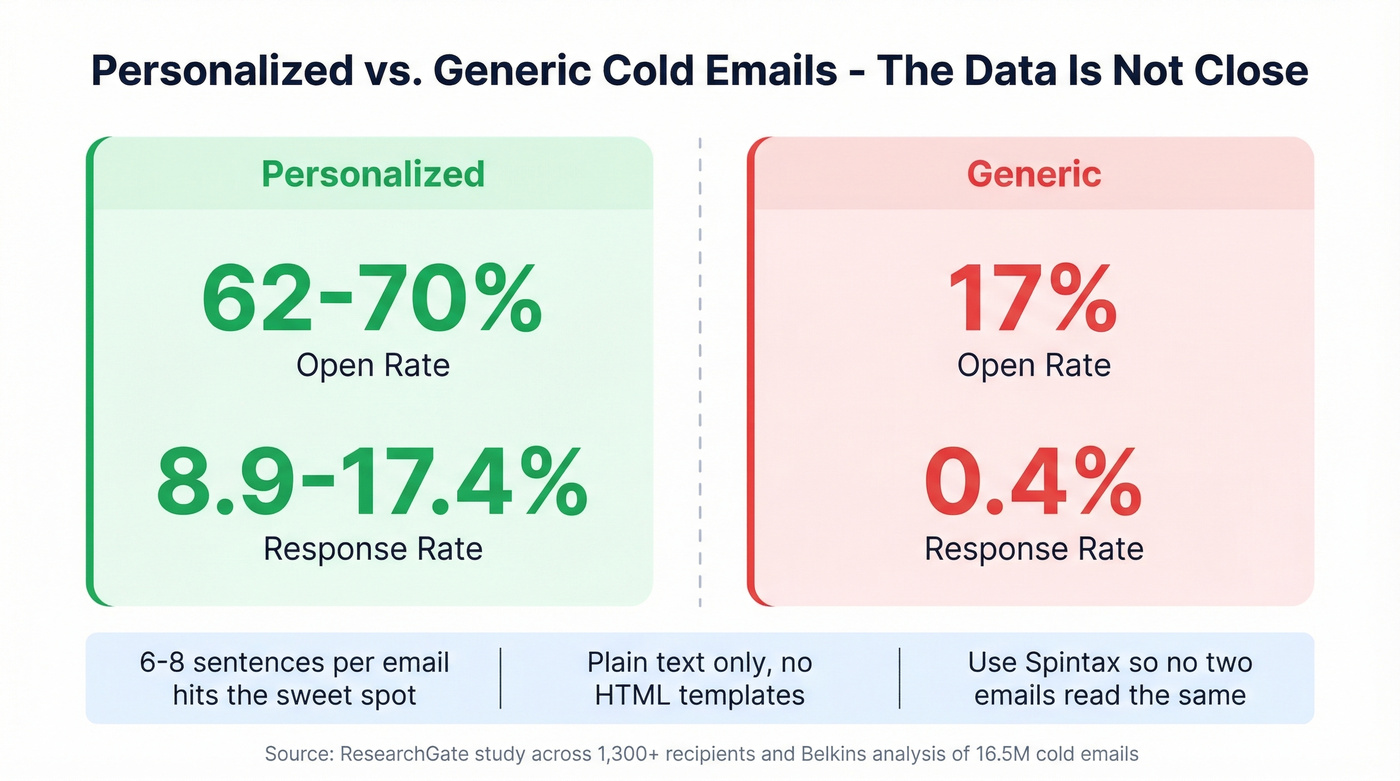
What actually moves the needle: 6-8 sentences per email hits a 6.9% reply rate sweet spot across those 16.5M emails studied. First-line personalization tied to the recipient's company, role, or a recent trigger like funding or a job change. Plain text formatting - no HTML templates, no images, no tracking pixels if you can avoid them. Use Spintax to rotate subject lines, greetings, and CTAs so no two emails read identically, which matters a lot when hundreds of contacts share the same ICP profile. (For subject ideas, pull from these cold email subject line examples.)
What kills your domain: more than 3 total emails in a sequence. Spam complaints jump from 0.5% to 1.6% by the fourth, and unsubscribes climb from 0.1% to 2%. Generic "just checking in" follow-ups with no new value. Sending the same template to 10,000 contacts with a {{first_name}} swap and calling it personalization. Skip that approach entirely.
Compliance Essentials
The fines are large enough to end a small business.
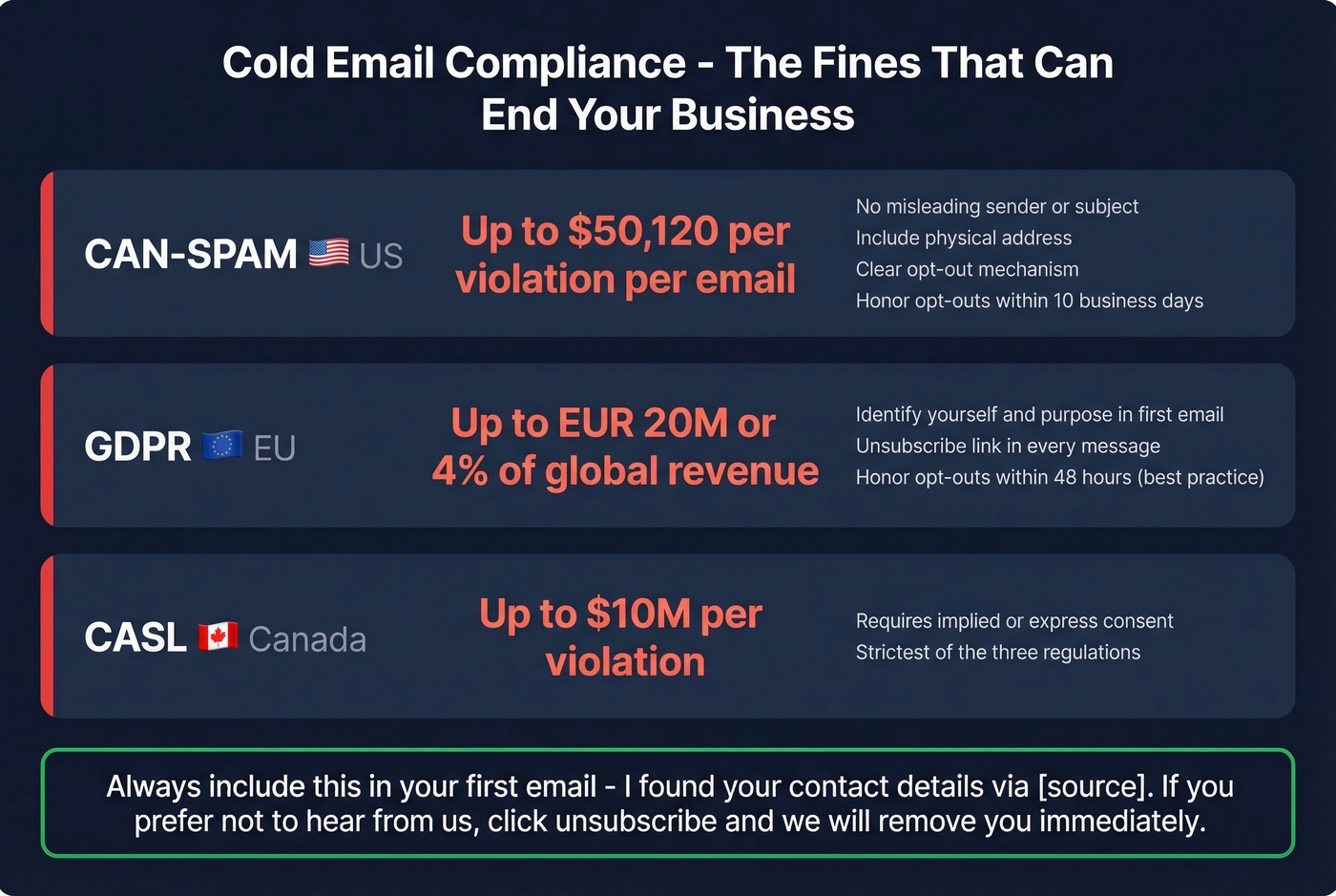
CAN-SPAM carries penalties up to $50,120 per violation per email. No misleading sender or subject, identify as commercial, include a physical address, provide a clear opt-out mechanism, and honor opt-outs within 10 business days.
GDPR allows up to EUR 20M or 4% of global annual turnover. B2B cold email is permissible under legitimate interest, but you must identify yourself and your purpose in the first email, include an unsubscribe link in every message, and honor opt-outs promptly - 48 hours is the operational best practice, though the regulation technically allows up to one month.
CASL in Canada carries penalties up to $10M per violation and requires implied or express consent.
Include a disclosure line in your first email: "I found your contact details via [source]. If you'd prefer not to hear from us, click unsubscribe and we'll remove you immediately."
Recommended Tool Stack
Sending platforms:
| Tool | Starting Price | Best For |
|---|---|---|
| Instantly | $37/mo | Inbox rotation + UX |
| Smartlead | ~$39/mo | Unibox + auto-rotation |
| GMass | $25/mo basic, $55/mo pro | Gmail-native simplicity |
| Saleshandy | ~$25/mo | Budget-friendly scaling |
Warmup: Lemwarm at $29/mo per email if you're already in the Lemlist ecosystem. Instantly and Smartlead include warmup in their plans - one less bill.
Verification: Prospeo for verification plus native integrations with your sending platform. NeverBounce starts around $0.003-0.008/email and ZeroBounce runs about $0.006-0.008/email if you want a second verification layer.
FAQ
How many cold emails per inbox per day is safe in 2026?
After a full 3-4 week warmup, 20-50 cold emails per inbox per day. Never exceed 50. Keep warmup running continuously alongside cold campaigns, and verify your list before sending - bounces count against your reputation faster than low volume protects it.
Is sending bulk cold email legal?
Yes, in most jurisdictions when you follow the rules. CAN-SPAM requires opt-out mechanisms and honest sender info. GDPR permits B2B outreach under legitimate interest with proper disclosure. CASL requires implied or express consent. Include an unsubscribe link in every email and honor removals within 48 hours.
How many follow-ups should I send?
Cap your sequence at 3 total emails - one initial message plus 2 follow-ups. Data across 16.5M emails shows spam complaints rise from 0.5% to 1.6% by the fourth email. A third follow-up rarely generates enough replies to offset the reputation damage from complaints.
What's the best free tool for email verification?
Prospeo's free tier includes 75 verified emails per month plus 100 Chrome extension credits - enough to validate a small campaign list. NeverBounce and ZeroBounce offer pay-as-you-go options starting around $0.003/email. For teams sending at scale, 98% accuracy and native integrations with Instantly and Smartlead make Prospeo the most efficient option at roughly $0.01 per verified email.