

Meeting Confirmation Emails That Actually Prevent No-Shows
You booked 12-15 meetings this week. Four people showed up. The rest ghosted without a word - despite the calendar invite, the reminder email, and the text you sent an hour before. Missed healthcare appointments alone cost $150 billion annually, and the same forgetting-and-ghosting dynamics drain every B2B pipeline. That's not a scheduling problem. It's a meeting confirmation email problem, and the fix is simpler than most reps think.
What You Need (Quick Version)
One confirmation email isn't enough for high-value meetings. You need a three-touch sequence: immediate post-booking, day-before reply-in-thread, and a morning-of nudge. Every confirmation should restate why the meeting matters, not just when it happens. And before any of this works, verify the email address - a bounced confirmation is a guaranteed no-show.
Do Confirmation Emails Actually Reduce No-Shows?
Yes. Dramatically.
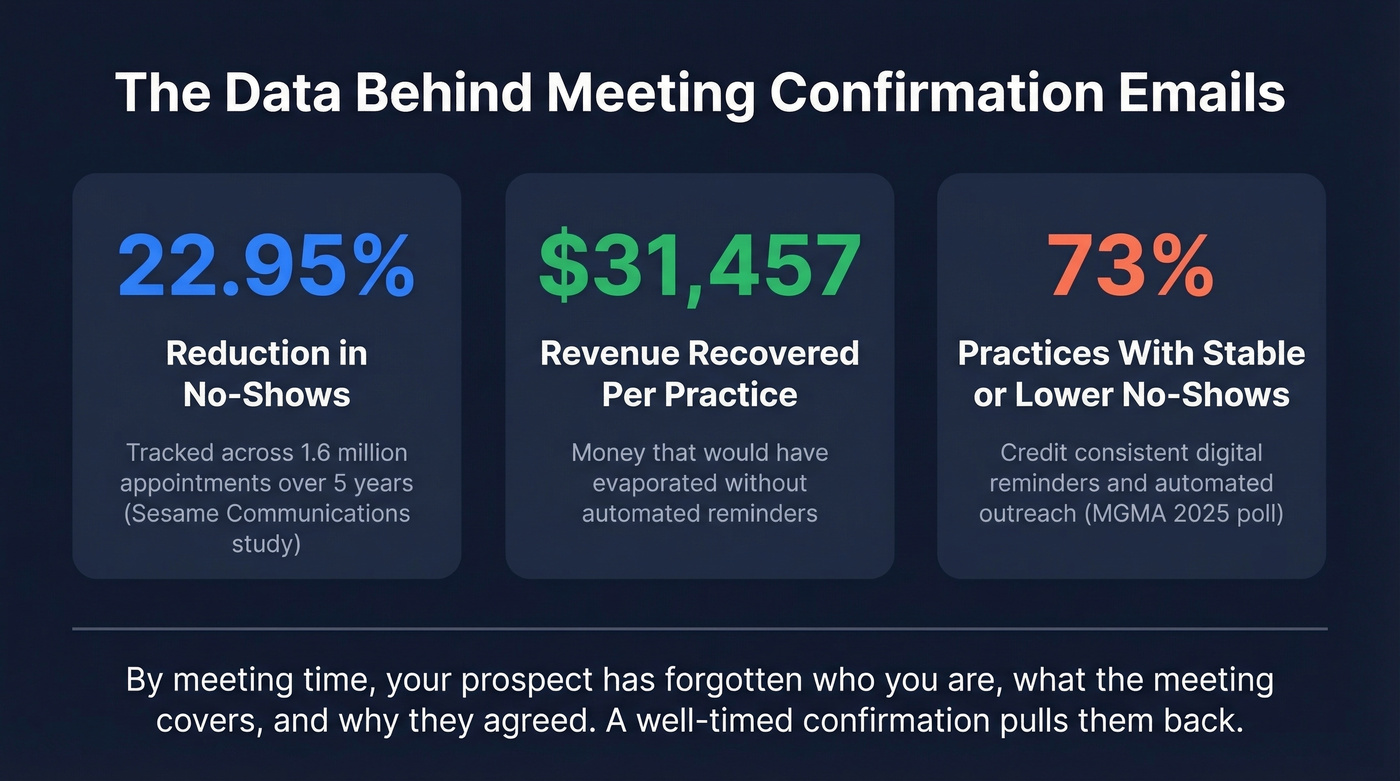
A Sesame Communications study tracked 1.6 million appointments across 64 practices over five years. Automated reminders reduced no-shows by 22.95% and recovered $31,457 per practice in revenue that would've evaporated.
An MGMA Stat poll backs this up: 73% of practices say no-show rates stayed the same or decreased versus the prior year. Practices with stable or declining no-shows most often credit consistent patient communication - frequent digital reminders, automated calls, and occasional live outreach.
The pattern holds across industries. By meeting time, your prospect has forgotten who you are, what the meeting covers, and why they agreed in the first place. A well-timed confirmation pulls them back.

What Every Confirmation Email Needs
Every confirmation should cover these basics:
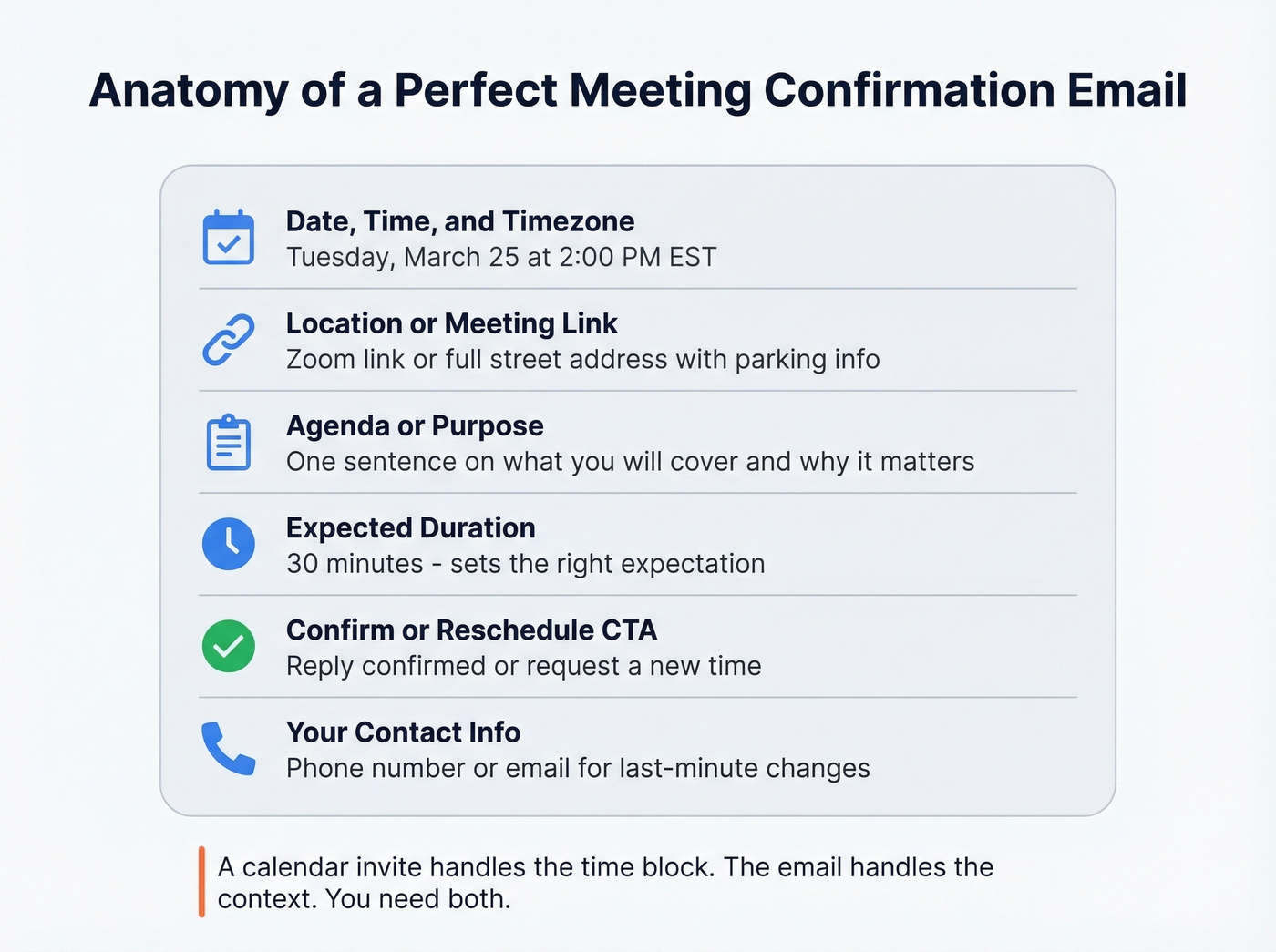
- Date, time, and timezone - "Tuesday at 2 p.m." means nothing without "EST" or "PST"
- Location or meeting link - physical address with parking details, or Zoom/Teams/Meet URL
- Agenda or purpose - one sentence on what you'll cover (use discovery questions to keep it specific)
- Expected duration - "30 minutes" sets the right expectation
- Confirm or reschedule CTA - make it effortless to reply "confirmed" or request a new time
- Your contact info - phone number or email for last-minute changes
A calendar invite alone isn't enough. Calendar invites get buried under dozens of other events. A confirmation email sits in the inbox, gives context, and creates a reply thread you can use for follow-ups. The calendar invite handles the time block; the email handles the context.

Your confirmation sequence is useless if the email bounces. Prospeo verifies emails with 98% accuracy through a 5-step process - catch-all handling, spam-trap removal, honeypot filtering. At $0.01 per email, verifying your entire meeting pipeline costs less than one no-show.
Stop confirming meetings to inboxes that don't exist.
10 Meeting Confirmation Email Templates
Sales Discovery Call
Subject: Confirmed: [Your Name] ↔ [Prospect Name], [Day] at [Time] [TZ]
Hi [First Name],
Looking forward to our call on [Day, Date] at [Time] [Timezone]. We'll spend 25 minutes on [specific topic - e.g., "how your team handles outbound list building and where the gaps are"].
Zoom link: [URL]
If anything changes, just reply here. Talk soon.
Best for first meetings where the prospect doesn't know you well. The agenda line reminds them why they booked.
Client Meeting (Existing Relationship)
Subject: [Company] sync - [Day] at [Time]
Hi [First Name],
Quick confirmation for our [Day] meeting at [Time] [TZ]. I'll have the [deliverable/report/update] ready to walk through.
Same link as usual: [URL]
Let me know if you need to shift the time.
Best for recurring or follow-up meetings where formality would feel odd.
Internal Team Meeting
Subject: Team sync: [Topic] - [Day] [Time]
Hey team,
Confirming our [Day] sync at [Time] in [Room/Link]. Agenda: [1-2 bullet points]. Please come with [any prep needed].
Duration: 30 min. We'll stay tight.
Best for cross-functional meetings where people need a reason to prioritize attendance.
Job Interview (Candidate-Facing)
Subject: Interview confirmed: [Role Title] at [Company], [Date]
Hi [First Name],
This confirms your interview for the [Role Title] position on [Day, Date] at [Time] [TZ]. You'll be meeting with [Interviewer Name, Title].
Location: [Address or video link] Duration: [X] minutes
Please bring [any required documents]. To reschedule, reply here or call [phone number].
Best for any candidate-facing interview. Professionalism here reflects your employer brand.
Virtual Meeting (Zoom/Teams/Meet)
Subject: [Meeting topic] - [Day] at [Time] [TZ] (virtual)
Hi [First Name],
Confirming our virtual meeting on [Day, Date] at [Time] [TZ].
Join here: [Link] Dial-in: [Number, if applicable]
We'll cover [brief agenda]. Should take about [duration]. See you there.
Best for any remote meeting where the link is the most important detail.
In-Person Meeting
Subject: See you [Day] - [Location], [Time]
Hi [First Name],
Looking forward to meeting in person on [Day, Date] at [Time].
Address: [Full address] Parking: [Instructions] Ask for: [Your name at reception]
We'll cover [agenda]. Plan for about [duration].
Best for on-site meetings where logistics can cause delays or no-shows.
Rescheduled Meeting Confirmation
Subject: New time confirmed: [Day] at [Time] [TZ]
Hi [First Name],
Got it - we're now set for [Day, Date] at [Time] [TZ] instead. Same agenda: [brief topic]. Same link: [URL].
Appreciate the flexibility. See you then.
Best for any rescheduled meeting. Restate everything so they don't have to dig through old emails.
Follow-Up When No Response
Subject: Re: [Original subject line]
Hi [First Name],
Just bumping this - are we still on for [Day] at [Time]? Happy to keep the slot or find a better time if something came up.
[Original meeting link]
Best when your first confirmation got no reply and the meeting is 24-48 hours away.
Webinar or Event Confirmation
Subject: You're registered: [Event Name] on [Date] at [Time] [TZ]
Hi [First Name],
You're confirmed for [Event Name] on [Day, Date] at [Time] [TZ].
Join link: [URL] Duration: [X] minutes Speaker(s): [Names]
We'll send a reminder the day before. Mark your calendar - replays aren't always available.
Best for webinars, workshops, or any event with more than five attendees.
Executive or Board Meeting
Subject: [Meeting Name] - [Date], [Time] [TZ]
Hi [First Name],
Confirming the [Meeting Name] on [Day, Date] at [Time] [TZ].
Location: [Address or video link] Pre-read: [Attached or linked document] Attendees: [Names and titles]
Please review the pre-read before the meeting. Reach out with questions.
Best for high-stakes meetings where preparation materials need to be front and center.
A note on automation: If you use a scheduling tool like Calendly, SavvyCal, or YouCanBook.me, swap the brackets for your platform's dynamic fields. Many tools support merge tags like {FNAME}, {START-TIME}, {START-DATE}, and {DURATION} so these templates send automatically.
The Sequence That Cuts No-Shows
Templates are the easy part. The sequence is what actually moves the needle. Here's the three-touch cadence that sales practitioners on Reddit consistently recommend:
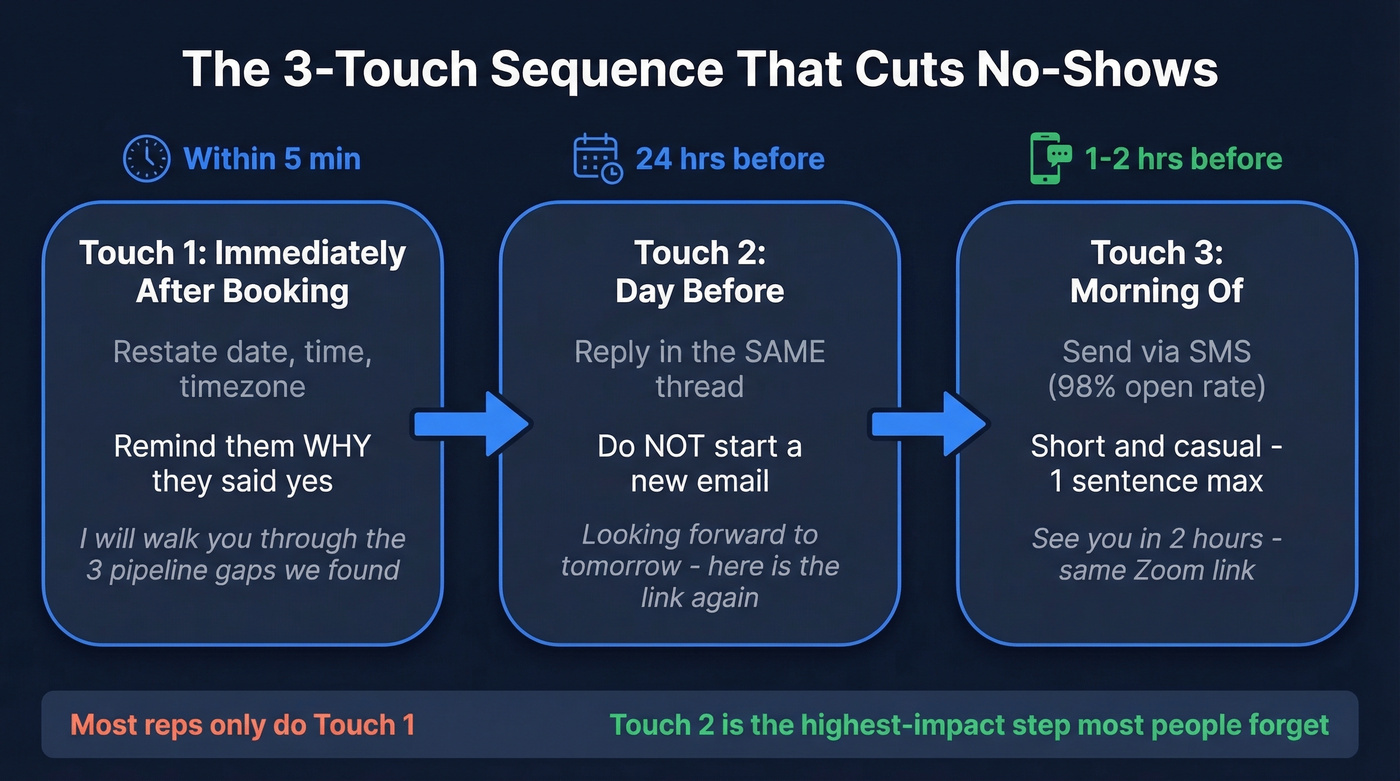
- Immediately after booking: Send a confirmation that restates the date, time, key points from your initial conversation, and the specific value you'll deliver. Don't just confirm logistics - remind them why they said yes. (If you need a system for this, start with sales communication.)
- Day before: Reply in the same email thread. A new email gets lost; a reply-in-thread refreshes the entire context. Two sentences max: "Looking forward to tomorrow. Here's the link again."
- Morning of: Send a brief SMS or a short "see you in 2 hours" message. SMS has a 98% open rate - it's the last-mile nudge that catches people who don't check email first thing.
The "value restatement" in step one is the part most reps skip. They send "Confirmed for Tuesday at 3 p.m." and wonder why people ghost. Instead, try: "Confirmed for Tuesday at 3 p.m. - I'll walk you through the three pipeline gaps we identified and show you how [specific outcome]." That gives them a reason to show up.
In our experience, the day-before reply-in-thread is the single highest-impact touch in the entire sequence. It's also the one most people forget.
Before you start this sequence, verify the prospect's email. Prospeo checks addresses in real-time with 98% accuracy and flags catch-all domains and spam traps - the free tier gives you 75 verifications a month, enough to make sure your confirmations actually land. (If you're troubleshooting bounces, see email bounce rate and email deliverability.)
Subject Lines That Get Opened
47% of people open emails based solely on the subject line, and 69% mark emails as spam based on the subject line alone. Personalized subject lines drive 29% higher open rates, and the sweet spot is 6-10 words. We've tested both logistics-first and question-based subject lines - logistics-first wins for first meetings, every time. (For more options, pull from these email subject line examples.)
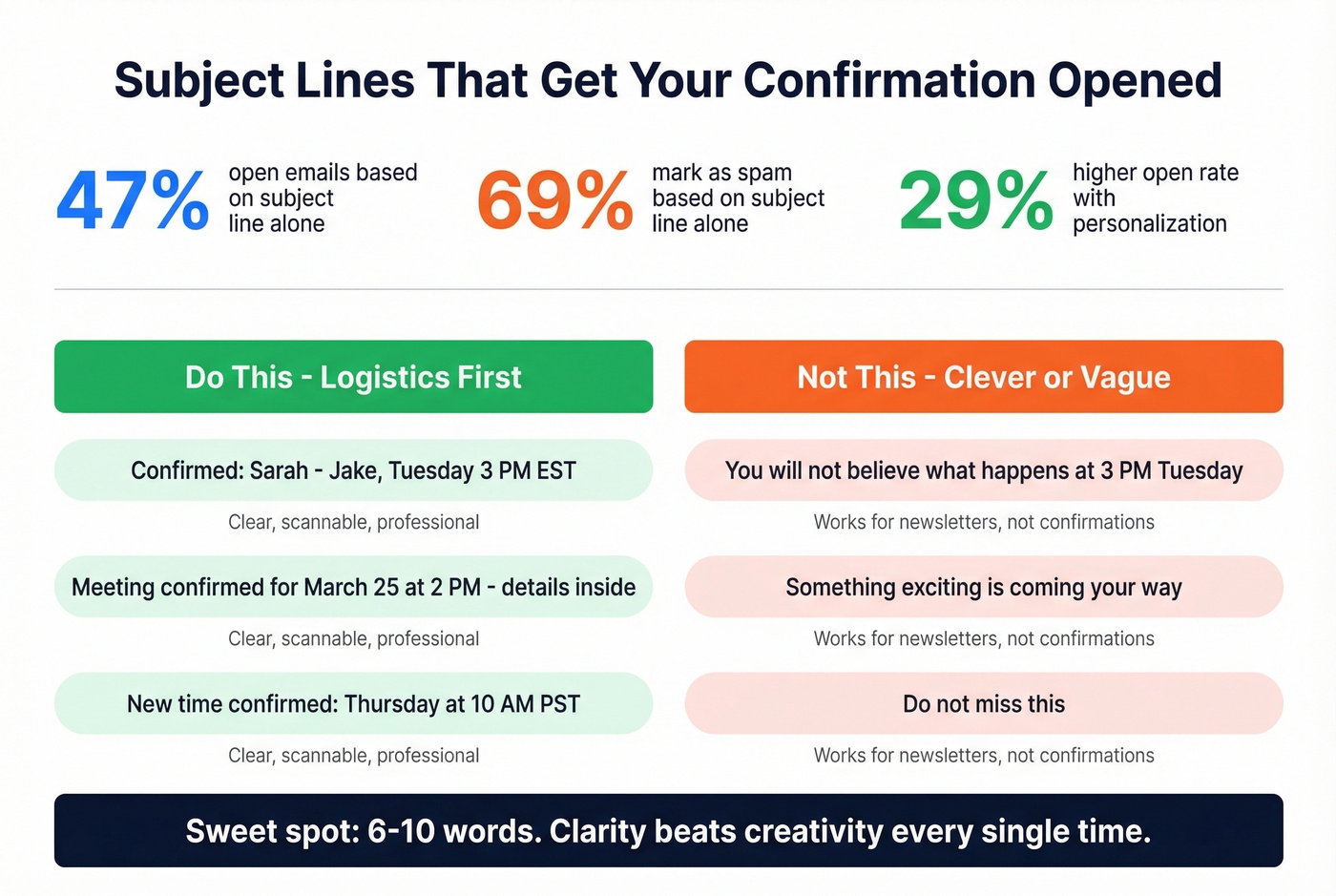
Logistics-first (clearest, safest):
- Confirmed: [Your Name] ↔ [Their Name], [Day] [Time]
- Meeting confirmed for [Date] at [Time] - details inside
- New time confirmed: [Day] at [Time] [TZ]
Question-based (drives replies):
- Still good for [Day] at [Time]?
- Are we set for tomorrow at [Time]?
- Quick confirm - [Day] [Time] still work?
Interview-specific:
- Interview confirmed: [Role] with [Company] on [Date]
- Your [Role Title] interview - [Date] at [Time]
Look, don't get clever with confirmation subject lines. "You won't believe what happens at 3 p.m. Tuesday" works for a newsletter. For a meeting confirmation, clarity beats creativity every single time.
Sales Meeting Confirmation Best Practices
When to Send
| Meeting Type | First Confirmation | Reminder | Final Nudge |
|---|---|---|---|
| Sales call | Immediately | Day before | Morning-of SMS |
| Webinar | 1 week before | 1 day before | 1 hour before email |
| In-person | 2 weeks before | 3 days before | Morning-of email |
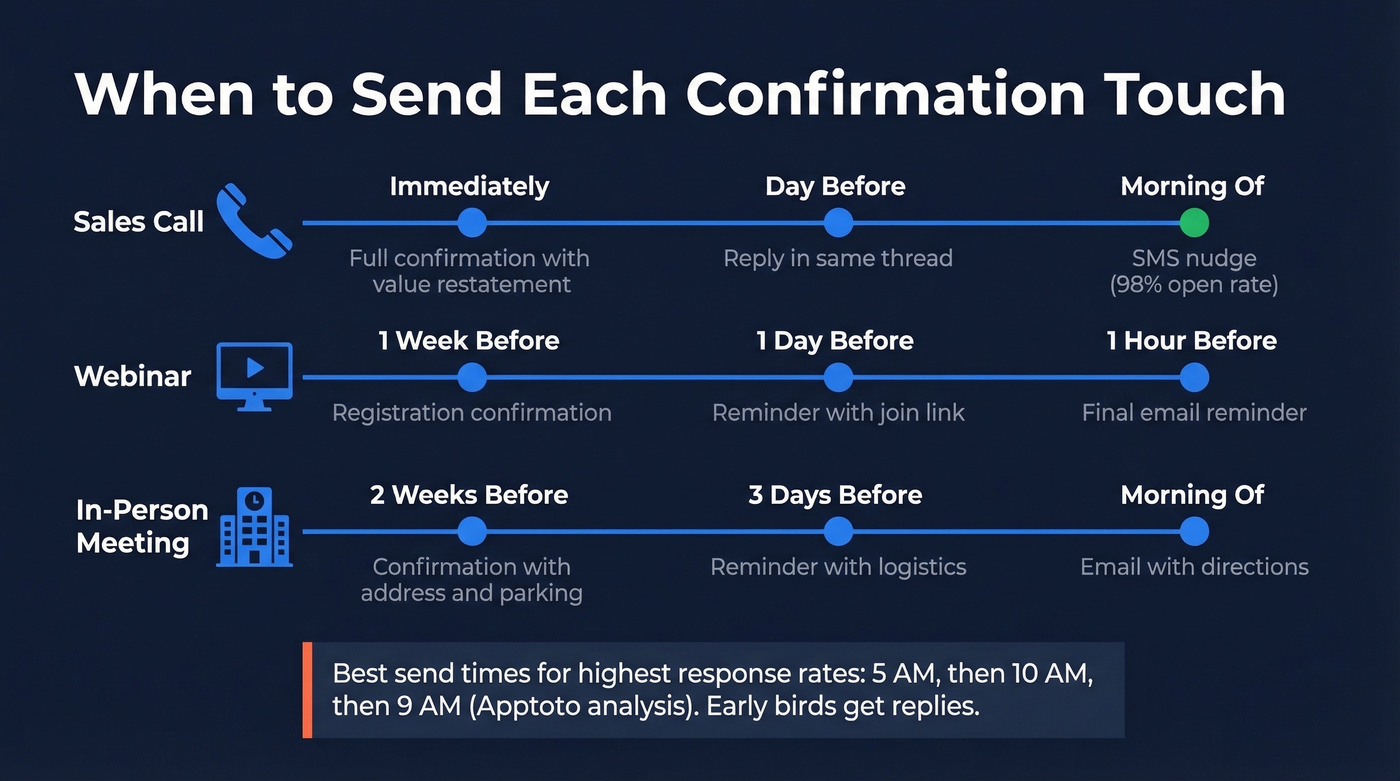
Apptoto's analysis of response-rate patterns found the highest response rates from emails sent at 5 a.m., then 10 a.m., then 9 a.m. Early birds get replies. (If you're optimizing send windows, compare with best time to send cold emails.)
Which Channel for What
| Channel | Best For |
|---|---|
| Detail, attachments, audit trail | |
| SMS | Last-mile nudge, 98% open rate |
| Phone | High-touch, complex scheduling |
Four Mistakes That Kill Confirmations
Mixing marketing into transactional emails. Twilio's deliverability team warns explicitly against this: stuffing promotional content into confirmation emails can trigger mailbox providers to reclassify them as marketing and route them to spam. Keep confirmations clean.
No timezone specified. "Tuesday at 2 p.m." is ambiguous when you're selling across time zones. Always include the timezone. Always.
Sending to unverified addresses. A 2% bounce rate is fine. A 15% bounce rate means your data is the problem, not your templates. Run your list through a verification tool before sending - bad addresses don't just bounce, they damage your sender reputation for every future email you send. (If you need to fix reputation, start with improve sender reputation.)
Over-sending reminders. There's a line between helpful and annoying. Three touches is the sweet spot for most B2B meetings. More than that and you risk the prospect feeling hounded, which is worse than no reminder at all.
Here's the thing most reps get wrong: they obsess over templates and ignore the sequence entirely. A mediocre email sent three times at the right moments will outperform a beautifully crafted confirmation sent once. The cadence is the strategy. The template is just the vehicle. (To keep the thread moving after the call, use these sales follow-up templates.)
Every no-show starts with bad contact data. Prospeo gives you 143M+ verified emails refreshed every 7 days - not the stale addresses other providers update every 6 weeks. Teams using Prospeo data see bounce rates drop from 35% to under 4%.
Book meetings with real emails that actually reach real people.
FAQ
When should I send a meeting confirmation email?
Send the first confirmation immediately after booking, then follow up the day before and morning-of. For meetings booked weeks out, add a touchpoint one week before. This three-touch cadence reduces no-shows by 20%+ according to both healthcare and B2B data.
What's the difference between a confirmation and a reminder?
A confirmation acknowledges the booking with full details - date, time, agenda, and link. A reminder is a shorter follow-up closer to the meeting date. You need both: the confirmation sets context, the reminder keeps it top-of-mind.
Should I send one if there's already a calendar invite?
Yes. Calendar invites get buried under dozens of events and don't support reply threads. A confirmation email provides context, a place to reschedule, and a thread for your day-before follow-up - none of which a calendar event handles.
How do I keep confirmation emails out of spam?
Keep them transactional - no marketing content, no promotional links. Use a clear subject line with the date and time, and verify the recipient's address before sending. A clean three-touch cadence also keeps engagement high, which signals to mailbox providers that your emails are wanted.