

How to Write Meeting Follow-Up Emails That Actually Get Replies
You sent the proposal. The meeting went well. Then - silence. A week passes, and you fire off "Hey, just following up - did you get a chance to review?" It lands with the enthusiasm of a parking ticket.
Across 16.5 million cold emails analyzed by Belkins, the peak reply rate is just 8.4%, and that's from the first email. Every message after that performs worse. The generic meeting followup - the kind that shows up in r/sales threads as the "desperate" example - is actively hurting your chances.
Here's the thing: writing a good follow-up isn't hard. It just requires you to stop treating it like a formality and start treating it like the most important email in the thread.
What You Need (Quick Version)
- Send within 24 hours. Under 150 words. Specific action items with owners and deadlines - not vague "let's circle back" language.
- Every follow-up must add something new. A recap, a resource, a concrete next step. If you're just bumping the thread, don't hit send.
Why Follow-Up Emails After Meetings Matter
Follow-ups generate 42% of all campaign replies, yet 48% of reps never send a second message. That's nearly half your team leaving almost half the replies on the table.
And it's getting harder. Average cold email reply rates have dropped from 5.1% in 2024 to 3.43% in 2025-2026, making every touchpoint count more than it did even a year ago.
The problem isn't limited to sales outreach. An OECD survey of companies with 500+ employees found that 57% of respondents said wasteful meetings are the most common productivity barrier. A written recap and a clear follow up after a meeting is how you stop good conversations from turning into "nothing happened." The post-meeting email isn't a courtesy. It's the mechanism that turns a conversation into actual progress.
Five Parts of an Effective Recap
Send a summary within 24 hours. This structure works whether you're following up on an internal standup or a sales discovery call.
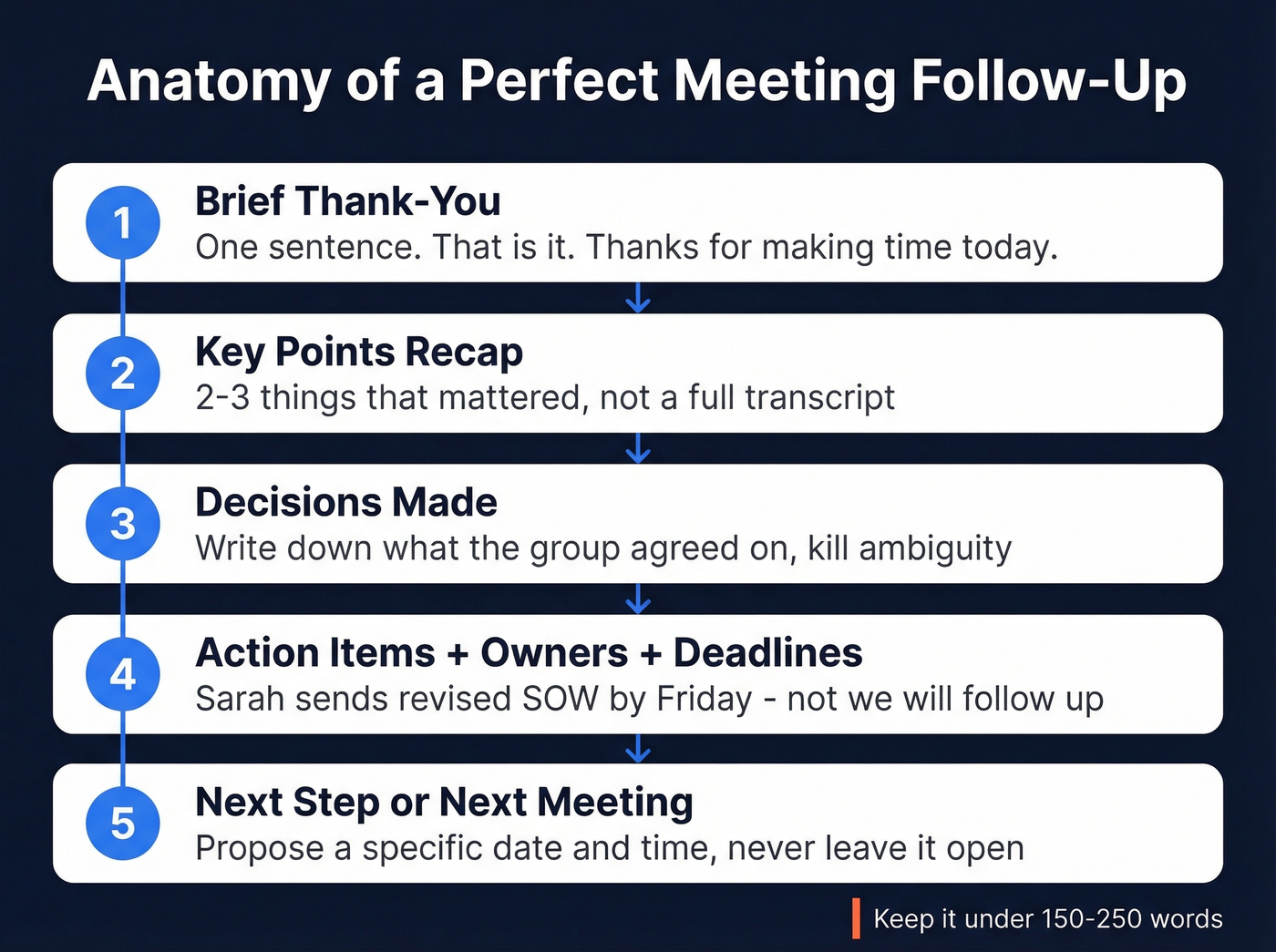
- A brief thank-you. One sentence. "Thanks for making time today" is enough.
- A recap of key points. Not a transcript - the two or three things that mattered. This proves you were paying attention and creates a shared record.
- Decisions that were made. If the group agreed on something, write it down. Ambiguity after a meeting kills momentum.
- Action items with owners and deadlines. "Sarah will send the revised SOW by Friday" is useful. "We'll follow up on the SOW" is not.
- The next step or next meeting. Propose a specific date and time. Don't leave it open-ended.
Keep the whole email between 150 and 250 words. Anything longer and you should probably schedule another call instead.
When to Send Your Follow-Up
Timing depends on context. A simple matrix:
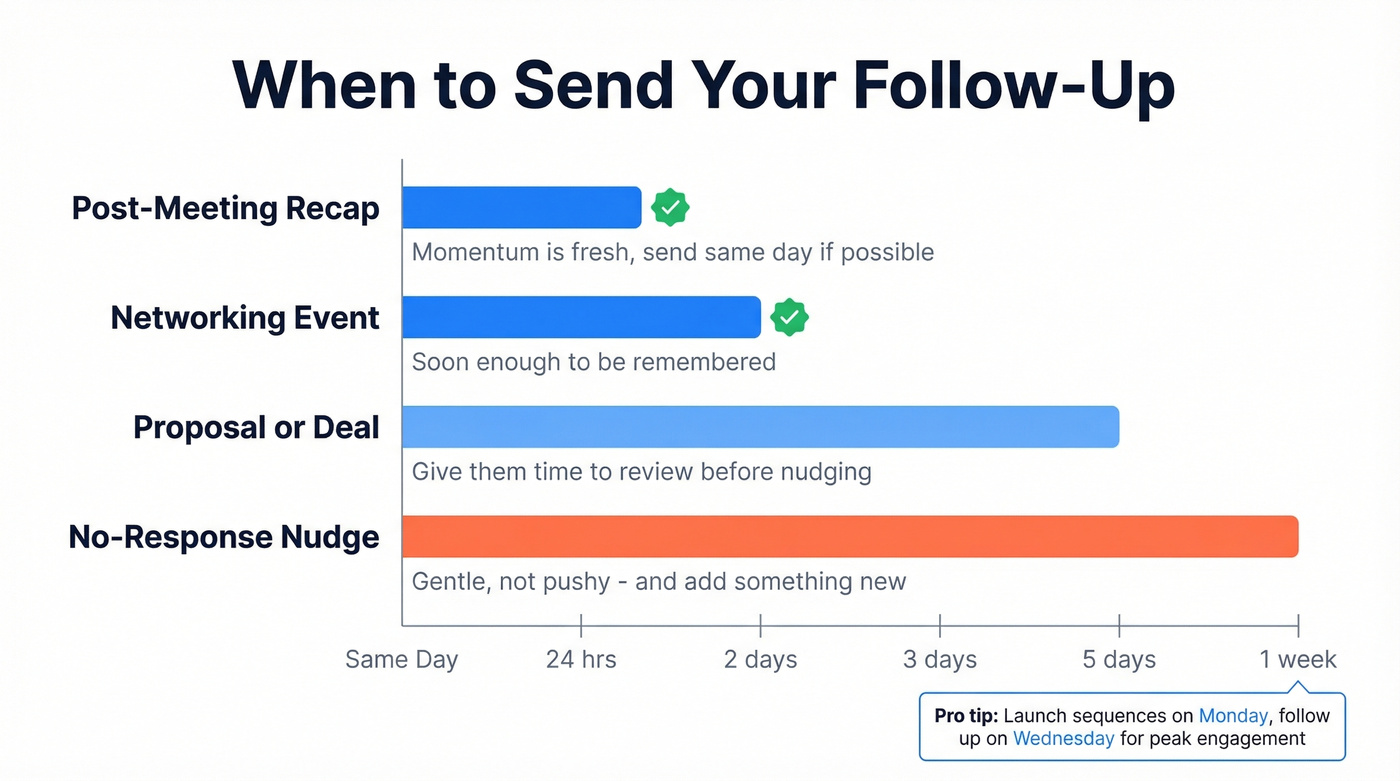
| Scenario | Send Within | Why |
|---|---|---|
| Post-meeting recap | 24 hours | Momentum is fresh |
| Networking event | 1-2 days | Soon enough to be remembered |
| Proposal / deal | 3-5 days | Give them time to review |
| No-response nudge | 1 week | Gentle, not pushy |
For cold outreach sequences, Monday is the best day to launch and Wednesday tends to drive peak engagement on follow-ups.
Email, Call, or Another Meeting?
Not every follow up from a meeting should be an email. Two gut-check questions before defaulting to the inbox: Will this become a long thread? Could a five-minute call save ten emails?
Can you say everything in 150 words or less? Send an email.
Does it need one person's input but requires real discussion? Pick up the phone. We've watched teams burn entire afternoons on email chains that a three-minute call would've resolved.
Does it need multiple people, nuanced answers, or back-and-forth that would spawn a 15-message thread? Schedule a meeting.

Your follow-up is only as good as the email address it lands on. 17% of cold emails never reach the inbox - which means one in six of your carefully crafted recaps disappears into the void. Prospeo's email finder delivers 98% accuracy with a 5-step verification process, so every follow-up actually arrives.
Stop writing perfect follow-ups to dead email addresses.
Five Mistakes That Kill Replies
1. Bumping with no new information. "Just making sure you saw this" adds nothing. Every follow-up needs a new touchpoint - a relevant case study, a fresh data point, a refined proposal. If you don't have something new to say, wait until you do. (If you want plug-and-play options, steal a few from our sales follow-up templates.)
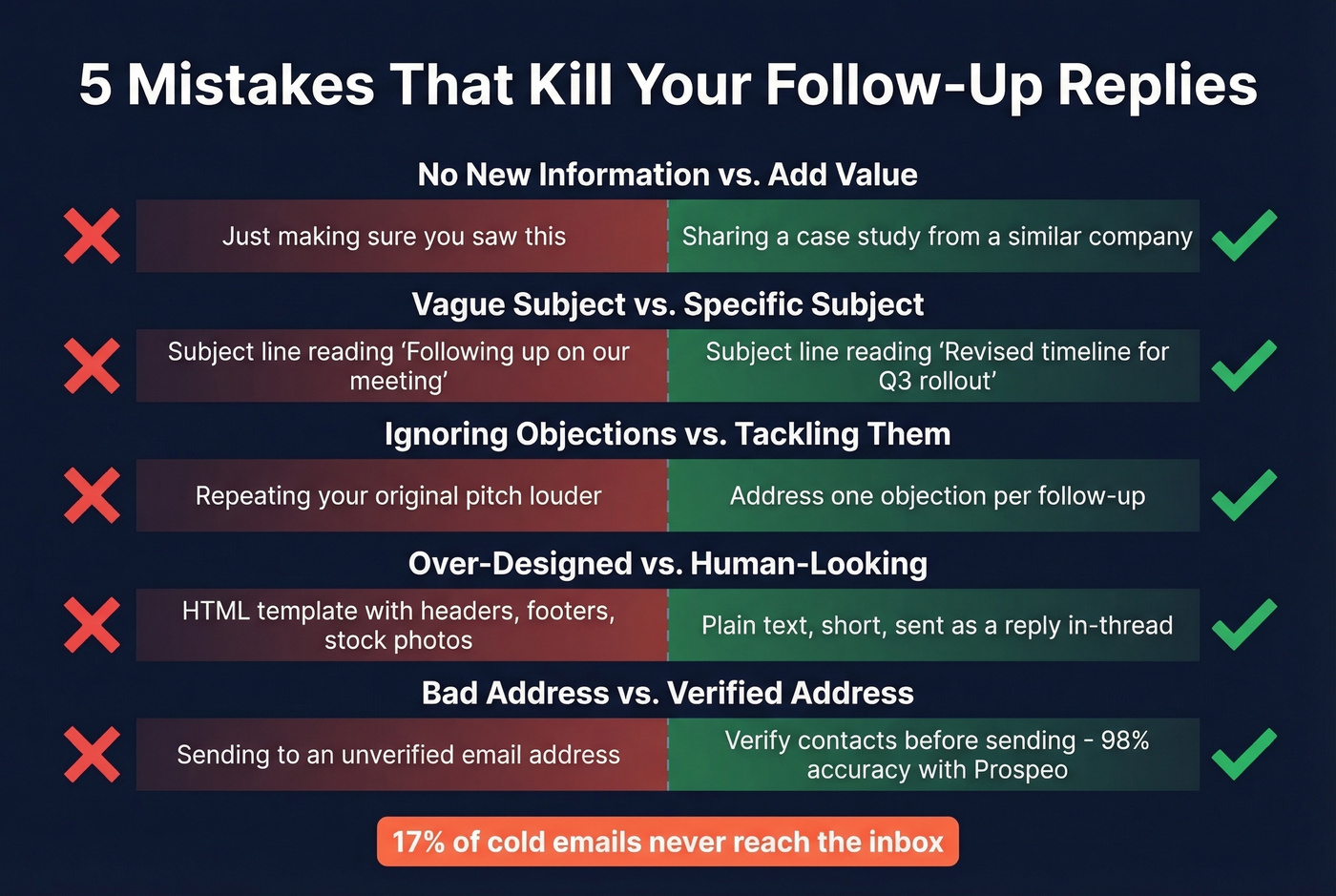
2. Using "follow-up" or "checking in" in the subject line. These phrases are getting ignored. Reference the specific decision or next step instead. "Revised timeline for Q3 rollout" beats "Following up on our meeting" every time. For more ideas, browse these subject line examples.
3. Not addressing objections. If a prospect went quiet, there's a reason. Rotate through the core objections - no need, unclear value, no urgency, don't want it, don't trust you - and address one per follow-up. Don't repeat your original pitch louder. (This is also where sales communication frameworks help.)
4. Over-designed emails. HTML templates with headers, footers, and stock photos scream "mass email." The follow-ups that get replies look like something a real person typed - plain text, short, sent as a reply in-thread.
5. Sending to a bad email address. 17% of cold emails never reach the inbox. A perfect follow-up that bounces is worse than no follow-up at all. Verify contacts with Prospeo's email finder before sending - 98% email accuracy and a free tier of 75 verifications per month means there's no excuse for preventable bounces. If you're comparing options, see our guide to email verification.
Meeting Follow-Up Email Templates
Internal Team Sync
Hi team - thanks for today's sync. Quick recap:
We agreed to push the launch date to March 14. Devon is owning the revised QA timeline (due by Friday). Priya will loop in legal on the updated terms.
Next check-in: Tuesday at 10am. I've sent the invite.
Sales Prospect (Post-Discovery)
This one works because it mirrors the prospect's own words back to them and attaches a number to the pain.
Hi [Name] - great conversation today. You mentioned [specific pain point] is costing your team roughly [X hours/dollars] per quarter. We've seen similar teams cut that by 40% within 60 days.
Does Tuesday at 2pm work for a 20-minute demo?
If you're building a full sequence, use this as part of a B2B cold email sequence.
Post-Proposal
Hi [Name] - wanted to share a quick case study. [Company similar to theirs] saw [specific result] after implementing in Q4. Happy to walk through how that maps to your setup - I've got availability Thursday or Friday afternoon.
Networking / No-Response / Scheduling
For networking contacts, reference something specific they said - it proves the email isn't a template. For no-response nudges, lead with a one-sentence value prop and give them an easy out: "If it's not a fit, no worries - just let me know and I'll stop cluttering your inbox." For scheduling, propose two specific times and send the invite yourself.
Pro tip: Draft the skeleton of your follow-up before the meeting starts. You'll capture better details and send faster. I started doing this last year and it cut my post-meeting admin time in half.
How Many Follow-Ups Should You Send?
The data is counterintuitive. Across 16.5 million emails, the highest reply rate - 8.4% - comes from just one email. Performance declines with each additional message, and 4+ emails in a sequence more than triples spam complaints. Belkins actually stopped tracking open rates in 2024 because tracking pixels themselves hurt deliverability - another reason to focus on reply rates, not opens. (More on that here: email tracking pixels.)
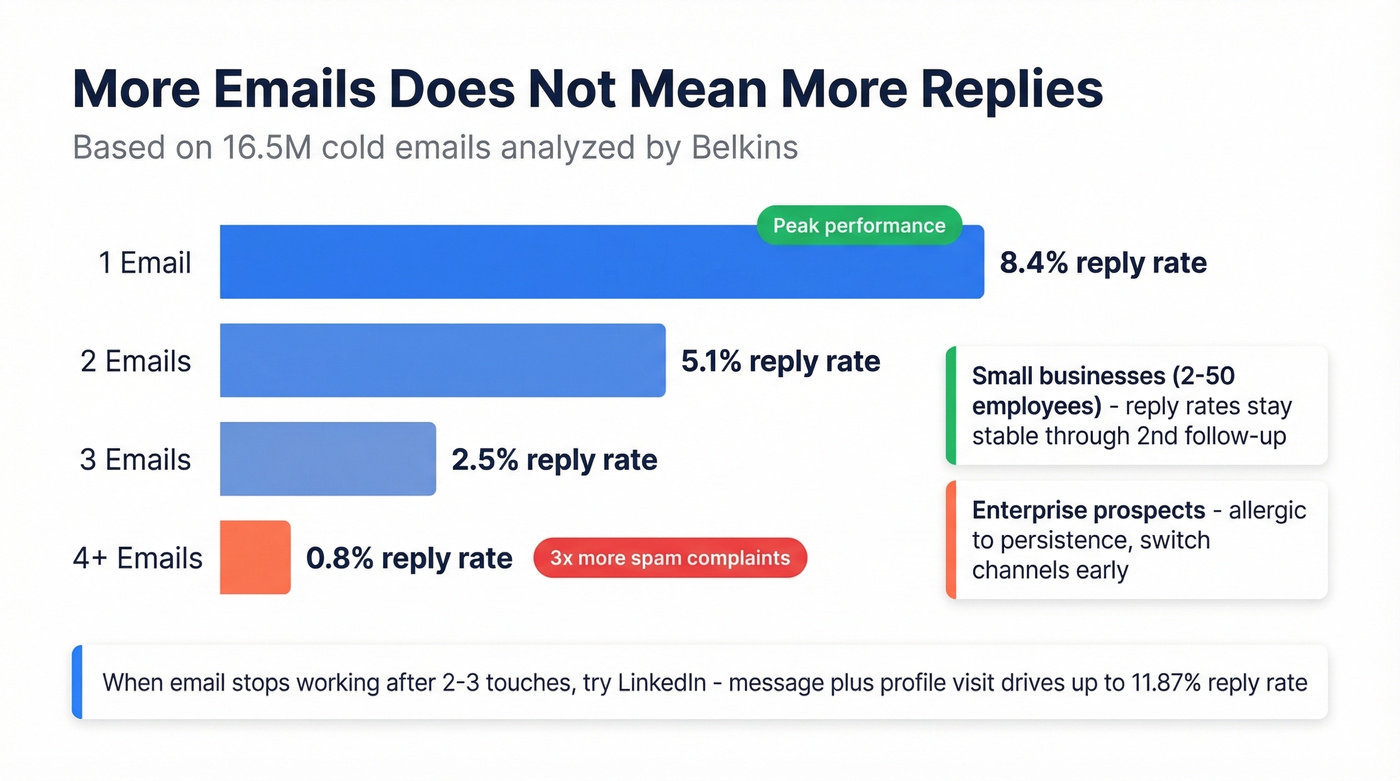
That doesn't mean you should never send a second message. It means each one needs to earn its place. For small businesses with 2-50 employees, reply rates stay relatively stable through the second follow-up. Enterprises are allergic to persistence.
Let's be honest: if your average deal size is under five figures, you probably don't need a 7-touch email sequence. Two or three well-crafted messages will outperform a long drip campaign every time - and your domain reputation will thank you. (If deliverability is slipping, start with how to improve sender reputation.)
When email isn't working after two or three touches, switch channels. A LinkedIn message-plus-profile-visit combo drives reply rates up to 11.87%. Sometimes the problem isn't your copy. It's the channel.
AI Tools That Write Your Follow-Up
AI meeting assistants save 4-8 hours per week on post-meeting admin by auto-generating recaps and drafting follow-ups from call transcripts. In our experience, the time savings are real - but you still need to edit the output before sending. Nobody wants to receive a follow-up that reads like a robot summarized a meeting it didn't understand.
These tools split into two camps: those that put a bot in your meeting and those that work silently in the background.
| Tool | Best For | Free Tier | Paid From |
|---|---|---|---|
| Fathom | Best free option | Unlimited (individuals) | $24/user/mo |
| Otter.ai | Transcription depth | 300 min/mo | $16.99/mo |
| Fireflies.ai | Searchable archive | Limited | $10/mo (annual) |
| Fellow | Structured agendas | Limited | $7/user/mo |
| Granola | No-bot experience | 25 meetings | $18/mo |
| tl;dv | EU / GDPR teams | Unlimited | ~$18/mo |
Fathom is the obvious starting point - free for individuals, and the AI-generated summaries are genuinely good. If you're a European team and data residency matters, tl;dv hosts in the EU and takes GDPR seriously. Granola is interesting if you hate meeting bots, but skip it if you're on Windows - it's Mac-only. Fellow works best when your whole team adopts it; the structured agenda features are strong, but only useful if everyone actually uses them.
We've tested most of these across different team sizes, and the common gap is always the same: they extract action items, but they don't ensure follow-through. You still need to actually send the email. (If you're evaluating automation, start with AI sales follow-up.)
Before You Hit Send
You've written the perfect meeting followup. The recap is tight, the action items are clear, you've proposed a specific next step. Then it bounces.
Even internal contacts change roles, switch companies, or let old addresses go stale. Verify the address before you send - one bounced email can hurt your sender reputation across every future message you send from that domain. If you want a quick diagnostic, use this guide on email bounce rate.

If your follow-up gets no reply, the next best move is a direct dial. Prospeo gives you 125M+ verified mobile numbers with a 30% pickup rate - so when email silence stretches past a week, you can pick up the phone and close the loop in three minutes instead of three more emails.
Skip the fifth follow-up. Call them directly instead.
FAQ
How long should a follow-up email after a meeting be?
Keep it under 150 words. That covers a thank-you, two-sentence recap, action items with owners, and a proposed next step. Past 250 words, switch to a call instead.
What should the subject line say?
Reference the specific decision or deliverable discussed. "Revised Q3 timeline + next steps" outperforms generic lines. Phrases like "following up" and "checking in" signal zero value and get ignored.
How many follow-ups is too many?
Reply rates peak at one email and decline with each additional send. Two to three well-crafted messages is the sweet spot for most deal sizes. Four or more triples spam complaints across Belkins' 16.5M-email dataset.
What's a free tool to verify emails before sending?
Prospeo offers 75 free email verifications per month at 98% accuracy - enough for most teams sending post-meeting recaps. Hunter provides 25 free searches monthly but caps enrichment features.