

Meeting Scheduling Emails That Actually Get Replies
It took 29 emails and two weeks to schedule a single follow-up meeting. Three or four people across organizations, one short call. That's not a hypothetical - it's a real scenario from r/productivity that anyone who's worked cross-functionally will recognize immediately.
Unproductive meetings already cost U.S. businesses $399 billion a year - roughly $29,000 per employee. The scheduling process that precedes them shouldn't add to the waste. The average worker receives 117 emails a day and gets interrupted every two minutes by a notification, a message, or a meeting ping. Your meeting scheduling email isn't competing with other scheduling requests. It's competing with everything. And 57% of meetings are ad hoc calls without a calendar invite in the first place, which means the ones that do get formally scheduled need to land clean on the first try.
The fact that booking a 30-minute meeting still often takes 4-8 messages is absurd. Let's fix that.
What You Need (Quick Version)
You don't need 10 templates. You need three frameworks and one rule.
Three frameworks cover every scheduling scenario: cold (earn the meeting before you ask for it), warm (propose specific times and close the loop), and logistics (confirm, reschedule, or nudge without friction).
One rule: always propose 2-3 specific times with time zones. "When works for you?" is a conversation starter, not a closer. It creates the exact back-and-forth that turns one email into twelve.
Before anything else, verify the email address. A bounced request doesn't just waste your time - it damages your sender reputation. Tools like Prospeo's Email Finder catch bad addresses before they bounce.
Five Elements Every Request Needs
Put the ask in the first 140 characters. That's what shows up in a mobile preview, and mobile is where most people triage their inbox. The military calls this BLUF - bottom line up front) . Your recipient should know what you want before they even open the message.
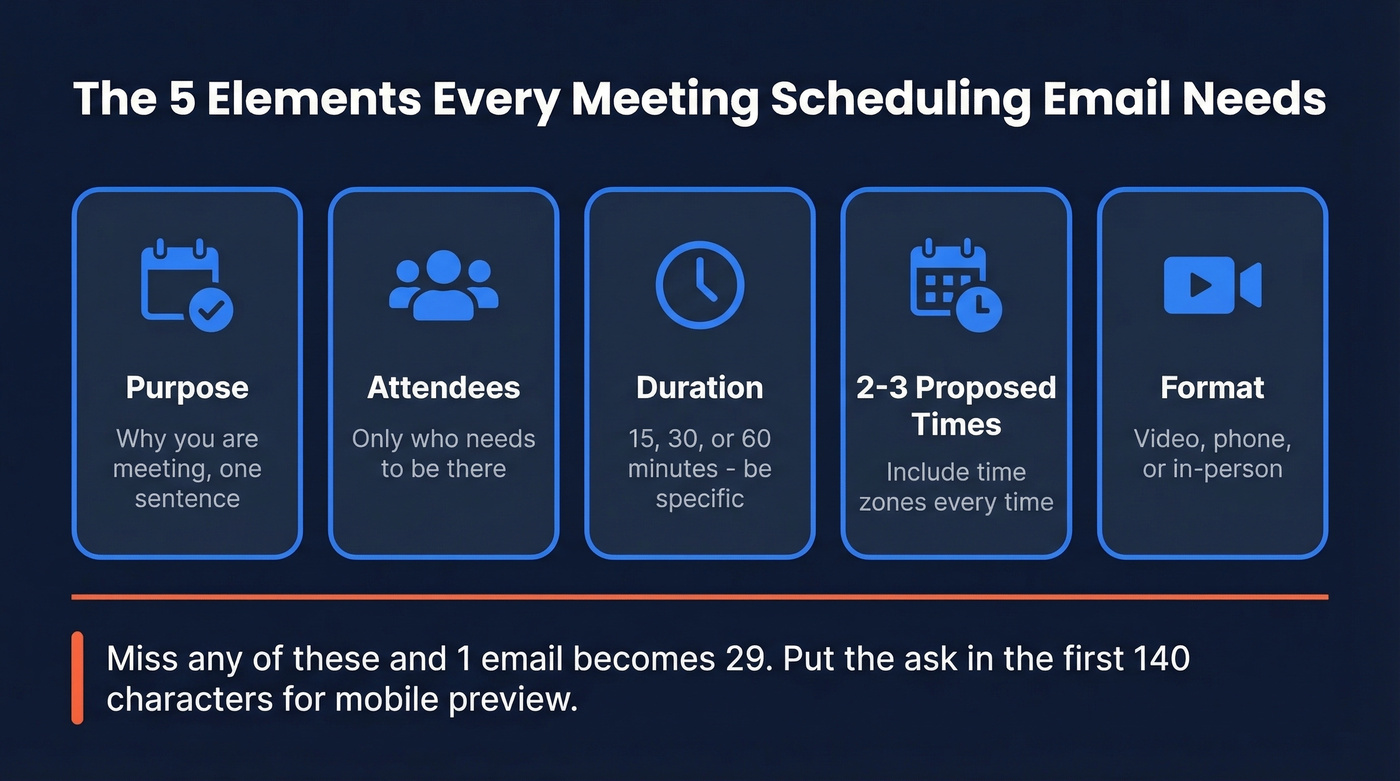
Every well-structured meeting scheduling email needs five elements:
- Purpose - why you're meeting, in one sentence
- Attendees - who needs to be there, and only who needs to be there
- Duration - 15, 30, or 60 minutes (don't leave it ambiguous)
- 2-3 proposed times with time zone - "Tuesday 2pm or Thursday 10am ET" removes the guesswork
- Format - video, phone, or in-person
Miss any of these and you're guaranteeing a follow-up email just to clarify what should have been clear from the start. That's how 1 email becomes 29.
Subject Lines That Get Opened
47% of recipients decide whether to open an email based on the subject line alone. Even worse, 69% flag emails as spam because of the subject line. So your perfectly crafted scheduling request is worthless if the subject line reads like a calendar notification from 2014.
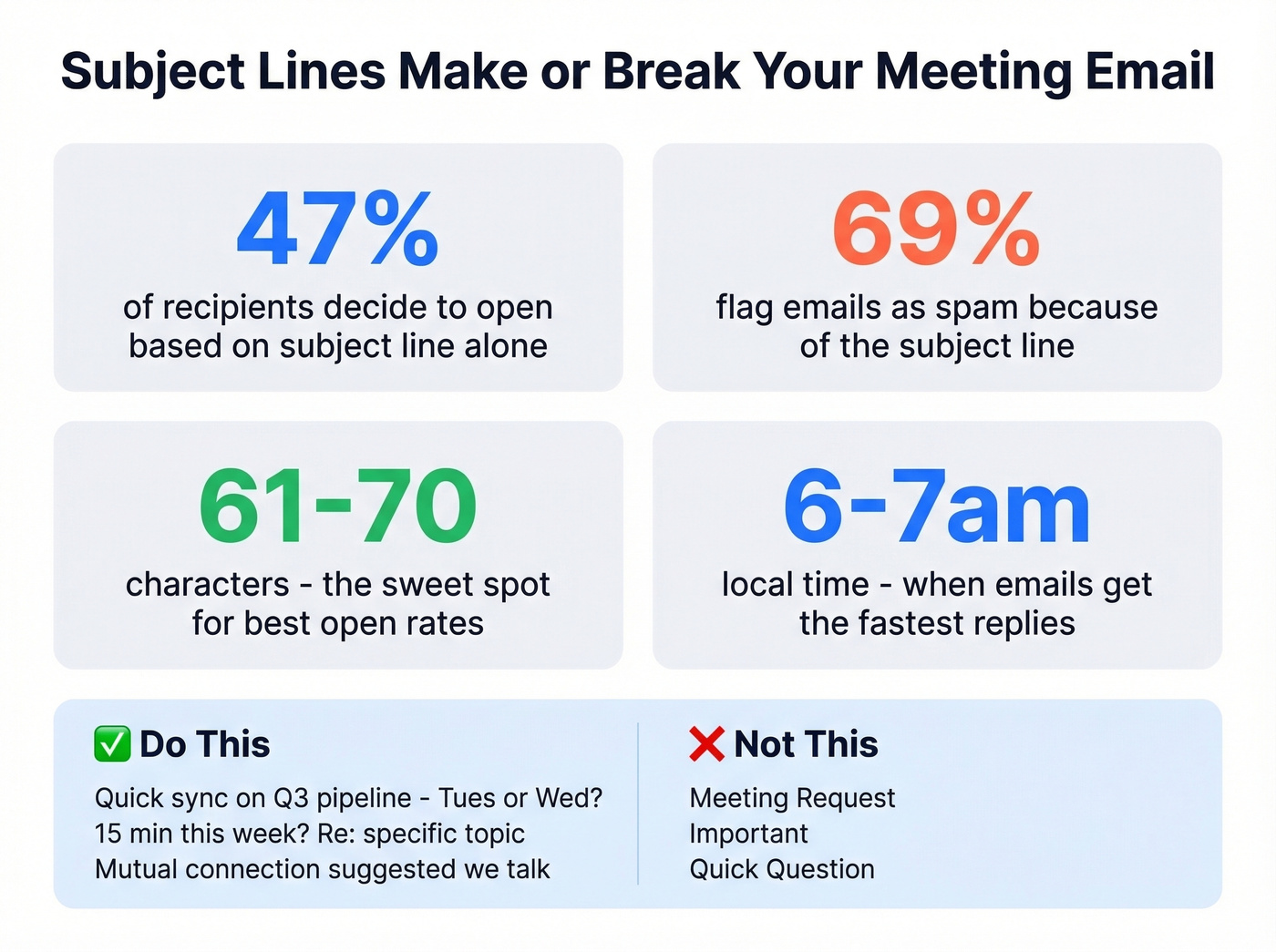
The sweet spot for open rates is 61-70 characters. For click-through, aim for 41-50. The average cold email open rate sits around 27.7% - you can beat that with a subject line that's specific and low-friction. If you want more options, pull from these email subject line examples.
Direct and time-bound:
- Quick sync on Q3 pipeline - Tues or Wed?
- 15 min this week? Re: [specific topic]
- Following up: [their company] + [your company] intro
Warm and personal:
- Great chatting at [event] - time to connect?
- [Mutual connection] suggested we talk
- Loved your take on [topic] - quick call?
Internal / logistics:
- Sprint retro - proposing Thursday 3pm ET
- Rescheduling: new times for our 1:1
Avoid "Meeting Request," "Important," or "Quick Question" - they're vague enough to trigger spam filters and boring enough to get ignored.
One timing tip most guides skip: 40% of workers review email by 6am. We've found that emails sent between 6-7am local time consistently get faster replies than anything sent mid-afternoon, before the inbox floods. (If you want a deeper breakdown, see best time to send cold emails.)
7 Templates for Every Scenario
Before you copy these: tone mismatches reduce email response rates by 23%. A formal template sent to a startup founder or a casual one sent to a C-suite exec at a Fortune 500 company will both tank your reply rate. Match the template to the relationship. (More frameworks here: emails that get responses.)
Cold Prospect - Soft CTA
When to use: First touch. You haven't earned the meeting yet.
Hi [Name], I noticed [specific observation about their company/role]. We helped [similar company] [specific result]. Would it be useful if I sent over a quick breakdown of how? Happy to share - no call needed unless you want one.
Here's the thing: don't ask "Do you have 15 minutes this week?" in a first email. A practitioner who ran 500,000 emails across three months found that soft CTAs like the one above generated roughly 3x the positive reply rate compared to "let's hop on a call." AI-heavy personalization didn't help either - 1.9% reply rate vs 1.8% for simple relevance, at 3x the cost. Save the meeting ask for email two. If you're building a full sequence, use this B2B cold email sequence structure.
Warm Lead - Propose Times
When to use: They've engaged - replied, downloaded something, attended a webinar.
Hi [Name], thanks for [specific engagement]. I'd love to walk you through [relevant topic] - takes about 20 minutes. Would any of these work? [Tuesday 2pm ET / Wednesday 10am ET / Thursday 3pm ET]. If not, here's my calendar link as a backup: [link]
The calendar link is a fallback, not the main event. Proposing specific times shows you did the work. The link is there for people who prefer to self-serve.
Existing Client - QBR or Check-In
When to use: Quarterly review, renewal prep, or proactive check-in.
Hi [Name], it's been [timeframe] since our last sync and I want to make sure [their product/initiative] is tracking. I've pulled together some usage data to review. Does [date] at [time] [timezone] work for a 30-minute call? I'll send an agenda ahead of time.
Rescheduling + Confirmation Pair
These two templates work as a set. In our experience, the biggest scheduling friction isn't getting the first "yes" - it's the shuffle that happens after. Keep both tight and actionable.
Rescheduling:
Hi [Name], I need to move our [day] call - apologies for the shuffle. Can we do [new date/time timezone] instead? Same agenda, same duration. Let me know and I'll update the invite.
Confirmation:
Hi [Name], confirming our call for [date] at [time] [timezone]. I'll send a [Zoom/Teams/phone] link shortly. Looking forward to it - if anything changes, just reply here.
Internal Team Meeting
When to use: Cross-functional sync, sprint planning, project kickoff. Frame it around a specific deliverable or decision - not just "aligning."
Team - need 45 minutes to align on [project/topic] before [deadline]. Proposing [date/time timezone]. Agenda: [2-3 bullet points]. Reply if that slot doesn't work; otherwise I'll send the invite by EOD.
Follow-Up / Nudge
When to use: They didn't respond to your first request. Wait 2-3 business days before sending.
Hi [Name], circling back on my note from [day]. Still happy to connect [this week / next week] if the timing works. Would [date/time timezone] or [date/time timezone] be better? No worries if now isn't right - just let me know.
Skip the nudge template entirely if you're cold emailing someone who never replied to your first message and never opted in. Two-step sequences outperformed five-step sequences by about 50% in that same 500K-email dataset. Emails three through five mostly generated unsubscribes and complaints, not meetings. For more options, see these sales follow-up templates.

A bounced meeting request doesn't just waste your carefully crafted email - it tanks your sender reputation and kills future deliverability. Prospeo verifies emails through a 5-step process with 98% accuracy, so your scheduling emails actually land in the inbox they're meant for.
Stop scheduling meetings with dead email addresses. Verify first.
Why "Let's Schedule a Call" Fails
Look - if your deal size is under $10K, you probably don't need a meeting at all. A Loom video, a personalized doc, or a quick async exchange will close more deals than forcing a 30-minute call with someone who barely knows your name. The meeting ask works in email two or three, after they've engaged - not as a cold opener.
The consensus on r/coldemail is consistent: prospects who haven't opted in don't want to give you 30 minutes. They want to know you're worth 30 seconds first.
One more thing: open rates are unreliable. Post-Apple Mail Privacy Protection, one campaign showed 85% opens with less than 1% human engagement. Track reply rates instead. (If you're diagnosing inboxing issues, start with an email deliverability guide.)
Scheduling Link vs. Proposing Times
The right approach depends entirely on context.
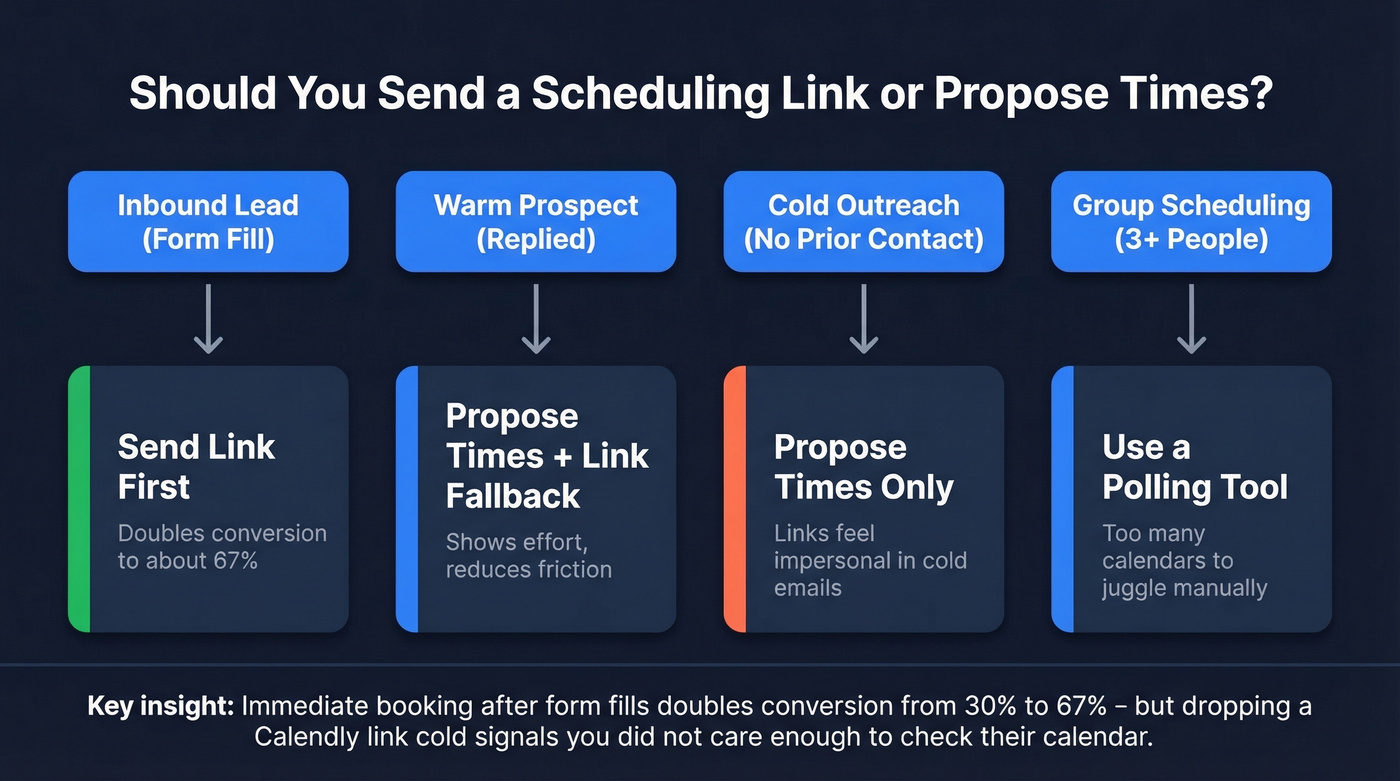
| Scenario | Best approach | Why |
|---|---|---|
| Inbound lead (form fill) | Link first | Doubles conversion to ~67% |
| Warm prospect (replied) | Propose times + link fallback | Shows effort, less friction |
| Cold outreach (no prior contact) | Propose times only | Links feel impersonal |
| Group scheduling (3+ people) | Polling tool (Doodle) | Too many calendars to juggle |
Chili Piper analyzed ~4 million form submissions and found that letting prospects book immediately after a form fill doubles the conversion rate from ~30% to 66.7%. RevenueHero's benchmarks confirm it - slow follow-up and back-and-forth scheduling, plus confusing calendar links, are major conversion killers for inbound.
For cold outreach, it's the opposite. Dropping a Calendly link in a first email signals "I didn't care enough to check your calendar or propose a real time." Propose 2-3 specific slots and include the link as a fallback.
Best Scheduling Tools in 2026
| Tool | Free tier | Paid price | Best for |
|---|---|---|---|
| Calendly | 1 event type | $10/user/mo (annual) | Solo reps, simple booking |
| Cal.com | Unlimited bookings | Free (self-hosted) | Open-source, dev teams |
| Chili Piper | No | $30-45/user/mo + platform fee | Enterprise inbound routing |
| Doodle | Limited | $19.95/user/mo | Group polls, multi-party |
| SavvyCal | Limited | $12/user/mo | Calendar overlay, polished UX |
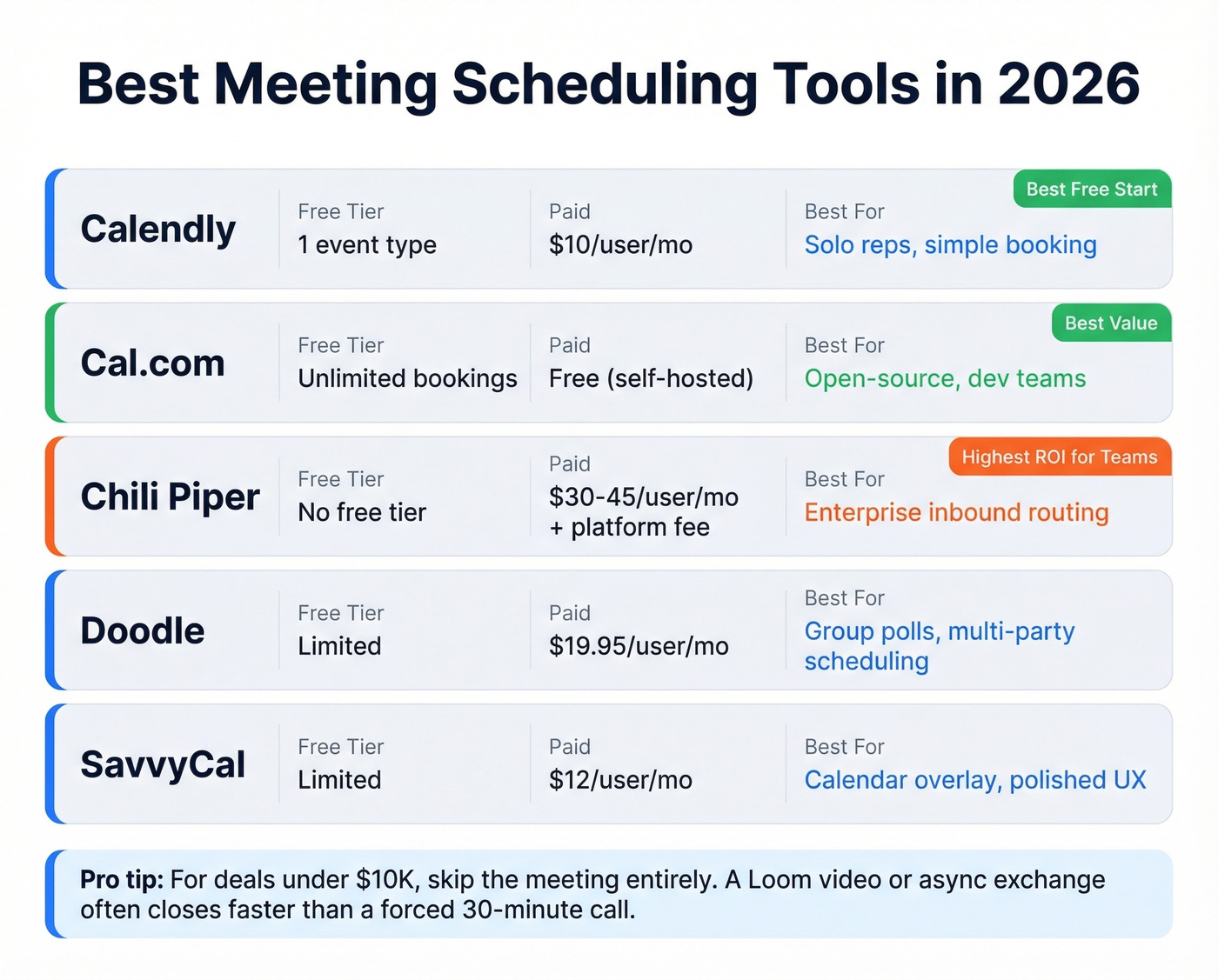
For solo use, Calendly's free plan handles the basics. For routing inbound demos across a sales team, Chili Piper pays for itself in conversion lift - but expect to spend $150-$1,000+/month on the platform fee depending on lead volume. For full control without paying anything, Cal.com gives you unlimited bookings and event types if you self-host. We've watched teams agonize over scheduling tool selection for weeks when the real bottleneck was bad email data, not the wrong calendar widget.
Verify Before You Hit Send
Your scheduling email is only as good as the address it's going to. Pre-built prospect lists produce 8-15% bounce rates. That's not just wasted effort - it's active damage to your sender domain. I've seen teams burn through domains because they skipped email verification. It's the most expensive shortcut in outbound. If you need to quantify and fix the issue, start with email bounce rate benchmarks and remediation.
Before you send that perfectly crafted template, run the address through Prospeo. It verifies emails in real time at 98% accuracy, refreshes data every 7 days, and the free tier covers 75 verifications a month. Takes seconds and saves you from the invisible cost of bounced emails eroding your deliverability for every future message you send.
You just spent 10 minutes writing the perfect meeting request with specific times, a clear agenda, and a sharp subject line. Don't send it to an outdated address. Prospeo's database refreshes every 7 days - not every 6 weeks - so you're always reaching the right person at their current role.
Book 26% more meetings by starting with data that's actually fresh.
FAQ
How many times should I follow up on a meeting request?
Send one follow-up after 2-3 business days, and cap total follow-ups at two. After that, you're creating friction, not persistence - move on or try a different channel like a phone call or async video.
Should I include a Calendly link in a cold email?
Not as the primary CTA. Propose 2-3 specific times and add the scheduling link as a fallback. For inbound leads who filled out a form, link-first booking doubles conversion rates to ~67%.
What's the best subject line length for a meeting scheduling email?
Aim for 61-70 characters for open rate and 41-50 for click-through. Specific, time-bound lines like "Quick sync on Q3 pipeline - Tues or Wed?" outperform vague subjects like "Meeting request" by a wide margin.
How do I handle time zones when scheduling?
Always state the time zone explicitly - e.g., "Tuesday 2pm ET." Cross-timezone meetings are up 35% since 2021, so assuming everyone's in your zone guarantees confusion and extra back-and-forth.
How do I make sure my email doesn't bounce?
Verify the address before sending. A single bounced email damages your sender reputation for every future message - not just the one that failed. Real-time verification tools catch invalid addresses, spam traps, and catch-all domains before they cause problems.