

Microsoft Email Finder: How to Find M365 Business Emails
There's no official Microsoft email finder. Microsoft doesn't offer an external email lookup tool, and if you're trying to find a prospect's business email hosted on Microsoft 365, you need third-party tools and a bit of technique. Here's what actually works in 2026 - and why M365 domains are uniquely tricky.
The Short Version
Microsoft doesn't build tools for external email discovery. M365 domains are harder to verify because of catch-all configurations and no external API. Your best move is a finder with real catch-all handling, or layering free methods with a dedicated verification step.
Two Searches, One Query
Two completely different intents land on "microsoft email finder." The first: you've lost access to your own Microsoft account and need to recover it. The second: you're a salesperson or marketer trying to find a prospect's work email hosted on Microsoft 365 - Exchange Online, Azure AD, the whole stack. Most online resources only address account recovery. Outlook support pages, password resets, the usual. If you're here for prospecting, those results are useless.
And if you've been searching for an "Outlook email finder" specifically, you've hit the same dead ends. Microsoft simply doesn't build tools for external email discovery.
Why M365 Emails Are Harder to Find
Microsoft doesn't expose any API to verify whether an external email address exists. As Microsoft MVP Vasil Michev confirmed on Microsoft's Q&A forum: "You cannot, there is no way for Office 365 (or any system) to validate external addresses. Only after sending a message and observing the server reply you can determine whether an external address is valid or no."
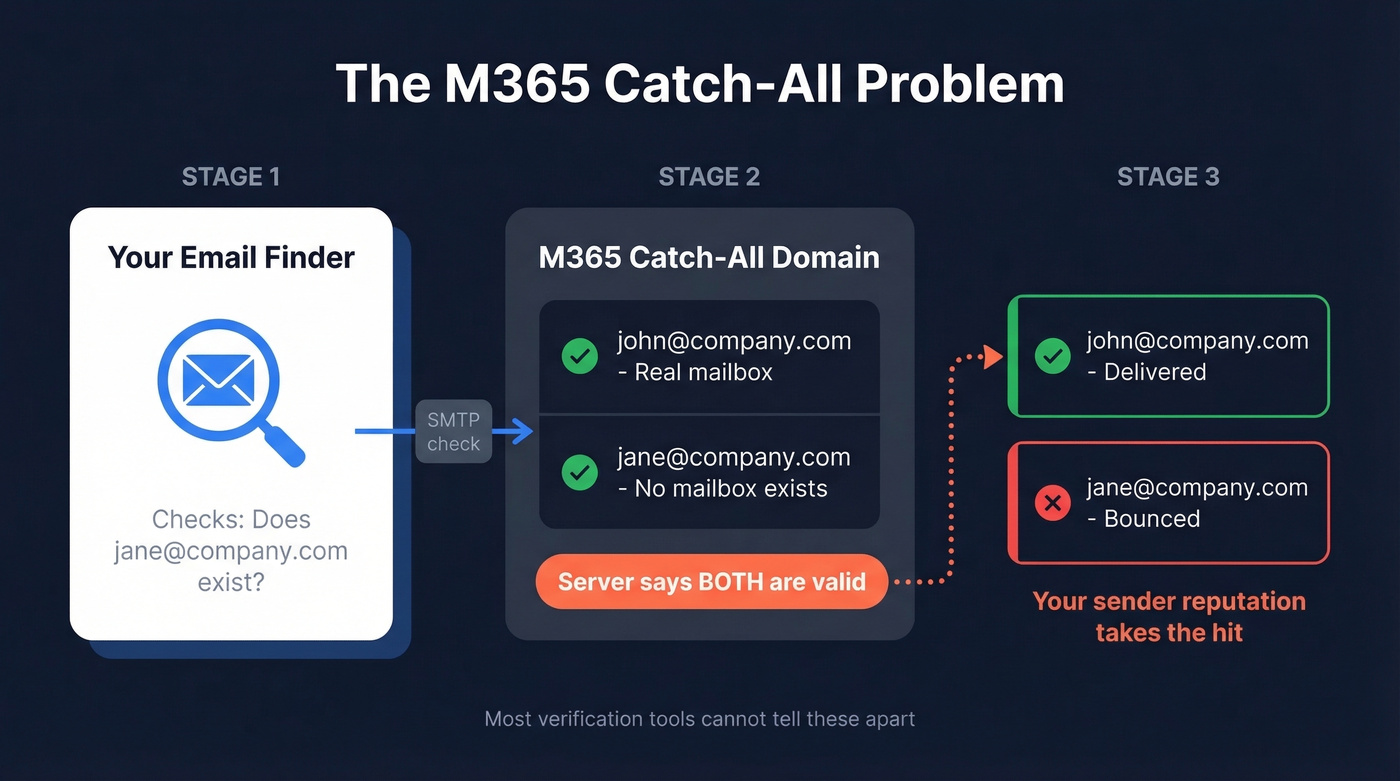
The Graph API isn't a public "does this mailbox exist anywhere on Microsoft" endpoint either. Calls like /users/{UPN} only return results for Azure AD objects inside your own tenant.
This matters because of catch-all domains. Many enterprise domains accept incoming email at the SMTP level even when the specific mailbox doesn't exist. Your verification tool marks the address as valid, you send your sequence, and it bounces. Your domain reputation takes the hit. We've seen teams burn through sender domains in weeks because they trusted a "valid" result on a catch-all M365 tenant. If you want the mechanics, start with how to check if an email exists and then compare email reputation tools before scaling volume.

Most email finders choke on M365 catch-all domains - flagging invalid mailboxes as "valid" and torching your sender reputation. Prospeo's 5-step verification resolves catch-all addresses other tools can't, with 98% accuracy across 300M+ profiles refreshed every 7 days. Teams using Prospeo on enterprise M365 lists cut bounce rates from 35% to under 4%.
Stop guessing on catch-all domains. Verify 75 M365 emails free.
Best Tools for Finding M365 Emails
No single tool solves the M365 catch-all problem perfectly. But some handle it dramatically better than others.
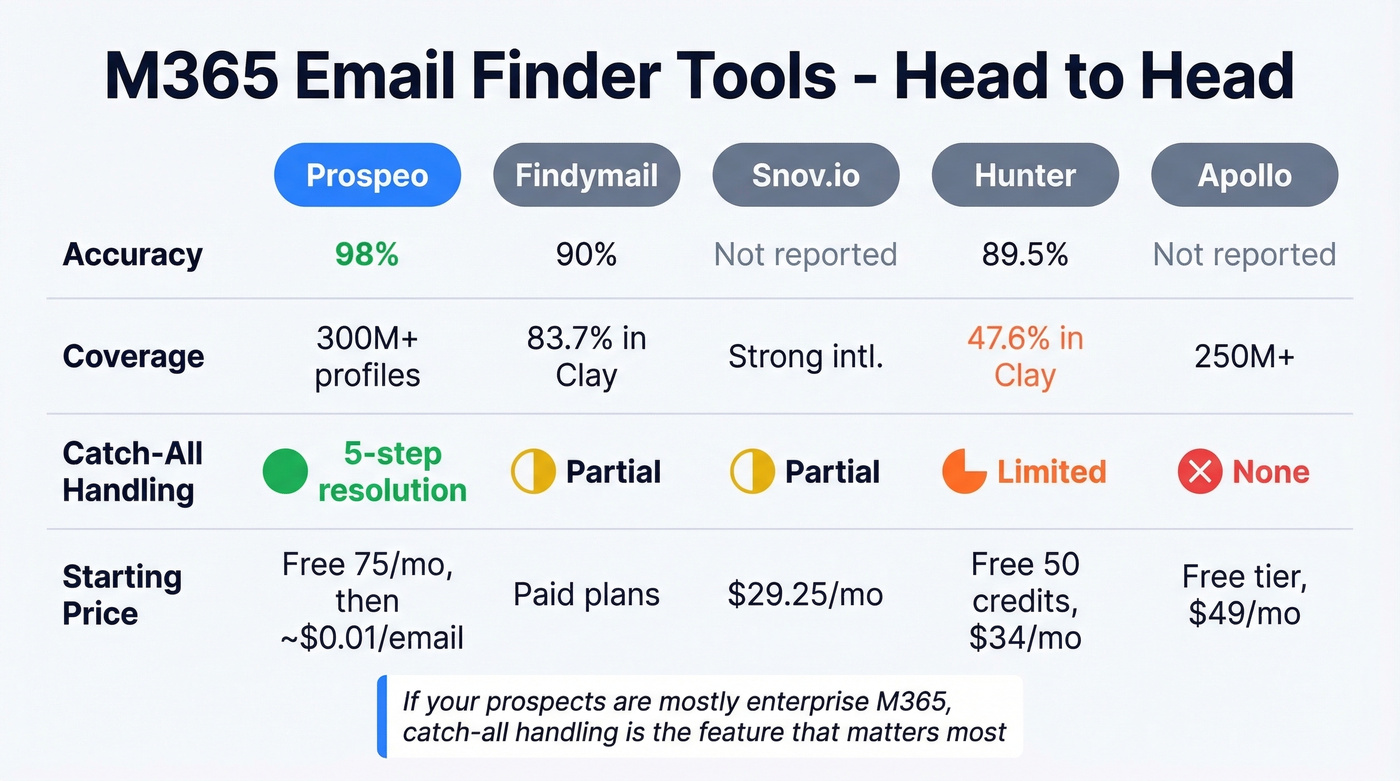
Here's the thing: if your total addressable market is mostly enterprise (read: mostly M365), catch-all handling isn't a nice-to-have. It's the single feature that determines whether your outbound program works or craters your domain. If you're building a full stack, see our breakdown of SDR tools and sales prospecting techniques.
| Tool | Accuracy | Coverage | Catch-All Handling | Pricing |
|---|---|---|---|---|
| Prospeo | 98% | 300M+ profiles | ✅ 5-step | Free 75/mo; ~$0.01/email |
| Findymail | 90.05% | 83.73% in Clay | Partial | Paid plans available |
| Snov.io | - | Intl. strength | Partial | ~$29.25/mo (1,000 credits) |
| Hunter | 89.56% | 47.62% in Clay | Limited | Free 50 credits; Starter $34/mo |
| Apollo | - | 250M+ | ❌ | Free tier; paid from ~$49/mo |
Prospeo
Prospeo's 5-step verification directly addresses the M365 catch-all problem. Where most tools flag catch-all domains as "risky" and leave you guessing, Prospeo resolves them - spam-trap removal, honeypot filtering, and catch-all handling are all part of the verification pipeline. It uses proprietary email-finding infrastructure rather than relying on third-party providers, which is why accuracy holds at 98% even on notoriously difficult Exchange Online domains.
The database covers 300M+ professional profiles refreshed on a 7-day cycle versus the six-week industry average. In our testing, we've seen bounce rates drop from 35%+ to under 4% on enterprise M365 domains - the kind of difference that keeps your sender domain off blocklists. If you're troubleshooting bounces, use our email bounce rate guide and the full email deliverability guide before you scale.
Meritt, one of Prospeo's customers, reported tripling their pipeline from $100K to $300K/week after making that switch.
Pricing is credit-based at ~$0.01 per email, no contracts. The free tier gives you 75 emails per month - enough to test whether it handles your target accounts before committing.
Findymail
Findymail hits a strong balance between quality and coverage. Clay's benchmark data puts it at 90.05% data quality with 83.73% coverage - one of the best combined scores in that ecosystem. Dropcontact's benchmark (Feb 2026, 20,000 real contacts) showed 39.9% effective enrichment with 1.1% hard bounces and 5.2% wrong-domain matches. For a broader view, compare data enrichment services and lead enrichment.
Use this if you're already deep in Clay's ecosystem. Skip it if catch-all resolution is your primary need - Findymail's handling is partial, and on heavy M365 prospect lists, that gap shows up fast.
Snov.io
If your prospect list spans EMEA and APAC, not just the US, Snov.io tends to outperform US-centric tools. It gets consistent praise on r/agency for international coverage and built-in automation. Starter pricing is $29.25/mo for 1,000 credits.
Hunter
Strong verification engine, small database. Clay's data shows 89.56% quality but only 47.62% coverage - better as a verification layer than a primary finder. Hunter's free tier gives 50 credits/month; Starter is $34/mo billed yearly. If you're comparing options, see our list of Hunter alternatives.
Apollo
Largest database in the space at 250M+ contacts, but Reddit users consistently flag data decay. "Lots of bounces on older contacts" is the recurring complaint on r/sales. Free tier available, paid from ~$49/mo. Useful for initial list building, but run everything through a dedicated verification tool before sending.
Free Methods That Work
Not ready to pay? These manual approaches can surface M365-hosted emails without a subscription:
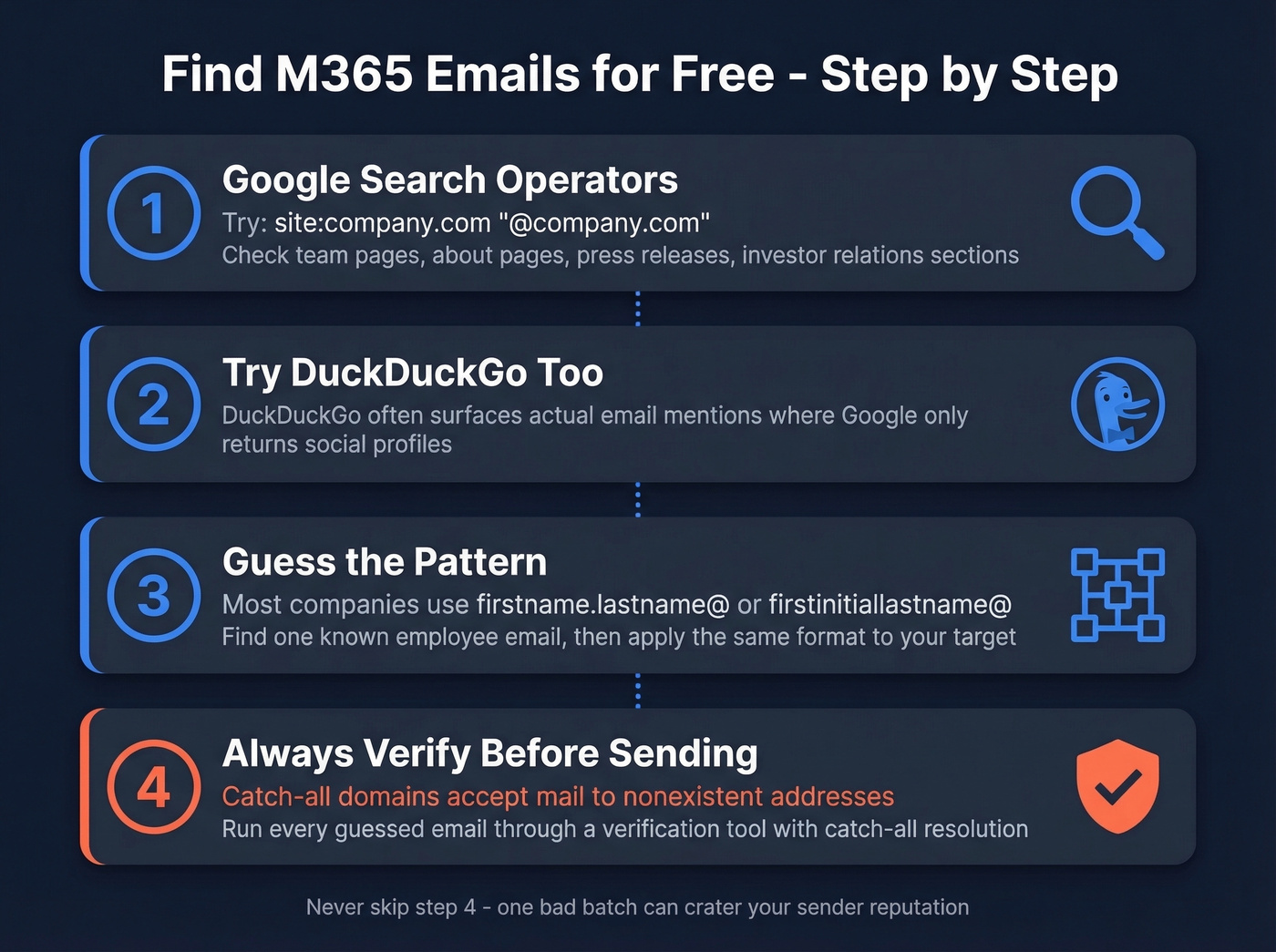
Google operators are your best friend here. Search site:company.com "@company.com" to find published addresses on a company's domain. Team pages, about pages, and investor relations sections often list leadership emails directly. Press releases on wire services frequently include media contact emails in the full text - people forget those are indexed. If you want more no-cost options, start with free lead generation tools.
Pattern guessing works more often than you'd think. Most companies use firstname.lastname@domain.com or firstinitiallastname@domain.com. Check a few known employees' email formats on the company's public pages, then apply the pattern to your target contact. For a more systematic approach, see name to email.
One underrated trick: try DuckDuckGo. It often surfaces actual email mentions where Google returns social profiles instead.
But never send to a guessed email without verifying it first. Catch-all domains will happily accept mail to nonexistent addresses - right up until your sender reputation craters.
Verify Before You Send
Verification matters more for M365 domains than any other provider, precisely because catch-all configurations mask invalid addresses. Your tool says "valid," you send 500 emails, and 80 bounce because the mailboxes don't exist. That's how domains end up on blocklists.
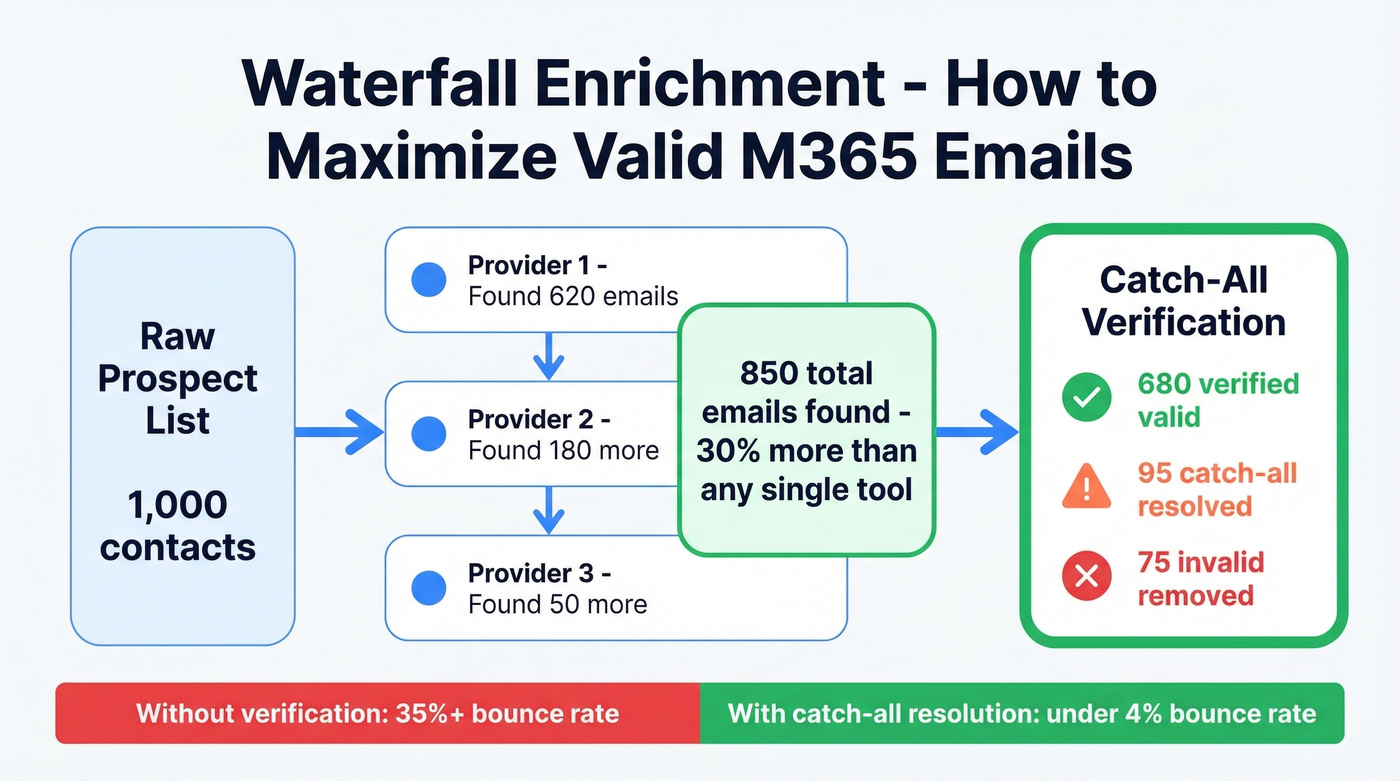
The smartest approach is waterfall enrichment - running contacts through multiple providers sequentially. In our experience, this yields roughly 30% more valid emails than relying on any single tool. Run your final list through a verification step that actually resolves catch-all domains rather than just flagging them as "risky." Whatever tool you choose, make sure catch-all resolution is part of the pipeline - not just a warning label. If you're sending at scale, also watch email velocity to avoid deliverability cliffs.
Since no official Microsoft email finder exists, your best bet is pairing a high-accuracy third-party tool with disciplined verification. Enterprise M365 domains will always be trickier than Gmail or generic SMTP setups. Plan your stack accordingly.
Enterprise prospects live on Microsoft 365. If your finder can't handle catch-all domains, you're burning sender domains instead of booking meetings. Prospeo's proprietary infrastructure verifies M365 emails at $0.01 each - no third-party providers, no contracts, no guesswork.
Your M365 prospect list is only as good as your verification. Test it free.
FAQ
Is there an official Microsoft email finder tool?
No. Microsoft doesn't offer any tool to look up external email addresses - not in Outlook, not through the Graph API. The Graph API's /users endpoint only returns Azure AD objects inside your own tenant. For prospecting, you need a third-party email finder with M365 catch-all handling.
Can I use PowerShell to find M365 emails?
Only within your own organization. Commands like Get-EXORecipient search recipients and aliases inside your tenant - useful for IT admins, useless for sales prospecting. External email discovery requires dedicated tools with SMTP-level verification.
Which email finder handles catch-all domains best?
Prospeo's 5-step verification resolves catch-all addresses that other tools mark as "risky" or "unknown." This matters most for enterprise M365 tenants, where catch-all configurations are common. Customers report bounce rates dropping from 35%+ to under 4% after switching.