

Name2Email Review: Find Email by Name for Free in 2026
Name2Email can help you generate a lot of email guesses fast. But here's the thing - if you send unverified guesses at scale, bounces pile up, your sender reputation takes a hit, and your sequences start landing in spam. That's the reality of pattern-guessed emails, and it's the story Name2Email's 80,000 users don't hear before installing.
With a 3.53 out of 5 rating across 251 Chrome Web Store reviews, the extension has fans. The core problem is simple, though: pattern guessing isn't email verification, and the difference will cost you deliverability.
What Is Name2Email?
Name2Email is a free Chrome extension built by Reply.io. It works inside Gmail's compose field - you type a first name, last name, and company domain (starting with @) into the "To:" line, and the extension generates a list of possible email addresses based on common naming patterns. Addresses it considers "valid" get highlighted in green, which the extension treats as a confidence signal.
For anyone trying to find a person's email by name without paying for a database, it's an appealing starting point. It's on version 3.1.6, last updated in early 2025.
How the Extension Works
The workflow is straightforward:
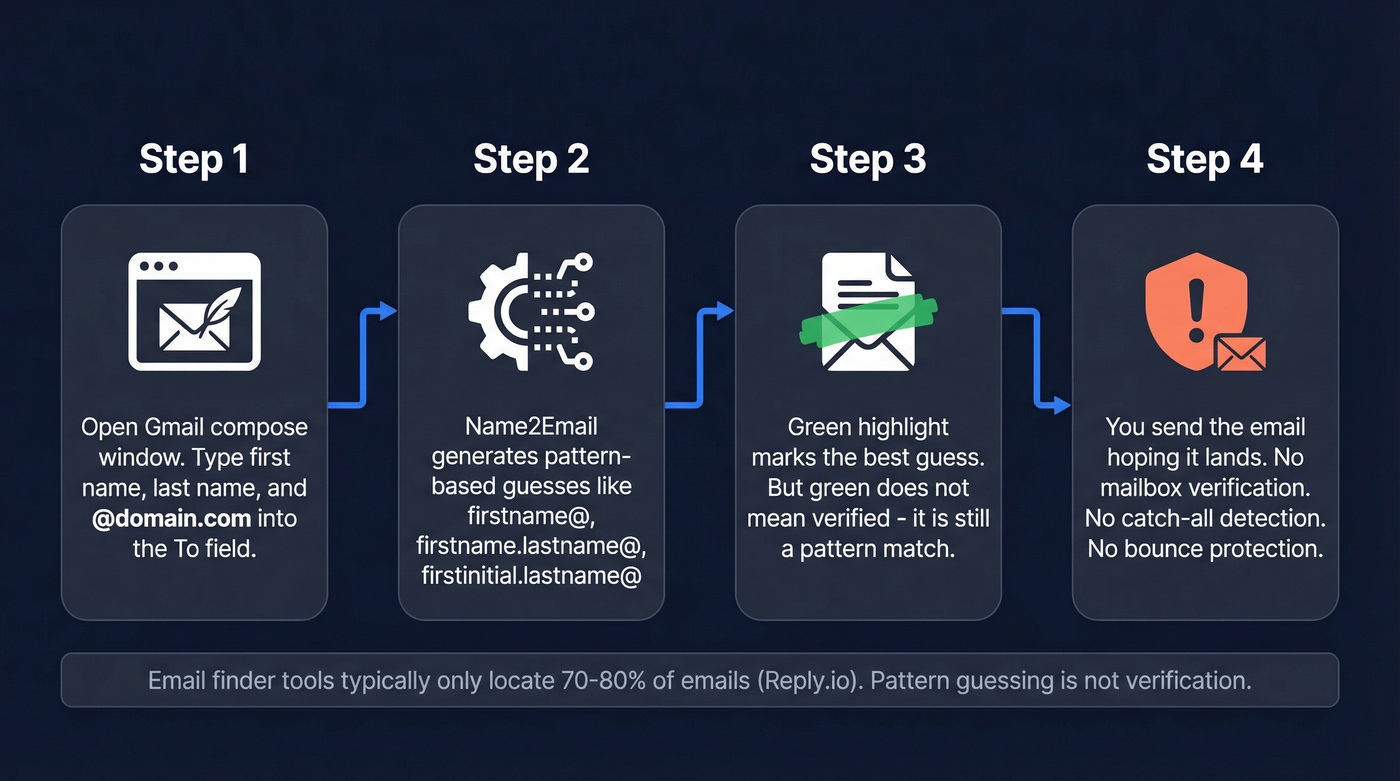
- Open Gmail and start a new compose window. Type the person's first name, last name, and
@domain.cominto the "To:" field. - Name2Email generates pattern-based guesses. Think
firstname@,firstname.lastname@,firstinitial.lastname@- the standard corporate formats. - Green highlight = the extension's best pick. Helpful hint, but not the same as verifying the mailbox exists.
- Check Gmail's profile card (if available). Hovering over a guessed address sometimes shows a Google profile card - but that's a Gmail feature, not a dedicated verification step.
Reply.io's own guide acknowledges that typical email finder tools only locate 70-80% of emails. The important nuance: a "green" suggestion is still a guess based on patterns, and catch-all domains can make guesses look "accepted" even when the specific inbox isn't real or monitored.
Where Name2Email Falls Short
The 3.53 rating tells part of the story. The reviews tell the rest.
The extension often stops working after Chrome updates - a recurring complaint across user reviews. One reviewer put it bluntly: "Confirmed IDs (green BG) are only sometimes correct." That's a problem when you're building outbound lists. We've seen this pattern ourselves: tools that rely on browser-level hacks tend to break every few months, and you don't always notice until your bounce rate spikes.
Here's what the tool still doesn't do well for serious outbound:
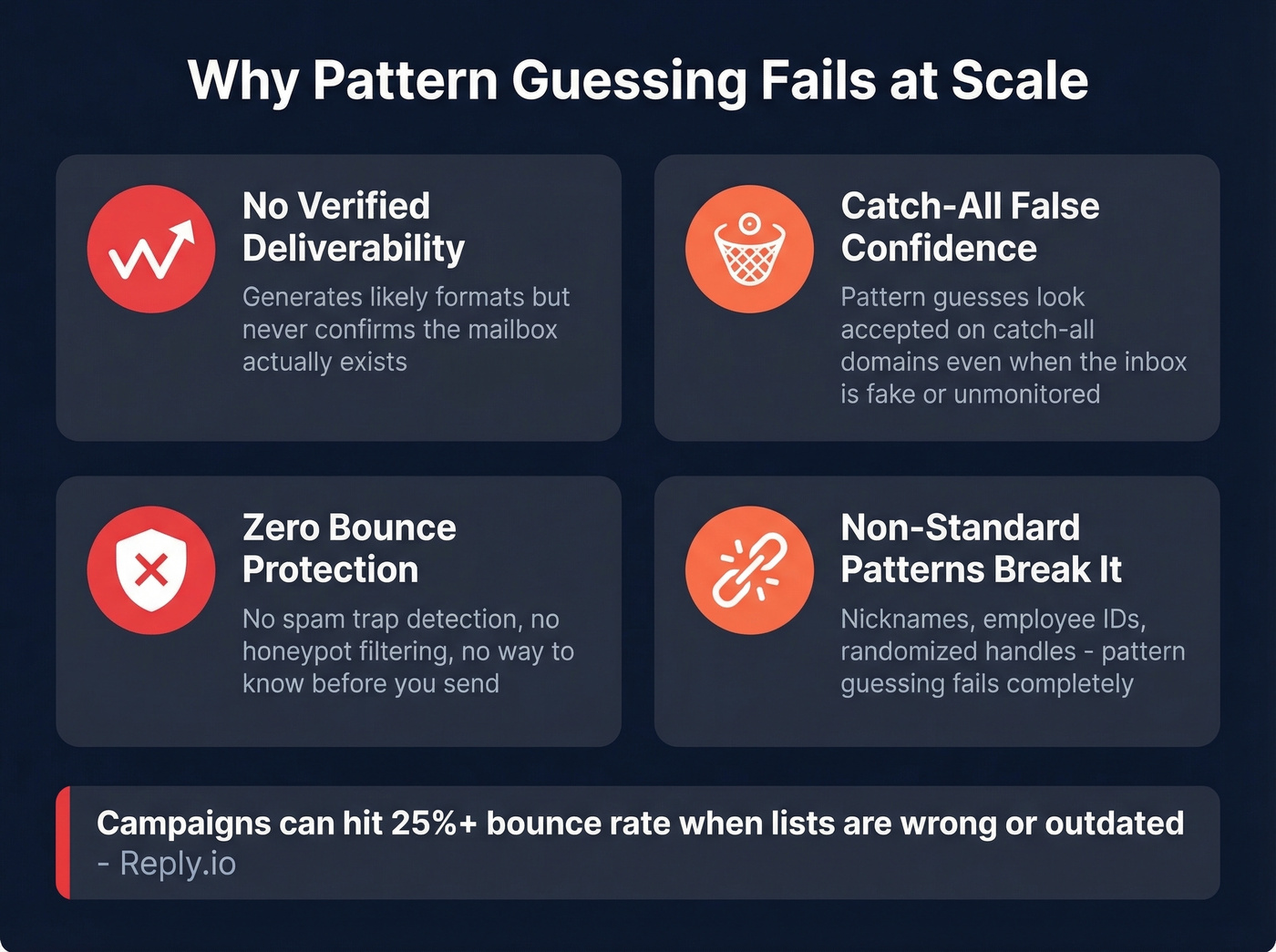
- No verified deliverability. It generates likely formats; it doesn't guarantee the mailbox exists. (If you need a deeper workflow, see How to Check If an Email Exists.)
- Catch-all domains create false confidence. Pattern guesses can look "good" while still being the wrong address.
- No protection from bad addresses. If you care about avoiding traps and junk data, you need a verification-first workflow (including spam-trap removal).
- Non-standard patterns break it. Companies using nicknames, employee IDs, or randomized handles? Pattern guessing fails completely.
Reply recommends aiming for roughly 5% bounce rate or lower, and notes many campaigns can hit 25%+ bounce when lists are wrong or outdated. Feeding sequences with unverified guesses is playing with fire. (Benchmarks and fixes: Email Bounce Rate.)

Pattern guessing gives you email formats. Prospeo gives you verified inboxes. Every email runs through 5-step verification with catch-all handling, spam-trap removal, and honeypot filtering - 98% accuracy on 300M+ profiles. Your free tier includes 75 verified emails per month, no credit card required.
Stop guessing emails by name. Start finding ones that actually land.
When Pattern Guessing Is Enough
For quick, one-off lookups on companies with standard naming conventions like firstname.lastname@company.com, Name2Email can be a decent shortcut.
One Reddit user in r/clinicalresearch, discussing cold email strategies for job hunting, called it the tool with "best results and fastest UX" compared to Hunter and Skrapp for casual cold emailing. The key word there is "casual." If you're sending a handful of emails a week, this extension can save time. If you're running outbound sequences at any real volume, unverified guessing becomes a liability fast. (For a safer playbook, see Cold Email Marketing.)
Better Free Alternatives for 2026
Here's what you actually get for free across the tools worth considering:
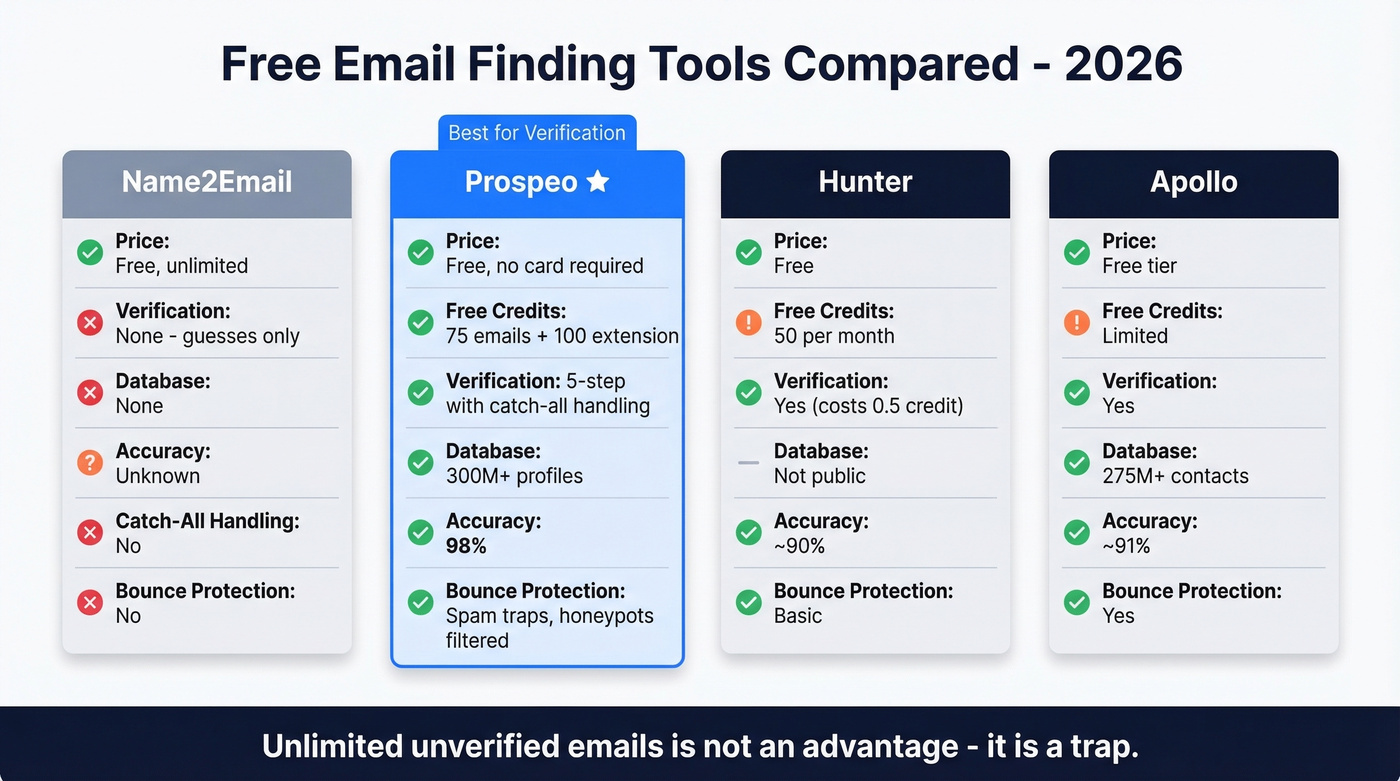
| Tool | Free Tier | Free Credits | Verification | Database | Accuracy |
|---|---|---|---|---|---|
| Prospeo | Free (no card) | 75 emails + 100 extension credits | 5-step, catch-all | 300M+ profiles | 98% |
| Hunter | Free | 50 credits | Yes (0.5 credit) | Not public | ~90% |
| Apollo | Free tier | Limited | Yes | 275M+ contacts | ~91% |
| Name2Email | Free, unlimited | Unlimited | No - guesses only | None | Unknown |
Prospeo wins on verification and accuracy. Hunter wins on ecosystem polish. Name2Email wins only on unlimited volume - but unlimited unverified emails isn't an advantage. It's a trap. (More options: Best Email ID Finder Tools.)
Prospeo
Every email Prospeo returns runs through 5-step verification with catch-all handling, spam-trap removal, and honeypot filtering - all powered by proprietary infrastructure, not third-party email providers. The free tier gives you 75 verified emails per month plus 100 Chrome extension credits, no credit card required. The database covers 300M+ professional profiles with 98% email accuracy on a 7-day refresh cycle. Paid plans start at roughly $0.01 per email with no contracts.
In our experience testing against pattern-guessed lists, the difference in bounce rates is dramatic. One of Prospeo's customers, Stack Optimize, maintains 94%+ deliverability and under 3% bounce across all their clients - the kind of numbers you simply can't hit with unverified guesses. (If you're troubleshooting deliverability, use this Email Deliverability Guide.)
Hunter
Skip Hunter if you need volume. Stay if you want a polished ecosystem. Hunter's free plan gives you 50 credits per month, with verification costing half a credit per check. You get a Chrome extension, a Google Sheets add-on, and basic sequences with one connected email account.
The consensus on r/sales is that Hunter's free tier is well-regarded but the 50-credit limit burns through fast when you're verifying guessed emails. Paid plans run $49/mo (Starter), $149/mo (Growth), and $299/mo (Scale). (If you're comparing options, see Hunter Alternatives.)
Apollo - Overkill for Email Finding
Let's be honest: if you just need to locate an email address by name, Apollo is the wrong tool. It's a full sales platform - sequences, CRM, dialer, the works - that happens to include email finding. The database runs 275M+ contacts with roughly 91% accuracy in third-party testing. Paid plans start around $49/user/month on annual billing. Great for teams that need the whole prospecting stack. Skip it if you're replacing a Chrome extension. (For more database-first options, see Best Sales Prospecting Databases.)
Free Methods Without Tools
You can search for email addresses manually with Google operators:
site:companywebsite.com "John Smith" email
site:companywebsite.com "firstname.lastname@companyname.com"
Combine that with common pattern guessing - firstname@, firstname.lastname@, firstinitial.lastname@ - and you've got a decent starting point. But always verify any guessed email with a verification tool before sending. A single bounced email to a spam trap can tank your domain for weeks. (More methods: Name to Email.)
The Bottom Line
Name2Email's "unlimited free" positioning is actually its biggest weakness. Unlimited unverified guesses train you to skip the step that matters most - verification. You'd genuinely be better off with 75 verified emails than 500 guesses.
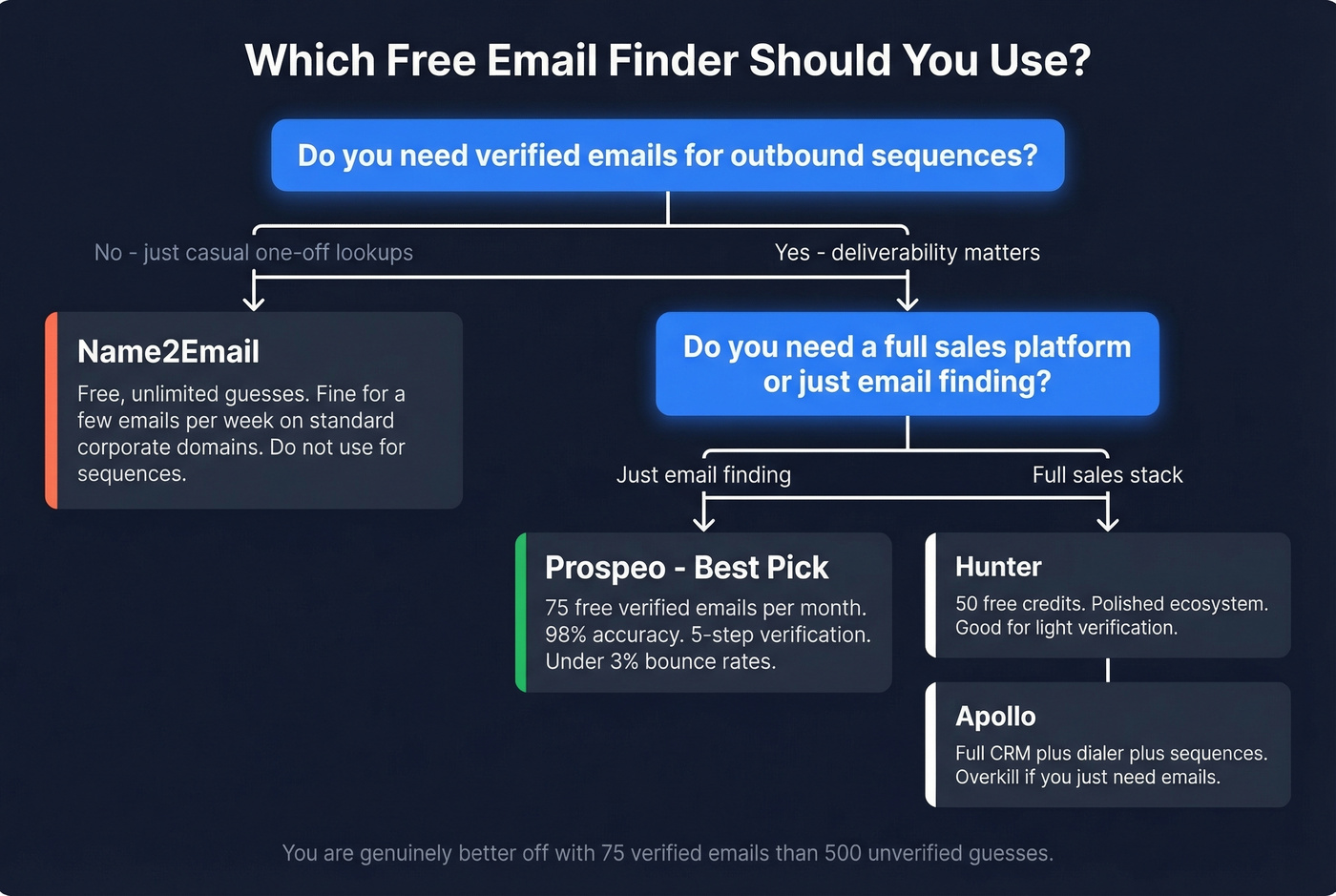
Name2Email is fine for casual one-off lookups, but it's a relic of a time when pattern guessing was the best way to find email by name for free. That era is over. Free tiers with real verification exist now, and there's no reason to risk your sender reputation on unverified guesses. (If you're trying to fix domain health, see How to Improve Sender Reputation in 2026.)
If your deliverability matters, here's our ranking: Prospeo's free tier first (75 verified emails/month with full verification), Hunter's free plan second (50 credits/month), and Name2Email as a last resort for quick guesses on standard corporate domains.
Name2Email's unlimited guesses sound great until your bounce rate hits 25% and your domain reputation tanks. Prospeo's customers maintain under 3% bounce rates because every email is verified before it reaches your list - refreshed every 7 days, not pattern-matched and hoped for the best.
Find any email by name with proof it exists - not a guess that it might.