

Outreach + Gmail: Setup Guide & Best Tools (2026)
"Outreach Gmail" means one of two things: you're connecting Outreach.io's sales engagement platform to your Gmail inbox, or you want to send cold outreach directly from Gmail without enterprise software. We've helped teams set up both approaches, and the right path depends entirely on your stack and budget.
Here's how to get either one running.
The Quick Version
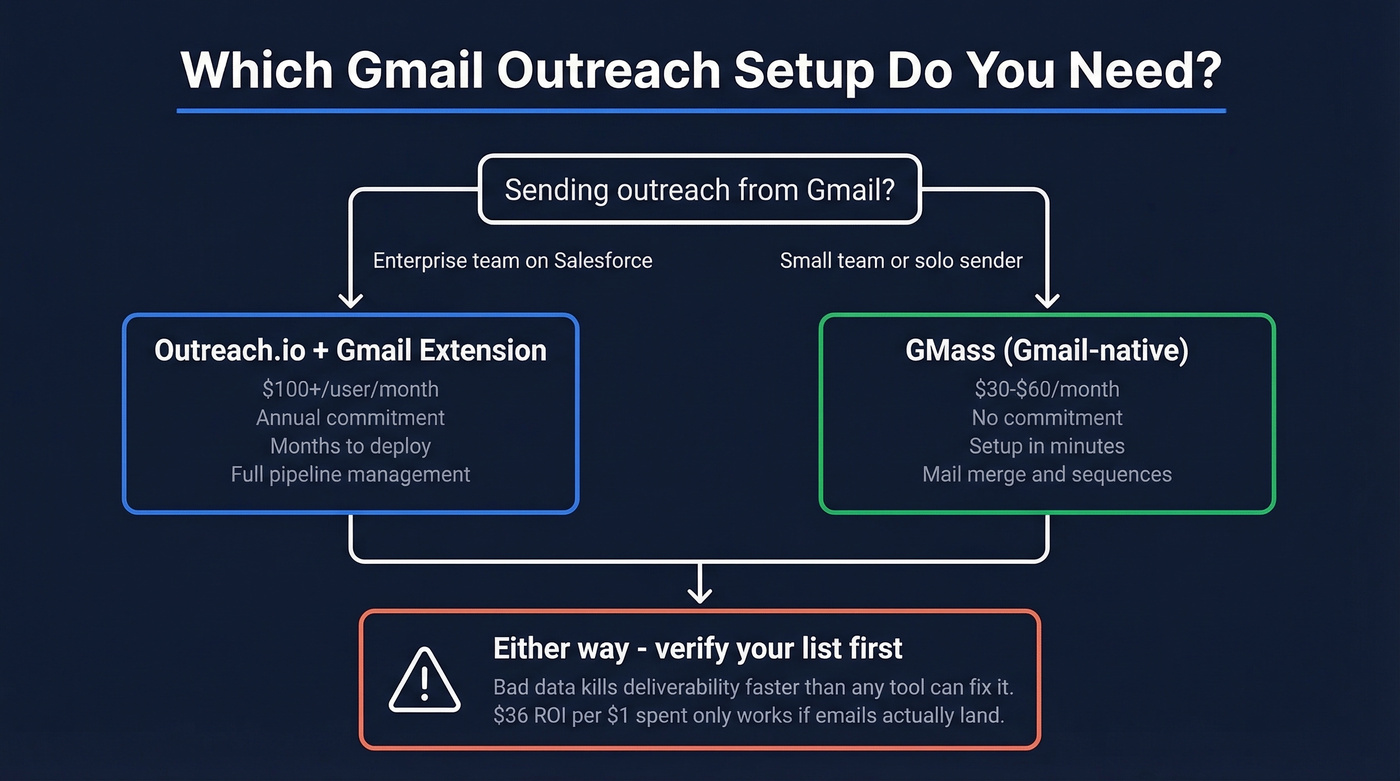
- Enterprise team on Salesforce? Outreach.io's Gmail extension works, but pricing is quote-based and typically starts around $100+/user/month with an annual commitment - and deployments can take months.
- Simple Gmail-native outreach? GMass handles mail merge, sequences, and A/B testing without leaving your inbox. $30--$60/month.
- Before you send anything: Verify your list first. Bad data kills deliverability faster than any tool can fix it. Cold email still returns $36 for every $1 spent - but only if your emails actually land.
Outreach.io's Gmail Integration
Use this if you're already paying for Outreach.io and need reps working inside Gmail instead of tab-switching to the Outreach dashboard. The Outreach Everywhere Chrome extension lets you create prospects, add recipients to sequences, insert templates and snippets, track opens and clicks, and sync activity back to Salesforce or Microsoft Dynamics 365 - all from your Gmail window.
Skip this if sending emails from Gmail is your primary use case. At roughly $100/user/month with an annual commitment paid upfront, plus implementation costs that can run into five figures depending on team size and scope, you're paying for pipeline management, analytics, and workflow features you'll never touch if all you want is cold email from Gmail. Setup alone can take months with an implementation team.
The extension itself is solid once it's running. But you need a paid Outreach license to use it, and it's Chrome-only. For teams under 20 reps doing straightforward outbound, the overhead just doesn't make sense.
Gmail-Native Outreach Tools
GMass
GMass is the tool most solo senders and small teams actually use for Gmail-based outreach. It's a Chrome extension that lives inside your Gmail interface - no separate dashboard, no context switching. You build your recipient list in Google Sheets, GMass converts it into a personalized mail merge, and outbound emails appear in your normal Sent folder with replies threading naturally.

The feature set punches above its price: A/B testing, automated follow-up sequences, reporting, and a Spam Solver that tests whether your email lands in inbox, promotions, or spam. If you're hitting Gmail's sending limits, GMass can route emails through an external SMTP server. One thing to know - GMass doesn't have a built-in lead finder, so you'll need a separate tool like Prospeo's Email Finder to build and verify your list before importing.
Pricing runs Standard at $29.95/month, Premium at $39.95/month, Professional at $59.95/month. Annual billing drops those to $249--$599/year. There's a free trial that lets you send 50 emails/day to test the workflow.
Woodpecker
Woodpecker takes a different approach. Starting at $37/month with a free trial available, it focuses specifically on cold email with built-in deliverability controls. It sends via SMTP rather than living inside Gmail, so you're working in Woodpecker's interface, not your inbox. There's no Chrome extension - it's a standalone platform. Pick Woodpecker if you want granular deliverability controls and don't mind leaving Gmail to manage campaigns.

GMass and Woodpecker send your emails - but they can't fix bad data. Prospeo's 5-step verification catches spam traps, honeypots, and catch-all domains before they tank your sender reputation. At $0.01 per verified email, it costs less than a single bounced message costs your domain.
Verify your entire Gmail outreach list in minutes, not hours.
Sending Limits & Deliverability
This is where most Gmail outreach setups break. Google enforces hard limits and increasingly aggressive spam filtering, and the rules have only gotten stricter heading into 2026.
| Account Type | Daily Limit | Mail Merge Limit |
|---|---|---|
| Free Gmail | 500 emails | 500 |
| Google Workspace | 2,000 emails | 1,500 |
Google can adjust enforcement at any time, so check the latest limits in your Workspace admin console. If you need a deeper breakdown of safe ramping, see our guide to email velocity.
Rules that'll get you blocked:
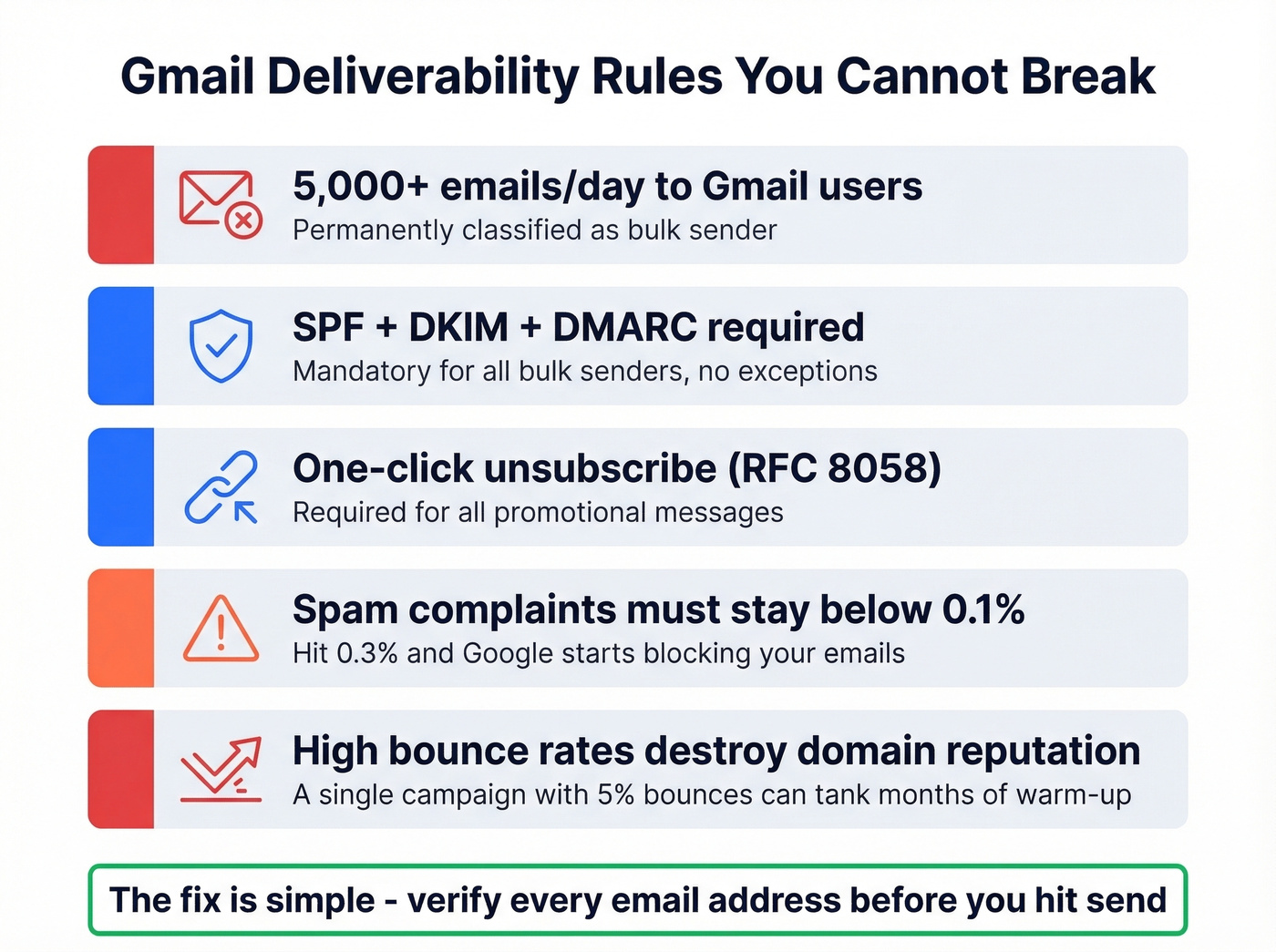
- Send 5,000+ emails/day to personal Gmail accounts and you're permanently classified as a bulk sender (see our bulk sender threshold explainer)
- For bulk sending, SPF + DKIM + DMARC alignment is required (here’s a practical guide to DMARC alignment)
- One-click unsubscribe (RFC 8058) is mandatory for promotional messages
- Keep spam complaints below 0.1% - hit 0.3% and Google starts blocking
- Non-compliant emails face temporary rate limiting (4.7.x errors) or permanent rejection (5.7.x)
Here's the thing: in our experience, teams that skip email verification burn through sending domains within weeks. A single campaign with a 5% bounce rate can tank a domain that took months to warm up. The sending tool rarely matters as much as the data going into it. If you’re troubleshooting bounces, start with email bounce rate benchmarks and fixes.

Setting Up Gmail for Cold Outreach
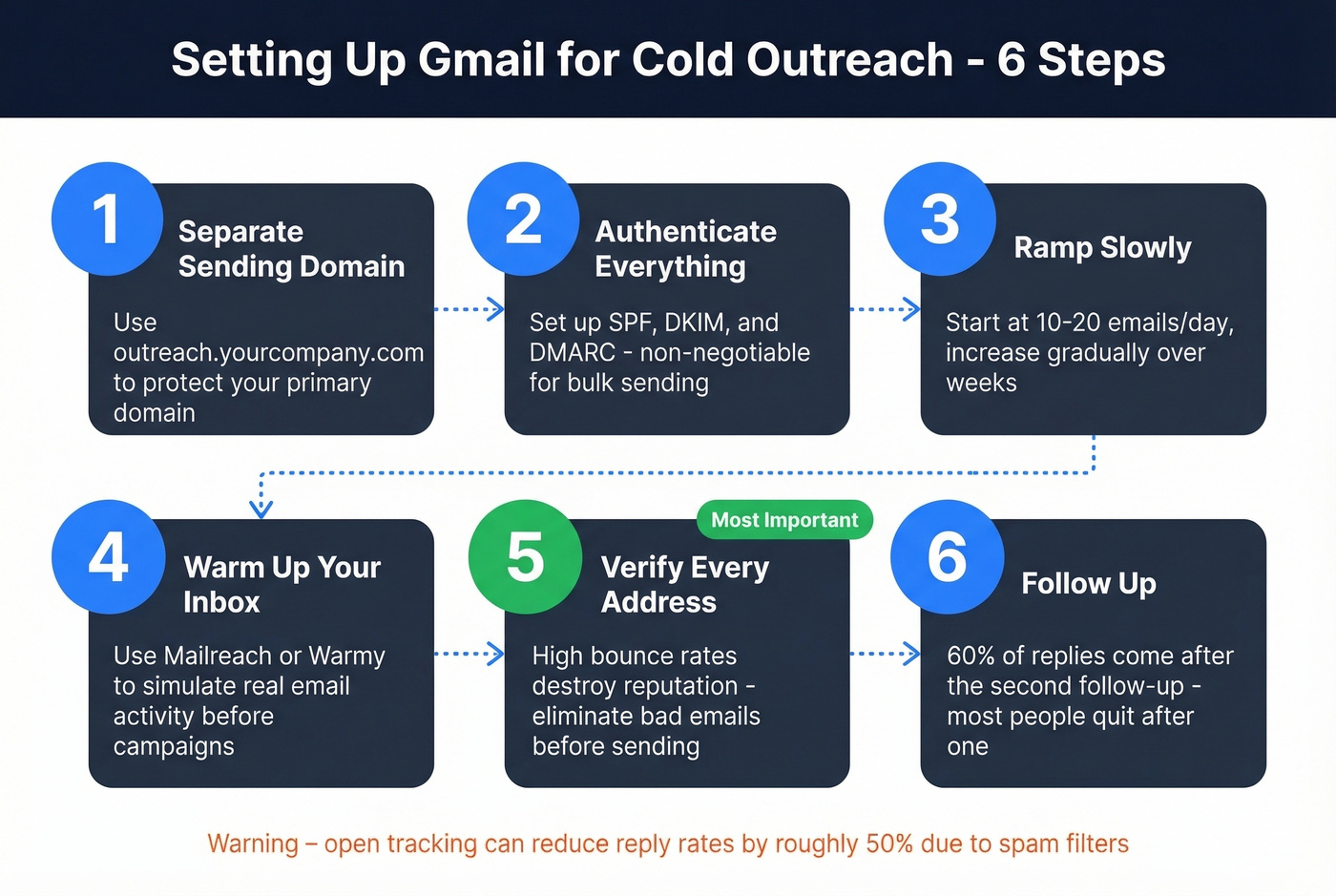
- Use a separate sending domain. Something like
outreach.yourcompany.comprotects your primary domain if things go sideways (and you can also set up a dedicated tracking domain to keep signals clean). - Authenticate with SPF, DKIM, and DMARC. Non-negotiable for deliverability, and required once you're operating as a bulk sender. If you’re unsure your setup is correct, follow how to verify DKIM is working.
- Start at 10 - 20 emails/day and ramp gradually. Jumping to high volume on a fresh domain is the fastest way to land in spam.
- Warm up your inbox. Tools like Mailreach or Warmy simulate real email activity. One practitioner on r/coldemail described warming 33 mailboxes across 11 domains at a max of 3 emails sent/day per inbox during warm-up - that's the level of patience this requires. (If you’re comparing options, see our roundup of email warmup tools.)
- Verify every address before importing. High bounce rates destroy domain reputation. Eliminate them before they start. For a full framework, use our email deliverability guide.
- Follow up. 60% of replies come after the second follow-up. Most people quit after one. If you need copy, grab these cold email follow-up templates.
Let's be honest about something: if your average deal size is under $5K, you probably don't need Outreach.io at all. GMass plus a verified list will outperform a $100/user/month platform that takes three months to deploy.
One more warning we've seen trip up teams repeatedly - open tracking can reduce your reply rate by roughly 50%. The tracking pixel triggers spam filters. Use link click tracking instead, or skip tracking entirely for your first few campaigns while building domain reputation. If you want the technical why, see our deep dive on the email tracking pixel.
Verify Before You Send
This is the step most guides skip, and it's the one that matters most. Once your domain reputation tanks, no warm-up tool or deliverability hack will save you.
Prospeo runs a 5-step verification process - catch-all handling, spam-trap removal, honeypot filtering - and delivers 98% email accuracy. Real results: Meritt saw bounce rates drop from 35% to under 4% after switching their verification workflow. The free tier gives you 75 email verifications plus 100 Chrome extension credits per month, enough to clean a small campaign list before it damages your domain. Paid plans run about $0.01/email, which is negligible compared to the cost of a burned sending domain.
Meritt dropped their bounce rate from 35% to under 4% and tripled pipeline to $300K/week - starting with verified emails. Prospeo delivers 98% email accuracy with data refreshed every 7 days, so your Gmail outreach hits real inboxes, not spam folders.
Stop warming up domains that bad data will burn down anyway.
Tool Comparison
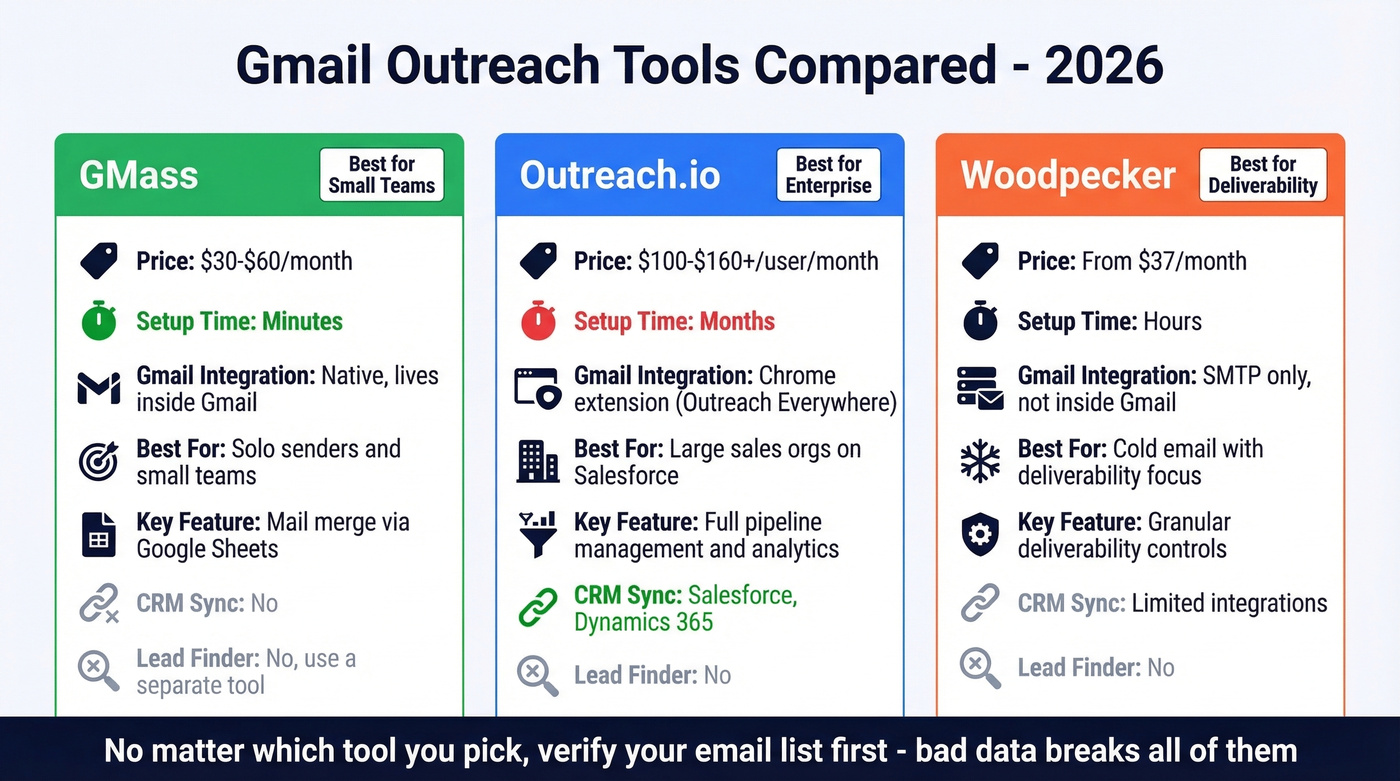
| Tool | Best For | Pricing | Setup | Gmail Integration |
|---|---|---|---|---|
| GMass | Solo & small teams | $30--$60/mo | Minutes | Native (inside Gmail) |
| Outreach.io | Enterprise + Salesforce | ~$100--$160+/user/mo | Months | Chrome extension |
| Woodpecker | Cold email deliverability | From $37/mo | Hours | SMTP (not in Gmail) |
FAQ
Can I do cold outreach from a free Gmail account?
Yes, but you're capped at roughly 500 emails/day with no SPF/DKIM/DMARC authentication. For serious outreach, Google Workspace gives you authenticated sending and higher daily limits around 2,000 emails/day - essential for maintaining deliverability at scale.
Is Outreach.io worth it just for Gmail?
Not really. At ~$100/user/month with annual commitment and months of setup, it's overkill if sending from Gmail is your primary use case. GMass handles mail merge, sequences, and A/B testing for $30--$60/month with setup in minutes. Outreach.io makes sense when you need full pipeline management and CRM sync across a large sales org.
How do I avoid landing in spam?
Authenticate your domain (SPF, DKIM, DMARC), keep spam complaints below 0.1%, start at 10 - 20 emails/day and ramp gradually, and verify every email address before sending. That last step is the one people skip, and it's the one that causes the most damage.
What's the difference between Outreach Everywhere and GMass?
Outreach Everywhere connects Outreach.io's full sales engagement platform to Gmail - sequences, CRM sync, pipeline management - and requires a paid Outreach license. GMass is a lightweight Gmail add-on for personalized mass emails via Google Sheets. Five-person team doing outbound? GMass. Fifty-person org on Salesforce? Outreach.io.