


PandaDoc Pricing, Reviews, Pros & Cons: An Honest 2026 Breakdown
Your sales manager asked you to evaluate PandaDoc. You've spent 20 minutes on the pricing page trying to figure out if it's $19 or $35. The discount banner says "save 46%" in one spot and "save 34%" in another. For a company that sells document clarity, the pricing page is a mess.
Here's a full breakdown so you can decide without the runaround.
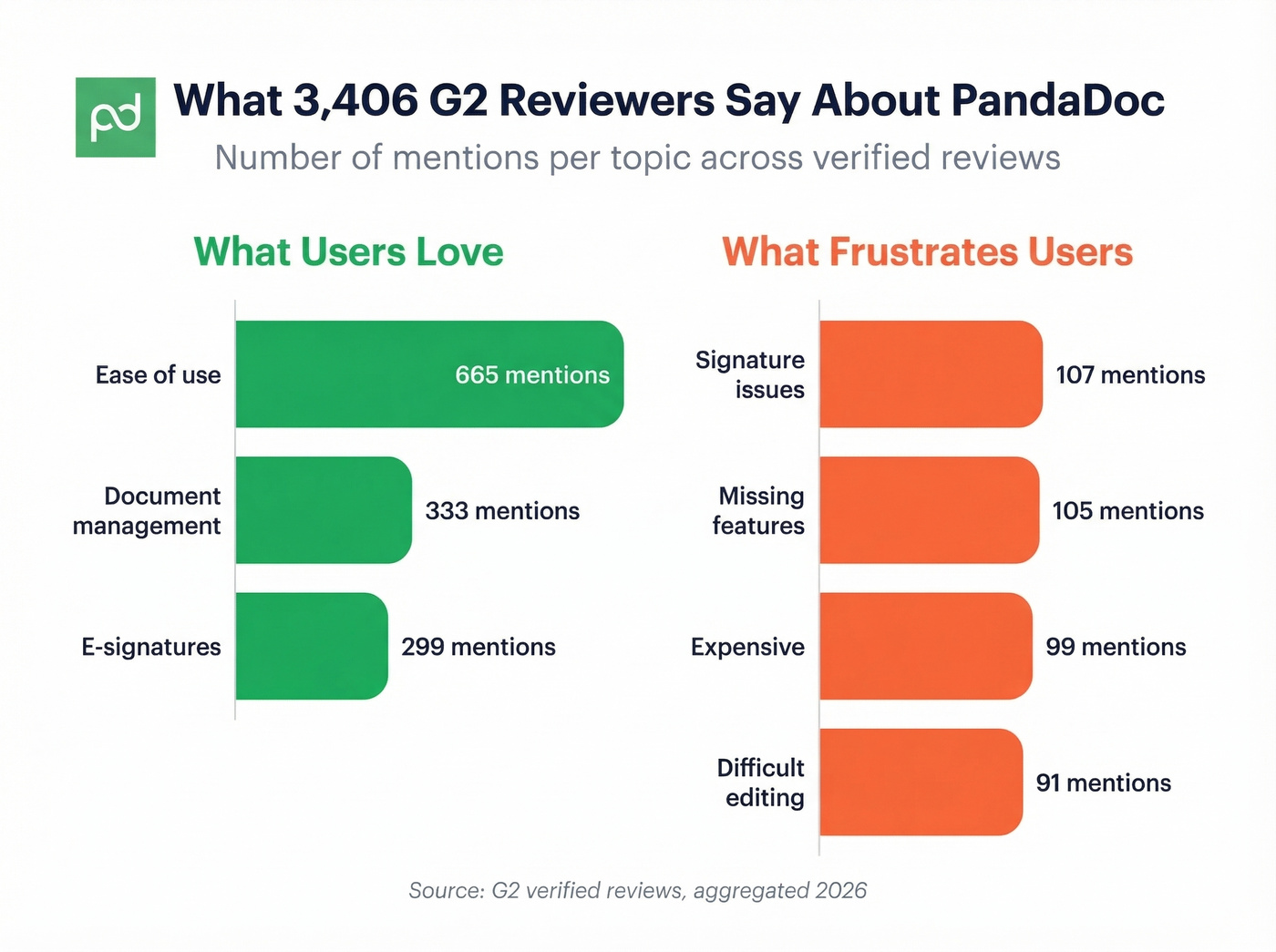
Quick verdict: PandaDoc scores a 4.7/5 on G2 across 3,406 reviews and a 4.6/5 on Gartner Peer Insights - and genuinely earns it for proposal-heavy sales teams. PandaDoc's own review page gives its support a 5/5, while G2 reviews include 107 mentions of signature issues and phone support is a paid add-on. Best for teams sending 10+ proposals a month. Skip it if you only need signatures - you'll overpay.
PandaDoc Pricing Breakdown
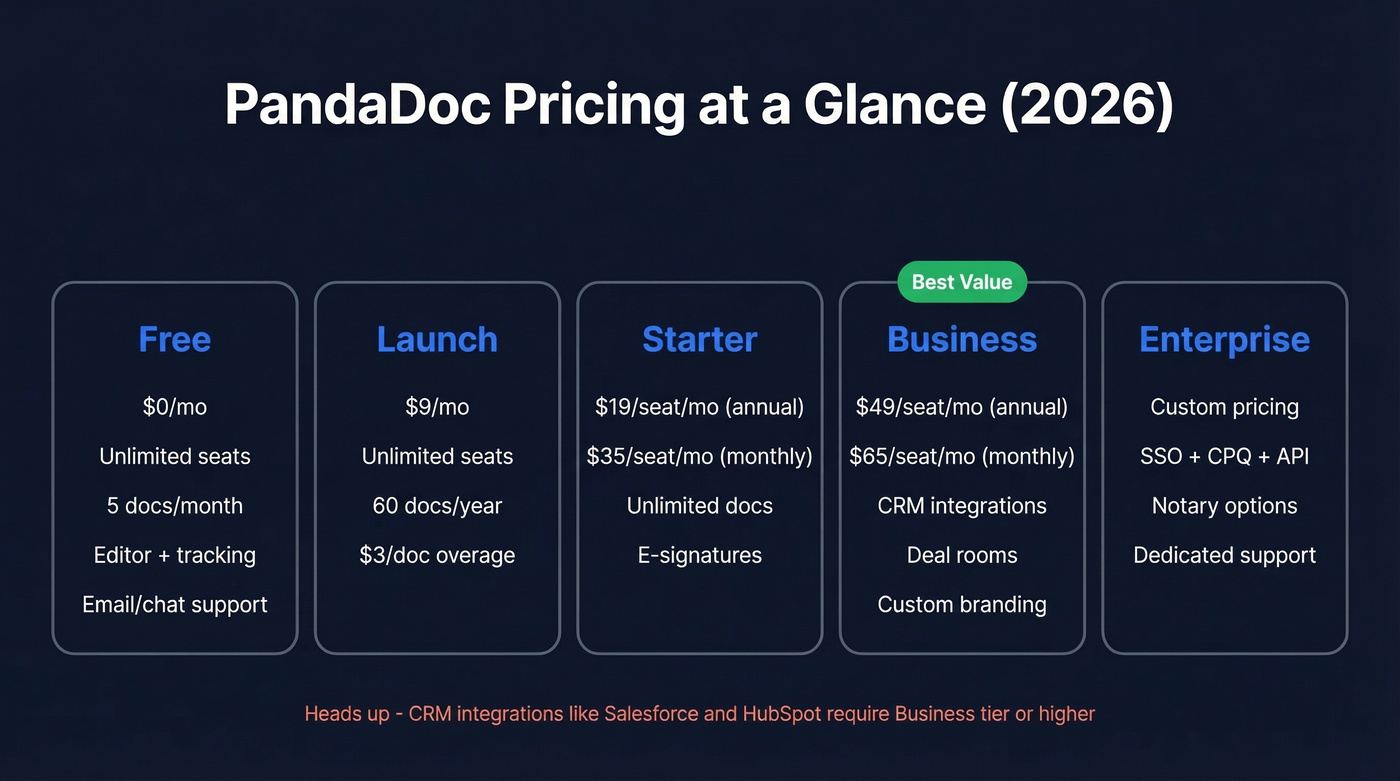
| Tier | Annual Price | Monthly Price | Seats | What You Get |
|---|---|---|---|---|
| Free | $0 | $0 | Unlimited | 5 docs/month (or 60/year - PandaDoc contradicts itself), editor, tracking, 24/7 email/chat support |
| Launch | $9/mo | - | Unlimited | 60 docs/year, $3/doc overage |
| Starter | $19/seat/mo | ~$35/seat/mo | Per seat | Unlimited docs + e-signatures |
| Business | $49/seat/mo | ~$65/seat/mo | Per seat | CRM integrations, deal rooms |
| Enterprise | Custom | Custom | Per seat | SSO, CPQ, API, options like notary |
Why Prices Vary Online
The $19 vs. $35 confusion is simple: $19 is annual billing, $35 is monthly. TrustRadius lists $35 as the starting price because they show the monthly-billed number. PandaDoc's own pricing page shows the annual figure with a toggle that's easy to miss. The discount claim? Their pricing page says "save up to 46%" while their blog says "save up to 34%." Nobody at PandaDoc seems to have noticed.
Enterprise Pricing Reality
Don't take list price at face value. Per Vendr's benchmark data, the median buyer pays ~$16,447/year, and buyers save 26% on average through negotiation. If you're signing an annual Enterprise deal without pushing back, you're leaving money on the table. (If you want a framework, use an anchor and define your walk away point before procurement calls.)
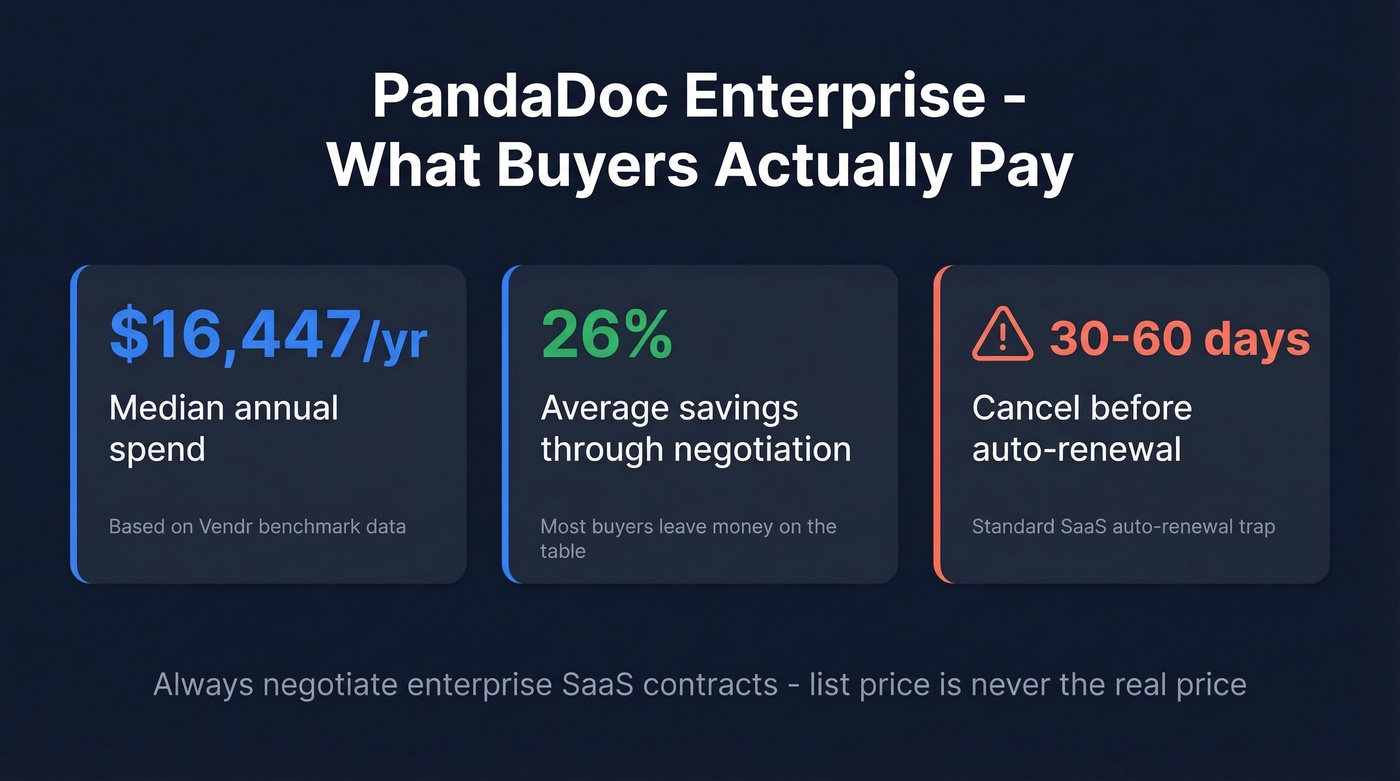
Also expect standard SaaS auto-renewal terms - many vendors require you to cancel 30-60 days before renewal or you roll into another year automatically.
What Users Actually Like
We've tested a lot of proposal tools, and PandaDoc's drag-and-drop editor is genuinely one of the few that works without a training session. Ease of use is the single most cited positive across G2 reviews, with 665 mentions. The real value is combining proposals and e-signatures in one workflow instead of building in Google Docs and signing in DocuSign.
As one r/Sales_Professionals user put it, having everything in one place eliminates the "duct-tape stack" problem entirely. That resonates - we've seen teams running three or four tools to do what PandaDoc handles in one window, and the context-switching cost is brutal when you're sending 15+ proposals a week.
Document management (333 mentions) is another standout. The 1,000+ template library and content locking save hours for teams sending repetitive proposals and SOWs. Real-time tracking - knowing exactly when a prospect opens, views, or signs - gives sales teams visibility that closes deals faster. (If you’re building a process around this, it helps to track funnel metrics and overall pipeline health.) E-signatures (299 mentions) are ESIGN Act and UETA compliant, with support for signing order and recipient verification.

Tracking opens and signatures means nothing if your proposal bounced. 98% of emails found through Prospeo are verified and refreshed every 7 days - so your PandaDoc proposals reach real inboxes, not dead ends.
Stop building proposals for contacts who'll never see them.
What Frustrates Users Most
The cons are just as quantified, and some are surprisingly persistent.
Signature issues top the list at 107 mentions. For a document signing platform, that's not a great look. Missing features come in at 105 mentions - CRM integrations, custom branding, and approval workflows are all gated behind the Business tier. The Starter-to-Business jump is where sticker shock hits hardest.
"Expensive" appears 99 times, especially from small teams who discover the features they need sit behind higher tiers. Difficult editing shows up 91 times - uploading .doc/.docx files creates multi-step formatting friction, and while PDFs work better, that limits flexibility.
Then there's the stuff that'll make you grind your teeth: documents landing in recipients' spam is a recurring complaint, and merge fields like {applicant name} sometimes don't populate, leaving embarrassing placeholders in sent documents. Phone support is a paid add-on even on paid plans, so fixing these issues means waiting on chat or email. (If spam placement is a recurring issue, start with an email deliverability guide and a quick email spam checker.)
Who Should Use PandaDoc
Use it if you're a sales team sending 10+ proposals per month and want templates, tracking, CRM integration, and e-signatures without stitching together three tools. The Business plan at $49/seat is where PandaDoc actually delivers on its promise - budget for it from the start instead of hoping Starter will be enough.
Skip it if you only need e-signatures, you're a solo operator, or you have fewer than 3 seats. We've seen teams waste weeks on Starter before realizing CRM integrations require the $19-to-$49 upgrade. That's the tier-gating trap most discover too late.

Let's be honest about something the proposal tools never mention: the proposal itself is only half the battle. Proposals sent to bad email addresses bounce. If your contact data is stale, the best template in the world won't reach anyone. Prospeo finds verified emails with 98% accuracy on a 7-day refresh cycle - pair it with PandaDoc so your proposals actually land. (If you’re diagnosing bounces, see email bounce rate benchmarks and fixes.)
You're evaluating PandaDoc to close deals faster. But stale contact data upstream kills proposals before they're opened. Prospeo gives you 300M+ verified contacts at $0.01/email - pair it with any proposal tool and watch bounce rates drop below 4%.
Fix your contact data before you fix your proposal workflow.
Cheaper Alternatives Worth Considering
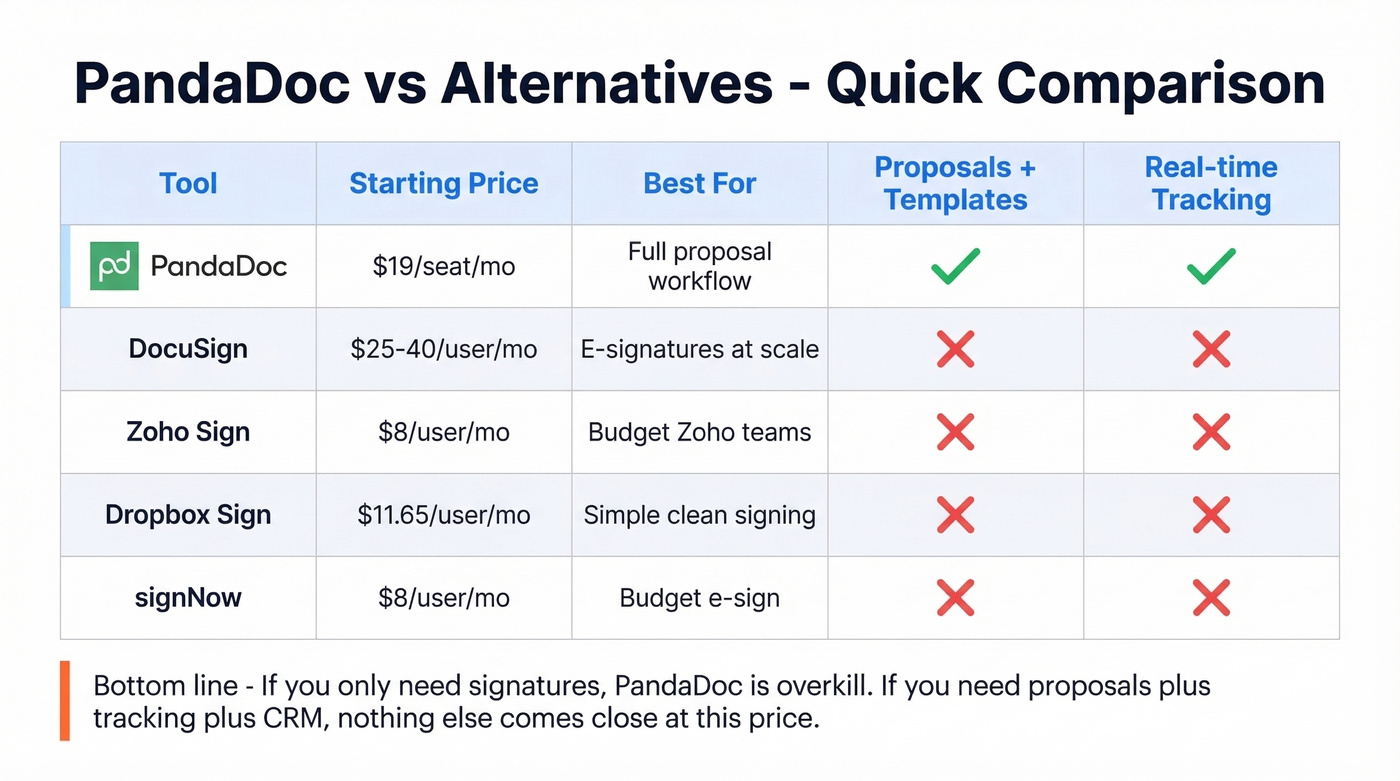
If PandaDoc's pricing doesn't fit, here are the tools users actually switch to:
| Tool | Price | Best For |
|---|---|---|
| DocuSign | ~$25-40/user/mo | Pure e-signatures at scale |
| Zoho Sign | $8/user/mo | Budget teams already in Zoho |
| Dropbox Sign | $11.65/user/mo | Simple, clean signing |
| signNow | $8/user/mo | Budget e-sign without frills |
None of these match PandaDoc's proposal-building and tracking capabilities. If you need the full workflow, PandaDoc is still the better tool. If you just need signatures, you're overpaying by a wide margin.
FAQ
Is PandaDoc's free plan actually usable?
Barely. You get 5 docs/month - or 60/year, depending on which part of PandaDoc's site you believe. It works as a trial, not a realistic long-term plan for any team sending proposals weekly. Upgrade to Starter at minimum for unlimited documents.
Does PandaDoc integrate with Salesforce and HubSpot?
Yes, but CRM integrations require the Business tier at $49/seat/month on annual billing. Most teams start on Starter at $19/seat, then discover the integration gap too late. Budget for Business from day one if CRM sync matters to your workflow.
How do I stop proposals from bouncing?
Verify recipient emails before building the proposal. Use a dedicated email finder upstream - catching stale addresses before they cause bounces saves you the embarrassment of a "delivery failed" notification on a deal you spent an hour customizing.
Is PandaDoc worth it for small teams under 5 people?
For teams sending 10+ proposals monthly, yes. The time saved on templates and tracking pays for itself quickly. For teams under 5 seats sending fewer than 10 proposals, the per-seat cost adds up fast. Consider Dropbox Sign or signNow if signatures are your main need.