

How to Write a Personal Introduction Email That Actually Gets a Reply
You're staring at a blank compose window, cursor blinking, wondering how much of your background to include before it starts reading like tacky peacocking. That anxiety is justified - first impressions have meaningful and surprisingly durable impacts on how people perceive you professionally. You don't need 15 templates for your personal introduction email. You need one framework and the judgment to adapt it.
What You Need (Quick Version)
- Keep it brief - aim for ~75-125 words. One CTA. Personalized greeting.
- Subject line under 50 characters. 47% of recipients decide to open based on it alone.
- Before you write, verify the address is real. Most guides skip this entirely.
What the Data Says
The average cold email reply rate is 3.43%. Top performers clear 10%. The difference isn't luck - it's structure.
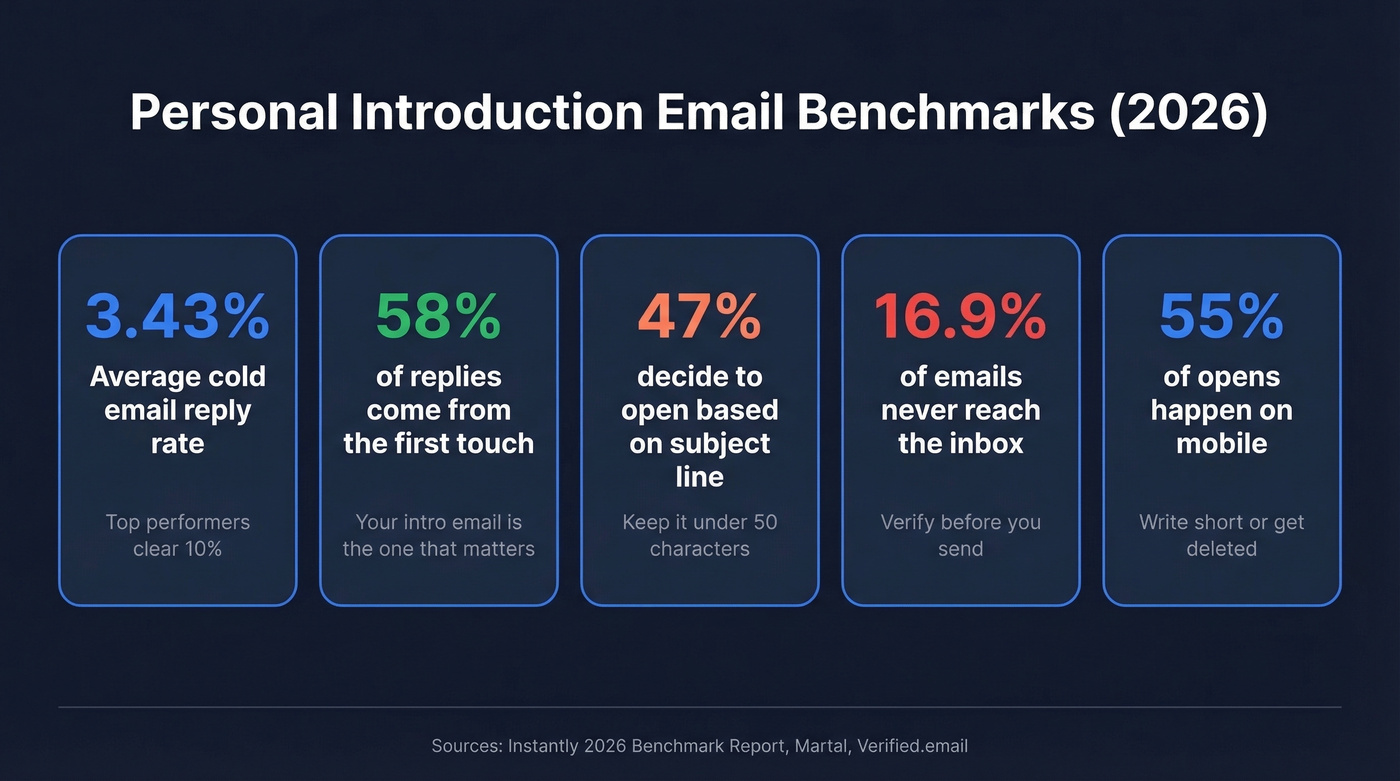
58% of replies come from the first touch. Emails under 80 words outperform longer ones consistently, and 47% of recipients decide whether to open based on the subject line alone. Your intro email gets one shot. Make the structure do the work.

Anatomy of an Effective Introduction Email
People read emails in an F-shaped pattern - they scan the top, skim the left edge, and bail if nothing grabs them. Structure yours like an inverted pyramid: most important information first, details second, ask last.
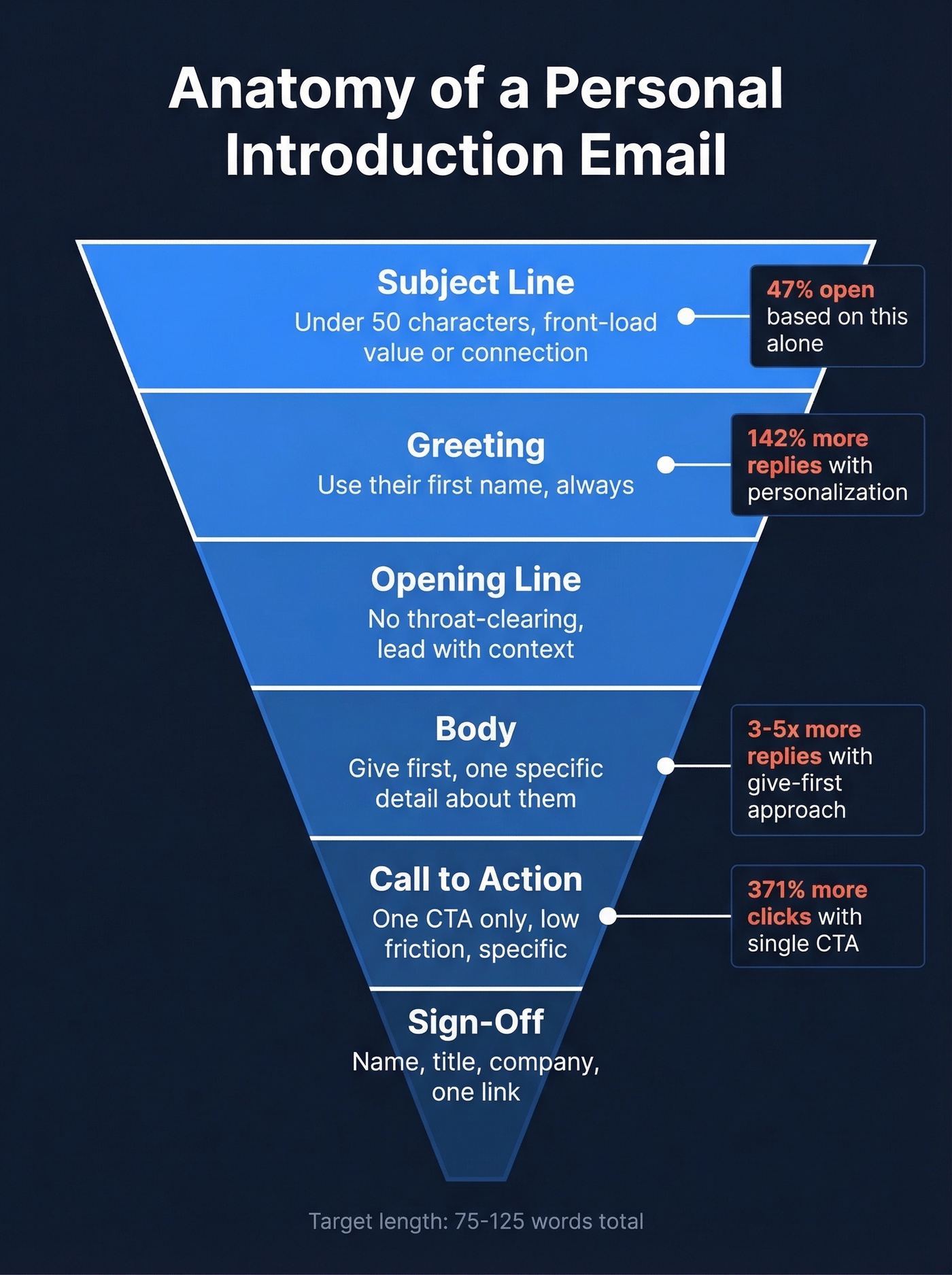
Here's the thing: you don't need a long, polished intro. A five-sentence email with one clear ask will beat a three-paragraph pitch almost every time.
Subject Line
Keep it under 50 characters. Front-load the value or the connection. 69% of recipients mark emails as spam based on the subject line alone - so clarity wins over clever wordplay. Patterns that work: "Introduction - [Your Name] at [Company]" or "[Mutual Contact] suggested I reach out." If you want more options, pull from these email subject line examples.
Greeting
Use their name. "Hi [First Name]" beats generic greetings by up to 142% in reply rates. If you don't know their name, you haven't done enough research to be emailing them yet.
One exception: finance and legal recipients often expect "Dear [Name]" with full titles. Tech and creative contacts respond better to casual "Hi [First Name]."
Opening Line
The first sentence does most of the work. No throat-clearing, no "I hope this email finds you well." Try: "I just joined [Company] as your new account manager" or "We met at [Event] yesterday - loved your take on [topic]."
Body
Stay brief. Give-first emails get 3-5x more replies than ask-first ones, so lead with value. Include one specific detail about the recipient that proves you didn't batch-send this. A single observation about their recent work or company news is enough. If you need a system for this, use a personalized outreach checklist.
Call to Action
One CTA. A single CTA generates 371% more clicks than multiple competing asks. Make it specific and low-friction: "Open to a 15-minute call this week?" beats "Let me know your thoughts." For more CTA patterns, see email call to action.
Sign-Off and Signature
Full name, title, company, one contact link. Optionally include pronouns. No inspirational quotes, no five-line legal disclaimers.

You just spent 10 minutes crafting the perfect introduction email. Don't send it to a dead inbox. Prospeo's 5-step email verification catches bad addresses before they tank your domain reputation - 98% accuracy, 143M+ verified emails, and teams that cut bounce rates from 35% to under 4%.
Verify your recipient's email before you hit send. It's free to start.
Step Zero - Find the Right Email
This is the step every other guide skips. 16.9% of emails never reach the inbox. Sending your carefully crafted intro to a dead address doesn't just waste your time - it damages your domain's deliverability on future sends. We've seen teams cut bounce rates from 35% to under 4% just by verifying addresses before hitting send. If you're troubleshooting bounces, start with email bounce rate and then work through an email deliverability guide.
Templates for 5 Common Scenarios
New Job or Team Introduction
Subject: Introduction - [Your Name], New [Title]
Hi [Name],
I just joined [Company] as [Title] and wanted to introduce myself. I'll be working closely with your team on [area]. I'd love to learn what's working well and where I can help. Open to a quick 15-minute chat this week?
Best, [Your Name]
Account Handoff
The biggest risk with handoff emails is the client feeling like they're starting over. Defuse that immediately by showing you've done your homework. If you want more variations, use these handoff email templates.
Subject: Your New [Title] at [Company]
Hi [Name],
I'm [Your Name], your new [Title] at [Company]. I'll be your primary contact going forward. I'd love a quick 15-minute call to cover how you define success with us and your priorities this quarter.
[Calendar link]
PS - Congrats on [specific thing from their website or recent news].
That PS trick comes straight from a Reddit sales thread - in our experience, it's the easiest personalization move that actually lifts reply rates.
After a Networking Event
Send same-day if they explicitly asked for a follow-up, next business day for warm conversations, and between days 3-14 for colder contacts. Tuesday and Wednesday see the highest reply rates. If you need a follow-up plan, use these sales follow-up templates.
Subject: Great connecting at [Event Name]
Hi [Name],
Really enjoyed our conversation about [specific topic] at [Event]. Here's that [resource/article] I mentioned. Would you be open to grabbing coffee or a quick call next week?
Best, [Your Name]
Cold Networking Introduction
Before you write this email, ask yourself: what can I give this person? A relevant resource, a specific observation about their work, an introduction they'd value. If you can't answer that, you're not ready to send. For a broader playbook, see sales prospecting techniques.
Subject: Quick question about [their work/topic]
Hi [Name],
I've been following your work on [specific project]. [One specific observation.] I put together [resource/insight] that builds on that - happy to share if useful. Would you be open to a 15-minute conversation?
Best, [Your Name]
Skip this template entirely if you can't name something specific about the recipient's work. A vague "I admire what you're doing" is worse than not emailing at all - it screams mass outreach.
Warm Introduction (Referral)
A warning before you use this one: make sure the mutual contact has actually told the recipient to expect your email. A quick "Hey, mind if I mention you?" text takes 10 seconds and prevents an awkward cold-drop.
Subject: [Mutual Contact] suggested I reach out
Hi [Name],
[Mutual Contact] mentioned you'd be a great person to talk to about [topic]. I'm [brief one-line context]. Would you have 15 minutes this week?
Best, [Your Name]
Mistakes That Kill Reply Rates
Multiple CTAs. Asking for a call, a connection request, and feedback in the same email splits attention. One CTA gets 371% more clicks. Pick one.
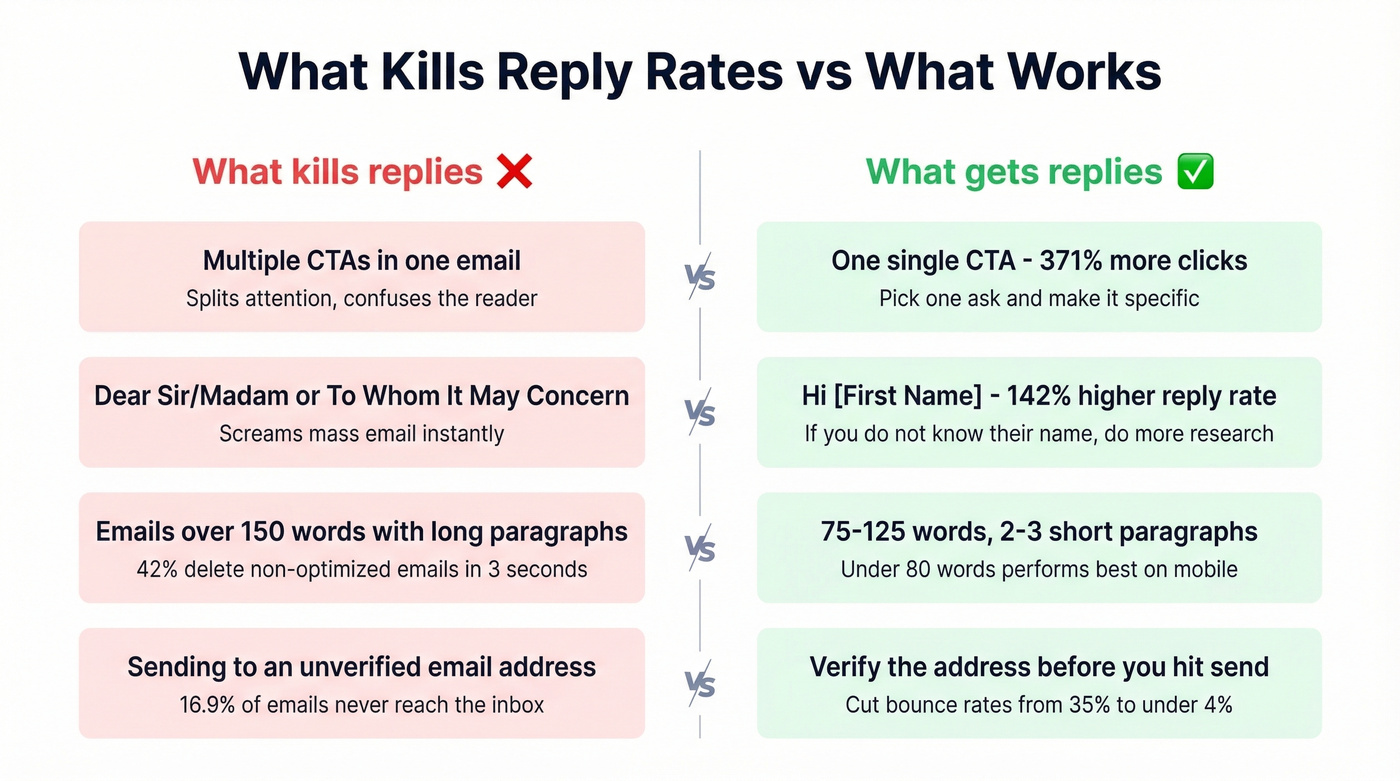
Generic greetings. "Dear Sir/Madam" signals a mass email. Personalized greetings lift reply rates by 142%. There's no excuse for not knowing someone's name in 2026.
Emails over 150 words. 55% of opens happen on mobile, and 42% of recipients delete non-optimized emails within three seconds. Write short or get deleted. If you're scaling outreach, watch your email velocity to protect deliverability.
Sending to a dead address. The biggest mistake isn't bad copy - it's emailing an address that bounces. We covered this in Step Zero for a reason.
Step Zero matters more than your subject line. 16.9% of emails never reach the inbox - and every bounce chips away at your sender reputation for future introductions. Prospeo finds verified professional emails at $0.01 each with 98% accuracy, so your first impression actually lands.
Stop introducing yourself to inboxes that don't exist.
FAQ
How long should a personal introduction email be?
Aim for 75-125 words - under 80 words tends to outperform in reply rates. Two to three short paragraphs maximum. Mobile readers delete long emails within three seconds, so brevity isn't optional.
What's the best subject line for an introduction email?
Keep it under 50 characters and front-load the connection. "Introduction - [Your Name] at [Company]" or "[Mutual Contact] suggested I reach out" consistently outperform clever or vague alternatives. 69% of recipients flag spam based on the subject line alone.
Do you have a self-introduction email example I can copy?
Every scenario above includes a ready-to-use template - just swap the bracketed placeholders with your own details. Start with the one closest to your situation, keep it under 125 words, and always verify the recipient's address before sending.
How do I find someone's email address before introducing myself?
Use a verified email finder like Prospeo - 300M+ profiles, 98% accuracy, 75 free lookups per month. Sending to an unverified address risks bounces that damage your domain's deliverability on every future send.