

The Pipeline Review Template Your Team Actually Needs
A sales leader managing 150 reps posted on r/sales describing a pipeline "realistically inflated by about 60%." Wrong values, outdated close dates, leadership making decisions on fiction. That's not an outlier - a Vantage Point study found 56% of sales teams rate their pipeline management effectiveness as poor or neutral.
The problem isn't the CRM. It's the meeting.
Most pipeline review template resources online are spreadsheet trackers. Useful, sure, but they don't fix the meeting itself - which is where pipeline accuracy actually breaks down. You don't need another tracker with 15 columns. You need three things: a 30-minute meeting agenda, coaching questions that aren't CRM-police interrogations, and stage exit criteria that mean the same thing to every rep on the floor. That's what's below, plus the metrics that tell you whether your reviews are working.
What a Pipeline Review Actually Is
A pipeline review is a sales execution meeting. You're assessing deal health, identifying risks, and making sure your pipeline supports revenue targets.
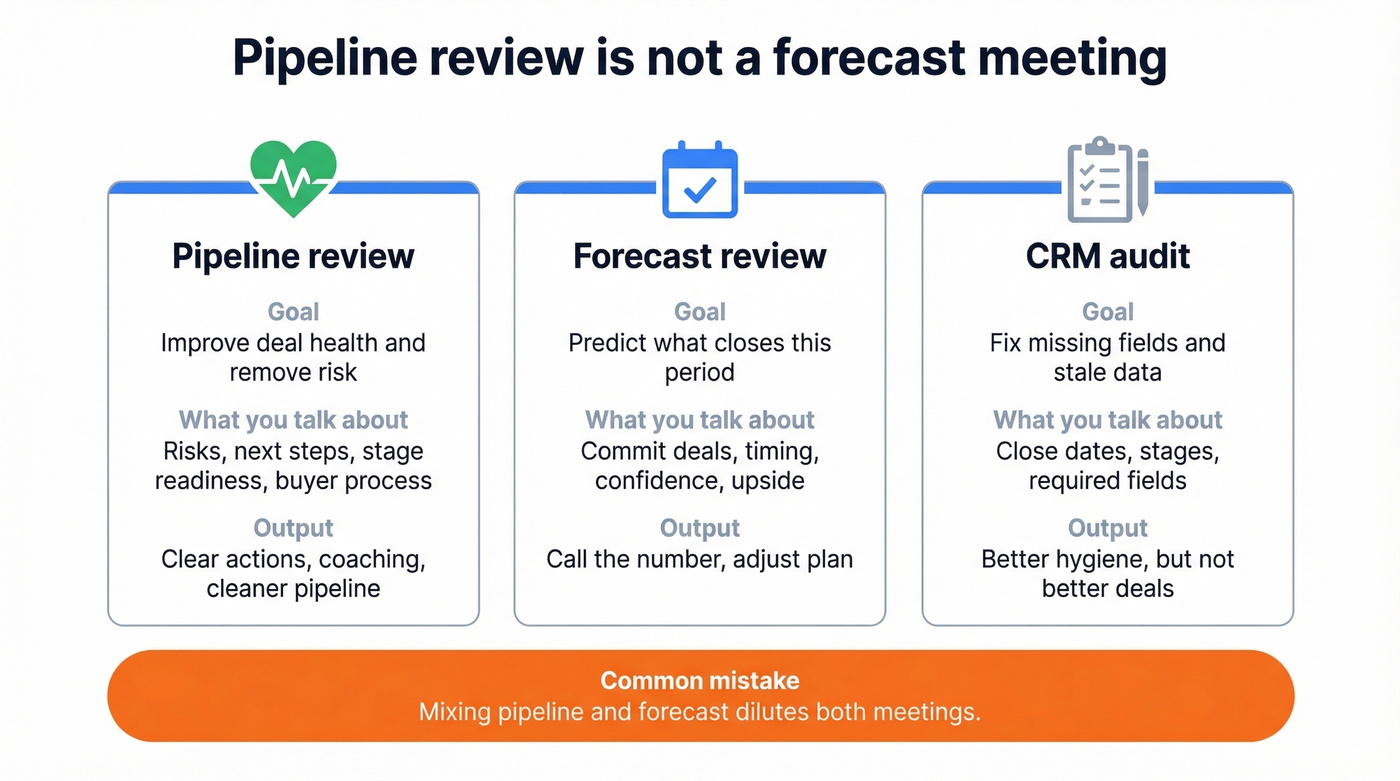
A pipeline review is NOT:
- A status check ("what happened this week?")
- A forecast meeting ("what's closing this month?")
- A CRM audit ("why isn't this field updated?")
The distinction between pipeline review and forecast review matters more than most managers realize. A pipeline review inspects deal health and removes risk across all stages. A forecast is a filtered, time-bound view - the deals you expect to close in a specific period. Best-in-class teams target 80-90% forecast accuracy, but only 7% ever get above 90%. Mixing the two dilutes both, and we've watched it happen at companies that should know better. (If you need to formalize the split, see Sales Forecast vs Sales Goal.)
The 30-Minute Meeting Agenda
Most pipeline reviews are "story time." A rep spends 10 minutes recapping a single deal, the manager asks one weak question, and everyone moves on having accomplished nothing. The 30MPC method fixes this with a structured format covering 10+ deals in 30 minutes.
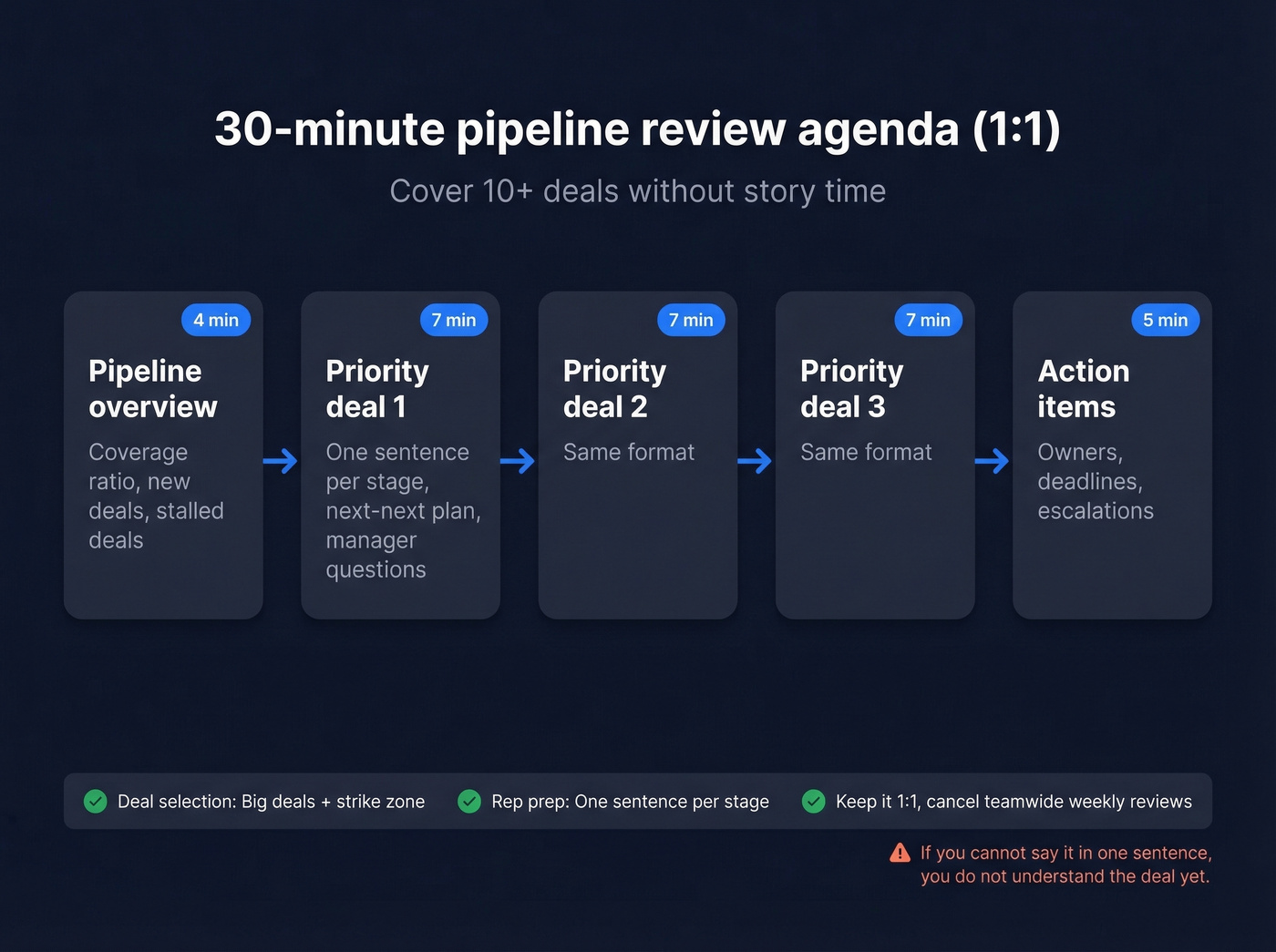
Salesforce recommends keeping reviews to 30 minutes max and canceling teamwide pipeline reviews entirely - reps don't pay attention when it isn't their deal. Keep it 1:1.
| Block | Time | What Happens |
|---|---|---|
| Pipeline overview | 4 min | Coverage ratio, new deals, stalled deals |
| Priority deal #1 | 7 min | One sentence per stage, next-next plan, manager questions |
| Priority deal #2 | 7 min | Same format |
| Priority deal #3 | 7 min | Same format |
| Action items | 5 min | Owners, deadlines, escalations |
Deal Selection: Big Deals + Strike Zone
Don't review every deal. Pick two types: big deals with high revenue impact and "strike zone" deals sitting in the stage where deals typically die. For most B2B teams, that's evaluation or proposal. If a deal isn't big and isn't in the strike zone, skip it - you'll cover it next week if it moves.
Rep Prep: One Sentence Per Stage
Reps come prepared to give one sentence per stage the deal has passed through, plus their plan for the next two stages. In our experience, this single rule is the biggest improvement teams make to their reviews. If a rep can't summarize a stage in one sentence, they don't understand the deal well enough.
Stage Exit Criteria
Every stage needs a clear exit gate. Without these, "Stage 3" means something different to every rep on the team.
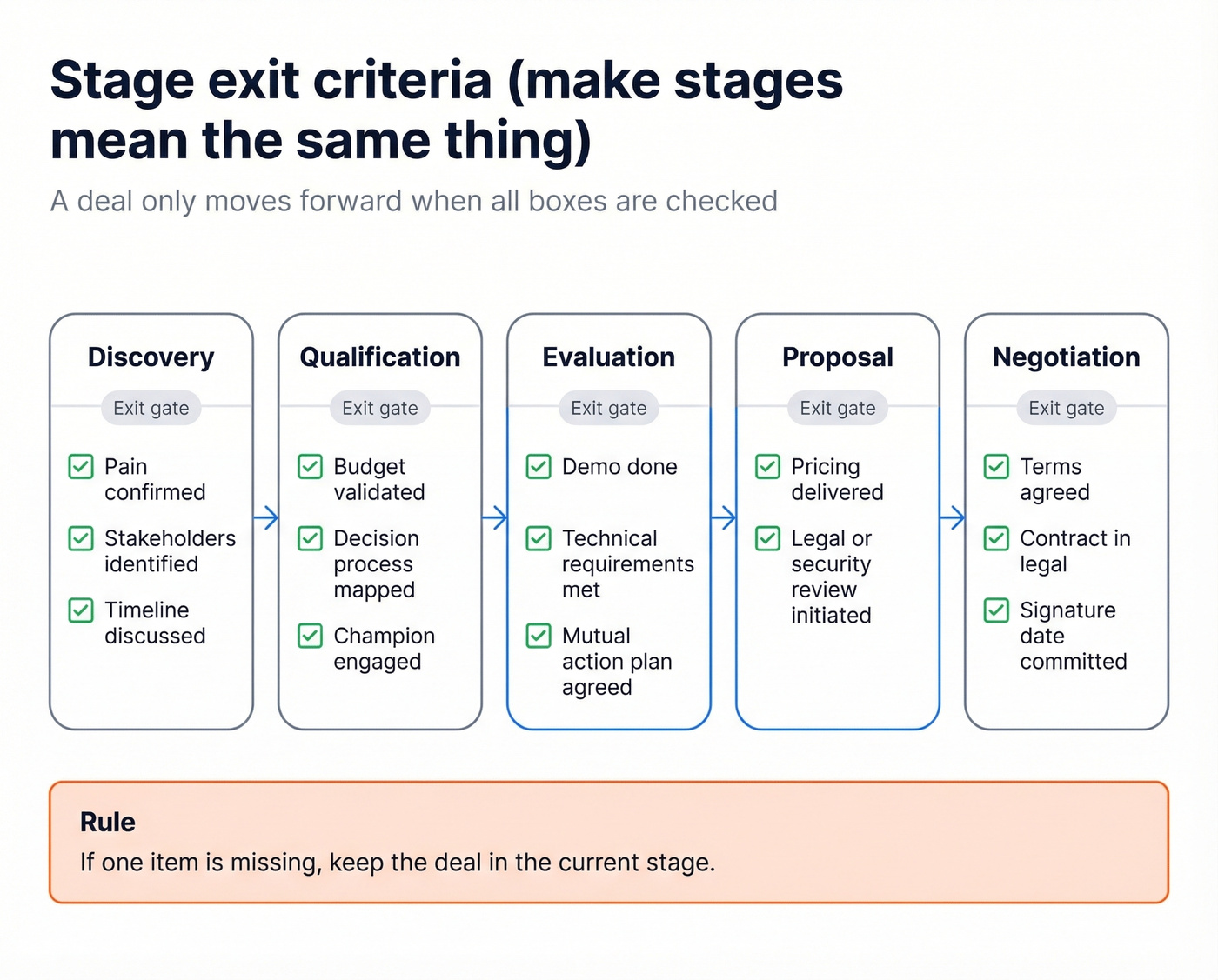
| Stage | Exit Criteria |
|---|---|
| Discovery | Pain confirmed, stakeholders identified, timeline discussed |
| Qualification | Budget validated, decision process mapped, champion engaged |
| Evaluation | Demo done, technical requirements met, mutual action plan agreed |
| Proposal | Pricing delivered, legal/security review initiated |
| Negotiation | Terms agreed, contract in legal, signature date committed |
Run weekly 1:1s between rep and manager, monthly team review for overall pipeline health.
Questions That Move Deals
Drop the Data-Trap Questions
If a manager can find the answer in the CRM in 30 seconds, don't waste meeting time asking it. Reevo calls this the "CRM Police" anti-pattern, and it's the fastest way to make reps dread reviews. Here are the five worst offenders:
- "Is the close date up to date?"
- "Did you email them back?"
- "What stage is this in?"
- "Do we have a champion?"
- "What probability is it?"
All visible in the CRM. Asking them signals distrust and wastes coaching time.
Coaching Questions That Work
These are the questions that actually move deals forward:
- Validation: "Why would they buy now instead of doing nothing?" / "What's the problem in their words - not yours?"
- Process: "Walk me through their legal and procurement process step by step." / "Have they bought something like this before?"
- Risk: "What objection haven't they said out loud yet?" / "If we lose, who do we lose to and why?" (For more, build a simple competitive intelligence strategy.)
- Commitment: "Has the economic buyer said yes to the price?" / "What's the next micro-commitment you can get today?" (If your team struggles here, align on the MEDDPICC economic buyer.)
Let's be honest - most managers default to the validation bucket and never touch risk or commitment. Print these out. Rotate through all four categories every review.

Your pipeline review is only as good as the data behind it. Deals stall when emails bounce and contacts have moved on. Prospeo refreshes 300M+ profiles every 7 days - so the contacts in your pipeline are real, reachable, and current.
Stop reviewing dead deals caused by dead data.
Metrics That Matter
Focus on five metrics. Not twelve. Five.
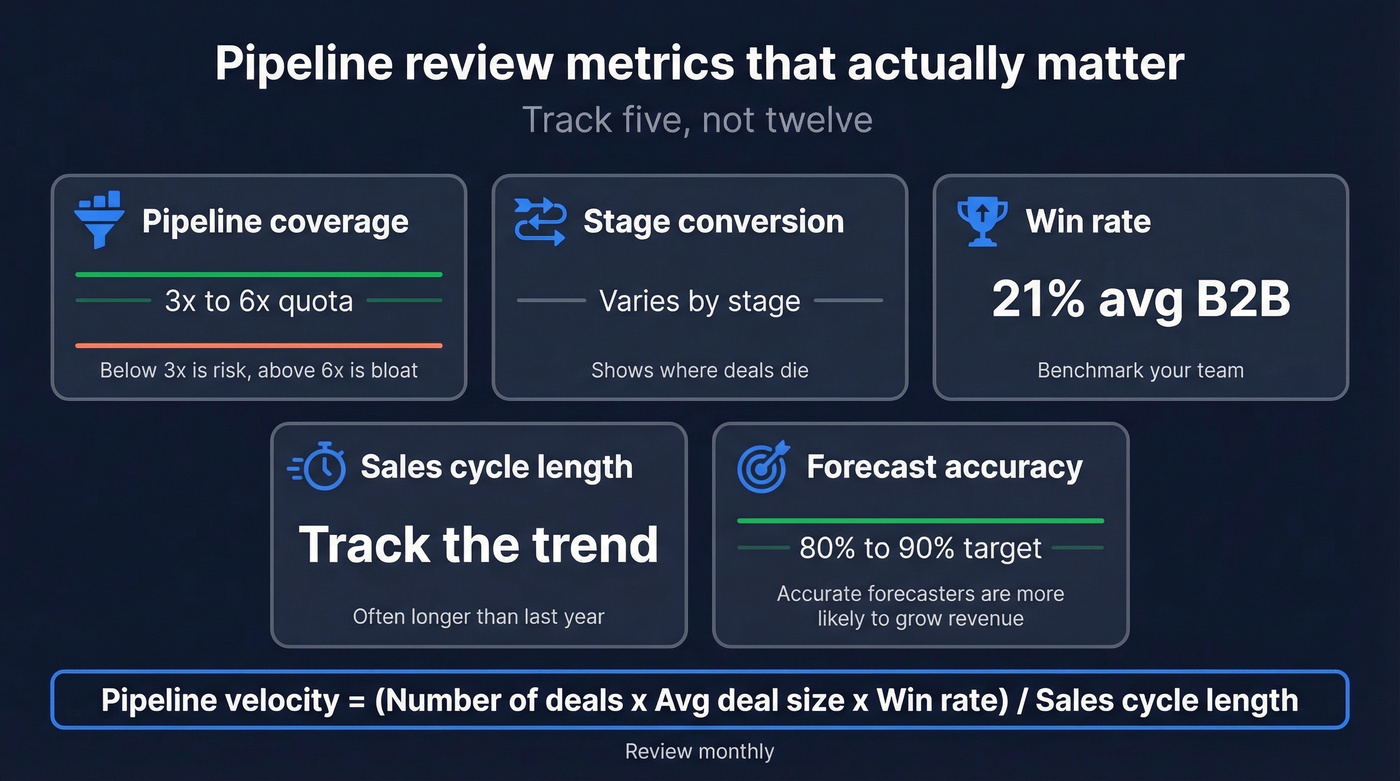
| Metric | Healthy Range | Why It Matters |
|---|---|---|
| Pipeline coverage | 3x-6x quota | Below 3x = risk; above 6x = bloat |
| Stage conversion | Varies by stage | Shows where deals die |
| Win rate | 21% avg B2B | Benchmark your team |
| Sales cycle length | Track the trend | 21% longer than 2020 |
| Forecast accuracy | 80-90% target | Accurate forecasters are 10% more likely to grow revenue YoY and 7.3% more likely to hit quota |
Pipeline velocity = (# of deals x avg deal size x win rate) / sales cycle length. Track it monthly. Effective pipeline management drives up to 15% revenue increase - these metrics tie directly to quota attainment. (If you want a deeper set of leading indicators, use a pipeline health scorecard.)
Keep Your Pipeline Clean
An inflated pipeline creates a vicious cycle: bad data drives inflated quotas, which creates more pressure, which makes reps stuff more garbage into the pipe. We've seen this pattern destroy forecast credibility at companies of every size, from 10-person startups to orgs with 500+ sellers.
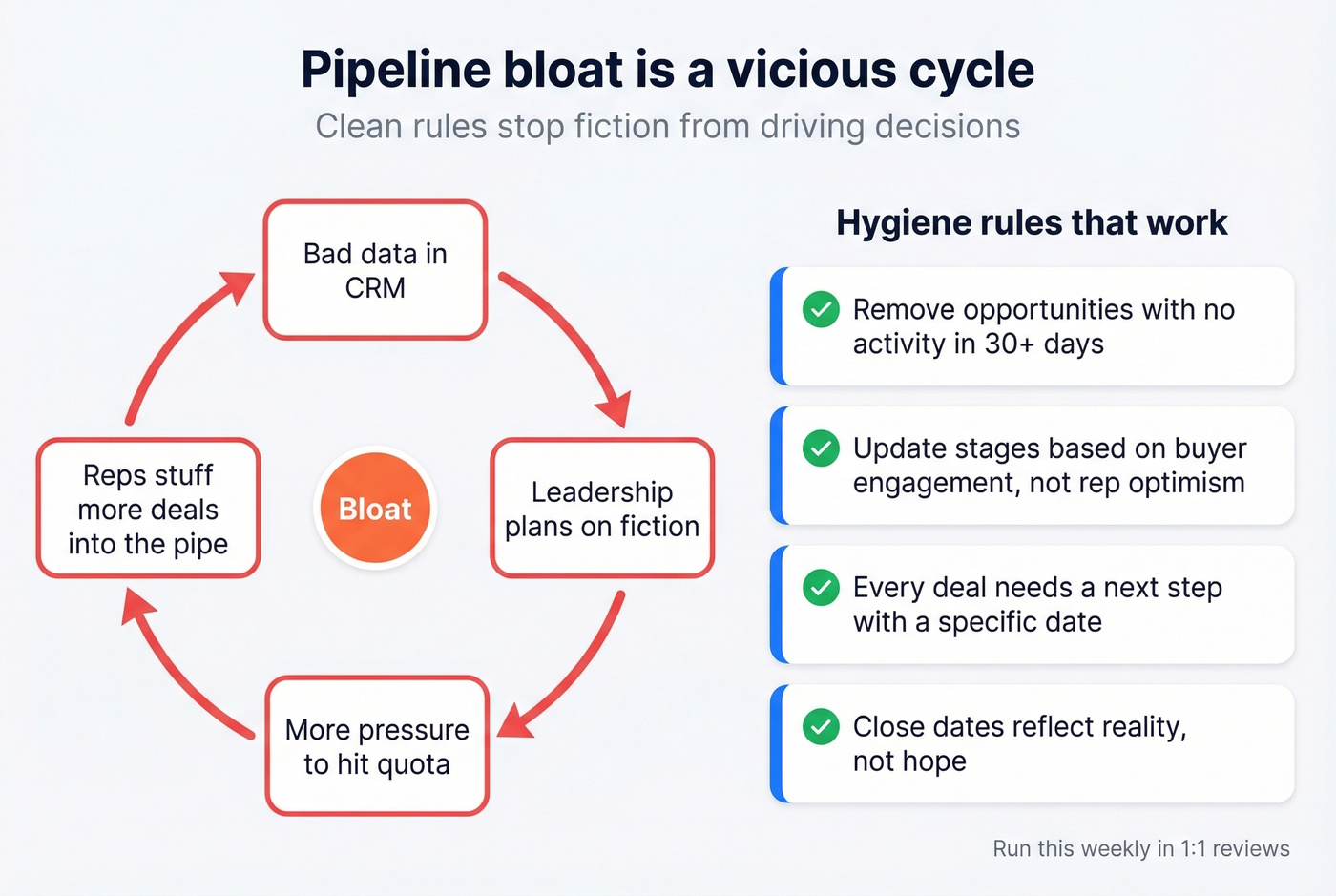
Hygiene rules that work:
- Remove opportunities with no activity in 30+ days
- Update stages based on buyer engagement, not rep optimism
- Every deal needs a next step with a specific date
- Close dates reflect reality, not hope
Here's a hot take: the biggest cause of pipeline bloat isn't lazy reps - it's bad contact data. Deals stall when emails bounce, phone numbers are disconnected, and contacts have changed roles three months ago. Prospeo verifies emails at 98% accuracy across 143M+ records and plugs into Salesforce and HubSpot, so the contacts feeding your pipeline are actually reachable before a rep ever picks up the phone. (If bounces are a recurring issue, track your email bounce rate alongside pipeline hygiene.)

Pipeline bloat isn't a rep problem - it's a data problem. When 35% of your emails bounce, deals sit in stages they shouldn't be in. Prospeo delivers 98% email accuracy and 125M+ verified mobiles so every opportunity in your CRM has a real person behind it.
Fix your pipeline at the source - starting at $0.01 per verified email.
Tools That Power Your Reviews
Your pipeline review template is only as good as the system underneath it. Here's what we've seen work across different team sizes and budgets.
For pipeline management, Pipeline CRM is purpose-built: custom stages, workflow automations, reports and dashboards, and a 14-day free trial with no credit card required.
If you're already on Salesforce (~$25-$330/user/mo depending on edition), don't switch - just focus on automating CRM updates so reps spend review time coaching, not doing data entry. HubSpot offers a genuinely usable free CRM tier for small teams, with Sales Hub at ~$20-$150+/user/mo when you outgrow it. (If you're evaluating options, start with examples of a CRM and a shortlist of best contact management software.)
Gong takes a different approach with slide-based pipeline review templates - team snapshots, rep-level breakdowns, and deal pressure-testing built into a deck format. Expect ~$100-$200/user/mo. One stat worth noting: win rates are 10% higher when pricing is discussed on the first call, which Gong's conversation intelligence surfaces automatically.
Skip Gong if your team is under 15 reps - the ROI doesn't pencil out until you have enough call volume to train the models on your specific sales motion.
FAQ
How often should you run pipeline reviews?
Weekly 1:1 between rep and manager, 30 minutes max. Monthly team review for overall health. Cancel teamwide weekly reviews - reps tune out when it isn't their deal.
What's the difference between a pipeline review and a forecast review?
Pipeline reviews inspect deal health across all stages and remove risk. Forecast reviews focus only on deals expected to close in a specific period. Mixing them dilutes both - run them as separate meetings.
How many deals should you cover in 30 minutes?
Aim for 10+ using the one-sentence-per-stage format. Deep-dive only 2-3 complex deals. The structured agenda makes this pace possible without sacrificing coaching quality.
How do you fix bad contact data in your pipeline?
Start by verifying emails and phone numbers for every open opportunity. Tools like Prospeo handle this with a free tier of 75 emails and 100 Chrome extension credits per month, and 98% email accuracy prevents bounces from stalling deals going forward.