

Power Dialer: The Complete Guide for Sales Teams in 2026
Your SDR manager's weekly report tells the whole story: 1,200 dials, 47 conversations, 2 meetings booked. A 3.9% connect rate. Not unusual.
The global dialer system market hit $506.6M in 2024 because the math behind automated dialing works - a power dialer pushes reps to around 70-80 dials per hour, which is a serious productivity jump before you optimize anything else. But here's what the vendors won't put on their landing pages: the dialer you pick has less to do with your connect rate than you think. The gap between dials and conversations is where most outbound teams bleed money, and the fix is almost always upstream of the dialer itself.
What You Need (Quick Version)
Don't know what type of dialer you need? Read the comparison section below. Power, predictive, parallel, and preview dialers solve different problems, and picking the wrong one creates compliance headaches.
Already know you want a power dialer? Jump to the comparison table. Kixie, PhoneBurner, and CloudTalk are our three shortlisted picks depending on budget and team size.
Have a dialer but your connect rate is terrible? Your problem is your data, not the dialer. The data quality section will save you from buying a more expensive tool that produces the same results.
What Is a Power Dialer?
A power dialer automatically calls the next number on your list the moment you finish your current call. One agent, one line, zero downtime between dials. That's it.
The workflow is dead simple: dial, connect or hit voicemail, disposition the call, and the system auto-dials the next number. No manual number entry, no alt-tabbing to your CRM to find the next contact. The rep stays in a rhythm.
What makes it distinct is the 1:1 agent-to-line ratio. Because there's always a live rep on the line when someone picks up, you avoid the classic "telemarketer delay" - that awkward two-second silence where the prospect says "hello?" twice before hearing a voice. That delay tanks trust instantly, and it's the signature tell of predictive and parallel dialers. Industry benchmarks commonly put power dialing throughput at 70-80 calls per hour.
Power Dialing vs. Predictive vs. Parallel vs. Preview
These four dialer types get conflated constantly. Here's the breakdown.
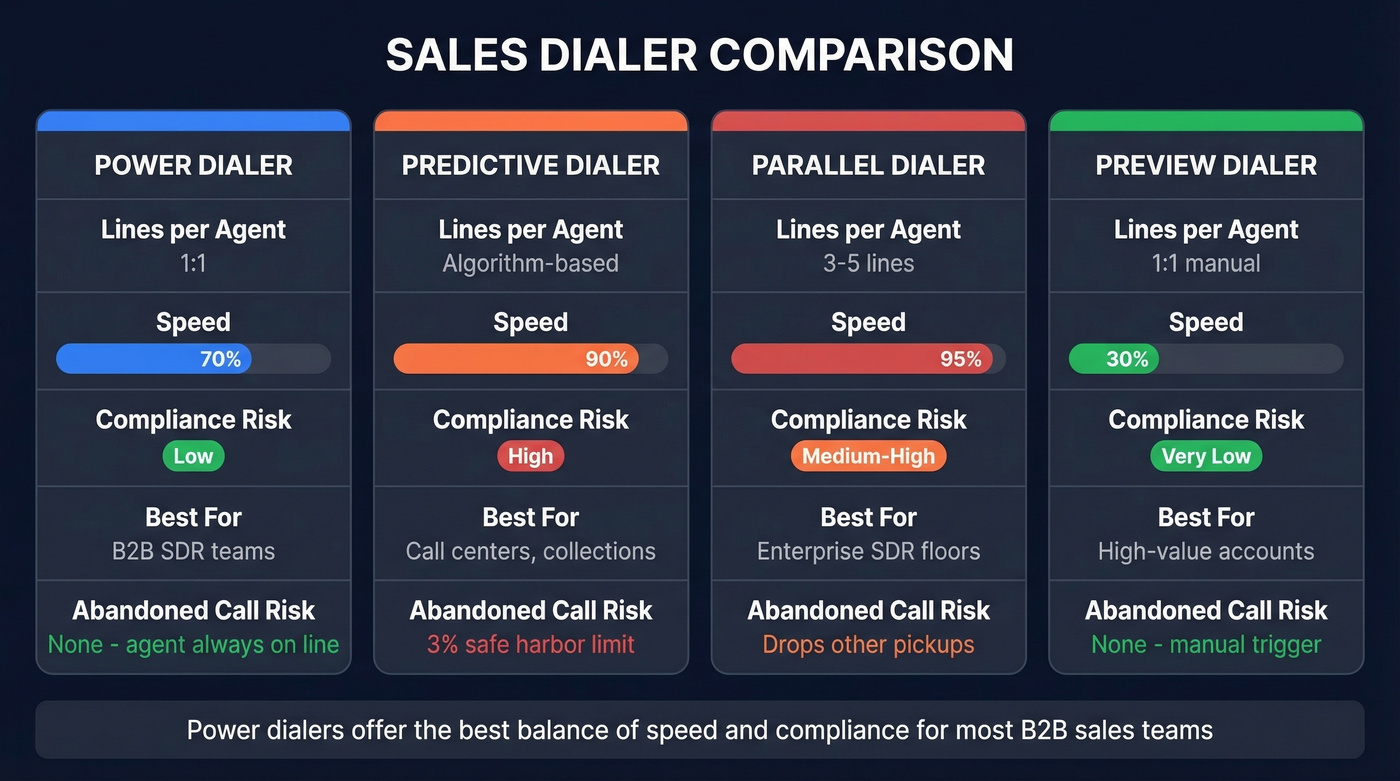
| Dialer Type | How It Works | Best For | Compliance Risk | Typical Use Case |
|---|---|---|---|---|
| Power | 1 line per agent, auto-dials next | Mid-volume B2B | Low | SDR teams, inside sales |
| Predictive | Algorithm dials ahead of agent availability | High-volume call centers | High (abandonment) | Collections, telemarketing |
| Parallel | 3-5 lines per agent simultaneously | Max volume SDR orgs | Medium-High | Enterprise SDR floors |
| Preview | Shows contact info, agent decides to dial | High-value accounts | Very Low | Enterprise AE outreach |
Power dialers are the workhorse for most B2B sales teams. They balance speed with conversation quality - you're always present when someone answers.
Predictive dialers use algorithms to forecast when agents will be free and dial ahead. This means they sometimes connect a prospect with no available agent, creating abandoned calls. The TSR enforces a 3% abandonment safe harbor - exceed that, and you're in regulatory territory. (If you’re evaluating this category, compare options in our predictive dialer software guide.)
Parallel dialers dial multiple numbers simultaneously per agent and connect the first live answer. Orum and Nooks are the big names here. Throughput is massive, but you're dropping calls on every other prospect who picks up, and the compliance math gets uncomfortable fast. The consensus on r/sales is that parallel dialers work great until they don't - and when they don't, the fallout is expensive. For a deeper breakdown, see our parallel dialer guide.
Preview dialers show the contact record and let the rep decide whether to call. Slowest throughput, highest conversation quality. Use these for strategic accounts where you need 30 seconds of prep before every dial.
When to Use Power Dialing
Not every team needs a standalone dialer.
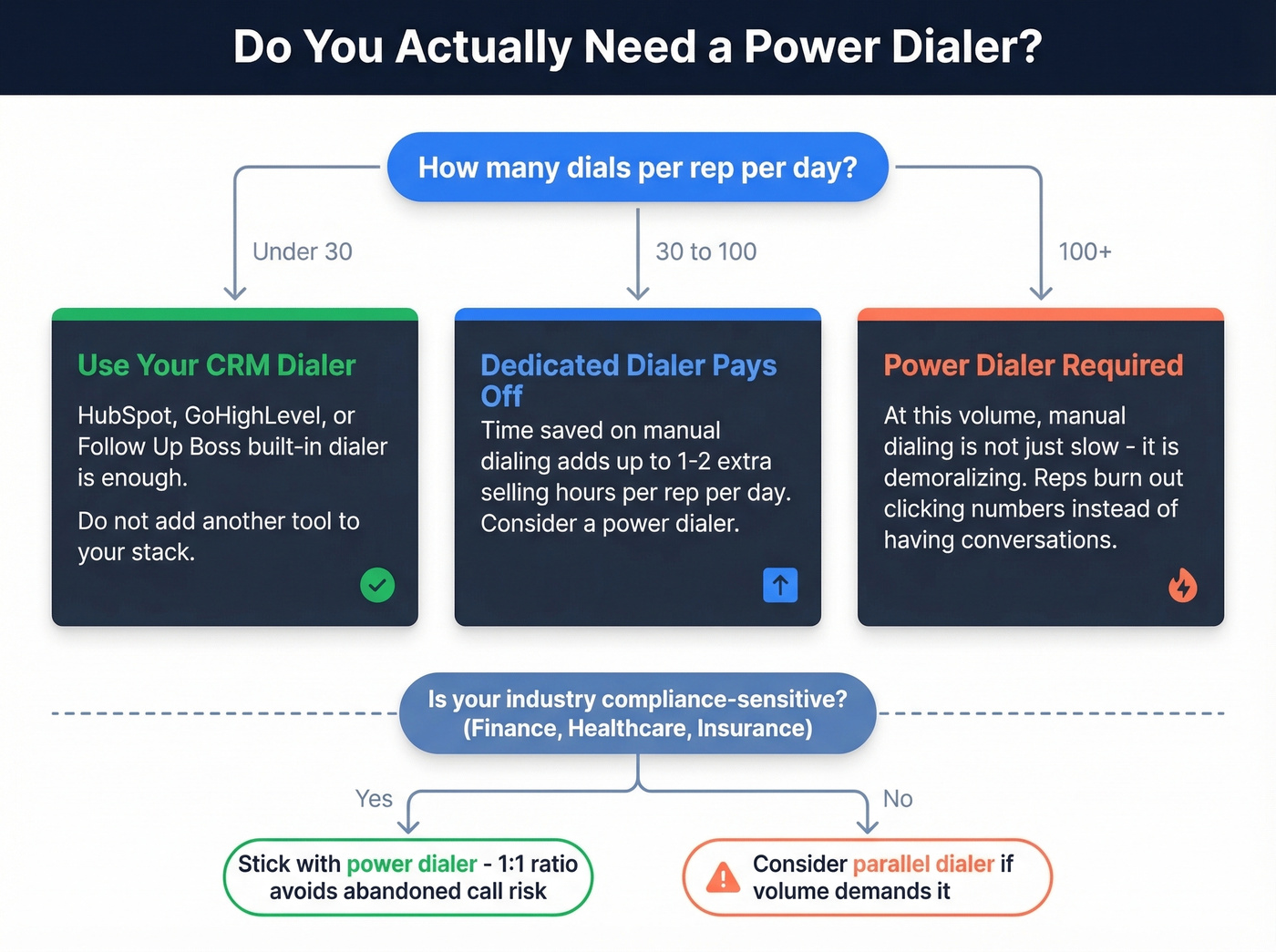
Under 30 dials/day per rep: Your CRM's built-in dialer is fine. HubSpot, GoHighLevel, and Follow Up Boss all bundle basic dialing. Don't add another tool to your stack for 30 calls.
30-100 dials/day per rep: A dedicated dialer starts paying for itself. The time saved on manual dialing adds up to 1-2 extra hours of selling per rep per day.
100+ dials/day per rep: You need power dialing, full stop. At this volume, manual dialing isn't just slow - it's demoralizing. Reps burn out clicking numbers instead of having conversations.
For compliance-sensitive industries like financial services, healthcare, and insurance, power dialers are the safest automated option because the 1:1 ratio avoids abandoned-call risk entirely. Predictive and parallel dialers introduce regulatory exposure you don't need. (If you need the full legal picture, see TCPA compliance and our guide on are auto dialers illegal.)
If your team is under five reps and your sequences run through Outreach or Salesloft, check whether their native dialer covers your volume before buying a standalone tool.

A power dialer pushing 80 calls/hour means nothing if half those numbers are dead. Prospeo gives you 125M+ verified mobile numbers with a 30% pickup rate - that's 3x the industry average. Teams using Prospeo's data cut bounce rates from 35%+ to under 4% and tripled their connect rates.
Fix your data before you upgrade your dialer.
TCPA Compliance in 2026
Compliance isn't optional, and the rules shifted meaningfully in 2025.
Baseline Rules
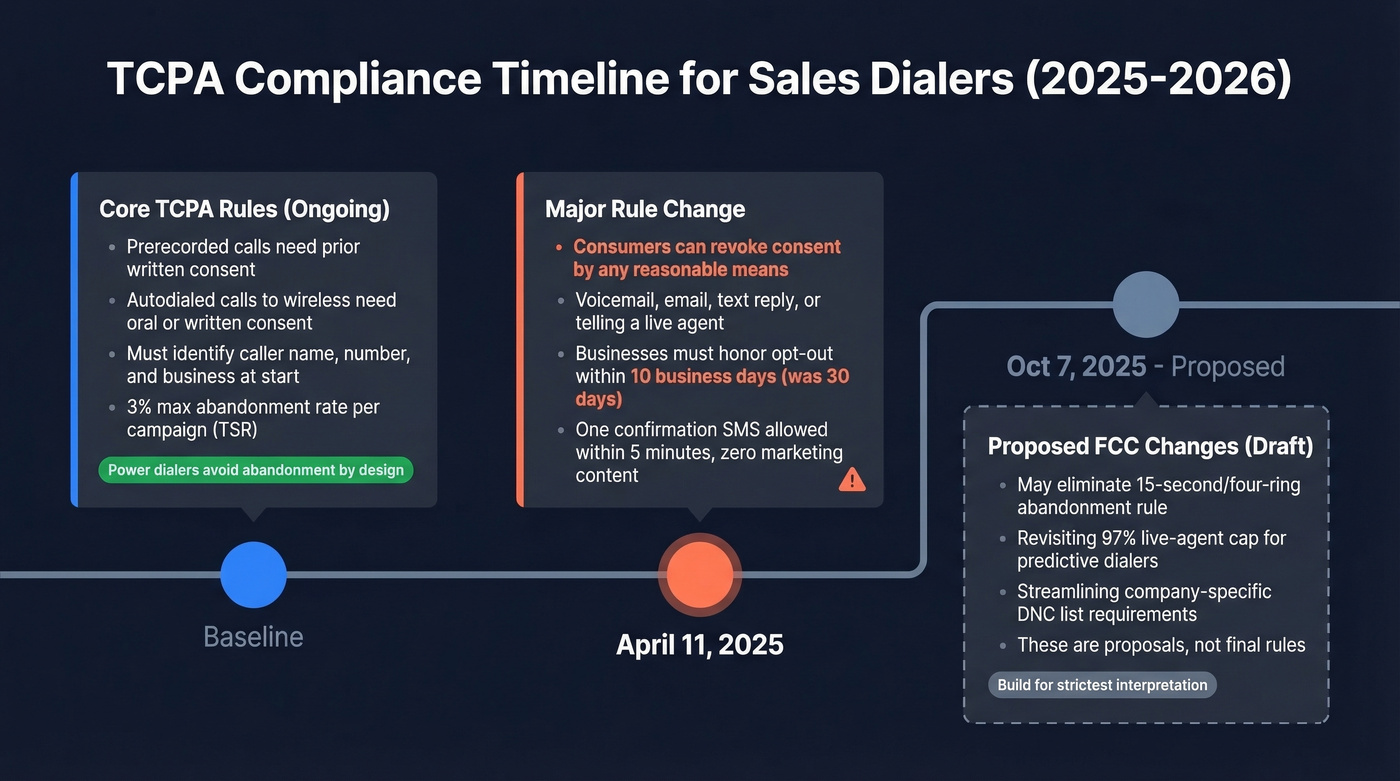
The FCC's core framework remains: prerecorded telemarketing calls require prior written consent via paper, electronic, web form, or keypress. Autodialed or prerecorded calls and texts to wireless numbers require oral or written consent. Prerecorded messages must identify the caller's name, phone number, and business name at the start.
The TSR maintains a 3% maximum abandonment rate per campaign measurement period. Power dialers avoid abandoned calls by design because an agent is always available when a call connects - that's the compliance advantage.
What Changed in 2025
The big shift hit on April 11, 2025: consumers can now revoke consent by "any reasonable means" - a voicemail, an email, a reply to a text, even telling a live agent. Businesses have 10 business days to honor the opt-out, down from the old 30-day buffer that many teams relied on.
One confirmation SMS is allowed after an opt-out, but only if sent within 5 minutes and containing zero marketing content. The fact that some dialer vendors haven't updated their compliance documentation since these changes went live is genuinely frustrating - ask your vendor directly how they handle revocation tracking before you sign anything.
What's on the Horizon
The FCC released a draft FNPRM on Oct 7, 2025 proposing several significant changes: potentially eliminating the 15-second/four-ring abandonment rule, revisiting the 97% live-agent cap for predictive dialers, and streamlining company-specific DNC list requirements. These are proposals, not final rules. Build your compliance posture for the strictest interpretation, not the most lenient.
Your Dialer Isn't the Problem - Your Data Is
Look, most dialer vendors won't tell you this: a power dialer dials numbers faster. It doesn't make those numbers more likely to be answered.
We see the same pattern over and over - teams blaming the dialer for low connect rates when the real problem is upstream. One CallTools user on Reddit put it plainly: "a lot of no answers" even when filtering their list. Another described Orum as working "about 80% of the time." In both cases, the conversation quickly shifted from "which dialer?" to "which data source?"
Typical outbound connect rates run 4-8% for most teams. Teams with clean, verified mobile numbers and local presence dialing hit 10-15%+. That's a 2-3x difference, and it has nothing to do with the dialer software. (If you want the benchmarks and levers, start with cold call connect rate and answer rate.)
If your average deal size is under $15k, you'll get more ROI from fixing your phone data than from upgrading your dialer. Stop obsessing over dials per hour. Conversations per hour is the metric that matters.
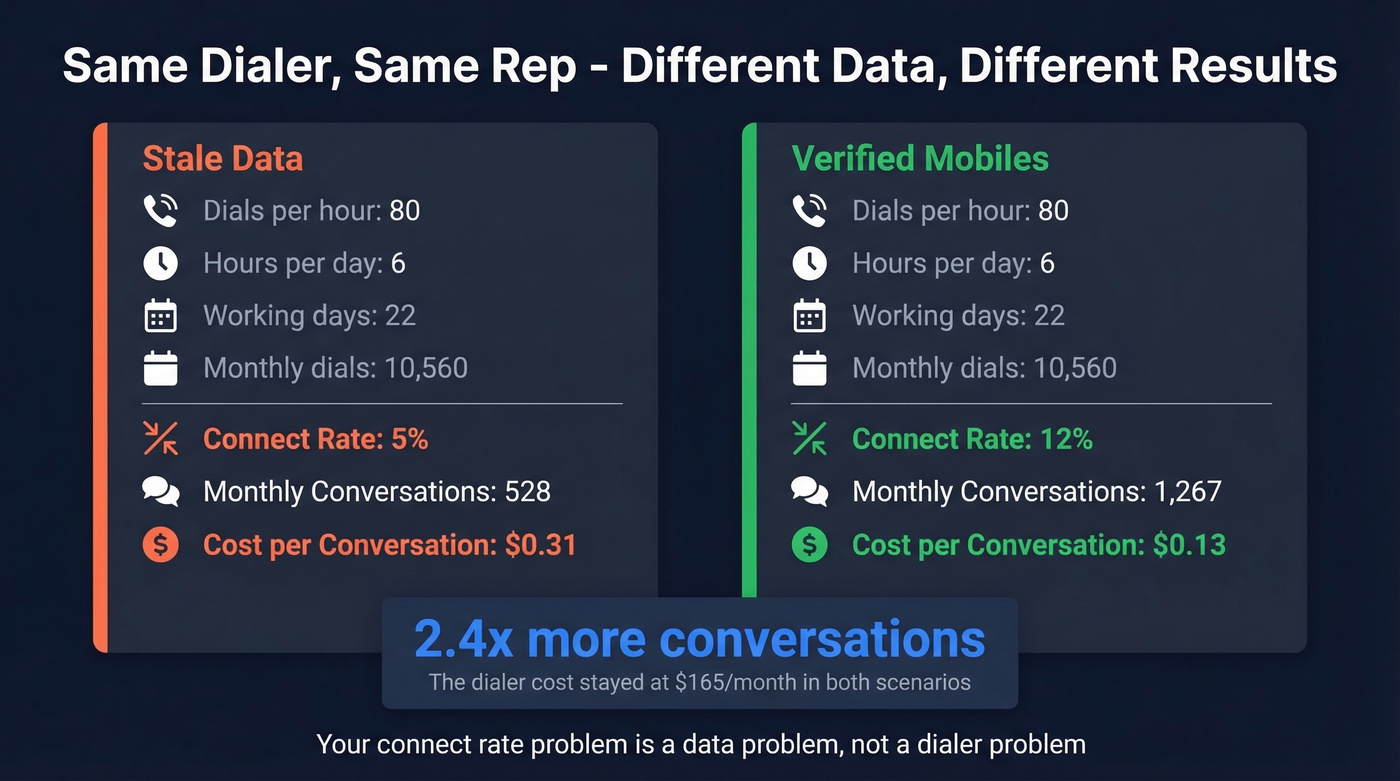
Let's put real numbers on it. Say you're paying $165/month for PhoneBurner and your team dials 80 calls/hour x 6 hours x 22 working days = 10,560 dials/month. At a 5% connect rate with stale data, that's 528 conversations. At a 12% connect rate with verified mobiles, that's 1,267 conversations - same dialer, same rep, 2.4x more pipeline. Your cost per conversation drops from $0.31 to $0.13. The dialer didn't change. The data did.
Prospeo's mobile finder covers 125M+ verified mobile numbers with a 30% pickup rate, compared to roughly 11-12% on competing platforms. Data refreshes every 7 days versus the 6-week cycle most providers run, which means fewer disconnected numbers and wrong-person pickups. There's a free tier to test, and the per-lead cost runs about $0.01. Pair it with any dialer on this list and the connect rate math changes dramatically. (If you’re comparing sources, see our roundup of B2B leads database providers.)
Best Power Dialer Software
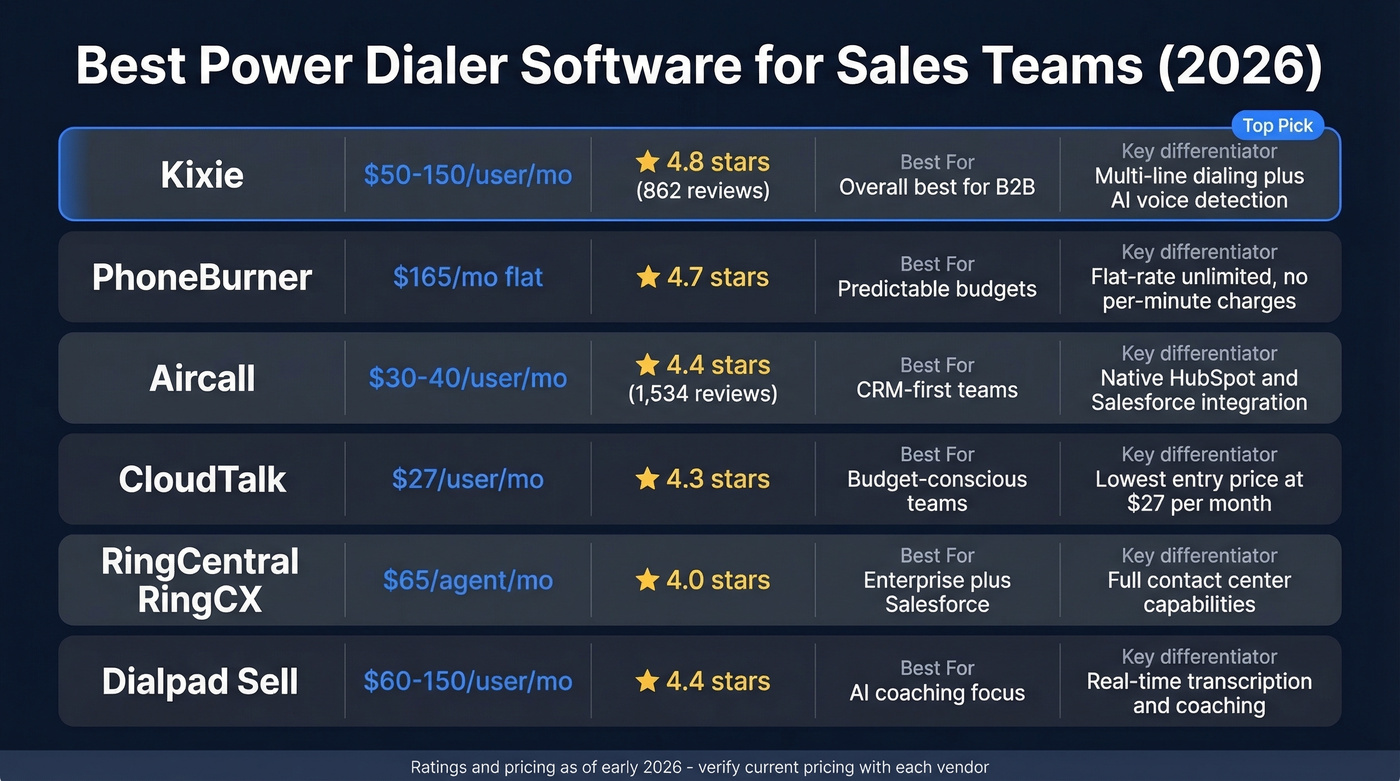
| Tool | Starting Price | G2 Rating | Best For | Key Differentiator |
|---|---|---|---|---|
| Kixie | ~$50-150/user/mo | 4.8/5 (862) | Overall best | Multi-line + AI voice |
| PhoneBurner | $165/mo flat | 4.7/5 | Predictable budgets | Flat-rate unlimited |
| Aircall | $30-40/user/mo | 4.4/5 (1,534) | CRM-first teams | HubSpot/Salesforce native |
| CloudTalk | $27/user/mo | 4.3/5 | Budget teams | $27/mo entry point |
| RingCentral RingCX | $65/agent/mo | 4.0/5 | Enterprise + Salesforce | Full contact center |
| Dialpad Sell | ~$60-150/user/mo | 4.4/5 | AI coaching | Real-time transcription |
Kixie
Use this if you want the best all-around option for a B2B sales team. Skip this if you need published pricing before getting on a call.
Kixie is the tool we'd recommend to most B2B sales teams right now. It scores a 4.8/5 on G2 with 862 reviews, and in our experience, the multi-line dialing mode gives reps real flexibility to scale up when they need volume. AI human voice detection means you're not wasting time connecting to recordings.
It connects natively to Salesforce, HubSpot, and Pipedrive. Local presence dialing is built in, which matters more than most reps realize for connect rates. The 7-day free trial lets you test with real data before committing.
The tradeoff: reviewers flag "Dialer Issues" as a recurring con - occasional call quality drops or connection hiccups. Pricing isn't published; expect $50-150/user/month depending on features and volume, with potential per-minute charges on top. That lack of transparency is annoying, but the product backs it up.
PhoneBurner
Use this if you want zero pricing surprises and don't want to negotiate with a sales rep. Skip this if you're a solo rep who can't justify $165/month.
PhoneBurner is one of the most transparent vendors in this space: $165/month flat, unlimited dialing, no contracts, no setup fees. They've been around 15 years and deliver up to 80 calls per hour. The 1:1 ratio means your prospect hears a human voice immediately - no telemarketer delay.
The higher price floor makes it a tough sell for individual reps or small teams. But for teams of 5+ who value predictable costs, it's one of the cleanest deals in the category.

Aircall
Use this if you're already on HubSpot or Salesforce and want the fastest setup. Skip this if you need rock-solid VoIP quality on inconsistent networks.
We've watched teams migrate from legacy phone systems to Aircall in about two days. The integration depth goes beyond basic call logging - you get click-to-dial from CRM records, automatic activity sync, and call recording tied to contact timelines. Pricing starts at $30/user/month billed annually with a 3-user minimum; monthly billing bumps to ~$40/user.
The 4.4/5 rating across 1,534 reviews gives it one of the largest review samples on this list. The downside: "Connection Issues" is a persistent complaint tag, suggesting VoIP quality can be inconsistent depending on your network.
CloudTalk
The budget pick. CloudTalk starts at $27/user/month, which makes it accessible for teams that need automated dialing without a big monthly commitment. The feature set covers the basics - automated dialing, call recording, CRM integrations - without the depth of Kixie or the unlimited model of PhoneBurner. For teams of 3-8 reps scaling up from manual dialing, it's a solid first step into power dialing.
RingCentral RingCX
Built for enterprise Salesforce teams that need a full contact center platform, not just a dialer. Starting at $65/agent/month on annual billing, RingCX bundles power dialing with omnichannel routing, workforce management, and analytics. Overkill for a 5-person SDR team. But if you're running 30+ agents with inbound and outbound mixed, the all-in-one approach reduces vendor sprawl. (If you’re shopping the category, see RingCentral alternatives.)
Dialpad Sell
Dialpad Sell leans hard on AI coaching. The real-time transcription and coaching features are genuinely useful for managers who want to monitor calls without sitting in on every one. Expect ~$60-150/user/month depending on your package. The AI features are the differentiator; the core dialing functionality is comparable to Aircall.
Other Tools We Evaluated
Orum is commonly used for parallel dialing on high-volume SDR floors at ~$100-200/user/month, but Reddit sentiment flags reliability concerns. PowerDialer.ai runs from free to $199/month with unlimited users - good for solopreneurs who need a dialer without CRM-level complexity. We also looked at Nextiva (~$129/user/month), DialedIn (~$99/user/month), and JustCall, but none outperformed the shortlist above for most B2B use cases.
How to Evaluate the Right Dialer
Every vendor demo looks identical. You need a framework, not another feature walkthrough.
The two most important technical criteria are local presence dialing and CRM integration depth. Local area codes for your target markets can materially improve pickup rates - it's one of the highest-impact features after data quality. For CRM integration, don't settle for "connects to Salesforce." You need disposition logging, recording sync, and the ability to trigger follow-up sequences automatically. If the integration is shallow, your reps end up doing manual data entry anyway, which defeats the purpose. (For more options, compare outbound calling software and best sales dialer picks.)
Beyond those two, prioritize audio quality and compliance features. Request a trial and make 50+ real calls - connection issues are a common complaint tag on G2, and you won't catch them in a demo. DNC list scrubbing, consent tracking, and opt-out management should be built in, not bolted on. (Use a TCPA compliance checklist to pressure-test vendors.)
One more thing: check for voicemail drop. Pre-recorded voicemail that drops automatically saves serious time on unanswered calls. At 70+ dials per hour, that adds up fast. And if you can't find the price on a vendor's website, expect a longer sales cycle and less negotiating leverage.

The article says it clearly: your dialer isn't the problem, your data is. Prospeo refreshes every record on a 7-day cycle - not the 6-week industry average - so your SDRs dial numbers that actually ring. At $0.01 per email and 10 credits per verified mobile, you spend less on data that works than you're spending now on data that doesn't.
Stop burning dials on stale numbers. Start with data that connects.
FAQ
How much does a power dialer cost?
Expect $27-$165/user/month depending on the vendor. CloudTalk starts at $27, PhoneBurner charges $165 flat with unlimited dialing, and enterprise tools like Orum run $100-200/user/month. Most offer free trials - test with real calls before signing annual contracts.
Is a power dialer legal?
Yes. Power dialers are the most TCPA-friendly automated dialer type because the 1:1 agent-to-line ratio ensures a live rep is always present when someone answers, eliminating abandoned-call risk entirely. You still need to follow consent requirements and honor DNC lists.
How many calls per hour can I expect?
Industry benchmarks put power dialing at 70-80 dials per hour. Actual conversations depend on your data quality and whether you're using local presence numbers. Verified mobile data with a 30% pickup rate can push connect rates from 5% to 12%+, which is where the real ROI lives.
What's the difference between power and predictive dialers?
A power dialer maintains one line per agent and dials the next number only after the current call ends. A predictive dialer uses algorithms to dial multiple numbers ahead of agent availability, increasing throughput but creating abandoned-call risk when no rep is free. For B2B teams prioritizing conversation quality and compliance, power dialing is almost always the better choice.
Do I need a CRM to use one?
Not technically, but you absolutely should. Every major dialer integrates with Salesforce, HubSpot, or Pipedrive. Without a CRM connection, you lose call logging, disposition tracking, and the ability to trigger follow-up sequences - which defeats the purpose of automating your outbound workflow in the first place.