

Professional Introduction Email Samples That Actually Get Replies
You've spent 20 minutes crafting the perfect introduction email, hit send, and... nothing. No reply. No open. Maybe it bounced. The average cold email reply rate sits between 3% and 5%, which means roughly 95 out of 100 people ignore you. Most professional introduction email sample lists you'll find online won't fix that - they're too long, too vague, and too focused on the sender.
We've sent thousands of cold intros across our team. The ones that work all follow the same pattern. Here's that pattern, with templates you can steal.
Three Rules From 5.5M Emails
Before you touch a template, internalize these findings from a Belkins study of 5.5 million B2B emails:
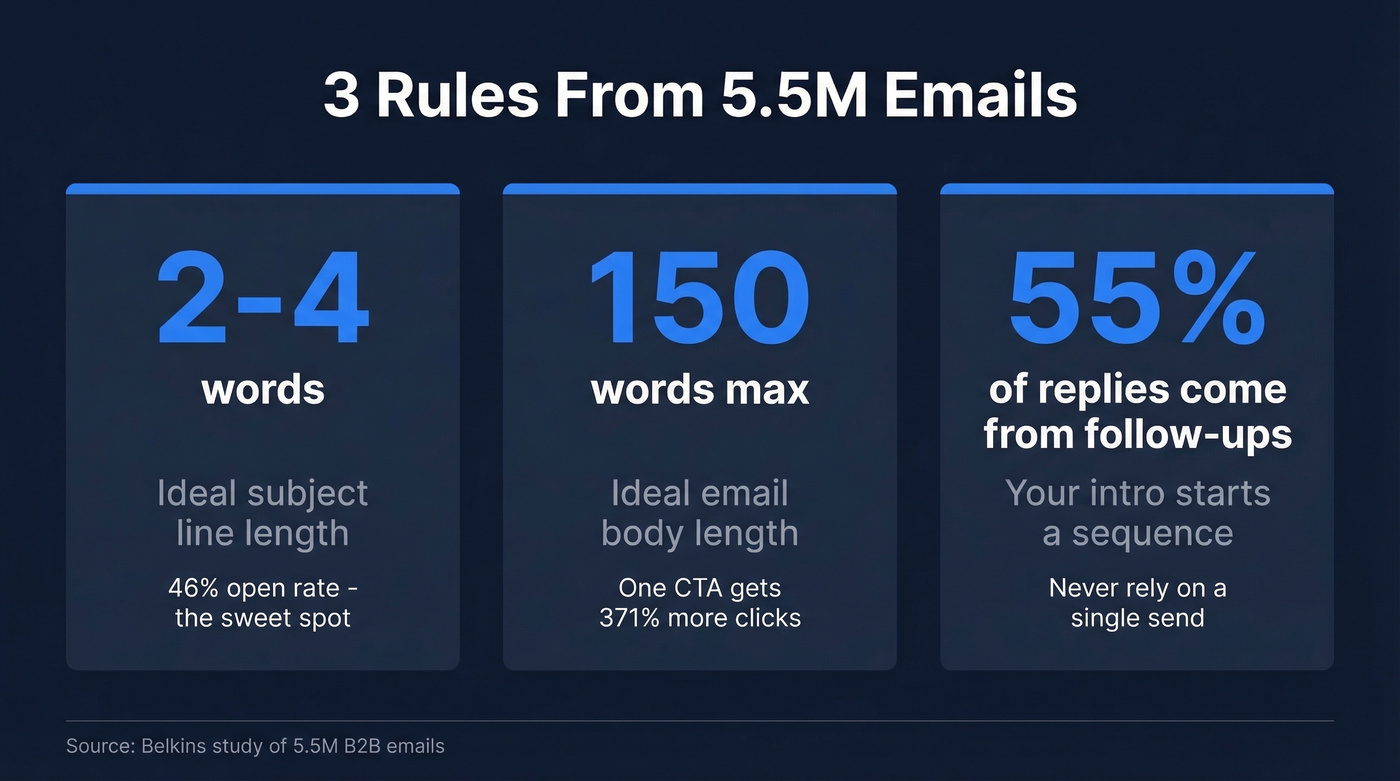
- Subject lines of 2-4 words hit 46% open rates. Longer ones drop fast.
- Keep the body under 150 words and stick to one primary CTA. Emails with one ask get 371% more clicks than those with multiple.
- 55% of replies come from follow-ups, not the first email. Your intro is the start of a sequence, not a one-shot.
For context, the average marketing email open rate across 183,000+ brands is 31%. Cold introduction emails compete for attention in that same inbox, so every word has to earn its place.

Why Most Introduction Emails Fail
The #1 killer is irrelevance. Nearly 70% of recipients judge whether to open based on the subject line alone. If yours reads "Introduction" or "Quick Question," you've already lost.
If you want more proven angles, pull from these subject lines and adapt them to your scenario.
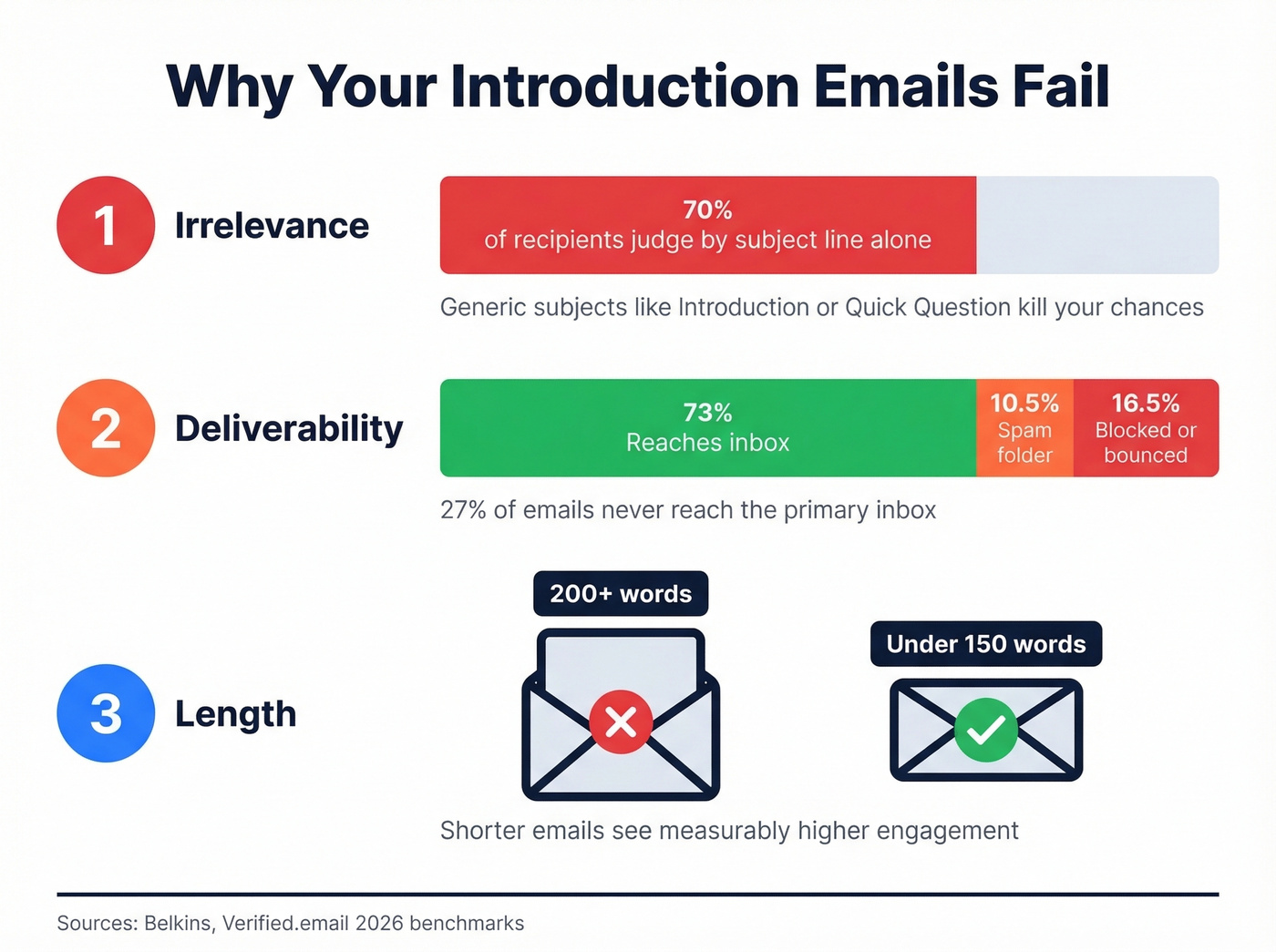
The #2 killer is deliverability. 16.9% of emails never reach the inbox - blocked, bounced, or filtered to spam. Another 10.5% land in the spam folder. That means about 27% of the emails you send won't land in the inbox, regardless of how well you wrote them.
If you're troubleshooting this, start with an email deliverability audit and then work on sender reputation.
The #3 killer is length. Emails over 150 words see measurably lower engagement. Your recipient doesn't want your life story. They want to know who you are, why you're emailing, and what you're asking - in that order. Mastering brevity comes first; everything else is secondary.
Anatomy of a Strong Introduction Email
Every effective introduction email follows the same skeleton:
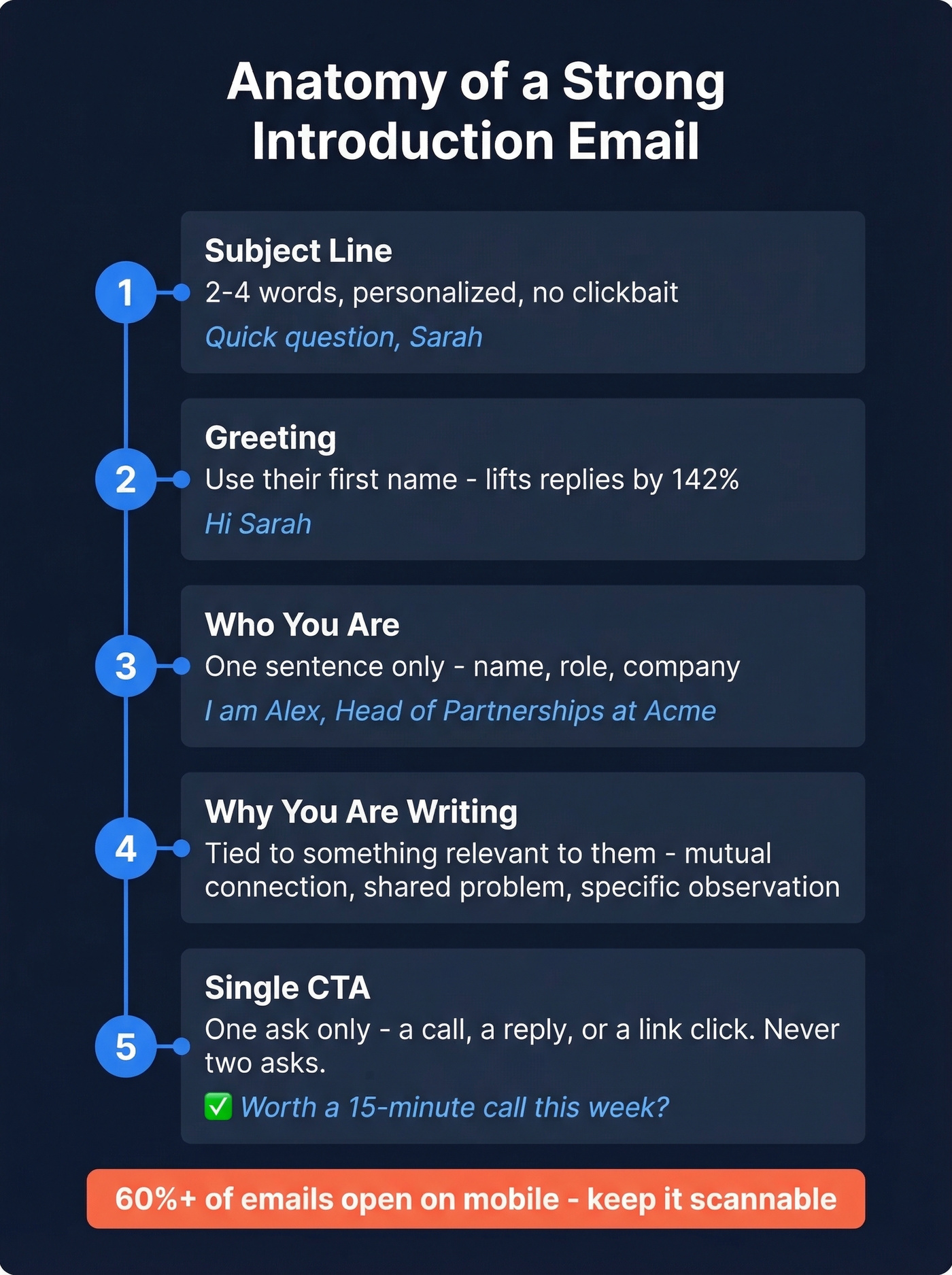
Subject line - 2-4 words, personalized. No clickbait.
Greeting - Use their name. "Hi Sarah" beats "Dear Sir/Madam" in every context except formal government correspondence. Using the recipient's first name in the greeting alone can lift reply rates by up to 142%.
Who you are - One sentence. Your name, role, and company. That's it.
Why you're writing - The purpose, tied to something relevant to them. A mutual connection, a shared problem, a specific observation about their work.
Single CTA - One ask. A 15-minute call. A reply. A link click. Never two asks in the same email. (If you need help tightening this, use these email call to action rules.)
Sign-off - Professional, brief. Include a complete signature with your title and contact info.
One thing people forget: 60%+ of emails are opened on mobile. If your email requires horizontal scrolling or has a wall of text, 42% of mobile readers delete it within three seconds. For roles where personality matters - sales, community, customer success - consider pairing your email with a short Loom video to stand out.
Subject Lines - What the Data Says
The Belkins study gives us hard numbers:
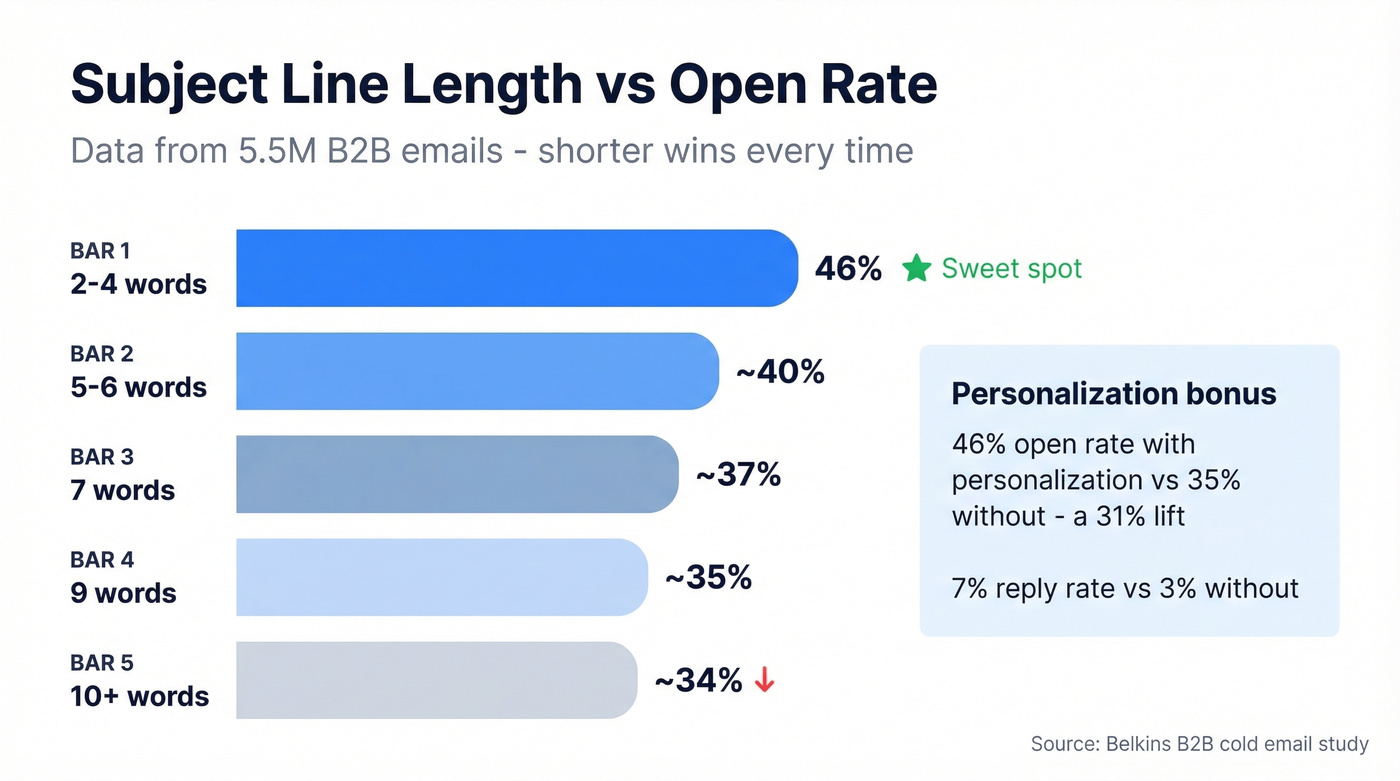
| Subject Line Length | Open Rate | Takeaway |
|---|---|---|
| 2-4 words | 46% | Sweet spot - use this |
| 5-6 words | ~40% | Still strong |
| 7 words | ~37% | Start trimming |
| 9 words | ~35% | Too long for most |
| 10+ words | ~34% | Diminishing returns |
Personalized subject lines hit 46% open rates versus 35% without - a 31% lift. Reply rates jump even more: 7% with personalization versus 3% without. Question-style subject lines match that 46% open rate. Numbers in subject lines don't help - 27% open rate with numbers versus 28% without.
Keep mobile in mind. Subject lines truncate after roughly 35-50 characters on most phones. If your key information is in word eight, half your audience never sees it.
Strong: "Quick question, Sarah" - "Loved your talk" - "Intro from [Mutual Name]" - "[Company] + [Their Company]"
Weak: "Introduction and Potential Synergies Between Our Organizations"

27% of emails never reach the inbox - and no template can fix a bad email address. Prospeo's 5-step verification delivers 98% email accuracy, so your carefully crafted introduction actually lands. At $0.01 per verified email, bad data stops being the reason your intros go unanswered.
Stop writing perfect emails to dead addresses.
15 Email Introduction Templates by Scenario
New Team / First Day
Send your team intro email before your first day. It sets the tone and means you're not a complete stranger when you walk in or log on. Include your name, role, brief background, one personal note, and an invitation to connect - that's the checklist that works.
Template 1: Pre-First-Day Email
Subject: Starting Monday - excited to join
Hi [Team/Name],
I'm [Your Name], joining as [Role] on [Date]. I've spent the last [X years] in [relevant experience], most recently at [Company].
I'm looking forward to learning how things work here before jumping in with ideas. Outside work, I'm into [hobby or interest].
Feel free to reach out anytime - I'd love to start putting names to faces.
Best, [Your Name]
This is a straightforward business email self introduction - no jargon, no overreach, just the essentials a new colleague needs.
Template 2: First-Week Team Intro
Subject: Hello from the new [Role]
Hi [Name],
I just started as [Role] on [Manager]'s team. I'll be working on [area/project], and I know our work overlaps on [specific thing].
Would love to grab 15 minutes this week to learn about what you're focused on. What's your calendar look like?
Thanks, [Your Name]
Casual version of Template 2: Swap the subject to "Hey - just joined [Manager]'s team" and open with "Wanted to say hi before we end up in a meeting together with no context."
New Manager or Client
When you're inheriting accounts or reporting to someone new, clarity beats charm. Lead with role clarity, a meeting ask, and 2-3 agenda bullets.
Template 3: Intro to New Manager
Subject: Looking forward to working together
Hi [Manager Name],
I'm [Your Name], joining your team as [Role] starting [Date]. I wanted to introduce myself and see if we could find 30 minutes in your first week to align on priorities.
Happy to cover whatever's most useful - my background, current projects, or your expectations for the role.
[Calendar link]
Best, [Your Name]
Template 4: CSM Account-Handoff Intro
Subject: Your new point of contact at [Company]
Hi [Client Name],
I'm [Your Name], taking over as your Customer Success Manager from [Previous CSM]. I'll be your primary contact, your advocate internally, and the person to call when something needs fixing.
I'd love 15 minutes to get up to speed on what success looks like for your team, any open issues, and your goals for the next quarter.
[Calendar link] - pick any time that works.
Looking forward to it, [Your Name]
Why this works: It leads with what you'll do for them, not your resume. A common theme in r/CustomerSuccess is that customers care more about what changes for them than your tenure or certifications.
Cold Outreach (Sales & Networking)
Cold intros succeed or fail based on relevance. The professional way to introduce yourself in an email to a stranger is to lead with purpose, not your bio. Keep each template under 100 words. Personalize beyond the first name - reference their recent work, company news, or a mutual connection.
If you're building a full outbound motion, pair these templates with a B2B cold email sequence so you’re not relying on one message.
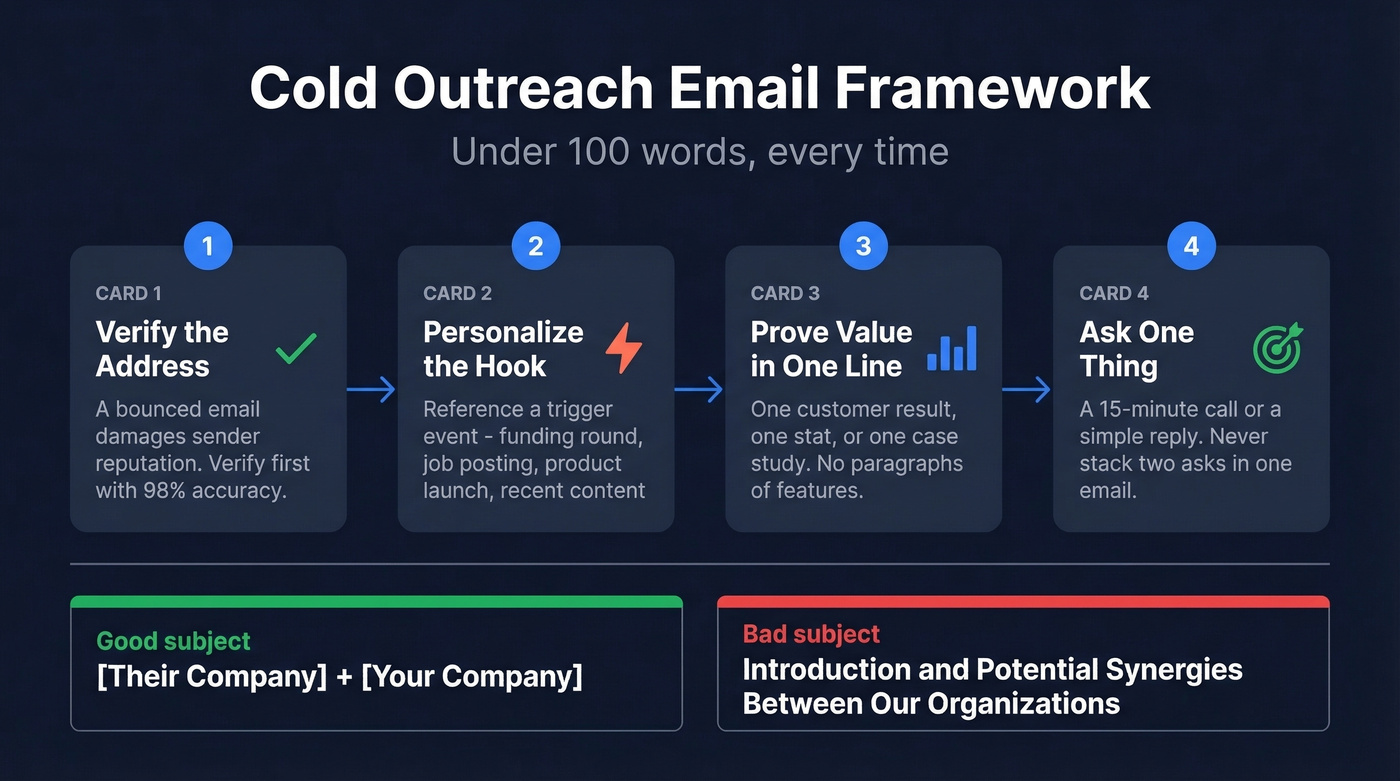
Look, if your average deal closes under $15K, you probably don't need a 200-word introduction. The shorter the email, the higher the reply rate. In our experience, sub-80-word cold emails consistently outperform longer ones.
Step zero: verify the address before you send. A bounced cold email damages your sender reputation. Prospeo handles this in seconds with 98% accuracy across 300M+ professional profiles. If you’re seeing issues, check your email bounce rate and fix the root cause. Template 5: Cold Sales Intro
Subject: [Their Company] + [Your Company]
Hi [Name],
I noticed [specific observation - recent funding round, job posting, product launch]. At [Your Company], we help teams like yours [solve specific problem].
[One sentence of proof - customer result, stat, or case study].
Worth a 15-minute call this week?
[Your Name]
Casual version: Swap the subject to "saw your [trigger event]" and open with "This might be a stretch, but..."
Template 6: Cold Networking Intro
Subject: Your [article/talk/post] on [topic]
Hi [Name],
I came across your [specific piece of work] and it changed how I think about [topic]. I'm [Your Name], [one-line role description].
I'd love to ask you one question about [specific angle]. Would a quick reply or a 10-minute call work better?
Thanks, [Your Name]
Template 7: Post-Event Follow-Up
Subject: Great meeting you at [Event]
Hi [Name],
Enjoyed our conversation about [topic] at [Event]. You mentioned [specific thing they said] - I've been thinking about that since.
I'd love to continue the conversation. Free for coffee or a call next week?
[Your Name]
Warm Introductions and Referrals
One non-negotiable rule: always double opt-in before making an introduction. Ask both parties if they want the intro before you send it. Skipping this step burns social capital fast. A thread on r/sales put it bluntly - unsolicited intros are "the fastest way to make two people annoyed at you simultaneously."
Template 8: Requesting a Warm Intro
Subject: Could you intro me to [Name]?
Hi [Connector],
I'm trying to connect with [Target Name] at [Company] about [specific reason]. I noticed you're connected - would you be comfortable making an introduction?
Happy to draft the email for you so it's zero effort on your end.
Thanks, [Your Name]
Template 9: Introducing Two People
Subject: Introducing [Name A] and [Name B]
Hi both,
[Name A], meet [Name B] - [one-line description of who they are and why this matters]. [Name B], [Name A] is [one-line description and relevance].
I think you'd have a great conversation about [specific topic]. I'll let you two take it from here.
Best, [Your Name]
Partnerships, Mentorship, and Recruiting
Template 10: Partnership Proposal
Subject: Partnership idea - [Their Company] + [Your Company]
Hi [Name],
I run [Your Company/Team], and we serve a similar audience to yours. I have an idea for a [co-marketing/integration/referral] partnership that could benefit both sides.
Can I send over a one-pager, or would you prefer a quick call?
[Your Name]
Why this works: It gives them two low-commitment response options. Nobody wants to agree to a partnership in email one - they just need an easy next step.
Template 11: Mentorship Request
Subject: Would love your advice on [topic]
Hi [Name],
I've followed your work on [specific thing] for [timeframe]. I'm currently [your situation], and your perspective on [specific challenge] would be useful.
Would you be open to a 20-minute call? I'll come prepared with specific questions - no open-ended "pick your brain" session.
Grateful for your time, [Your Name]
Template 12: Recruiter Outreach
Subject: [Role] at [Company] - thought of you
Hi [Name],
I'm hiring for a [Role] at [Company], and your background in [specific skill/experience] stood out. The role focuses on [one-line description], and the team is [size/stage].
Interested in learning more? Happy to share the full details over a quick call.
[Your Name]
Template 13: Vendor/Freelancer Intro
Subject: [Your Service] for [Their Company]
Hi [Name],
I'm [Your Name], a [freelancer/consultant] specializing in [service]. I noticed [specific observation about their company - gap, opportunity, recent change].
I recently helped [similar company] achieve [specific result]. Would it make sense to chat about whether I could do the same for you?
[Your Name]
This is a clean self-introduction email for freelancers - specific enough to show you've done your homework, short enough to respect their time.
Template 14: Job Seeker to Hiring Manager
Subject: [Role] opening - quick question
Hi [Name],
I saw the [Role] posting and wanted to reach out directly. I've spent [X years] doing [relevant work], most recently [specific accomplishment that maps to the role].
I've applied through the portal, but I'd love 10 minutes to ask about the team's biggest priority for this hire.
[Your Name]
Template 15: Re-Engagement with a Dormant Contact
Subject: It's been a while
Hi [Name],
We connected [timeframe ago] about [original context]. I've since [relevant update about you or your company], and I think there's a stronger reason to reconnect now.
[One sentence on what's changed or what you can offer]. Worth revisiting?
[Your Name]
Deliverability Checklist
Your email's content doesn't matter if it never arrives. Before you hit send, verify the recipient's address - this is the step everyone skips, and invalid emails bounce, tanking your sender reputation. Stick to plain text or minimal formatting, which performs better for deliverability and loads faster on mobile. Include a complete signature with your name, title, company, and phone number; emails without signatures look like spam to filters. Preview your email on a phone screen, and if it requires scrolling through a wall of text, trim it. Check your sender reputation too - if you've been sending to unverified lists, your domain is probably already flagged. (If you need tooling, start with email reputation tools.)
Skip this section if you're only emailing people you already know. But for cold outreach, the best introduction email is worthless if it bounces. Prospeo verifies emails in real time with 98% accuracy, and the free tier gives you 75 verifications per month - enough to validate your most important outreach before a single email leaves your inbox.
You've got the template. Now you need the right person's real email. Prospeo gives you 300M+ professional profiles with 30+ filters - role, company size, intent signals - so your introduction emails reach decision-makers who actually match your ICP. Data refreshed every 7 days, not 6 weeks.
Pair great copy with the most accurate B2B contact data available.
Follow Up or Lose the Reply
Here's the thing: 55% of cold email replies come from follow-ups, not the initial email. If you're sending one introduction and moving on, you're leaving more than half your potential replies on the table.
If you want more plug-and-play options, use these sales follow-up templates or these cold email follow-up templates.
The timing framework that works: send your first follow-up 2-3 days after the initial email, then space them out - 4 days, 7 days, 14 days. Graduated spacing feels persistent without being annoying. Stick to Tuesday through Thursday, 9-11 AM in the recipient's time zone. For inbound leads, the window is tighter - contact within 5 minutes for the best connect rate.
Follow-Up Template:
Subject: Re: [Original Subject]
Hi [Name],
I sent a note last [day] about [one-line reminder]. I know inboxes get buried - just wanted to bump this in case it's relevant.
[One new piece of value - a relevant article, a stat, a case study].
Worth a quick reply?
[Your Name]
Mistakes That Kill Introduction Emails
Too much about you. Lead with purpose, not biography. Your recipient cares about what you'll do for them, not your 12-year career arc.
Too long. Let's compare:
Bad: "I wanted to take a moment to introduce myself and share a bit about my background. I've been in the industry for over 12 years, working with companies ranging from startups to Fortune 500 enterprises..." (47 words and you still haven't said anything useful)
Good: "I'm Sarah, your new CSM at [Company]. I'll be your go-to for renewals, escalations, and making sure you're getting full value from the platform. Can we grab 15 minutes this week?" (33 words, specific)
Multiple CTAs. "Let's schedule a call, and also check out our case study, and feel free to connect on social media." Pick one. A single CTA gets 371% more clicks.
Generic subject lines. "Introduction" tells the recipient nothing. "Quick question about [their project]" tells them everything.
Gendered greetings. "Dear Sir" or "Dear Madam" is a coin flip that alienates half your audience when you guess wrong. "Hi [First Name]" is universally safe.
Culturally tone-deaf language. If you're emailing internationally, drop the idioms. "Let's knock this out of the park" means nothing to someone in Munich or Tokyo. Keep language clear and globally readable.
FAQ
How long should an introduction email be?
Under 150 words. Aim for one CTA, short paragraphs, and formatting that's scannable on mobile. Emails with a single ask get 371% more clicks than those with multiple CTAs. If you can say it in 80 words, do that.
What's a good subject line for an introduction email?
Two to four words, personalized to the recipient. Personalized subject lines hit 46% open rates versus 35% without - a 31% lift. Questions perform equally well. Avoid anything over seven words; it truncates on mobile.
Should I follow up if I don't get a reply?
Yes - 55% of replies come from follow-ups. Wait 2-3 days, then follow up with new value like a relevant stat, article, or case study. Space subsequent messages at 4, 7, and 14 days.
How do I introduce myself to a new team over email?
Send it before your first day. Include your name, role, brief background, one personal note, and an invitation to connect. Template 1 above covers everything a new team needs without overloading them - keep it under 80 words.
How do I make sure my introduction email doesn't bounce?
Verify the recipient's address before sending. We've seen teams cut their bounce rate from 35%+ down to under 4% just by running addresses through a verification tool before hitting send. One bounced email can damage your sender reputation for weeks.