

How to Reconnect with Old Clients: 7 Email Templates + a Win-Back Sequence That Works
You just exported a chunk of old CRM contacts and realized you've been sitting on a pile of past clients you haven't emailed since the project wrapped. A single re-engagement email to a small slice of that list can beat a month of cold outreach. These people already know your work. The catch: a lot of those email addresses are probably dead, and the rest may have forgotten who you are.
Clients disappear for four reasons: mediocre results, your prices, their forgetfulness, or your silence. Most of the time, it's the last two. That's fixable.
What You Need (Quick Version)
- Verify your old email list before sending. Addresses decay roughly 25% per year.
- Use the casual check-in template first. It's the lowest-friction way to restart the conversation.
- Send a 3-email sequence, not a single shot. The first follow-up alone boosts response rates by 50%.
Clean the List First
Most re-engagement guides skip the most important step: verifying your list. It's the step that determines whether the rest of this article works or blows up your sender reputation.
The stakes are real. A hard bounce rate above 3% tanks your sender reputation fast (see bounce rate benchmarks). [CAN-SPAM penalties run up to $53,088](https://www.venable.com/-/media/files/events/2025/01/email-marketing-in-2025 - debunking-myths-and-discu.pdf?rev=38b72d0663d544d4a1c83a2ee13c479e&hash=5CDB04101D6BD10805A750D0E0193A5A) per email violation. And 69% of recipients mark emails as spam based on the subject line alone - so even if the address is valid, a bad subject line kills you before the body copy gets a chance. If any old clients are EU-based, GDPR applies too, with fines up to EUR 20M or 4% of global annual turnover.
One email practitioner on r/EmailMarketing documented open rates jumping from 12% to 58% after fixing deliverability basics - verification being step one.
Run your list through Prospeo's email verification before writing a single template. The 5-step verification process catches spam traps, honeypots, and dead addresses with 98% accuracy. There's a free tier (75 emails/month) so you can test on a segment before committing.

If you're ramping volume or using a new sending domain, warm up first - start with 10-20 emails per day and scale over 4-8 weeks (use safe email velocity limits). Some CRMs like HubSpot auto-suppress unengaged contacts, which is another reason to re-engage before the platform does it for you.
Who to Email First
Not every old client deserves the same email. Segment before you send (a simple churn analysis mindset helps).
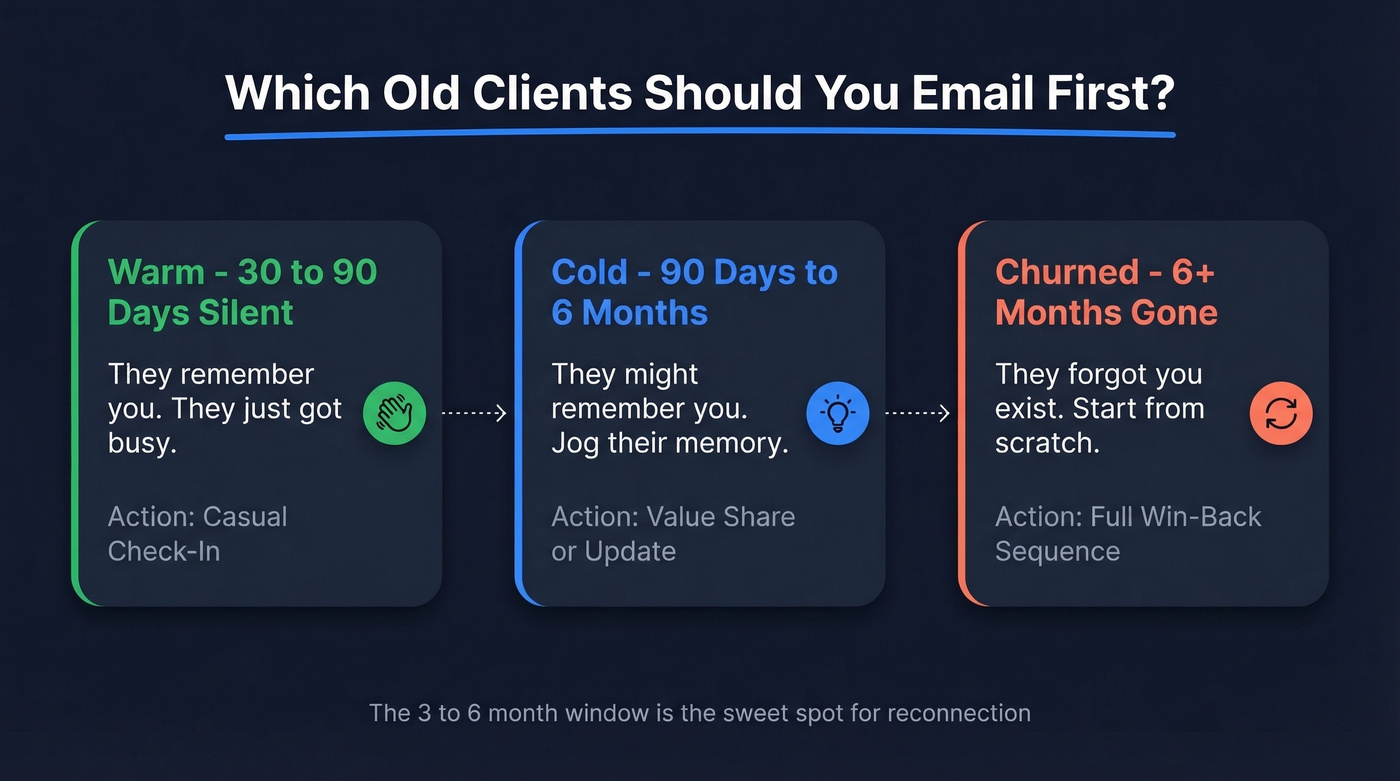
| Segment | Definition | Action |
|---|---|---|
| Warm | No engagement in the last 30-90 days | Casual check-in |
| Cold | Silent 90 days to 6 months | Value share or update |
| Churned | 6+ months with no reply | Full win-back sequence |
The 3-6 month window is the sweet spot for reconnection. Whether you send a casual check-in, a value share, or a structured win-back sequence depends entirely on which segment you're targeting.

Before you send a single re-engagement email, clean the list. Prospeo's 5-step verification catches spam traps, honeypots, and dead addresses with 98% accuracy - so your win-back sequence lands in inboxes, not bounce logs. Free tier starts at 75 emails/month.
One hard bounce kills more deals than a bad subject line.
7 Templates for Reconnecting with Old Clients
Here's the thing: stop copying templates verbatim. Thirty seconds of personalization - a specific project name, a detail about their business - separates "ignored" from "replied." If you want more patterns, borrow from proven sales follow-up templates and adapt them for past clients.
Personalized emails hit 46% open rates vs 35% without. And use plain text. A formatted newsletter screams "mass email." A plain text message signals personal outreach (more on email copywriting if you need a refresher).
1. The Casual Check-In
Subject: Quick hello
Hi [Name], it's been a while since we wrapped [project]. I was thinking about [specific detail about their business] and wanted to see how things are going. No agenda - just checking in.
When to use: First email to any warm or cold contact. Asks nothing, opens the door. This is the simplest re-engagement email you can send, and it consistently gets the best response rates.
2. The Value Share
Subject: Thought of you
Hi [Name], I came across [article/resource/tool] and immediately thought of your team's work on [specific area]. Figured it might be useful - happy to chat if it sparks ideas.
When to use: When you have something genuinely relevant to share. Don't force it.
3. The New Offering
Subject: Something new at [your company]
Hi [Name], since we last worked together, we've launched [new service/product]. Given what I know about [their challenge], it could be a fit. Worth a quick conversation?
Skip this if you're just rebranding the same service. Clients see through that instantly.
4. The Feedback Request
Subject: Quick question about our work together
Hi [Name], I've been reflecting on past projects and wanted to ask - was there anything about our engagement you'd do differently? Honest feedback helps me improve.
When to use: When you suspect results were mediocre or the client went quiet without explanation. Disarming and genuine. We've seen this one reopen conversations that seemed completely dead, because it flips the dynamic - you're asking for help instead of selling something.
5. The Referral Ask
Subject: Know anyone who needs [your service]?
Hi [Name], I'm taking on a few new clients this quarter and wondered if anyone in your network might benefit from [specific outcome you deliver]. No pressure - just thought I'd ask.
Warning: Never send this as a first touch. Re-establish contact first.
6. The Incentive / Discount
Subject: Something for past clients only
Hi [Name], I'm offering [specific discount or bonus] exclusively for past clients through [date]. Given our work on [project], I thought you'd want to know.
When to use: Later in a sequence, not the opener. Leading with a discount trains clients to wait for one.
7. The Event Invite
Subject: You're invited - [event name]
Hi [Name], we're hosting [event/webinar] on [date] covering [topic relevant to their industry]. Here's the link: [URL]. Would love to see you there.
Low-pressure, no meeting ask. Good for re-engaging past clients who aren't ready for a sales conversation.
The Win-Back Email Sequence
One email isn't a strategy. This three-touch sequence escalates from value to social proof to a soft close.
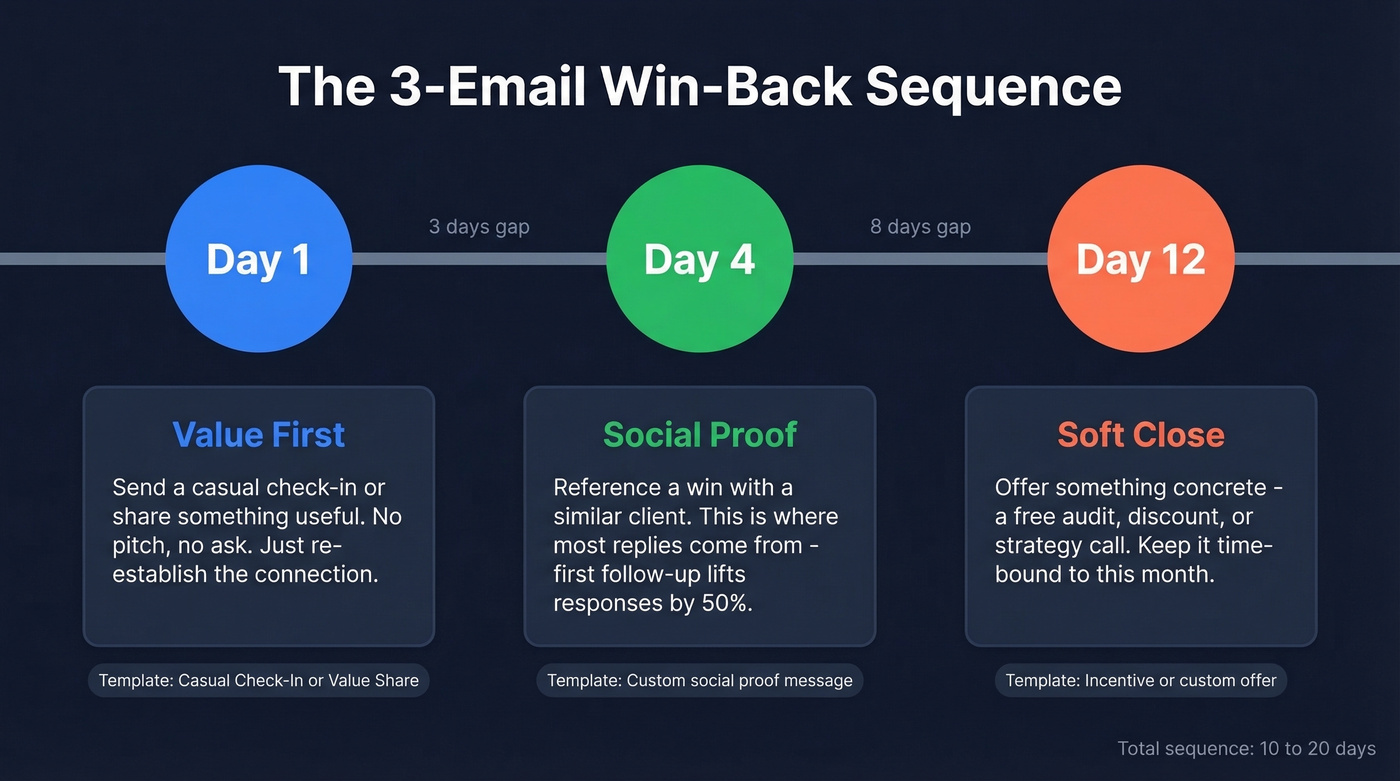
Day 1 - Value. Send the Casual Check-In or Value Share template. No ask, no pitch. Just re-establish the connection.
Day 4 - Social Proof. Reference a result you've delivered for a similar client: "We just helped [company type] achieve [specific outcome] - reminded me of the work we did together." In our experience, the Day 4 social proof email is where most replies come from. The first follow-up lifts response rates by 50%, and three days is the right gap between touches (see when you should follow up).
Day 12 - Soft Close with Incentive. Now you can offer something. A free audit, a discount, a strategy session. Keep it time-bound: "If you're open to it, I'd love to do a quick [value offer] this month - no strings."
This 3-part series over 10-20 days hits the sweet spot. Make sure every address in your sequence is verified - hard bounces add up fast in small-batch sends and can drag down your sender reputation. The structure is the framework, not the final product; customize the details for each contact.
Subject Line Rules
Your subject line is the entire campaign. 47% of recipients decide whether to open based on the subject line alone.
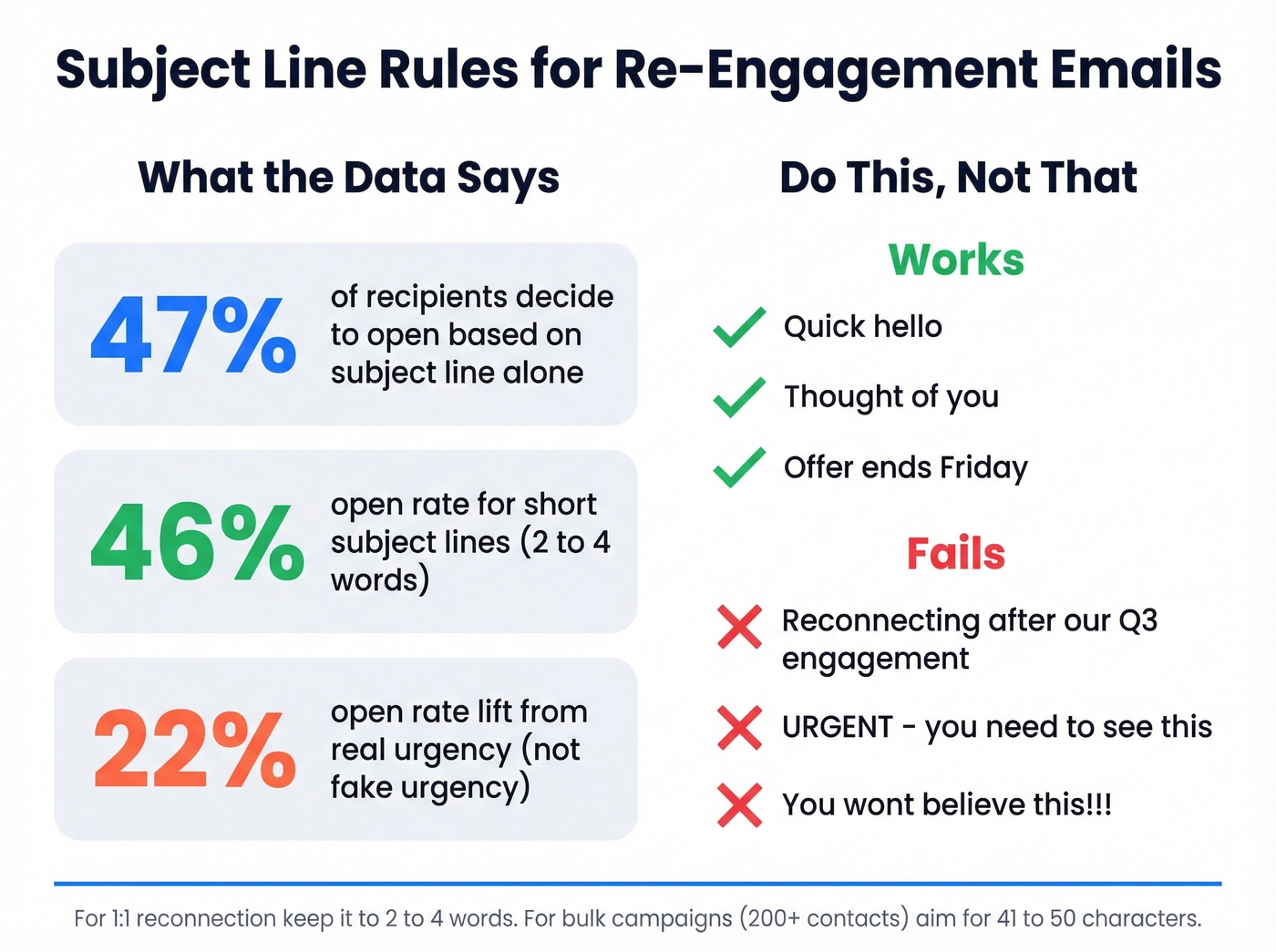
For 1:1 reconnection, keep it to 2-4 words. Short subject lines hit 46% open rates. "Quick hello" beats "Reconnecting after our Q3 engagement" every time. For bulk re-engagement campaigns to 200+ contacts, 41-50 characters tends to drive the best click-through rates. Questions work well in both cases. If you need ideas, pull from a swipe file of email subject line examples.
Avoid all caps, excessive punctuation, and clickbait. "You won't believe this" gets opens and immediate unsubscribes. Urgency language lifts open rates by 22%, but only when it's real. "Offer ends Friday" works. "URGENT" doesn't.
When They Don't Reply
Let's be honest: some people won't respond. That's fine.
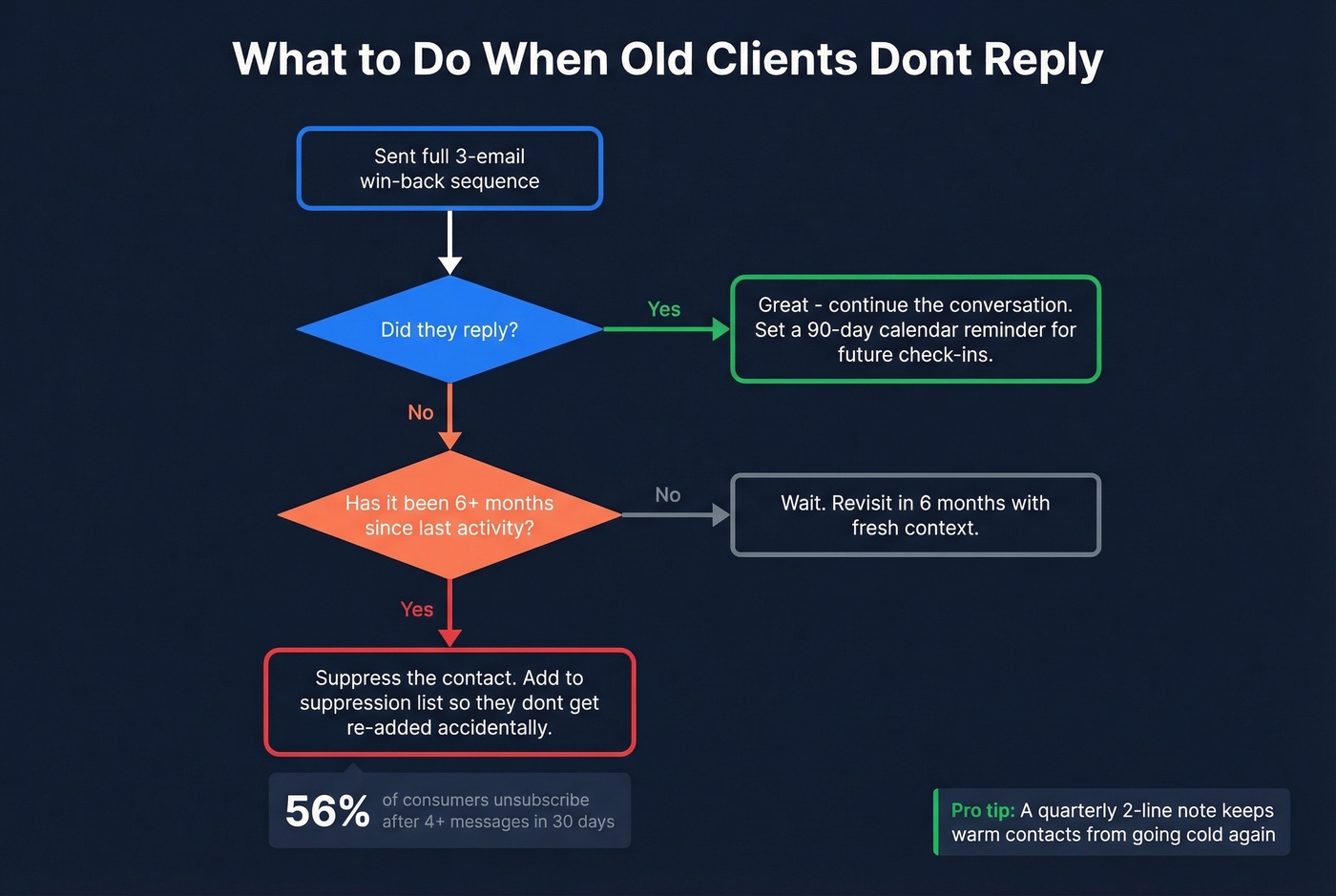
What's not fine is continuing to email them. 56% of U.S. consumers unsubscribe when they receive four or more messages from the same sender within 30 days, according to Mailchimp's deliverability research. If someone doesn't engage after your full win-back sequence plus six months of silence, suppress them. Keep a suppression list so you don't accidentally re-add them later. Letting go protects your deliverability for the contacts who actually want to hear from you.
Most teams overthink the templates and underthink the list. A mediocre email sent to a verified, well-segmented list will outperform a brilliant email that bounces 15% of the time. Fix the data first, then worry about the copy. Whether you're re-engaging past clients or running full-scale cold outreach, deliverability is the foundation everything else sits on (use a full email deliverability guide if you’re troubleshooting).
Once you've re-established contact, a quarterly check-in keeps you top of mind without being annoying. We've found that a simple calendar reminder every 90 days - even just a two-line "saw this, thought of you" note - is enough to keep the relationship warm indefinitely.
Half your old CRM contacts probably changed jobs since you last spoke. Prospeo enriches stale records with fresh emails and direct dials - refreshed every 7 days, not 6 weeks. Reconnect with the right person at the right address.
Stop emailing addresses that expired two job changes ago.
FAQ
How long should I wait before reconnecting?
Three to six months after your last project is the sweet spot - long enough that you're not hovering, short enough that they remember you. Beyond six months, use the full win-back sequence rather than a single check-in to rebuild familiarity before making any ask.
Plain text or designed HTML?
Plain text for 1:1 reconnection. It signals personal outreach rather than a mass campaign. Save HTML templates for bulk sends to 200+ contacts where brand consistency matters more than intimacy.
How many follow-ups is too many?
Three emails over 10-20 days is a solid default for a past client win-back sequence. If there's no response after that, suppress the contact and revisit in six months. Pushing too many touches in a short window is how you get marked as spam. Campaign Monitor's research backs this up - engagement drops sharply after the third unreturned touch.
How do I verify old client emails before sending?
Run your exported CRM list through a verification tool that catches spam traps and dead addresses. Prospeo's free tier lets you verify 75 emails per month at 98% accuracy - enough to test a segment. Other options include NeverBounce and ZeroBounce, though Prospeo's 5-step process also handles catch-all domains, which is where a lot of B2B addresses live.