

How to Write a Reminder Email for a Meeting That Actually Gets Attended
You prepped for 45 minutes, opened the Zoom room, and waited. Five minutes. Ten. Nobody showed. The average B2B no-show rate hovers around 30%, which means roughly one in three of your booked meetings evaporates before it starts. That's not a scheduling problem - it's a reminder problem. And a single reminder email for a meeting won't fix it. You need a sequence.
The Quick Version
A 3-step reminder sequence:
- Confirmation at booking - lock in the commitment immediately
- Value reminder 3-5 days before - restate why this meeting matters
- Final confirmation 24 hours out - include a micro-commitment ask
A healthy show rate for booked discovery calls is 70-80%. If you're below that, your reminder cadence is the first thing to fix.
Anatomy of a Great Meeting Reminder
A strong reminder has five components: subject line, preview text, greeting, logistics block, and something extra - a small touch that makes it feel human rather than automated. Twilio's framework breaks this down well.
The most important rule: put your meeting link in the first three lines. We've seen teams cut no-shows in half just by moving the link above the fold. Your recipient is scanning on mobile, probably between meetings, and they need the join link immediately - not after two paragraphs of pleasantries.
Avoid passive-aggressive filler. Phrases like "just checking in" or "per my last email" signal obligation, not value. A gentle reminder message for meeting attendance should be direct and friendly instead. (If you need alternatives, see just checking in.)
Bad: "Hi, I'm reaching out to remind you about our upcoming meeting. Please find the details below when you get a chance."
Good: "Quick reminder - we're meeting tomorrow (Tuesday, March 11) at 2:00 PM ET. Here's your Zoom link: [link]. We'll cover your Q2 pipeline targets."
The good version leads with logistics, includes the link upfront, and adds a reason to show up. The bad version reads like it was written by someone who gets paid by the word.
Subject Lines That Get Opened
Personalized subject lines can lift open rates by 50% compared to generic ones. Time-specific language and topic context do the heavy lifting. (For more ideas, borrow from these subject line examples.)
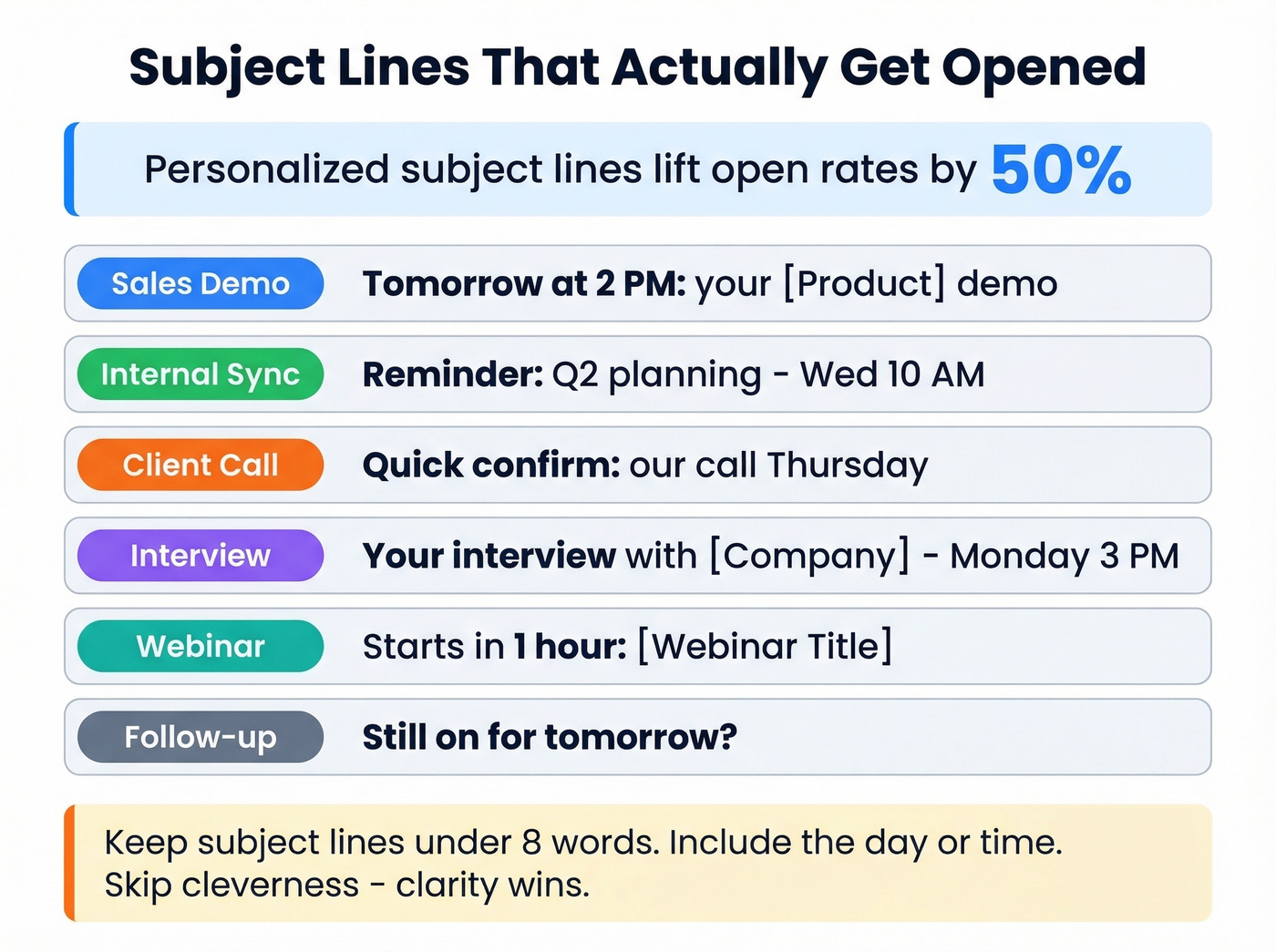
| Scenario | Subject Line Example |
|---|---|
| Sales demo | Tomorrow at 2 PM: your [Product] demo |
| Internal sync | Reminder: Q2 planning - Wed 10 AM |
| Client call | Quick confirm: our call Thursday |
| Interview | Your interview with [Company] - Monday 3 PM |
| Webinar | Starts in 1 hour: [Webinar Title] |
| Follow-up | Still on for tomorrow? |
Keep subject lines under 8 words. Include the day or time. Skip cleverness - clarity wins every time.
When to Send Each Reminder
Timing depends on the meeting type and stakes. Here's the cadence we've found works best after testing across dozens of outbound campaigns (and it maps well to broader sequence management best practices):
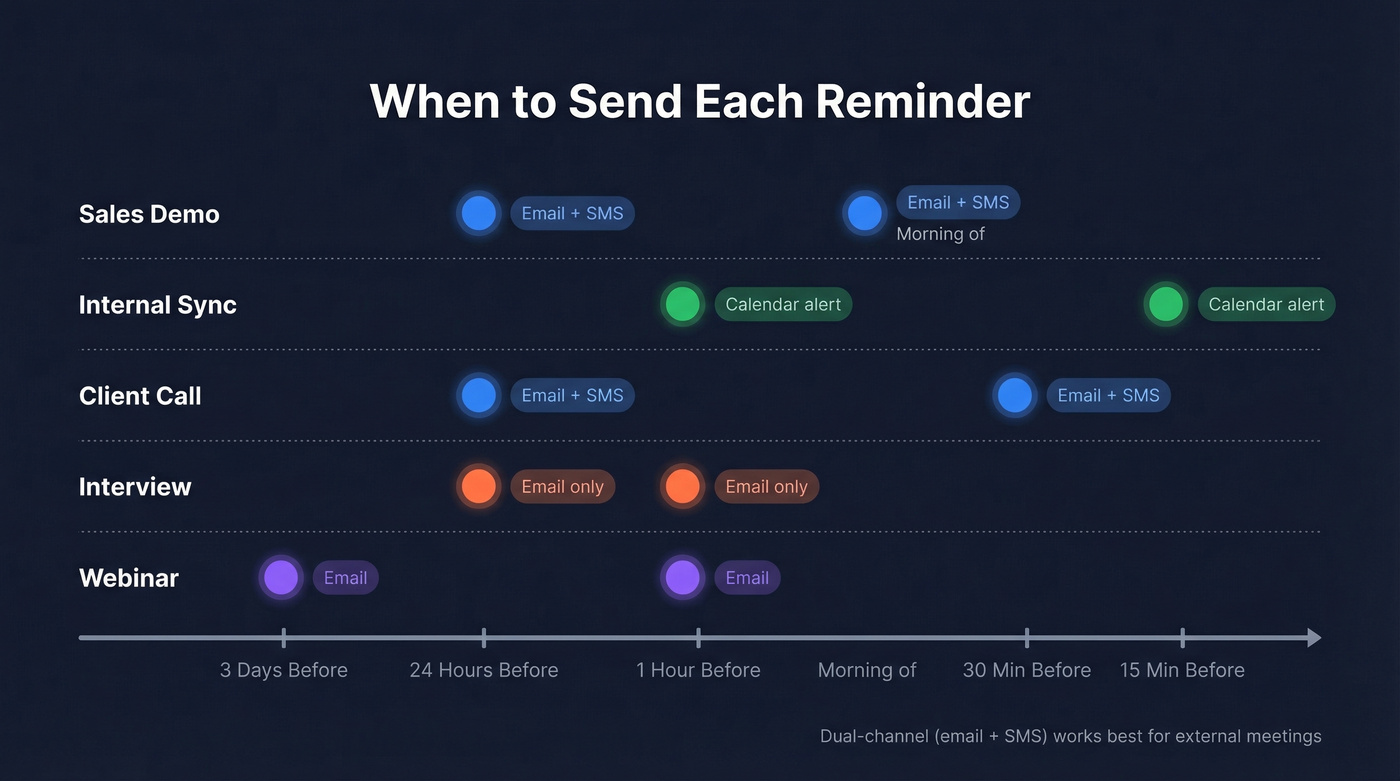
| Meeting Type | First Reminder | Second Reminder | Channel |
|---|---|---|---|
| Sales demo | 24 hours before | Morning of | Email + SMS |
| Internal sync | 1 hour before | 15 min before | Calendar alert |
| Client call | 24 hours before | 30 min before | Email + SMS |
| Interview | 24 hours before | 1 hour before | Email only |
| Webinar | 3 days before | 1 hour before | Email (2x) |
Calendly's baseline recommendation - email 24 hours before plus a text 30 minutes before - is a solid starting point. For interviews, tighten the cadence to 1 hour and 15 minutes before; candidate anxiety demands it. Sales demos benefit most from the dual-channel approach because your prospect has twelve other things competing for that time slot. (If you're building a full outbound motion, these sales prospecting techniques help keep meetings flowing.)

A perfect reminder sequence means nothing if it lands in the wrong inbox. Prospeo delivers 98% verified email accuracy across 300M+ professional profiles - so your reminders reach the person who actually booked the meeting, not a dead address.
Stop reminding inboxes that don't exist. Start with accurate data.
The 3-Step Sequence That Cuts No-Shows
Here's the thing: one reminder is a coin flip. A proper sequence changes the math entirely.
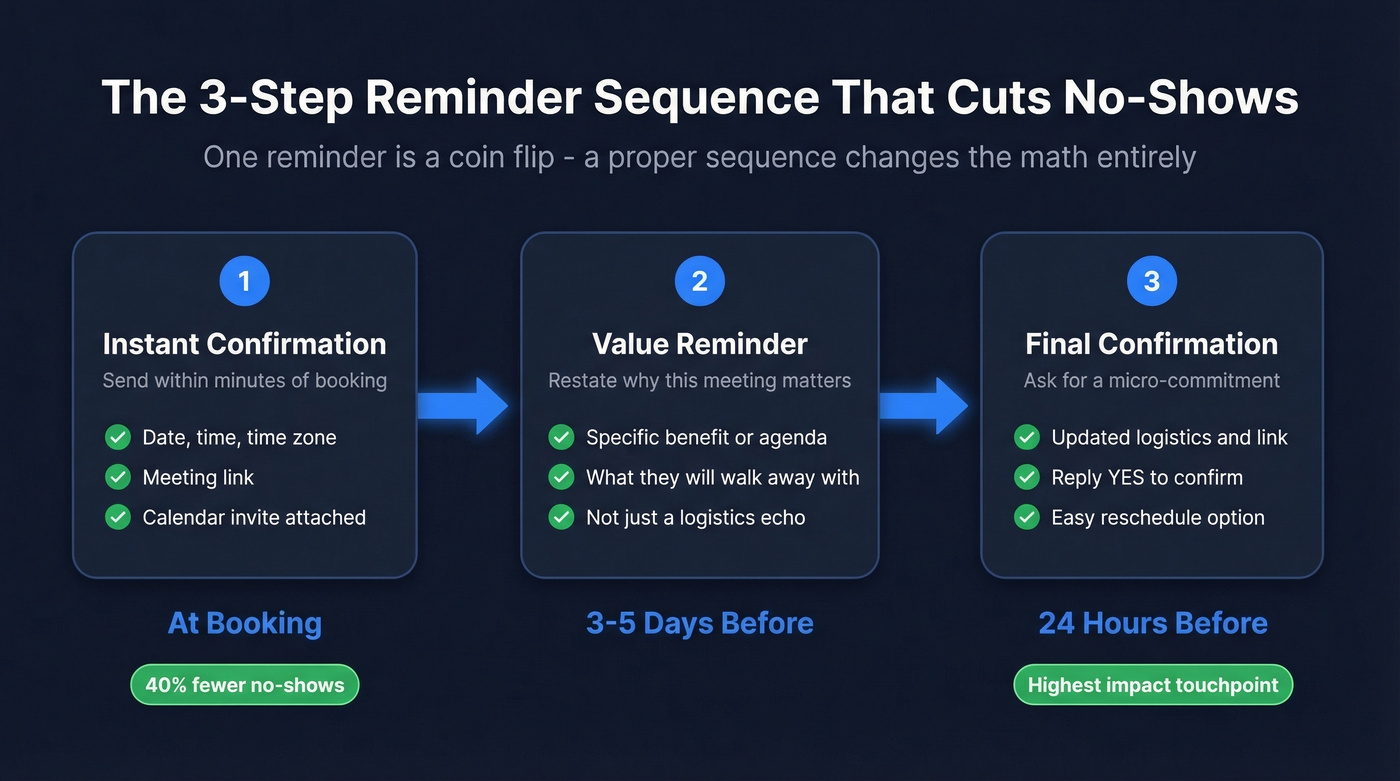
Step 1: Immediate confirmation at booking. Send within minutes. Include date, time, time zone, meeting link, and a calendar invite attachment. Prospects who receive immediate confirmation are 40% less likely to no-show.
Step 2: Value reminder 3-5 days before. Don't just repeat the logistics - restate why this meeting matters. "We'll walk through three ways to cut your prospecting time by half" gives them a reason to protect the calendar slot. This is where most sequences fall flat because people treat it as a logistics echo instead of a value pitch. (If you want to sharpen the value angle, use a few sample elevator pitches as a starting point.)
Step 3: Final confirmation 24 hours before. Ask them to reply "YES" to confirm. That tiny act of typing a response creates psychological commitment - the same principle behind the foot-in-the-door technique studied in behavioral psychology. In our experience, the micro-commitment ask lifts show rates noticeably. A simple "reminder: meeting tomorrow" message with a confirm request outperforms a passive notification every time.
Copy-Paste Templates
24-Hour Reminder (General)
Subject: Tomorrow at [Time]: [Meeting Topic]
Hi [Name], quick reminder about our meeting tomorrow, [Day], at [Time] [Time Zone]. Here's your link: [Meeting Link]. Looking forward to it - let me know if anything's changed.
This is your default. It works for most meetings.
Morning-Of Nudge
Keep this one brutally short - under 30 words, no agenda recap. Just the time and the link.
Subject: See you at [Time] today
Hi [Name], we're on for [Time] today. Join here: [Meeting Link]. See you shortly.
Sales Demo Reminder
Subject: Your [Product] demo - tomorrow at [Time]
Hi [Name], looking forward to walking you through [specific benefit] tomorrow at [Time] [Time Zone]. Join here: [Meeting Link]. If you'd like to reschedule, just reply and we'll find a new time.
The reschedule option matters. Making it easy to reschedule reduces no-shows because people ghost when changing feels harder than skipping. When sending a reminder email for a meeting with a prospect, always give them an easy out - it paradoxically increases attendance.
No-Show Follow-Up
This is the template most guides skip, and it's arguably the most important one: the follow-up meeting invitation that gets the conversation back on the calendar. (If you want more follow-up options, use these sales follow-up templates.)
Subject: Missed you today - want to reschedule?
Hi [Name], looks like we missed each other for our [Time] meeting. No worries - things come up. Here's a link to rebook whenever works: [Scheduling Link]. I'll hold the agenda for whenever you're ready.
No guilt. No passive aggression. Just a clear path back to the meeting. Most no-shows are logistical, not personal - treat them that way and your rebook rate climbs.
Mistakes That Kill Your Show Rate
Five things that quietly tank your attendance numbers:
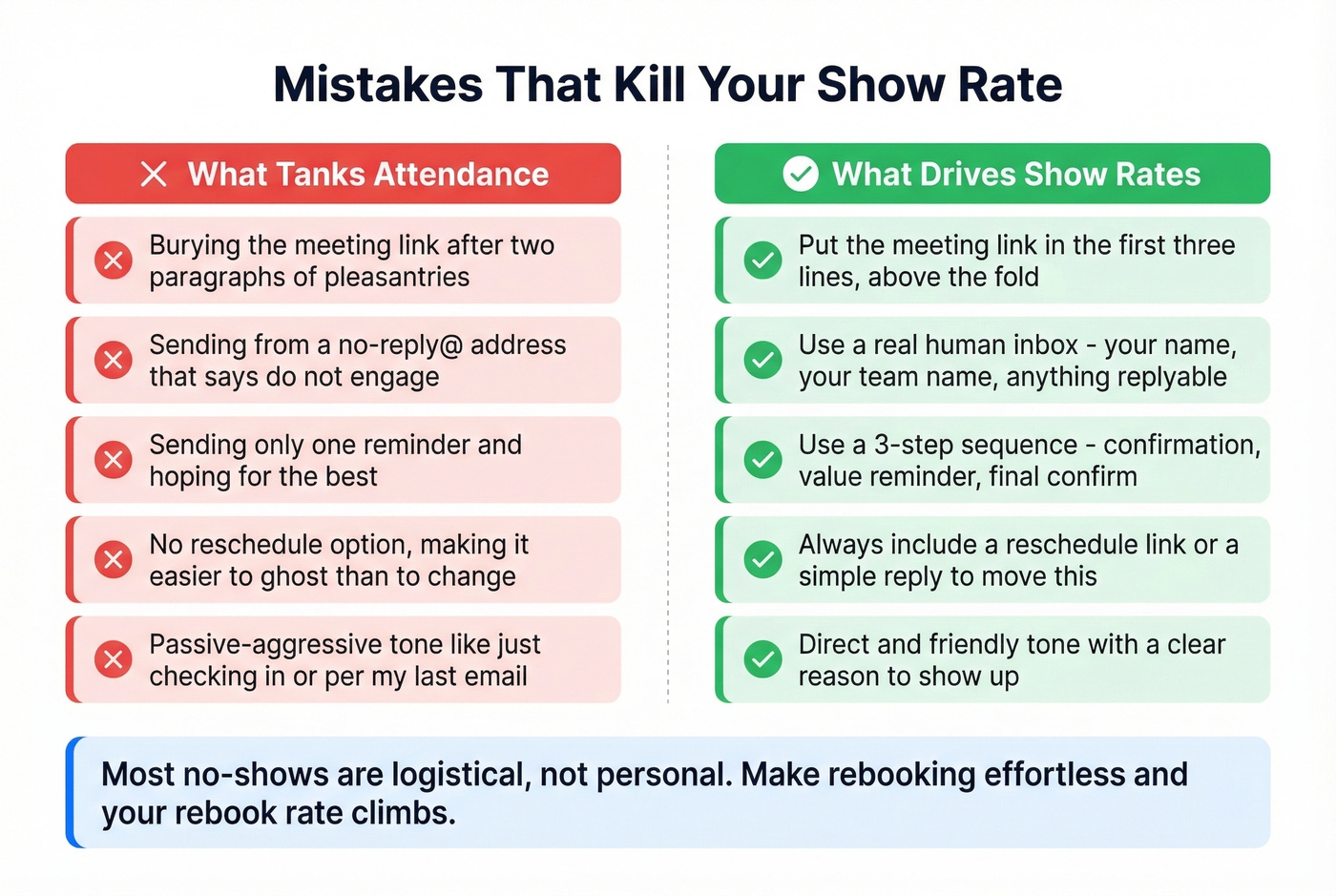
Burying the meeting link. Put it in the first three lines, not after two paragraphs of pleasantries. Your recipient is scanning, not reading.
Sending from a no-reply@ address. It signals "don't engage with this email," which is the opposite of what you want. Beyond the engagement signal, no-reply addresses create compliance friction under CAN-SPAM. Use a real inbox - your name, your team's name, anything a human would reply to. (If deliverability is a recurring issue, start with an email deliverability guide.)
Only sending one reminder. A single touchpoint isn't a sequence. It's a hope.
Skipping the reschedule option. If changing the meeting feels harder than ignoring it, people will ignore it. Always include a reschedule link or a simple "reply to move this."
The best no-show fix? Reaching prospects on two channels. Prospeo gives you verified emails and direct mobile numbers for 125M+ contacts - so your 24-hour reminder hits their inbox and your morning-of nudge hits their phone.
Dual-channel reminders need real phone numbers. Prospeo has 125M+ of them.
How to Automate Reminders
Gmail doesn't offer native recurring email functionality, which catches a lot of people off guard. Boomerang (~$15/mo per Gmail account) handles recurring sends and scheduled follow-ups reliably.
Calendly (free tier available) automates pre-meeting reminders with dynamic fields and reschedule links built in. SavvyCal offers similar scheduling-based reminders with a cleaner recipient-side booking experience.
Native Google Calendar and Outlook reminders are all-or-nothing - they'll ping you, but they won't send customized emails based on RSVP status. For teams that need conditional logic, tools like Timelier add rule-based automation on top of your existing calendar, filtering by RSVP status so you're only reminding attendees who haven't confirmed yet. (If you're doing this at scale, pairing reminders with follow up email software can simplify the workflow.)
Let's be honest: if your deals are typically under five figures, you don't need a $200/month automation stack. Calendly's free tier plus a two-email reminder cadence will get you 80% of the way there. Save the complex tooling for enterprise deals where a single no-show costs you real pipeline.
FAQ
How many reminders should I send before a meeting?
Two to three is the sweet spot. Send a confirmation at booking, a reminder 24 hours before, and a morning-of nudge for high-stakes meetings like sales demos or client calls. More than three feels pushy and can actually hurt attendance.
What's the best way to write a gentle reminder message for a meeting?
Lead with the meeting link and logistics in the first two lines, then add one sentence of value - what you'll cover or why it matters. Avoid guilt-tripping phrases like "I noticed you haven't responded." A friendly, direct tone with a clear join link outperforms formal language every time.
Should a meeting reminder be formal or casual?
Match the relationship. External client or interview reminders lean professional. Internal team syncs can be casual. Either way, be direct and friendly - skip phrases like "just checking in" or "as per my previous email." Clarity beats formality.
What should I do if someone no-shows after my reminders?
Send a brief, no-guilt follow-up meeting invitation within 30 minutes of the missed time. Acknowledge the miss, offer to reschedule, and include a one-click booking link. Most no-shows are logistical - make rebooking effortless and your rebook rate will climb.
How do I make sure my reminder emails actually get delivered?
Verify every email address before adding it to your reminder sequence. Bounced reminders are invisible no-shows - you'll never know the person didn't get your message. Tools like Prospeo offer 98% email accuracy with 75 free verifications per month, so you can clean your contact list before a single reminder goes out.