

How to Write a Reminder Email for No Reply That Actually Gets Answered
You sent the proposal Monday. It's Thursday. Nothing. Not a "got it," not a "we're reviewing," not even a polite "no."
That silence isn't rejection - it's just how inboxes work. An analysis of 16.5 million cold emails found the first email pulls a blended 8.4% reply rate. The other 91.6% need a well-timed reminder email for no reply to break through. Let's make sure yours actually lands.
The Quick Version
- Wait 2-3 business days, then reply in the same thread with new value - not "just checking in." (If you need a full set of options, borrow from these sales follow-up templates.)
- Cap follow-ups at 2-3. Four or more emails in a sequence more than triple spam complaints.
- Verify your contact data first. Bounced emails can't remind anyone of anything. (Use an AI email checker or follow a full email deliverability guide before scaling.)
Here's a universal gentle reminder you can copy right now:
Subject: Re: [Original subject]
Hi [Name],
I know things get buried - wanted to resurface this. [One sentence of new value or a specific question]. Would [specific next step] work for you this week?
Best, [Your name]
Why People Don't Reply
It's almost never personal. HubSpot reports that 40% of consumers have 50+ unread emails sitting in their inbox right now. Your carefully crafted message is competing with Slack notifications, a quarterly review, and a dozen other vendors.
Five common reasons for silence:
- Overloaded inbox - they saw it, meant to reply, forgot.
- Spam filter - your email never reached them. (Run a quick email spam checker if you suspect filtering.)
- Waiting on internal approval - they can't say yes alone.
- Bad timing - budget cycle, vacation, reorg.
- Wrong address - the email bounced and you didn't notice. (Track your email bounce rate so you catch this early.)
That last one is more common than most people think. It's also the only reason your follow-up strategy can't fix on its own.
How Many Follow-Ups to Send
The Belkins dataset tells a clear story: reply rates show diminishing returns with each additional email, and spam complaints spike hard after the third follow-up.
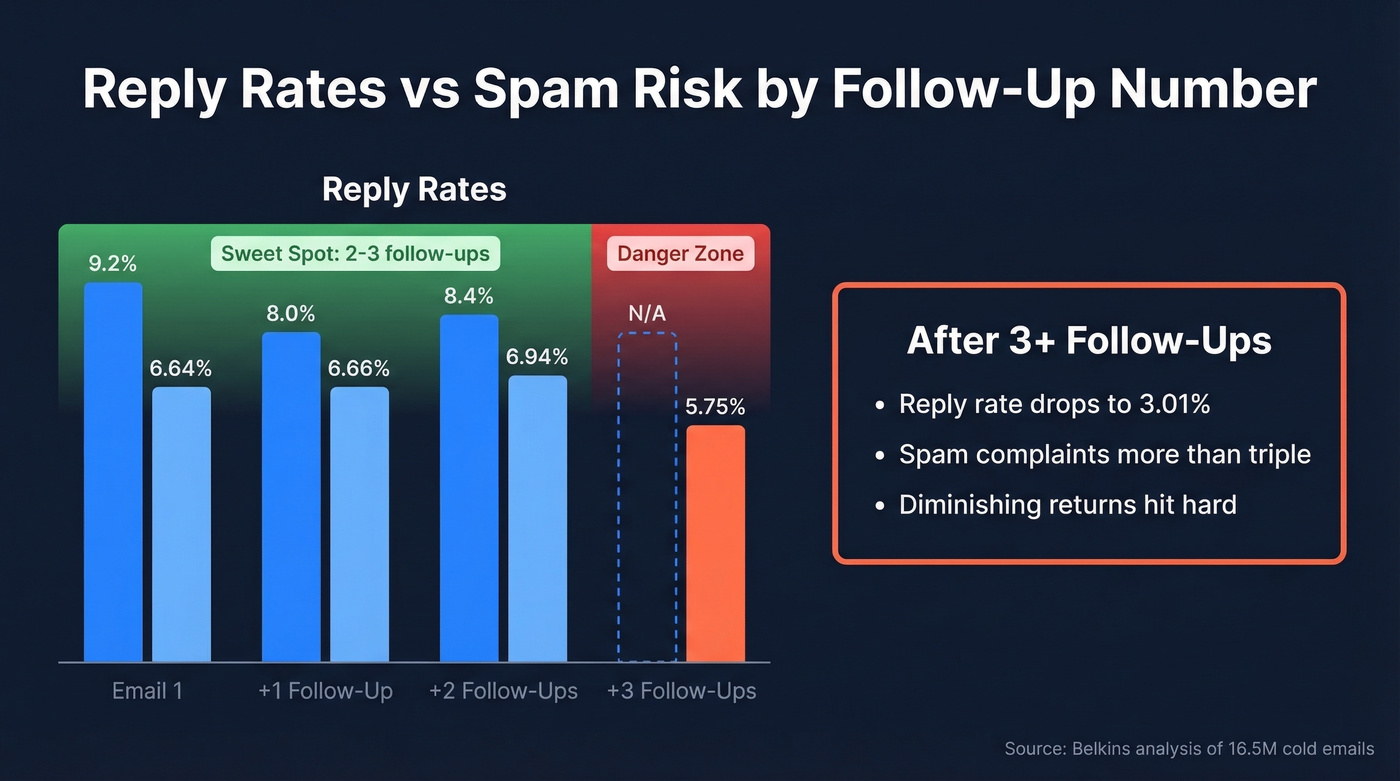
| Segment | Email 1 | +1 Follow-Up | +2 Follow-Ups | +3 Follow-Ups |
|---|---|---|---|---|
| Small biz (2-50) | 9.2% | 8.0% | 8.4% | Not reported |
| Founders | 6.64% | 6.66% | 6.94% | 5.75% |
You get a slight bump on the second and third touch, then a cliff. By the fourth email, founder reply rates drop to 3.01% and spam complaints more than triple. Two to three follow-ups is the sweet spot - after that, switch channels.
We've seen the same pattern across every campaign we've analyzed. The third email is your last real shot over email.
When to Send After No Response
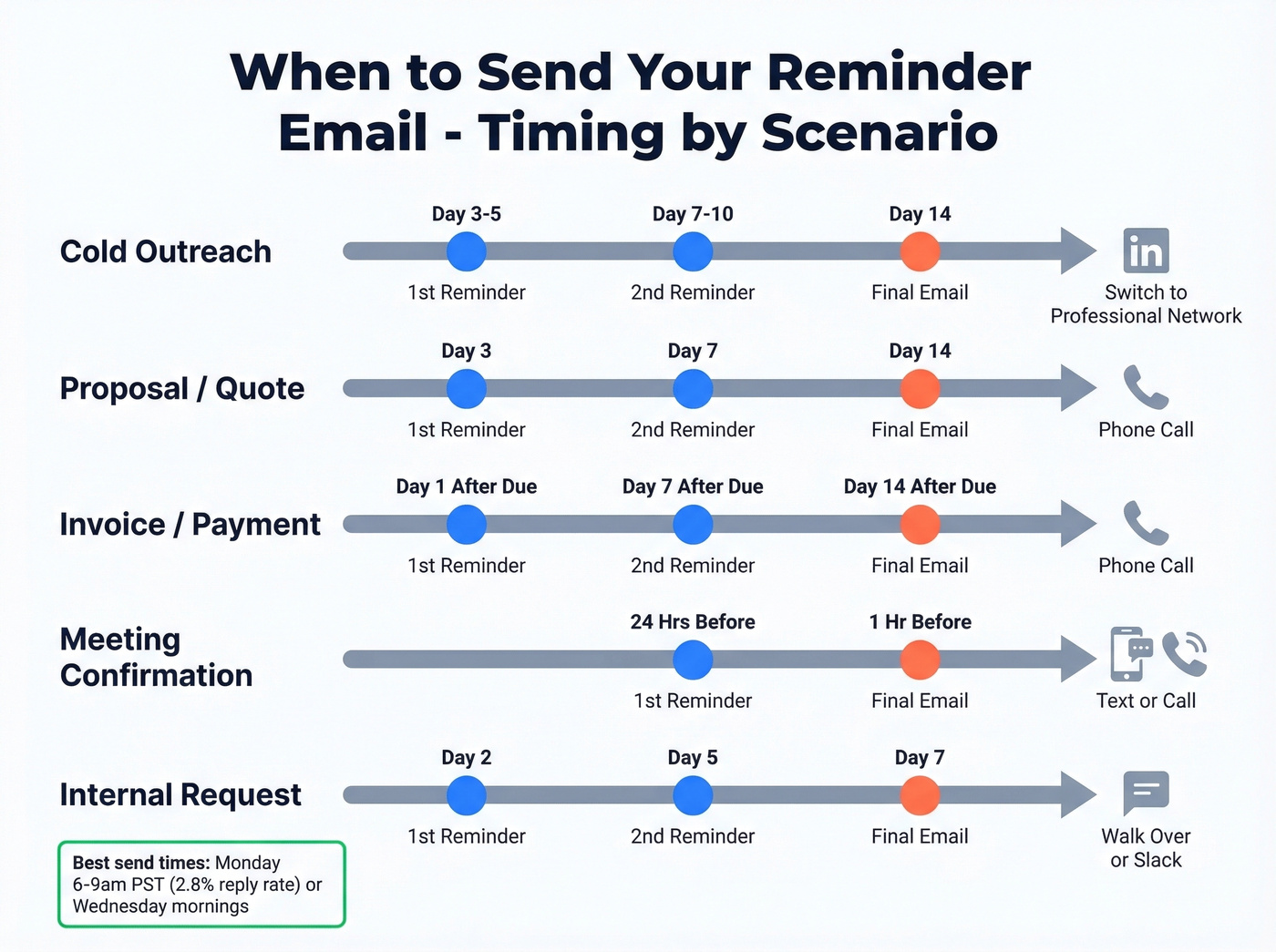
Timing matters more than most people give it credit for. Siege Media's analysis of 85,000+ personalized emails found that Monday mornings between 6-9am PST pull a 2.8% reply rate - the highest of any slot. Wednesday comes close at 2.6%.
For marketing-style reminders, the data looks different. MailerLite's benchmark of 2,138,817 campaigns shows Friday topping open rates at 49.72%, with opens peaking between 8-11am local time.
The real answer depends on your scenario:
| Scenario | First Reminder | Second Reminder | Final Email | Channel Switch |
|---|---|---|---|---|
| Cold outreach | Day 3-5 | Day 7-10 | Day 14 | Professional network |
| Proposal/quote | Day 3 | Day 7 | Day 14 | Phone call |
| Invoice/payment | Day 1 after due | Day 7 after due | Day 14 after due | Phone call |
| Meeting confirm | 24 hrs before | 1 hr before | - | Text/call |
| Internal request | Day 2 | Day 5 | Day 7 | Walk over / Slack |

A bounced email kills your follow-up sequence before it starts. Prospeo's 5-step verification delivers 98% email accuracy - so every reminder you send actually reaches a real inbox. At $0.01 per email, fixing your contact data costs less than one wasted follow-up.
Stop reminding inboxes that don't exist. Verify first.
Writing Reminders That Get Replies
Every follow-up should earn its place in someone's inbox. That means treating each one as a new touchpoint with new value - not a carbon copy of your first email with "bumping this" slapped on top.
For cold outreach, aim for 50-90 words. For warmer relationships, stay under 120. Keep it in the same thread, plain text, with a specific ask at the end. We've tested plain text vs. HTML across thousands of sends, and plain text consistently wins for one-to-one reminders. (If you're stuck on the ask, use these email call to action rules.)
Subject Lines That Work
Your subject line does one job: get the open. These patterns consistently outperform generic "Following up" lines:
- "[Specific topic] - quick question" - specificity signals relevance.
- "Re: [Original subject]" - threading signals continuity, not a new cold email.
- "[Name], [one-line value prop]?" - personalization plus a curiosity gap.
- "Thought on [specific thing they care about]" - positions you as helpful, not needy.
Phrases to Delete Forever
| Kill This | Use This Instead |
|---|---|
| "Just checking in" | "Had a thought on [topic]" |
| "Touching base" | "Quick update on [specific]" |
| "Circling back" | "[New data point or resource]" |
| "Following up" (subject) | "[Topic] - next steps?" |
| "Hope you're well" | Skip it - go straight to value |
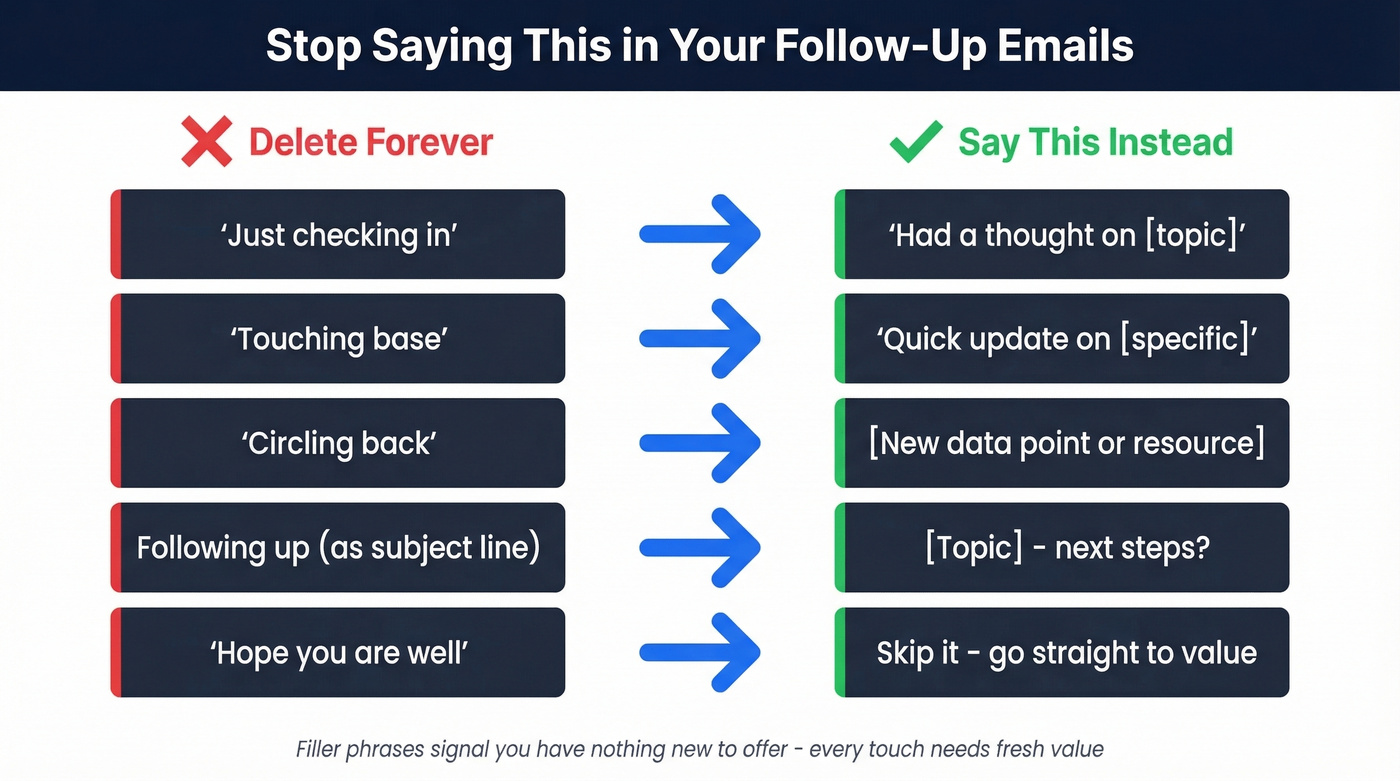
NetHunt's research matches what we've seen in practice: these filler phrases come off as value-less and make your email easier to ignore. (For more alternatives, see how to say just checking in professionally.)
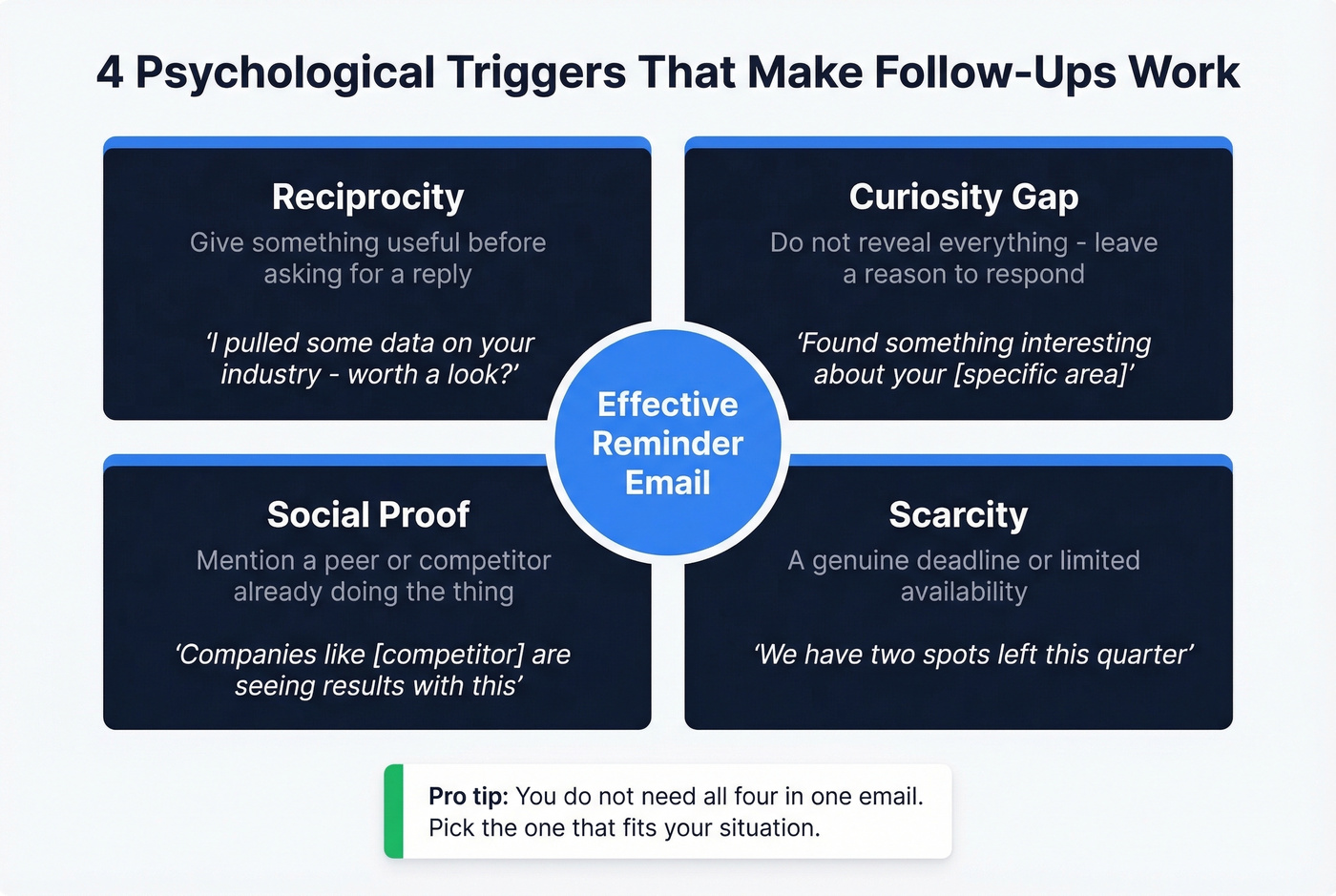
The Psychology Behind It
Four triggers make follow-ups work. Reciprocity: give something useful before asking for a reply. Curiosity gap: don't reveal everything - leave a reason to respond. Social proof: mention a peer or competitor already doing the thing you're proposing. Scarcity: a genuine deadline or limited availability creates urgency without feeling pushy. You don't need all four in one email. Pick the one that fits.
Reminder Templates by Scenario
Cold Outreach Follow-Up
Subject: Re: [Original subject]
Hi [Name], I pulled some data on [specific challenge] for companies like [their company]. Worth a 10-minute look?
Send 3-5 business days after your initial email. The data offer creates reciprocity and gives them a reason to respond beyond obligation.
Proposal or Quote
Subject: [Project name] - any questions on the proposal?
Hi [Name], wanted to make sure the numbers made sense. Happy to adjust scope or walk through anything. What works for a quick call?
Send 3 business days after the proposal. In our experience, this template pulls more replies than a generic "checking in" because it invites a specific action - asking questions feels low-commitment.
Invoice or Payment
This one's different from the others - you're not selling, you're collecting. Keep the tone warm but direct, and always include the invoice number and amount so they can act without digging through their inbox.
Subject: Invoice #[number] - quick reminder
Hi [Name], just a heads-up that invoice #[number] for [amount] was due on [date]. Let me know if anything's holding it up.
Send 1 day after the due date.
Meeting Confirmation
Subject: Confirming tomorrow's call at [time]
Hi [Name], looking forward to tomorrow at [time/timezone]. Here's the agenda: [one line]. Let me know if anything's changed.
Send 24 hours before. A single confirmation email cuts no-show rates dramatically.
Document or Information Request
Subject: [Document name] - still need this by [date]
Hi [Name], I'm missing [specific document] to move forward on [project]. Could you send it by [date]?
Send 2 business days after the initial request.
Job Application
Subject: [Role title] application - [Your name]
Hi [Name], I applied for the [role] on [date] and wanted to express continued interest. I'd love to discuss how my [specific skill] fits. Is there a good time this week?
Send 5-7 business days after applying.
RSVP and Appointment Reminders
These share a common trait: a hard deadline that makes urgency genuine, not manufactured.
For RSVPs, lead with the deadline: "We're finalizing headcount for [event] on [date]. Can you confirm by [deadline]?" Send 3-5 days before the RSVP deadline. For appointments, send two touches - 24 hours before and 1 hour before: "This is a reminder about your [appointment type] on [date] at [time]. Need to reschedule? Reply here or call [number]."
Task Delegation
Subject: [Task name] - status check
Hi [Name], checking on [task]. The deadline is [date] and [downstream dependency] is waiting on it. Where are we?
Send 2 business days after assigning, or halfway to the deadline.
Feedback Request
Subject: Your take on [specific deliverable]?
Hi [Name], I sent over [deliverable] on [date]. Even a quick thumbs-up or "needs changes" helps me plan next steps.
Send 3 business days after the deliverable.
Contract or Agreement
Subject: [Agreement name] - ready for signature
Hi [Name], the [contract/agreement] is still awaiting your signature. Legal questions? Happy to loop in our team. We'd like to finalize by [date].
Send 3 business days after sending, then weekly.
Breakup / Final Email
Subject: Should I close your file?
Hi [Name], I've reached out a few times and haven't heard back - totally understand if the timing isn't right. I'll close this out unless I hear from you. If things change, my door's open.
Send 14 days after your last follow-up. Here's the thing: this email often pulls more replies than the second follow-up. The implied loss of access triggers action.
When Email Isn't Working
After three emails with no reply, switch channels entirely.
Professional network DM:
Hi [Name], I sent a couple of emails about [topic] - figured I'd try you here instead. [One sentence of value]. Worth a quick chat?
Text message (if you have their mobile):
Hi [Name], it's [Your name] from [Company]. Sent you an email about [topic] - didn't want it to get lost. Quick call this week?
Keep both under 40 words. The channel switch itself signals persistence without desperation.
Mistakes That Kill Reply Rates
Every non-reply maps to one of five objections: no need, unclear value, no urgency, don't want it, or don't trust you. Your follow-up should address whichever one applies. Here are the mistakes that guarantee you'll never find out which it is.
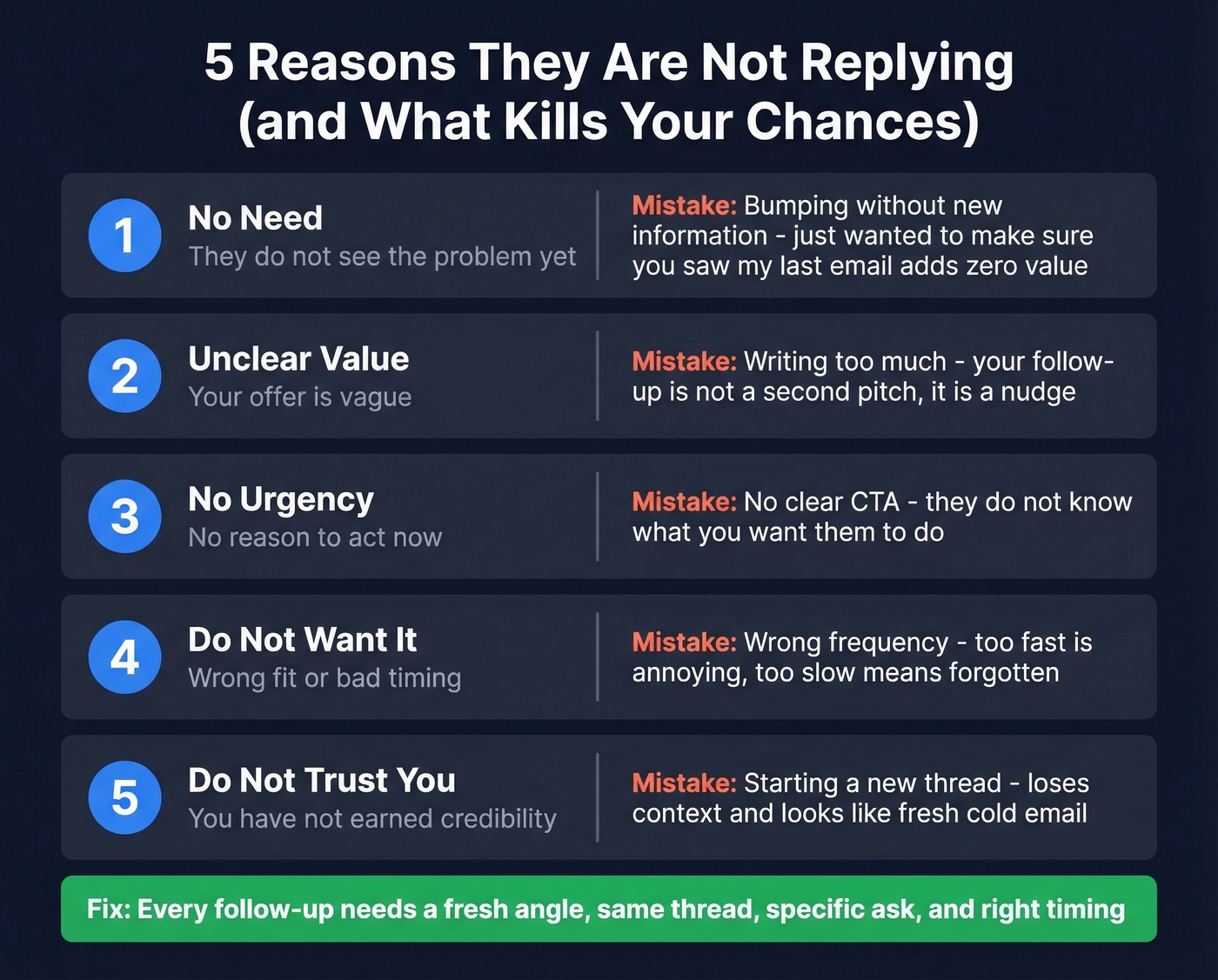
Bumping without new information. "Just wanted to make sure you saw my last email" tells the recipient you have nothing new to offer. Every follow-up needs a fresh angle - a new data point, a relevant resource, a different question. This is the #1 killer.
Wrong frequency. Too fast and you're annoying. Too slow and they've forgotten you. Stick to the cadence table above. (If you want a deeper timing breakdown, see when should I follow up on an email.)
Starting a new thread. Reply to your original email. A new thread loses context and looks like a fresh cold email, which means fresh skepticism.
Writing too much. Your follow-up isn't a second pitch - it's a nudge with a reason to respond.
No clear CTA. "Let me know your thoughts" is vague. "Does Thursday at 2pm work?" is actionable.
Ignoring deliverability. This is the mistake almost nobody talks about, and it's the one that frustrates us most when we see it: your email might not even be arriving.
Make Sure Your Emails Actually Arrive
Look - most teams spend hours optimizing subject lines and copy when the real problem is deliverability. You can write the perfect follow-up email after no response with flawless timing, and it won't matter if the email bounces or lands in spam. Stale contact data wrecks follow-up sequences before they start. Every bounce damages your sender reputation, which means your next reminder is more likely to hit spam too.
Before optimizing your copy, verify your contact list. Prospeo's email finder covers 300M+ professional profiles with 98% email accuracy and a 7-day data refresh cycle - compared to the six-week industry average. That freshness matters when you're following up with contacts who may have changed roles or companies since you first added them. (If you're troubleshooting reputation, use this guide on how to improve sender reputation.)

The results speak for themselves. Stack Optimize built to $1M ARR running client campaigns with 94%+ deliverability, under 3% bounce rates, and zero domain flags. Snyk's team of 50 AEs cut their bounce rate from 35-40% down to under 5% after switching their data source. Bad data doesn't just waste follow-ups - it actively sabotages your domain.
Make sure SPF, DKIM, and DMARC are configured on your sending domain. Then make sure the addresses you're sending to are actually valid.
Tools for Follow-Up Reminders
Boomerang - the "remind me if no reply" tool. Set it to ping you when someone hasn't responded within your timeframe. Free plan available; paid tiers run ~$5-20/user/mo.
HubSpot Sequences - automate follow-up cadences directly from your CRM. Great if you're already in the HubSpot ecosystem.
Mailtrack / Yesware - open and click tracking so you know if your reminder was seen but ignored (a different problem than never delivered). Skip these if you're sending fewer than 20 follow-ups a week - the overhead isn't worth it at low volume.
You've got 2-3 follow-ups before spam complaints spike. Don't waste them on wrong addresses. Prospeo refreshes 300M+ contacts every 7 days - not every 6 weeks - so the email you're sending that reminder to is still valid today.
Make every follow-up count with data refreshed weekly.
FAQ
How long should I wait before sending a follow-up?
Two to three business days for most scenarios. For invoices, send a reminder one day after the due date. For meeting confirmations, 24 hours before. Cold outreach can stretch to 3-5 business days depending on your audience's seniority.
How many follow-up emails is too many?
Cap at two to three. The Belkins dataset across 16.5 million emails shows four or more follow-ups more than triple spam complaints while reply rates crater to 3.01%. After three, switch to phone or a professional network.
What's the best subject line for a gentle reminder?
Reference the specific topic, not "following up." Something like "[Project name] - next steps?" outperforms generic subjects every time. Specificity signals you have something worth opening, not just another nudge.
What if they still don't reply after three emails?
Send a breakup email - the "should I close your file?" template works well and often outperforms the second follow-up. Then switch channels entirely: a phone call or professional network message breaks through when email can't.
Are my reminder emails going to spam?
They might be - especially if your contact data is stale. Bounced emails damage sender reputation, pushing future messages to spam. Verify your list with a tool like Prospeo before sending to protect deliverability long-term.