

Reply.io Pros and Cons: What 1,500+ Reviews Actually Say
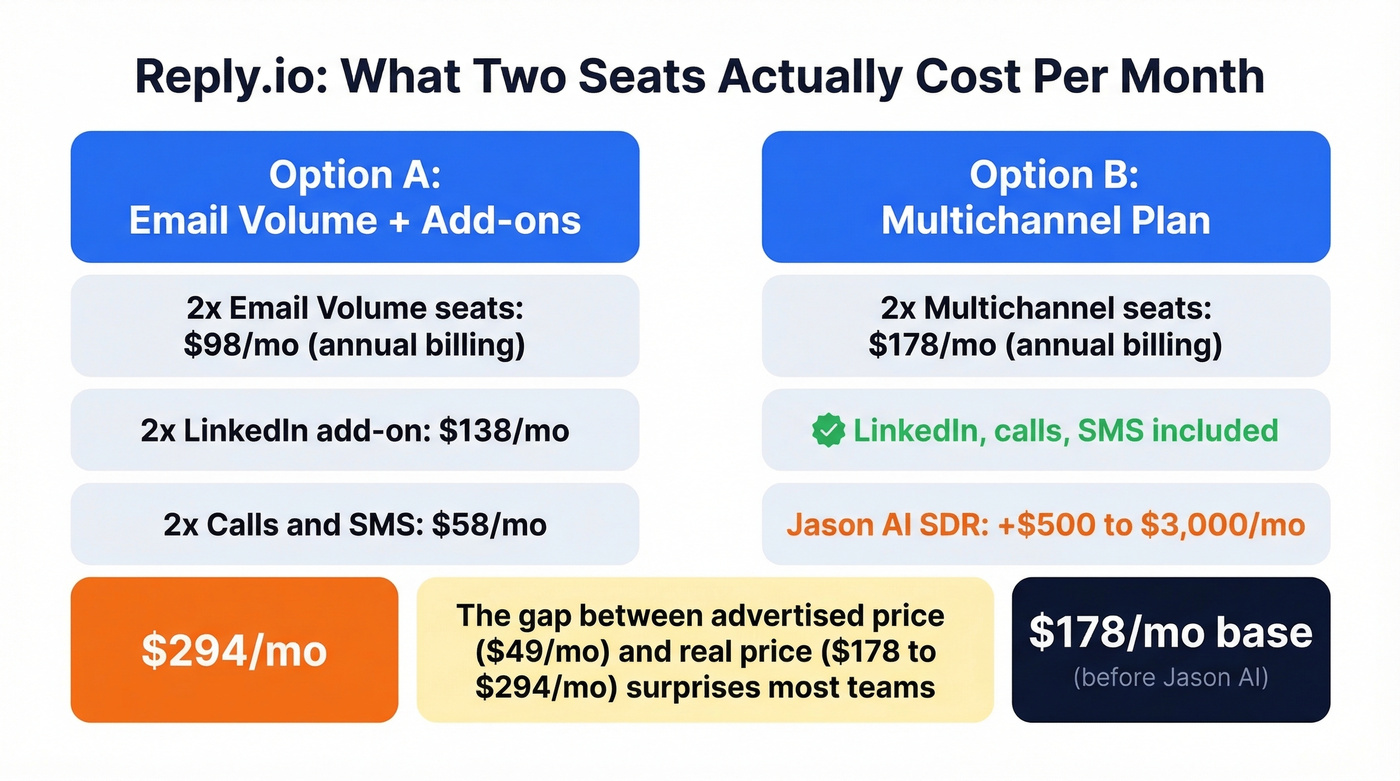
You ran the numbers on your outbound stack and realized Reply.io's "starting at $49" can turn into $294/month once you add LinkedIn automation, calls/SMS, and a second seat. That's annual seats priced as a monthly equivalent plus monthly add-ons stacked on top. Here's the Reply.io pros and cons breakdown that actually matters - and what to pressure-test before you commit.
What Reply.io Is (and Isn't)
Reply.io is an AI-powered multichannel outbound sequencer covering email, LinkedIn, SMS, WhatsApp, and calls with conditional logic that branches based on prospect behavior. It includes an AI SDR agent called Jason AI and over 1B verified B2B contacts built into the platform. About 3,000+ companies use it, with a heavy SMB user base on G2.
What it isn't: a CRM, an intent data platform, or a data quality tool. It's the engine that sends your messages. The quality of those messages depends entirely on what you feed it.
30-Second Verdict
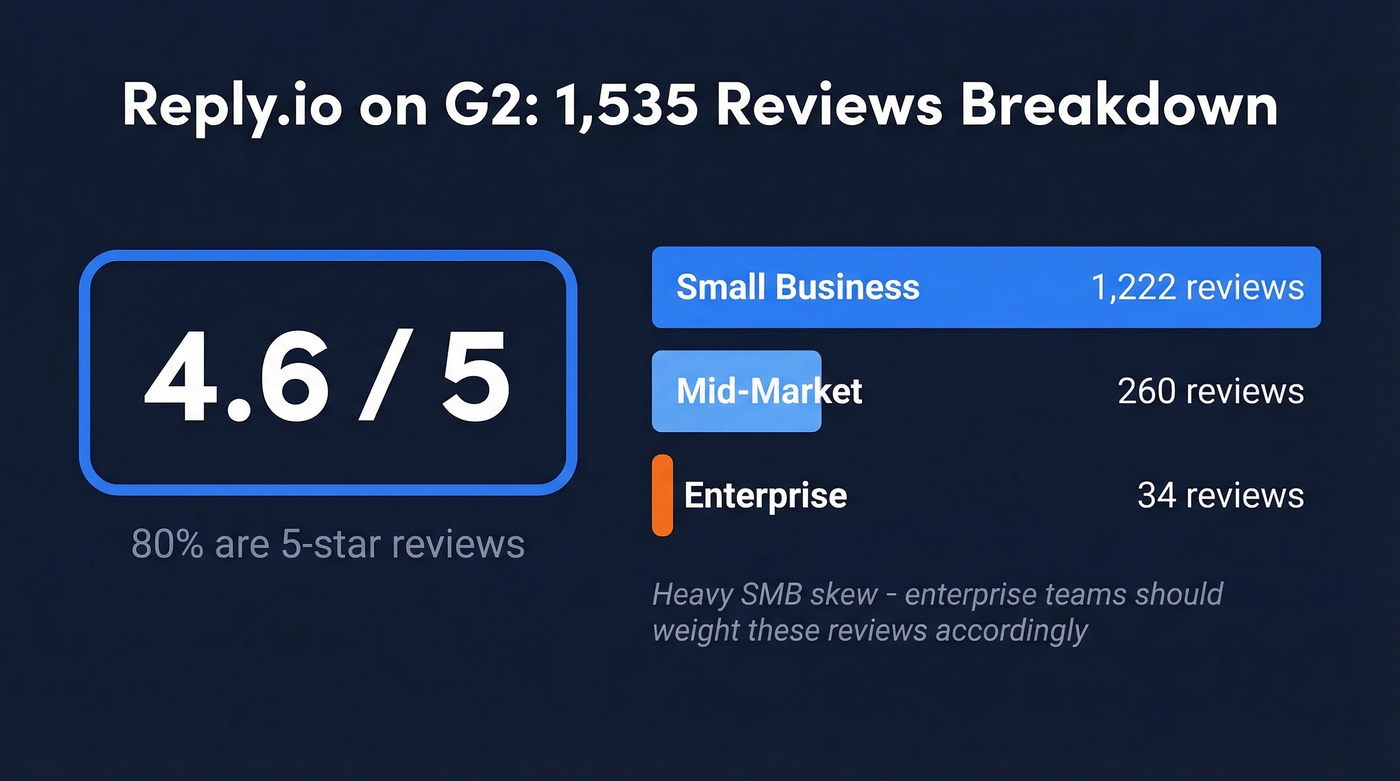
Best for: Multi-seat SDR teams running outbound across email, calls, and social who want one workflow tool instead of three. The 4.6/5 rating from 1,535 reviews is earned - 80% are five-star. Of those reviewers, 1,222 are small-business users, 260 mid-market, and just 34 enterprise.
Not for: Solo founders who only need simple cold email. The add-on pricing and learning curve aren't worth it if you're sending email sequences and nothing else. Skip this one and look at Instantly or Smartlead instead.
Here's the thing most teams get wrong: your sequencer choice matters far less than the data feeding it. If your bounce rate is above 5%, fix the list before you touch the tool (or use a dedicated email verification workflow first).
Where Reply.io Excels
Ease of use gets the most love. It's the #1 pro theme with 99 reviewer mentions on G2. The sequence builder is drag-and-drop, and conditional branching - like triggering a LinkedIn touch if an email goes unopened - works intuitively once you learn the interface. We've seen teams get their first multichannel sequence live in under an hour, which is fast for a tool with this many moving parts.
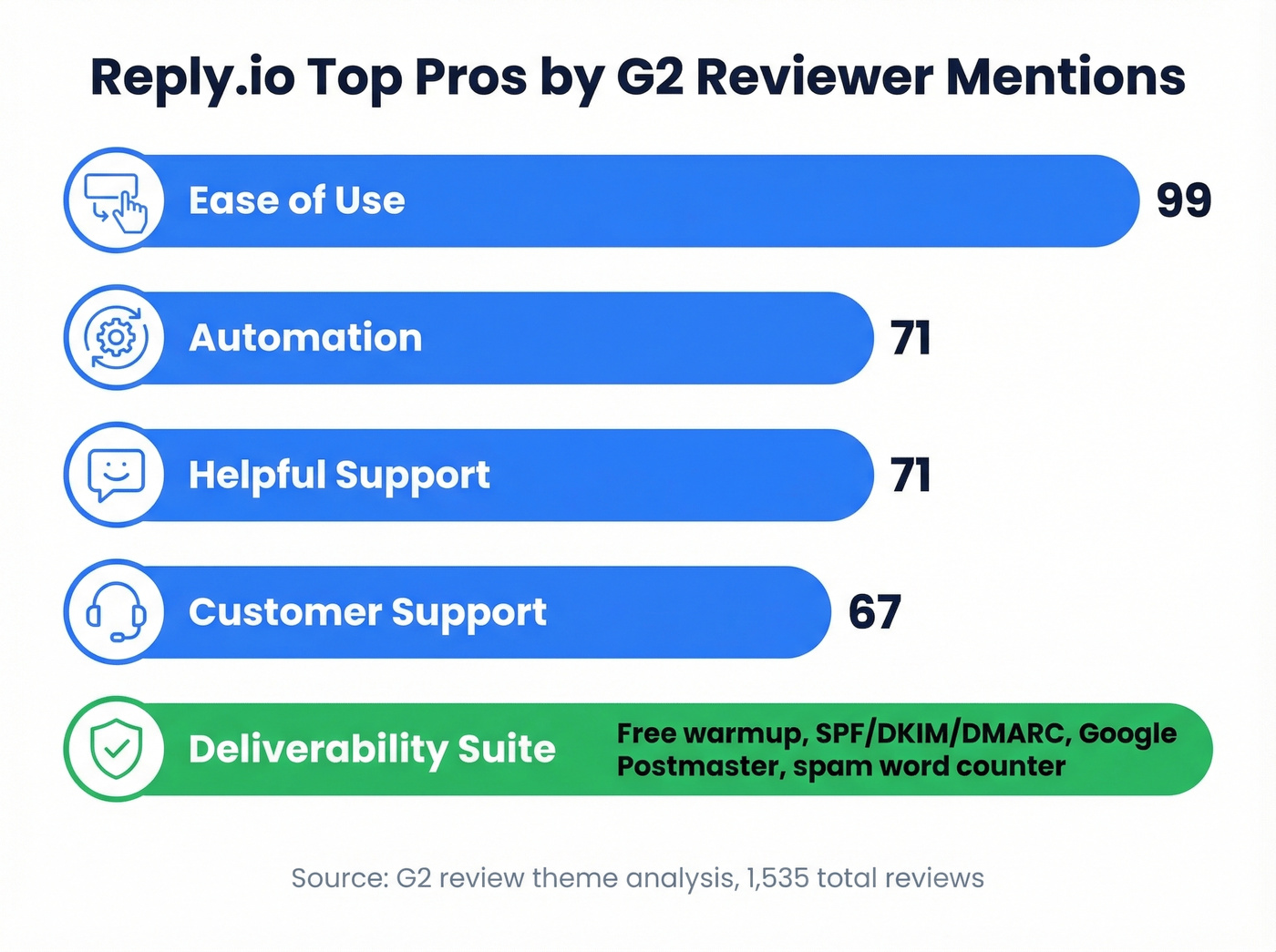
Reply.io's automation goes deep across channels. With 71 reviewer mentions, automation is the second-most praised feature. You can build sequences that branch across email, LinkedIn, calls, and SMS based on opens, clicks, replies, or silence. That behavior-based logic is where Reply.io separates from simpler setups that just send emails on a timer (if you’re comparing tools, see our guide to cold email campaign software).
Support is responsive. "Helpful Support" (71 mentions) and "Customer Support" (67 mentions) both rank in the top five pro themes. Reviewers consistently cite fast turnaround - unusual for a tool at this price point.
Deliverability suite is solid. Free warmup for every mailbox, SPF/DKIM/DMARC checks, Google Postmaster monitoring, spam word counter, and ramp-up mode. Reply.io also offers Gmail API sending and claims it can increase average open rates by 15% versus SMTP. Per-channel analytics dashboards round out the package, so managers can spot underperforming channels without exporting to a spreadsheet (more on this in our email delivery tracking guide).

Reply.io's sequencer is only as good as the data you feed it. Import a list with 10%+ bounces and you'll torch your domain before the first follow-up fires. Prospeo's 5-step email verification delivers 98% accuracy - so every sequence step hits a real inbox, not a spam trap.
Fix the list before you touch the sequencer. Start free.
Where Reply.io Falls Short
A mid-market reviewer on G2 put it plainly: "Sometimes the UI can feel a bit cluttered when managing multiple sequences at once." The learning curve is the #1 con with 30 mentions, plus "Learning Difficulty" adds another 24. Uploading contacts alone was called "somewhat daunting" by a small-business user.
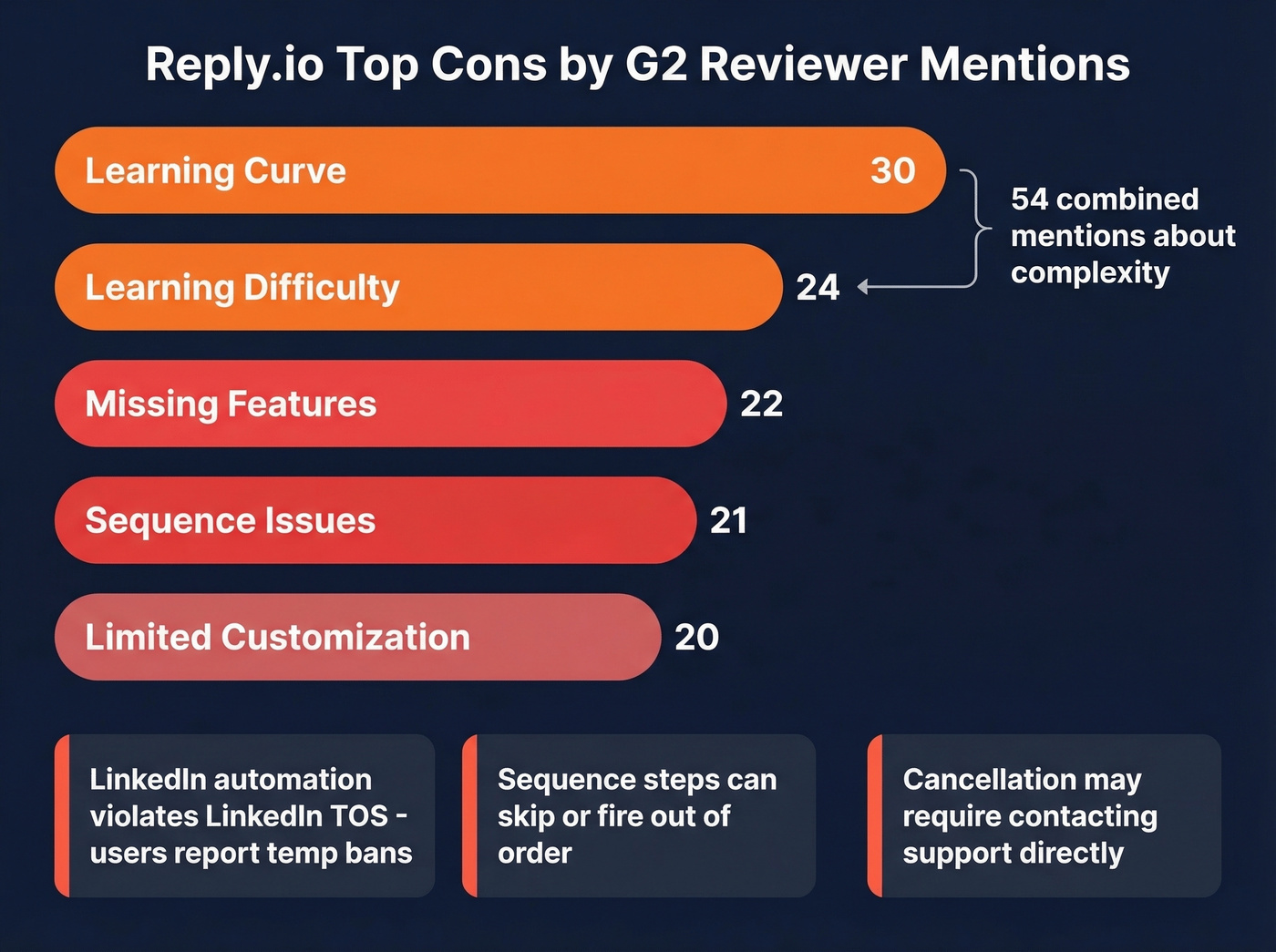
Sequence reliability has gaps. 21 mentions flag sequence issues like steps skipping or follow-ups firing out of order. For a tool whose entire job is sequencing, that's concerning. We ran into a similar report from a colleague whose follow-up emails fired on day 1 instead of day 3 - a mistake that burned a 200-contact list before anyone caught it (this is why teams build a repeatable email workflow with QA gates).
LinkedIn automation carries real risk. Reply.io's LinkedIn automation covers actions like connection requests, messages, InMails, and endorsements. This kind of automation violates LinkedIn's Terms of Service, and users describe temporary account blocks and cookie-related campaign failures. Most practitioners cap automation at 20-30 actions per day, which limits throughput significantly (if you’re doing this anyway, pair it with tighter social selling personalization).
Cancellation friction is a red flag. A Reddit user in r/coldemail reported no self-serve cancellation in the app and that a promised AI SDR price of $499/mo didn't match any available upgrade option - they said all were $1,200+. The same user said the LinkedIn importer overwrote third-party personalization fields. One data point, but specific enough that you should confirm cancellation steps before signing anything.
Missing features and limited customization round out the top cons (22 and 20 mentions respectively). Users flag gaps like no "Reply All" functionality, limited SIC code filtering, and incomplete direct CRM integrations.
What You'll Actually Pay
Reply.io's pricing looks straightforward until you start adding channels.
| Plan | Price | What's Included |
|---|---|---|
| Free | $0 | Limited features |
| Email Volume | $49/user/mo (annual) | Unlimited emails, unlimited warmup, deliverability suite, 1,000 active contacts/mo, 50 live data credits/mo |
| Multichannel | $89/user/mo (annual) | Unlimited active contacts, multichannel steps (LinkedIn, calls/SMS, WhatsApp, Zapier) |
| LinkedIn add-on (Email Volume) | $69/mo per account | LinkedIn automation |
| Calls & SMS (Email Volume) | $29/mo per account | Dialer + SMS steps |
| Jason AI SDR | $500-$3,000/mo (annual) | AI agent tiers from 1,000 to 10,000 active contacts |
"Active contacts" means unique contacts you can send one first-step email plus unlimited follow-ups per month. That 1,000-contact starting tier on Email Volume fills up fast across multiple campaigns (especially if you’re scaling lead prospecting across segments).
The real math for a common setup: two reps on Email Volume ($49 x 2) plus LinkedIn ($69 x 2) plus Calls & SMS ($29 x 2) = $294/month, with seats billed annually and add-ons billed monthly. Move to Multichannel and your baseline drops to $178/month for two seats on annual billing ($89 x 2), but Jason AI is still extra. Either way, you're spending more than the sticker price suggests.
Pre-Purchase Checklist
Before you sign, run through these:
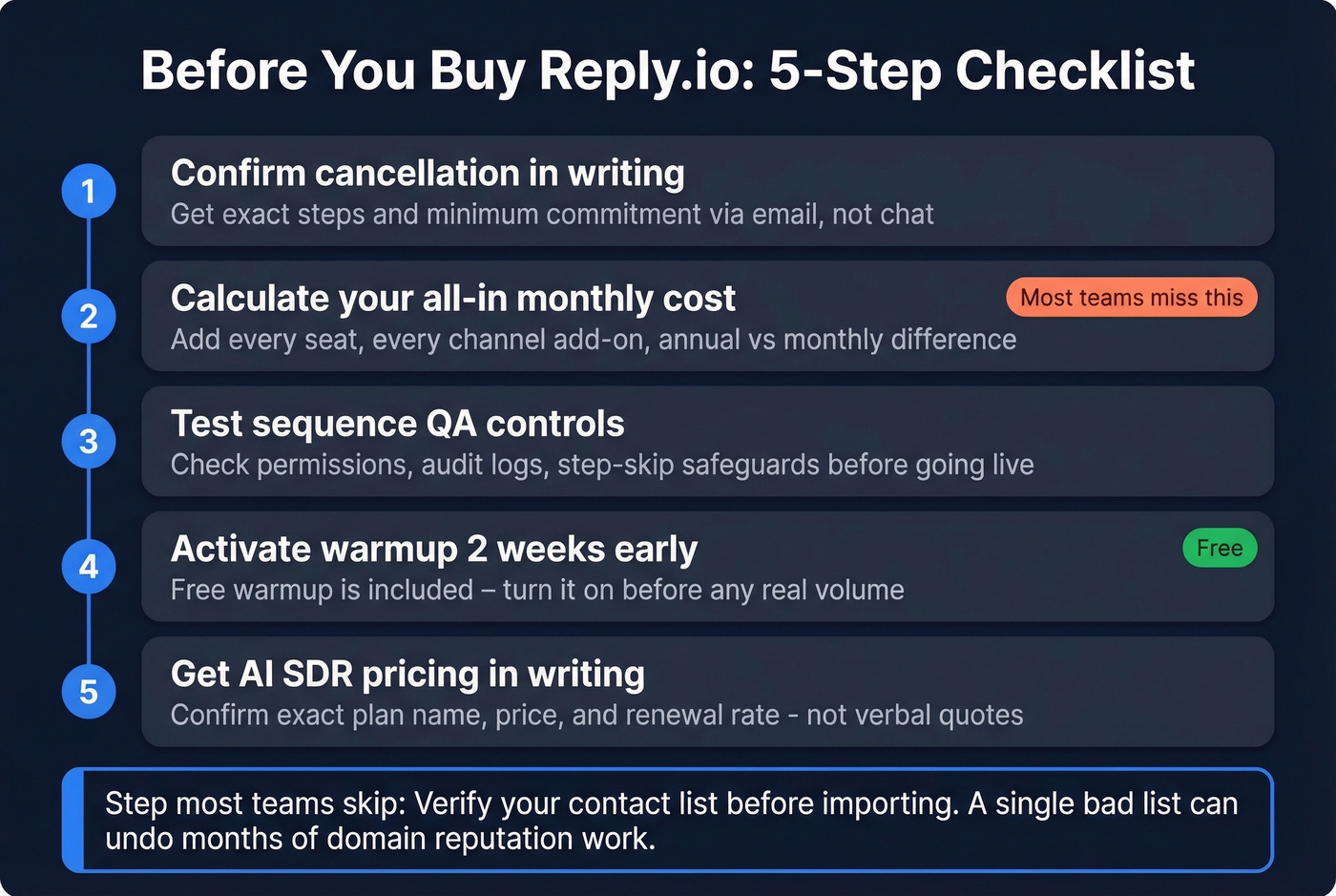
- Confirm cancellation in writing. Ask support exactly how to cancel and what the minimum commitment term is. Get it in an email, not a chat window.
- Calculate your all-in monthly cost. Add every channel add-on, every seat, and the annual vs. monthly difference. The gap between advertised and actual pricing surprises most teams.
- Test sequence QA controls. Check for permissions, audit logs, and step-skip safeguards. Double sends damage domain reputation fast (use a basic outbound email spam prevention checklist).
- Activate warmup before sending. Reply includes free warmup - turn it on at least two weeks before you launch real volume (benchmarks and setup: email warmup).
- Get AI SDR pricing in writing. If you're considering Jason AI, confirm the exact plan name, price, and renewal rate. Don't rely on what a sales rep quotes verbally.
Let's be honest about the step most teams skip entirely: verifying the contact list before importing. A single bad list can undo months of domain reputation work. Prospeo's 98% email accuracy and 7-day refresh cycle keeps your sequences running on clean data from day one, at roughly $0.01 per email with no contract required (if you’re sourcing lists, start with where to buy B2B leads).

You just calculated $294/month for two Reply.io seats with add-ons. Don't stack that cost on top of bad data. Prospeo gives you 143M+ verified emails at $0.01 each with a 7-day refresh cycle - so the contacts you import into Reply.io are accurate the week you send, not six weeks stale.
Bad data is the most expensive line item in your outbound stack.
Final Take
Reply.io is a capable multichannel platform if you go in with eyes open on pricing, sequence reliability, and cancellation terms. Weighing the Reply.io pros and cons comes down to whether your team actually needs multichannel orchestration or just solid cold email - because those are very different problems at very different price points.
The biggest lever most teams ignore isn't the sequencer. It's the data feeding it. In our experience, teams running verified data through any sequencer see fewer bounces, healthier sender reputation, and more replies from day one. Get the data right first, then optimize the tool.
FAQ
Is Reply.io worth it for small teams?
It depends on channel needs. If you only send cold email, the $49/user Email Volume plan works, but simpler tools like Instantly or Smartlead cost less for email-only workflows. Reply.io's value kicks in when you need LinkedIn, calls, and SMS in one sequence. For teams under three reps, calculate the all-in cost with add-ons before committing.
What are the biggest complaints about Reply.io?
Sequence reliability and UI complexity top the list. G2 reviewers flag 21 mentions of steps skipping or firing out of order, and 54 combined mentions cite the learning curve. Cancellation friction and LinkedIn account restrictions are also recurring pain points in community forums like r/coldemail.
Does Reply.io have accurate contact data?
Reply.io includes 1B+ contacts, but users report mixed results on data freshness. For outbound campaigns where bounce rates directly affect domain reputation, pairing Reply.io with a dedicated verification tool keeps deliverability clean without relying on a single source.