

Email Warmup: How to Build Sender Reputation Without Wrecking Your Domain
You just spun up three fresh outreach domains, loaded 2,000 prospects into your sequencer, and hit send. By Thursday, your open rate is 9%, half your emails are landing in spam, and Google Postmaster Tools shows your domain reputation cratering. That's what happens without a proper warmup email strategy.
Email warmup is the process of gradually increasing send volume from a new or dormant mailbox so inbox providers recognize you as a legitimate sender - not a spammer who appeared overnight. The short version:
- What it is: Sending and receiving a rising number of emails daily to build sender reputation with Gmail, Outlook, and other providers.
- How long it takes: 2-4 weeks for a new mailbox, 4-8 weeks for a brand-new domain.
- What most guides skip: Data quality. Bounces during warmup destroy the reputation you're trying to build faster than anything else.
- Do you need a paid tool? Not always. Manual warmup works for a single inbox. Paid tools save time when you're managing 4+ mailboxes.
What Is Email Warmup and Do You Need It?
You need it if:
- You registered a new domain or subdomain for outreach
- Your existing domain has been inactive for 30+ days
- You're migrating to a new ESP or email infrastructure
In practical terms, it's the deliberate, controlled process of warming up an email address so inbox providers learn to trust it before you start sending at scale. The consensus on r/coldemail is blunt: warmup is mandatory before cold outreach. Going from zero to 100 emails a day on a fresh domain looks robotic to inbox providers, and they'll throttle you accordingly.
You can skip it if your domain has been sending consistently for months, your bounce rate sits below 2%, and your open rates are healthy (20%+). Established senders with clean metrics don't need to re-warm - just don't spike volume dramatically.
Email vs Domain vs IP Warmup
These terms get used interchangeably, but they're different things. Most cold emailers only need warmup at the mailbox level.
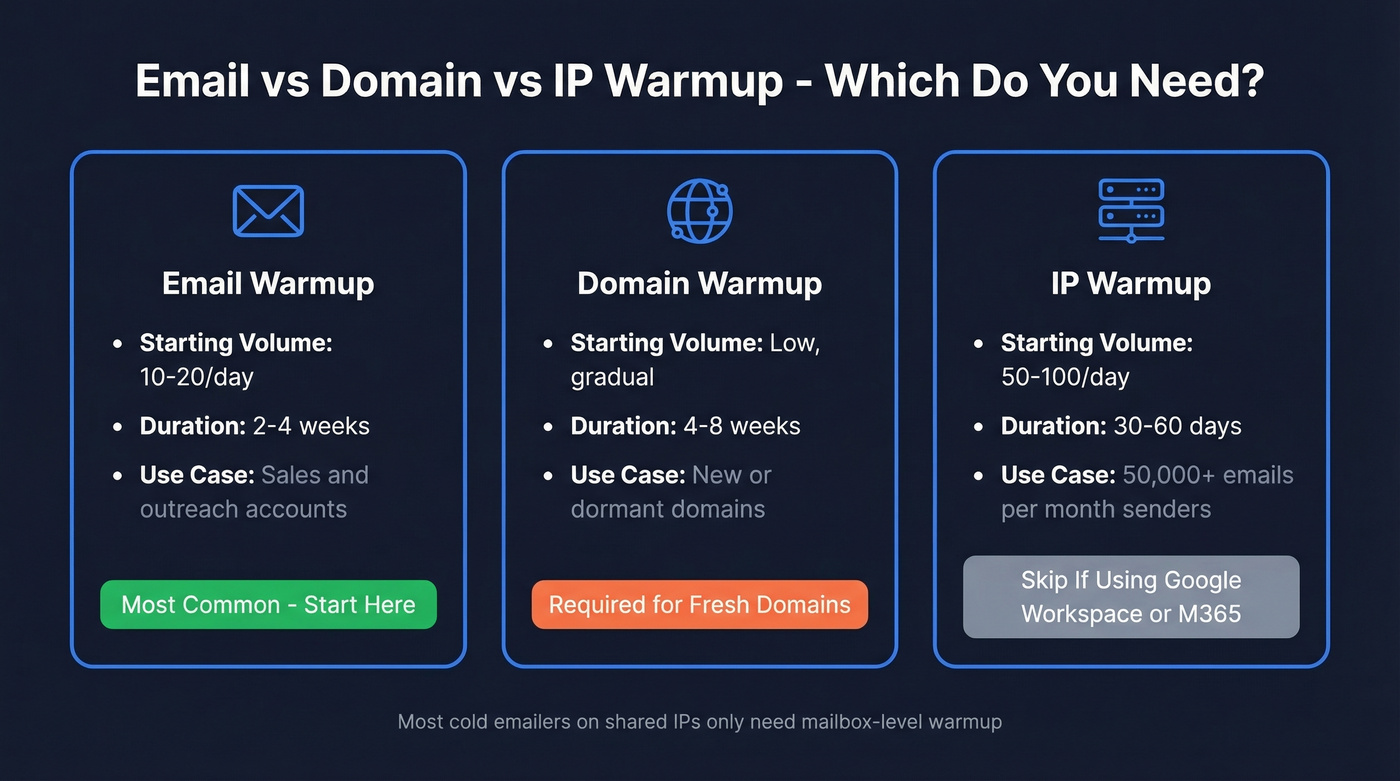
| Type | Starting Volume | Duration | Use Case |
|---|---|---|---|
| Email warmup | 10-20/day | 2-4 weeks | Sales/outreach accounts |
| Domain warmup | Low, gradual | 4-8 weeks | New/dormant domains |
| IP warmup | 50-100/day | 30-60 days | 50,000+/month senders |
If you're running cold outreach from Google Workspace or Microsoft 365, you're on shared IPs - IP warmup doesn't apply. Google and Microsoft manage IP reputation across their shared infrastructure, so your individual IP behavior matters less than your domain and mailbox reputation. IP warmup only matters if you're sending high-volume campaigns on a dedicated IP, which most outbound teams aren't.
One nuance nobody talks about: a single email actually carries multiple domain signals - your DKIM signing domain, Return-Path domain, From domain, and any link domains in the body. Each builds or damages its own reputation independently. Misaligned domains are a silent warmup killer.
The Pre-Warmup Checklist
Before you send a single message, nail these fundamentals. Skipping any of them undermines everything that follows.
Set up a dedicated outreach domain. Never warm up your primary company domain for cold email. Use a variant like getacme.com instead of acme.com so a reputation hit doesn't tank your transactional email.
Publish your SPF record - one record that includes your mailbox provider and sending platform. (If you want examples and syntax gotchas, see SPF record.)
Enable DKIM with a 2048-bit key. Non-negotiable. (If you’re unsure it’s actually signing, use this verify DKIM checklist.)
Add a DMARC record starting with
p=none(monitor mode). Tighten the policy later. (More detail: DMARC alignment.)Create a real-person mailbox. Use a first.last@ format with a profile photo and text-based signature. Role accounts like sales@ or info@ look automated.
Connect via OAuth where possible. For Microsoft 365, ensure Authenticated SMTP is enabled if you're using SMTP/IMAP. Misconfigured SMTP settings can silently tank deliverability before warmup even begins.
Turn off open and link tracking during warmup. Tracking pixels and redirect links look unnatural at low volume. Add them back once you're sending real campaigns. (Related: email tracking pixel and tracking domain.)
Verify your prospect list. This is the step most teams skip - and the one that matters most. Bounces during the ramp destroy the reputation you're building. Prospeo's 5-step verification catches invalid addresses, catch-all domains, and spam traps with 98% accuracy, so you're not sending to addresses that went stale between list build and launch. (If you want deeper benchmarks and fixes, see email bounce rate.)

Since Gmail's November 2025 enforcement rollout, non-compliant messages are rejected at SMTP level - not just routed to spam. SPF/DKIM alignment, a DMARC record, and staying below a 0.3% spam complaint rate aren't best practices anymore. They're requirements.
Day-by-Day Warmup Schedule
No single schedule works for everyone, but here's a synthesized 28-day ramp based on what we've seen work consistently across dozens of inbox setups.
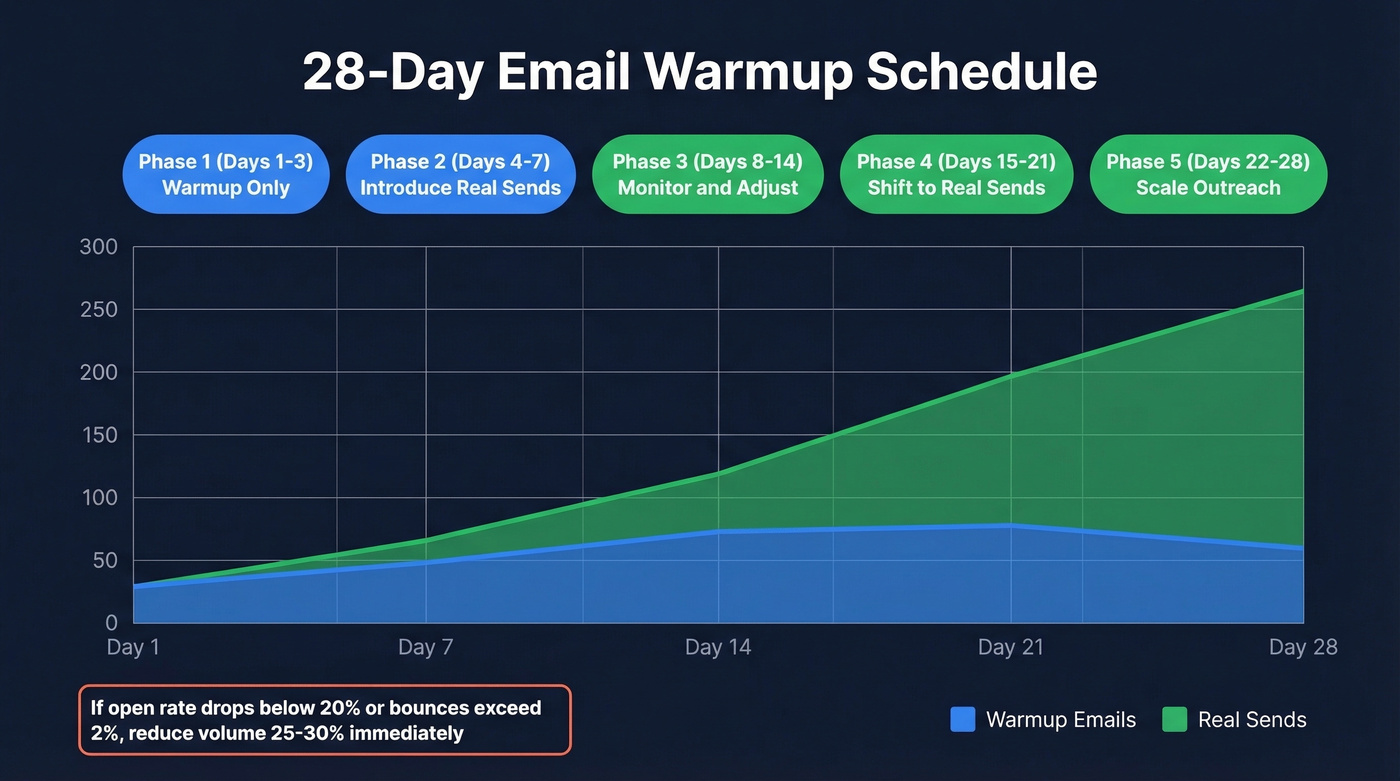
| Days | Warmup Emails/Day | Real Sends/Day | Notes |
|---|---|---|---|
| 1-3 | 20-40 | 0 | Warmup only. Build baseline. |
| 4-7 | 40-60 | 10-20 | Introduce small real sends. |
| 8-14 | 60-80 | 30-60 | Monitor open rate + bounces. |
| 15-21 | 60-80 | 80-150 | Shift ratio toward real sends. |
| 22-28 | 50-70 | 150-250 | Taper warmup, scale outreach. |
During warmup, prioritize sending to your most engaged contacts first - people who are likely to open and reply - to build positive signals faster.
The warmup-to-real ratio matters. Early on, keep it near 1:1. As you scale past 50 real sends per day, shift to 1:2. Above 200 real sends, you can taper to 1:3 or 1:4. The warmup volume acts as a reputation cushion - don't cut it to zero the moment you start real campaigns.
Healthy KPI thresholds during ramp: open rate above 20%, bounce rate below 2%. If either metric slips, reduce volume 25-30% and hold until things normalize. Postmark's domain warmup guide recommends segmenting by receiver provider (Gmail, Outlook, Yahoo) and warming each stream separately - extra work, but it gives you cleaner signals.
One practitioner tip from r/coldemail: start at 5 emails per day and add roughly 5 per day. That's more conservative than the table above, but it's a safer floor for brand-new domains with zero history.

A single bounce during warmup does more damage than 50 clean sends can repair. Prospeo's 5-step verification catches invalid addresses, spam traps, and catch-all domains before they torch the reputation you're carefully building - with 98% email accuracy at $0.01 per lead.
Don't warmup a mailbox just to bounce on bad data.
Manual vs Automated Warmup
Manual Warmup
Have colleagues, friends, or team members exchange real emails with your new inbox for two weeks. Open them, reply, mark as important, move from promotions to primary. Tedious, but genuinely effective for a single inbox - and free.
The upside: these are real human interactions that inbox providers can't flag as artificial. The downside: it doesn't scale past one or two mailboxes without becoming a full-time job.
How Automated Warming Tools Work
Tools like Instantly, Warmup Inbox, and TrulyInbox maintain networks of real inboxes that exchange messages with yours. They simulate opens, replies, and inbox moves automatically. Premium tools go further - aligning content with your ICP's industry language and simulating realistic engagement behaviors like scroll depth and time-in-inbox, not just opens and replies.
Here's the thing: there's a credible skeptical case against automated warmup. A Postbox Services analysis argues that Google can detect predictable bot patterns - cloud-hosted automated openers, repetitive templates across warmup networks - and ignore those interactions for reputation scoring. We've seen mixed results ourselves. Some inboxes warm beautifully with tools; others show no measurable lift in Postmaster reputation.
The decision framework is simple. Warming 1-2 mailboxes? Manual is better and free. Warming 3+? Automated tools save enough time to justify the cost. Either way, validate with independent seed tests using GlockApps or your own Gmail/Outlook seed inboxes. If an automated tool shows no improvement after two weeks, stop paying and switch to manual.
Mistakes That Kill Sender Reputation
- Volume spikes on day one. Sending 2,000+ emails from a fresh domain is the fastest way to get flagged. Inbox providers expect gradual ramps, not explosions.
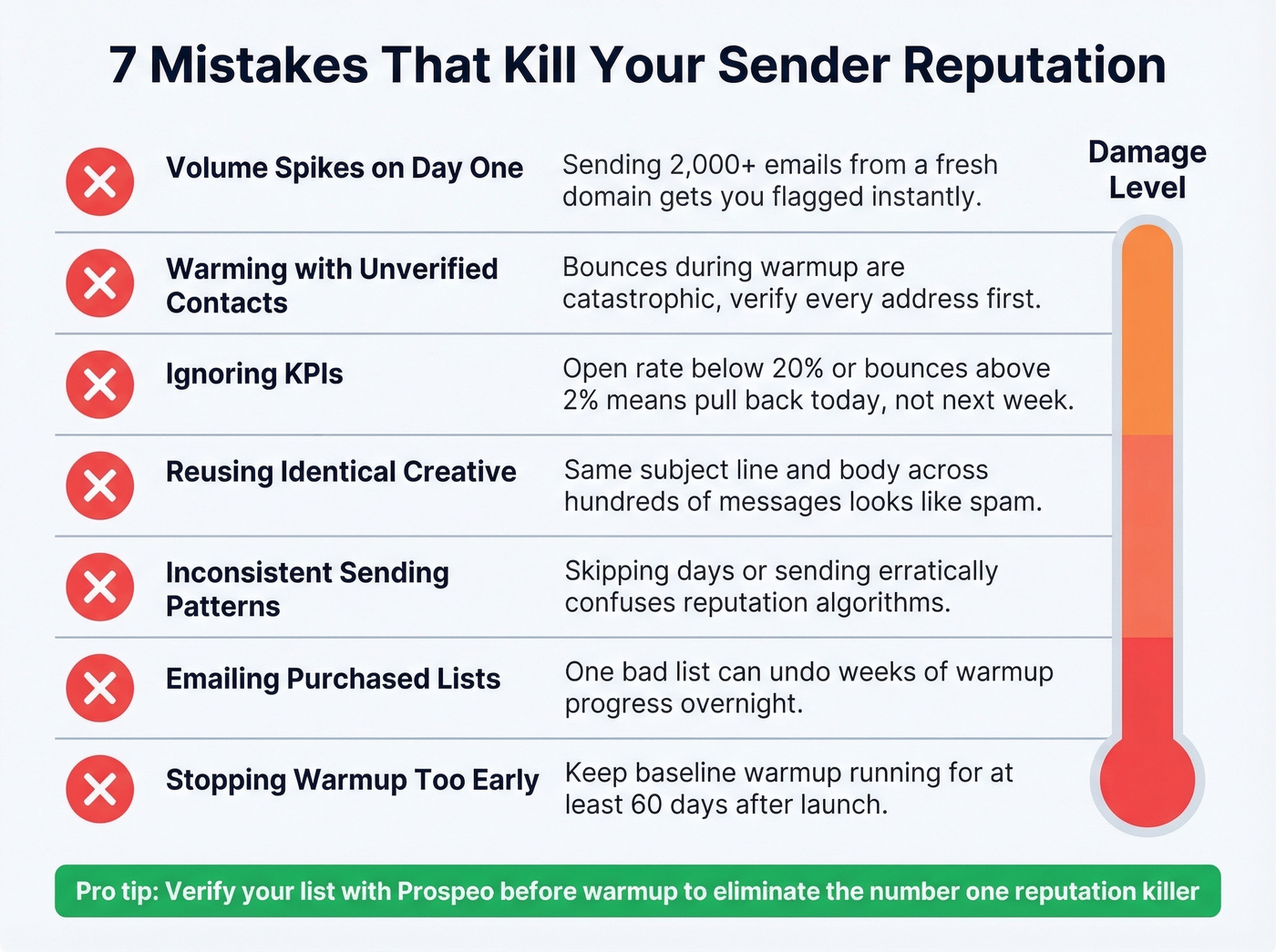
Warming with unverified contacts. Bounces during warmup are catastrophic. Verifying every address before you send eliminates the most common warmup killer.
Ignoring KPIs. If your open rate drops below 20% or bounces spike above 2%, you need to pull back volume immediately. Not next week. Today. (If you need a deeper diagnostic flow, use an email deliverability guide.)
Reusing identical creative. Sending the same subject line and body across hundreds of messages looks like spam. Vary your content. (If you need options, pull from these cold email subject line examples.)
The next three are subtler, but just as damaging over time.
Inconsistent sending patterns. Skipping days or sending erratically confuses reputation algorithms. Warmup needs to be daily and steady.
Emailing random or purchased lists. This includes scraped addresses and anything you haven't verified recently. One bad list can undo weeks of warmup progress. We watched a client burn through three domains in a month because they skipped verification on a purchased list of 8,000 contacts - 12% bounced, and all three domains were flagged within a week. (If you’re debating the risk, read Is It Illegal to Buy Email Lists?.)
Stopping warmup too early. Launching real campaigns after 5 days because "open rates look fine" is a trap. Give it the full 2-4 weeks, and keep a baseline warmup ratio running for at least 60 days after launch.
Best Email Warmup Tools Compared
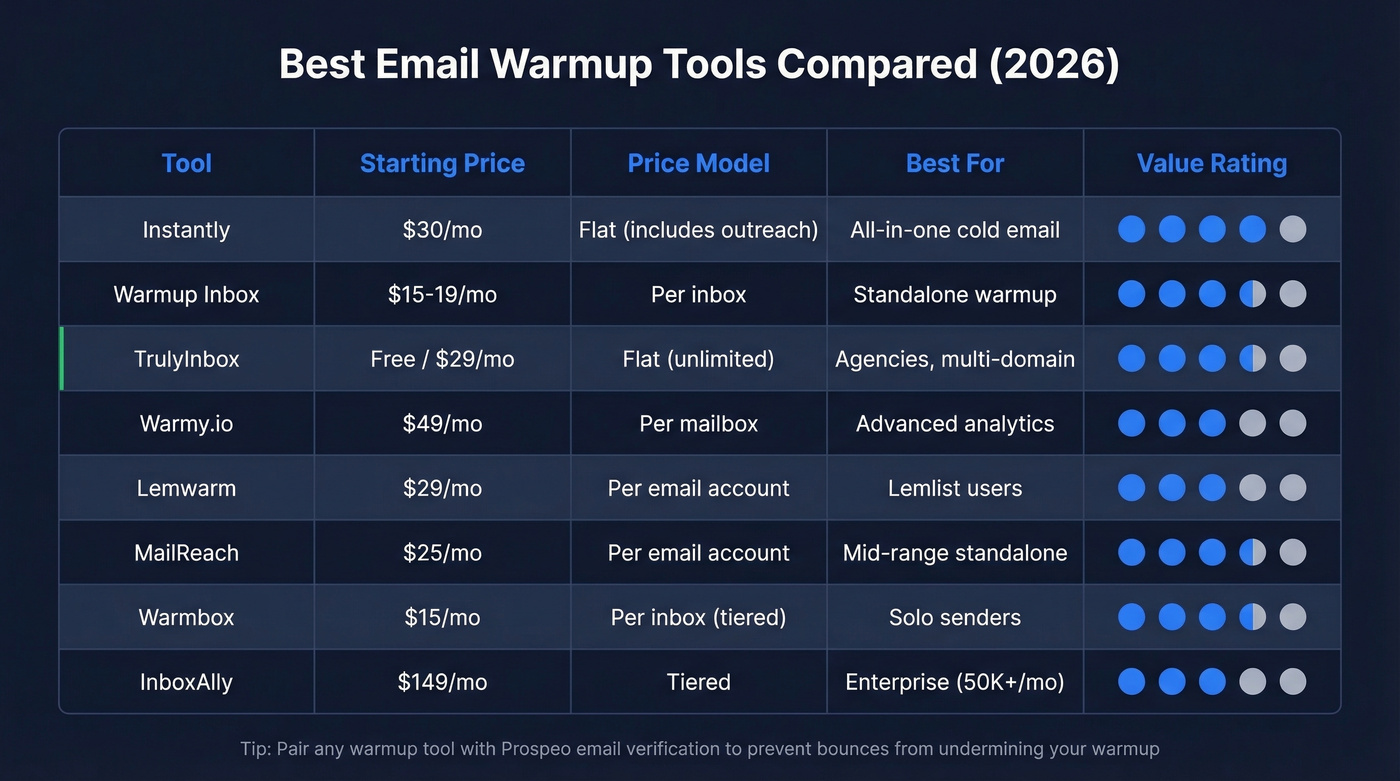
| Tool | Starting Price | Price Model | Best For |
|---|---|---|---|
| Instantly | $30/mo | Flat (incl. outreach) | All-in-one cold email |
| Warmup Inbox | $15-19/mo | Per inbox | Standalone warmup |
| TrulyInbox | Free / $29/mo | Flat (unlimited) | Agencies, multi-domain |
| Warmy.io | $49/mo | Per mailbox | Advanced analytics |
| Lemwarm | $29/mo | Per email account | Lemlist users |
| MailReach | $25/mo | Per email account | Mid-range standalone |
| Warmbox | $15/mo | Per inbox (tiered) | Solo senders |
| InboxAlly | $149/mo | Tiered | Enterprise (50K+/mo) |

Instantly
Instantly is the obvious pick if you want warmup and cold email sequencing in one platform. Plans start at $30/month, and setup is one-click. The warmup network is large, which helps with variety. The common complaint on r/coldemail: Instantly's warmup pool can get flagged because the inboxes warming yours are also warming hundreds of other accounts. It's a valid concern, but for most teams, the convenience outweighs the risk. Instantly's warmup guide is also one of the better free resources on the topic.
Warmup Inbox
Use this if you want a dedicated tool that does one thing well. Pricing runs $19 per inbox per month, or $15 when paid annually. It uses a network of 20,000+ real inboxes and focuses purely on warming. Skip this if you need outreach features bundled in.
TrulyInbox
Best value in the category, full stop. $29/mo for unlimited mailboxes makes this the go-to for agencies managing 10+ client domains. There's also a free-forever plan - one account, 10 warmup emails per day - which is enough to test whether automated warmup actually moves the needle for your setup before committing money.
Warmy.io
Feature-rich with detailed analytics and deliverability scoring. The problem is price: $49/mo per mailbox at the Starter tier, scaling to $429/mo for Premium. That's hard to justify when TrulyInbox offers unlimited mailboxes for $29. If you need granular warmup analytics and have the budget, Warmy delivers. Otherwise, you're overpaying.
Lemwarm
$29/mo per email account, but here's the catch - you need a Lemlist subscription to access the trial. If you're already running sequences in Lemlist, Lemwarm is a natural add-on. If you're not in that ecosystem, there are cheaper standalone options.
Quick Mentions
MailReach ($25/mo per account) is a solid mid-range option with decent reporting and volume discounts. Warmbox starts at $15/mo for a single inbox but scales to $49/mo for 5 and $99/mo for 25. InboxAlly runs $149-1,190/mo - enterprise-grade pricing that's overkill for anyone sending under 50,000 emails a month.
Let's be honest: most teams overthink warmup tool selection. The difference between a $15/mo tool and a $49/mo tool is marginal for inbox placement. What actually determines whether warmup succeeds or fails is your data quality and DNS setup - the boring stuff you do before the tool even matters. If you're closing deals under $20k, TrulyInbox's free plan plus verified contacts will outperform any premium warmup tool paired with a dirty list.
Scaling Past 1,000 Emails per Day
A single warmed mailbox handles 150-400 real sends per day, depending on domain age and reputation.
| Target Volume | Mailboxes Needed | Sends/Mailbox |
|---|---|---|
| 500/day | 3 | ~170/day |
| 1,000/day | 4-5 | ~200-250/day |
| 2,000/day | 8-10 | ~200-250/day |
The risk-averse approach: run 5-6 mailboxes at 170-200 sends each rather than pushing 4 mailboxes to their ceiling. If deliverability degrades, reduce volume 25-30% per mailbox until metrics stabilize. Keep a baseline warmup ratio running on every mailbox - even at scale, a 1:4 warmup-to-real ratio provides a reputation buffer.
At this volume, data quality becomes the bottleneck, not warmup. A 5% bounce rate across 1,000 daily sends means 50 bounces hitting your reputation every single day. Verification isn't optional here - it's the difference between sustainable growth and domain burnout.
How to Monitor Warmup Progress
Don't fly blind during warmup. Set up these monitoring checkpoints before day one.
Google Postmaster Tools now shows binary Pass/Fail compliance status under v2. Check daily during warmup. Microsoft SNDS tracks your reputation with Outlook/Hotmail recipients - less granular than Google, but still essential.
For independent validation, send to your own Gmail and Outlook accounts or use GlockApps to verify inbox placement. Automated warmup tools report their own metrics, which can be biased. We've seen this disconnect more than once - the tool's internal metrics look healthy while real-world placement tells a different story. Trust the seed inboxes over the dashboard.
Your target thresholds: open rate above 20%, bounce rate below 2%, spam complaint rate below 0.3%. Gmail's 0.3% complaint ceiling is a hard line - exceed it and you'll face SMTP-level rejections, not just spam folder routing.
You're spending 2-4 weeks warming up each inbox. One batch of stale emails undoes all of it. Prospeo refreshes its 300M+ profiles every 7 days - not every 6 weeks like competitors - so the contacts you load into your sequencer are verified the week you send.
Start your outreach on data that's fresher than your warmup schedule.
FAQ
How long does email warmup take?
Two to four weeks for a new mailbox; four to eight weeks for a brand-new domain with zero sending history. Don't start real campaigns until open rates consistently exceed 20% and bounce rates stay below 2%. Rushing the timeline is the most common warmup mistake.
Can I warm up an email for free?
Yes. Manual warmup - exchanging real emails with colleagues for two weeks - works for single inboxes and costs nothing. TrulyInbox offers a free-forever plan with one account and 10 warmup emails per day, which is enough to test the concept before spending.
Should I keep warmup running after launching campaigns?
Yes. Maintain at least a 1:3 or 1:4 warmup-to-real ratio for the first 60 days. Cutting warmup entirely after launch removes the reputation cushion that keeps your deliverability stable during early outreach.
What happens if I skip warmup entirely?
Sending volume spikes from a new domain trigger spam filters immediately. Open rates crater, your domain gets flagged, and recovery takes weeks - sometimes longer than warmup would have taken. Prevention is always faster than rehabilitation.
How does warming differ for Gmail vs Outlook?
Gmail relies heavily on domain reputation and engagement metrics, while Outlook leans more on complaint rates and sender authentication. Segmenting your warmup sends by provider gives you cleaner data on where deliverability issues originate. Most teams warm both simultaneously but track metrics separately.