How to Build a Sales Content Library Your Reps Will Actually Use
Your new SDR asks for the latest case study. Three people send three different versions over Slack. One's from 2022. Another has the old logo. The third is a PDF nobody can track.
If your reps are emailing each other asking "do we have a case study for X?", your sales content library doesn't exist. The cost is real: unused marketing content costs enterprises roughly $2.3M annually, and reps spend only 28% of their week actively selling. A well-built repository fixes both problems - and the right approach to sales enablement content management makes the difference between a library that collects dust and one that drives revenue.
What You Need Before Buying Software
Before you touch any tool, nail three fundamentals:
- Map your taxonomy in a spreadsheet. Don't open software until you know your categories, naming conventions, and ownership model.
- Assign an owner to every content category. Unowned content dies. Every single time.
- Pick a tool that fits your team size. Google Drive can work for very small teams. Dock fits startups and mid-market well. Highspot, Seismic, or Showpad are built for larger enterprises. Don't overspend on day one.
What Belongs in the Library
The distinction between internal-facing content - battle cards, competitive intel, demo scripts - and external-facing content like case studies, one-pagers, and proposals matters because they have different governance rules, different audiences, and different shelf lives.
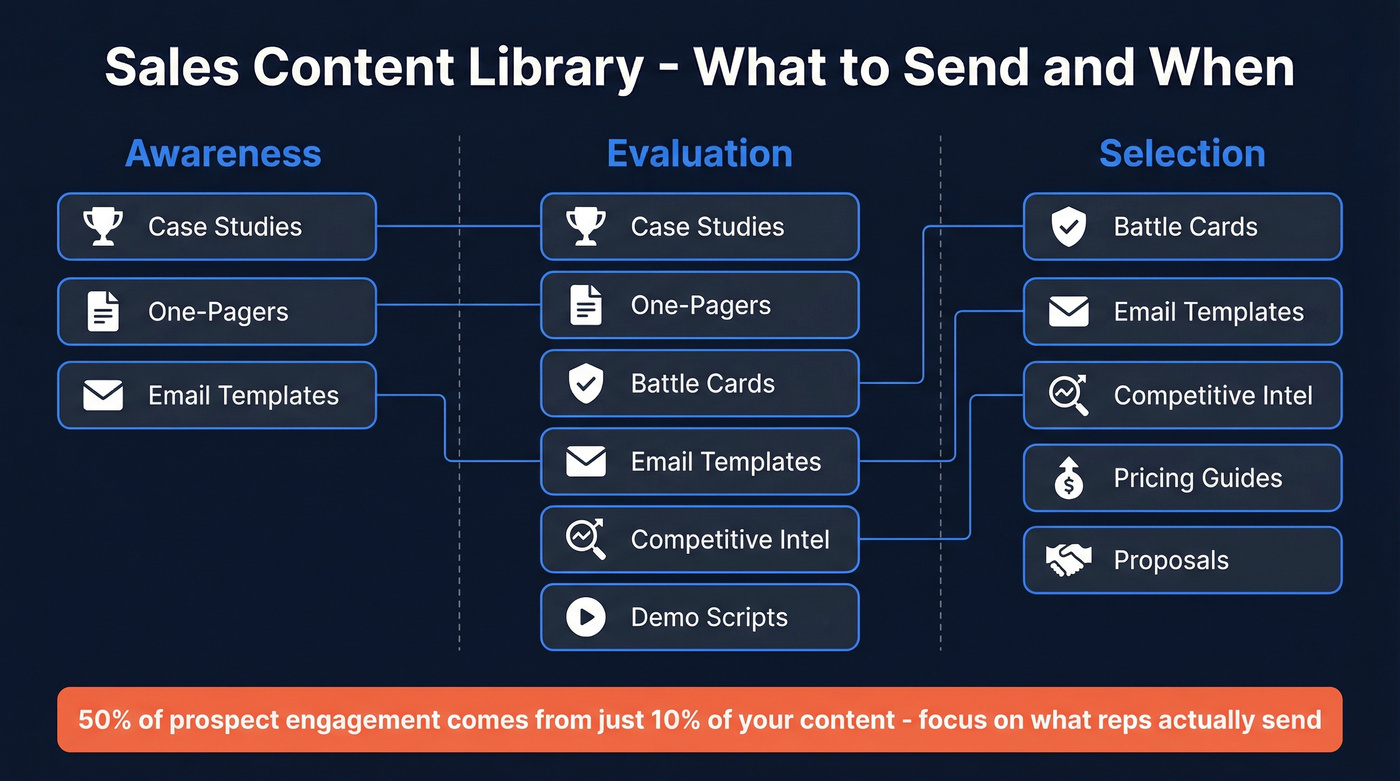
Here's how content maps to the buyer journey:
| Content Type | Awareness | Evaluation | Selection |
|---|---|---|---|
| Case studies | ✓ | ✓ | |
| One-pagers | ✓ | ✓ | |
| Battle cards | ✓ | ✓ | |
| Email templates | ✓ | ✓ | ✓ |
| Competitive intel | ✓ | ✓ | |
| Pricing guides | ✓ | ||
| Demo scripts | ✓ | ||
| Proposals | ✓ |
Here's the thing: 50% of prospect engagement comes from just 10% of your content. Forrester estimates that upwards of 1,400 sales assets are available to the average B2B seller. Most of that is noise. Build the library around the assets reps actually send, not the assets marketing wishes they'd send.
Build Your Taxonomy Step by Step
This is where most teams either skip ahead to buying software or overthink it into paralysis. We've seen both failure modes up close. Start with a spreadsheet, spend a few hours on structure, and you'll save weeks of rework later.
The 5-Level Framework
Loopio's filing system gives you a clean, copy-paste mental model:
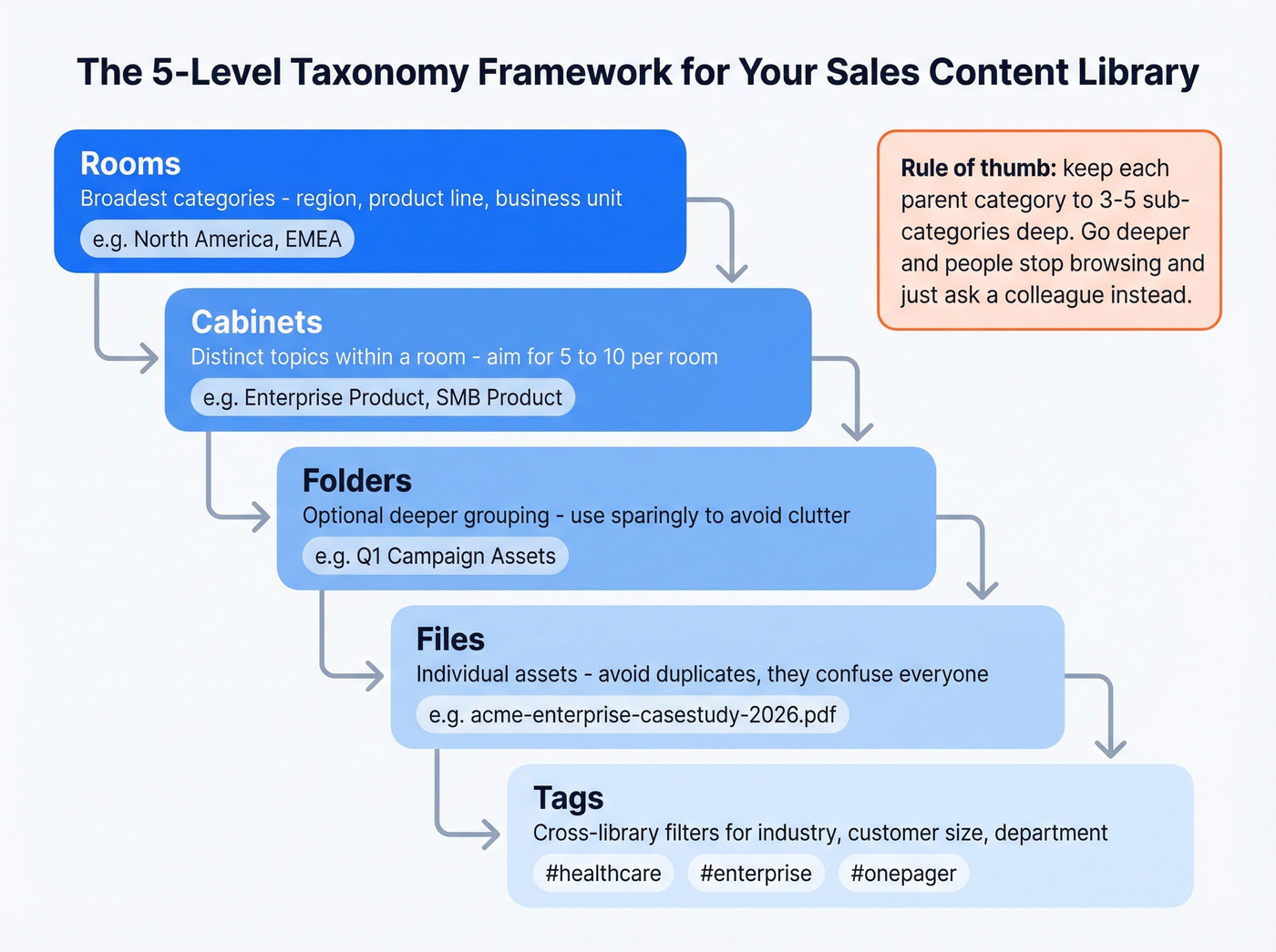
- Rooms - broadest categories like region, product line, or business unit
- Cabinets - distinct topics within a room; aim for 5-10 per room
- Folders - optional deeper grouping; use sparingly to avoid clutter
- Files - individual assets; avoid duplicates because they confuse everyone
- Tags - cross-library filters for industry, customer size, or department
A practical heuristic from MediaValet's taxonomy guide: keep each parent category to roughly 3-5 sub-categories deep. Go deeper than that and people stop browsing. They just ask a colleague instead - which defeats the entire purpose.
The most common complaint on sales enablement forums boils down to this: "We have the content, we just can't find it." That's a taxonomy problem, not a content problem. Interview your reps about how they search. Audit what you already have. Declutter aggressively.
Naming Conventions That Work
Pick a format and enforce it ruthlessly. A simple example: companyname-productname-onepager-2026 with tags like #onepager #productname. That gives you both human readability and machine searchability.
One detail teams miss: on some enablement platforms, file names are visible to prospects. So acme-competitive-teardown-2026 isn't the filename you want a buyer seeing. Name accordingly.

A perfect content library means nothing if your reps are sending assets to bad email addresses. Prospeo gives you 98% verified emails so every case study, one-pager, and proposal actually reaches the buyer's inbox - not a bounce folder.
Stop perfecting content that bounces. Start reaching real buyers.
Governance and Content Access Control
Most sales content libraries fail because nobody owns them. The build is the easy part. Maintenance is where libraries go to die.
Assign an SME owner to each content category - this is non-negotiable. Set a quarterly audit cadence at minimum and flag anything older than 12 months for review or retirement. Add expiration dates to content, because a pricing guide from 18 months ago is worse than no pricing guide at all. Train reps on both retrieval modes: search for when they know what they want, and filter-based browsing for when they're exploring. Enforce version control with one master version per asset, period.
Content access control is another piece teams overlook. Not every rep needs access to every asset - segment permissions by role, region, or deal stage so reps see only what's relevant. This reduces clutter and prevents outdated or off-limits materials from reaching prospects.
Let's be honest: most teams need to stop adding content and start removing it. If 10% of your library drives 50% of engagement, the other 90% is creating friction, not value.
Tools by Team Size
You don't need a $30K enablement platform to start. Sellers already use an average of 8 tools to close deals, and 42% feel overwhelmed by the stack. Adding another bloated platform won't help. The tool matters less than the structure.
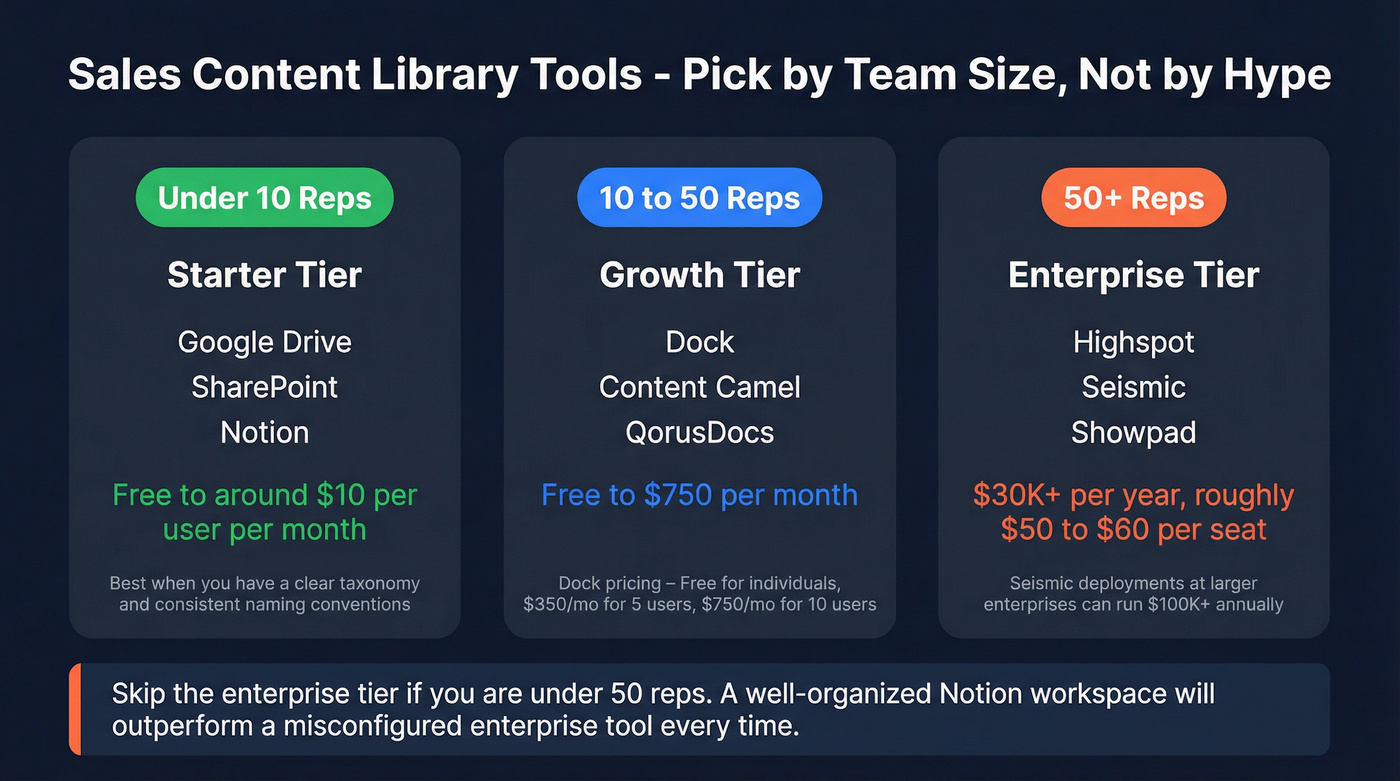
| Team Size | Tool Options | Price Range |
|---|---|---|
| <10 reps | Google Drive, SharePoint, Notion | Free - ~$10/user/mo |
| 10-50 reps | Dock, Content Camel, QorusDocs | Free - $750/mo |
| 50+ reps | Highspot, Seismic, Showpad | ~$30K+/yr ($50-60/seat) |
Dock publishes transparent pricing: free for individuals, $350/mo for up to 5 users, $750/mo for 10 users. Enterprise platforms like Highspot, Seismic, and Showpad don't publish pricing, but expect minimum contracts around $30K and per-seat costs of $50-60. Seismic deployments at larger enterprises can run $100K+ annually.
Skip the enterprise tier if you're under 50 reps. We've talked to teams that bought Seismic at 20 seats and spent more time configuring the platform than actually using it. A well-organized Notion workspace with clear naming conventions will outperform a misconfigured enterprise tool every time.
AI Features Worth Paying For
The enterprise platforms are layering in AI: auto-tagging, AI-powered search, and governance guardrails that flag missing disclosures. Some also surface recommended content based on deal stage, buyer persona, or industry - which dramatically cuts time-to-find and keeps reps from guessing which asset to send next.
Fair warning though: AI auto-tagging doesn't fix a bad taxonomy. If your category structure is a mess, AI will just auto-tag content into messy categories faster. Get the foundation right first.
Building an Email Template Library
One category that deserves its own structure is your email content library - the collection of outbound templates, follow-up sequences, and nurture emails your reps pull from daily. Organize these by buyer stage, persona, and use case, and treat them with the same governance rigor as your case studies and one-pagers. Stale email templates tank reply rates just as fast as stale collateral tanks deal velocity.
If you're standardizing outbound, start with a proven set of outreach templates and then iterate based on performance.
The Last Mile: Data Quality
Your content library is only as useful as your ability to deliver that content to real inboxes. You can spend weeks building the perfect case study, tag it beautifully, and have a rep send it to a bounced email address.
Prospeo handles this piece - it verifies emails in real time with 98% accuracy on a 7-day refresh cycle, so the assets your reps send actually land. The free tier gives you 75 email verifications per month, enough to test the workflow before committing.
If bounces are a recurring issue, it’s usually a mix of invalid emails and list decay - both fixable with a consistent email verification workflow.

Measure What Matters
Don't track everything. Track what changes behavior.
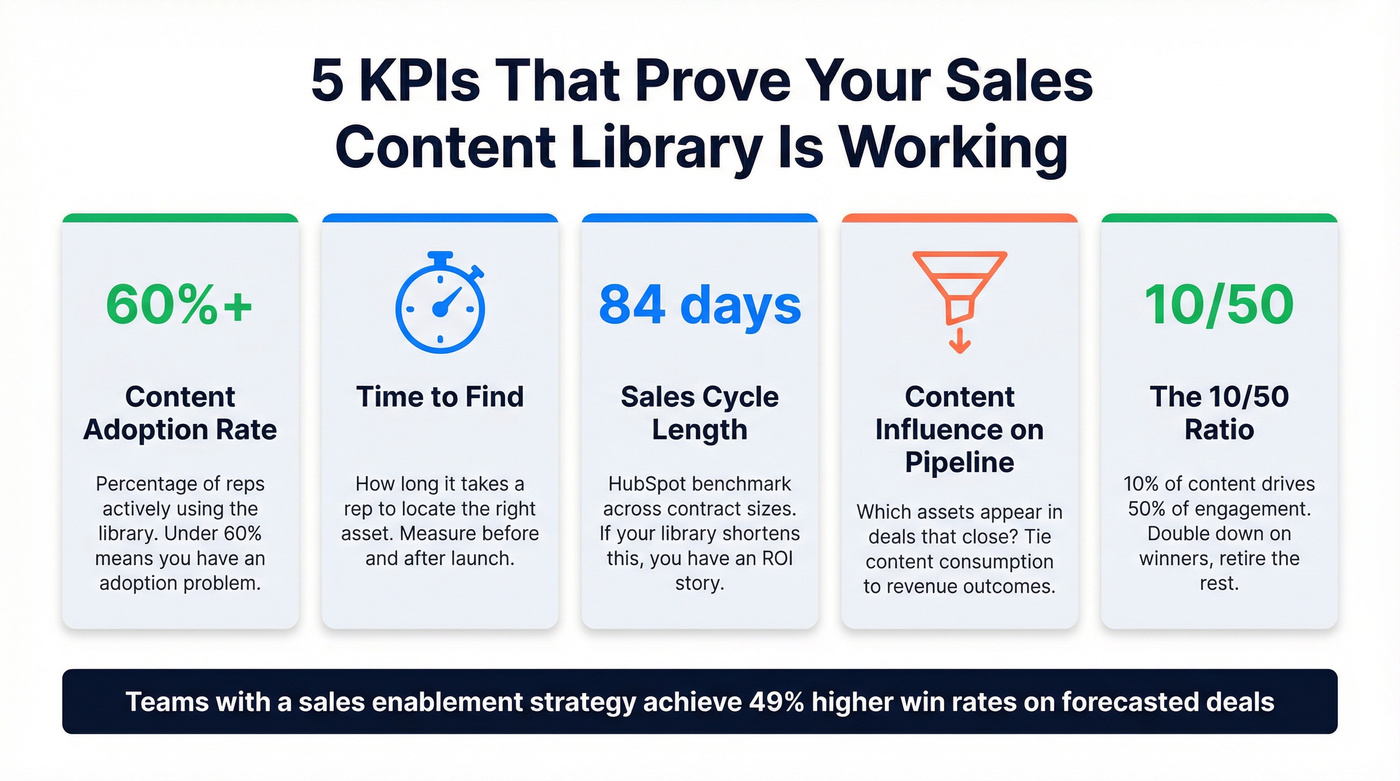
- Content adoption rate - what percentage of reps use the library? Under 60% means you have an adoption problem, not a content problem.
- Time-to-find - how long does it take a rep to locate the right asset? Measure before and after launch.
- Sales cycle length - HubSpot benchmarks 84 days across contract sizes. If your library shortens this, you've got an ROI story. (If you want to go deeper, track sales cycle acceleration drivers alongside content usage.)
- Content influence on pipeline - which assets appear in deals that close? Highspot's analytics framework ties content consumption to revenue outcomes.
- The 10/50 ratio - identify the 10% of content driving 50% of engagement and double down. Retire the rest.
One stat worth anchoring to: organizations with a sales enablement strategy achieve 49% higher win rates on forecasted deals. That's the number that gets budget approved.
Real talk: Most teams don't need better content. They need less content, better organized, sent to verified contacts. If your average deal size is under five figures, a Google Drive with a solid taxonomy and clean prospect data will outperform a $30K enablement platform with 500 stale PDFs every single day of the week. A well-structured sales content library paired with verified contact data is the highest-leverage investment you can make in your outbound motion.
If you're rebuilding the rest of your motion too, align the library to your B2B sales process so reps always know what to send next.
You're building email templates organized by persona and deal stage - smart. Now pair them with 300M+ verified contacts filtered by buyer intent, job changes, and 30+ signals so every template hits the right person at the right time.
Great templates deserve great data. Get both for $0.01 per email.
FAQ
What's the difference between a sales content library and a CMS?
A CMS manages website content like blog posts and landing pages. A sales content library organizes collateral - case studies, battle cards, proposals - so reps can find and send the right asset in seconds. Different tools, different audiences, different governance models.
How often should I audit my content library?
Quarterly at minimum. Flag anything older than 12 months for review or retirement. Assign an SME owner to each category so audits don't fall through the cracks - unowned content decays fastest.
Do I need a dedicated platform or can I use Google Drive?
Google Drive works for teams under 10 reps with a clear taxonomy and consistent naming conventions. Once you outgrow it, mid-market tools like Dock starting at $350/mo add search, analytics, and permissions that Drive can't match. The jump to a dedicated platform makes sense when you need role-based access control across multiple regions or product lines.
How do I make sure content actually reaches prospects?
Even perfectly organized assets fail if they're sent to invalid email addresses. Use a verification tool like Prospeo - 98% accuracy, 75 free verifications/month - to validate contacts before outreach. Teams like Snyk cut bounce rates from 35-40% to under 5% after adding real-time verification to their workflow.