

The 10 Best Site Email Extractors for 2026
You scraped 2,000 emails from prospect websites last Tuesday. By Thursday, your ESP flagged your account - 6% bounce rate, sending privileges suspended, and a warm domain you spent three months building now sitting in timeout. The industry threshold is 2% total bounces. One bad extraction run is all it takes.
Choosing the right site email extractor is the difference between a productive pipeline and a burned domain. In a 5,000-contact benchmark, the best email finder still missed 23% of addresses. Most free tools don't verify at all. We've tested dozens of these over the years, and the pattern is always the same: raw, unverified strings dressed up as "leads." Here are 10 tools that actually work - ranked by whether they'll help you build pipeline or torch your sender reputation.
Our Picks (TL;DR)
Prospeo - Best for verified accuracy. 98% email accuracy across 300M+ profiles, with 5-step verification that catches spam traps, honeypots, and catch-all domains before they hit your sequences. Free tier gives you 75 verified emails/month.
Outscraper - Best for bulk email extraction. Cloud-based, no-code, pay-as-you-go. Free for your first 500 records/month, then $3 per 1,000 records. Trustpilot sits at 4.7/5 from 225+ reviews. Outputs raw data - you'll still need a verification step.
Hunter.io - Best Chrome extension for quick lookups. 4.7 stars with 12,500+ Chrome Web Store reviews. Free plan includes 50 searches and 50 verifications/month. Solid for one-off lookups, less impressive in bulk accuracy benchmarks.
What These Tools Actually Do
Not all email extractors work the same way, and the differences matter more than most people realize.
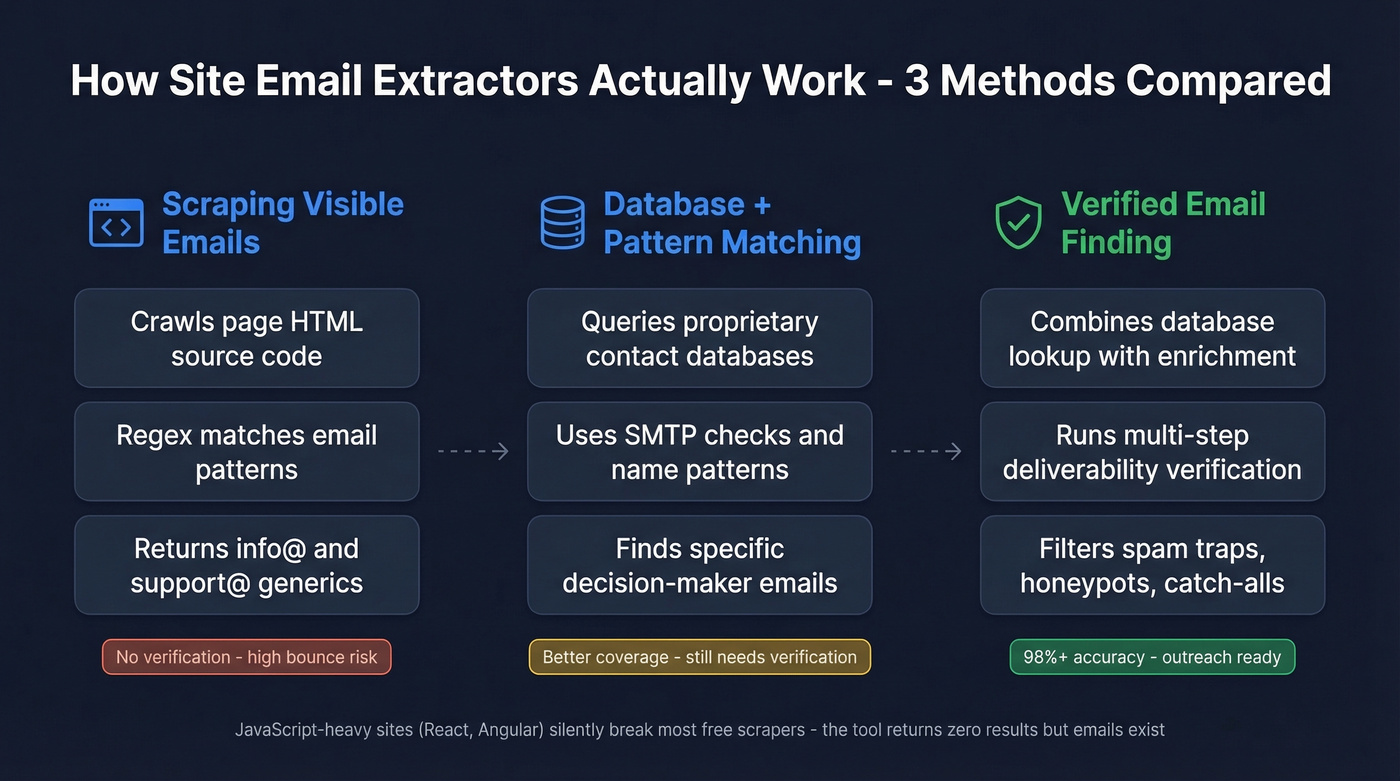
Scraping visible emails is the simplest approach - a web crawler visits a page's HTML and pulls anything that looks like an email address via regex matching. This is what most free Chrome extensions do. It's fast, but you're limited to whatever's publicly displayed, which is usually generic inboxes like info@ or support@.
Finding emails via database and pattern matching is a fundamentally different workflow. A company email extractor uses proprietary databases, SMTP verification, and pattern recognition to locate a specific person's work email - even when it isn't displayed anywhere on the site.
Verifying deliverability is the step most free tools skip entirely. Without it, you're emailing addresses that don't exist, that are spam traps, or that sit on catch-all domains accepting everything but delivering nothing. (If you want a deeper breakdown of verification layers, see our guide to email verification.)
Here's the thing most people miss: JavaScript-heavy sites built with React or Angular silently break most free extractors. The tool runs, returns zero results, and you assume there are no emails. In reality, the page never rendered.
10 Best Tools Compared for 2026
Prospeo - Best for Verified Email Accuracy
Use this if: You need decision-maker emails that won't bounce, not just whatever regex pulls off a contact page. (Related: our full ranking of B2B email finders.)
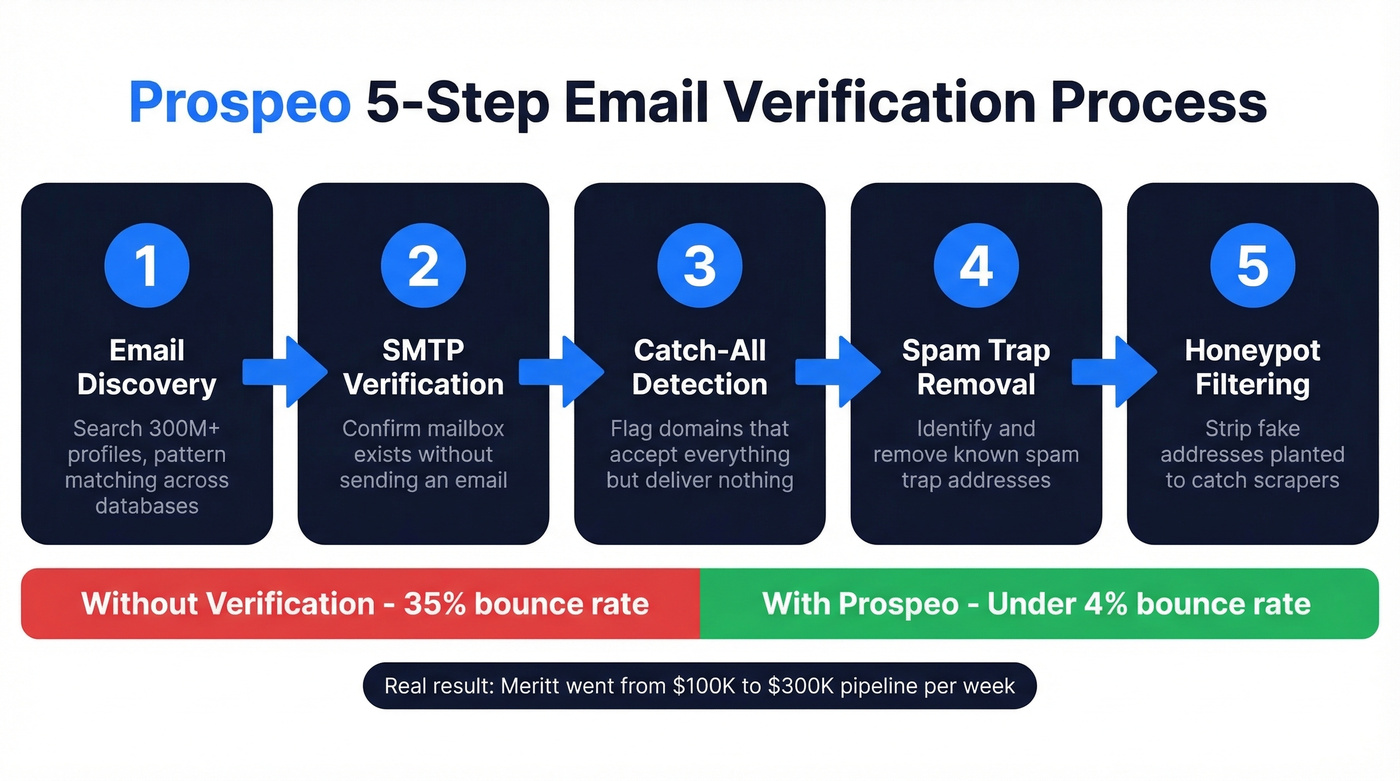
Prospeo's database covers 300M+ professional profiles with 143M+ verified emails, all refreshed on a 7-day cycle. The 5-step verification process - catch-all handling, spam-trap removal, honeypot filtering - is why accuracy sits at 98% while most extractors don't verify at all. One customer, Meritt, saw bounce rates drop from 35% to under 4% after switching, and their pipeline tripled from $100K to $300K per week.
The Chrome extension has 40,000+ users and works on any website or professional profile. Pull verified emails and phone numbers in one click, with 50+ data points per contact. Native integrations push directly to Salesforce, HubSpot, Instantly, Lemlist, and Clay.
Pricing runs ~$0.01 per email on a credit-based model. Free tier gives you 75 emails plus 100 Chrome extension credits monthly. No contracts, no sales calls.
Skip this if: You literally just need to scrape visible mailto: links from static HTML pages and don't care about verification. A free regex tool will do that.
Outscraper - Best for Bulk Domain Scraping
Use this if: You need to scrape thousands of domains for contact data and you're comfortable cleaning raw output. (If you're doing this at scale, you may also want a bulk email extractor workflow.)
Outscraper is a cloud-based, no-code scraping platform that expanded beyond Google Maps to websites, Amazon, Trustpilot, Yellow Pages, and more. For bulk extraction, it crawls domains at scale and returns whatever contact information it finds. One Trustpilot reviewer reported roughly 85% accuracy on contact info - solid for raw scraping, but not outreach-ready without verification.
Pricing is genuinely simple: first 500 records/month free, $3 per 1,000 records from 501 to 100,000 records/month, and $1 per 1,000 after that. Prepaid credits don't expire. Reviews consistently praise support responsiveness and ease of use, though some users flag that cost estimates can be unpredictable on large jobs.
Skip this if: You need verified, deliverable emails ready for outreach. Outscraper gives you raw scraped data - you'll need a separate verification tool before emailing anything it returns.
Hunter.io - Best Chrome Extension
Use this if: You're doing quick, one-at-a-time lookups on company websites and want one of the most established Chrome extensions in the category.
Hunter's Chrome extension has strong social proof - 4.7 stars across 12,500+ Chrome Web Store reviews. Click the extension on any company website, and it returns associated email addresses with a confidence score. Built-in verification is included, which puts it ahead of pure scrapers. (More context: Hunter.io use cases.)

The free plan offers 50 searches and 50 verifications/month. Paid plans start at $49/month, or roughly $34/month billed annually. That's reasonable for individual prospectors.
The tradeoff: in the Anymail Finder benchmark of 5,000 contacts, Hunter's verified rate came in at 37.6% - middle-of-the-pack. For quick lookups it's excellent. For bulk accuracy, you'll want something stronger.
Skip this if: You're building large verified lists. Hunter's strength is convenience, not volume accuracy.
Snov.io - Best for Outreach Integration
Snov.io is the tool you pick when you want extraction and email sequences in the same platform. The Chrome extension carries a 4.9-star rating across 6,000+ reviews. Paid plans start at $39/month for 5,000 credits, and the built-in drip campaign feature means you can go from extraction to outreach without switching tools. (If you're comparing combo tools, see email finder and verifier options.)
The accuracy question is real, though. In the same Anymail Finder benchmark, Snov.io's verified rate landed at 20.1% - roughly four out of five results came back unverified or catch-all. For small-batch prospecting with built-in sequences, it's convenient. For large verified lists, pair it with a dedicated verification tool.
Thunderbit - AI-Powered Extraction
Thunderbit takes a different approach entirely. Instead of database lookups or regex scraping, it uses AI-driven field suggestions that auto-detect what data to extract from a page, plus OCR for pulling emails from PDFs and images. The Chrome extension has 90,000+ users and a 4.6-star rating.
User sentiment is mixed. Trustpilot reviews flag that scraping stops after 10-21 pages even when given 100+ URLs, and there are recurring billing complaints around unexpected annual charges. Reddit threads echo similar frustrations with dynamic page handling. The free tier lets you test before committing - worth doing given the feedback. Paid plans start around $30-$40/month.
Mailmeteor - Best Free Single-Page Extractor
Mailmeteor's email extractor is 100% free, requires no signup, and handles JavaScript rendering - which puts it ahead of most free alternatives that silently fail on modern websites. The limitation is scope: single-page extraction only, no deliverability verification, no bulk mode. (If you're looking for more options in this category, compare free email address search tools.)
For zero-budget, zero-commitment extraction from one page at a time, it's the cleanest option available.
FullEnrich - Waterfall Enrichment
FullEnrich queries 20+ data sources simultaneously and runs triple email verification with catch-all checks - a "waterfall" approach that maximizes coverage by not relying on any single database. Pricing starts at $29/month for 500 credits, with a $55/month tier for 1,000 credits. Credits roll over for up to 3 months. Free tier gives you 50 credits to test. Best for teams that want enrichment depth over raw scraping speed.
Clearout
Clearout starts at $14/month for email verification, with free extraction capabilities. Best suited for teams that already have lists and need cleaning rather than discovery. If your workflow is "scrape elsewhere, verify here," Clearout is a cost-effective verification layer. (See also: bulk email address list cleaner.)
Kaspr
Kaspr starts at $49/month and focuses on European contact data - 120M+ contacts checked against 120 sources, with GDPR and CCPA alignment baked in. If you're prospecting into EU markets specifically, it's one of the few tools purpose-built for that geography. (More detail: Kaspr pricing.)
AeroLeads
AeroLeads starts at $39/month and offers a Chrome extension for extracting emails from business directories and company pages. Straightforward, no advanced features - functional for basic extraction workflows when you need something simple and affordable. (Full review: AeroLeads Email Finder.)

Most site email extractors skip verification entirely - that's how you hit 6% bounce rates and lose your domain. Prospeo's 5-step verification catches spam traps, honeypots, and catch-all domains before they reach your sequences. 98% accuracy across 300M+ profiles, refreshed every 7 days.
Extract emails that actually land in inboxes - starting at $0.01 each.
Pricing Comparison
The range here is enormous - from completely free to enterprise-grade credit systems.
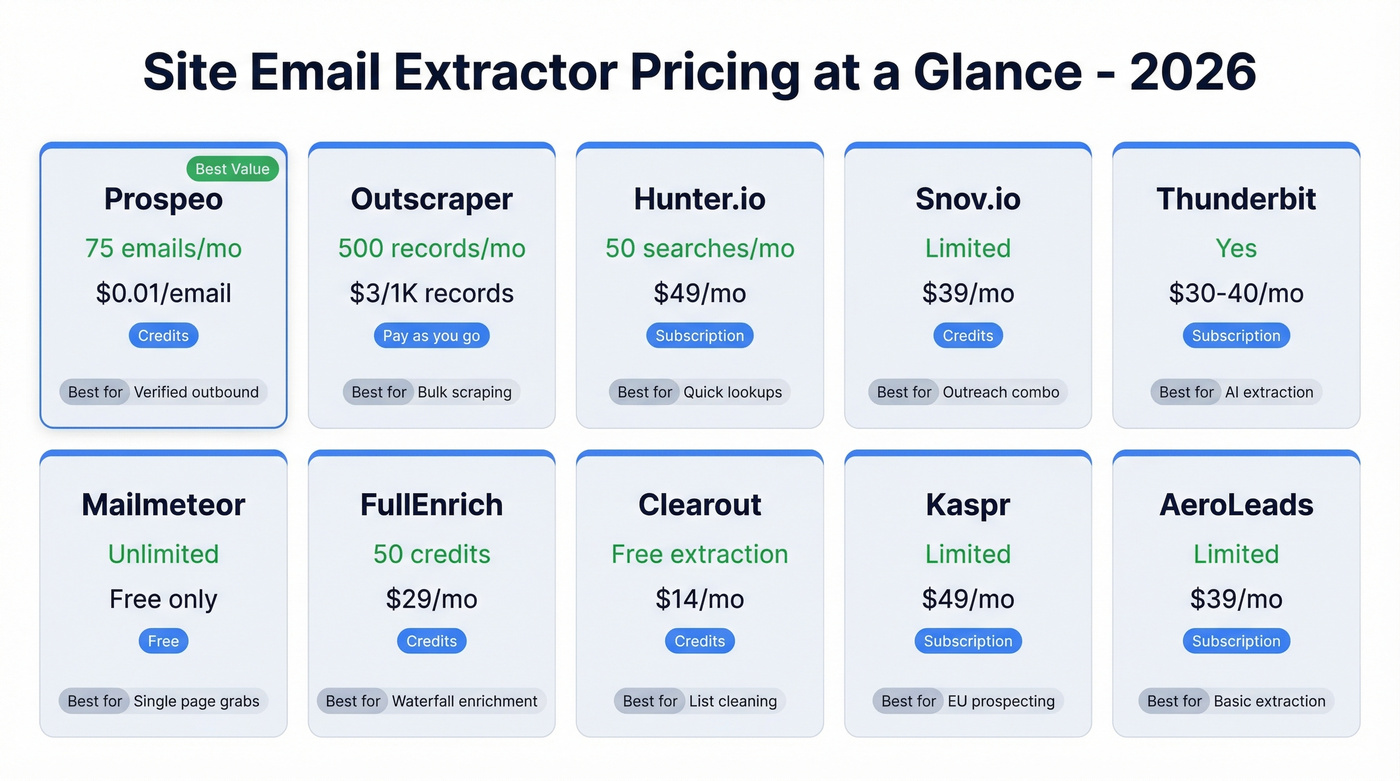
| Tool | Free Tier | Paid Start | Model | Best For |
|---|---|---|---|---|
| Prospeo | 75 emails/mo | ~$0.01/email | Credits | Verified outbound emails |
| Outscraper | 500 records/mo | $3/1K records | Pay-as-you-go | Bulk scraping |
| Hunter.io | 50 searches/mo | $49/mo | Subscription | Quick lookups |
| Snov.io | Limited | $39/mo | Credits | Outreach combo |
| Thunderbit | Yes | ~$30-$40/mo | Subscription | AI extraction |
| Mailmeteor | Unlimited | Free only | Free | Single-page grabs |
| FullEnrich | 50 credits | $29/mo | Credits | Waterfall enrichment |
| Clearout | Free extraction | $14/mo | Credits | List cleaning |
| Kaspr | Limited | $49/mo | Subscription | EU prospecting |
| AeroLeads | Limited | $39/mo | Subscription | Basic extraction |
How Accurate Are These Tools?
Most "best tools" articles dodge this question. Here are actual numbers from an Anymail Finder benchmark that tested 5,000 contacts across major finders:
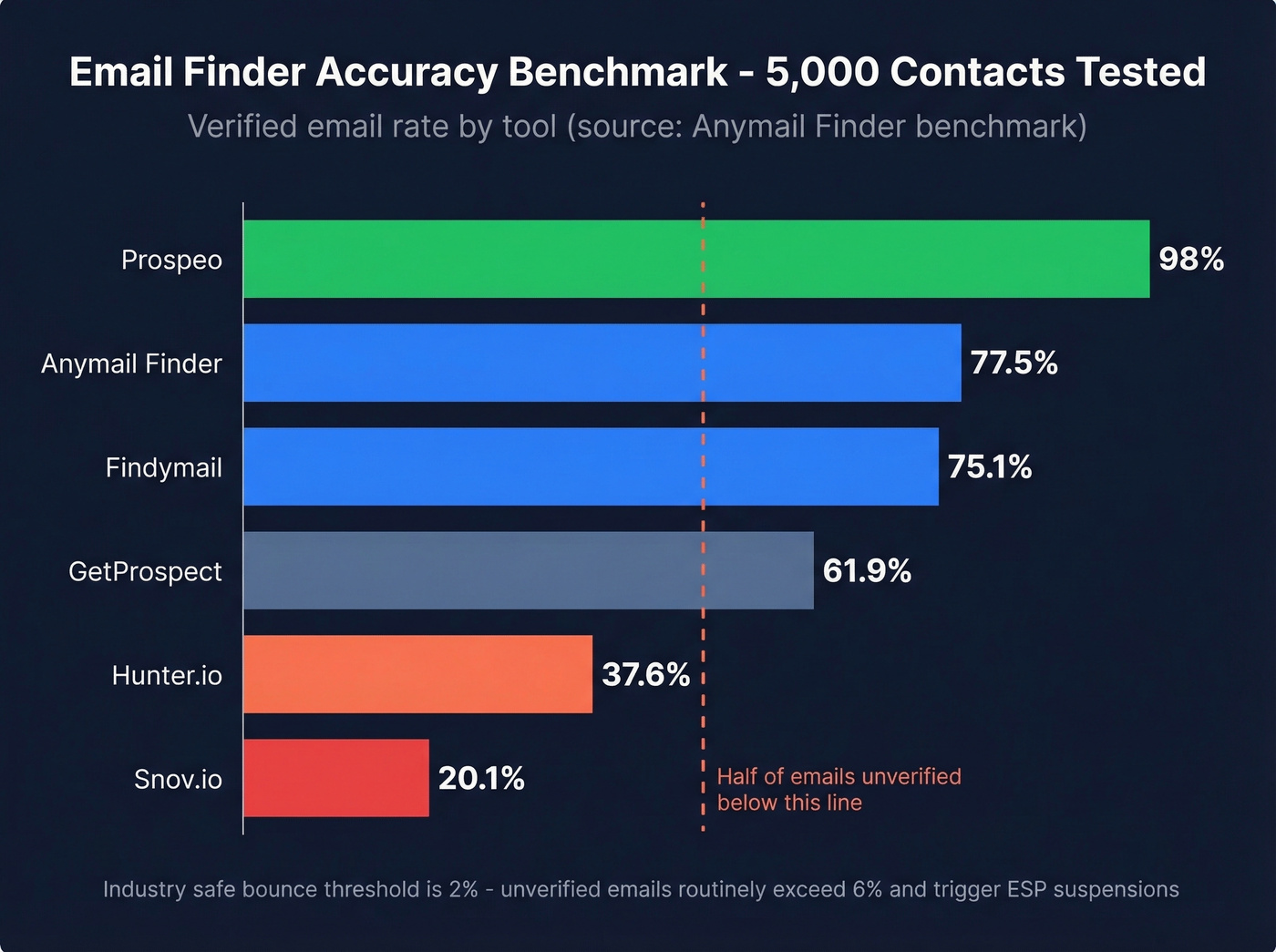
| Tool | Verified Rate |
|---|---|
| Anymail Finder | 77.5% |
| Findymail | 75.1% |
| GetProspect | 61.9% |
| Skrapp | 42.8% |
| Hunter.io | 37.6% |
| Voila Norbert | 36.0% |
| Snov.io | 20.1% |
Even the best tool in that benchmark missed nearly a quarter of addresses. A separate 3,000-email benchmark showed top verifiers ranging from just 67% to 70% accuracy. (If you're shopping specifically for verifiers, start with best email validation.)
Let's be honest about what these numbers mean. These benchmarks measure "found rate" in database lookups - a different workflow than post-extraction verification pipelines that catch catch-all domains, spam traps, and honeypots inflating other tools' "found" counts. That gap between "scraped" and "verified" is the difference between a productive outbound campaign and a suspended sending account.
In our experience, catch-all domains are the #1 list killer. The consensus on r/coldemail backs this up - bounces, spam traps, burned domains. These domains accept mail to any address, so SMTP checks return "valid," but the email never reaches a real person. Any tool that doesn't specifically handle catch-all verification is leaving you exposed. (More on this: B2B email verification.)

Hot take: If your average deal size is under $10K, you probably don't need a $15K/year data platform. But you absolutely need verified emails. A $0.01-per-email verification tool will protect your domain better than a $1-per-lead database that skips catch-all handling.
Free extractors pull raw strings off HTML pages. Prospeo pulls verified decision-maker emails with 50+ data points per contact - then pushes them straight to HubSpot, Salesforce, or your sequencer. Meritt dropped bounce rates from 35% to under 4% and tripled their pipeline.
Get 75 verified emails free - no credit card, no sales call.
Is Email Extraction Legal?
Extracting emails isn't inherently illegal, but how you use them determines compliance.
In the EU under GDPR, named email formats like firstname.lastname@company.com qualify as personal data. Generic inboxes like info@ or sales@ typically don't. For scraped B2B contacts, "legitimate interest" is the most realistic lawful basis - but it requires a documented balancing test, a least-intrusive approach, and a clear opt-out mechanism.
In the US under CAN-SPAM, there's no federal ban on collecting publicly available emails. The rules focus on use: truthful headers, clear sender identity, a working unsubscribe link, and honoring opt-outs within 10 business days.
Practical compliance checklist:
- Record the source URL, date, and method for every extracted email
- Map your lawful basis in writing before sending
- Exclude emails scraped from behind-login pages
- Include a working unsubscribe in every outbound message
- Honor opt-outs immediately
Compliance isn't just legal protection. ESPs monitor complaint rates, and a few "I never signed up for this" reports tank your deliverability faster than bounces will.
Chrome Extension vs. Web Tool vs. API
The format you choose should match your volume.
Chrome extensions like Hunter and Snov.io are built for quick lookups - you're on a company website and want contact info in one click. Best for under 50 emails per week.
Web tools like Outscraper and Mailmeteor handle bulk domain scraping through a browser interface. Upload a list of domains, let the tool crawl, download results. Best for 50-500 emails per week.
APIs are for programmatic enrichment at true scale. If you're processing 500+ contacts per week, this is the only approach that doesn't involve manual CSV wrangling. Prospeo's API delivers a 92% match rate and integrates with Clay, Zapier, and Make for automated workflows. At this volume, a dedicated tool with API access saves hours of manual work each week. (If you're evaluating endpoints, compare email check API options.)
FAQ
Can I extract emails from any website?
Most extractors work on static HTML. JavaScript-heavy sites built with React or Angular require tools with JS rendering - most free extractors silently fail on these. Outscraper and Mailmeteor handle JS rendering. Tools with proprietary databases bypass page scraping entirely.
Are extracted emails verified?
Usually not. Most free tools scrape regex-matching strings without checking deliverability. You need a separate verification step or a tool with built-in real-time verification to catch spam traps, honeypots, and catch-all domains before they damage your sender reputation.
How many emails can I extract for free?
Mailmeteor is unlimited but single-page only. Outscraper offers 500 free records/month. Prospeo gives 75 verified emails/month. Hunter offers 50 free searches/month. The key distinction: does "free" mean unverified scrapes or verified contacts?
What's the difference between a web crawler extractor and an email finder?
Extractors scrape visible addresses from webpage HTML by crawling pages and matching patterns. Finders use databases, pattern matching, and verification to locate emails that aren't publicly displayed. Finders produce higher-quality results because they aren't limited to what a website shows.
Will extracted emails hurt my domain reputation?
Yes, if you email unverified addresses. The industry threshold is 2% total bounces - top performers keep hard bounces under 1%. Always verify before sending, regardless of which extraction tool you use.